-
Aniblock Glitch
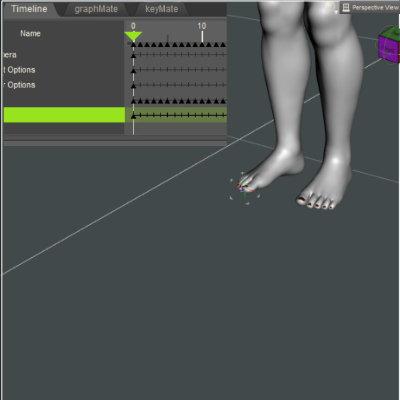
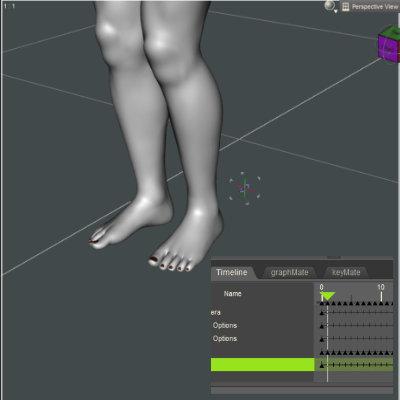
I`m not sure if this is actually DAZ animate glitches or just the way I`ve working with Animate2. I`m always using (short ) Empty Aniblok before applying another aniblok . So When I`m doing BAKE to DAZ Timeline I`ve got Zero pose ( rotation - scale etc) before the action . I do believe this is useful if someday I need to use dynamic dress or hairs ( having several frame for drapped before all animation kicking start) .
In Final render animation you dont have to render from frame zero right? Just start render from frame which your action start .
This technque I`ve learned long time a go when still using Poser 5/6 and their Dynamic dress
Here my attempt to duplicate yours . I`m adding empty block before using any aniblok . It seems I`ve got same position when baking to timeline . In this sample I`m using very extreme morph character
Introducing the Daz to Blender Bridge & native Blender File FormatsEverything seems to work perfectly for me except... When I first import a Daz character into Blender the morph sliders are there and working perfectly. When I save the character as a Blender file, close and re-open, all the DTB morph sliders are gone. The shapekeys are intact but most of them are drivers (which drive the missing morph sliders). I can delete the drivers and the shape keys work, but with a lot of morphs that's counter productive.
Is there a way to retain those DTB sliders in a native Blender file without having to re-import the character each time?
Eyes/Eyelids do not closing properly - Character based on Face-TransferSet the viewport to "Smooth Shaded" to render the figure with no textures. If the face looks "normal" with closed eyes, examine the Face Transfer generated face texture. Could be Face Transfer generated eyes in the eyelid texture area.
AIUTO...CHI CONOSCE L’ITALIANO? PARTE TREDICIMuscleman said:
Silvhe said:
Imago said:
Sono anni che dico che DAZ Studio da dopo la 4.12.0.86 è sempre più rotto, ma vengo puntualmente preso per scemo da tutti.
Finalmente non sono più solo! Spero che la tua voce sia più "importante" della mia e che si decidano a fixare i bug. Se riesci a farti dare la 4.12.0.86 non lasciarla mai più e vivrai felice.
See figurati se mi danno retta. Però uno raccomandato ce l'abbiamo...
 Muuuusclemaaaan dove sei? Potresti dire una cosetta a quelli della DAZ?
Avanti, ditemi che posso fare...Imago non farmi un papiro chilometrico please...XD
Impossibile non fare un papiro, Ragazzone...
Tutto questo accade in 4.15:
Come ripeto sempre, la timeline è rotta, se creo un keyframe muovendo un oggetto, il suddetto keyframe NON può essere mosso lungo la timeline se prima non seleziono la figura e poi premo "create keyframe" sulla timeline. In una animazione complessa dovrei fare questo centinaia di volte per ogni elemento che viene mosso...
Sempre nella timeline, il copia-incolla è frantumato, se copio e incollo anche solo un keyframe e faccio partire l'anteprima, tutti i valori della figura impazziscono e vanno su "n%n" o una roba simile e DAZ Studio freeza o crasha. Qualche volta non crasha ma l'intera scena sparisce nel oblio, non è possibile vedere nemmeno il grid di base. L'unica soluzione è quella di selezionare tutti i keyframes, impostarli su "linear" e poi di nuovo sul tweener che mi serve. E non sempre risolve. In una scena complessa dovrei farlo ogni volta per ogni elemento...
Frame selected, anni che lo ripeto, manda la visuale anche più lontano di come era prima di usarlo. Se mi serve inquadrare qualcosa perchè non devo risucirci?
Il Puppeteer non registra tutti gli alias e morph, perfino quelli commerciali venduti dalla DAZ stessa.
Gli Undo Stack, non registrano tutte le azioni, specie delle telecamere. Se fai l'errore di spostare una telecamera pensando sia il Perspective e poi pigi CTRL+Z per rimediare, non succede nulla.
Le ombre in Filament vengono spezzate di netto in base alla posizione della visuale e del orientamento del Dome. E' l'ultimo ostacolo al utilizzo "serio" del renderer.Questi sono i peggiori, ce ne sono altri mille, ma ci si può anche convivere, tipo il fatto che le impostazioni dell'interfaccia vengono eliminate a caso o che le tab vengono riordinate in modo casuale da un caricamento all'altro.
Silvhe ne ha scovati altri, a quanto vedo, fatti fare la lista anche di quelli.
In ogni caso, non cambierà nulla di sicuro. Diciamo che questo è l'ultimo tentativo con poca speranza. Mi tengo 4.12.0.86 e basta.
Auto-fit Clones - RetiredWow. Those disclaimers sure tell a story. Sorry about any drama you had to deal with to bring us these.
Everytime I try to make the switch to G8, I run back to G2. There are some things, especially among the regular base morph dials, that never got a G8 equivalent. But there are some good post-G2 clothing and hairs out there. Already made a G3 clone that works well, but G8 was a bit more of a challenge. This is solid work.
Is it possible to transfer a G2M nose morph to G8M?there is a nose morph for G2M that makes a perfect "pig nose". i'd like to use just that morph on a G8M figure. How can i isolate and transfer just a single morph to G8M.
Eyes/Eyelids do not closing properly - Character based on Face-TransferRichard Haseltine said:
It may be the Face Transfer shape - morphs often need corrections for things like eyes closed, which are hooked up to the morph and the eye closed control so that they kick in as needed.
What kind of corrections are you referring to?
Aniblock GlitchSo I did that test and found the following:
1. If I test with a base G8F, I don't have a problem. I took the precaution of making frame 0 a keyframe before baking to the timeline and G8F did not move from the position I placed her at frame zero.
2. I then tried with a character which is morphed and scaled so definitely not the base G8F. Otherwise I went through the same steps. Now I am back to having the character shift out of position after frame zero (i.e. there is a significant jump out of position at frame 1) when baked to the timeline.
So, base G8f figure works fine. A character does not but I'm not sure whether it is a general morph problem or (as I suspect) a scaling problem. G8F is quite a tall figure so most of my female characters are scaled down. As this only happens after baking, none of the above tutorials about editing aniblcoks are relevant. However, there might be a possibility of just editing the aniblock and not taking the step of baking.
 Tracking Interactive License purchases
mrinal said:
I think my major concern at this point is why the invoice/order confirmation uses a generic placeholder lineitem and Sku for each of these licenses when the shopping cart already has access to the specific details for each of the interactive license. Technically, the shopping cart should be able to transfer the exact lineitem information to invoicing module, as in the case of standard licenses purchase.
But this generic placeholder item raises some concerns such as the buyer not being able to assert their legitimacy of usage in case they lose access to their Daz accounts. So if Daz decides (at their own discretion) to dispute your usage of any product... you get the picture.
I agree - a few months ago I checked my library for licenses and discovered that over half of them were missing, according to my own records. The library just said "standard license" when I looked them up. Then I checked my receipts and couldn't find any records for these licenses at all (no placeholders or anything - they were simply not present in any of the receipts). A couple of weeks ago I checked my library again and now they were updated and correct though. But currently the flags on the store pages is the only proof I have for owning them.
Tracking Interactive License purchasesI think my major concern at this point is why the invoice/order confirmation uses a generic placeholder lineitem and Sku for each of these licenses when the shopping cart already has access to the specific details for each of the interactive license. Technically, the shopping cart should be able to transfer the exact lineitem information to invoicing module, as in the case of standard licenses purchase.
But this generic placeholder item raises some concerns such as the buyer not being able to assert their legitimacy of usage in case they lose access to their Daz accounts. So if Daz decides (at their own discretion) to dispute your usage of any product... you get the picture.

 Anime ?? Sakura 8 Character - fit eyes to mix morph with other shapes ?? Tips?
A while back I made a morph that makes the default eyes work with Sakura
3dOutlaw kindly hosts it on their site
heres 50% Sakura 8, 25% Aiko 8, and 25% Girl 8. with the default eyes (and textures borrowed from Bette) I'm sure you can find more anime textures
I think sakura also got an update at some point for the default eyes
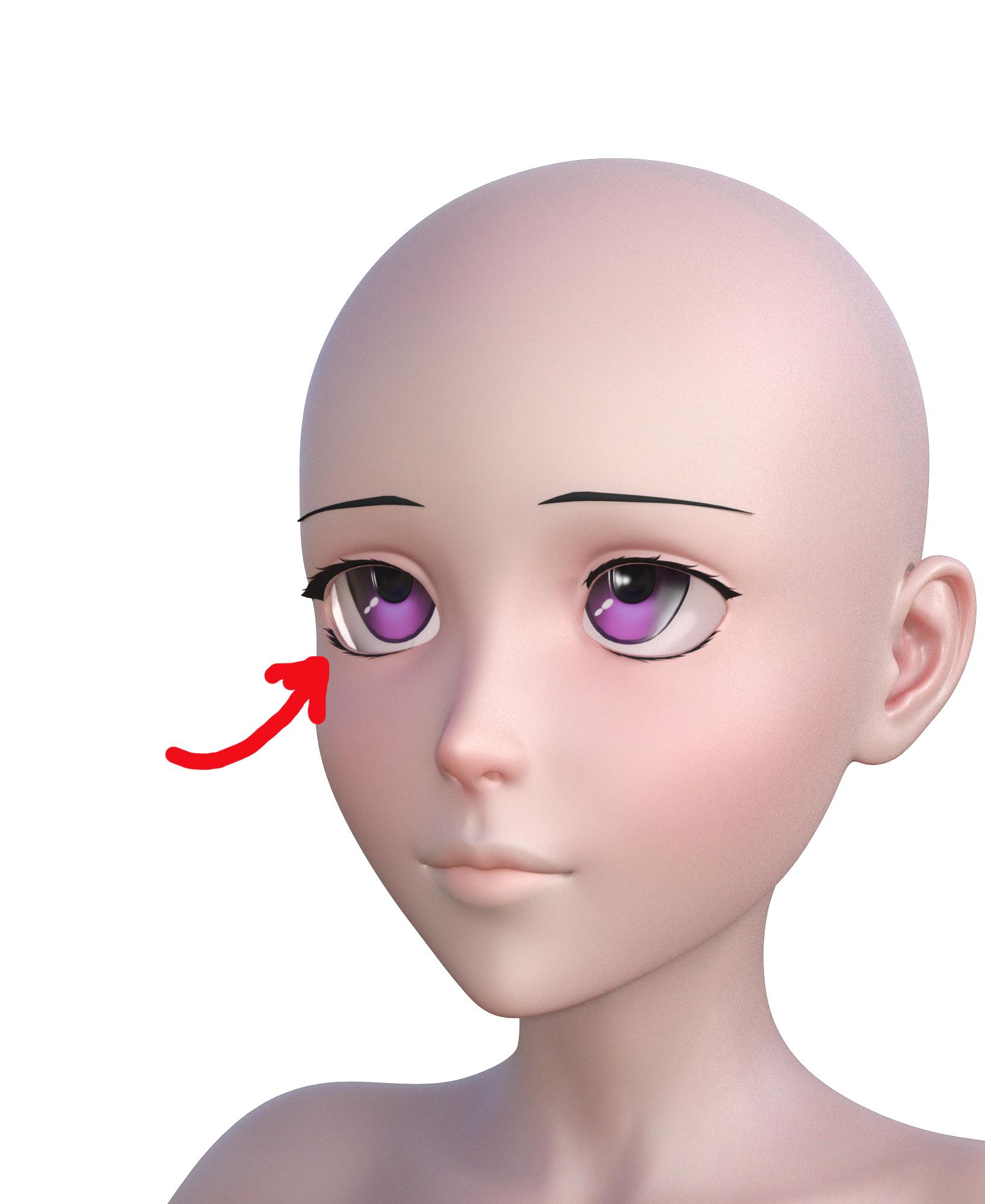
Anime ?? Sakura 8 Character - fit eyes to mix morph with other shapes ?? Tips?Anime fans. Help. I would appreciate some tips. I have had Sakura 8 forever and a day without doing much. Therefore, I MUST make use of Sakura 8 and render some anime style fun. I am having trouble mixing the Sakura 8 head with other head morphs yet still maintain the match of eye balls to eye sockets. In the attached, I have a simple head morph of 50% Sakura 8, 25% Aiko 8, and 25% Girl 8.
No match.
Do I need to export it all, do morphs, and reimport as a single morph? Woudn't I lose important JCMs unique to Sakura 8, Aiko 8, and Girl 8?
Tips and suggestions welcome.
 DS and virtual memory / page file
I've never really looked at how much DS is using virtual memory / page file, since I currently only have 8 GB RAM in my render PC I know it is swapping when I load too much into the scene, but I didn't expect it to do so as long as there's still available RAM. But maybe it's Windows memory management that controls that, though it usually only throw data into virtual memory when they haven't been accessed for a while. But this is what I discovered when checking memory use with AnVir Task Manager (can be downloaded for free at anvir.com).
I've tested on two PCs which hardware wise are 100% identical, except for GPU and HDDs. PC1 is running Windows 8.1 and has a 1 GB Asus card, PC2 is running Windows 10 and has an 8 GB GTX1070 - I don't think this matters in this context though as no rendering is taking place when testing this.
When testing, I start DS, load one character, take a screenshot of memory use, then load another character and take another screenshot. Same characters for both tests.
The first test is done on PC1, with DS 4.12 and 14 G8F characters installed. Total load time for the two characters is about 40 seconds.
The second test is on PC2 with DS 4.15 and 755 GF8 characters plus some G8F morph packages installed. Total load time for both characters is 10+ minutes.
I'm really surprised about the difference in both the amount of RAM as well as virtual memory that is being used on these two setups. On PC2 DS uses about 5 times as much memory in total when loading these two characters which must mean an incredible overhead. Writing 8 GB page file to an HDD also takes a good while which probably is responsible for a lot of the load time.
So I wonder how it behaves on a system with a lot of RAM. Since it apparently uses the page file even if there's a good amount of free RAM available it could be interesting too see how much it's being used on a system with lots of RAM, like 32 or 64 GB, under the same circumstances. Have anyone tested that?
Victoria 4.2 in Studio 4.15 Mac - quickest way of doing things?There should be a PowerLoader (PwrLdr or the like) for the muscle morphs too. Install that lot and when you double click Poser Formats>yourcontentdirectory>Figures>Daz People>Victoria 4.2 (or whatever it's labelled) you should get a dialogue box listing the available morph sets, with thumbnails (if you install the main Power Loader but not the ones for the morph packs they will just be listed by their really old style product code - ps_mr###). If you don't get the dialogue try holding down the cmd/ctrl key while double-clicking.
Eyes/Eyelids do not closing properly - Character based on Face-TransferIt may be the Face Transfer shape - morphs often need corrections for things like eyes closed, which are hooked up to the morph and the eye closed control so that they kick in as needed.
NFT and the Future of Digital ContentMcGyver said:
Apparently there is a new twist in the NFT game... NFT horse racing...
https://www.nytimes.com/2021/05/01/style/zed-run-horse-racing.html
This could be a real game changer for people bored by the fact that their current NFTs just sit around doing nothing but collect digital dust on some server somewhere.
The people making the real money are those selling the NFTs to hopeful fools and those collecting for every transfer - so they need you thinking you have to buy/trade those NFT. Just another stock market game that the house makes money every time you place a 'bet'.
Victoria 4.2 in Studio 4.15 Mac - quickest way of doing things?If you install the figure, the morph packs you want, and the PowerLoader packages for all then you should get a dialogue in DS when you load the figure that will let you choose which morphs to load. Use something other than DS itself to do the installing.
AIUTO...CHI CONOSCE L’ITALIANO? PARTE TREDICINo Imago.. ne Face Transfer e nemmeno Headshop. Per il render ho proiettato le texture originali a 4k sulla surface Face (Se noti il collo è di colore diverso perché usa la texture standard di G8M). Non l'ho proiettata dappertutto perché prima è meglio verificare il morph e poi fare tutte le texture. Al momento ho messo solo il morph senza texture.AIUTO...CHI CONOSCE L’ITALIANO? PARTE TREDICIKainjy said:
Chi dorme non prende morph !!!

Oggi mi sono rimesso su DAZ e avendo trovato una testa 3D scansionata (liberamente usabile) ho provato a ricavarne un morph. Siccome ho bisogno di gente che la testi (pessimo gioco di parole...), vi do il link per provarlo e farmi sapere se va e quali problemi ci sono. Essendo ancora ai miei primi morph so che ci saranno errori e dunque voglio prima sapere che cavolate ho fatto e che problemi la gente potrebbe avere.Il morph è per G8M e si chiama WILFRED (nome inglese venuto fuori da un generatore di nomi online) e lo trovate in Actor/Full Body
LINK: https://we.tl/t-igCikYdY60
(Lo lascio attivo tutto di Domenica e Lunedì lo cancellerò) - allego render prelimianre del voltoAl momento ci sono i seguenti errori:
- Occhi si sono ovalizzati (a causa di alcune operazioni di editing ... devo eliminare il morph dai bulbi e torna OK)
- la posa è verso avanti (a cadere) perchè la testa originale era in posizione quasi a struzzo e dunque per avere la forma del collo ho portato verso avanti il corpo.. il rigging l'ho aggiustato. Mi manca da rimettere tutto nella posa di default del G8M. Occhio che le pose G8 potrebbero dare alcuni problemi
- Le orecchie se renderizzate con SubDivision 0 fanno pena, mettete subdivision almeno a 1
- Anche le labbra con SubDivision 0 hanno un problema (mettete dunque 1)
- Non ci sono texture apposta (usate quelle di G8M)
- La faccia non è simmetrica... non so se potrebbe creare problemi a qualcuno
Fatemi sapere se trovate qualcosa.
BuonanottePS @Muscleman o @Richard Haseltine fatemi sapere se infrango qualche regola o se è tutto ok.
Hai usato il face Transfer?
 Eyes/Eyelids do not closing properly - Character based on Face-Transfer
Hi, I have a problem with this character that I created, starting from Face Transfer. When I close his eyes, the lids of his left eye are deformed. I used a lot of morph dials to sculpt the character and I don't know which one is causing problems. I read in the forum that others have had a similar problem and, from what I understand, to solve it one would have to resort to modeling software such as Zbrush. I don't know these software and I was wondering if any of you could help me. I apologize for my bad English and thank you.
Daz 3D is part of

Connect
DAZ Productions, Inc.
7533 S Center View Ct #4664
West Jordan, UT 84084Licensing Agreement | Terms of Service | Privacy Policy | EULA
© 2026 Daz Productions Inc. All Rights Reserved.