-
Jazz 8.1 discussion
I like his head morph, I don't think he looks toon (not that I would mind that). He looks kind and I think he does bring something a little different to the gene pool.
His skin seems fine, if not all that special.
His body morph is... really bad. And not because he's skinny. Elijah 7 is a skinny dude and has a much more interesting body morph.
Jazz 8.1 discussion
LOL *high five* (and I was on sarcastic mode when I said they were counterparts)Frinkky said:CHWT said:
Frinkky said:
Whilst I'm all for options for the 'bnd' (bloke next door), eg. not an olympic swimmer, gladiator or some other fitness freak, it's almost like they forgot to finish the torso here - it looks like a toon. Even the HD morph seems to neglect this area. It is not a suitable counterpart to Jacqueline.
Nah they are counterparts (see the resemblance: the 2008 movie Get Smart)I didn't say they weren't, I said that he is not suitable.
Steve Carell looks like a human being and not a cartoon character, even next to Anne Hathaway.
Jazz 8.1 discussionxyer0 said:
CauriB said:
I like him. Here's a quick render of him in Cycles, added some muscles to buff him up a bit.
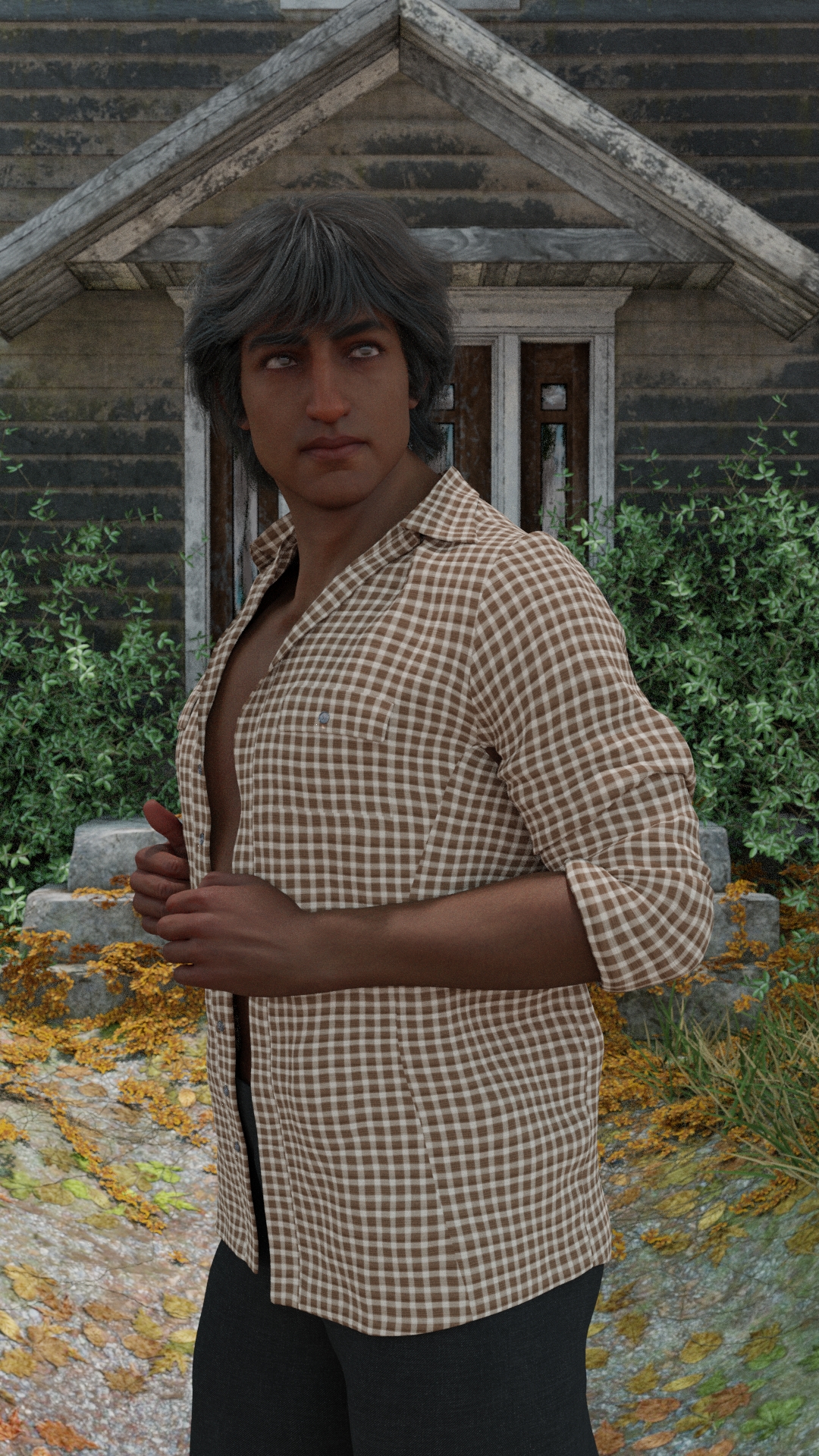
@CauriB Great job! You saved his papadum. He needs the Bollywood hair to frame his face, I guess. But he's still too Pixar for my tastes. If I may ask, did you morph his face a bit?
No morphs on the face :-)
Jazz 8.1 discussionCHWT said:
Frinkky said:
Whilst I'm all for options for the 'bnd' (bloke next door), eg. not an olympic swimmer, gladiator or some other fitness freak, it's almost like they forgot to finish the torso here - it looks like a toon. Even the HD morph seems to neglect this area. It is not a suitable counterpart to Jacqueline.
Nah they are counterparts (see the resemblance: the 2008 movie Get Smart)I didn't say they weren't, I said that he is not suitable.
Steve Carell looks like a human being and not a cartoon character, even next to Anne Hathaway.
Jazz 8.1 discussionCauriB said:
I like him. Here's a quick render of him in Cycles, added some muscles to buff him up a bit.
@CauriB Great job! You saved his papadum. He needs the Bollywood hair to frame his face, I guess. But he's still too Pixar for my tastes. If I may ask, did you morph his face a bit?
Jazz 8.1 discussionThe Blurst of Times said:
A simple shot with less going on, showing the body... presented without comment.
The head morph is a nice enough addition to the gene pool. The body is -- as you carefully did not say -- so non-descript as to be . . . unworthy of comment.
I think I just broke my own brain.
Duplicate Formulas - possible solutionPerttiA said:
It should be noted that if you make changes to your morph folders, either by adding, removing or editing the morph files, the next time you load the figure, the load time is longer because DS updates the useless cache file.
That might explain the random deviations. I was thinking that DS might be busy importing metadata or updating the database, but the instances seemed too random.
Duplicate Formulas - possible solutionIt should be noted that if you make changes to your morph folders, either by adding, removing or editing the morph files, the next time you load the figure, the load time is longer because DS updates the useless cache file.
[Released] Character Converter from Genesis 2 Female to Genesis 8 Female [Commercial]MGMOZ said:
I have been trying to solve an issue with the Male equivilent of this G2 to G8 Converter.
I have tried following the directions suggested on this the Female equivilent but all attempts have failed.
In every attempt, I end up with three characters on screen, the G2 character (turned off), a RSCloneGenesis2Male with the Genesis 8 character with it's head way off to the left!
I am about to give up on this product but decided to try one last time via this forum.
What am I doing wrong??
Why you have 3 characters at the end I don't know without seeing why the script crashed. However, the head to the left is a common error where you had moved one of the figures before running the script. The converted morph works to push the head over to where you placed the figure. You need to delete BOTH the clone and all the morphs and run again. On first run, the script creates a clone (and never recreates it). You need to delete the clone so the script will regenerate it. It is located at C:/Users/USER NAME/AppData/Roaming/DAZ 3D/Studio4/CharacterConverterMorphs.
Duplicate Formulas - possible solutionFurther experimentation has lead me to a retraction, a correction, and a couple of additional tid bits.
The highpoints first:
1. The G8F load time reported in the error log takes into consideration the human interaction time required to click the "Ok" button on the Duplicate Formula error. In other words, the load time clock keeps ticking while waiting for the error to be cleared. In hindsight this is obvious, but just didn't occur to me at the time. The DF errors still have an impact on load times, just not as dramatic as I first thought they were.
2. DS seems to have a variance of load times on G8F from anywhere between 30 seconds to a minute. I haven't been able to determine what might be causing this, but I wanted to mention it. I usually do multiple loads just to make sure I am not seeing one of these blips.
3. Having two video cards seems to have an impact on G8F load times. Which isn't something I would have expected.
4. Missing Target warnings has an impact on the load times, but usually not as dramatic as the Duplicate Formula errors. I say usually only because there are a few products with a lot of these warnings that do have a significant load time impact.
With that out of the way, here is the new data I found. LT stands for Load Time.
5 minutes 48 seconds LT: 2 Video cards, Duplicate Formula errors present (and babysat).
4 minutes 48 seconds LT: 1 Video card, Duplicate Formula errors present (and babysat).
2 minutes 49 seconds LT: 2 Video cards, no Duplicate Formula errors.
3 minutes 25 seconds LT: 1 Video card, no Duplicate Formula errors.It's interesting that having two video cards makes LT worse with Duplicate Formula errors and better without. Babysat means that I waited for the error message to appear and clicked it as fast as I could. Removing as much of the human interaction time as possible.
A couple of comments about my hardware / software set up. I have an external secondary video card that I can turn on and off. So the system and software is exactly the same when the video cards are switched. I have somewhere between 650 and 750 G8F character / morph packages installed. Which should explain why the LT would be this long at all.
For the Duplicate Formula errors, I have three products that have these issues. Two of them have conflict with one other product. The other one I haven't been able to determine the conflict. I'm not going to name the products as it is irrelevent because you have to have both conflicts installed to experience the error.
Hair Issue - FloatingIf autofollow is checked on the used morphs, the morphs should be transfered to the fitted items like hair and clothing (hidden) and this works pretty well with morphs that are moving the vertices, but... If the morph is un-evenly scaling the bones, the scaling doesn't have autofollow. I haven't figured yet, why some hair and clothing still do fit properly while some fail. Maybe it has something to do with the rigging of the item to be fitted.
The My Bucket's Got a Hole In It Complaint threadkyoto kid said:
...non complaint: Put in the order for the 2 TB SATA III SSD and the 3.5 to 2.5 adapter for the drive bay which will hold both the C & D drives as it was "payday" and I had a discount coupon offer good until tomorrow Should be here within the week and finally I'll have a much more zippy content library (getting a lot of wait times lately as the current drive is filling up as a good portion non library/runtime related stuff that will remain on the HDD when it gets moved to the "E" slot.
Nice on the new drive. Now, since I'm the "backup loon", I have a tip to share with you and anybody who might use the backup program Macrium:Reflect. This could apply to other backup programs too, so whatever backup method you use, take a moment here.
Whenever you add a drive, move partitions from one physical drive to another, change drive letters, or hide/reveal drive letters in your partitioning software, you should ALWAYS go back into your backup program afterward and make sure that your backup "jobs" still point to the drive letters/partitions that you expect them to.
Many many times, I've made drive changes to one of my systems with ultimately NO DIFFERENCES at the end of the process. For example, my C drive is still my C drive, but it just sits on a different physical drive now than it did before. Or my P drive is still my P drive and still contains my DAZ library, but it's not at the end of physical device 2, it's at the beginning of physical device 3.
And I'll go into Macrium:Reflect and will see that my C drive backup is now backing up F drive instead. And P drive backup backs up drives J and K instead, while my F drive backup job is pointing to a drive partition identifier that doesn't translate to any valid drive partition, meaning that that job will fail upon next execution.
It's easy enough to fix this, and I do. But that's always a step I do whenever I just messed around with physical or logical drive partitions: Check my backup jobs. Or else I might no longer be backing up C drive, a content drive, or my documents drive. Yikes!
It's a simple "best practices" check and may only take you 5 minutes to complete, depending on the backup program you use. But I highly recommend taking that time and doing it right.
Good luck with the data transfer and getting your new drive up and running.
Jazz 8.1 discussion
Nah they are counterparts (see the resemblance: the 2008 movie Get Smart)Frinkky said:Whilst I'm all for options for the 'bnd' (bloke next door), eg. not an olympic swimmer, gladiator or some other fitness freak, it's almost like they forgot to finish the torso here - it looks like a toon. Even the HD morph seems to neglect this area. It is not a suitable counterpart to Jacqueline.
Jazz 8.1 discussionWhilst I'm all for options for the 'bnd' (bloke next door), eg. not an olympic swimmer, gladiator or some other fitness freak, it's almost like they forgot to finish the torso here - it looks like a toon. Even the HD morph seems to neglect this area. It is not a suitable counterpart to Jacqueline.
Daz2Blender questionEverything seems to work perfectly for me except... When I first import a Daz character into Blender the morph sliders are there and working perfectly. When I save the character as a Blender file, close and re-open, all the DTB morph sliders are gone. The shapekeys are intact but most of them are drivers (which drive the missing morph sliders). I can delete the drivers and the shape keys work, but with a lot of morphs that's counter productive.
Is there a way to retain those DTB sliders in a native Blender file without having to re-import the character each time?
Offsite dForce?Well how I go about it is to make a morph of the draped results. That can be then be saved and reused.
How Exactly DO you Use GenX2 it says Morphs should be in the morphs folder for the according figureWhat to do? I'm trying to convert a michael 4 figure to genesis 2. I first shaped it with Body morphs and head morphs, then I saved to the libraries as a .CR2 file cause that's the only way i can drag it to the GenX2 window, then in the window, it has al my Body morphs and head morpsh etc, i push the select button and choose "Transfer ON for all Non Zero values" . Then finally i get this message
Jazz 8.1 discussionSerene Night said:
His morph does not excite me. Thin shoulders, big head, and grompy cat expression in the hd morph with that squint. A body you might dial with morphs. We'll see what else comes with him.
Yes, when looking at the torso and comparing it with the size of his head, they don't belong to the same person.
Jazz 8.1 discussionHis morph does not excite me. Thin shoulders, big head, and grompy cat expression in the hd morph with that squint. A body you might dial with morphs. We'll see what else comes with him.
Jazz 8.1 discussionWhile I loaded the default shape, I used the sliders to bring in the HD morph in my render, so you can see what it looks like there. The numbers were at 2 and 4 on the sliders. (I have DS down, have to leave now.)
Daz 3D is part of

Connect
DAZ Productions, Inc.
7533 S Center View Ct #4664
West Jordan, UT 84084Licensing Agreement | Terms of Service | Privacy Policy | EULA
© 2026 Daz Productions Inc. All Rights Reserved.