-
Jada 8.1 discussion - the rollerskating "undercover civilian" with bright clothing
daveso said:
The Blurst of Times said:
daveso said:
Question: Do you think it would be easy to apply a hat on theStack Perm Hair ?
I use SickleYield's Hat & Hair Helper to accomplish this kind of thing.
For whatever reason, Stack Perm Hair is resistant to morphing by the Hat & Hair Helper. I'm not sure why. Maybe a different hair technology.
(not saying it's aliens, but it's aliens)It may be tough to get it to match up well with a hat? You could try to Parent to the Head, then use some other deformer to TRY to morph the hair under a hat... but Hat & Hair Helper for G8F does not seem to work here. I didn't seem to have success with a primitive torus as a hair shaper, either... but I didn't try for long... and then it locked up my computer, so I gave up.
Thanks :)
Sometimes it’s easier to just do a separate render of the hat alone then layer it on the main render in Photoshop (or Gimp). I often find it much easier to render things in layers then fix in post...
Jada 8.1 discussion - the rollerskating "undercover civilian" with bright clothingThe Blurst of Times said:
daveso said:
Question: Do you think it would be easy to apply a hat on theStack Perm Hair ?
I use SickleYield's Hat & Hair Helper to accomplish this kind of thing.
For whatever reason, Stack Perm Hair is resistant to morphing by the Hat & Hair Helper. I'm not sure why. Maybe a different hair technology.
(not saying it's aliens, but it's aliens)It may be tough to get it to match up well with a hat? You could try to Parent to the Head, then use some other deformer to TRY to morph the hair under a hat... but Hat & Hair Helper for G8F does not seem to work here. I didn't seem to have success with a primitive torus as a hair shaper, either... but I didn't try for long... and then it locked up my computer, so I gave up.
Thanks :)
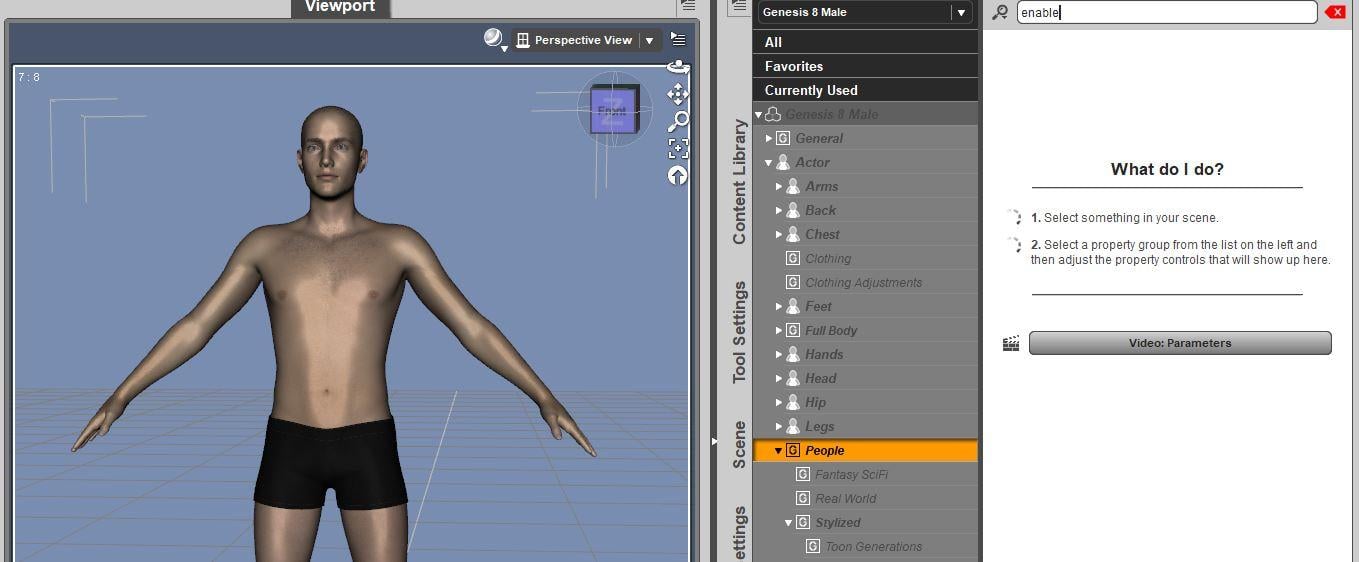
SereneNight’s Sci-Fi Fun Thread 3I don't have the enable TG4 that I can see. I looked in hidden properties
Unfortunately, the morph was poorly saved, and is now universal.
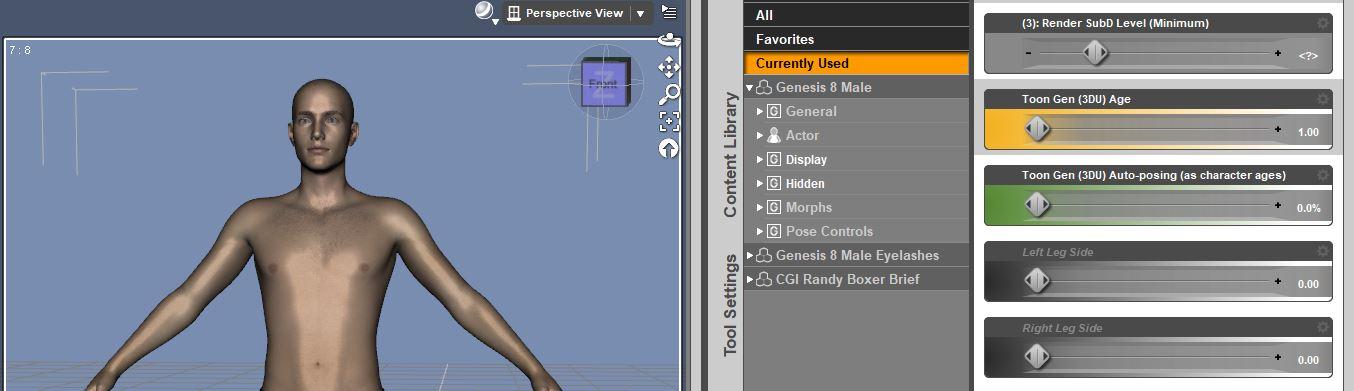
I search for enable, and see nothing.
 Jada 8.1 discussion - the rollerskating "undercover civilian" with bright clothing
daveso said:
Question: Do you think it would be easy to apply a hat on theStack Perm Hair ?
I use SickleYield's Hat & Hair Helper to accomplish this kind of thing.
For whatever reason, Stack Perm Hair is resistant to morphing by the Hat & Hair Helper. I'm not sure why. Maybe a different hair technology.
(not saying it's aliens, but it's aliens)It may be tough to get it to match up well with a hat? You could try to Parent to the Head, then use some other deformer to TRY to morph the hair under a hat... but Hat & Hair Helper for G8F does not seem to work here. I didn't seem to have success with a primitive torus as a hair shaper, either... but I didn't try for long... and then it locked up my computer, so I gave up.
RedactedWhat a coincidence! Just now I needed to loacate the data file for a particular morph. PropertyMaster worked great. Thanks. The column sorting is really helpful, too. I haven't yet tried changing anything.
Face Transfer Squash FacesHi, I've been playing around with Face Transfer a lot and I've noticed a problem with some of the results. The nose, lips, cheeks, and chins don't come out right. They get pushed in some. The image below shows a regular G8 figure on the left and the results of a Face Transfer on the right. They look alright when you look at it from the front but when you turn the figure around you see the face got pushed in some. Any ideas what's going on here?
Render Setting Suggestions for Close Up of Dire Wolf
I don't have the Dire Wolf for Daz Dog8 but I suspect most what you want to do can be done with lighting as you seem to be leaning. Getting some fill AND backlighting will go a long way to snap things in place, particularly with fur. The fill might even be done bringing at least one of your keys around more frontal. That should help soften the bump textures some too but you might lower those values too particularly for a close up. Also, since it's a POV, where's the reflection of the hapless victim? Don't forget stuff behind camera that can reflect & also bounce light & serve as fill too.Daz spec values for many things always seems excessive to me but tweek those once you've got the lighting adjusts.
Dew claw didn't stand out excessively but perhaps there's a morph that will allow you to retract & hide it.
Jada 8.1 discussion - the rollerskating "undercover civilian" with bright clothingnice, but still looking a bit chalky in some of the promos, but this is a female character I would buy for sure, even though I have too many females already, base, vendor, and about 200 morph characters.
I got the price down to $47.32 for the bundle, which is still high but $5.81 per product. Works out to 66% off, close to my 70% requirement.
Question: Do you think it would be easy to apply a hat on the Stack Perm Hair ?
OH ... I got paid today.Can't find/install face transfer unlimitedJust found this in a post from a few years back.....
How to activate the plugin
This plugin does NOT require a separate installer to be downloaded and run separately. The plugin itself is included in the installation of Daz Studio, but it is not activated until you enter a valid serial number. To do this, go to the "Help" menu in the main menu bar of Daz Studio and select the "About Installed Plugins…" action. Next, find the entry for "Face Transfer" and paste or type in your serial code* into the Serial Number field. Finally, click on the "Accept" button to finish the registration process. You will need to close Daz Studio and reopen it before you can start using the the plugin.
*Your serial code will be listed in the "Serial Numbers" section of your www.daz3d.com account.
Can't find/install face transfer unlimitedYes, Face Transfer For Daz Studio is the one. I have had a look and I cannot see or remember how to enter the serial number.... but mine may look different because I have entered it already, someone else will hopefully know......
Jada 8.1 discussion - the rollerskating "undercover civilian" with bright clothingSnowSultan said:
If someone has the time, could you post some examples of the scaling and other morph options of Soto's new afro? Thanks.
edit: Also, does Jada have a no-makeup face option with no eyebrows as well?
Jada 8.1 uses the Makeup channel in the 8.1 PBR setup. There's only a face with a brow or no brow. Then you add the Makeup via the Makeup channel on top of that face.
Jada 8.1 discussion - the rollerskating "undercover civilian" with bright clothingIf someone has the time, could you post some examples of the scaling and other morph options of Soto's new afro? Thanks.
edit: Also, does Jada have a no-makeup face option with no eyebrows as well?
Reminder Email to Redeem your GiftcardsDaz_Jessica said:
watchdog79 said:
Alright, I am now absolutely certain Daz had some sort of a hickup with the codes.
I got an orange banner and no e-mail. I sent a support ticket, and below are the Gift Card values for the codes the support sent me as the ones I had not redeemed, after, you know, "double and triple checking them", which now seems quite hillarious a method of checking to me. Lo and behold my mighty riches:
$0.04
$0.28
$0.07
$0.05
$0.12
$0.55
$0.24
$0.16
$0.62
$0.42
$0.10
$0.34
$0.28
$0.47How did I even manage to buy Gift Cards for these fractions of a dollar value in the first place?

You didn't, you likely used almost all of a gift card on purchases (and didn't transfer to store credit) and had a small left over balance.
I always redeem my Gift Cards after purchase and use store credit. I didn't even know another option existed until you told me now.
Which character is used in Kahanu?@Ismiz You're very welcome! He's not Kimo 7 (I wish we'd gotten a proper Kimo 8 as well), but I do like Ashan 8 and he mixes attractively with many other base characters, so he's great to have.
I think one of the morphs in Alt Valentino 8 may have been sorta-kinda supposed to give a Kimo vibe. Kimo 7 (right) also transfers very well to G8M with Zev0's XTransfer (left). It's not perfect, but it's one of the closest I've seen. Obviously it's not the same as a whole new morph and texture, but if you really like Kimo 7 it's very easy to bring him to 8/8.1 and spruce him up with all the new HD morphs that are available, FACS, etc. I would recommend Ashan 8 and Darius 8's HD morphs to replace the Kimo 7 one.
Can't find/install face transfer unlimitedriverman63 said:
I got puzzled by this when I purchased it. Have you entered the serial number? Face Transfer is already installed so you do not need to install anything extra, you just need to enter the number to unlock the full version. Look under My Serial Number on My Account for it.
The serial number? Hmm...I think that might be my issue, right here. I didn't enter any serial number, as far as I can tell. Hmm...After checking, I have several serial numbers, there. I had never looked into this tab. Although it refers to "face transfer" not "face transfer unlimited". Is that the correct one anyway?
And where/how do I enter this serial number?
Thank you for the tip.
Star Trek Builders Unite 8: THE REBOOTI applied the suggested changes and made several of my own, also made a better quality GIF (that gloss on the hair has got to go!). The face "pose" is my attempt to mimic the pose from the STNG season 1 episode 21 "The Arsenal of Freedom". I'm not sure about the legality of posting the original image, but it is easily found by a Google image search.
Again, please provide your feedback.
Correct me if I'm wrong, but since this morph was made from purchased face morphs not specifically marketed as "merchant reasource" it is unshareable? Is there a legal workaround?
Where does Face Transfer save your Morphs to?Face Transfer saves it inside the Scene Subset it makes.
Plugin does not work in C4D R23chweintr said:
Some of the code has been updated for R23 - for instance, the DRAWFLAGS_NO_REDUCTION has been removed and they tried to change floats for integers, but the script still does not run.
I still can't get files to transfer. OIn the C4D side it says 'nothing to import'. On the DAZ side when trying to run the script, the screen flashes but does not go through the prep process. Any thoughts?
For me it still functions fine (But not perfectly) if I run it on Poser files, but anything using the new DAZ files it'll do what you're experiencing.
Morphing Python (Poser .cr2 file) Export works fine!
The Constrictor (DAZ 'DUF' file) <Nothing happens>I ran through and checked a dozen figures each. Every Poser file exports fine - albeit with every joint's alignment being borked - and every DUF file refuses to even initiate the script. Honestly, I've taken to just exporting figures via FBX when possible and then tweaking them myself, but I might look into the Blender one if the joint alignment problem's not present there though, since I hear most of the development effort in the Bridges is funneled into that one (Not hard to see why, Blender's free after all).
Reminder Email to Redeem your Giftcardswatchdog79 said:
Alright, I am now absolutely certain Daz had some sort of a hickup with the codes.
I got an orange banner and no e-mail. I sent a support ticket, and below are the Gift Card values for the codes the support sent me as the ones I had not redeemed, after, you know, "double and triple checking them", which now seems quite hillarious a method of checking to me. Lo and behold my mighty riches:
$0.04
$0.28
$0.07
$0.05
$0.12
$0.55
$0.24
$0.16
$0.62
$0.42
$0.10
$0.34
$0.28
$0.47How did I even manage to buy Gift Cards for these fractions of a dollar value in the first place?
You didn't, you likely used almost all of a gift card on purchases (and didn't transfer to store credit) and had a small left over balance.
Why are G8 expressions disabled on G8.1, even though they work fine on G8.1?vozolgant said:
j cade said:
Some things don't work the same, or do the same thing but differently
All the building blocks for expressions were created anew and some things overlap
For instance genesis 8 and 8.1 both have mouth smile and mouth smile open morphs - but these morphs look completely different because the 8.1 version was built from scratch with no relation to the 8.0 version
Having 2 smile morphs 2 smile open 2 eyes closed 2 brows up etc etc etc seems kind of messy no?
I see. Hmm. When I dial Mouth Smile 2, I still get a mouth smile, but which morph is it using? 8 or 8.1? Or is it actually using both morphs at the same time, in which you get a double smile strength effect? Anyone know?

Strangely, I'm not getting 2 mouth smile open.
This is explained in the update section of the first post in this thread: https://www.daz3d.com/forums/discussion/477386/how-to-get-genesis-8-expressions-working-on-genesis-8-1/p1
Daz 3D is part of

Connect
DAZ Productions, Inc.
7533 S Center View Ct #4664
West Jordan, UT 84084Licensing Agreement | Terms of Service | Privacy Policy | EULA
© 2026 Daz Productions Inc. All Rights Reserved.