-
Save/Render Options for rough draft
Filament is a great option for testing your characters motion. It's the 2nd fastest set up I use. I've been testing for speed the last few days here are my findings.
All are with either a G8 or a G2 female in a dress with hair, all with a light HDRI background. I've been using in a field type HDRIs - so plenty of sunlight. I test render at 12 fps, and my full renders are 24 fps. 12 is fine for our purposes.I tested with a dancing girl. The motion wasn't as fluid but she dances and looks ok.I used an RTX 2070 super card - so a medium card up against the best. Given that film makers switch camera shots regularly I went with 2 seconds of footage, which is the most common shot time I use anyway.
1. Engine Viewport (texture shaded selected) - 2 secs per frame. So each 2 secs of footage means you wait only 48 seconds for your output.
2. Engine Viewport (filament selected) - 3 secs per frame. So each 2 secs of footage means you wait only 1 mins 12 seconds for your output.
3. Iray Engine - 6 seconds per frame (100 samples per image / denoiser ON). So each 2 secs of footage means you wait just 2 mins 24 seconds for your output. <-- In a previous 3d life that was often how long it took to render ONE frame - lol - an that was with Octane which is about 30% faster than Iray.
On that last note - I can sometimes go down to just 25 samples per image. It depends on the HDRI / foreground lighting combination. I'm a cyberpunk fan and I found some of the cyberpunk night scenes need 100 samples per frame to truely denoise the image. However heres the thing to note with ultra quick rendering ...
.... THE LOAD TIME BETWEEN FRAMES IS THE KILLER. So small scenes are beautiful. The actual render time is negligable - IRAY matches the 3 secs for filament, the load time is the lions share at this speed. It's not a consideration for longer renders, taking 4 secs to load on a 2 min render is nothing for example. This is one way in which Octane (at least for Carrara) scores over Daz's Iray in that the load time between frames is faster. I've not tested that recently, but I've set up huge scenes in Carara and the wait between frames is still near instant. I'm not sure if that's the case with Octane in DAZ. Something tells me it's the way DAZ handles the changeover not the render engine. I haven't used Octane in Daz for years so someone might want to clarify that.
Hope that helps. This testing has certainly clarified my mind as how to proceeed with animation. I can't be cavalier and stick lots of things in a scene anymore. I'm going to experiement with PNG image series (no background, but the same lighting rig as the background image), which get layered over a seperately rendered background (in a compositing program such as Sony Vegas).
Lastly on an 8GB card, I can get 2 characters to render in about 14-15 secs with the denoiser on, and no shader reduction (usually), but Daz holds on to resources, so sometimes coming out and back in the scene is required (to keep the denoiser happy).
Save/Render Options for rough draftFilament
Help with recently purchased Skin ShaderHi all
I'm very new to Daz; I just bought this skin shader and am having some difficulties with it.
My questions are as such
1. What am I doing wrong in terms of the eyes? Whenever I load in the various parts (Cornea, Iris, etc.), her eye turns out like this in Iray view and seem not to be able to load properly. Is there a particular order I'm supposed to load them in, or is it something else?
2. What are these white lines that are appearing in her head in the Filament view once I start applying the shaders? Are they safe to ignore?
3. I'm assuming there's a reason it doesn't come with a shader for the Head; what should I be putting there?
4. Would this work with an 8.1 figure or should I be strictly using 8.0?
Thanks, any help would be very appreciated.
HDRI extremely dark and I'm stumped (Solved!)vwrangler said:
arsmoriendimega said:
Hello,
Apologies in advance, I'm completely self-taught on Daz. I recently purchased iRadiance HDR Resources - Parks and Rec Vol 1 and want to use it as the background for indoor scenes. I have a scene already lit with a light or two, and emissive ceiling lights. When I add the HDRI, it looks pitch black compared to the rest of the scene. I found that if I drop the exposure value to between 1 and 5, which seems to be the equivalent of a 1/3rd second shutter speed at F8, I can now see the HDRI, but I have to drop the rest of the interior lighting to match it. Kind of odd, but the worst part is that it seems to strain the system and I'm getting way more noise than usual. I can't help but feel like I'm doing something wrong. Why would an image of a park on a sunny day need such a long shutter speed anyway?
I browsed through the surface settings panel for the HDRI but I'm not sure if there's anything useful in there and frankly I don't know what half of it means.
Or are these HDRIs just poorly made and that's why they were on sale

I have tried browsing the forum and tutorials on YouTube but haven't found an answer to this yet so I figured I would try posting about it.
Thanks in advance if anyone responds.
The important question, which you didn't answer, is: are you using Iray or 3Delight/Studio Default rendering?
You can tell which renderer you're using by clicking on the Render tab, then seeing what the "Engine" option at the top says. (See attached image.)

If the render engine selector says "NVIDIA Iray", then Parks and Rec won't work for you with that setup. You would need to change to 3Delight, and that would likely mess up how everything else in your scene would render.
Studio comes with three render engines: Filament (the newest, and it takes a few steps to use, so you're almost certainly not using that), Iray (the second newest) and 3Delight (the oldest). "Parks and Rec vol 1" is old enough that it was made for 3Delight, not Iray. It doesn't have the right settings or application method to work in Iray. If you haven't changed the renderer/render engine, then you're using Iray, and "Parks and Rec" can't work.
They're not poorly made; they just came out well before Iray and can't easily be used with it.
The product is just a bunch of HDRIs. It doesn't look very good, but it absolutely works with Iray. Here I did literally nothing besides click on one of the presets and render.
 HDRI extremely dark and I'm stumped (Solved!)
arsmoriendimega said:
Hello,
Apologies in advance, I'm completely self-taught on Daz. I recently purchased iRadiance HDR Resources - Parks and Rec Vol 1 and want to use it as the background for indoor scenes. I have a scene already lit with a light or two, and emissive ceiling lights. When I add the HDRI, it looks pitch black compared to the rest of the scene. I found that if I drop the exposure value to between 1 and 5, which seems to be the equivalent of a 1/3rd second shutter speed at F8, I can now see the HDRI, but I have to drop the rest of the interior lighting to match it. Kind of odd, but the worst part is that it seems to strain the system and I'm getting way more noise than usual. I can't help but feel like I'm doing something wrong. Why would an image of a park on a sunny day need such a long shutter speed anyway?
I browsed through the surface settings panel for the HDRI but I'm not sure if there's anything useful in there and frankly I don't know what half of it means.
Or are these HDRIs just poorly made and that's why they were on sale
I have tried browsing the forum and tutorials on YouTube but haven't found an answer to this yet so I figured I would try posting about it.
Thanks in advance if anyone responds.
The important question, which you didn't answer, is: are you using Iray or 3Delight/Studio Default rendering?
You can tell which renderer you're using by clicking on the Render tab, then seeing what the "Engine" option at the top says. (See attached image.)
If the render engine selector says "NVIDIA Iray", then Parks and Rec won't work for you with that setup. You would need to change to 3Delight, and that would likely mess up how everything else in your scene would render.
Studio comes with three render engines: Filament (the newest, and it takes a few steps to use, so you're almost certainly not using that), Iray (the second newest) and 3Delight (the oldest). "Parks and Rec vol 1" is old enough that it was made for 3Delight, not Iray. It doesn't have the right settings or application method to work in Iray. If you haven't changed the renderer/render engine, then you're using Iray, and "Parks and Rec" can't work.
They're not poorly made; they just came out well before Iray and can't easily be used with it.
Daz Studio Pro BETA - version 4.20.0.17! (*UPDATED*)Imago said:
New version, old bugs. They are here since five years and they are going for the sixth.
Timeline, puppeteer, Frame selected, interface, sliders and a lot of other stuff related to animation are broken. The only usable release is 4.12.0.86 that's really old now.@ Richard: Yes, I reported these bugs multiple times in the latest years, so many times I can't even remember how many. I even sent another report one week ago, still waiting an answer. It's really that hard fix those bugs? If it's THAT hard, just put the 4.12.0.86 versions of those tools in the latest release! At least I can have the chance to try Filament and the other changes.
This is why I despise workarounds so much, as it's so easy to ignore/bypass fixing bugs when you could just use workarounds... in reality, those unfixed bugs may contribute to other bugs and hidden instabilities just like the current one that they have with the viewport being as slow as molasses making this beta (Like the last 2) impossible to use if you have a scene larger than having just one figure in it!
I may be guessing here but there is a distinct possibility those bugs that you mentioned may never get fixed as we're going to be transitioning over to DS5 soon enough, so what would be the point of fixing bugs in an obsolete program?
Daz Studio Pro BETA - version 4.20.0.17! (*UPDATED*)wsterdan said:
olegov.nsk_e159069e49 said:
Ouch... I mean Windows in the Parallels virtual machine on a mac os
Sorry, not at my machine at the moment, but select "Filament" in the Renderstyles drop down menu in the Viewport, and in the Render Settings choose "Viewport".
Hope that helps.
-- Walt Sterdan
Unfortunately it doesn't work :(
Daz Studio Pro BETA - version 4.20.0.17! (*UPDATED*)Imago said:
New version, old bugs. They are here since five years and they are going for the sixth.
Timeline, puppeteer, Frame selected, interface, sliders and a lot of other stuff related to animation are broken. The only usable release is 4.12.0.86 that's really old now.@ Richard: Yes, I reported these bugs multiple times in the latest years, so many times I can't even remember how many. I even sent another report one week ago, still waiting an answer. It's really that hard fix those bugs? If it's THAT hard, just put the 4.12.0.86 versions of those tools in the latest release! At least I can have the chance to try Filament and the other changes.
It'snot just a matter of how hard the bug is to fix but what the cinsequences would be and whether that section of the code is receiving attention anyway, to say nothing of the actual impact (the frame bug is annoying but it affetcs mainly situations where the target is away from the origin, which reduces the number of peoplke affected, and has a relatively simple work-around, make sure the camera is pointing at the origin, so it may well be given a lower priority than another bug which affects more users or has not work around).
Daz Studio Pro BETA - version 4.20.0.17! (*UPDATED*)New version, old bugs. They are here since five years and they are going for the sixth.
Timeline, puppeteer, Frame selected, interface, sliders and a lot of other stuff related to animation are broken. The only usable release is 4.12.0.86 that's really old now.@ Richard: Yes, I reported these bugs multiple times in the latest years, so many times I can't even remember how many. I even sent another report one week ago, still waiting an answer. It's really that hard fix those bugs? If it's THAT hard, just put the 4.12.0.86 versions of those tools in the latest release! At least I can have the chance to try Filament and the other changes.
Daz Studio Iray - Rendering Hardware BenchmarkingYeah, the log file does not have all the info until the image is either saved or closed. You do not actually have to save the image if you do not want to, you can select to close it.
I rather doubt the M1 will ever get full GPU support for Daz Iray. Iray requires CUDA to run on a GPU. Only Nvidia GPUs can run this code. So no matter how fast or amazing AMD, Intel and Apple make their GPUs, they will never be able to run Iray. Any devices that have GPUs from them will always be forced to render on CPU. And in case somebody asks, no Rosetta cannot be used to run CUDA applications. I have seen the topic come up, but I have not seen a case of it actually working.
I am sorry, but that is just how it is. If Nvidia allows them to use CUDA that could change, but it seems extremely unlikely that will ever happen. CUDA is Nvidia's single greatest asset in the industry. Additionally, Nvidia and Apple had a major falling out between each other a few years ago. Regardless of whose fault it might be, there are no Nvidia drivers for any Apple products for Turing and Ampere. So you cannot even plug a 2000 or 3000 series GPU up to a Mac with an external enclosure.
So lets look at the benchmarks:
Apple M1........1.5 HOURS That equates to 0.315 iterations per second.
RTX 3090.......1.5 MINUTES That is 19.623 iterations per second (based on my personal 3090 time).
That is a factor of 60! Not 2 or 3 times faster, not even 10 times faster. The 3090 is over 60 times faster than the Apple M1 for rendering Iray. And while it may be seem unfair to compare the 3090 to what is essentially a mobile CPU rather than the GPU, the Apple GPU is never going to run Iray. So it is in fact totally fair to make that comparison because the CPU is all that M1 owners will ever get to use on Iray.
So Apple users will probably want to either use 3DL or Filament to render or export to other software that can render on the M1 GPU.
Any suggestion to turn on bulb in Filament?I don't think we have any filament shaders yet, do we?
I remember seeing the hair shaders, but I admit I didn't search for any filament specific shaders.
Any suggestion to turn on bulb in Filament?Want to know how to let a bulb looks like a real turned on bulb in Filament, not a white tube, any suggestion? Except PS.
Meanwhile, is it possible to get Depth of Field effect in Filament?
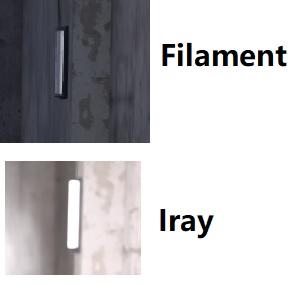 Daz Studio Pro BETA - version 4.20.0.17! (*UPDATED*)
olegov.nsk_e159069e49 said:
Ouch... I mean Windows in the Parallels virtual machine on a mac os
Sorry, not at my machine at the moment, but select "Filament" in the Renderstyles drop down menu in the Viewport, and in the Render Settings choose "Viewport".
Hope that helps.
-- Walt Sterdan
[Released] Camera Doctor Bundle [Commercial]barbult said:
If you are receptive to suggestions for an update (whenever...) I would like a way to change draw style while in the camera visual switcher. I usually have my viewport in Texture Shaded, but when the switcher shows me previews, sometimes I cannot make out enough detail to know what I am looking at. A way to quickly switch to a different draw style, without exiting the script and starting it over, would be useful to me.
For example, in Texture Shaded, I can't tell where the path is on my ground texture. I switch to Filament (PBR) and voila, I see it clearly.
That is a good idea. I will add it.
[Released] Camera Doctor Bundle [Commercial]If you are receptive to suggestions for an update (whenever...) I would like a way to change draw style while in the camera visual switcher. I usually have my viewport in Texture Shaded, but when the switcher shows me previews, sometimes I cannot make out enough detail to know what I am looking at. A way to quickly switch to a different draw style, without exiting the script and starting it over, would be useful to me.
For example, in Texture Shaded, I can't tell where the path is on my ground texture. I switch to Filament (PBR) and voila, I see it clearly.
Daz Studio Pro BETA - version 4.20.0.17! (*UPDATED*)olegov.nsk_e159069e49 said:
I am very sorry, but I don’t know where to ask ... How to make the filament work in parallel on mac os, if possible ...
It isn't currently supported.
Daz Studio Pro BETA - version 4.20.0.17! (*UPDATED*)I am very sorry, but I don’t know where to ask ... How to make the filament work in parallel on mac os, if possible ...
Filament hair apperance, need help!!Padone said:
The scalp you can hide by setting opacity to 0%, so that is not a issue. Nevertheless transmapped hair will not render fine even without scalp.
uh, not yet. The scalp appeared is because the hair partially disappered because the Filament transparency problem, so even hide the scalp, the hair still not appear, it looks more weird.
Filament hair apperance, need help!!Thanks Padone, WendyLuvsCatz and vrba79.
I heard it before that Filament has problems with layer, transparency, opacity, etc,. If Filament always shows scalp, it is understandable, however, it continually shifts between normal hair appearance and scalp, this is out of my understanding.
Anyway, yesterday when woke up, I suddenly got an idea, duplicate! Here it is:
1. Duplicate the hair;
2. rotate the duplicated hair(2) a little bit, say X Y rotate 0.5%;
3. if can not rotate the hair(2) itself, rotate its Hip;
4. now the figure has 2 hairs, it solved half of the scalp problem. If see scalp again, turn off one hair (hide), sometimes it works. If doesn't work, turn on it, turn off another one, back and forth in between, it should work by chance.5. if there are few people in one scene, duplicate everyone's hair. The tricky is, when turn off one person's hair, other person's scalp may appear! Do the back and forth again until everyone's hair is normal.
6. last, can make one group for everyone's hair so that it is easy to find the hair before render. For this, the hair will be 'parent' to the group, but it doesn't matter for character's pose, hair will continually follow the person, or we can change the hair 'Fit to Mode' to Redirect Transforms in the Parameters tab.
7. Didn't try duplicate 2 or 3 hairs for one person, maybe try it later.All right, that's it, duplicate, rotate, turn off, turn on, turn off..., what a stupid way, but at least life can go on. God bless Filament!
Blender 3.0Hello Daz,
Why don't you make filament and dforce better? Would be a game changer. Ok What about th new daz to blender new plugigin? I prefer Daz Studio for film making, so guys... Sorry for...
Daz 3D is part of

Connect
DAZ Productions, Inc.
7533 S Center View Ct #4664
West Jordan, UT 84084Licensing Agreement | Terms of Service | Privacy Policy | EULA
© 2026 Daz Productions Inc. All Rights Reserved.