-
Soft Expressions for Genesis 9
P3D's new Soft Expressions look natural, and they may help Genesis 9 deliver on the hopes I initially had after seeing Victoria 9 promos. If only the promos were labeled with their actual names so I could use them as a quick guide.
Help: GTX 1650 Turning Off Randomlyso here's the history of my desktop:
- Motherboard: MSI H110M Pro-VH Plus
- CPU: Intel Core i3-6100 LGA1151
- RAM: 8GB HyperX Fury
- PSU: FSP Hexa+ 550
- GPU: MSI GT 730
- GPU Studio Driver: 388.71 (for the majority of the almost 6 years)
- Daz Version: 4.9
- Render Mode: Iray
- Render Device: both CPU and GPU, OptiX Prime Acceleration off
- Rendering Converged Ratio: 95% or for 2 hours limit
- GPU-Z monitoring: nothing too high in value
- Years in Daz Service: almost 6 years
- Note: i always close every other application program before rendering, only Daz is open
yeah, it's a poor man's PC build, but it has been performing okay with Daz 4.9 for the past years since i bought it.
for light scenes, mostly outdoor, it utilizes both CPU and GPU.
for indoor scenes or scenes with multiple Generation 7 characters, it usually switches to CPU only.
for Daz 4.12 Beta, it only uses the CPU for rendering, that's why i don't realy use that version.
Problem 1A) just this February, after trying to render an implied indoor scene, my GTX 730 shut off, leaving my CPU alive.
it's a scene that my PC can handle during the past years, that's why i was surprised.
it's only an implied indoor setting because i usually remove every wall and anything else that the camera cannot see.
but the GPU came back to life after reset.Problem 1B) it happened during an Iray preview of an outdoor scene, meaning a lighter scene compared to the first problem.
after i ender the Iray preview, it took a few minutes before the GPU shut off.
but it never came back to life after reset, or power on, or reinstall then power on.
and so thinking that the GPU is the one at fault, i decided to buy a new one.
Error: LiveKernelEvent 117 for Windows and GPU failure according to Daz log
- Replacement GPU: MSI GTX 1650 Ventus XS
- GPU Studio Driver: 528.49 (released just this February 2023)
- Render Mode: Iray
- Render Device: both CPU and GPU, OptiX Prime Acceleration off
- GPU-Z monitoring: nothing too high in value
- Note: i was recommended this one because it's the only better GPU version that is compatible with my existing PC components, and thinking that the GT 730 was able to handle all the work for the past years, i assumed that GTX 1650 can do the same with a slightly better performance.
Problem 2A) since the Nvidia Studio Driver version 528.49 is not a Beta, i thought that it was already safe to install.
i only learned later that many gamers are experiencing problems with it, but not the same case as mine.
after updating my GPU driver, i did some test render with Victoria 7 with some small assets, but with just a blank default environment.
this is something that my GTX 730 can render within 15 to 20 plus minutes, both CPU and GPU involved.
after doing the Iray render in Daz 4.9, it only utilized the CPU and it the result took more than 20 minutes.
after doing the Iray render in Daz 4.12 Beta, it surprisingly lasted for only 1 minute plus, the log file says that it uses both CPU and GPU, although (unlike in Daz 4.9) it didn't report how many iterations were done by the CPU and how many were done by the GPU.
after the completion of that 2nd render, the GTX 1650 shut off, leaving the CPU running.
Error: LiveKernelEvent 117 for Windows and successful end of render for Daz log
- Action 1: i did the sfc/scannow and the system said it fixed some corrupted files after
- Action 2: i updated my MSI BIOS to the latest compatible version listed on the official website
Problem 2B) after those actions, i was able to make my GTX 1650 run again.
i was only browsing the internet, nothing too heavy for the system.
but then my GPU shut off again, while my CPU is still alive.
Error: LiveKernelEvent 141 for Windows
my questions now are the following, since i have't read any case that is exactly similar to mine.
this is also considering something that i read, that the PCIe slot getting broken is rare, and that GPU Studio Driver version 528.49 has a lot of reported bugs.
that's why i'm very puzzled why my problem with the GT 730 is almost similar to my current problem with the GTX 1650:
1) if a PCIe slot is broken, does that mean that everything that will be plugged to it will not work?
2) is it possible for the PCIe slot to be moody, letting the GPU turn on and then turning it off randomly?
3) if the GPU can still be turned on, is it possible that the GPU driver is the one that has the problem?
4) in case it's just a GPU issue, what Nvidia Studio Driver version is safe for my GTX 1650, not just safe but is also certified to utilize both CPU and GPU for Iray rendering in Daz 4.5 or 4.12 Beta?
i really hope some of you can help me.Resourses for shaping faces / understanding physionomyHi,
I've been looking around the interwebs for anything to help me create realistic faces that stand out from a basic model like Victoria. Daz has tools to modify all the micro details that build the face, but I don't even understand faces in the first place. Somebody tell me about nose types, face shapes, eye shapes, position, all of that so that I can have the vocabulary to conceptualize and name for myself how I want to modify a face. What makes a face look causasian? Arabic? Old? What makes this and that actual human stand out and look real while most of the characters that I see created seem... bland. All I find are analysies of personality based on the shape of the face and that's not at all what I'm looking for.
Thanks to anyone who knows of videos or courses on the topic!
Problems converting Michael 4 male clothes to Gen 8I added metadata to all my Generation 4 and 3 era items. When I went to convert it went better because they were identified. But it is a challenge to 'find' the products if you were not used to the Poser file system.
This is the link to the Commercial thread where most of the initial problems were reported and answered. And where suggestions were incorporated.
Legacy UVs for Genesis 9Mouser, I'm working on the Victoria 4 UVs at the moment. Beyond that I'm not really sure. I don't know how strong the demand for the earlier UVs is likely to be - I shall have to gauge that somehow by the V4 sales.
Legacy UVs for Genesis 9Any chance of the other gereation's like Michael 4 & Victoria 4 UV's?
Looking for this modelLeana said:
She's most likely a custom character, Fabiana usually credits them when she uses existing characters.
I was thinking it was this https://www.daz3d.com/fwsa-whitley-hd-for-victoria-7 but Idk its hard to tell
Genesis Figures for Poserwassean_1fcf286464 said:
Hello All,
I've been using Poser for several years now. I currently run Poser 11. I primarily use Victoria and Michael's 4 figures. But I'm noticing fewer products being developed for Victoria figures and more for Genesis figures, especially 8 and 9. Curious to hear people's experiences with these figures, particularly in Poser.
My version of Poser 11 comes with Genesis 2 base figures. Are there Genesis 8 or 9 base figures for Poser 11? If so, where would I find/purchase Genesis 8 or 9 base figures for Poser?
Thanks,
S
There is not. Your best bet is to download Daz Studio since it is free and start playing with it I have poser, versions 5 thru 10 and moved to Daz Studio because I wanted better rendering capabilities. It took me awhile to figure out Daz Studio, but once I did, stopped using poser altogether.
Feedback on catalog search in the Daz StoreCurious if others get the same search results.. presented as feedback: as a customer I expect the numbers on the page to jive with one another.
If I go to the store and search for "tights", I am told there are 16 results (grey box under "Your Search Results...").. Then 7 items are displayed (The show mature box is checked, this occurs both logged in and out, this also occurs in both Firefox and Safari).
Now I search for "stockings", I am told there are 47 results and 15 items are displayed. The page button at the bottom indicates that there are 2 pages of results, when I click for page 2.. it is empty. Same details as above. The artist, figure, and genre numbers are all over the place e.g. Figures G8F: (17), G8.1F: (15), G3F: (7), Genesis: (4), The Girl 4: (3), Victoria 4: (3), Aiko 3: (2), G2F: (2), Aiko 4: (2), Victoria 4 Elite: (2), Stephanie 3: (1), Victoria 3: (1), N/A: (1). The 15 items are tagged: G8.1F: (4), G8.1F & G8F: (3), G8F: (1), G2F: (1), G1F: (1), V4: (1), V4 & A4: (1), and No Figure tag: (3)
Hope this helps.
Genesis Figures for Poserwassean_1fcf286464 said:
Hello All,
I've been using Poser for several years now. I currently run Poser 11. I primarily use Victoria and Michael's 4 figures. But I'm noticing fewer products being developed for Victoria figures and more for Genesis figures, especially 8 and 9. Curious to hear people's experiences with these figures, particularly in Poser.
My version of Poser 11 comes with Genesis 2 base figures. Are there Genesis 8 or 9 base figures for Poser 11? If so, where would I find/purchase Genesis 8 or 9 base figures for Poser?
Thanks,
S
As far as I am aware no version of Poser includes a Genesis figue of any kind. I trust you are using a properly licensed copy.
Genesis Figures for PoserHello All,
I've been using Poser for several years now. I currently run Poser 11. I primarily use Victoria and Michael's 4 figures. But I'm noticing fewer products being developed for Victoria figures and more for Genesis figures, especially 8 and 9. Curious to hear people's experiences with these figures, particularly in Poser.
My version of Poser 11 comes with Genesis 2 base figures. Are there Genesis 8 or 9 base figures for Poser 11? If so, where would I find/purchase Genesis 8 or 9 base figures for Poser?
Thanks,
S
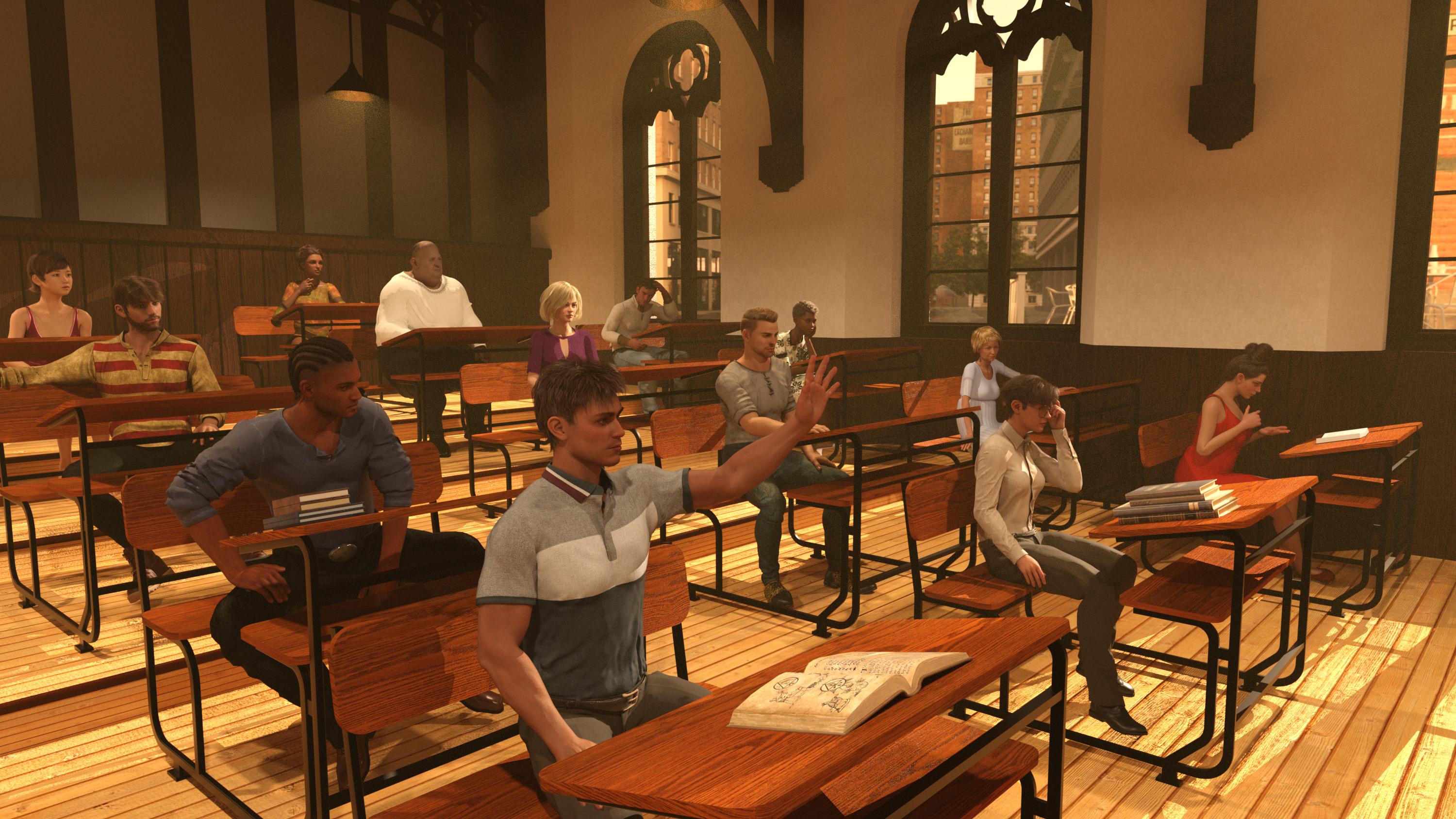
February 2023 - DAZ 3D New User Challenge - Lighting and Light EffectsHere is the latest iteration of this image.
A lot has been done to improve it.
I had hands going through clothing, changed some of the clothing itself.
None of them have teeth anymore. lol
I had to change Victoria 9's skin to regular Genesis 9 skin.
I deleted bump and normal maps in a few characters in the back.
And yes, I did instance the desks.
I did not think of turning off body parts under clothing but that would be the next thing if I had not gotten a fraction of headroom to render.
Victoria got a pair of glasses, and they swallowed up the headroom I garnered.
It took 45+ minutes to load the scene so I had to turn off thousands of Geneses 8 morphs.
Now it loads in about 3 minutes. This image made it to about 8000 iterations before completing.
The light is finer looking now and the atmosphere a bit less granular.
I also changed poses to a lot of the figures, made them look ahead more instead of into the camera.
A lot of the clothing had poke through some of the dresses were not even wrapped around the figures and George had a straight jacked his arms got surrounded by his waist clothing, that got fixed as well.
Some of the books were floating off the desk.
My VDB particle field was not filling the whole room, I was able to make the VDB a bit bigger to encompass the entire room.
There are two Genesis 9 figures, the male and female in the forefront of the image. They still have their morphs.
There is a lot of fiber mesh hair going on in this scene, I assume that took a huge amount of resources as well. I lowered subd in many instances.
Everything in the entire scene is base resolution even eyelashes, except Redz Kaz's shirt in the forefront it was too wrinkly, so I had to turn up subD and set the definition to high.
Turning off morphs did not create much render room, it just lowered scene load times immensely which was absolutely necessary.
Right up to the end I still had to reload the scene to clear out the video ram quite frequently.
I encountered the black screen a few hundred times with this scene.
I had to get rid of the billboard guy in the back of the room, he looked terrible and I could not secure enough video ram to load another figure in the far corner.
(Please give us memory pooling that works in Daz.)
This scene I will perhaps revisit when I can double my memory footprint.
A few laptops, some deforce clothing strewn around, backpacks, food items more books and maybe someone will be allowed to open their mouth and smile.

Thank you Linwelly for your awesome tips as well!
I had not thought of shutting off body parts under clothing, If I revisit this scene that is where I am going.
I think this scene is done for now, it has been a fun project and I have learned a lot in the process.
I feel I have become acquainted with some new friends as well. And Mabel does not look as depressed anymore.
I will refer to this scene as Classroom (Day 2)
 What are the system requirements for Daz Studio 4.21(64bit)??
Do you have the "Genesis 8 Female Head Morphs", which Alt Teen Jane is looking for?
What about "Genesis 8 Female Body Morphs", which for example Dacey is looking for?Formula output property not found: Genesis8Female:/data/.../PBMTrapsSize.dsf#PBMTrapsSize?value - in file: /data/.../Dacey/%21sDacey%20Body%20Original.dsf
The above means that, the file "Dacey Body Original.dsf" has a reference to formula in file "PBMTrapsSize.dsf" and either the formula inside the file or the file itself cant be found. The file "PBMTrapsSize.dsf" is part of "Genesis 8 Female Body Morphs"
If you do own the G8F head morphs and body morphs, they are not installed correctly, and/or the nested directories you have are confusing DS
DS is also complaining about not finding Growing Up, Victoria 8, etc... With about 10 thousand complaints for DS not finding what it is looking for, it is no wonder that the loading takes over 20 minutes and the figure looks weird.
How are your Content Directories set up in Content Directory Manager? Show us with all the directories expanded like in the attached sample.
As for your computer, you need more RAM and you need more space on your drives (16-20GB's free is nothing, especially on C-drive)
Ps. Signing off as it's half an hour to midnight over here.
Hair for Wednesday (and Enid?)I think the OOT hair is the best fit for Wednesday, but here are other options worth looking at:
- https://www.daz3d.com/double-trouble-braids-for-genesis-3-female-s
- https://www.daz3d.com/bridget-hair-for-genesis-3-female-s << doesn't have bangs, though.
- https://www.daz3d.com/lori-hair-for-genesis-3-and-8-females << doesn't have bangs.
- https://www.daz3d.com/short-pigtails-for-genesis-3-and-8-female-s << bangs but no braids.
- And ali over at Rendo has a hair that might also work (though full disclosure, I've never bought anything from this PA, since I never know if his hairs work on DAZ): Hr-186 (this has fits for Victoria 7 and G3, but in software requirement only Poser is mentioned).
For Enid, maybe one of these could work:
- https://www.daz3d.com/kuo-hair-for-genesis-8-and-81-females
- https://www.daz3d.com/dforce-kay-hair-for-genesis-3-and-8-females
- https://www.daz3d.com/riley-hair-for-genesis-8-and-genesis-3-females
- https://www.daz3d.com/side-parted-long-bob-hair-for-genesis-9
- https://www.daz3d.com/georgia-hair-and-oot-hairblending-2-0-for-genesis-3-female-s
- https://www.daz3d.com/misty-hair-for-genesis-3-females
- https://www.daz3d.com/wave-hair-for-the-genesis-3-female-s-and-genesis-2-female-s
- https://www.daz3d.com/layered-spring-style-hair-for-genesis-8-and-81-females
- https://www.daz3d.com/2021-08-hair-for-genesis-8-and-81-females
- https://www.daz3d.com/fe-female-linda-medium-hair-for-genesis-8-and-81-female
- https://www.daz3d.com/glamorous-style-hair-for-genesis-8-and-9
- https://www.daz3d.com/dforce-lupineve-hair-for-genesis-8-and-81
- https://www.daz3d.com/fantasia-hair-for-genesis-3-female-s
- https://www.daz3d.com/ronya-hair
- https://www.daz3d.com/dforce-fringe-theory-hair-for-genesis-8-81-and-3-females
- https://www.daz3d.com/geo-hair-for-genesis-8-females
- https://www.daz3d.com/kieron-hair-for-genesis-3-8-male-s
Transferring DAZ to new/different ComputerThis is the outfit:
https://www.daz3d.com/steampunk-outfit-for-v4
I have Victoria 4.2. I have successfully used this in the past - 2020. I can get other models to work with their outfit. But this is the main one I want to interact with. Incidentally, the script for altering the waist for the corset and the high heels work fine.
Transferring DAZ to new/different Computerfelis said:
You still haven't told what the log says (Help > Troubleshooting > View Log File) when you try to load the outfit.
DAZ/Victoria 4/Deltas/PowerLoader.pz2
2023-02-12 10:32:25.221 [INFO] :: Retrieving Checked files...
2023-02-12 10:32:25.232 [INFO] :: Script executed successfully: /Users/Shared/My DAZ 3D Library/runtime/libraries/character/daz people/victoria 4.2.dsb
2023-02-12 10:32:36.683 [INFO] :: Received URL to open: file:///Volumes/Mac Account Storage/rohanstevensonG5/Library/Application Support/DAZ 3D/InstallManager/LaunchStudioProduct.dsa
2023-02-12 10:32:36.685 [INFO] :: Loading script: /Volumes/Mac Account Storage/rohanstevensonG5/Library/Application Support/DAZ 3D/InstallManager/LaunchStudioProduct.dsa
2023-02-12 10:32:36.692 [INFO] :: Script executed successfully: /Volumes/Mac Account Storage/rohanstevensonG5/Library/Application Support/DAZ 3D/InstallManager/LaunchStudioProduct.dsa
2023-02-12 10:32:37.486 [INFO] :: Received URL to open: file:///Volumes/Mac Account Storage/rohanstevensonG5/Library/Application Support/DAZ 3D/InstallManager/LaunchStudioProduct.dsa
2023-02-12 10:32:37.487 [INFO] :: Loading script: /Volumes/Mac Account Storage/rohanstevensonG5/Library/Application Support/DAZ 3D/InstallManager/LaunchStudioProduct.dsa
2023-02-12 10:32:37.494 [INFO] :: Script executed successfully: /Volumes/Mac Account Storage/rohanstevensonG5/Library/Application Support/DAZ 3D/InstallManager/LaunchStudioProduct.dsa
2023-02-12 10:32:57.450 [INFO] :: Loading script: /Users/Shared/My DAZ 3D Library/poses/steampunkv4/steampunk elite/steamcorset.ds
2023-02-12 10:32:57.567 [INFO] :: Script executed successfully: /Users/Shared/My DAZ 3D Library/poses/steampunkv4/steampunk elite/steamcorset.ds
2023-02-12 10:32:59.598 [INFO] :: Loading script: /Users/Shared/My DAZ 3D Library/poses/steampunkv4/steampunk elite/steamcorset.ds
2023-02-12 10:32:59.711 [INFO] :: Script executed successfully: /Users/Shared/My DAZ 3D Library/poses/steampunkv4/steampunk elite/steamcorset.dsHmm. It appears to think it has executed successfully. But I can assure you it has not.
Where is the Maisie figure?Which one?
https://www.daz3d.com/maisie-for-teen-jane-8
https://www.daz3d.com/fwsa-maisie-hd-for-victoria-8
The Arya lookalike is on that other site that we don't link to, but there is one on Renderosity too, with different name.
Transferring DAZ to new/different ComputerOn PC: Victoria is loading by double-clicking on it but not on that icon. If I go to figures>people>sci-fi all of the models turn up.
I double-click on V4 and she loads.
The problem is I cannot apply the clothing she was purchased for to her. Double clicking on them has no effect. I can apply a hair item that was bought seperately. Trying to get more information results in being taken to a window "page not found".
This looks like I need to open a support ticket.
Transferring DAZ to new/different ComputerCan you load the item, just not drag them into the scene, or can't you load them at all?
If you look in the log, does it then say the the item has been loaded successful?
And have you tried with something newer - Victoria 4.2 is in poser format.
Transferring DAZ to new/different ComputerHi - what is the process for transferring all Daz content to a new/different computer?
I currently have Daz on a Mac, and I am looking to move everything to a dedicated Windows computer running W10.
- The Windows computer has latest Daz installed with everything I think I need. However, after downloading my content the download manager will not install it. Do I need to uninstall from the Mac first?
- Some of the content is visible in Daz Studio on the PC, but it won't open.
- Experimenting on the Mac, my V4 cothing is not loading onto the V4 model.
- The install manager has uninstall options. Presumably uninstall everything and then delete the manager?
- Just on the Mac...I installed Daz Central and wanted to open the Library Steampunk Outfit for V4, and also Victorian Innocence for V4, it guided me through to the location of the content in Daz Studio which I had already found anyway, but the clothing articles will not load on to the V4 model. The same thing occured on PC, but presumably the content had not been installed there.
- Opening Victoria 4 from Daz central also does not work.
- Double clicking on content I am trying to load takes me to a 404 page not found error on the pop-up screen in Daz Studio (on mac).
I think there are 2 parts to my query; 1) how to successfully access my content on a new/different computer and remove Daz from the old. 2) Why the V4 model which loads fine into Daz Studio will not load the accessories for it.
Daz 3D is part of

Connect
DAZ Productions, Inc.
7533 S Center View Ct #4664
West Jordan, UT 84084Licensing Agreement | Terms of Service | Privacy Policy | EULA
© 2026 Daz Productions Inc. All Rights Reserved.