-
Daz Octane plugin only rendering first frame of timeline animation
Hi all,
I’ve been trying to render an animation using the Daz Octane plugin but am having issues and can’t find a solution anywhere.
In the scene I have a guy wearing a cloak, his clothing is reacting to the wind node I have in the scene. The animation works fine in Filament but when I attempt to use Octane it’s only rendering the first frame of timeline animation over and over again. All frames are identical (apart from some lighting changes in the hair).
Any ideas?
Thanks!
No "type" dropdown in my "Environment" pane...Does the scene contain an Environment Settings node? If not add one from the Create menu, or do an Iray render, or use the iray or Filament Drawstyle in the Viewport.
Filament missing in recent public betanakamuram002 said:
Tugpsx,
Correct me if I am wrong. In the other discussion, you mentioned that the RTX3060 is not being used as the GPU that drives your display. If this is the case, I suggest that you disable and/or remove the other GPU, and just use the RTX3060. If that works, problem solved, but if it does not, then try reinstalling DS. It should get the drivers right.
Also, make sure that the RTX3060 is properly seated, and that the connector (12-pin?) from the power supply is solidly connected.
Thanks for the advise. I will confirm the seating. i can render with the GPU in the older version of Studio and the new version. Filament is the only thing not working in the new vesion. i replaced the OpenGL32.dll in the Windows directory with another version thats how I Studio to work. I tried both the Nvidia Studio and Game drivers but it doesnt fix the issue with filament. Will research some more,
PSA: Best Buy RTX 3000s In-Store Only - Eastern Standard Time Daily Checks (20211001 - 20211231)nakamuram002 said:
Subtropic Pixel said:
nakamuram002 said:
Thanks for reminding me. I always change my File Explorer view settings to show extensions and hidden files and directories. I forgot to do so on my new machine. Searching again, I found: QtOpenGl4.dll. I suspect that this has something to with playing Quick Time videos. These are my settings and search results:
QT is a development framework written in C++.
This is probably a lot more likely than being for Quick Time videos.
Link to info here.
I wonder what uses it - Filament, 3Delight? OpenGL would not be needed by IRay.
It is used by the generic DAZ Studio GUI and almost certainly for all the wireframe, texture shaded, cartoon shaded and most of the other non-Iray viewport draw choices. I don't think Filament would use it either as Filament preferably uses Vulkan, but Google may have decided to also allow openGL library linkage for more widespread platform accessibility, but I'm not sure on that I've never looked in the Filament documentation to be sure.
PSA: Best Buy RTX 3000s In-Store Only - Eastern Standard Time Daily Checks (20211001 - 20211231)Subtropic Pixel said:
nakamuram002 said:
Thanks for reminding me. I always change my File Explorer view settings to show extensions and hidden files and directories. I forgot to do so on my new machine. Searching again, I found: QtOpenGl4.dll. I suspect that this has something to with playing Quick Time videos. These are my settings and search results:
QT is a development framework written in C++.
This is probably a lot more likely than being for Quick Time videos.
Link to info here.
I wonder what uses it - Filament, 3Delight? OpenGL would not be needed by IRay.
PSA: Best Buy RTX 3000s In-Store Only - Eastern Standard Time Daily Checks (20211001 - 20211231)The RTX 360 is not being used as a display card, a NVS 310 has been the display car in this system when the GTX 660Ti was installed. If i start up Studio 4.16.0.3 on the same machine, Filament works just fine. Launching Studio 4.16.1.21 which states it using the same OpenGL version and Filament is grayed out. I toggled filament pugin but same issue.
Lets take the discussion to this other thread since others may be interested in getting updates on available cards.
Check CDW some cards are in stock.
Daz Studio Nvidia Iray Interactive & Photoreal Animation Tests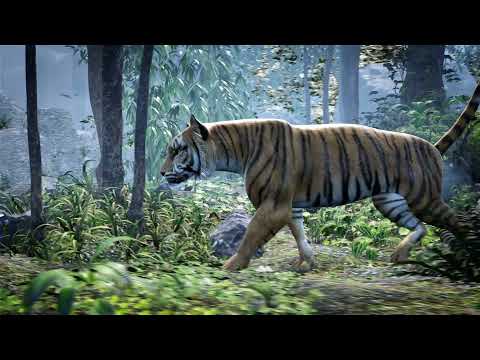
Playing with applying some of the "Animations for the HiveWire House Cat" Aniblocks to "Hivewire Tiger". I also played with adding vegetation and some camera movement. It's all real time rendered using Filament in DAZ Studio. Then a little motion blur in After Effects.
Music from https://www.free-stock-music.com/fsm-team-over-the-ocean.html
Filament bring out the RendersNylonGirl said:
And just like that, the thread returned...
I edited the title to be less offensive
 the detractors seem to have moved on
...or finaly realised using it is not compulsory

I have actually uploaded lots of Filament videos to Youtube, often postworked, I often render light bulbs separately and add glow and flares etc in post
the fact it easily does 4K images videos is an added bonus, you don't want to try that in iray unless cooking your GPU over a few days your desire
Filament bring out the RendersI find filament is useful for getting me a really fast scenery render I can then postwork the hell out of.
Filament missing in recent public betaTugpsx said:
Yes the plugin is installed and shows active.
I also have 4.16.0.3 installed and Filament is working correctly on that version.

Did you delete maybe a shared dll Filament (PBR) needed when you were cleaning up old openGL installations? I have both DAZ Studio versions installed that you have & I have Filament (PBR) active in both.
Filament missing in recent public betaInteresting I just upgraded Studio on the Windows 11 machine and now it also has Filament grayed out.
Filament missing in recent public betaFilament is available in v4.16.1.21 for me.
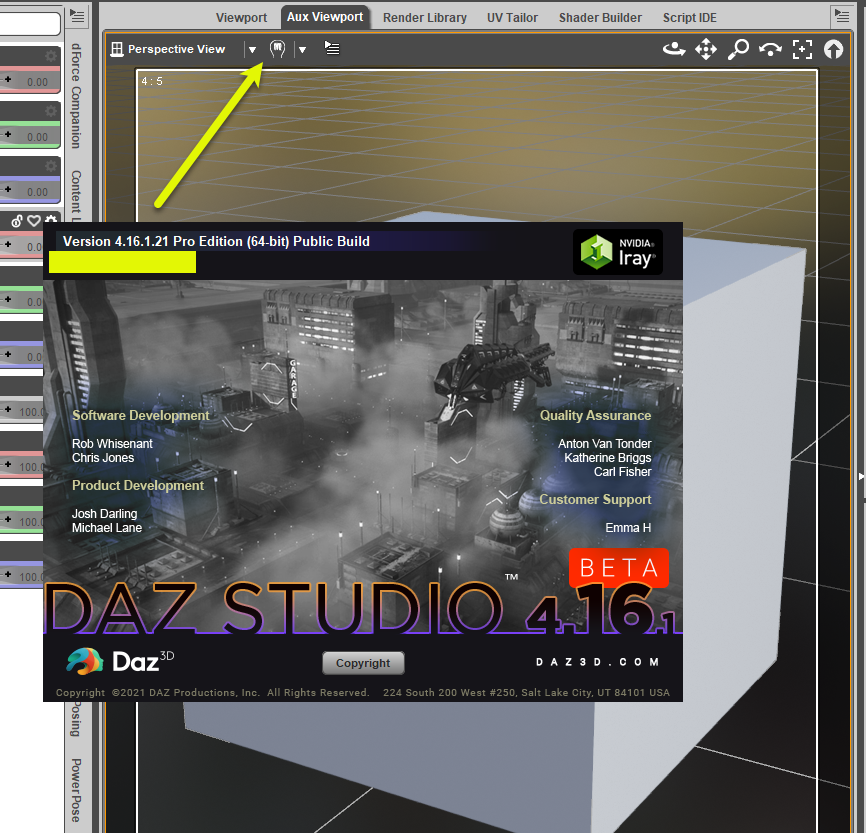 Filament missing in recent public beta
Yes the plugin is installed and shows active.
I also have 4.16.0.3 installed and Filament is working correctly on that version.
Filament missing in recent public betaTugpsx said:
I updated to Studio 14.6.1.21 yesterday only to find that the Filament PBR is grayed out in the viewport options.
Adding specific Filament presets does not return the option. Curious if anyone else having the same issue. Filament worked fine on previous version.

Do you have it turned off under "Help/About Installed Plugins"?
Filament missing in recent public betaI have 4.16.1.17 and there is Filament working.
Filament missing in recent public betaI updated to Studio 14.16.1.21 yesterday only to find that the Filament PBR is grayed out in the viewport options.
Adding specific Filament presets does not return the option. Curious if anyone else having the same issue. Filament worked fine on previous version.
Filament looks identical to Texture-Rendered Viewport?Thanks a lot for the feedback. I did some more checking on the forum and I think it might also be an OpenGL Driver issue. Someone with a similar system to me had the same problem and they mentioned that it was an OpenGL issue. Filament seems to require a certain version.
Filament looks identical to Texture-Rendered Viewport?wolvesandlambes said:
Thanks for the clarification :) Although I find it bizarre that I can render Iray scenes in a relatively reasonable amount of time but can't use a more "light weight" option like Filament.
I haven't used Filament much, but it does ring a bell that people found it was more demanding on memory than Iray.
Filament looks identical to Texture-Rendered Viewport?Thanks for the clarification :) Although I find it bizarre that I can render Iray scenes in a relatively reasonable amount of time but can't use a more "light weight" option like Filament.
Filament looks identical to Texture-Rendered Viewport?Hello
I apologise if this topic has been covered before. I cannot seem to get Filament to look anything like in the screenshots or promos I've seen. It looks identical to the texture-shaded viewport. I've added Environment Options mode, Tone-mapping node, and Filament Draw Options node as required.
Adjusting any of their settings in Parameters has no effect on the image in the Filament viewport. Nor does a distant light create a shadow of any sort. I've watched and followed the video tutorial and nothing seems to work.
Can someone please give me some insight into what I'm doing wrong? Is it a setting under my Preferences? Or perhaps something else? Is there a specific light I should be using? I am currently working in Daz 4.15.
Any help would be appreciated, thank you :)
Daz 3D is part of

Connect
DAZ Productions, Inc.
7533 S Center View Ct #4664
West Jordan, UT 84084Licensing Agreement | Terms of Service | Privacy Policy | EULA
© 2026 Daz Productions Inc. All Rights Reserved.