-
Can I get a parented item to move/shape with the item it's parented to ?
Instead of parenting try fitting them - load the boots, import your OBJ for the laces, and go to Edit>Figure>Transfer Utility. Set the boots as the Source, the laces as the Target, and click Accept.
How Do I "Smooth" Parts Of Storybook Mouse For Genesis 8.1 Males?Thanks, Catherine, for that comment about hiding morph body parts to help render times.
Whether I choose Mouse body parts or Mouse Fur body parts, when I try closing the 'eye' in the scene window, individual body parts do NOT vanish.
When I choose the eye for the whole Mouse Fur, it all vanishes, leaving a shivering short-haired rodent on scene.
Is there a toggle somewhere that I need to change to enable selecting individual body parts to make invisible?
I sort of remember playing with invisible legs and boots back in the early 2000s, but not really since those began behaving better.
Thanks,
Colin
Daz Original 8 Figures - Most Photorealistic Skin?zombiewhacker said:
j cade said:
novastrider said:
Babina is by far the best Originals skin. I cannot express how far ahead it is of other G8's. Extremely versatile, adapts great on different figures. Excellent details and correct pores in all the right places, especially all the wrinkles around the eyes with the little redness which PAs tend to forget. And does not require the unusably heavy SubD4 to look good at all. Pretty sure it's a textures dot xys skin. Would recommend you learn from that one.
As an avowed texture peeper it's definitely not a textures.xyz based texture, as it still has a tiny bit of baked lighting data in it. The texturing.xyz maps are all taken with cross polarized filters to remove all specular from them.I think the reason babina stands out as real is she has a bit less even skin tone than most textures - more purple around the eyes as you mentioned. And just a bit less even all around.The new 8.1 textures on the other hand do look closer to texturing.xyz ones. absolutely no baked in lighting data on them. And theres actual confirmation that certain elements use stuff from texturing.xyz at minimumAs a GIMP user I'm wondering if there's a workflow to removed baked lighting (glossiness) from texture skins. I rely on high resolution real skin textures for sources, and even the best quality samples have traces of shimmer and shine.
I have done this some. But I also like mixing textures. Even if I do get a Daz Original (which has been increasingly less frequent) I will still Bluejaunte's gloss maps on them. They work almost universally with some minor edits. Since Bluejaunte has not created a male, I converted some of his texture sets to the male UV. They work great.
If any are wondering, I bought the UV Swap product that lets you switch male and female UVs. Then I used the Map Transfer feature in Daz to bake the textures to match the male UV. This way, I can now mix the Bluejaunte gloss maps with any male texture. Whooo!
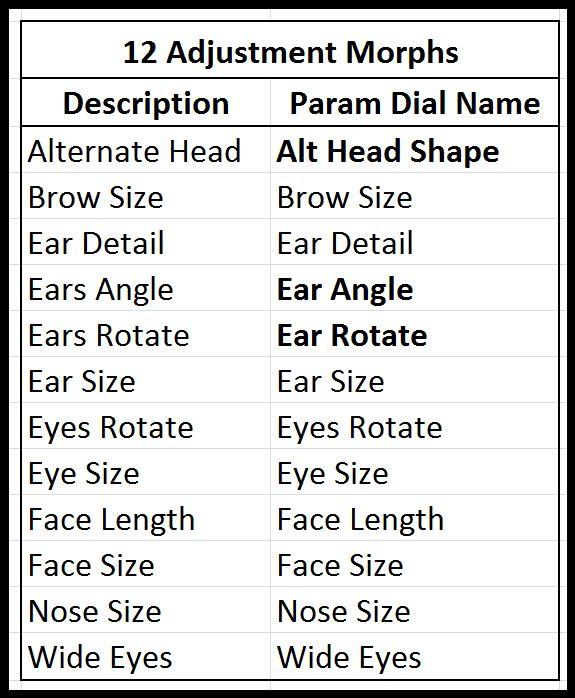
Storybook MouseI was able to locate and test the morphs by selecting the Mouse and typing in the morph name in the Param Dial Name column.
The naming differences from the product page are bolded.Edit: Replaced table with picture.
 JoeQuick appreciation - simply the best.
Thank you for explaining and for the projection morph as well. It's disappointing, but understandable considering the technology and limitations of these figures.
There really should be better and more in-depth descriptions of products though. I bought this to use in kitbashing, and while I won't return it because the quality is very good and I might find a use for it one day, this is probably the fourth item that I've bought recently (from various PAs) that had limitations that were not mentioned in the description. I didn't return those either, but that may change for future purchases.
a painless way to convert hd morphs to .dsf files?is there a painless way to save hd morphs to a regular .dsf morph file?
my software doesnt recognize the fancy file type.
thanks.
Looking for a particular figureAhh. Thanks. Right, the hair is probably Voss Hair. The character doesn't jump out at me as one I instantly recognise. Looks a bit like Victoria 8, but with a different texture and morph. If the character appears in several places, probably a ready made one not generated by several graphic novel authors independently. I am sorry, but I don't recognise it. I feel I should. This is going to niggle.Book Cover Designerdakotapadgett said:
Hello! I am currently studying book cover design as a hobby and I know that a lot of designers are using this program for 3d models. It can be really hard to find great poses with stock image alone. As I'm very new to Daz and the 3d world, I was wondering if there's a place that 3d artists are selling their art or if I would need to learn to make the models myself? Sorry if this sounds like a dumb question, I'm just genuinely new to this.
There are book cover artists making use of Daz Studio for their artwork. The figures {Genesis clans} that come with Daz Studio plus their character morphs that are sold in the Daz3D store can be used for commercial 2D artwork with no problems. To pose them, there are "many" pose packages available plus individual morph packages to further enhance your characters, making them 'your' characters.
For eg.: https://www.daz3d.com/200-plus-head-and-face-morphs-bundle-for-genesis-8-female-s-and-male-s
Gen 8.1 missing posing morphsTsuba said:
PerttiA said:
How did you install your Genesis 8 Starter Essentials? (DIM/DAZ Central/DAZ Connect/Manuallly)
If your content is installed in a "traditional" installation path (No 'Cloud' in the path), this will get the expressions working;Making the G8 base expressions (and any expressions that are using them) work on G8.1 requires removing dummy/placeholder expressions that are installed to G8.1 morph folders - These dummy/placeholder expression files have no other function than to prevent the base G8 expressions from loading.
The dummy/placeholder files are located in;
...\Data\DAZ 3D\Genesis 8\Female 8_1\Morphs\Daz 3D\Base Pose Head\ (255 files)
...\Data\DAZ 3D\Genesis 8\Female 8_1\Morphs\Daz 3D\Expressions\ (24 files)
...\Data\DAZ 3D\Genesis 8\Male 8_1\Morphs\Daz 3D\Base Pose Head\ (255 files)
...\Data\DAZ 3D\Genesis 8\Male 8_1\Morphs\Daz 3D\Expressions\ (24 files)Please make sure you are removing the files from G8.1 morph folders and not G8 morph folders.
That worked, pose morphs are back. Thanks !
Richard Haseltine said:
on your own head be it.
Sounds ominous, what's the risk ? :)
Increased load time (how bad will depend on how heavily loaded your character is already), there are a couple of overlapping labels (easy enough to fix). But there may be other issues that will crop up, and daz obviously won't be able to offer any suport if you've gone off piste like that (other than telling you to put the blockers back and see if your issue is resolved)
JoeQuick appreciation - simply the best.JoeQuick said:
Here's the projection morph. It should apply automatically once installed. I went for maximum coverage.
https://drive.google.com/file/d/1FoTyTUffehe1N1SjBPDuTPTNTY2ArGGb/view?usp=sharing
Thanks for this, Joe!
Slight offset after Fit-to different parent objectsI created a few belts that are the same mesh except for different lengths, imported them via the Figure Setup tab and made sure the joint setup is exactly the same on all of them by applying the "Edit>Figure>Rigging>Transfer Rigging (Figure Space)" command. Now I have a belt buckle object which i imported the same way and that I want to fit to the different belts. This works fine except that for some reason the buckle has a slight offset on the z-axis, when it is fitted to different belts. The only difference between the belts are fewer joints on the other end of the belt the shorter they are, but this shouldn't affect the start of the belt in any way right?
The offset is really quite small, on the first attached Image it might not even be visible. But on the second Image when I overlay the belts on the exact same position and color one buckle blue and the other red it is clearly visible that they don't share the same position on the z-axis.
Image 1
 Image 2
I really don't understand what is causing this behaviour, can anyone help me out here?
Any Way to Copy Paste Keyframes Between Assets in Timeline?Is there any way to copy paste keyframes from one node ( or prop or figure ect.) to another as long as they have the same transform, rotation, scale, or morph parameters. I seem to only be able to copy paste in time, but not across different nodes. Am I missing something here? This seems like a pretty basic thing keyframes do in other animating tools.
Black Eyes/Location problem current state of thingsHas any solution been found for the black eyes situation in Genesis 8 that we have when the character is away from the center of the scene? Moving the geometry in G8's eyes only works partially, a solution I tried with a morph found on ShareCG. It can be really annoying, especially when the scene product you use comes with very handy relocation poses over a large area (Snorkel Island by PW Production for example) and you can't even use those because of the eye issue. I noticed that the same problem happens if you use some of the geoshell wetness/sweat/sunscreen available in well known stores. Black patches all over... Moving the shells manually isn't exactly a solution in itself, it's poek-and-guess work at best.
Gen 8.1 missing posing morphsPerttiA said:
How did you install your Genesis 8 Starter Essentials? (DIM/DAZ Central/DAZ Connect/Manuallly)
If your content is installed in a "traditional" installation path (No 'Cloud' in the path), this will get the expressions working;Making the G8 base expressions (and any expressions that are using them) work on G8.1 requires removing dummy/placeholder expressions that are installed to G8.1 morph folders - These dummy/placeholder expression files have no other function than to prevent the base G8 expressions from loading.
The dummy/placeholder files are located in;
...\Data\DAZ 3D\Genesis 8\Female 8_1\Morphs\Daz 3D\Base Pose Head\ (255 files)
...\Data\DAZ 3D\Genesis 8\Female 8_1\Morphs\Daz 3D\Expressions\ (24 files)
...\Data\DAZ 3D\Genesis 8\Male 8_1\Morphs\Daz 3D\Base Pose Head\ (255 files)
...\Data\DAZ 3D\Genesis 8\Male 8_1\Morphs\Daz 3D\Expressions\ (24 files)Please make sure you are removing the files from G8.1 morph folders and not G8 morph folders.
That worked, pose morphs are back. Thanks !
Richard Haseltine said:
on your own head be it.
Sounds ominous, what's the risk ? :)
JoeQuick appreciation - simply the best.Here's the projection morph. It should apply automatically once installed. I went for maximum coverage.
https://drive.google.com/file/d/1FoTyTUffehe1N1SjBPDuTPTNTY2ArGGb/view?usp=sharingNEW 2021 Sales thread: Report Issues Here "There's Always Another Sale™"HoMart said:
Xanathon said:
L4N4: https://www.daz3d.com/l4n4-hd-morph-for-genesis-8-females
Installed via DIM.Body materials cannot be applied. Error: "An error occured while reading the file, see the log for details."
Log:
2021-05-17 22:46:54.772 Error reading file, see log for more details.
2021-05-17 22:46:55.424 Iray [INFO] - IRAY:RENDER ::   1.0   IRAY   rend progr: Received update to 01584 iterations after 14.825s.
2021-05-17 22:46:56.878 WARNING: ..\..\..\..\..\src\sdksource\cloud\dzcloudtasknotifier.cpp(178): curl_easy_perform(https://cdn.daz3d.com/file/dazcdn/p/11/80611/meta/80611_a1e45f_data.json) failed: HTTP response code said error
2021-05-17 22:46:56.878 WARNING: ..\..\..\..\..\src\sdksource\cloud\dzcloudtasknotifier.cpp(178): TaskLoadProductDataWeb (80611) failed, url: https://cdn.daz3d.com/file/dazcdn/p/11/80611/meta/80611_a1e45f_data.json
2021-05-17 22:46:56.878 Updated metadata for 4 of 5 items.
2021-05-17 22:46:56.915 Iray [INFO] - IRAY:RENDER ::   1.0   IRAY   rend progr: Received update to 01798 iterations after 16.316s.
2021-05-17 22:46:57.277 WARNING: ..\..\..\..\..\src\sdksource\cloud\dzcloudtasknotifier.cpp(178): curl_easy_perform(https://cdn.daz3d.com/file/dazcdn/p/83/72283/meta/72283_d76c27_file.json) failed: HTTP response code said error
2021-05-17 22:46:57.277 WARNING: ..\..\..\..\..\src\sdksource\cloud\dzcloudtasknotifier.cpp(178): TaskLoadProductDataWeb (72283) failed, url: https://cdn.daz3d.com/file/dazcdn/p/83/72283/meta/72283_d76c27_file.json
2021-05-17 22:46:57.277 WARNING: ..\..\..\..\..\src\sdksource\cloud\dzcloudtasknotifier.cpp(660): sync completed with errors, 3 items succeeded, 2 items failed.
2021-05-17 22:46:57.277 Metadata update failed: 3 items succeeded, 2 items failed.
Uninstalled and reinstalled. Download failed multiple times.
After multiple installation trieds it installed. Still the same problems.
same here
NONE of the H.Materials is working
None of the errors in the log file snippet refer to SKU:81533 L4N4 HD Morph for Genesis 8 Females, so are unlikely to be the source of the problem. They are for metadata for two other products.
Error: "An error occured while reading the file, see the log for details."
That message can result from not selecting an item to be textured, or not having the items in the proper hierarchy (parented order) on the root element, or not having the root element loaded (but then you wouldn't be able to create the geoshell in the first place). To apply a hierarchical material preset, some part of the hierarchy must first be selected.Check the log immediately (well, wait a few seconds) after attempting to apply a H.Material preset. See if there is a message like [Invalid hierarchy for selected node(s) and "preset_hierarchical_material" type; no root(s) found], or something related to that action.
200 Plus Head and Face morphs for Genesis 8 (Commercial)Hi Zev0, I'm using quite a few of your products, and love them, thanks for creating them.
With the latest update to 200Plus head/face morphs for gen8 Female, I noticed something strange today. It seems some of the morphs around the face and forehead area are off in this version. The nose is substantially wider, and there's also something different going on with forehead and brows. I've also had quite a few morphs applied to cheeks, jaw and chin, but they seem unaffected.
If I roll back just the files in my library for the 200Plus head/face morphs for gen 8 female, to a backup I made just prior to updating to the latest version (and change nothing else), it shows the proportions I expected, which seems to indicate the difference is the result of changes in the latest version.
Images attached to show what I mean. This character is a standard gen8 with just the 200Plus morphs and few morphs of the Cartoonized product applied to create the face
Do you have any idea why this would be happening using the latest version, and if there's a fix that doesn't involve either baking a morph from the old version of the product, or tweaking manually to approximate the original shape? Appreciate your time.
Full disclosure, I'm running Daz Studio 4.14, and can't update to 4.15 because the iray version that uses renders skin way brighter (meaning I can't mix new renders into existing series which is a problem for my usage)
Recommend morph package for changing body dimensionsDo you have the Genesis 8 Body Morphs? They have a good basic selection, though there are no doubt better choices for specific measurements. Don't go overboard on setting targets, the script works by adjusting the morph(s) for the target values, then looking at the result and either increasing or decreasing the adjustment on the next round to try to get closer to the target value; if therea re several morphs affecting an area then it can end up fighting itself and as a result fail to reach a helpful outcome.
How to make a morph for teeth in BlenderIf you apply the morph (assuming it isn't HD, we can't create or modify those), export as OBJ at Base resolution and with no attachments (such as lashes), import into Blender, make your chnages, export, and open Edit>Figure>Morph Loader Pro then once you have selected the morph OBJ you can check Reverse Deformations in the options under the filename in the lower part of the dialogue - that will split out your chnages from the SY morph, so when you apply both you will get your desired result (and because the new morph is all your own work you can share it, it won't be overwritten by a product update for the SY set, and any corrections for things like closing the mouth associated with the SY morph will still work).
Make sure, in Blender, that when importing and exporting you don't chnage the scale and preserve the vertex order, and that none of the tools you use add or remove geometry. Make sure that you use the same preset in the OBJ export and in morph loader, so that scaling and orientation match.
Crumpled Parts in fitted hair for G8FI've used Daz studio for years so I'm no where near to a new user but this is the only forum that fits. But anyway i made hair for G8F, right? Well when i imported it and did the transfer utility thing, parts of the hair bent weird or crumpled up and idk how to fix it. I tried to reweight it within daz studio and that did nothin. I then tried deleting it, reimport the .obj file, parented it to the G8F character's head, then go to Edit -> Object -> Rigging -> Convert Prop to Figure and manually added weights, but when i do fit <figure's name> to and select G8F character, it asks me to define what figure it's originally for or whatever and when i do that and click accept, it still adds the crumpled up parts. what am i doing wrong? Genesis 3 and below has never given me this issue
Daz 3D is part of

Connect
DAZ Productions, Inc.
7533 S Center View Ct #4664
West Jordan, UT 84084Licensing Agreement | Terms of Service | Privacy Policy | EULA
© 2026 Daz Productions Inc. All Rights Reserved.