-
Face Transfer - Custom 'base' textures?
prawilniak said:
I read this tutorial, it seems i already did excatly what U said in there. Tried to follow these steps again [ i'm only interestedd in textures, since FG makes much better morphs ] and it still using base g8f textures as base to blend custom face. I downgraded my daz to 4.12 from 4.15, still no results. To be honest, screens in the tutorial makes me think it haven't used " Merchant Resource " textures in there either. A good example is the torso texture file which doesn't have any details at 'private area' which Urs MR-nonMR textures had. Maybe i'm missing the point in here, maybe it does use my custom face as base and base body. Funny, since there is no base G8F textures in my daz install after swapping them with my custom base.
Or maybe DAZ updated plugin to have some archived copy of the textures hidden somewhere and it's just impossible to use any custom MR now...As I recall in swapping out the textures, you have to be removing 'all' the skin textures for G8. You have to put in replacement textures [exactly the same size/type/name] so when you go to load G8 it appears wearing 'your' 'blank' textures. [be they merchant resources or resources or just a square of painted colour]
Run Face Transfer, save the result. Go to the Face Transfer texture folders and dig out the new textures. They should have been made using whatever you had put in the main folder. They will likely need to be fixed in an image editor [any one that can work with layers].
Close D/S and go back to the main texture folder for G8 and zip up the 'blanks' or whatever you have put there. Unzip "here" [7zip] to reload all the proper textures so the next time you open D/S and load G8 it looks proper.
Put your newly made textures in a folder [under Runtime > textures > your name or whatever] and apply them to the figure. Save out new mat files.
Scaling issues between daz studio and blenderOK, so I am in the middle of a big project I been working on for over a year now. When I started, I set the scene scale in blender to be cm, and modeled to real world scales, thinking that doing it that way would make it so I would import into daz at 100% and I didn't have to worry about any scaling on import. For some reason it didn't work out that way. I have to import into DS at 1000% for some weird reason. Is there a way I can set thing up next time so I don't have to worry about scale imports? I know it's like a minor thing most of the time, but it has caused many wasted precious hours. First finding the scale that would work in the first place when I was finished modelling it. Then sticking to it. Like for example I have 18 beds in my scene, and each one I imported a morph for. I forgot every import with morph loader pro I have to keep changing it to 1000%, because DS keeps changing it back to 100% for some reason. It took me a few hours, and a few different import attempts to figure out why the beds were flying away instead of morphing properly lol. I would like to obliterate that issue if at all possible.
JoeQuick appreciation - simply the best.The Horns are smart props. You will need to move/scale them.
It looks like for some reason the drago morph isn't auto following. Strange. It doesn't make sense that it would in one instance (hatchling) and not another (drago). They are the same wings and morphs.
Daz to Cinema 4D Beta: How To Download Release Versions, Manually Install, and Replace Old InstallsDAZ_sam said:
peterpeter said:
Hi Sam,
Tested the latest beta and it's still the same.
I'm uploading a c4d project. I just transfered a basic g8male and applied the JCM morphs to the arms.Let me know if it helps.
Thanks.
Download: https://www.dropbox.com/s/95qnxelr4634rsu/Untitled.c4d?dl=0This is so weird peter so I see where it's coming from the rotation value is flipping when you go to high but, I can seem to recreate it at all. I do want to solve this for you so I guess let's start here.
Can you try to these first.
Disable any plugins that isn't DazToC4D to make sure it isn't a Dependency issue.
Match your fbx setting to what you see above.
If the still persists I think we would need to try a fresh install. The Orientations on the entire rig and skeleton are all automatic now based on what Daz Studio has so I really can't see where the issue is coming from. Just to make sure tho can you check the console? Shift + F10 let's just make sure no errors popped up when running.
I will look more into your file as well tomorrow to see if I can pin down this issue.Your FBX settings are the same as mine.
I tested the JCMs before converting to the Auto-IK rig and it works fine, so the problem happens after you convert the daz bones to the IK rig. Here's the log:
Import Done
Starting Material Updates
Material Conversion Done
Starting Morph Updates
Morph Corrections Done
'NoneType' object has no attribute 'GetMg'
Joint skipped...jCollar___R
>>>Daz to blender is great, but what about Blender to Daz?Padone said:
@benniewoodell It should be possible to animate in mhx then export the baked animation to daz with "save pose preset". At least this was the intent from what I know. But im my tests it doesn't seem to work. Not sure why may be it's a bug or may be Thomas dropped mhx support for some reason. Will update as I know it better.
Unfortunately there's also a bug with the blender baking, so you have to use 2.91 that's the only working version now. Or 3.0 alpha. update. Bouich reports that the latest 2.93 beta is fixed too. Not tested it myself yet.
https://bitbucket.org/Diffeomorphic/import_daz/issues/527/mhx-rig-major-baking-issue-with-blender
https://diffeomorphic.blogspot.com/2021/04/save-pose-preset.html
update. Reported to Thomas.
update. It seems to work fine with the "simple ik" rig. So you can use "simple ik" to animate in blender then export the animation to daz.
update. Thomas fixed it and now it works with mhx too, though in my tests "simple ik" seems more accurate. You have to use "transfer ik > fk" first as explained in the discussion below. Please get the latest development version.
https://bitbucket.org/Diffeomorphic/import_daz/issues/545/save-pose-preset-doesnt-work
Oh my gosh, it works! I couldn't get the simple IK rig to transfer, I can bake it under object/animation but then when I save it as a pose preset, the movement leaves and the character reverts to the A pose and then just kind of glide downwards in that A position. So I don't know what step I'm missing and I followed the links you posted regarding this, I even went and downloaded 2.91, 2.93, and 3.0 and it didn't work, but I tried MHX and it transferred over! The huzzah I yelled was probably louder than it should have been lol. I did get the feet sliding, or more so they pushed down and came back up as I tested the character sitting, but I downloaded that retargeter thing that was mentioned as well and am going to play around with that when I have some more free time to see if I can get it to work that way, or I'll keep playing around and seeing if I can figure out the simple IK issue I'm having if you say it works better, it's just figuring out what user error it is on my end. But for my purposes right now with this client, what I can get done with MHX will work beautifully. Thank you so very much @Padone and @ThomasLarsson for helping to make my life a million times easier with this gig that I'm so very, very fortunate to have.
Asian Beauty Appreciation ThreadHylas said:
PixelSploiting said:
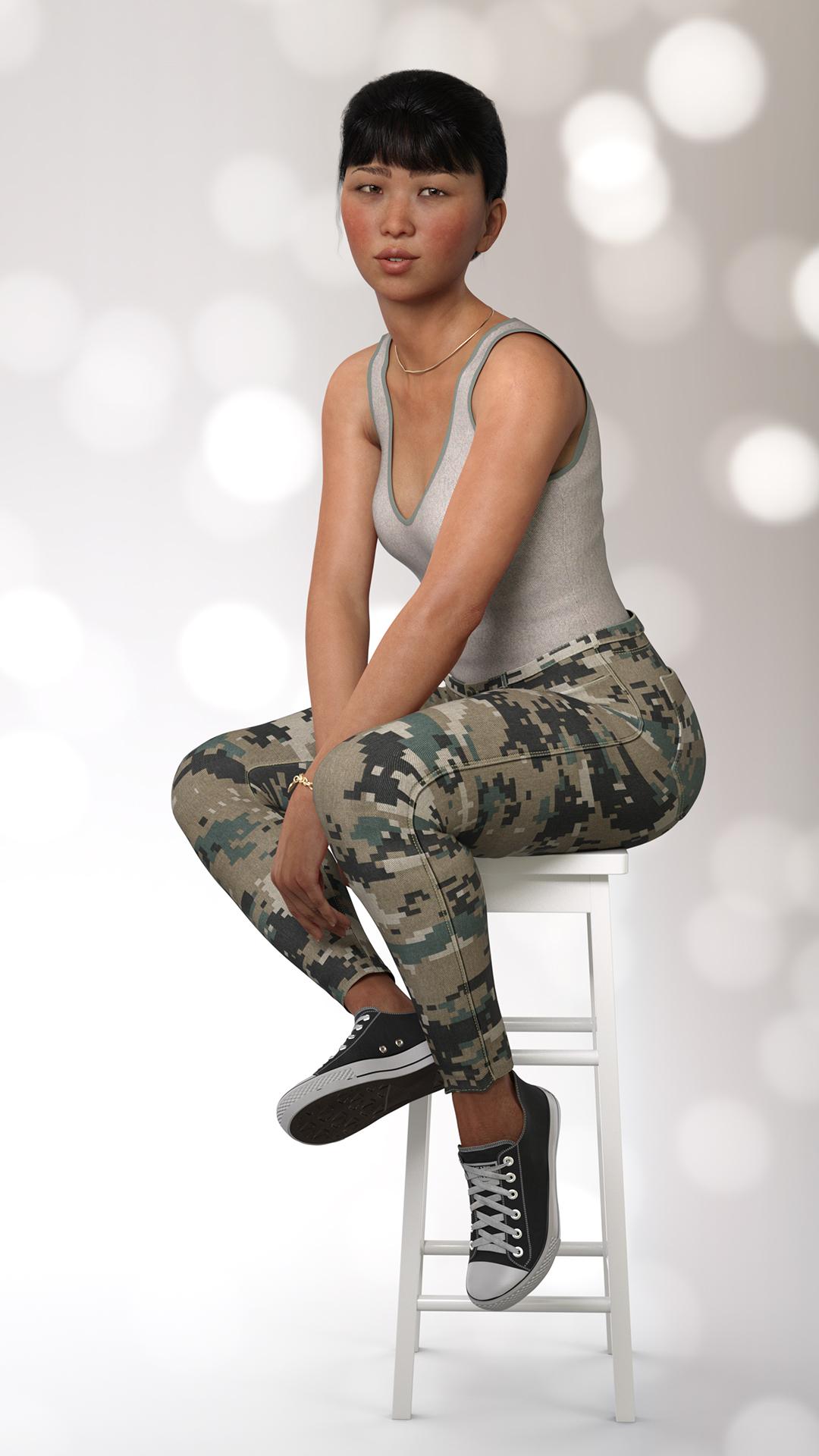
The model is DaYin Nguyen from another store but the materials are from WkD3D Ulaan from another another store because default skins on this figure are very basic. No alteration was done to the shape except for dialing in Zevo's shape enchancer and skin folds. Her shape morph is fine as is.
Very cute combination! Ulaan is on my wishlist, she looks awesome.
I was wondering about DaYin´s work, some of their characters look quite good in the promos. What´s "basic" about Nguyen´s skin?
It's not very detailed. Textures on the face are ok, but the body is sparse in detail like those very stylised characters made to look partly anime partly real. Basic shapes from this artist are good but need detailing coming from other assets.
Asian Beauty Appreciation ThreadPixelSploiting said:
The model is DaYin Nguyen from another store but the materials are from WkD3D Ulaan from another another store because default skins on this figure are very basic. No alteration was done to the shape except for dialing in Zevo's shape enchancer and skin folds. Her shape morph is fine as is.
Very cute combination! Ulaan is on my wishlist, she looks awesome.
I was wondering about DaYin´s work, some of their characters look quite good in the promos. What´s "basic" about Nguyen´s skin?
3D Art Freebie Challenge-May 2021-"May Mysteries" -Entries Thread Only3D Art Freebie Challenge May 2021 "May Mysteries"
[Best watched at full size for details.]
"Only the ravens..."
Starring: Alysha, Ella and Barack
The tale:
No one knows who built the ruin wall, some say it was the Templars, others say it was The Gods themselves. But only the ravens can get close to it, grass grows only hundreds of meters from it but is poisonous. Nobody knows why. Barackm'bwana was born blind and also clairvoyant and some tribal elders say it's both because of the ravens...
Soundtrack:
Alan Parsons Project The Raven (© 1976) https://www.youtube.com/watch?v=YAE1XTvKLXA
COUNTABLE FREEBIES: (Alphabetic order)#01! Afro Earrings G8F-FREE by SdeB
https://www.sdebstore.com/collections/free-stuff/products/afro-earrings-g8f-free **#02! AfroHead G3M 1 by abe01
https://sharecg.com/v/86164/gallery/21/DAZ-Studio/AfroHead-G3M-1 **#03! Alysha for Genesis 8 Female by emotionaldreams
https://www.renderosity.com/freestuff/items/83613/alysha-for-genesis-8-female **#04! Aurochs Skull 1977-5012 (OBJ) by NHM_Imaging
https://sketchfab.com/3d-models/aurochs-skull-1977-5012-30a8753007bd4e9fac33c18a06512562 **#05! Barack for G3M by dumbuser
https://www.sharecg.com/v/88699/gallery/21/DAZ-Studio/Barack-for-G3M **#06! Bracelet for genesis 8 female by Valmont59
https://www.renderosity.com/freestuff/items/86004/bracelet-for-genesis-8-female **#07! Braid Bracelets for G3M, G3F, G8M, and G8F by Fisty
https://www.sharecg.com/v/92874/gallery/21/DAZ-Studio/Braid-Bracelets-for-G3M-G3F-G8M-and-G8F **#08! Candy Braids Hair for Genesis 8 Female(s) by zoro_d
https://www.renderosity.com/freestuff/items/88062/candy-braids-hair-for-genesis-8-female-s- **#09! Chameleon ROse2 for Genesis 8 Female by zoro_d
https://www.renderosity.com/freestuff/items/85859/chameleon-rose2-for-genesis-8-female **
[Head morph used]#10! Dante DMC5 Free Stubble for Genesis 8 Male by InTheFlesh
https://sharecg.com/v/94752/gallery/21/DAZ-Studio/Dante-DMC5-Free-Stubble-for-Genesis-8-Male **#11! Dashiki Dress G8F_FREE by SdeB
https://www.sdebstore.com/collections/free-stuff/products/dashiki-dress-g8f_free **#12! EA Sidecut Hair for Genesis 3 & 8 Female(s) by EichhornArt
https://www.renderosity.com/mod/freestuff/ea-sidecut-hait-for-genesis-3-amp-8-femela-s-/82972 **#13! ED's Bends V8 Poses Part 2 by Edheldil3D
https://www.deviantart.com/edheldil3d/art/Freebie-ED-s-Bends-V8-Poses-Part-2-799687169 **#14! Ella for Genesis 8 Female by tottallou
https://www.renderosity.com/freestuff/items/77844/ella-for-genesis-8female **#15! Fiberhair Goatee Beard for Genesis 3 Male by RedzStudio
https://www.renderosity.com/mod/freestuff/fiberhair-goatee-beard-for-genesis-3-male/75957 **#16! Flo Makeup For Genesis 8 Females by AprilYSH
https://shop.aprilsvanity.com/flo-makeup-for-genesis-8-females.html#17! Grass as Grass can be! (DAZ3D, Iray) by SmidA
https://www.renderosity.com/freestuff/items/88095/grass-as-grass-can-be-daz3d-iray- **#18! Iray Jewelry Shaders by AllenArt
https://sharecg.com/v/95893/gallery/21/DAZ-Studio/Iray-Jewelry-Shaders **#19! Iro Hair by MysticArtDesign
https://sharecg.com/v/97502/browse/21/DAZ-Studio/Iro **
[Skull cap used]#20! Kamala Khan Young for G8F by Shinteo
https://www.patreon.com/posts/kamala-khan-for-44615503
[Bracelet left]#21! M4 Jewelry Pack 5 by Cool Tuna Studio
https://www.cooltuna.com/poser/poser-freebies.html (item 10)#22! Melitaea britomartis (OBJ) by Digital Archive of Natural History
https://sketchfab.com/3d-models/melitaea-britomartis-20a41658fa284141815977b277a08520 **#23! Morphing Garden Style Stone by Mapps Graphics
http://www.freewebs.com/mapps/downloads4.htm (last item)#24! Mouse by Most Digital Creations
https://www.most-digital-creations.com/mouse.htm#25! Muddy Path by SmidA
https://www.renderosity.com/freestuff/items/88169/muddy-path **#26! Old-Lamp for DAZ Studio by kalhh
https://www.renderosity.com/freestuff/items/88299/daz-studio-old-lamp **#27! OnFleek for Genesis 3 & 8 Female(s) by AprilYSH
https://aprilsvanity.com/shop/onfleek-for-genesis-3-8-female-s.html#28! Passer domesticus (OBJ) by Digital Archive of Natural History
https://sketchfab.com/3d-models/passer-domesticus-eeffd0bb0d28471aae9b13937b2087db **#29! Raven by Most Digital Creations
https://www.most-digital-creations.com/raven_2.htm#30! Raven clipart by HiClipart
https://www.hiclipart.com/free-transparent-background-png-clipart-ioqqw
https://www.hiclipart.com/free-transparent-background-png-clipart-iypyb#31! RE5 Sheva Alomar Head Morph for G8F by TritiumCG
https://www.deviantart.com/tritiumcg/art/RE5-Sheva-Alomar-Head-Morph-for-G8F-822643742 **#32! Ringed Zebra for G2F by SquarePeg3D
https://www.renderosity.com/freestuff/items/76186/clothing-ringed-zebra-for-g2f **#33! Ruinwall (Iray) by SmidA
https://www.renderosity.com/freestuff/items/88069/ruinwall-daz3d-iray **#34! Rustshader for Iray by SmidA460
https://www.deviantart.com/smida460/art/Rustshader-for-Iray-758330803 **#35! Rusty junk set 1 by DryJack
https://www.sharecg.com/v/53012/gallery/21/DAZ-Studio/Rusty-junk-set-1 **#36! Sam Giddings for G8F and G8.1F by Shinteo
https://www.patreon.com/posts/sam-giddings-for-48463704#37! Sinister Structures by SquarePeg3D
https://www.renderosity.com/freestuff/items/81060/props-sinister-structures **#38! SY 200 Morphs for Genesis 8 Head and Body by SickleYield
https://sharecg.com/v/91888/view/21/DAZ-Studio/SY-200-Morphs-for-Genesis-8-Head-and-Body **#39! Wall-Lamp for daz studio iray with wall by kalhh
https://www.renderosity.com/freestuff/items/87614/wall-lamp-for-daz-studio-iray-with-wall **#40! Wizard Sticks by MysticArtDesign
https://sharecg.com/v/96092/gallery/21/DAZ-Studio/Wizard-Sticks **And the ones I forgot:
#41! Arabian Dress (for G3M) by Noone102000
https://www.deviantart.com/noone102000/art/FREEBIE-Arabian-Dress-814819412 **#42! Henna Tattoo by MysticArtDesign
https://sharecg.com/v/92182/gallery/21/DAZ-Studio/Henna-Tattoo **#43! Kiara 8 Sunset by HDRIHaven
https://hdrihaven.com/hdri/?h=kiara_8_sunset#44! Pajaro Trousers + PhD Glasses for G8F by Poses17
https://www.deviantart.com/poses17/art/Freebie-Pajaro-Trousers-PhD-Glasses-for-G8F-788560405 **#45! Terror Eyes for G3F and Iray by Sabby
https://issuu.com/philatdsc/docs/ds_creative_16 (page 49)
NO-COUNT ITEMS:--- CariqueB by hindudreams
--- Casual Outfit for G3M by Tab
--- Eyes Dilate for Genesis 8 Female by felldude
--- Free Iray Outdoor Lights by Dreamlight
--- Genesis 2 Male Beard by Laticis Imagery
--- Genesis 2 Male Beard 03 by Laticis Imagery
--- Nose Ring 01 for G2F, G3F and/or G8F by AllenArt
PURCHASED/PAID FOR ITEMS: None 100% Freebies*1 E-mail address required
** Registration required
#x! Countable Items (Bold ones are used by me for the first time I think.)
--- No longer available freebies
++ Free with DAZ Studio (or the Essentials)
$x. Purchased/Paid For Item
Rendered with DAZ Studio 4.10.0.123 (nVidia Iray)Other free software used: GIMP v2.10.24 and Irfanview 4.57
Postwork: used the AltaLux Image Enhancement Filter (Effect) by Stefano Tommesani that comes with Irfanview and some filters (oa) that come with GIMP. Also used mcjDenoise by mcasual. (https://sites.google.com/site/mcasualsdazscripts9/mcjdenoise)
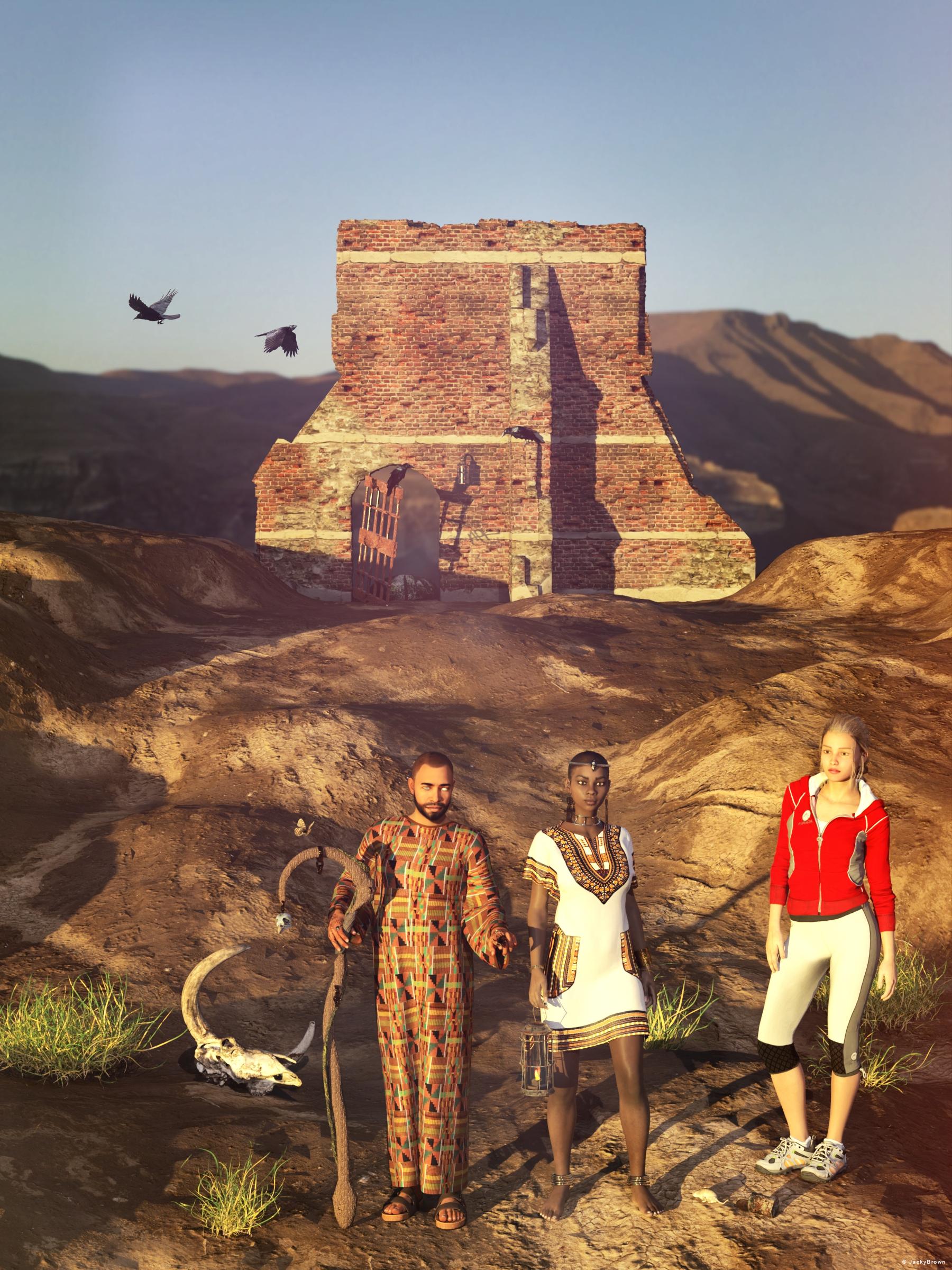
"Only the ravens..."
Edit Mesh Data Only on BlenderIf it lines up with the thing you want to replace when both are zeroed, and the thing is a figure, then you could use Edit>Figure>Transfer Utility with the original as the source and your impoted model as the target.
Asian Beauty Appreciation ThreadThe model is DaYin Nguyen from another store but the materials are from WkD3D Ulaan from another another store because default skins on this figure are very basic. No alteration was done to the shape except for dialing in Zevo's shape enchancer and skin folds. Her shape morph is fine as is.
Someone please create a plugin for this drag & dropFolks, please weigh in on this idea. I'm hoping that a DAZ whiz-kid can create a plugin to create a drag & drop function to aid those of us that move the Lost and Found items into folders where it makes sense for them to reside. There are plenty of plugins for older generations of products, so why not create this plugin. What I'm looking for is a designated function to drag WHOLE products over to a new destination. AND display how many files are in the folder for that product. Why the file count? Because there may already be a folder at the destination with the same name but with fewer files in it. We'd need to know that so we can delete that folder first. If it has the same file count then we could simply delete the folder in the Lost & Found. A simple program would work. No need for anything fancier. Just an easy, drag and drop, whole product, transfer plugin. Anyone with me on this? Please weigh in. Yes, I know it can be done now, using a time-consuming, frustrating, process. It needs to be faster and easier. So, any heroes out there? You create it and we will buy it.
what happened to pwtoon?Taoz said:
I think yours looks pretty good. Just tried to install pwToon and it does seem to work fine yes (Cookie render). I also tried ToonyCam Pro which I had problems with in DS a few years ago (product page says DS 4.9), so didn't expect it to work in DS 4.15, but it actually does, at least with the settings I tried. I do get an error message when rendering but it doesn't seem to cause any problems, Hitomi looks OK AFAICS. Is Zeep a 3D model you have made, or is it hand drawn? Looks like it's slowly starting to evolve into a catlike creature. :)
I made the 3d model of Zeep myself but the webcomic has been hand drawn with the model a reference until the last page. My time has become shorter and shorter with all the stuff I have to do and things that I am doing that I went full 3d. I still touch up and draw the textures in illustrator and photoshop but as I said, time is short so it's easier to just pose and morph 3d characters
Daz to Cinema 4D Beta: How To Download Release Versions, Manually Install, and Replace Old InstallsRezca said:
DAZ_sam said:
Thank you for being patient the new beta is here there is a small issue still in R22 but should work fine with R23 and R24. Please let us know what you think!
https://github.com/daz3d/DazToC4D/releases/tag/1.2.0-beta
Please post any issues you come ac
Changelog:-
Morph Updates
-
Morphs Drivers are automatically being set up, this includes JCMs and 8.1 Facs System.
-
Set up in an Xpresso Tag under the body of the Genesis Character.
-
Uses Python Node to contain the conversion of Daz ERC Properties to Cinema 4D
-
-
Morphs will Be renamed to Match the Name in Daz.
-
Some Morph Optimization has been created. Will Delete any morphs that “shouldn’t” be on the children objects. For example JCMs for the legs appearing on the hair.
-
-
Material Updates
-
Automated the Standard Materials to Create Materials that follow a PBR Standard.
-
This is done automatically from Values in Daz and Can see the difference from updating in Daz as well.
-
-
Given New Controls to Control the Multiplier for the Bump, Normal, and Subsurface Scattering Strength.
-
Redshift Fixes:
-
Fixed Normal Map input being incorrect changed to Tangent Space Normal
-
Changed Normal Map level to 0.5
-
New dropdown menu to choose bump type (this is a temporary fix to the code)
-
-
-
Rigging Updates
-
Orientation on Joints are now Fixed at Import to match what you see in Daz Studio
-
This will allow you to rotate the joints as if it was still in Daz.
-
Does not get applied when Animation or a Pose is exported from Daz.
-
-
Fixed Eye Controls not being Visible for single eyes.
-
Fixed the orientation on the Control Rig’s Joints to Match the Daz Joints
-
-
Other Fixes
-
Changes made to Iterator Classes to fix Python 2 compatibility
-
Add an Environment/Prop Export option this will allow for faster transfer when you do not want to transfer a character.
-
-
To Be Fixed.
-
The New update will leave some issues on original Material Conversions this will be relooked at in Future Updates
-
A new control rig or IK/FK Switches will be added for a more friendly Rig.
-
Joint Orientations to be fixed on Daz Character with a Pose or Animation.
-
That's an amazing list of changes! It truly pays to be patient, good things come to those who wait. The C4D Bridge just from these last few posts the team's made is already making it look like it'll be on par with the old InterPoser Pro plugin Cinema used to have - but for free. (IPP was like, what.... $100 something? $120? I can't remember, but it was a paid pluggy)
The only things its really lacking now that IPP had is importing entire Poser - or in this case, D|S - scenes with lights & cameras, and the ability to save out/create Morphs & INJ files that Poser/D|S can load. I'd include Poser Cloth too, but that feature sadly never got fully implemented before the developer retired from the programming scene.
Thank you for your kind words and thank you for being patient. I will look into the plugin maybe get some ideas for the bridge itself.
Daz to Cinema 4D Beta: How To Download Release Versions, Manually Install, and Replace Old InstallsNew Release for Testing: Here is the Changelog.
https://github.com/daz3d/DazToC4D/releases/tag/1.2.1-beta- Fix Error Causing Cinema 4D To Crash and Setting Window to not open on R24.
- Fix Color Error Causing Color Conversion to be incorrect.
- Fixed Morph Bug Causing Morphs to Disable after reaching strength of 100%
- Add an Option to Autoweight a figure if it comes in with Subdivision (Currently Subdivision is not fully Supported)
- Updated the Genesis 8.1 Facial Morphs Preset to Match what should be exported to Use them with Move By Maxon
- Added Basic Functionality of Getting Facial Animation from Move By Maxon on a Genesis 8.1 Character.
- Import Face Capture.
- Create Pose Morphs and Press Create All Pose Morphs.
- Press Auto-IK and Go to the Setting Window.
- In the link box select the Face Capture's Created object with the pose morph tag.
- Make sure to put the Pose Morph Tag from Edit to Animate.
- Select Connect Morphs.
- Further Testing and Integration to Com
So, Move By Maxon won't be released further then my testing so far for the next full release follow the Github for more current updates.
Move By Maxon Test:
@Gordig It works fairly well so far let me know if you have any feedback.
@peterpeter want to try the newest release? Just to make sure.3D Art Freebie Challenge-May 2021-"May Mysteries" -Entries Thread OnlyUnexpected.
A treasure hunter spent years working out the clues, found the site, found the enterance, managed to make her way through the maze correctly. After entering the chamber the massive stone door fell closed, blocking the way out. But nothing had prepared her for this. All she had was an old legend. The legend said that if you got this far that you must choose to continue on. But you must choose wisely, as the true bottle will bring you sustanance, and the false bottles will take it from you. What does she do now? How will she know?
Items used in the render.
Free stuff:
Columns - https://www.sharecg.com/v/94481/related/21/DAZ-Studio/BronzeDragonsStuff
Potion Bottles (DS CREATIVE MAG - ISSUE 18) - 4eyes.code66.se/dsc/DSC_Potion_Bottles.zip
Sigil - https://www.deviantart.com/i-jay-cg/art/Sigil-845646712
Clothing - https://www.renderosity.com/freestuff/items/77959
Dirty skin - https://www.renderosity.com/freestuff/items/83623/swt-dirty-skins-version-a-for-genesis-8-females
Hair - https://www.deviantart.com/kayleyss/art/Gwennili-Hair-670556854
Phantom morph - https://www.deviantart.com/checkertoo/art/Phantom-For-G8f-858294456
Flame - https://sharecg.com/v/92198/gallery/21/DAZ-Studio/Fire-of-Magic
Floor Texture (very large 1.9 GB) - https://onedrive.live.com/?authkey=!AF5l3Fw-WgHzB6I&cid=AB095DD7B2CB4DCF&id=AB095DD7B2CB4DCF!20967&parId=root&action=locatePurchased stuff:
nothing
No count items:
DAZ3D - Genesis GF8
Modern art (appears it's not available) - www.most-digital-creations.com_modernart.zipPost processing software - ON1 Effects 2019
IRAY Render created in DAZ3D Studio 4.15
3D Art Freebie Challenge-May 2021-"May Mysteries" -Entries Thread OnlyWhat is this Obalisk, and what is inside?
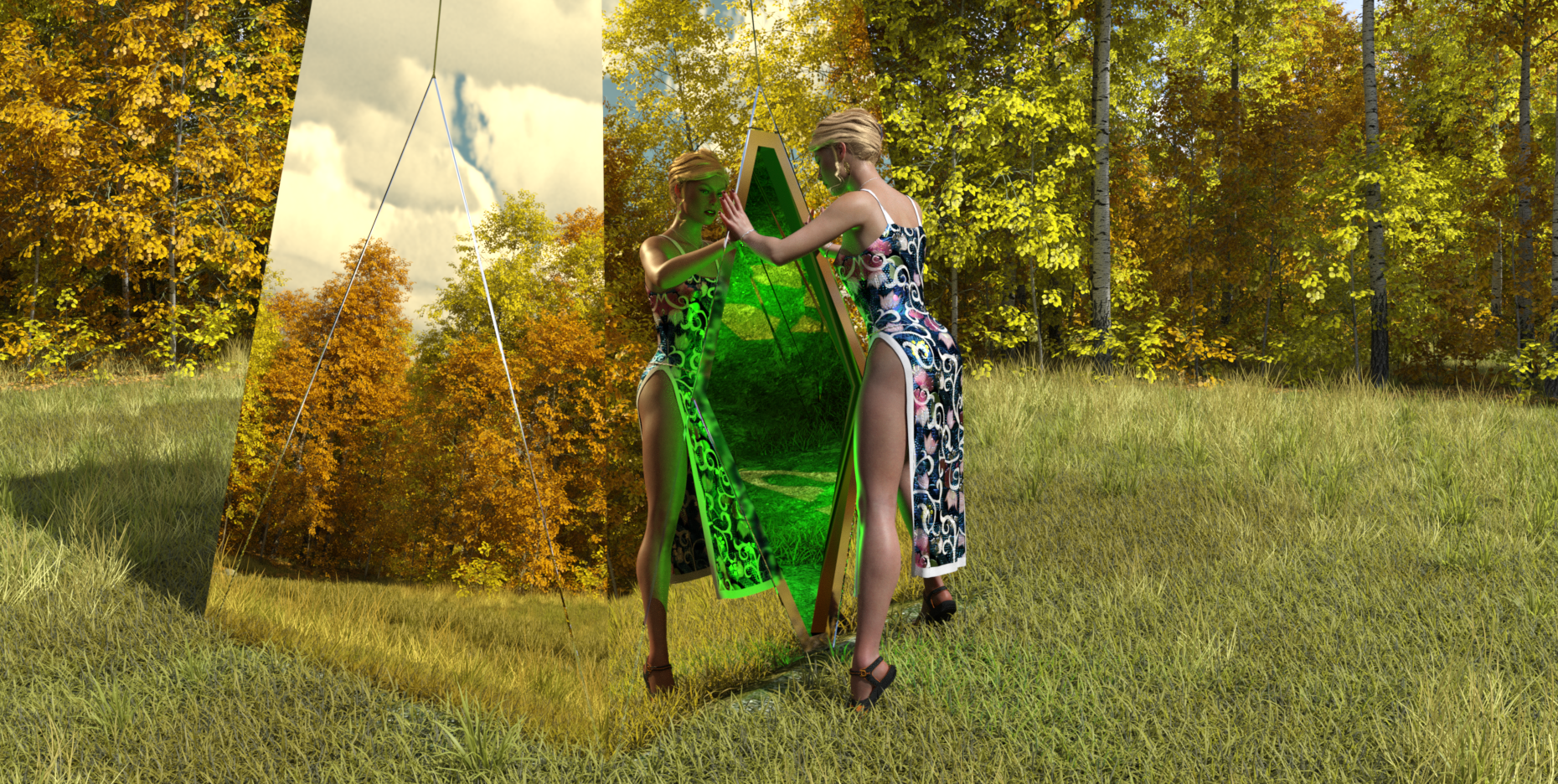
Free Items
1) Obalisk
https://www.renderosity.com/freestuff/items/87671/obalisk2) Sky
https://hdrihaven.com/hdri/?c=skies&h=circus_maximus_13) Wrist and Waist Rope
https://www.deviantart.com/noone102000/art/Odalisque-Dress-FREEBIE-TO-DOWNLOAD-822900201
Caution, mature content on page.4) My heart necklace
https://www.deviantart.com/amyaimei/art/My-Heart-Necklace-for-Genesis-8-Female-7290100475) Asian Dress 01:
https://www.renderosity.com/freestuff/items/833466) Hair
https://www.renderosity.com/freestuff/items/81937/dforce-french-twist-hair-for-genesis-8-femalesPaid Items
Character: A) TritiumCG custom morph. B) Skin: CB Guilia skin texture hue and tone mapped. C) Sue Yee SY sandals from 'Cute suspender dress'. I thought they were freebies until I found the link pointed to the DAZ store. Oops.
Background: D) UltraScenery basic package with home-made vegetation distribution maps for the trees and grasses.No Count Items
1) G8F
2) VYK Filigree Earrings. Christmas 2019 freebie.I had to increase the raytrace Max Path Length to 9 to get all the reflections to show inside the obalisk. Took nearly 4 hours to render on my GTX 1060 GPU, and about 8 mins for the first iteration to appear. Tried red and blue lights inside the obalisk, but neither looked particularly peculiar. There is no post-work - I am so ham-fisted in graphics packages that it's best I don't do any. Had intended this to be a second entry, but liked it enough to make it into my main entry.
Regards,
Richard
3D Art Freebie Challenge-May 2021-"May Mysteries" -Main Thread Onlyrichardandtracy said:
What is this Obalisk, and what is inside?
Free Items
1) Obalisk
https://www.renderosity.com/freestuff/items/87671/obalisk2) Sky
https://hdrihaven.com/hdri/?c=skies&h=circus_maximus_13) Wrist and Waist Rope
https://www.deviantart.com/noone102000/art/Odalisque-Dress-FREEBIE-TO-DOWNLOAD-822900201
Caution, mature content on page.4) My heart necklace
https://www.deviantart.com/amyaimei/art/My-Heart-Necklace-for-Genesis-8-Female-7290100475) Asian Dress 01:
https://www.renderosity.com/freestuff/items/833466) Hair
https://www.renderosity.com/freestuff/items/81937/dforce-french-twist-hair-for-genesis-8-femalesPaid Items
Character: A) TritiumCG custom morph. B) Skin: CB Guilia skin texture hue and tone mapped. C) Sue Yee SY sandals from 'Cute suspender dress'. I thought they were freebies until I found the link pointed to the DAZ store. Oops.
Background: D) UltraScenery basic package with home-made vegetation distribution maps for the trees and grasses.No Count Items
1) G8F
2) VYK Filigree Earrings. Christmas 2019 freebie.I had to increase the raytrace Max Path Length to 9 to get all the reflections to show inside the obalisk. Took nearly 4 hours to render on my GTX 1060 GPU, and about 8 mins for the first iteration to appear. Tried red and blue lights inside the obalisk, but neither looked particularly peculiar. There is no post-work - I am so ham-fisted in graphics packages that it's best I don't do any. Had intended this to be a second entry, but liked it enough to make it into my main entry.
Regards,
Richard
All The Links Check Out Plz Move To Entries Thread
3D Art Freebie Challenge-May 2021-"May Mysteries" -Main Thread OnlyJackyBrown said:
3D Art Freebie Challenge May 2021 "May Mysteries"
[Best watched at full size for details.]
"Only the ravens..."
Starring: Alysha, Ella and Barack
The tale:
No one knows who built the ruin wall, some say it was the Templars, others say it was The Gods themselves. But only the ravens can get close to it, grass grows only hundreds of meters from it but is poisonous. Nobody knows why. Barackm'bwana was born blind and also clairvoyant and some tribal elders say it's both because of the ravens...
Soundtrack:
Alan Parsons Project The Raven (© 1976) https://www.youtube.com/watch?v=YAE1XTvKLXA
COUNTABLE FREEBIES: (Alphabetic order)#01! Afro Earrings G8F-FREE by SdeB
https://www.sdebstore.com/collections/free-stuff/products/afro-earrings-g8f-free **#02! AfroHead G3M 1 by abe01
https://sharecg.com/v/86164/gallery/21/DAZ-Studio/AfroHead-G3M-1 **#03! Alysha for Genesis 8 Female by emotionaldreams
https://www.renderosity.com/freestuff/items/83613/alysha-for-genesis-8-female **#04! Aurochs Skull 1977-5012 (OBJ) by NHM_Imaging
https://sketchfab.com/3d-models/aurochs-skull-1977-5012-30a8753007bd4e9fac33c18a06512562 **#05! Barack for G3M by dumbuser
https://www.sharecg.com/v/88699/gallery/21/DAZ-Studio/Barack-for-G3M **#06! Bracelet for genesis 8 female by Valmont59
https://www.renderosity.com/freestuff/items/86004/bracelet-for-genesis-8-female **#07! Braid Bracelets for G3M, G3F, G8M, and G8F by Fisty
https://www.sharecg.com/v/92874/gallery/21/DAZ-Studio/Braid-Bracelets-for-G3M-G3F-G8M-and-G8F **#08! Candy Braids Hair for Genesis 8 Female(s) by zoro_d
https://www.renderosity.com/freestuff/items/88062/candy-braids-hair-for-genesis-8-female-s- **#09! Chameleon ROse2 for Genesis 8 Female by zoro_d
https://www.renderosity.com/freestuff/items/85859/chameleon-rose2-for-genesis-8-female **
[Head morph used]#10! Dante DMC5 Free Stubble for Genesis 8 Male by InTheFlesh
https://sharecg.com/v/94752/gallery/21/DAZ-Studio/Dante-DMC5-Free-Stubble-for-Genesis-8-Male **#11! Dashiki Dress G8F_FREE by SdeB
https://www.sdebstore.com/collections/free-stuff/products/dashiki-dress-g8f_free **#12! EA Sidecut Hair for Genesis 3 & 8 Female(s) by EichhornArt
https://www.renderosity.com/mod/freestuff/ea-sidecut-hait-for-genesis-3-amp-8-femela-s-/82972 **#13! ED's Bends V8 Poses Part 2 by Edheldil3D
https://www.deviantart.com/edheldil3d/art/Freebie-ED-s-Bends-V8-Poses-Part-2-799687169 **#14! Ella for Genesis 8 Female by tottallou
https://www.renderosity.com/freestuff/items/77844/ella-for-genesis-8female **#15! Fiberhair Goatee Beard for Genesis 3 Male by RedzStudio
https://www.renderosity.com/mod/freestuff/fiberhair-goatee-beard-for-genesis-3-male/75957 **#16! Flo Makeup For Genesis 8 Females by AprilYSH
https://shop.aprilsvanity.com/flo-makeup-for-genesis-8-females.html#17! Grass as Grass can be! (DAZ3D, Iray) by SmidA
https://www.renderosity.com/freestuff/items/88095/grass-as-grass-can-be-daz3d-iray- **#18! Iray Jewelry Shaders by AllenArt
https://sharecg.com/v/95893/gallery/21/DAZ-Studio/Iray-Jewelry-Shaders **#19! Iro Hair by MysticArtDesign
https://sharecg.com/v/97502/browse/21/DAZ-Studio/Iro **
[Skull cap used]#20! Kamala Khan Young for G8F by Shinteo
https://www.patreon.com/posts/kamala-khan-for-44615503
[Bracelet left]#21! M4 Jewelry Pack 5 by Cool Tuna Studio
https://www.cooltuna.com/poser/poser-freebies.html (item 10)#22! Melitaea britomartis (OBJ) by Digital Archive of Natural History
https://sketchfab.com/3d-models/melitaea-britomartis-20a41658fa284141815977b277a08520 **#23! Morphing Garden Style Stone by Mapps Graphics
http://www.freewebs.com/mapps/downloads4.htm (last item)#24! Mouse by Most Digital Creations
https://www.most-digital-creations.com/mouse.htm#25! Muddy Path by SmidA
https://www.renderosity.com/freestuff/items/88169/muddy-path **#26! Old-Lamp for DAZ Studio by kalhh
https://www.renderosity.com/freestuff/items/88299/daz-studio-old-lamp **#27! OnFleek for Genesis 3 & 8 Female(s) by AprilYSH
https://aprilsvanity.com/shop/onfleek-for-genesis-3-8-female-s.html#28! Passer domesticus (OBJ) by Digital Archive of Natural History
https://sketchfab.com/3d-models/passer-domesticus-eeffd0bb0d28471aae9b13937b2087db **#29! Raven by Most Digital Creations
https://www.most-digital-creations.com/raven_2.htm#30! Raven clipart by HiClipart
https://www.hiclipart.com/free-transparent-background-png-clipart-ioqqw
https://www.hiclipart.com/free-transparent-background-png-clipart-iypyb#31! RE5 Sheva Alomar Head Morph for G8F by TritiumCG
https://www.deviantart.com/tritiumcg/art/RE5-Sheva-Alomar-Head-Morph-for-G8F-822643742 **#32! Ringed Zebra for G2F by SquarePeg3D
https://www.renderosity.com/freestuff/items/76186/clothing-ringed-zebra-for-g2f **#33! Ruinwall (Iray) by SmidA
https://www.renderosity.com/freestuff/items/88069/ruinwall-daz3d-iray **#34! Rustshader for Iray by SmidA460
https://www.deviantart.com/smida460/art/Rustshader-for-Iray-758330803 **#35! Rusty junk set 1 by DryJack
https://www.sharecg.com/v/53012/gallery/21/DAZ-Studio/Rusty-junk-set-1 **#36! Sam Giddings for G8F and G8.1F by Shinteo
https://www.patreon.com/posts/sam-giddings-for-48463704#37! Sinister Structures by SquarePeg3D
https://www.renderosity.com/freestuff/items/81060/props-sinister-structures **#38! SY 200 Morphs for Genesis 8 Head and Body by SickleYield
https://sharecg.com/v/91888/view/21/DAZ-Studio/SY-200-Morphs-for-Genesis-8-Head-and-Body **#39! Wall-Lamp for daz studio iray with wall by kalhh
https://www.renderosity.com/freestuff/items/87614/wall-lamp-for-daz-studio-iray-with-wall **#40! Wizard Sticks by MysticArtDesign
https://sharecg.com/v/96092/gallery/21/DAZ-Studio/Wizard-Sticks **And the ones I forgot:
#41! Arabian Dress (for G3M) by Noone102000
https://www.deviantart.com/noone102000/art/FREEBIE-Arabian-Dress-814819412 **#42! Henna Tattoo by MysticArtDesign
https://sharecg.com/v/92182/gallery/21/DAZ-Studio/Henna-Tattoo **#43! Kiara 8 Sunset by HDRIHaven
https://hdrihaven.com/hdri/?h=kiara_8_sunset#44! Pajaro Trousers + PhD Glasses for G8F by Poses17
https://www.deviantart.com/poses17/art/Freebie-Pajaro-Trousers-PhD-Glasses-for-G8F-788560405 **#45! Terror Eyes for G3F and Iray by Sabby
https://issuu.com/philatdsc/docs/ds_creative_16 (page 49)
NO-COUNT ITEMS:--- CariqueB by hindudreams
--- Casual Outfit for G3M by Tab
--- Eyes Dilate for Genesis 8 Female by felldude
--- Free Iray Outdoor Lights by Dreamlight
--- Genesis 2 Male Beard by Laticis Imagery
--- Genesis 2 Male Beard 03 by Laticis Imagery
--- Nose Ring 01 for G2F, G3F and/or G8F by AllenArt
PURCHASED/PAID FOR ITEMS: None 100% Freebies*1 E-mail address required
** Registration required
#x! Countable Items (Bold ones are used by me for the first time I think.)
--- No longer available freebies
++ Free with DAZ Studio (or the Essentials)
$x. Purchased/Paid For Item
Rendered with DAZ Studio 4.10.0.123 (nVidia Iray)Other free software used: GIMP v2.10.24 and Irfanview 4.57
Postwork: used the AltaLux Image Enhancement Filter (Effect) by Stefano Tommesani that comes with Irfanview and some filters (oa) that come with GIMP. Also used mcjDenoise by mcasual. (https://sites.google.com/site/mcasualsdazscripts9/mcjdenoise)
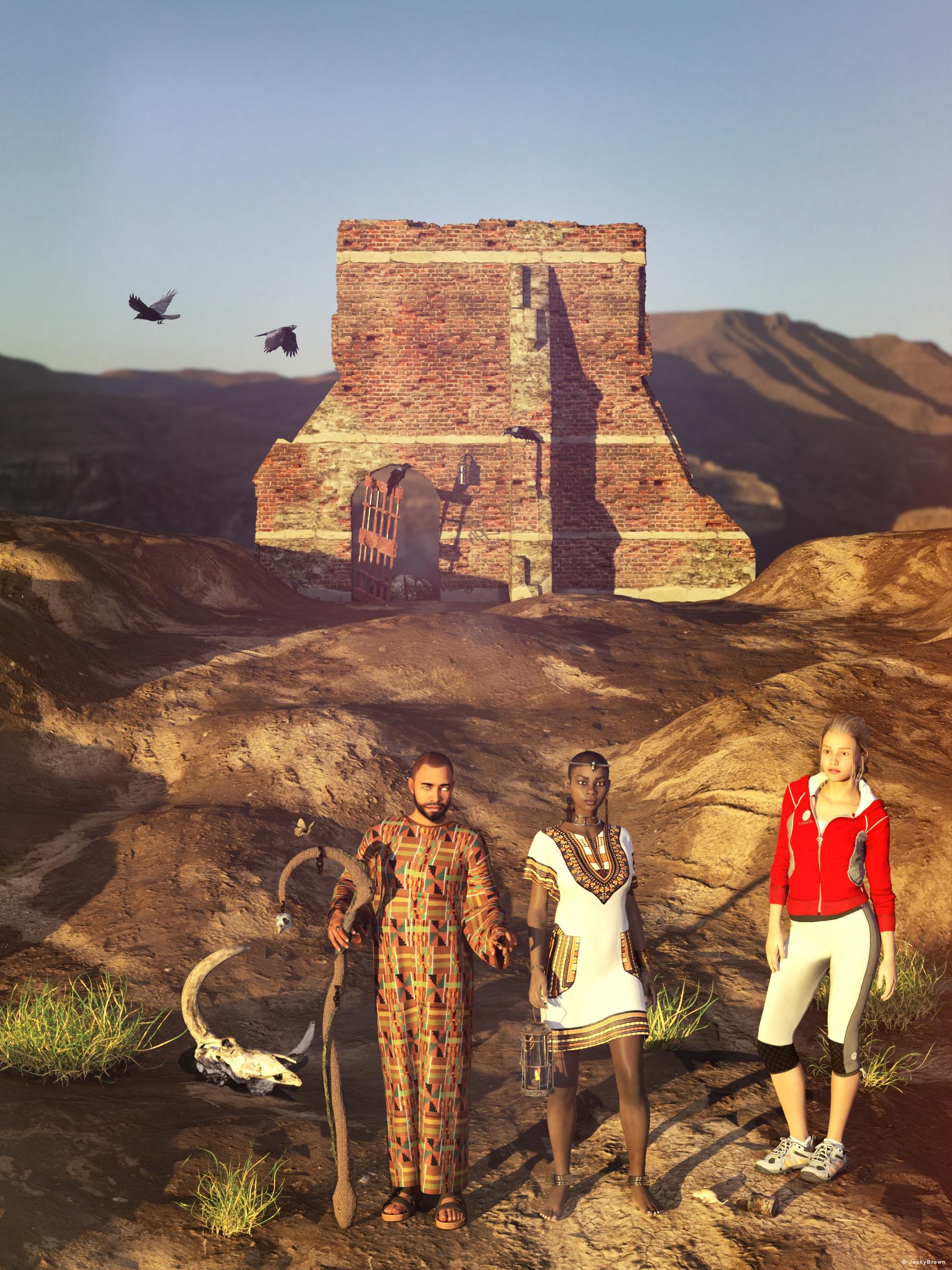
"Only the ravens..."
All The Links Check Out Plz Move To Entries Thread
3D Art Freebie Challenge-May 2021-"May Mysteries" -Main Thread OnlyBronzeDragon said:
Last Entry.
Unexpected.
A treasure hunter spent years working out the clues, found the site, found the enterance, managed to make her way through the maze correctly. After entering the chamber the massive stone door fell closed, blocking the way out. But nothing had prepared her for this. All she had was an old legend. The legend said that if you got this far that you must choose to continue on. But you must choose wisely, as the true bottle will bring you sustanance, and the false bottles will take it from you. What does she do now? How will she know?
Items used in the render.
Free stuff:
Columns - https://www.sharecg.com/v/94481/related/21/DAZ-Studio/BronzeDragonsStuff
Potion Bottles (DS CREATIVE MAG - ISSUE 18) - 4eyes.code66.se/dsc/DSC_Potion_Bottles.zip
Sigil - https://www.deviantart.com/i-jay-cg/art/Sigil-845646712
Clothing - https://www.renderosity.com/freestuff/items/77959
Dirty skin - https://www.renderosity.com/freestuff/items/83623/swt-dirty-skins-version-a-for-genesis-8-females
Hair - https://www.deviantart.com/kayleyss/art/Gwennili-Hair-670556854
Phantom morph - https://www.deviantart.com/checkertoo/art/Phantom-For-G8f-858294456
Flame - https://sharecg.com/v/92198/gallery/21/DAZ-Studio/Fire-of-Magic
Floor Texture (very large 1.9 GB) - https://onedrive.live.com/?authkey=!AF5l3Fw-WgHzB6I&cid=AB095DD7B2CB4DCF&id=AB095DD7B2CB4DCF!20967&parId=root&action=locatePurchased stuff:
nothing
No count items:
DAZ3D - Genesis GF8
Modern art (appears it's not available) - www.most-digital-creations.com_modernart.zipPost processing software - ON1 Effects 2019
IRAY Render created in DAZ3D Studio 4.15
All The Links Check Out Plz Move To Entries Thread
Auto Muscle Enhancer HD [Commercial]This is of course G8M Cloned to G8F, layered with a grownup version of the 3DU Gayll product package. AME at only 15%, Flex at 275%, and the ASE at 15% for the elbow and shoulder. So far these seem to be reliable settings on the more slender/lean models. I also have created with D-forms wider/thicker bicep morphs that are ERC'd onto the HD Musculature products. Additionally the hands have two morphs ERC'd for an additional bicep and tricep morph controlled by the hand bend control, with a foot bend controlling an add-on calf morph. These morphs have the max/min settings controlled so the morphs are delayed, and the max amount tailored to the model's physique. Also 25% AFE to enhance the facial expressions. Tons of trial and errors to get here! All this so I could work with AME on female models, but everything transfers nicely onto the male models also.
I am still holding out hope that a G8F version will still be released in the future I really enjoy working with this product. The three way interaction between the AME Body Size/Amount, AME Flex Size, and the ASE Joint Controls have been really fun to explore and try to understand! I still feel like there is still more to learn! Thx to D.Master, for these fabulous products. TD
Daz 3D is part of

Connect
DAZ Productions, Inc.
7533 S Center View Ct #4664
West Jordan, UT 84084Licensing Agreement | Terms of Service | Privacy Policy | EULA
© 2026 Daz Productions Inc. All Rights Reserved.