-
New Year, New Sales Thread: Report Issues Here "Reporting Only"
NorthOf45 said:
Thanks, guys. (I'm not holding my breath about the ReadMe's)
Good plan. There have been no readme files and no metadata for any of this old stuff, from my limited purchase experience. There is really no good clue that they are old stuff. The have brand new SKUs.
Trouble with importing pose using diffeocrosswind said:
You just need to set all Pose Control properties on Nubis as Favorites. Easy Import with Diffeo plus ticking DAZ Favorites, then all imported Favorites morphs will work. The Pose Preset will work as well.
BTW, I use Diffeo 4.2.1 but it should also work with your 1.7.3 ~~
Thanks I'll give this a try, and I didn't realize I was using an old version of diffeo!
Missing files on PAMAWO's Pirate's Bride Captain’s Quarters VignetteThey're not missing but just with wrong file names... actually with wrong character (apostrophe) within the file names of both Full Scene and some Material Presets.
- Just unzip the IM package, in the below folders, replace the wrong file names or that wrong character with the correct ones in whatever way... (ss 1 ~ 3)
- Then open Manifest.dsx file with Notepad++, replace the wrong unicode apostrophe character with correct ASCII apostrophe (ss 4). Do the same to the DAZ_3D_99515_Pirate's_Bride_Captains_Quarters_Vignette.dsx in runtime\support folder.
- Re-zip IM package and install it ~ All files / metadata will be fine.
Then fill a ticket as you wish.
[Released] Content Wizard [Commercial]K8johnsonauthor said:
Mark_e593e0a5 said:
form what I can see you are using a Mac. PLUS you have installed CW via DAZ connect (i.e. you have the cloud data path in there). I have moved all my DAZ data to an extrnal file storage (Synology NAS, connected as a network share) and that does work with no issues other than being slightly slower).
I would suggest the following:
- Uninstall CW from your system - start with DIM to uninstall, if you also tried a DIM installation.
- Once done, close DIM and start DS - you need to remove the DAZ Connect install, and that can only be done inside DS
- Open the Content Library tab. You shoiuld see a list of directories. Navigate to the bottom of the list. There should be an item labled "Products"
- Open the "Products" folder. You see a list of numbers and letters. Open the section starting with "C" (as this is the first letter in the product name, Content Wizard is sorted into that folder)
- Locate CW in that subfolder. Right-click on the CW icon. A menu should pop up.
- From that menu, select "Delete". That action should be the second entry in the menu. A dialog pops up asking if you really want to remove that product. Select "yes"
- The product will be removed from that list. Wait until the product list is refreshed
- Exit from DS
Next, you need to clean the file system.
- In Finder, navigate to /Volumes/RedBackup/Users/etaktrash/Documents/DAZ 3D/Studio/My Daz Connect Library/data/cloud
- locate the 1_67507 folder and remove it
Now you should be able to do a clean install of CW via DIM. As @RiversoftArt already stated, try to avoid installing anything using DAZ connect. Especially script-based products are a nightmare to use - if they work at all.
It usually is safe to use DAZ Connect to update metadata only, but that will happen automatically if you connect, so no need to start anything. INSTALLING via DAZ Connect is a totally different beast.
Side note: If you have other products from @RiversoftArt, you also need to have those installed via DIM only, as these prodcust may share scripts, e.g. /riversoft art/common/rsconstants.dsa
Thanks, but I can't do that: when I try to delete CW from the product library, I don't have the option to do it (screenshot).
I've never installed anything via Daz Connect until now; TBH I'd never even heard of it until recently, when it became the ONLY way I could use Smart Content. Now it appears to be the work of the devil and everyone hates it, although I still don't know why. Currently it's the only way I can use any of my Daz content.
Ok, skip to the step where you delete 1_67507 folder.
Newbie - new clothing item goes in "Lost and Found"It looks like it is one of those transferred products, which don't have got metadata.
You can then either use something like https://www.daz3d.com/content-wizard
to create metadata or you can do it yourself. By categorizing you can put it in the right location, but it will still not be matched to the character. To to that you need to edit metadata, and set it compatible with the base character it is intended for.
[Released] Content Wizard [Commercial]Mark_e593e0a5 said:
form what I can see you are using a Mac. PLUS you have installed CW via DAZ connect (i.e. you have the cloud data path in there). I have moved all my DAZ data to an extrnal file storage (Synology NAS, connected as a network share) and that does work with no issues other than being slightly slower).
I would suggest the following:
- Uninstall CW from your system - start with DIM to uninstall, if you also tried a DIM installation.
- Once done, close DIM and start DS - you need to remove the DAZ Connect install, and that can only be done inside DS
- Open the Content Library tab. You shoiuld see a list of directories. Navigate to the bottom of the list. There should be an item labled "Products"
- Open the "Products" folder. You see a list of numbers and letters. Open the section starting with "C" (as this is the first letter in the product name, Content Wizard is sorted into that folder)
- Locate CW in that subfolder. Right-click on the CW icon. A menu should pop up.
- From that menu, select "Delete". That action should be the second entry in the menu. A dialog pops up asking if you really want to remove that product. Select "yes"
- The product will be removed from that list. Wait until the product list is refreshed
- Exit from DS
Next, you need to clean the file system.
- In Finder, navigate to /Volumes/RedBackup/Users/etaktrash/Documents/DAZ 3D/Studio/My Daz Connect Library/data/cloud
- locate the 1_67507 folder and remove it
Now you should be able to do a clean install of CW via DIM. As @RiversoftArt already stated, try to avoid installing anything using DAZ connect. Especially script-based products are a nightmare to use - if they work at all.
It usually is safe to use DAZ Connect to update metadata only, but that will happen automatically if you connect, so no need to start anything. INSTALLING via DAZ Connect is a totally different beast.
Side note: If you have other products from @RiversoftArt, you also need to have those installed via DIM only, as these prodcust may share scripts, e.g. /riversoft art/common/rsconstants.dsa
Thanks, but I can't do that: when I try to delete CW from the product library, I don't have the option to do it (screenshot).
I've never installed anything via Daz Connect until now; TBH I'd never even heard of it until recently, when it became the ONLY way I could use Smart Content. Now it appears to be the work of the devil and everyone hates it, although I still don't know why. Currently it's the only way I can use any of my Daz content.
Trouble with importing pose using diffeoYou just need to set all Pose Control properties on Nubis as Favorites. Easy Import with Diffeo plus ticking DAZ Favorites, then all imported Favorites morphs will work. The Pose Preset will work as well.
BTW, I use Diffeo 4.2.1 but it should also work with your 1.7.3 ~~
Trouble with importing pose using diffeoPadone said:
Easy import only works fine with genesis figures from G1 to G9. For other figures you have to import morphs separately as custom morphs, then you can import the pose preset you saved in daz studio. If the pose preset uses any body morph you have to import those as well. Another option is to bake the pose in daz studio before saving the pose preset, which this way doesn't require the body morphs.
edit > figure > bake to transforms
Sorry, well I thought that was working but it's defintely not. as far as the first suggestion, when I try to import custom morphs I get a python error. When I try to bake in daz it also doesn't work. Maybe you can tell me what I'm doing wrong?:
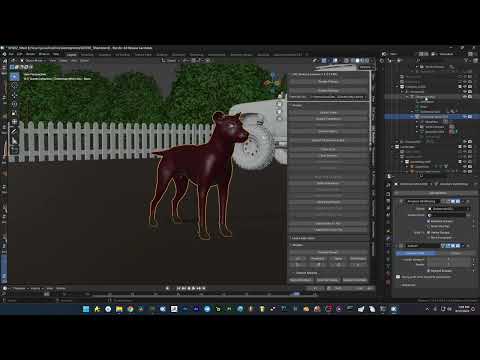 Trouble with importing pose using diffeo
Padone said:
Easy import only works fine with genesis figures from G1 to G9. For other figures you have to import morphs separately as custom morphs, then you can import the pose preset you saved in daz studio. If the pose preset uses any body morph you have to import those as well. Another option is to bake the pose in daz studio before saving the pose preset, which this way doesn't require the body morphs.
edit > figure > bake to transforms
dude, you're a life saver. Thank you!!
Trouble with importing pose using diffeoEasy import only works fine with genesis figures from G1 to G9. For other figures you have to import morphs separately as custom morphs, then you can import the pose preset you saved in daz studio. If the pose preset uses any body morph you have to import those as well. Another option is to bake the pose in daz studio before saving the pose preset, which this way doesn't require the body morphs.
edit > figure > bake to transforms
Budget Halloween Animal Costumes, Cat / Mouse / Dog / Lion, stuff like thatI have made them, but I haven't saved them in Daz Studio (DS) format.
Can you import objs? Has to be imported at scale 10000%.
When imported they will match base G8F (in default pose). I will recommend to us them as props parented to the head. Then you can scale or move them as relevant.
They don't have any materials. I used some fur shaders for the ears, and a plasic for the headband (hardly visible).
You can do transfer utility, so they are become conforming to the character, but I think they might distort if doing so, so therefore my recommendation to use them as props.
If you want to save them, then after importing them first save as a prop, and then after parenting to the head save as a wearable preset.
If you have problem doing it, let me know, then I can save it as duf (DS) files.
[Released] Content Wizard [Commercial]RiverSoft Art said:
etaktrash_d29ae59121 said:
I'm having trouble installing Content Wizard.
To be honest, I'm having horrendous trouble with Smart Content--it doesn't work at all unless I install first via DIM and then update metadata and install through Daz Connect (long story involving moving content to a different drive, which might be the stupidest thing I ever did). Obviously that's absurd, so I thought Content Wizard would help me install everything from Content Library. But I can't get CW to run from Content Library (I can't use it from Smart Content because see above).
Here's the log file for when I try to run it from Content Library after installing via DIM:
2024-09-12 04:19:31.134 [INFO] :: Loading script: /Volumes/RedBackup/Users/etaktrash/Documents/DAZ 3D/Studio/My Daz Connect Library/data/cloud/1_67507/scripts/riversoft art/content wizard/content wizard.dse
2024-09-12 04:19:31.174 [DEBUG] :: Found: /Volumes/RedBackup/Users/etaktrash/Documents/DAZ 3D/Studio/My Daz Connect Library/data/cloud/1_67507/data/riversoft art/common/rsconstants.dsa
2024-09-12 04:19:31.183 [DEBUG] :: Found: /Volumes/RedBackup/Users/etaktrash/Documents/DAZ 3D/Studio/My Daz Connect Library/data/cloud/1_67507/data/riversoft art/common/rssmartcontentconstants.dsa
2024-09-12 04:19:31.190 [DEBUG] :: Found: /Volumes/RedBackup/Users/etaktrash/Documents/DAZ 3D/Studio/My Daz Connect Library/data/cloud/1_67507/data/riversoft art/common/rsbuildpanels.dsa
2024-09-12 04:19:31.197 [DEBUG] :: Found: /Volumes/RedBackup/Users/etaktrash/Documents/DAZ 3D/Studio/My Daz Connect Library/data/cloud/1_67507/data/riversoft art/common/seedrandom.dsa
2024-09-12 04:19:31.203 [WARNING] :: Script Error: Line 131
2024-09-12 04:19:31.203 [WARNING] :: ReferenceError: Can't find variable: sIncludeFileExt
2024-09-12 04:19:31.203 [WARNING] :: Stack Trace:
<anonymous>()@/Volumes/RedBackup/Users/etaktrash/Documents/DAZ 3D/Studio/My Daz Connect Library/data/cloud/1_67507/scripts/riversoft art/content wizard/content wizard.dse:131
2024-09-12 04:19:31.203 [INFO] :: Error in script execution: /Volumes/RedBackup/Users/etaktrash/Documents/DAZ 3D/Studio/My Daz Connect Library/data/cloud/1_67507/scripts/riversoft art/content wizard/content wizard.dseAny ideas? I would really really like to get this working so I don't have to install 700+ items one by one with Daz Connect. I know I've probably messed up the file paths for my installations somewhere, but nobody will tell me what I've done wrong!
Eek, what must be wrong in your system?!? The sIncludeFileExt is defined in RSConstants.dsa, which CW loaded, so there is no reason why it should not be able to find it. I usually tell people CW should be installed from DIM not Daz Connect to work (and all files deleted from /My Daz Connect Library/data/cloud/1_67507). However, with your system, I am not sure if that will even work.
form what I can see you are using a Mac. PLUS you have installed CW via DAZ connect (i.e. you have the cloud data path in there). I have moved all my DAZ data to an extrnal file storage (Synology NAS, connected as a network share) and that does work with no issues other than being slightly slower).
I would suggest the following:
- Uninstall CW from your system - start with DIM to uninstall, if you also tried a DIM installation.
- Once done, close DIM and start DS - you need to remove the DAZ Connect install, and that can only be done inside DS
- Open the Content Library tab. You shoiuld see a list of directories. Navigate to the bottom of the list. There should be an item labled "Products"
- Open the "Products" folder. You see a list of numbers and letters. Open the section starting with "C" (as this is the first letter in the product name, Content Wizard is sorted into that folder)
- Locate CW in that subfolder. Right-click on the CW icon. A menu should pop up.
- From that menu, select "Delete". That action should be the second entry in the menu. A dialog pops up asking if you really want to remove that product. Select "yes"
- The product will be removed from that list. Wait until the product list is refreshed
- Exit from DS
Next, you need to clean the file system.
- In Finder, navigate to /Volumes/RedBackup/Users/etaktrash/Documents/DAZ 3D/Studio/My Daz Connect Library/data/cloud
- locate the 1_67507 folder and remove it
Now you should be able to do a clean install of CW via DIM. As @RiversoftArt already stated, try to avoid installing anything using DAZ connect. Especially script-based products are a nightmare to use - if they work at all.
It usually is safe to use DAZ Connect to update metadata only, but that will happen automatically if you connect, so no need to start anything. INSTALLING via DAZ Connect is a totally different beast.
Side note: If you have other products from @RiversoftArt, you also need to have those installed via DIM only, as these prodcust may share scripts, e.g. /riversoft art/common/rsconstants.dsa
Trouble with importing pose using diffeoI'm trying import a pose on an imported dog model called Nubis. I've tried importing him with the morphs and without, with posable bones and without, but no matter the case if I export a pose from daz and import it onto my dog in blender it doesn't work. If I import the pose without the morphs then the neck bends correctly, but the face doesn't have an expression, but if I import WITH morphs it does the expression as expected but then the neck doesn't bend at all. Anytime I import the morphs with the pose it rests the neck, even if I de-select "clear bones." I can't even add the expression with morphs AFTER I import the pose without because it just clears the bones again. So it's like I'm forced to choose either facial expression or body expressions, it's weird. Hopefully this makes sense. Please help!Do I need a super computer to make animations with DS?I would add to what DrunkMonkey says with this: Don't animate in Daz. Do it in Blender. Use Diffeomorphic to import/export. It's overwhelming at first and will take time. May be a considerable time, to become familiar with its workings but it's worth the effort.
Daz is very weak when it comes to animation and Diffeomorphics Cycles shader setup is almost as good as IRay (almost indistinguishable actually).
looking to change the pivot points of limbs in an imported figureYou don't, except for testing, import the OBJ into the scene - you import it into the Figure Setup pane, which will create bones from groups and allow you to arrange their hierarchy, then you tel the application to create the figure from that. It's still a fair bit of work, yes, but not as bad as trying to do the job in the Viewport.
Introducing the AI Character Shape Generator by Yellowpaulawp (marahzen) said:
daveso said:
it looks simple enough. I don;t like the idea of having to log on to DAZ. I never login mainly becasue it checks things already installed and makes changes as needed. If there is a way to not change any meta data or anything else I might give it a go.
Exactly. I have not logged in to Daz since finishing a cleanup operation to fix problems with installed products - it was enough of a nuisance that I swore I'd never log in to Daz again. I'd be willing to give it a try as part of my character creation process if logging in here ONLY means logging in to "Yellow" for this purpose.
Since they introduction of the new New dialogue, and the in-app notifications, the refreshing of metadata is off by default and has to be enabled in the log-in box (or triggered manually) - it won't change content data without being allowed.
looking to change the pivot points of limbs in an imported figureOK, that is aprented prop not a figue at all. What I would do is load it, then export as OBJ using node names for groups. Import that into the Figure Setup pane (right-click in the Groups panel), drag into the Relationships panel to set up a new figure, drag the groups (bones) into the desired hierarchy, right-click on Rotation order to change it as needed (the first axis is twist, the second should be the one least likely to hit 90 degrees to reduce the risk of gimbal lock - you can chnage thiss etting later with the Joint editor if necessary) and create the figure using the button at bottom-right. You will then have a figure, with the bones roughly aligned with the group boundaries, from which you can go on to make adjustments with the Joint Editor, then weight map (the Node Weightmap brush right-click menu has an option to fill groups to match the bones, which will give a starting point for a hard-surface model like this). You may want to insert more bones in the arms, though, if theya re meant to actually bend rather than pivotting as a unit (Joint Editor right-click menu).
Over 2,400 FREE bespoke BVH animations for Genesis 8!!
Get your FREE 2,400+ bespoke BVH animations for Daz Genesis 8 here:
https://drive.google.com/file/d/1kao0dt9T67rdJ7aVMB47bFLDcNpTnv7x/view?usp=sharingNeed to preview them before import? get this free utility
https://github.com/orangeduck/BVHView
Need to use them for Genesis 9?
save as animated .duf to your library
and use FREE script from this Freebie thread
https://www.daz3d.com/forums/discussion/605941/genesis-1-2-3-8-9-to-genesis-3-8-9-pose-converter-updated-2023-04-28/p1short video on usage of the BVH files
 [Released] Content Wizard [Commercial]
etaktrash_d29ae59121 said:
I'm having trouble installing Content Wizard.
To be honest, I'm having horrendous trouble with Smart Content--it doesn't work at all unless I install first via DIM and then update metadata and install through Daz Connect (long story involving moving content to a different drive, which might be the stupidest thing I ever did). Obviously that's absurd, so I thought Content Wizard would help me install everything from Content Library. But I can't get CW to run from Content Library (I can't use it from Smart Content because see above).
Here's the log file for when I try to run it from Content Library after installing via DIM:
2024-09-12 04:19:31.134 [INFO] :: Loading script: /Volumes/RedBackup/Users/etaktrash/Documents/DAZ 3D/Studio/My Daz Connect Library/data/cloud/1_67507/scripts/riversoft art/content wizard/content wizard.dse
2024-09-12 04:19:31.174 [DEBUG] :: Found: /Volumes/RedBackup/Users/etaktrash/Documents/DAZ 3D/Studio/My Daz Connect Library/data/cloud/1_67507/data/riversoft art/common/rsconstants.dsa
2024-09-12 04:19:31.183 [DEBUG] :: Found: /Volumes/RedBackup/Users/etaktrash/Documents/DAZ 3D/Studio/My Daz Connect Library/data/cloud/1_67507/data/riversoft art/common/rssmartcontentconstants.dsa
2024-09-12 04:19:31.190 [DEBUG] :: Found: /Volumes/RedBackup/Users/etaktrash/Documents/DAZ 3D/Studio/My Daz Connect Library/data/cloud/1_67507/data/riversoft art/common/rsbuildpanels.dsa
2024-09-12 04:19:31.197 [DEBUG] :: Found: /Volumes/RedBackup/Users/etaktrash/Documents/DAZ 3D/Studio/My Daz Connect Library/data/cloud/1_67507/data/riversoft art/common/seedrandom.dsa
2024-09-12 04:19:31.203 [WARNING] :: Script Error: Line 131
2024-09-12 04:19:31.203 [WARNING] :: ReferenceError: Can't find variable: sIncludeFileExt
2024-09-12 04:19:31.203 [WARNING] :: Stack Trace:
<anonymous>()@/Volumes/RedBackup/Users/etaktrash/Documents/DAZ 3D/Studio/My Daz Connect Library/data/cloud/1_67507/scripts/riversoft art/content wizard/content wizard.dse:131
2024-09-12 04:19:31.203 [INFO] :: Error in script execution: /Volumes/RedBackup/Users/etaktrash/Documents/DAZ 3D/Studio/My Daz Connect Library/data/cloud/1_67507/scripts/riversoft art/content wizard/content wizard.dseAny ideas? I would really really like to get this working so I don't have to install 700+ items one by one with Daz Connect. I know I've probably messed up the file paths for my installations somewhere, but nobody will tell me what I've done wrong!
Eek, what must be wrong in your system?!? The sIncludeFileExt is defined in RSConstants.dsa, which CW loaded, so there is no reason why it should not be able to find it. I usually tell people CW should be installed from DIM not Daz Connect to work (and all files deleted from /My Daz Connect Library/data/cloud/1_67507). However, with your system, I am not sure if that will even work.
[Released] Content Wizard [Commercial]I'm having trouble installing Content Wizard.
To be honest, I'm having horrendous trouble with Smart Content--it doesn't work at all unless I install first via DIM and then update metadata and install through Daz Connect (long story involving moving content to a different drive, which might be the stupidest thing I ever did). Obviously that's absurd, so I thought Content Wizard would help me install everything from Content Library. But I can't get CW to run from Content Library (I can't use it from Smart Content because see above).
Here's the log file for when I try to run it from Content Library after installing via DIM:
2024-09-12 04:19:31.134 [INFO] :: Loading script: /Volumes/RedBackup/Users/etaktrash/Documents/DAZ 3D/Studio/My Daz Connect Library/data/cloud/1_67507/scripts/riversoft art/content wizard/content wizard.dse
2024-09-12 04:19:31.174 [DEBUG] :: Found: /Volumes/RedBackup/Users/etaktrash/Documents/DAZ 3D/Studio/My Daz Connect Library/data/cloud/1_67507/data/riversoft art/common/rsconstants.dsa
2024-09-12 04:19:31.183 [DEBUG] :: Found: /Volumes/RedBackup/Users/etaktrash/Documents/DAZ 3D/Studio/My Daz Connect Library/data/cloud/1_67507/data/riversoft art/common/rssmartcontentconstants.dsa
2024-09-12 04:19:31.190 [DEBUG] :: Found: /Volumes/RedBackup/Users/etaktrash/Documents/DAZ 3D/Studio/My Daz Connect Library/data/cloud/1_67507/data/riversoft art/common/rsbuildpanels.dsa
2024-09-12 04:19:31.197 [DEBUG] :: Found: /Volumes/RedBackup/Users/etaktrash/Documents/DAZ 3D/Studio/My Daz Connect Library/data/cloud/1_67507/data/riversoft art/common/seedrandom.dsa
2024-09-12 04:19:31.203 [WARNING] :: Script Error: Line 131
2024-09-12 04:19:31.203 [WARNING] :: ReferenceError: Can't find variable: sIncludeFileExt
2024-09-12 04:19:31.203 [WARNING] :: Stack Trace:
<anonymous>()@/Volumes/RedBackup/Users/etaktrash/Documents/DAZ 3D/Studio/My Daz Connect Library/data/cloud/1_67507/scripts/riversoft art/content wizard/content wizard.dse:131
2024-09-12 04:19:31.203 [INFO] :: Error in script execution: /Volumes/RedBackup/Users/etaktrash/Documents/DAZ 3D/Studio/My Daz Connect Library/data/cloud/1_67507/scripts/riversoft art/content wizard/content wizard.dseAny ideas? I would really really like to get this working so I don't have to install 700+ items one by one with Daz Connect. I know I've probably messed up the file paths for my installations somewhere, but nobody will tell me what I've done wrong!
Daz 3D is part of

Connect
DAZ Productions, Inc.
7533 S Center View Ct #4664
West Jordan, UT 84084Licensing Agreement | Terms of Service | Privacy Policy | EULA
© 2026 Daz Productions Inc. All Rights Reserved.










