-
How do you create your own fibermesh hair?
Fibermesh and DAZ strandbased hair (and LAMH) all actually end up much the same if made into geometry
as does Blender particle hair
strandbased and LAMH has the advantage of being curves in DAZ studio so less overheads
none of them can be made into Dforce hair though unless you are a PA
but all fine for image renders with hand styling
I own Zbrush and don't really bother with the Fibermesh that much as it's very heavy
I only really use it for short hairs with a few puppeteered movements in Filament as I do animations
you really don't want to try dforcing it
 as it's a lot of geometry (PAs make it into curves)Stubbornly Dark Iray Spotlight
Thanks @cgidesign - you nailed it! It was not about the Emission color but about the program version.
I'd been avoiding upgrading beyond 4.12 because I was worried about something going terribly wrong, but last night I bit the bullet and upgraded both DAZ & my video drivers to the latest versions. Now the spotlight works as intended! Plus now I have Filament. Woo hoo!
A Huge Regretpartly that. spent too much plus constant problems with the program. This is at least the 4th time the database fell to pieces in the last 3 years...total reinstalls each time plus days of headaches to go with it. I will say the crashes seemed to have stopped, but. My overall enjoyment just isn;t there anymore. I won;t renew my DAZ+ this time either. I think much is the overall way this site works, problems constantly, the forums upset me quite a bit, search is non-existent in the store. The total of it has left me gasping for breath. I used to like it here a lot, not so much anymore.
I think if I redo and not instal so much, things might work better and faster. I cannot afford to buy a new system, and mine should be able to handle this decently, but the newer content not as easilty. Yeah ..backwards I think might be a help. Coming to the store daily has become one of my tasks ... its very tempting. That has to stop as well.I totally understand where you're coming from... and believe me, as someone who literally owns three quarters of all the products in the store, I feel your pain. And yeah, the basic vibe of this store has changed dramatically from one of a fun hobby center created and run by other creators to one run with a near manic "buy this to get this to get this to get a bunch of ancient junk that we'll probably give away for free in the near future" zeal and a constant barrage of ridiculously convoluted verbiage and promotions. Which I could handle if the software itself didn't keep playing second fiddle to hamfisted attempts at big brotherish content management tools that, inexplicably, all offer less functionality than the product that they're supposed to replace (DIM), and sidetracks into ventures that seem way out of the companies established wheelhouse (but, hey avatar software is trendy... No! Wait! It's NFTs that are trendy now! Change course... oops! ICEBERG!)
Of course, as I've got more figure assets than I can really imagine ever needing, I basically called it quits on the DS merry-go-round with Genesis 8 and DS 4.12, and generally focus on buyings sets, scripts and other items that are backwards compatible. And that's actually worked out pretty well so far, as while the improvements of Genesis 8 over 7 were comparitively minor, the changes for 8.1 seemed more for the sake of change and making older products less competive than creating any significant visual improvements. Honestly, I don't care for how the PBR skins look, I already have TWO face conversion programs that were both sold by DAZ vendors, and I saw little need at all for Filament (and boy, did interest in that one burn out quick, to take an aside to use the obvious pun) or most of the other knick knacks in the newest versions of DS. Maybe I'd be more enticed if DAZ ever actually wrote a users manual that covers even half of the existing features that have come out and been buried since they last bothered updating the thing... which was when they changed some parts to add references to Genesis 2, for crying out loud.
As for slimming down... YES! DO IT! I took advantage of the purchase of a new rendering computer to radically slim down my active runtimes versus what had become a giant bloated mess, and I'm so glad that I did. Now all my old files and runtimes are on separate external storage drives, and anytime I want to use those assets, all I have to do is open that drive, click on the duf, note which files are needed when it tries to load, and then add them. It's really so much better that it's not even funny.
A Huge RegretWendyLuvsCatz said:
My rigs don't cope with a lot of the new stuff either.
I am learning to stop buying it, not being in DAZ+ helps a lot.
That said I have being using Aiko3 etc a lot more lately and most of the clothing Dforces well too
(and VWD in Carrara)
Filament is great for animations too if one avoids ovelapping cut out opacity, and the great thing about toony stuff is you can forgo transparency maps altogether.
my product list in my content is full of those triangles with question marks BTW, I give up on the metadata crap and just search for stuff with Voidtools Everthing now

..I never bother with the database as it can be flaky as well (even brand new items sometimes do not show up in the database). .I just use the old "tried and true" content tree as I have for the last 14 or so years (albeit these days with a customised setup)
I still know how to use a library card catalogue and an actual map as well as also used to do management and programming flow charts so it's not really all that difficult.
 A Huge Regret
My rigs don't cope with a lot of the new stuff either.
I am learning to stop buying it, not being in DAZ+ helps a lot.
That said I have being using Aiko3 etc a lot more lately and most of the clothing Dforces well too
(and VWD in Carrara)
Filament is great for animations too if one avoids ovelapping cut out opacity, and the great thing about toony stuff is you can forgo transparency maps altogether.
my product list in my content is full of those triangles with question marks BTW, I give up on the metadata crap and just search for stuff with Voidtools Everthing now
Best 3D viewer for Daz modelsPhones and tablets are remarkably powerful computers - my little Lenovo tablet is a lot more powerful than the first PC I had DS 0.7 running on. So, it seems a shame not to be able to play with things like posing characters and creating expressions by posing the face rig. If anything a touch screen interface would be more intuitive than PowerPose. Drag and drop for clothes is implemented for the 'Love Nikki' game my daughter plays, just extend that a bit.
I accept that it's well nigh impossible for Iray quality rendering to be done on a mobile device, so it'd have to be limited to Filament. IIRC, Filament was intended as a lightweight renderer for mobile devices, so.. it's one leap of imagination that's not so impossible.
Regards,
Richard.
Metamixer GrayClaygermanianer said:
Hey guys, i bought Metamixer and its realy nice, but i run into an issue with the rendering after creating the Face.
When i enable Metamixer on the character and finish the face mix, i like to render the character, but the problem is, that the face is realy shiny and the whole body is darken.
It doesn't matter if i remove or change the lighting, the face increase the brightness but the body keeps beeing darker then the face.
Is this a shader? Do i have to export the Metamixer Morph as Objekt and reimport to a new Genesis character to get the original shader back? Is it possible to remove the GrayClay after mixing?
Thanks all.
Save the MetaMixer preset using the script found in the Elements folder (same folder where you found the Gray Clay material). Be sure to have the Genesis character selected in the scene before running the script. Afterwards you can apply this preset to any Genesis 8/8.1 character.
Alternatively just have the Genesis figure in the scene selected, then go to your Characters folder and apply the Iray materials of your character of choice. MetaMixer was made to work in real-time with the Filament renderer. If you want to render with Iray you need to make some changes. You might also want to add the Eyelashes and Tear figures to your figure in case you removed them before using MetaMixer (these 2 figures slow MetaMixer down to a crawl).
Daz Studio 5 development updateRichard Haseltine said:
Chumly said:
Richard Haseltine said:
Chumly said:
Hmmmm.....
We are now into October. 4th Quarter 2021.
I think its about time Daz started releasing/leaking solid info on what direction Daz15 is going in... no?Daz ddi say that - now that they had 4.15.x.x usable on Big Sur - they would not be bringing DS 5 out early.
Ok... but what is early?
Originally, the update page saidAs for the final Daz Studio 5 release:
- The timeline for this is to have it out near the very end of this year.
- Features and enhancements will be rolling in through the rest of the year.
- Anyone who has Daz Studio 4 in their account will be able to keep it. You'll be able to continue to download and use it for the foreseeable future.
So, was the end of the Year early? I pulled 2021 off the wall, and have pulled the month of January off and tossed it in the bin.
The Daz Studio Delayed thread was started back in August (or 6-7 months ago), and there has been Radio silence regarding it since then.
Are all the eggs in the 4.16 basket? I would have thought, that even though delayed, we'd have heard "sumthin" by now. I know folks hate to give dates and timelines FOR THIS SPECIFIC REASON, that is, folks like me saying, "You said End of year", "You said Delayed", yadda yadda.. I don't want to give Richard a reason to delete my post out of hand....
I wsa just hoping/thinking that there SHOULD be SOME news right? Even if it is along the lines of "coding is much harder than we though it was going to be, we are hoping for 2 quarter 2022".
I have been dragging my feet on some purchase because, my hope was that Daz5 was going to address some of the data crunching short falls of 4.x (Morph/Load time, I starring daggers at you)...
Anyways... I assume that there is still a Daz 5 in the works... no?I would assume that that timeline was still aiming to get a barebones version so Mac users had something, now that that is unneeded they can take more time to add the elements that were part of the main plan for DS 5 (whatever those may be).
True, the pre-beta was going to help Mac users have a version that at least worked in the newer operating systems, an actual Beta would have been near the end of the year, and an actual release for Daz 5 was supposed to be early 2022, was my understanding.
Once they got a version that did work (that couldn't be done without updating QT, until it suddenly could with help from Apple) the pressure was off and DAZ could relax as it's not absolutely critical to give Mac users Filament (which can't possibly be done without updaing QT, right?) and the focus now appears to be getting iRay to work better for PC users, something that is very important.
I am happy that DAZ works on all of my Macs, and I'm continuing to use it as I did before. I'm not, though, buying much in the way of product these days, as my main projects are waiting for Filament on the Mac, possibly later this year? I guess that depends on getting iRay working well for eveyone first.
All that grumbling grumbled, it would be nice to have a vague sense of a timeline for D|S 5. We were told that had filament running on the pre-Beta for Mac, so I would assume D|S 5 will have it too.
-- Walt Sterdan
#daz3d #Filament Can I render water or liquids ?I guess the best way just to add a solid material to any liquads, right, but water is terrible. Anyone have any advice?
How to Render Hair in Fillament?This product sorted me out. IF you have hair with dforce, you have to show the hair and play with the render settings to show that hair. I have decent computer. https://www.daz3d.com/fsl-realistic-hair-shaders-for-iray-and-filament
HDR & HDRI Lighting - Is this Exterior or Interior LightingFauvist said:
nemesis10 said:
The Prism promos show figures surrounded by 3d props in a 3D room lit by the HDRI product. Either walls were hidden or Paper Tiger's X-ray camera (a Daz Studio camera with section planes parented to it) to let the light shine through. Section plabes are one of those things than anyone who needs to light a room should understand.
OK, I own Paper Tiger's X-ray Camera with one of her light sets - the lens is only 50mm - it doesn't work if you change the focal length of the lens. I bought this today, which has the section planes https://www.daz3d.com/interior-light-pro-for-filament-and-iray. I've just been confused because I thought there was some way to get one of those HDR or HDRI lights INSIDE a closed room. But now, I take it, that isn't possible. Is there some other product or way to get Section Planes?
I'm told that you can attach (parent) your own IRay Section Planes to any camera but I didn't try it because I had the Paper Tiger camera. More often than not, however, I just load a couple of Section Planes and position them without bothering to parent them to the camera. So long as they are out of shot it doesn't really matter.
HDR & HDRI Lighting - Is this Exterior or Interior Lightingnemesis10 said:
The Prism promos show figures surrounded by 3d props in a 3D room lit by the HDRI product. Either walls were hidden or Paper Tiger's X-ray camera (a Daz Studio camera with section planes parented to it) to let the light shine through. Section plabes are one of those things than anyone who needs to light a room should understand.
OK, I own Paper Tiger's X-ray Camera with one of her light sets - the lens is only 50mm - it doesn't work if you change the focal length of the lens. I bought this today, which has the section planes https://www.daz3d.com/interior-light-pro-for-filament-and-iray. I've just been confused because I thought there was some way to get one of those HDR or HDRI lights INSIDE a closed room. But now, I take it, that isn't possible. Is there some other product or way to get Section Planes?
Filament may not be a good choice for Daz StudioIs it possible to get fur to display on filament
iray preview is so bright than final renderOH, Ok, got it, my mistake.

This scene was previously I used for Filament render, now back to iray, so previously I convered it by RSSY Shadowcaster which seems like a distance light, and it didn't show up in iray's final render.
Turn that RSSY Shadowcaster off, everything is OK.
Daz Studio and Linuxnomad-ads_8ecd56922e said:
Interesting, is there a thread where they're talking about the plans, improvements, and goals for Filament in Daz5?
Absolutely no idea, I don’t know where I saw that
What's This CULLING CAMERAWhat is the "culling camera" that comes with this light product https://www.daz3d.com/interior-light-pro-for-filament-and-iray
I guess what I want to know is - what is the focal length of the lens on the camera? I understand it makes part of your set invisible and that light from an exterior light source can illuminate the interior.
Thanks!
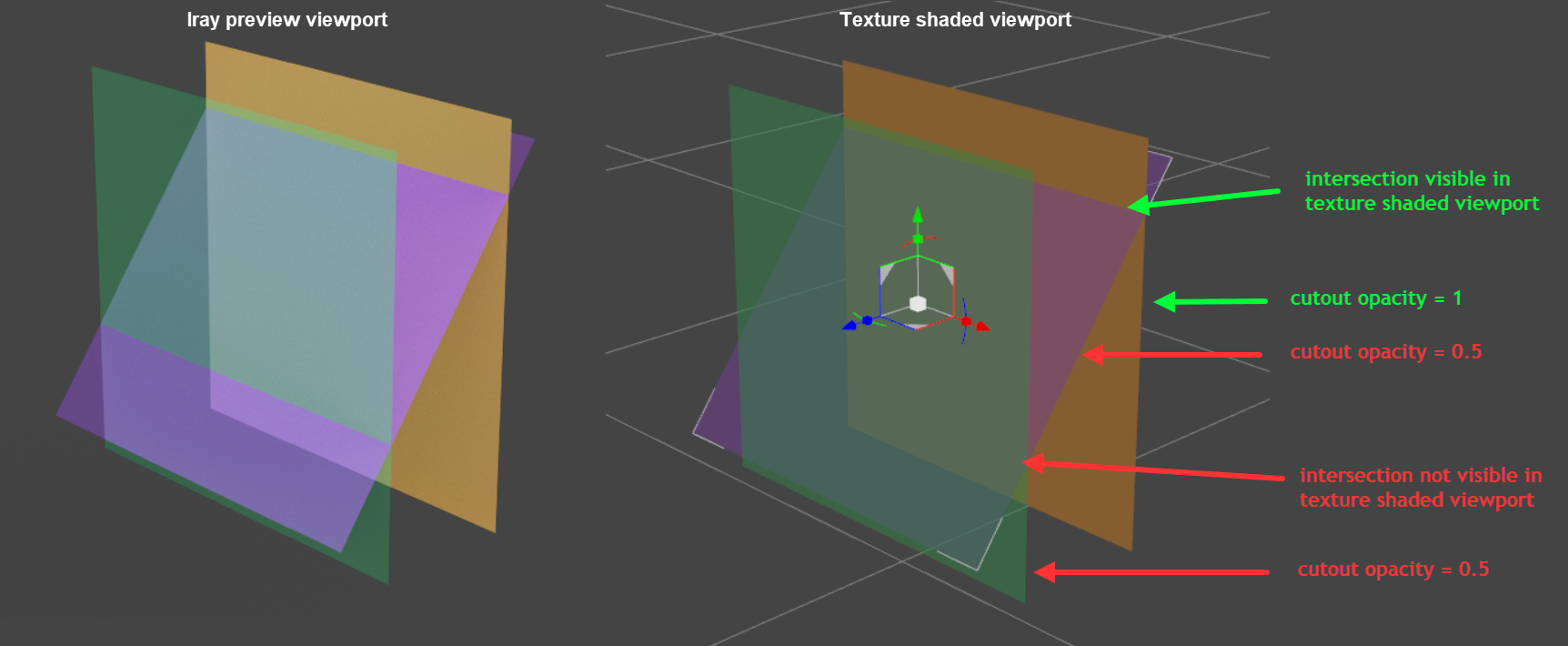
Texture shaded viewport - transparent objects intersection visibility ?DS 4.16.1.34 beta - Nvidia RTX 2070 - latest driver
Issue in in Texture Shaded viewport:
When two or more transparent objects (cutout opacity < 1) are on top of each other, I can't see whether they are intersecting. This is a hinderance when trying to solve poke through issues (e.g. with mesh grabber).
Is there a setting or a custom GL shader that I can use instead of the default one DS's uses for its Texture Shaded viewport? (filament is not an option because not available in the DS version I use).
 daz turning to grey missing geometry boxes when moving or rotating
It's the grey missing geometry boxes, happens in texture or filament, it goes right back to normal view when rotate or move is finished.
I've restarted used new file, will I have to reinstall daz or what could it be?
thanks
HDRI HelpKeithH said:
Fishtales said:
KeithH said:
I have the exact same everything after moving the car and model -600 on the Y axis.
In the first two images the ground plane isn't on the HDRI ground, the ground plane is too high and the next one the characters are below the ground.
Set everything to zero. If the vehicle is floating or the ground plane isn't on the ground raise the camera up and then tilt it forward until it is. The car should now be on the ground.
If you want a different view of the background spin the camera or zoom it and move the car left/right/back or forward to get it positioned.
Don't move the HDRI or you will have to start again.
Everything is set to zero. I even deleted and started new with being all default. Still same issue. It's got to be something simple I am messing up.
One major problem with filament (you seem to use it for your previews) is that it does not render all possible settings of the dome!
For example Ground Texture Scale has no effect in filament. I usually set it to match the height of my camera as a start.
Try the following:
- Start a new empty scene
- Add a camera
- Set the following camera properties to 0 and lock them (to not accidentally change them, because this usually gives weird effects with the HDRI):
X Translate
Z Translate
Z Rotate - Guess at which height the center of the panorama is. I start with average eye level of 150 cm
- Set the following camera properties to 0 and lock them (to not accidentally change them, because this usually gives weird effects with the HDRI):
- Switch to Environment Options and set the following parameters
- Dome Mode ► Finite Sphere w/ Ground
- Draw Dome ► On
- Select the Environment Map (For first experiments choose one with flat ground in the center I used https://polyhaven.com/a/autumn_crossing)
- Ground Texture Scale ► Your guess from the camera eye level above (150)
- Draw Ground ► On
- Ground Position Mode ► Manual
- Place your object in the scene
- Move your object into the view
- Change your available free camera parameters
- Y Translate (after changes you usually need to change also Ground Texture Scale)
- Y Rotate
- Z Rotate
- Focal Length
- Go back to 5.
Daz Studio and LinuxInteresting, is there a thread where they're talking about the plans, improvements, and goals for Filament in Daz5?
Daz 3D is part of

Connect
DAZ Productions, Inc.
7533 S Center View Ct #4664
West Jordan, UT 84084Licensing Agreement | Terms of Service | Privacy Policy | EULA
© 2026 Daz Productions Inc. All Rights Reserved.