-
Is this a bug in Diffeomorphic or am I being stupid?
Have you imported Standard Morph > JCMs ? I tested a case with G9 Anime figure and correctiver morphs can be fully imported and worked well as expected.
Edit: Suggest you post your threads / issues to the Blender sub-forum next time >> https://www.daz3d.com/forums/categories/blender-discussion
The 'Eat Your Food and Like It' Complaint ThreadI am trying to transfer photos from my iPad to my computer. For some reason, my computer can't see the iPad. I restarted the iPad and just restarted the computer.
SaveGuard: Ultimate Scene Saver for Daz Studio Win 64 v1.2memcneil70 said:
DIM had updates for Morph Master and Wearables Manager today when I opened it to download purchases.
Yes, Morph Master and dForce Archmage were updated today.
Is this a bug in Diffeomorphic or am I being stupid?Hi, I recently started using the diffeomorphic addon for blender and it works surprisingly well. However when I try to pose a toon character none of the corrective morphs seem to be working, and when I look at the drivers for the shapekeys it is looking for something with "bs" in the filename as apposed to the "cbs" that is in the name of the corrective morph from DAZ. I have attached an image to illustrate what I mean, I am unsure if this is a bug or if I havent set something up properly as I am certainly no expert, either way none of the corrective morphs actually do anything unless I actually force a value to the shapekey directly.
SaveGuard: Ultimate Scene Saver for Daz Studio Win 64 v1.2DIM had updates for Morph Master and Wearables Manager today when I opened it to download purchases.
Easy FilaToon [Commercial]3Diva said:
noshobawolf_f994bf986d said:
Ok. Let me say not any specific complaints about the product. What I am talking about is being able to do something with it. That is not a product problem. Sorry if what I said came across wrong.
Oh! That's a relief! lol :) I am not sure what is meant by "do something with it" - something specific that someone was trying to do? Or just not able to do anything with it? I would love to see what face book page and post you guys are talking about. I don't normally use face book so a link would be appreciated.
As for doing American comic book style, I think that's achievable.
Here are a few different styles that I think could work with a comic.
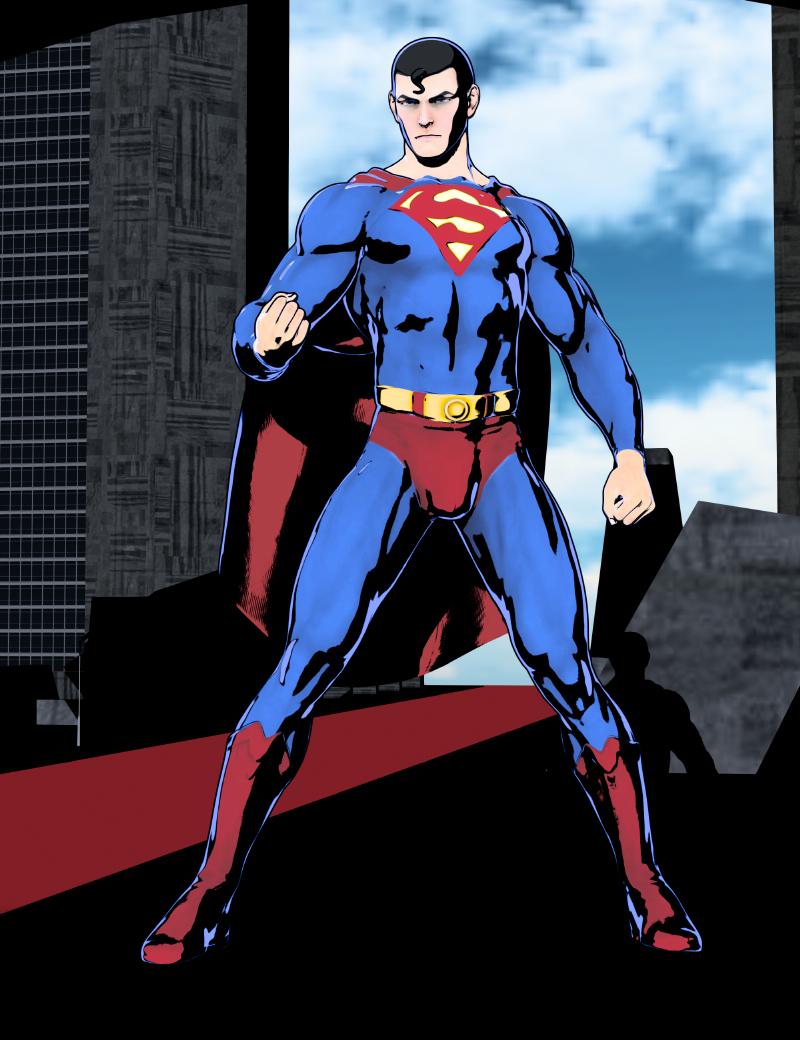
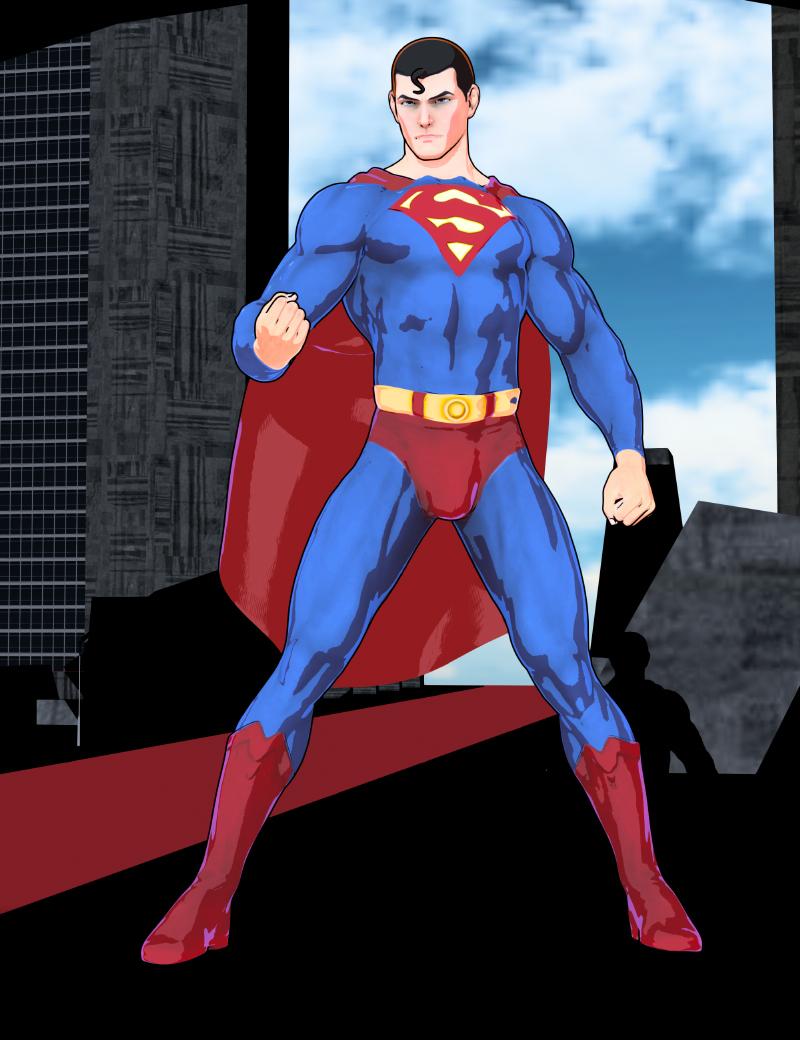
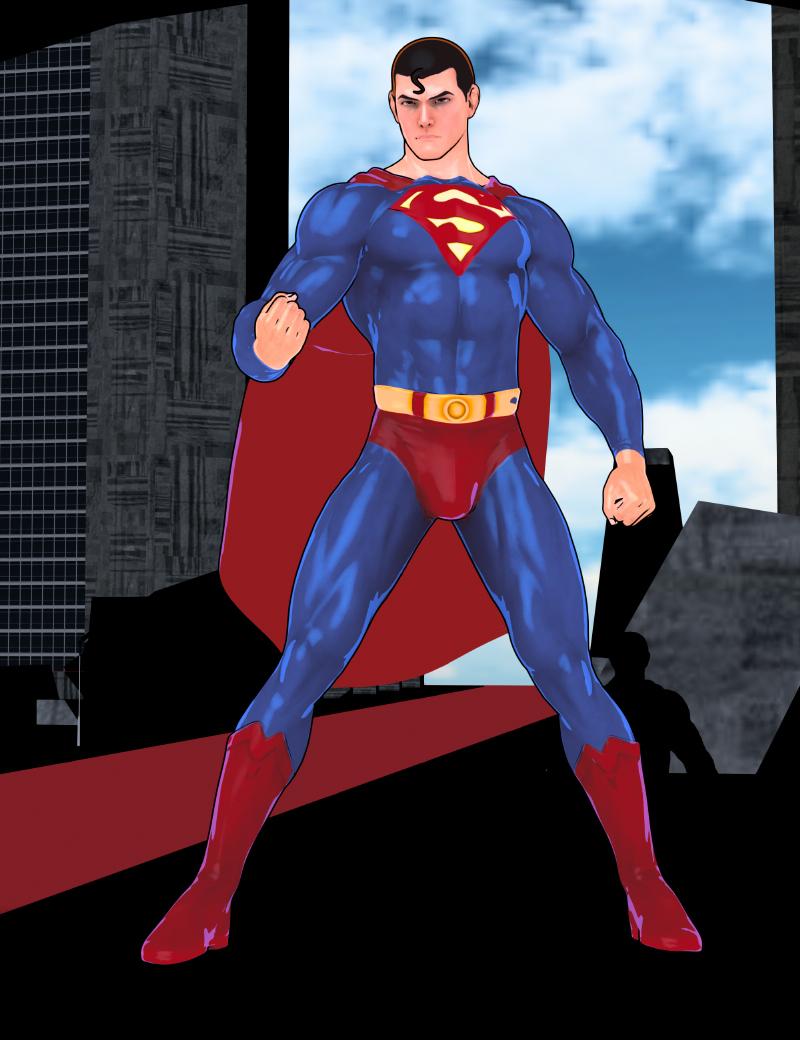
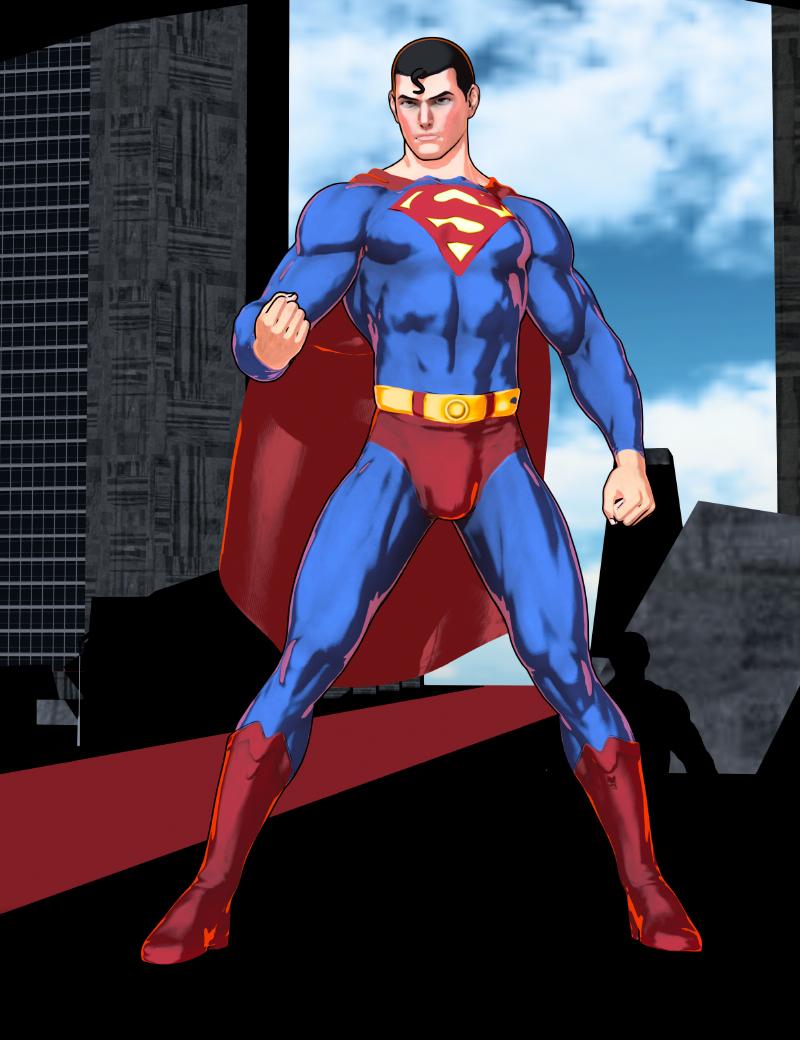
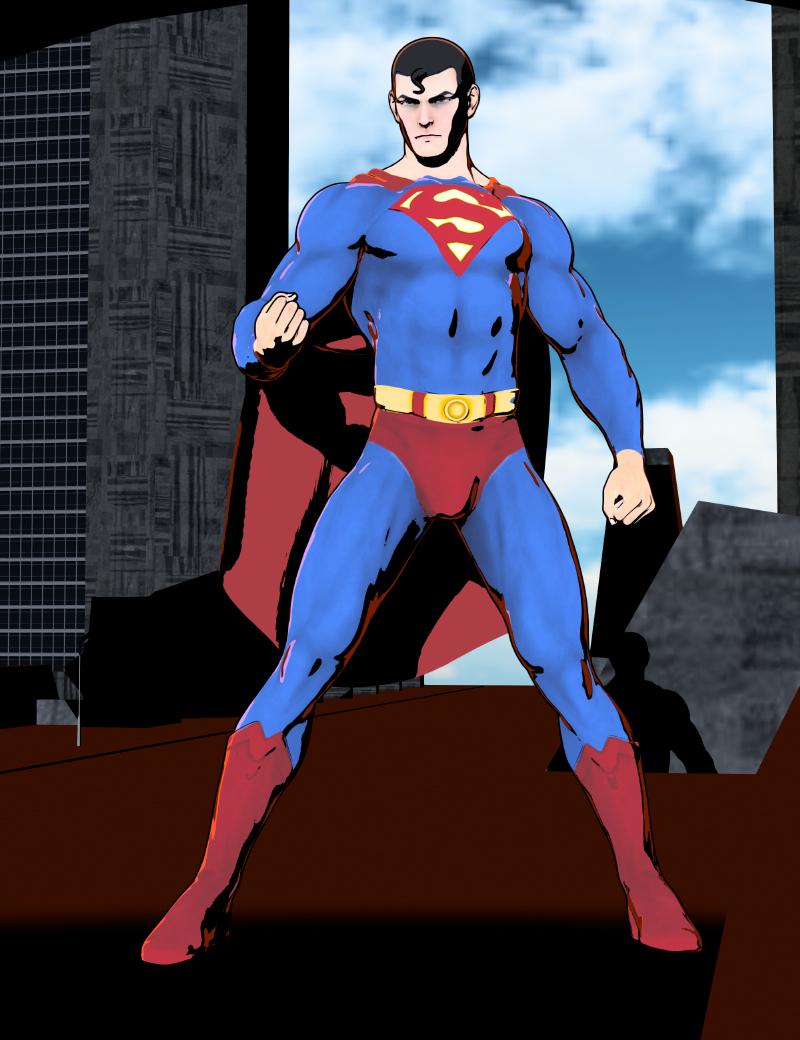
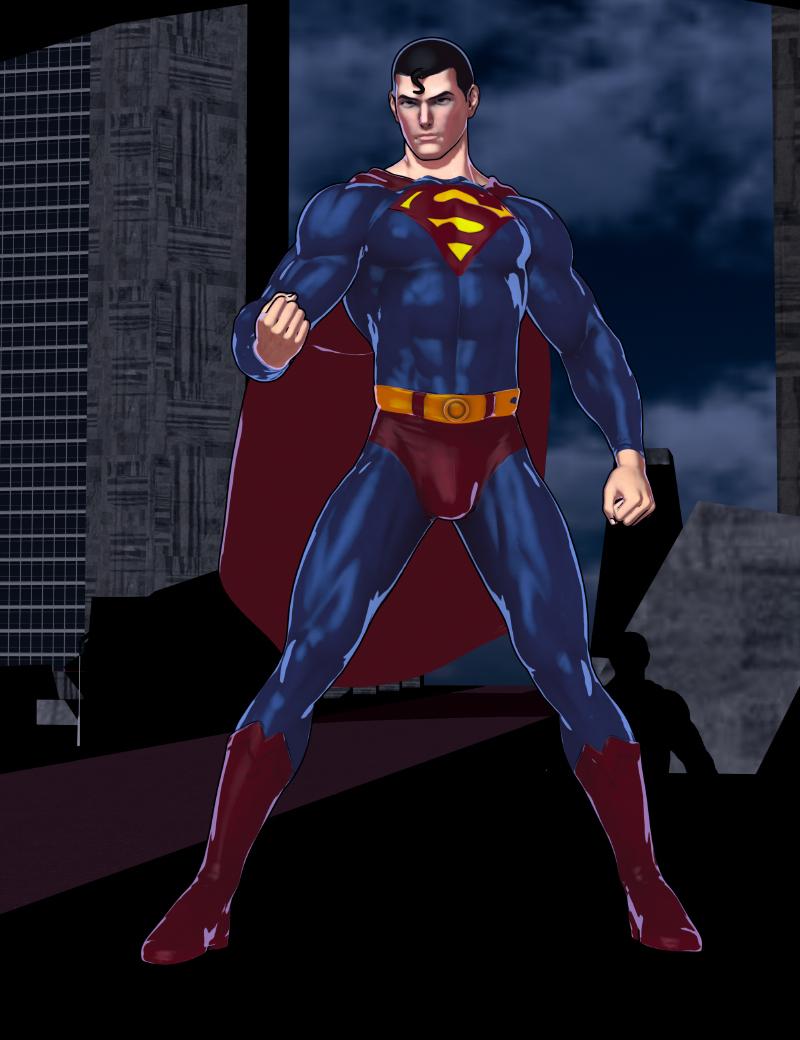
I think if people play around with the different presets, they can find a large variety of different styles can be made. :)
From where did that Superman morph, custom, and hair come from please? The hair especially. Your Easy Filatoons works perfect.
Female Police Uniform for Genesis 8/8.1The trick with most if not all of the police uniforms I've seen in the store is that the badges are part of the shirt's mesh, not a separate item non-conforming object. The best course of action would be to hide the badge (either by lowering the cutout opacity on that surface to zero, or by hiding the geometry using the Geometry Editor), find a badge prop that you want to use, position that where you want, then use a rigid follower node to attach it to the vest. You can easily create a nameplate yourself out of a primitive cube (subdivided if you want it to be rounded) and do the same thing with that.
The handmic is a more complex issue, and I suspect it's a result of you autofitting an outfit not just across generations (with different default poses), but also across genders. You'll generally have better results fitting clothing across genders using the Cross-Figure Resource Kit. For generations, you'll have better luck with the scene identification trick: add the outfit into the scene WITHOUT fitting it to your character, click on the three-lined hamburger icon in the Scene pane and go to Edit -> Scene Identification. Click on the ellipsis (...) button next to Preferred Base and select whatever generation you want to fit it to, then fit it to that character. You can change Scene Identification on multiple items at once, but you have to fit them to your figure one by one.
So, to sum up:
- Load an unmorphed G8M into the scene
- Load the outfit into the scene without fitting it to the G8M
- Change the scene identification on all the components from G3M to G8M
- Fit all the components onto your G8M
- Use the Cross-Figure Resource Kit to morph the outfit into a female shape
- Change the scene identification on all the outfit parts again, this time to G8F
- Load a G8F and fit the whole outfit to the G8F
- (optional, but highly recommended) Save all the fitted components as new assets
- Hide the badge and nameplate
- Replace them with the badge and nameplate of your choice, connected to the vest with rigid follow nodes
- (optional) Save a wearable preset with the fitted outfit parts and the props so that you can load them all at once
Genesis 9 eye blink problem [closed]An eye morph from another model somehow snuck in.
When I enabled hidden properties and searched for 'eyes' under Genesis 9, it showed up – highlighted in blue. Setting it to 0 fixed the eyes. I think the color depends on the morph from the model that got mixed in.The other major issue was the asset 'The Age', which I uninstalled. But same story there: hidden properties had active morphs that shouldn’t have been enabled at all.
Easy FilaToon [Commercial]3Diva said:
I'm a bit late in announcing this - But it looks like the Daz3D team was able to track down the issue that Mac users were having with a couple of the scripts in Easy FilaToon. They've released an update for Easy FilaToon. If you're on Mac, please update your download of Easy FilaToon and let me know if the "Base Feminine" and "Base Masculine" scripts now work for you! :D
These two scripts are in the very top folder of Easy FilaToon (found here: People >> Genesis 9 Toon >> Easy FilaToon). The scripts are the "Easy FilaToon - Base Feminine - APPLY FIRST" and "Easy FilaToon - Base Masculine - APPLY FIRST" scripts, with pink and blue icons, respectively. They should now work for Mac users, but if they don't, please let me know and I'll get in touch with the Daz3D team again. Hopefully they'll work ok for you guys now!
Thank you everyone who's supported this product! You all are awesome and I couldn't be happier with the response that Easy FilaToon has received! :D You all made my year!
I think they work? I don't get errors, but I guess I was expecting something different, but looking it over, it's working as it should.
First, they only work for Genesis 9 characters, selecting any other figures puts up a box advising you to select a Genesis 9 character, which makes sense if it's adding some toon anime morphs.
Second, it applies anime toon morph extras to the figure, where I guess I was just expecting it to make an outline and apply the skin settings, but that's just me misunderstanding. That said, it did a great job on it and is very useful and I'm going to use it a lot going forward.
Thanks 3Diva, the product works 100% now on at least *my* Mac and it's going to be used even more now going forward.
Aeon soul - Zero One - Morphing Itemcrosswind said:
You have to make sure the vertices are equal... not only the face. Which product did you manipulate... to be exactly ?
Some vendors leave unused vertices on the item... If you checked the option of "Remove Unused Vertices" when exporting to OBJ, you would be not able to import the OBJ as a morph with MLP.
Check if that was the case you had ~~
Hello Crosswind,
the product is "Expressive Chroma Poses and Zero One Clothes for Genesis 8, 8.1, and 9"
I have done it checked and unchecked on "Remove Unused Vetices"
but it still "did not match"...
thank you Crosswind for mention it
Calum 9 the BarbarianWrite Idea said:
Richard Haseltine said:
Face Transfer isn't linked to Premier anyway
You're right! I should have been looking for Shape Transfer. Which I looked under Edit>Figure>Shape and it isn't there.
I have had issues with Shape Transfer showing up, as have others. The check box for hiding notifications s more reliable as a test snce it doesn't depend on plug-ins or layout fles.
Saving clothes with simulated dataalofaro said:
Richard Haseltine said:
Export an OBJ and import as a morph, with Reverse Deformations on since the unsimulated clothing will respond to bones and morphs on the figure then start tyhe simulation from the morphed state. Just bear in mind that doing it this way you will lose all informatiuon on tension and momentum that you would get from the earlier steps of the simulation if you reran it.
Thanks, I actuallly did that yesterday for something else (skirt of a character doing an handstand, the skirt simulated correctly on a single frame coming down so the legs were exposed, but then if I moved the legs the skrt would deform like if following the legs) and used it before a number of times to use G3 shoes with G8, but I had not tought about using it for reaching my goal.
In that case the clothes are stll rgged, so adjustng after simulation the pose will layer the effects of the pose on top of the siimulation's effect. The same goes for adjusting morphs.
Now that you suggest it, it makes perfect sense, though I also see see what you mean with the tension and momentum information beign lost, since it becomes a static deformation.
The ideal would have been being able to save the full state, but since iti s not possible, I thought about a possible workaround using your suggestion, to still have some of that dynamic information.
My idea was anyway to go back a couple of steps, e.g. if the new timeline could start from frame 120 of the old one, instead of saving the clothes and positions at 120, save the clothes and positions at 105 or even 90, then create the new timeline with the position 105 (or even 90) of hte old one, recreating thee the 120 (or 105 and 120) using the saved poses corresponding to those steps and then adding up the last steps (that in the old timeline would have been 135 and 150/165).
It would not be a empty and light timeline, but it would anyway make the starting timeline half or less of the timeline I have now, so still managemeable even adding the new keyframes..
Maybe also doing the reverse deformation multiple times (for the 90, 105 and 120 of the old timeline) to force the simulation to follow the shape of the old one - but I will need to experiment to see if it works better that way, or just running the new simulation
I cannot do it now, but I will try in the next days and then change the post, it may be useful information for other people, in various fora I had seen I am not the only one that had problems with timelines ending up being heavy and not so easy to modify
Thanks again for heling me think out of the box !
There's Always Another Sale Thread -- Discussions Only Pt 4today as example of savings. I have 3 DO bundles, What I usually do is add to my cart then go in and decide which product I actually would use the most, and delete the rest. The total as it stand right now is $42, so considering what is in the cart, not too bad. It also brings in 8 tokens, which replaces the 8 I'm using on this order. 3 items are from my WL. I really like Damira and her bends, they are very nice. That she is G9 I am assuming she could be used as a base to introduce other characters or morph her to look like different characters. We shall see.
Barnabus - I jumped on him from the beginning and now purchasing his products as they go on sale. I have Lyna character bundle, so the add-on bundle @$7.70 is nice for sure. Lucas is a great price as well. The Orc bundle might get deleted as I don;t do many orc images. We shall see about that.
FREE always goes to me I don;t pass them up. One never knows when they will come in handy.
I'm into strong male characters, and like I've said before, characters with character, and Frank for sure fits that bill.
The decayed room fits in with a lot of what I render, decayed, apocalyptic stuff.
As with most DAZ sales now, you need a buy-in of a new debut product, so I chose the strand based French Braid hair. 71% off isn;t really too bad for a new released item. Today there are two new releases that I would use, the school bus, and the hair.
There is one more product that is in the Outlet store for $1.99 from Code66 that I should put in cart, that's the Emission Profile Master | Daz 3D I like the results from this for sure. Some added realism to emission lighting.
Anyway, sorry to bore you with my thought process, but I go through this nearly everyday, but so far I've only purchased the $2.99 item the last few days just to keep the punches going. Today. the punch 40% and 8 tokens
Naturally Bending Damira HD for Genesis 9 Feminine $28.99 $3.65 87% Off
Lucas 9 HD Character Bundle $99.99 $6.44 94% Off
Z Magnetic Pose Set for Genesis 9 and 8 Female $9.99 $0.00 100% OffdForce Strand-Based FE French Braid Hair for G9 & G8.1 $24.99 $7.34 71% Off
M3D Frank HD for Genesis 9 $21.99 $2.9 687% Off
The Leprechaun for Barnabus Ragwort $19.99 $3.36 83% OffBarnabus Ragwort Body Hair Collection $17.99 $3.02 83% Off
Lyna 9 HD Add-On Bundle $89.99 $7.72 91% Off
Orcs 9 HD Add-On Bundle $89.99 $2.65 97% Off
M3D Decayed Room $21.99 $2.96 87% Off
Order Summary
Subtotal$425.90
Discounts$-385.80
Sales Tax$2.19
Total $42.2990% discount
G9 Woesmaikdecker said:
In my experience the INPUT isn't the problem, but usually the EXPORT (aka the result of the process) usually leaves a lot to desire. Might be, because I'm no vendor and don't have that "HD functionality".
It's not. Outside of some fantasy and sci-fi morphs that do genuinely need the extra mesh density for horns or robot inlays or whatever, and maybe people with really heavy wrinkles, removing the HD from a morph usually doesn't make much difference.
It is, in many respects, a marketing gimmick that makes it sound like the character is better/higher quality. (I certainly know I've heard some vendors say that they really would rather not work with HD but are forced to because getting to put "HD" on the product name makes a big difference to sales).
Poses... many of those come as identical poses with new names for new generations.
Pose converters are usually the very first conversion tools to exist for a generation after the basic auto-fit clones. They also often quickly exist as freebies as well as paid products.
Are they 100% perfect for the new generation? No, but poses usually need fine-tuning on anything but the exact shape they were made for.
No pose maker is getting away with relying on users not being able to convert poses to the new generation; maybe getting away with users *forgetting* they have those poses, but
Hair? So many look-alike products within a generation, no wonder there are tons of re-do's for the next generation and with clothes it's even more obvious.. IMHO there are quite a few vendors who really depend on incompatible new generations, to re-do their standard designs again and again and again...
Honestly, the number of times I find "I want this hair style, just slightly more volume" or "I need jeans with a just slightly lower waist" or "damn it, it's obvious they're wearing the same t-shirt" or such means that I often deliberately buy similar hair and clothes.
Unless a vendor is actually reusing or reworking the same mesh, I'm not planning to hold it against them if they've made a similar product in the past.
Overall Daz don't really want people thinking "Oh, that's a really nice shirt, shame I can't use it for the figure I want, so I won't buy it", or refusing to move to a new generation because there's not enough content to make it usable yet.
Well, at least in my case they fail the other way around, as I have seen quite a few products already, when my thinking was "My, what a nice figure/hair/piece of clothing.. too bad it doesn't work with my preferred generation (or: "that I can't be sure to will work with my preferred generation" in case of some clothing items)
Uh.... other way around? What you've said is basically a rewording of what I said.
I would say that as a general thing, Daz probably love converter products; when they don't exist, I would say it's more likely because of technical limitations or difficulties rather than reluctance.
Whatever the reason, it keeps people like me from buying G9 products. I guess we're too few to have a big enough impact on the sales, though. And in the end it leaves me with more money to spend elsewhere or for other hobbies, so *shrug*
If the answer genuinely is that they found it impossible to create something of the quality they wanted, then you'd just be complaining about the output of that converter if it had been sold to you.
Speaking as someone who has more experience than many when it comes to converting assets between bases, I can assure you that it is a decidedly non-trivial problem, particularly as there is little standardisation in how vendors set up products.
What do I need to recreate this ai pic?I want to recreate this ai picture with Genesis 9 in DS premier version. I guess I can use either yellow or face transfer o create the face.
I'm thinking of making this character to sell if she comes out well. Can I use Yellow morphs commercially? What do I need for the skin textures? Also how do I make FilaToon skin textures?
Back to my original question, are there any of the other elements in the picture that are already made?
Another "which character" question - solvedtwiztedmetal said:
Hi everyone I can answer your questions, The morph is From TMHL Veshti for Genesis 9 and the skin is from one of DAZ's base skins The Feminine skin 04 to be exact and the lipstick was from my Twizted Makeup set for Genesis 9.
Thank you so much for the info twized, that is an exquisite portrait
G9 WoesMatt_Castle said:
maikdecker said:
I'm 100% sure that such a product will never be made. The first reason for that is, no figure transfer product we got up to now was able transfer HD figures to a different generation.
In relation to what you said before about "even if I lose the HD part when doing it", every previous transfer product has been able to take an HD morph as an input. Some can even transfer the HD data, should you be a vendor with access to the HD functionality.
In my experience the INPUT isn't the problem, but usually the EXPORT (aka the result of the process) usually leaves a lot to desire. Might be, because I'm no vendor and don't have that "HD functionality".
The next reason would be, it would remove the need to re-buys too many products to work with G9 as one has worked with G3/8 before. And many PA's here live from re-doing there full product list to work with the next generation.
This theory that Daz want to stop users from transferring stuff to instead make them buy it is prevalent and persistent, but holds little water.
There's really not that many products that get redone each generation; a few basic morph packs, some utility stuff like Fit Control, the anatomical elements, etc, but things like hair, clothes, characters, etc and the like are usually fresh.
Poses... many of those come as identical poses with new names for new generations. Hair? So many look-alike products within a generation, no wonder there are tons of re-do's for the next generation and with clothes it's even more obvious.. IMHO there are quite a few vendors who really depend on incompatible new generations, to re-do their standard designs again and again and again...
Overall Daz don't really want people thinking "Oh, that's a really nice shirt, shame I can't use it for the figure I want, so I won't buy it", or refusing to move to a new generation because there's not enough content to make it usable yet.
Well, at least in my case they fail the other way around, as I have seen quite a few products already, when my thinking was "My, what a nice figure/hair/piece of clothing.. too bad it doesn't work with my preferred generation (or: "that I can't be sure to will work with my preferred generation" in case of some clothing items)
I would say that as a general thing, Daz probably love converter products; when they don't exist, I would say it's more likely because of technical limitations or difficulties rather than reluctance.
Whatever the reason, it keeps people like me from buying G9 products. I guess we're too few to have a big enough impact on the sales, though. And in the end it leaves me with more money to spend elsewhere or for other hobbies, so *shrug*
The New Mac FAQI tried to open poser pro 11 on my new Mac studio for the first time yesterday. It asked if poser could have access to my documents folder and I clicked allow. But once open, I couldn't get poser to open any item from its libraries.
I wanted to use an item by the vendor Pandorian. It's a wrestling ring. I decided to open it in Daz Studio. I did so. But the item has ropes that can morph up down sideways, etc. I could not get any of the morphs to work. I looked in the parameters tab, and none of the morphs showed. Clicking on the roaps in the viewport Did nothing. In fact, that only meant I had selected the entire ring.
So what's going on? That item can be bought again on another site, but would that do any good?
I'm stumped. Is there a way around this? I have that wrestling ring on my computer, and I have used it in studio before. Why won't it work this time?
this is Studio 4, Not studio 2026.
Mesh grabber for Daz 2025 Alpha?calok84_62e8db9913 said:
Richard Haseltine said:
drcko016 said:
Without Mesh Grabber, Daz is literally unusable.
Then, if you have a Premier Membership wait for Geometry Scul;ptor to be updated for the alpha or just continue to use DS 4..x.x.x for the tasks that need Mesh Grabber and then bake the modifier to geoemtry if you need the results in DS 2025.
Hi, can I ask what you mean by bake the modifier to geoemetry? How do you do that?
One way is to use meshgrabber itself, I think it is an addon, it allows to save you the modifications you did as a morph. Another would be to do the modifications, and then use the export obj/import morph approach
Just in case (doubtful) Manfriday or others PAs with similar products happen to see this thread, they can add up one extra person that would consider the possibility of buying an upgrade (well, hopefully not again full price :-P :-D) if after DAZ 2025 final comes out they make a compatible version that is not linked to premium.
I for one will continue to buy content from DAZ, but I intend to continue using DAZ 4.x for as long as the OS allows and not move to DAZ 2025, exactly also because I have too many plug-ins and add-on and I don't plan to throw them away.Saving clothes with simulated dataRichard Haseltine said:
Export an OBJ and import as a morph, with Reverse Deformations on since the unsimulated clothing will respond to bones and morphs on the figure then start tyhe simulation from the morphed state. Just bear in mind that doing it this way you will lose all informatiuon on tension and momentum that you would get from the earlier steps of the simulation if you reran it.
Thanks, I actuallly did that yesterday for something else (skirt of a character doing an handstand, the skirt simulated correctly on a single frame coming down so the legs were exposed, but then if I moved the legs the skrt would deform like if following the legs) and used it before a number of times to use G3 shoes with G8, but I had not tought about using it for reaching my goal.
Now that you suggest it, it makes perfect sense, though I also see see what you mean with the tension and momentum information beign lost, since it becomes a static deformation.
The ideal would have been being able to save the full state, but since iti s not possible, I thought about a possible workaround using your suggestion, to still have some of that dynamic information.
My idea was anyway to go back a couple of steps, e.g. if the new timeline could start from frame 120 of the old one, instead of saving the clothes and positions at 120, save the clothes and positions at 105 or even 90, then create the new timeline with the position 105 (or even 90) of hte old one, recreating thee the 120 (or 105 and 120) using the saved poses corresponding to those steps and then adding up the last steps (that in the old timeline would have been 135 and 150/165).
It would not be a empty and light timeline, but it would anyway make the starting timeline half or less of the timeline I have now, so still managemeable even adding the new keyframes..
Maybe also doing the reverse deformation multiple times (for the 90, 105 and 120 of the old timeline) to force the simulation to follow the shape of the old one - but I will need to experiment to see if it works better that way, or just running the new simulation
I cannot do it now, but I will try in the next days and then change the post, it may be useful information for other people, in various fora I had seen I am not the only one that had problems with timelines ending up being heavy and not so easy to modify
Thanks again for heling me think out of the box !
Daz 3D is part of

Connect
DAZ Productions, Inc.
7533 S Center View Ct #4664
West Jordan, UT 84084Licensing Agreement | Terms of Service | Privacy Policy | EULA
© 2026 Daz Productions Inc. All Rights Reserved.
















