-
Course on creating skin textures
Thank you very much for all your answers, I will look at it!

By the way, I have noticed that there is a cheaper version of Zbrush called Zbrush core (https://www.maxon.net/en/zbrushcore?srsltid=AfmBOoo3P1MtgqVXrCuRATmqNeO1l5aEGJZSDjjQIIS8-k2Xc4JgycL3). Do you know if it has tool to create high resolution character and skin as Zbrush has? Or if it is possible to export the Skin Detail Ressource alphas (https://www.daz3d.com/skin-detail-resource-4) into it to scumpt a character with them?
I recently downloaded Zbrush core mini, which is free, to see how it works, and I searched for how to import alphas into it, but I have the impression that it is not possible to import any brush or alpa into Zbrush core mini...
lilweep said:
Im not watching an hour long video that isnt time stamped to the relevant seciton.
Oh, sorry, I forgot to give you the time, it starts around 24:05. It is the "Cavity Textures" section, the title of the sections is visible on the vidoe...
mesh maps are usually baked from highpoly models, and generators often use mesh maps.
Did you bake mesh maps from a high poly model? Probably not.
For now, I used the G8M default bump map. I thought that if I could not succeed to create cavity textures from an existing map, I couldn't succeed to do it from any baked map too, so I used the G8M bump map as training... Further, I have not the impression that there are more particular details on the tutorial character map than on the G8M bump map, and the effect of the generator is completlty visible on the tutorial...
* Released * Mask Builder III am looking at buying this, but it appears that I cannot import my own mask to use.
Hair export from Daz to Clo3DGordig said:
Richard Haseltine said:
each strand in the export will be a single strip of edges or a line of polygons - which of course adds up to a lot of data.
It will add up to a lot of data if the hair is exported as mesh rather than curves. I have a whole bunch of SBH hairs exported to OBJ, and they're mostly in the 2-4mb range for the curves plus scalp.
yeah but can clo3d import them and will they render in clo3d's vray, which is apparently this person's intended workflow?
Their workflow seems a bit limiting.
THey may be better to export from Clo3d and render in Daz Studio, or export both from source software and do the render in Blender.
Daz Studio BETA - version 4.23.0.4! (*UPDATED*)crosswind reminded be of a problem I previously mentioned that has not been addressed as of 4.22.1.224. I submitted a ticket about it today. It doesn't work in 4.22.0.16 either. I don't know if it ever worked. Does anyone have any insight into why these invert checkboxes don't do anything?
Request #463282
Daz Studio OBJ Import does not invert the imported object when the invert checkbox is checked
Clothing JCMs and Morph Mirroring - What am I doing wrong?Now that you reminded me, I do remember that import invert bug. I never submitted a help request about it, but I will do that now.
Tiny Glade and Daz Studio, a match made in heaven.richardandtracy said:
Having gone through the demo's to Tiny Glade, it does look fantastic. Can it import obj files? Regards, Richard.
I own it and I'm not seeing anything of that kind, I really think it's meant to be a (creative) game and not an environment creation software. It's very very cute though, and quite smart behind the sweet graphics, and people are already creating unbelievable scenes with it.
Tiny Glade and Daz Studio, a match made in heaven.SnowSultan said:
Townscaper looks interesting, it might be a quick way to make a layout for a town that you could then use as a guide when arranging the buildings we use in Studio. Thank you for sharing that link.
Wendy: Yeah I never bothered getting Twinmotion before, but now is probably a good time. That also might be useful for environmental building if we don't need to worry about figures.
it has a datasmith plugin for unreal engine so you actually can export the the terrains and trees etc you use to there along with any content you add, not the included animated people and cars but the animals do export
you also could then export from there to DAZ studio too but there are limitations both in licensing for the foliage, megascans and practical issues with instancing and procedural terrain textures, I can confirm the animals do import into DAZ studio animated as FBX from Unreal but they are not licensed for it and honestly too low poly to for me to really care for them anyway
Tiny Glade and Daz Studio, a match made in heaven.Having gone through the demo's to Tiny Glade, it does look fantastic. Can it import obj files? Regards, Richard.How do I make custom G9 characters with original morphs?Are your 26,000 posts real? Seems strange you would not have picked this up purely by osmosis with that post count.
Do I need to explain why I can't have them have those names?
Someone pedantic is going to chime in that you do need to explain that as norse gods are not copyrighted, but not me.
To answer your questions about daz to blender process:
1. Export G9 dev load at base res (no attachments) as obj (you can export at 100% scale and leave pretty much everything as it is)
2 Import to Blender (you can leave default scale and all default options as they are)
3. Sculpt in Sculpt mode. Dont use brushes that add geometry. Most tools dont add geometry. You might want to put placeholder G9 eyes in your scene so you know where they are supposed to go.
4. After you finish sculpting, export as obj, and import back into daz via morph loader pro
5. Adjust rigging so it fits your new shape. (you can do this automatically with Edit>Figure>Adjust rigging to shape)
6. Link the rigging change to your new shape (you can do this automatically with ERC Freeze
7. Fix G9 Eyes and G9 Mouth as a separate step
Everything is pretty straight forward except for the part about actually doing the sculpting, which I assume you dont know how to do based on your line of questioning. If you dont want to sculpt you can just wrap using some wrapping method like faceform, and insert that in place of step 3.Daz to Unity Bridge - Geograph morphs not porting to unityI remember doing the first video though I wasn't sure if it was even necessary. Too long ago. I generally just delete the geomorphs -
I do the tools-> node weight brush -> export -> add morph -> import
In the torso material under alpha ( I increase the alpha so that it becomes see through) I add the attached map, and it works great. No need for geomorphs, and it's fast to setup and export.
Diffeomorphic How to import via script?I don't script the plugin either, but there are some examples in this repo:
https://bitbucket.org/Diffeomorphic/daz-importer-scripts
In particular, the file easy_import.py contains an example on how to use easy import from a script. It works in Blender versions up to 4.1, presumably also in Blender 4.2 if the addon is a legacy addon. However, if you installed the addon from a downloaded zip file, it becomes an extension, which is a new (mis-)feature of Blender 4.2. The script doesn't work then, because the import_daz module is not located in one of the python paths,. I'm not sure what to do with this.
Anyway, here is the easy_import script that works in Blender 4.1.:
# # Easy import Aiko using a script, and then pose her and set an expression. # Updated for version 1.7.0 # import os import bpy import import_daz relpath = "/scenes/aiko-basic-wear.duf" abspaths = import_daz.get_absolute_paths([relpath]) print("Absolute paths: %s" % abspaths) import_daz.set_selection(abspaths) # Turn on silent mode import_daz.set_silent_mode(True) bpy.ops.daz.easy_import_daz( useExpressions = True, useJcms = True, clothesColor = (0,0,1,1.000), useTransferClothes = True, useMakePosable = True, ) print("Loaded %s" % import_daz.get_selection()) # Load a pose relpath = "/people/genesis 8 female/poses/base poses/base pose kneeling b.duf" abspaths = import_daz.get_absolute_paths([relpath]) import_daz.set_selection(abspaths) bpy.ops.daz.import_pose() print("Loaded %s" % import_daz.get_selection()) # Set a morph rig = bpy.context.object rig["eCTRLTriumph"] = 0.8 # Need an update import_daz.update_drivers(rig) # Turn silent mode off again import_daz.set_silent_mode(False)Tiny Glade and Daz Studio, a match made in heaven.looks cute
another thing you might want to grab while it is still free with Megascan downloads included is Twinmotion from Epic games,
it has animated FBX import too but only bones not vertex so your DAZ figures need to use only bone animation .
(no morph animation or Dforce)
(I cheat and use a foliage material for hair and skirts, capes etc)
Adobe subscribers can use Substance in it too.
Also has SketchFab browsing and import
all going to change I guess with FAB
Tiny Glade and Daz Studio, a match made in heaven.I would be so fun iff we could import Daz figures into it and then walk around our constructs in 3rd person view. It's very similar to Townscaper but white the graphics are better it saddly lacks the .obj export function that Townscaper has. It would be amazing to be able to bring these models into Daz for animating.
Course on creating skin texturesyuyu.atem said:
Do you mean that I should import the mesh whith only the body itself, without the eye and the mouth? Since I didn't wanted to work on them, I first imported the mesh to Blender, and i created a new material (that I called "skin") contianing only the part of the body that have actually a skin... Maybe there would be simpler to do?
Yes that is what I mean. Just export figure without any attachments.
It is not the end of the world if you have them, Im just saying you dont need them.
I dont understand the point of going to blender for that. Without attachments, you can just export obj without Surfaces from Daz and everything will be on appropriate UDIM.
I tried other padding but I got other weird results. Do you mean I should change the nuber on the right-hand of the padding section?

I never said it needed to be changed. I said it looked fine.
If you want to change it, those padding options in your screenshot are how you can change it.
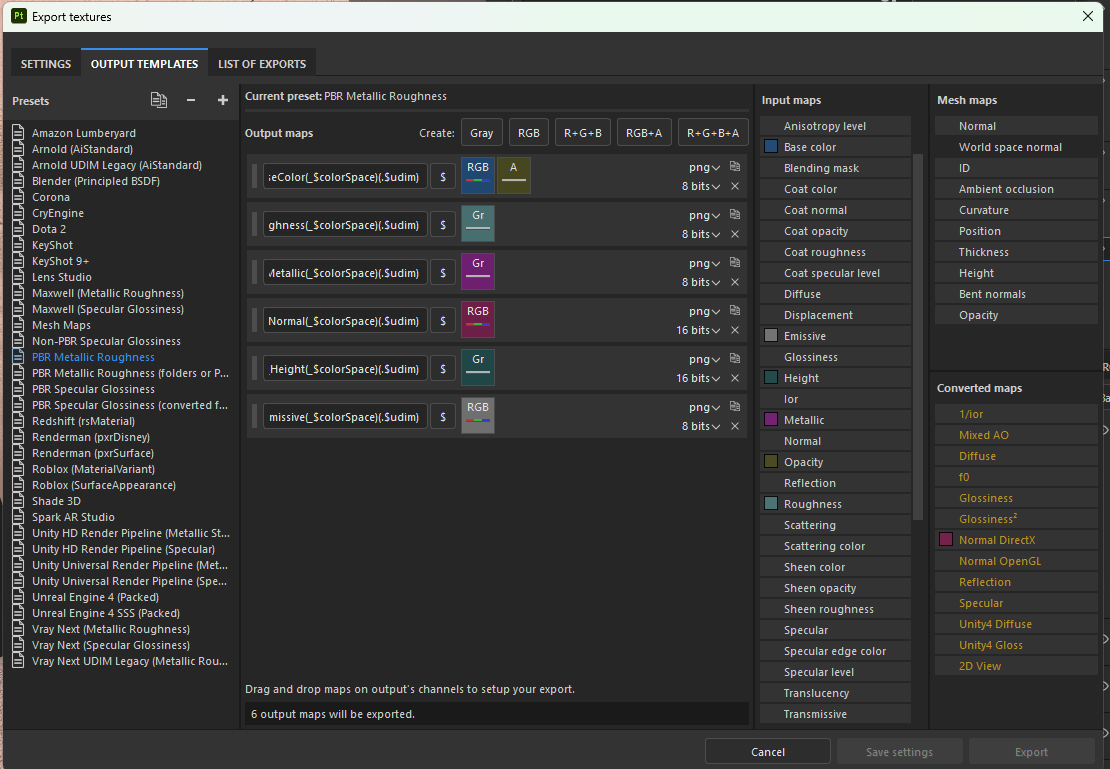
Also, by the way, you screenshotted your templates list but didnt show the template you had selected under 'Output Template'
Ah ok, I didn't understood! Here is what I have in the PBR Metallic Roughness section:
You have a Normal DirectX Converted Map plugged into your Normal Map. Daz Studio uses OpenGL normal maps, so you should not be using a template with DirectX as ouput set up. Your next question is going to be what to do next but honestly im not fully sure. I usually just use either the Normal channel or the Normal OpenGL in the Normal slot. Just see which one gives you proper result.
Diffeomorphic How to import via script?I'm going to make it automatically import blender after it detects an export from daz.
Course on creating skin texturesThank you very much!
lilweep said:
Maybe you are aware of this, but exporting Eyes and Mouth from Daz and importing these into your project is a waste of time. Better to do focus just on skin in one project.
Do you mean that I should import the mesh whith only the body itself, without the eye and the mouth? Since I didn't wanted to work on them, I first imported the mesh to Blender, and i created a new material (that I called "skin") contianing only the part of the body that have actually a skin... Maybe there would be simpler to do?
I never said that. I said you can convert height to normal (if you wanted to, but not that you should)
Ah, ok, I misunderstood.
The projection outwards from edge of map are set by padding value. You can pad to infinity or pad a set amount. It's fine.
I tried other padding but I got other weird results. Do you mean I should change the nuber on the right-hand of the padding section?
Also, by the way, you screenshotted your templates list but didnt show the template you had selected under 'Output Template'
Ah ok, I didn't understood! Here is what I have in the PBR Metallic Roughness section:
I have another question about the Cavity Texture of the tutorial (https://www.youtube.com/watch?v=s0DhvFML7oM). I created the Curvature generator as shown in the tutorial, but nothing happen, I can't see any effect on the material. I first thoght that is was because I used a Substance Paiter texture instead of an actual map to obtain the skin pores, so I insterted the G8M default bump maps on my charater, but I still can't see any effect of the curvature generator. Could you help me, please?
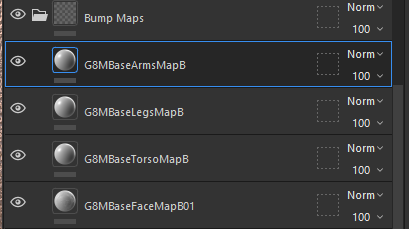
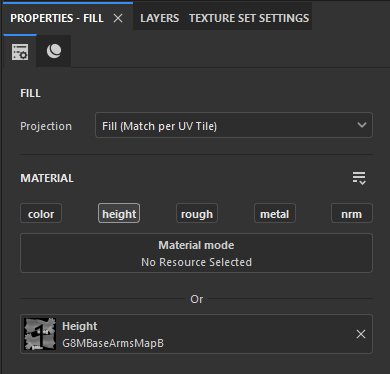
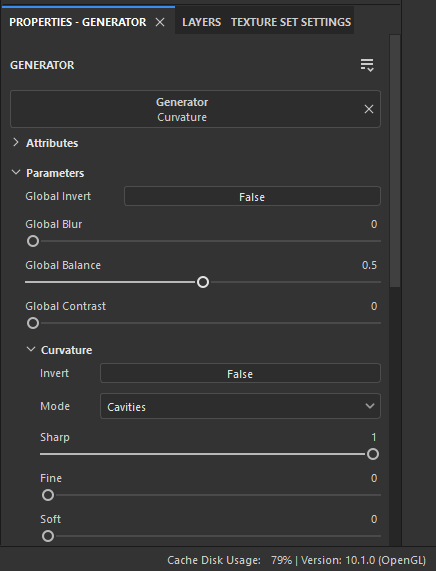
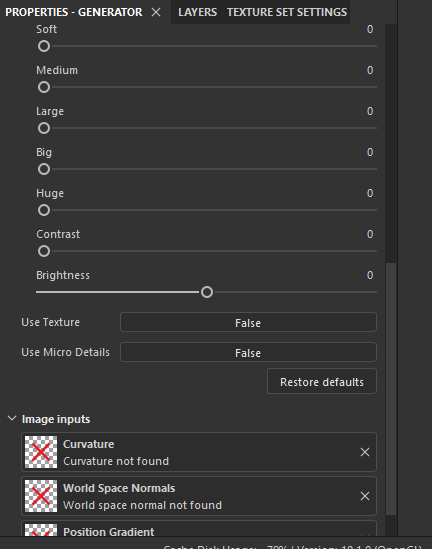
I made a short video showing what happens when I hide and unhide the curvature generator, and we can see that nothong happen...
https://workupload.com/file/5ucmTQkYsry
Thank you in advance!
Daz Studio 4.22[.0.x] Pro, General Release!DoctorJellybean said:
vaaern said:
Here is the saved zip file
Thanks.
You may have a corrupt database. There are 2 ways of dealing with that. The easiet way:
Start DS, click on the hamburger icon on the Content Library pane (see attached screenshot). On that menu, click on Content DB Maintenance. Select the bottom option (Reset Database) and click Accept. You'll get a warning about the loss of user data. You can click Yes if you want. Click Accept. When it's done, restart DS, repeat the steps to display the Content DB Maintenance dialog, and select the 4th option Re-Import Metadata. Accept. This could take awhile.
If that doesn't fix it, repeat but do not export the user data.
I hate to come back on this. I've been talking to support a few weeks ago and after trying just about everything, I still have the issue. The biggest thing I learned is that it's probably from the undo/redo stack that can't handle large memory sets. I did discover that my RAM wasn't running at the correct speed, but just now it crashed again. I have been cleaning my library to save some space, but it's just not working. It's really annoying having to save everytime I click on something in the scene tab.
Diffeomorphic Add-ons Version 5.0.0 ReleasedIn 4.2.1 "save/load settings" are moved to the addon tab if this is what you mean.
blender preferences > addon > daz importer
Yes the blender asset browser only supports bone animations, so it is limited as for morphs if they're not driven by bones. One way is to import the daz face controls for FACS, this way the FACS morphs are driven by bones and can be saved to the browser.
Creating a hanging, twisting roadway.dash2128 said:
Thanks! ...Both of you! I will work on that!
Also, I have a friend who is learning Blender, has been wanting me to try it out. This gives me a good chance to do just that, now that I have Blender set up to run. All I really know about Blender, is that- after only a quick glance, it reminds me of Hexagon. I would, actually, like to create things like 'winding roadways'- for example- that I could import back to DazStudio, and use with my D-files.
That sounds great ! Learning Blender will definitely bring you to next higher level !
I recorded a short video to show you how to make the road winding and hanging with Blender.
https://mega.nz/file/fXQ02T6T#zoCZ3gIHePDBE81bk8XPh7GblWrpL9o9RZ2A4x_ENB8
Creating a hanging, twisting roadway.Thanks! ...Both of you! I will work on that!
Also, I have a friend who is learning Blender, has been wanting me to try it out. This gives me a good chance to do just that, now that I have Blender set up to run. All I really know about Blender, is that- after only a quick glance, it reminds me of Hexagon. I would, actually, like to create things like 'winding roadways'- for example- that I could import back to DazStudio, and use with my D-files.
Daz 3D is part of

Connect
DAZ Productions, Inc.
7533 S Center View Ct #4664
West Jordan, UT 84084Licensing Agreement | Terms of Service | Privacy Policy | EULA
© 2026 Daz Productions Inc. All Rights Reserved.