-
~Problem with Millawa 8 Head morph~ (SOLVED)
avatar0319 said:
YEP! Can confirm it - the issue is gone now! Millawa head morph slider is working as it should be. Thank you for such a quick response, FenixPhoenix :)
Not a problem, thank you for confirming so quickly. I'll issue an update right away. Glad we managed to fix this so quickly and I apologize for the inconvenience the corruption caused!
PS: I've sent you a Private Message. :)
~Problem with Millawa 8 Head morph~ (SOLVED)YEP! Can confirm it - the issue is gone now! Millawa head morph slider is working as it should be. Thank you for such a quick response, FenixPhoenix :)
~Problem with Millawa 8 Head morph~ (SOLVED)PerttiA said:
Is it possible that there is a botched version on some server, do you get the very same file if downloading in the US and on the other side of the globe?
That is no corruption, but someone manually editing files and possibly inserting code to a wrong file... Except that part is referring to both products...
Not sure, but something must have indeed happened at some point during the process to submit the file. The thing is, the morph wasn't even kicking in, so it would've been apparent during testing that it wasn't working. But the whole process happened so long ago, it would be anyone's guess what happened or how. Hopefully the fix works, though.
Transfer Head Genesis follow OBJ HeadExport the base Genesis character to Blender and use vertex snapping and the shrinkwrap modifier to make the Genesis mesh conform to the head, then re-import the Genesis mesh as a morph.
~Problem with Millawa 8 Head morph~ (SOLVED)avatar0319 said:
Thank you for the answer, FenixPhoenix! But this is where it gets really weird. I just deleted, downloaded and re-installed HD Face Staples and Stitches for Genesis 8 Females with DIM - Millawa head morph still not working properly. Then I decided to download it right from my product library - got the .zip file, unpacked it and just looked at FSSF S04 without installing it. And yep, FHMMillawa8 is still there. I don't know what to think of it. One thing for sure - with HD Face Staples and Stitches installed I can't use Millawa head morph :'(
Oh, hold on, let me take another look because we were looking at different paths (this last screenshot will be helpful). Will check this with Esid and let you know what we find.
~Problem with Millawa 8 Head morph~ (SOLVED)Thank you for the answer, FenixPhoenix! But this is where it gets really weird. I just deleted, downloaded and re-installed HD Face Staples and Stitches for Genesis 8 Females with DIM - Millawa head morph still not working properly. Then I decided to download it right from my product library - got the .zip file, unpacked it and just looked at FSSF S04 without installing it. And yep, FHMMillawa8 is still there. I don't know what to think of it. One thing for sure - with HD Face Staples and Stitches installed I can't use Millawa head morph :'(
~Problem with Millawa 8 Head morph~ (SOLVED)avatar0319 said:
PerttiA was right. The culprit is... indeed "FSSF 04 Staples.dsf" from "HD Face Staples and Stitches for Genesis 8 Females"... For unknown reason his creator forget to change "id" and "name" in the file. Here's the thing - it refers to FHMMillawa8, yet it's parented to FSSF S04 Staples. Big thanks for help to PerttiA and everytone who tried to make my Millawa 8 working as it should be! I'll edit first post with the solution, so if anyone will ever have this problem he'll know what to do.
},
		{
			"id" : "FHMMillawa8",
			"name" : "FHMMillawa8",
			"parent" : "/data/FenixPhoenix/HD%20Face%20Staples%20and%20Stitches%20for%20Genesis%208%20Female/FSSF%20S04%20Staples/FSSF_S04_Staples_96.dsf#geometry",
			"presentation" : {
				"type" : "Modifier/Shape/Generated",
				"label" : "",
				"description" : "",
				"icon_large" : "",
				"colors" : [ [ 0.3529412, 0.3529412, 0.3529412 ], [ 1, 1, 1 ] ]
			},
			"channel" : {
I just downloaded a fresh install of the product in quesiton to check this problem. It's really weird, because I myself don't have any figure installed at any given time unless I'm making a morph specifically for that figure.
What I'm seeing on that file (FSSF S04 Staples.dsf) is as follows:
{
	"file_version" : "0.6.0.0",
	"asset_info" : {
		"id" : "/data/FenixPhoenix/HD%20Face%20Staples%20and%20Stitches%20for%20Genesis%208%20Female/FSSF%20S04%20Staples/Morphs/FenixPhoenix/HD%20Face%20Staples%20and%20Stitches%20for%20Genesis%208%20Female/FSSF%20S04%20Staples.dsf",
		"type" : "modifier",
		"contributor" : {
			"author" : "Giselle",
			"email" : "",
			"website" : ""
		},
		"revision" : "1.0",
		"modified" : "2021-01-19T21:01:02Z"
	},
	"modifier_library" : [
		{
			"id" : "FSSF S04 Staples",
			"name" : "FSSF S04 Staples",
			"parent" : "/data/FenixPhoenix/HD%20Face%20Staples%20and%20Stitches%20for%20Genesis%208%20Female/FSSF%20S04%20Staples/FSSF_S04_Staples_96.dsf#geometry",
			"presentation" : {
				"type" : "Modifier/Shape",
				"label" : "",
				"description" : "",
				"icon_large" : "",
				"colors" : [ [ 0.3529412, 0.3529412, 0.3529412 ], [ 1, 1, 1 ] ]
			},
			"channel" : {
				"id" : "value",
				"type" : "float",
				"name" : "Value",
				"label" : "FSSF S04 Staples",
				"auto_follow" : true,
				"value" : 0,
				"min" : -1,
				"max" : 1,
				"display_as_percent" : true,
				"step_size" : 0.01
			},
			"region" : "Face",
			"group" : "/Staples & Stitches",
			"morph" : {
				"vertex_count" : 96,
				"deltas" : {
					"count" : 0,
					"values" : [
					]
				}
			}
		}
	],
	"scene" : {
		"modifiers" : [
			{
				"id" : "FSSF S04 Staples-1",
				"url" : "#FSSF%20S04%20Staples"
			}
		]
	}
}
I would recommend to delete the product and re-download it to doubt check that it wasn't corrupted, somehow, by mistake. Just in case, how did you download the file before? I got mine through DIM.
marvelous designer alternativesif you are using Dforce you can honestly box model clothes in just about anything including Wings3D and drape it, export an obj then reimport that and use the transfer utility
Catty 8.1 Gender Fluid BundleThe head and body morph are definitely separate.
Catty 8.1 Gender Fluid Bundletsroemi said:
Gogger said:
I really do like the quality of this model. In this image I was just having a go at lighting and expression. And of course, both characters are 100% Catty.
Love that render! Would you mind sharing your lighting setup? It's beautiful!
I'd really love to get Catty, but I'm not so fond of the body. Can I split the head morph just like I would when, say, exporting a G3 head morph for G8? Is it the same process? I could do that.
Thanks, @tsroemi. The lights are : Render Studio 2.0 - Production Scenes | Daz 3D specifically the "Rembrandt" scene (if I recall correctly)
and the other items used are listed on the gallery image here: https://www.daz3d.com/gallery/user/6426613281456128#gallery=newest&page=1&image=1156510
I am not at my home computer right now, but I am PRETTY SURE the head and body morphs are separate.
Good luck!AIUTO...CHI CONOSCE L’ITALIANO? PARTE TREDICINella Gen 4 gli attributi maschili veninvano con i morph ++ se non ricordo male, nella Gen 3 non mi ricordo.
Correct Transfer Utility Setting for a Jester Hat? Help!Unfortunately this is a case where the transfer utility alone won't do the job - the further things are from the skin the more likely it is that further editing will be required. In this case it should probably get you close to select the horns with the Geometry Editor tool, then with the Node Weightmap brush tool active select teh head of the hat and in Tool Settings target the General Weights map - right-click in the Viewport>Weight Editing>Fill Selected, and set the value to 1.
Correct Transfer Utility Setting for a Jester Hat? Help!Hi everyone!
I'm semi-new to Daz, so please excuse any stupid questions. I have made a jester outfit (Genesis 8) for a cetain render I am working on - it is in two pieces: the headpiece (picture 1) and the body (picture 2). The body part is perfect and fits well, also conforming to any pose (using the transfer settings for full body), but I am having major problems with the headpiece. If I use the transfer setting for full body, whenever I pose the character, it deforms the mesh greatly (see picture 4) and if I use the short hair setting, it does not conform by the shoulder area (see picture 5). Is there any settings that I can use to fix this? Any help will be greatly appreciated, thanks.
Using clothing from the kids 4 on g8fDo the autofit path which will likely distort it. But if that doesn't quite work well enough for you, then...
Then take the original clothing and shape it to the G8 child figure. Export those clothes as a mesh, and import it as a shape morph (without distortion) on the G8 autofit version of the clothing. [This is one of the recommended paths for dealing with extreme morphs within the same figure. i.e. this is what FBM clothing fits are.]
Gen 8 vs 8.1 - ExpressionsFor those landing here, this worked for me based on the other posting info:
1 - Navigate to the morph directory in your Daz library: ..\data\Daz 3D\Genesis 8\Female 8_1\Morphs\Daz 3D
2 - rename the "Base Pose Head" and "Expressions" folders to something like "Expressions saved"
3 - Genesis expressions should now work after restart of Daz
Good luck
Transfer Head Genesis follow OBJ HeadOh you might interested in FaceGen. That has the ability to morph from a 3D obj. It is sold at Daz3D as well as from their own website.
Catty 8.1 Gender Fluid BundleGogger said:
I really do like the quality of this model. In this image I was just having a go at lighting and expression. And of course, both characters are 100% Catty.
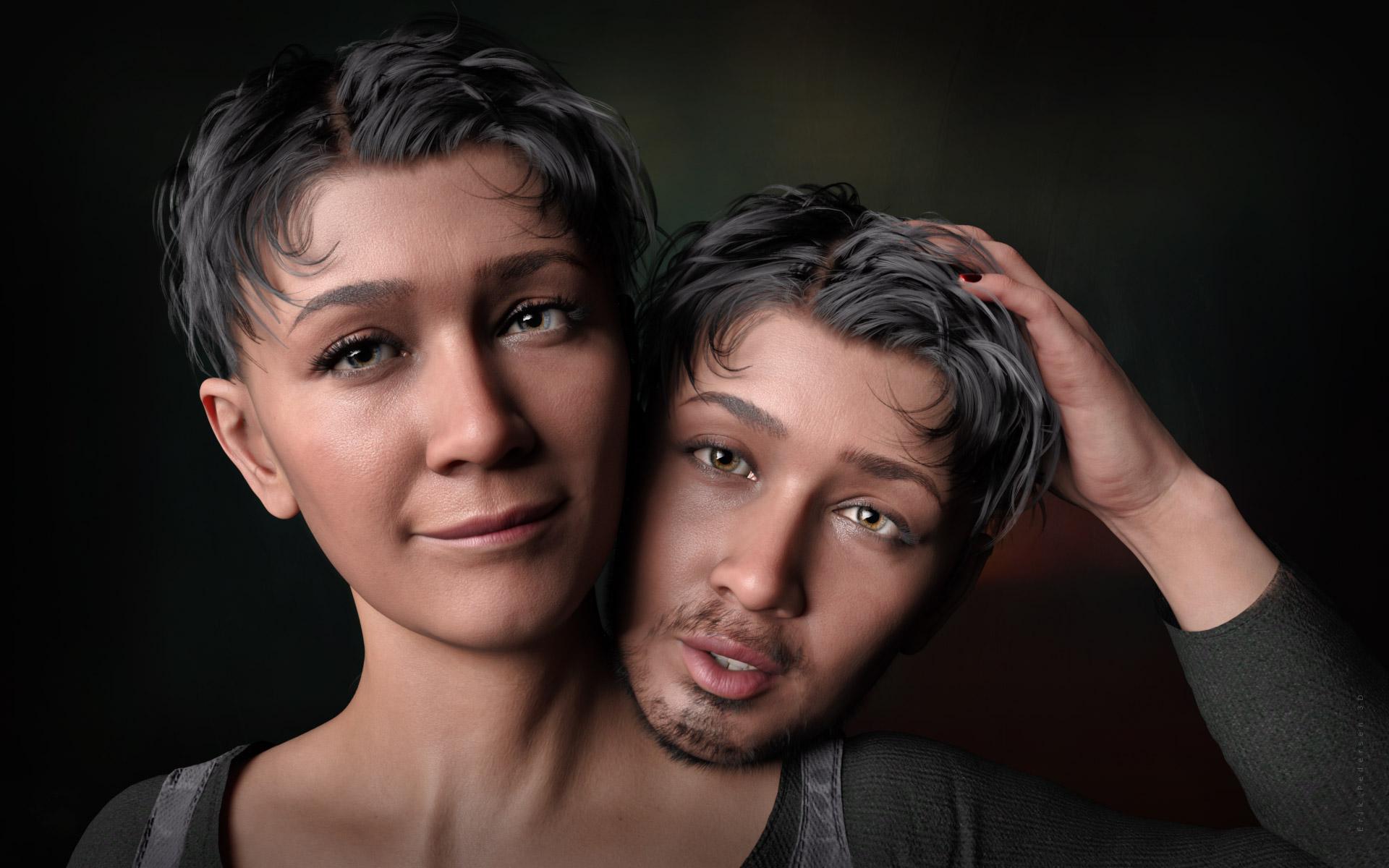
Love that render! Would you mind sharing your lighting setup? It's beautiful!
I'd really love to get Catty, but I'm not so fond of the body. Can I split the head morph just like I would when, say, exporting a G3 head morph for G8? Is it the same process? I could do that.
Skunk girl/skunkette for genesis 8 female anyone????There is no native G8F one I can find. The one in the store here: https://www.daz3d.com/furries-furs-skunk-and-squirrels is for a morph of A3. Which means it is possible to apply a similar morph to G8F, but not easy. You will need GenX2 and its A3 add-on, plus the G3F add-on, and then a convertor to G8F such as the RiverSoftArt one. It may be cheaper, instead, to commission someone like TritiumCG to do you a morph similar to the skunk & you do the texture yourself. TritiumCG has done a freebie A3 lookalike morph for G8F, so it's not a totally wild idea.
Sorry I can't help further.
Regards,
Richard.
Transferring Morphs Between Figures Tutorial - Released!Should not take that long to make a "converter" in a spreadsheet.
1. The morphs/characters are just lists of vertice deltas, those lists can be found in legible and editable form inside the morph files
2. When you have figured out, which line on the list moves which vertice on the source and found the corresponding line on the target figure, you already have all the information you need.One of the good things in DS is the fact that most of the files are basically text files that are not that difficult to understand.
Instead of trying to find some solution where you get the work done using several programs and hoping that the output is what you want, often the easier and faster method is editing the "code", and spreadsheets are very good at that - I could even build a 3D model for buildings and/or machines in a spreadsheet, you don't need a 3D modelling program for that. [Released] Character Converter from Genesis 2 Female to Genesis 8 Female [Commercial]
Dartanbeck said:
Aha! I was just watching your awesome video tutorial again and, Yes! It copies over the individual morphs on custom characters! That what I thought!
Question Answered!
In cart, hitting Check Out! :)
Thanks for this amazing product!
You're welcome! I am glad you figured it out. Yes, every morph is converted individually and can be dialed in/out individually.
Daz 3D is part of

Connect
DAZ Productions, Inc.
7533 S Center View Ct #4664
West Jordan, UT 84084Licensing Agreement | Terms of Service | Privacy Policy | EULA
© 2026 Daz Productions Inc. All Rights Reserved.