-
AIUTO...CHI CONOSCE L’ITALIANO? PARTE TREDICI
Io pure ho aggiornato, anzi sono stato "obbligato" a farlo, visto che uso l'orrido - per alcuni - Central che prima di caricare l'interfaccia col catalogo forza a far l'upgrade.
Naturalmente Iray non funzionava (dopo 0 secondi di rendering dava gli stessi per terminati); aggiornati i driver Nvidia all'ultima versione è tornato tutto a posto.
Sinora, e tocco tutto lo scaramenticamente toccabile, non ho avuto particolari problemi, forse un crash su una ventina d'ore di utilizzo.
Macchina più vecchia di una buona bottiglia di sherry, Windows 7 64-bit, 8 GByte RAM, 4 GByte VRAM.
going back to 4.16function said:
cridgit said:
Any back up of installers must include the plug-ins as well as the main application.
Thank you that is a VERY helpful reminder. I hadn't even considered I'd need to back those up too. You may have just saved me another bout of cursing :-)
Now could you please provide a detailed list and method on this backup? For example, from where to copy which files/folders? and how to step back after upgrade?
If you install through Daz Install Manager, open advanced settings (from the cog at the top-right) and this is where you can see where the files are downloaded to:
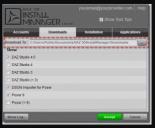 (Sorry this is so tiny, I lifted it from the documentation centre for DIM)
I think settings for Daz Central have something similar, but I've never used it so can't say.
ETA: these are the files I'm aware of that you need to backup:
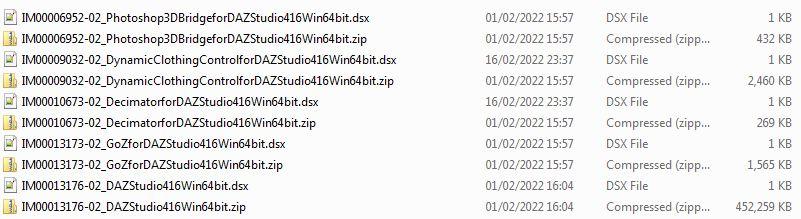
You may not have the DynamicClothingControl not the Decimator if you've never owned those products.
NB: This assumes it's the General Release you want to save the installers for - the Beta filenames are similar but say "PublicBuild" in their filenames. ETA: And the main software installer for the Beta starts IM00012000 not 13176.
If you then install the latest version and decide you want to go back, then for DIM you can simply copy those backed up installers back to where you found them and run DIM to reinstall the older version. I'm sorry but I really don't know how/whether you can do that in Daz Central.
Unable to find texturesdecimalpoint999 said:
This are screen shots of my settings.
I also just tried Resetting the content DB and reimporting the meta data. Same issue.
Ok, so you are logging in to DS... Remove the checkmark from "Automatically login with remembered credentials".
Logging in to DS is only needed for installing content within DS, with DAZ Connect and if that is what the user wants, then it is useless to use the other installation methods as DAZ Connect installations are overriding all other installation methods - DAZ Connect also uses a completely different location for installing content, which means the content is installed twice, taking twice the space (if also installed with DIM, DAZ Central or manually)
Unable to find texturesHow do you install content, using DAZ Install Manager (DIM), DAZ Central, manual installation or do you log in to DS and let DAZ Connect install content?
Iray Rendering - is SLI finally broken? (+some render artifacts)Sorry for the attention-grabbing title. However - either i'm doing completely wrong or there is some major stuff broken with the new Iray in Studio 4.20.0.2 release. Until the previous version, SLI did work as far as i can tell, even with memory pooling.
I am using 2 x RTX 2080 Ti with the latest Nvidia Studio Driver Version 511.65- Got the new release notification, so i upgraded via DIM
- Started a render, finished the render, started a render again -> DAZ Studio switches to CPU renderingSo i started to dig into the log files and found a plethora of error messages, which can be summarized by a central statement:
[WARNING] :: ..\..\..\..\..\src\pluginsource\DzIrayRender\dzneuraymgr.cpp(367): Iray [ERROR] - IRAY:RENDER :: 1.27 IRAY rend error: CUDA device 0 (NVIDIA GeForce RTX 2080 Ti): an illegal memory access was encountered (while launching CUDA renderer in <internal>:937)Using Iray rendering without SLI doesn't show this error message - several subsequent renders will stay on the GPU(s).
---
There are several other Iray related error messages which you can see in the attached log files. The reason i have omitted them in my above explanation is, that they seem to have no or a minor impact.
However the is one thing that startles me - it can be experienced when using "Matte Fog" and "Atmospheric Ground Fog": There is a difference in applying the fog in different areas of the render. Also there are some ghosts in the image. Please see the attached images below.So my questions are.
- Is anybody out there with a SLI setup who is experiencing these memory error messages?
- Are the render artifacts caused by my setup or is this a common thing which can be seen by other users?Thanks a lot to anybody who is willing to have a look into my problem!
Help with external GPU for macintoshAt long last, problem solved!
After long sessions with Apple Care, Daz tech and various forums I did a clean install of Monterey on my 2018 MiniMac. Installed DS4.20 with IM and all is well. However, my 2013 iMac still did not render. Instead of doing a clean instal on my iMac, I tried downloading DS 4.20 with IM and it cured the problem. In the past I have always used Daz Connect for installation. I really loved that app but unfortunately it now creates very serious problems.......... Or does DS create problems for DazCentral? ......Hmmm! See Jay Versluis article about DazCentral: https://www.versluis.com/2020/06/daz-central/
Can't find "Daz to Blender" Add on in blenderkyleburk98 said:
Ok guys I have Figured out the "Not being able to find or open the Daz To Blender Add on" in blender.
So i used daz central installed the Daz to Blender Add on or Daz to Blender Bridge what ever you want to call it. what happened to me was it installed to the wrong location.
It installed to "C:\Users\PHNX\AppData\Roaming\Blender Foundation\Blender\BLENDER_VERSION\scripts\addons\DTB"
I copied everything in the DTB folder went back a few folders to "3.0" or the actual version you have installed.
Navigate to scripts addons CREATE a DTB folder and paste what you copied into that folder.
open blender go to add on's and the DazToBlender add on should now show up in blender hope this helps.
Blender Version: 3.0
Daz Version : 4.16 Pro
This worked, thanks. (BTW you can just copy the DTB folder from one version (in addon\) to another)
How to get Genesis 8 expressions working on Genesis 8.1Hello all, hope you guys are doing okay. I'll try and keep this as short as I can. Since I downloaded the lates update yesterday, my genesis 8 expressions does not work on my Genesis 8.1. Usually the old method fixes things. The Base Pose Head and all the other files are in folders. I used the Daz Central for downloading. Any ideas how to fix this? Has anyone else this issue?
Stay well and stay creative! 83Help with getting Daz to update after making a change to my Daz CentralGordig said:
That looks like the install path for the program. I mean the location to which Central downloads the packages before installing them.
Please forgive the basic and maybe dumb question. How do I go about finding that? I looked around in the Daz Central files on my C drive, but nothing stood out.
Edit:
Could it be this?
E:\External Drive Daz Assets\Applications\Data\DAZ 3D\Content Database\ContentCluster
I uninstalled one item through daz central and did a search on my C and E drive but was unable to locate where it is temporarily stored.
Daz Studio and OneDrive ConcernsI used Daz Central before.
Second Daz3D on C drive or onto external driveRichard Haseltine said:
Daz Studio has two different release channels (well, at least three, but at least one of those is not available to most users) - currently the Public Build (beta) and General Release are the same but if you still have the installers for an older version of one or both you could update the other channel. You can also back up the zips (application, plug-ins, and probably the Default resources) from Install Manager's Downloads folder (this isn't an option with Daz Central, or if Install Manager is set to delete files after installation) and then if you want to recet to an older version put them back in place of the current files and, with Install Manager working offline so it can't see the newer version, install them from the Ready To Install tab.
Thank you Richard I am going to try the beta version it appears the best method.
Link to Studio 4.20 brokenDiomede said:
It is 'Hidden' in my Install Manager. Why? Is there a reason I should not be downloading it with DIM? Windows Users? Windows users pre-11? Direct me to Connect?
I attach my settings.
You must have hidden it at some point in the past. I have never seen anything hidden that I did not myself hide.
Studio cannot be installed with Connect. I must be done with DIM (or Central?) or use the standalone installer (exe). If DIM is your preferred method of installation for content, use it to install Studio (shut it down first). Any dependent plugins will also need to be updated or they will no longer work. They will have "4.20" in the product name, like "Measure Metrics for DAZ Studio 4.20+".
Second Daz3D on C drive or onto external driveDaz Studio has two different release channels (well, at least three, but at least one of those is not available to most users) - currently the Public Build (beta) and General Release are the same but if you still have the installers for an older version of one or both you could update the other channel. You can also back up the zips (application, plug-ins, and probably the Default resources) from Install Manager's Downloads folder (this isn't an option with Daz Central, or if Install Manager is set to delete files after installation) and then if you want to recet to an older version put them back in place of the current files and, with Install Manager working offline so it can't see the newer version, install them from the Ready To Install tab.
Link to Studio 4.20 brokenNath said:
Stargazey said:
It seems there's a problem with that link. It should be https://www.daz3d.com/dazcentral
AFAIK it's no longer possible to download DS, other than via DAZ Central.
The most recent version of Studio is available in your product library - filter by "DAZ studio 4." (or perhaps this link works as well: https://www.daz3d.com/downloader/customer/files#prod_13176)
No need to use DAZ Central
It also should be available in Install Manager.
Link to Studio 4.20 brokenStargazey said:
It seems there's a problem with that link. It should be https://www.daz3d.com/dazcentral
AFAIK it's no longer possible to download DS, other than via DAZ Central.
The most recent version of Studio is available in your product library - filter by "DAZ studio 4." (or perhaps this link works as well: https://www.daz3d.com/downloader/customer/files#prod_13176)
No need to use DAZ Central
Link to Studio 4.20 brokenIt seems there's a problem with that link. It should be https://www.daz3d.com/dazcentral
AFAIK it's no longer possible to download DS, other than via DAZ Central.
AIUTO...CHI CONOSCE L’ITALIANO? PARTE TREDICIKainjy said:
E' appena uscito un update per i G8...vi farò sapere come vanno ma già le anteprime nell'Install Manager sono fuori misura....
EDT: se lo installate dall'Install Manager DAZ non lo riconosce.. dovete scaricarlo da DAZ Central
Io non lo scarico manco morto.
Per quel poco che lo uso, mi serve che G8 carichi in pochi secondi con migliaia di morph installati e non in ore con due morph in croce.
 Sono stato davvero fortunato ad avere ancora in un angolino quel vecchio backup dell'installazione di G8 Pre-FaceTransfer!AIUTO...CHI CONOSCE L’ITALIANO? PARTE TREDICI
E' appena uscito un update per i G8...vi farò sapere come vanno ma già le anteprime nell'Install Manager sono fuori misura....
EDT: se lo installate dall'Install Manager DAZ non lo riconosce.. dovete scaricarlo da DAZ Central
Help with getting Daz to update after making a change to my Daz CentralThat looks like the install path for the program. I mean the location to which Central downloads the packages before installing them.
Daz immediately quits on launch. Running Mac OS MontereyAnneWertheim said:
Richard Haseltine said:
AnneWertheim said:
I started out with DIM when I started using DAZStudio and switched to DAZ Central may be a year or two ago.
Daz Central is essentially a skin for DIM, the installation helper (which handles things needing elevated privileges) is the same for both.
What can I do to install or reinstall DAZ Studio?
You need to check ther permissions as I said - I'm not familiar with Macs but presumably DIMHelper needs to eb able to write application code and data.
Daz 3D is part of

Connect
DAZ Productions, Inc.
7533 S Center View Ct #4664
West Jordan, UT 84084Licensing Agreement | Terms of Service | Privacy Policy | EULA
© 2026 Daz Productions Inc. All Rights Reserved.