-
Camera Translation: save parameters?
takezo_3001 said:
marble said:
takezo_3001 said:
marble said:
takezo_3001 said:
Do what I do, just use puppeteer to save your cameras and simply save your scene as normal, or save a puppeteer preset to apply to as many new cameras as you want!
Puppeteer is one of those DAZ utilities that I tried a couple of times and couldn't get any joy with it. I probably need to watch a tutorial on how it works but that sliding between dots seems so imprecise to me that I gave up on it quickly. How I would use it to save camera presets is quite beyond me.
Anyhow, the regular way of saving the camera preset seems to work just fine now - I can't imagine why it didn't work for me previously.
I'm glad it worked out for you, as far as using puppeteer for cameras, all you need to do is select your camera and if your cam is not selected just go to puppeteer's drop-down menu and select the camera, and go to puppeteer and make a dot... that's it, your camera state is stored, that includes the cam settings such as FOV and focal length!
I use puppeteer for all my poses, and I can transfer those poses between characters!
What about saving for other scenes though? Where (and how) are the dots stored?
Wait, I'll post a quick tut I'll edit it in when I'm done:
Very kind, thank you.
Camera Translation: save parameters?marble said:
takezo_3001 said:
marble said:
takezo_3001 said:
Do what I do, just use puppeteer to save your cameras and simply save your scene as normal, or save a puppeteer preset to apply to as many new cameras as you want!
Puppeteer is one of those DAZ utilities that I tried a couple of times and couldn't get any joy with it. I probably need to watch a tutorial on how it works but that sliding between dots seems so imprecise to me that I gave up on it quickly. How I would use it to save camera presets is quite beyond me.
Anyhow, the regular way of saving the camera preset seems to work just fine now - I can't imagine why it didn't work for me previously.
I'm glad it worked out for you, as far as using puppeteer for cameras, all you need to do is select your camera and if your cam is not selected just go to puppeteer's drop-down menu and select the camera, and go to puppeteer and make a dot... that's it, your camera state is stored, that includes the cam settings such as FOV and focal length!
I use puppeteer for all my poses, and I can transfer those poses between characters!
What about saving for other scenes though? Where (and how) are the dots stored?
Wait, I'll post a quick tut I'll edit it in when I'm done:
Here it is... hope it helps!
Transfer characters created using the morph sliders between G3 and G8Leana, thanks to you I just figured it out! There was indeed a morph controller setting the values of other morphs.
One of my G8 characters uses a custom made age preset which adjusts all the Youth Morphs at once. When I set that preset to zero and then re-set the Youth Morph values to how they were, I was able to load the character in both G3 and G8 'full body.'
Now I know what to look for, I can see if there's anything similar is interfering with loading G3 to G8.
Transfer characters created using the morph sliders between G3 and G8Leana said:
G3 and G8 equivalent morphs may not all have the same technical name which is used by the preset. At a guess, transferred morphs have a special prefix so they don't risk overriding existing morphs with the same technical name, for example, which would explain why a preset made for the G3 version would not apply to G8 version. I think at least some character converters can convert presets too.
No idea why a preset would apply a different value to some morphs though... Unless maybe there's a morph controlling that one which was set by another value in your preset?
Also, the fact that both figures have morphs called the same in their base morphs packs doesn't mean that the result of using those morphs on both figures is exactly the same. The base shape is different, for one thing, even if G3 and G8 base shapes are close. So even if you apply the same value to the morphs on both figures you're likely to end up with a character which is different, unlike with a character transfer.
I thought the characters would look different too, but when I put a G3 and G8 character side by side with exactly the same morph slider settings and the same materials, they look quite similar. The only slight difference is in the head shaping parameters if the G8 character uses the 'Youth Head Width' morph from the Growing Up bundle. The bundle for G3 does not have that particular morph. So the G3 version of the character has a slightly rounder head.
The issue for me is why some of my saved shaping presets can work equally well on both G3 and G8, while others do not. If there was a prefixing issue, then surely the attempt would be consistent with all characters. It would either work for all characters or it would not.
Ironically, if I save the head shaping and body shaping parameters seperately, I can then apply a G8 created shape to G3 (or a G3 created shape to G8). But saving the shaping preset 'full body' is hit and miss. I think there must be something in the body slider morphs which is causing the issue, so I will just have to work through them when I can.
For now though, it was just a fun experiment to see what would happen.
Transfer characters created using the morph sliders between G3 and G8G3 and G8 equivalent morphs may not all have the same technical name which is used by the preset. At a guess, transferred morphs have a special prefix so they don't risk overriding existing morphs with the same technical name, for example, which would explain why a preset made for the G3 version would not apply to G8 version. I think at least some character converters can convert presets too.
No idea why a preset would apply a different value to some morphs though... Unless maybe there's a morph controlling that one which was set by another value in your preset?
Also, the fact that both figures have morphs called the same in their base morphs packs doesn't mean that the result of using those morphs on both figures is exactly the same. The base shape is different, for one thing, even if G3 and G8 base shapes are close. So even if you apply the same value to the morphs on both figures you're likely to end up with a character which is different, unlike with a character transfer.
Transfer characters created using the morph sliders between G3 and G8This again may seem like a really stupid question. I thought I would experiment and see if I could load some of my custom G8 characters to G3 and likewise, my saved G3 character shapes to G8.
The characters in question have all been 'dialed' using the morph shaping sliders. I have the same morph shaping parameters in both G8 and G3 (such as the standard body morphs and the Growing Up youth morphs), so in theory there's no reason why a character shaping preset created in G3 cannot be loaded into G8. Similarly for a shape created in G8 to load in G3.
My process is to create a character using the morph sliders, and then save as a shape preset.
Then I load up a figure of a different generation and apply that saved preset to the figure.
I got mixed results. Sometimes the characters loaded correctly and looked practically identical - especially after applying the same materials presets. However, others do not. Instead, when the morphs are loaded they are completely random.
To give you an example: I created a G8 character which has a Youth Morph setting of 53. When I save that shape preset and apply it to G3, the Youth Morph setting is something like -39. Completely random.
Other character shapes though are not an issue and load between G3 and G8 correctly. Now, like I said, all these characters are using the same set of morphs, so I cannot figure out why some would load correctly and others not. All the shaping presets are saved in exactly the same way so it cannot be to do with that. Neither can it be to do with a particular morph package, because otherwise all saved presets would either work or they would not.
I also attempted the morph transfer utility (edit -> figure -> transfer utility) to see if I could transfer the morph settings of a G8 shape to a G3 figure. I used the instructions provided in this thread as a guide: https://www.daz3d.com/forums/discussion/177246/basic-tutorial-for-transferring-genesis3-female-morphs-to-genesis8-female Obviously in this case my source was G8 and my target was G3, with a G8 clone.
However, again, the slider settings did not transfer. I did however discover I could transfer the actual shaping morphs from G8 to G3 and from G3 to G8, which will be useful in the future. (Though in this case, I would like to transfer two or three custom morphs created for G3 to G8 and not the whole lot)
So, does anyone know why some saved shape presets load correctly on a different generation figure and others do not? Also, is there a simple way of doing this that I have overlooked? Surely if the morph sliders are present in both G3 and G8, the shape should transfer between these generations easily. But it seems some work while others do not. Those that do not often put random values in the morph sliders.
Camera Translation: save parameters?takezo_3001 said:
marble said:
takezo_3001 said:
Do what I do, just use puppeteer to save your cameras and simply save your scene as normal, or save a puppeteer preset to apply to as many new cameras as you want!
Puppeteer is one of those DAZ utilities that I tried a couple of times and couldn't get any joy with it. I probably need to watch a tutorial on how it works but that sliding between dots seems so imprecise to me that I gave up on it quickly. How I would use it to save camera presets is quite beyond me.
Anyhow, the regular way of saving the camera preset seems to work just fine now - I can't imagine why it didn't work for me previously.
I'm glad it worked out for you, as far as using puppeteer for cameras, all you need to do is select your camera and if your cam is not selected just go to puppeteer's drop-down menu and select the camera, and go to puppeteer and make a dot... that's it, your camera state is stored, that includes the cam settings such as FOV and focal length!
I use puppeteer for all my poses, and I can transfer those poses between characters!
What about saving for other scenes though? Where (and how) are the dots stored?
Looking for an outfit anything like this (Sylvie from Loki) Solved KindaI'm on another Loki mission, now I'm looking for an outfit for Sylvie from the Loki series. I know I'm not going to get anything exact, but does anybody know of anything I could kitbash to try to get close to this? It's a top, pants, belt and cloak. Pants shouldn't be too hard I hope, but the rest is going to be difficult. Any ideas?
***Ok, so here's what I ended up doing. I used the top, jacket and gloves from Sci-fi Action Outfit for Genesis 8 Female(s), the pants and boots from Bounty Huntress Outfit for Genesis 8 Female(s), the cape from dForce Nkea Outfit for Genesis 8 Female(s), hair is Wicker Bob and the magic from SY Magnificent Magic Genesis 8. The crown is a freebie from GMS on Renderosity, it's called Kid Loki's Helmet. The character I'm using looks nothing like her, but I haven't been able to morph a better one yet. Green fabric shader on the cape, and a (crappy) custom-made texture on the jacket to add the gold half-circle. Just incase anybody wants to try to make any Sylvie art.
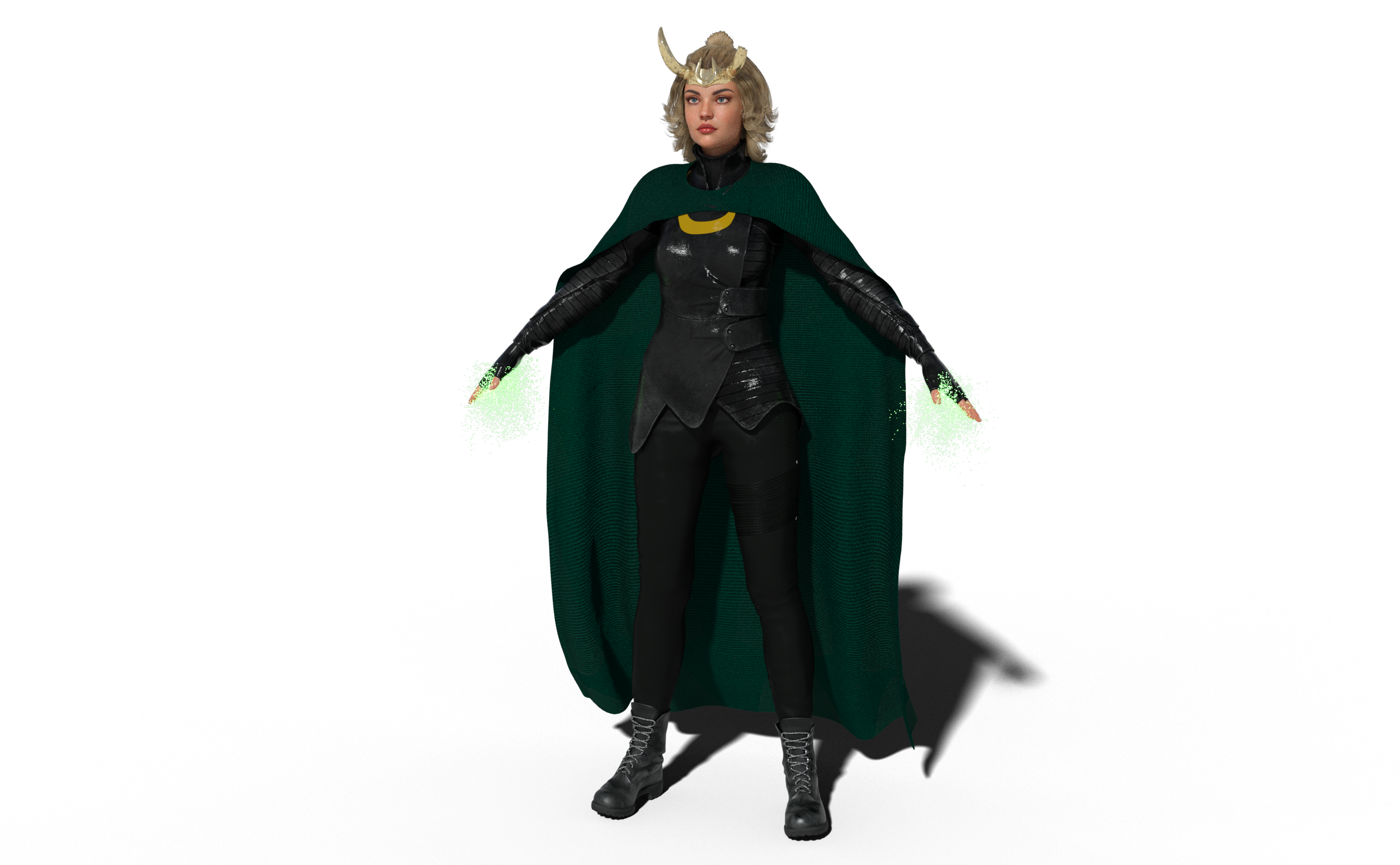
If anybody finds anything that works better, please post here to let me know, but I think I'm pretty happy with this!
Camera Translation: save parameters?marble said:
takezo_3001 said:
Do what I do, just use puppeteer to save your cameras and simply save your scene as normal, or save a puppeteer preset to apply to as many new cameras as you want!
Puppeteer is one of those DAZ utilities that I tried a couple of times and couldn't get any joy with it. I probably need to watch a tutorial on how it works but that sliding between dots seems so imprecise to me that I gave up on it quickly. How I would use it to save camera presets is quite beyond me.
Anyhow, the regular way of saving the camera preset seems to work just fine now - I can't imagine why it didn't work for me previously.
I'm glad it worked out for you, as far as using puppeteer for cameras, all you need to do is select your camera and if your cam is not selected just go to puppeteer's drop-down menu and select the camera, and go to puppeteer and make a dot... that's it, your camera state is stored, that includes the cam settings such as FOV and focal length!
I use puppeteer for all my poses, and I can transfer those poses between characters!
The We Will Miss You, Chohole Complaint Threadcertaintree38 said:
I have some absurd grocery delivery stories myself... People delivering my groceries hours late "because they were waiting for a wire transfer," or showing up with kids (which is pretty sad, imo, because they couldn't find/afford childcare), or marking themselves as arrived and my food as delivered when they were in fact lost two miles away. The problem with them saying they've arrived is that you can no longer call them to give them directions to the right house. It's very frustrating. One guy spent half an hour parked in my driveway after dropping off my food (and moving it a couple of times. At first I thought he was stealing it! But now I think he set the bags on the front steps, thought better of it, moved them to the porch, then read the note and moved them back) and it really creeped me out. I asked him what the deal was, and he said he was having trouble with the app. So I told him to call support (I have done some deliveries with my husband and there is a support line that picks up right away for drivers). He then proceeded to pull out of my driveway and park along my neighbor's lawn and stayed there for another 15 minutes. I was pretty surprised ( and still kind of creeped out). I'd never had an issue support couldn't solve in 5. And one time! Well this person got thier own bags mixed in with mine and inadvertently dropped off some brand new Calvin Klein pants (maybe six pairs, all with tags) along with a bag stuffed full of ramen. I tried getting into contact with them. When that failed, I held onto it for months, hoping they would come back to get their stuff. These days, I'm slowly eating the ramen and looking to give the pants away. Luckily, these kinds of things are the exception, not the rule. The worst that's happened lately is the driver not reading the note on my account and leaving the bags in the wrong spot.
...if you have it in your area, several of the major market chains have their own delivery services that are a bit more reliable and less sketchy, The rub is you usually need to make a minimum order (often 50$) to use the service.
G8F: Close right eye deforms teeth.margrave said:
If you open a property's options, you'll see two tabs. One is "Controllers", the other is "Sub-Components". A controller tells you which other properties are manipulating the current one, and a sub-component tells you which other properties the current one is manipulating.
Check and see if "Eyes Closed" is driving another property which it shouldn't.
If you need to, you can use the Property Heirarchy to remove the controller/sub-component.
How to remove and adding controller/sub component information ? Just edit in DAZ or need external editor ? I saw your post about toon mom and I think I have similar problem with my custom morph ( not Toon Mom specific)
AIUTO...CHI CONOSCE L’ITALIANO? PARTE TREDICIImago said:
Silvhe said:
Anfy said:
Siamo sicuri che ci sia stato un avanzamento tangibile in tutti questi anni?
Ti posso assicurare che sì, di avanzamenti ce ne sono stati. Non so se già eri entrato nel settore all'epoca, ma ti ricordi le spalle di V3 e M3? O come si piegavano le gambe di V4 alle anche? C'erano una pletora di morph (io avevo quelli di Meipe) per far sembrare umana V4 quando appena si spostava dalla posa ad "A".
Mettere seduta una con la gonna era quasi impossibile, per non parlare dei capelli che se appena inclinavi la testa diventavano "leggermente" improbabili. Già con la comparsa dei primi vestiti dinamici di Optitex le cose hanno cominciato a migliorare, poi con dForce siamo passati proprio su un altro pianeta.
Iray invece non è il massimo come motore di rendering, sinceramente preferivo il buon vecchio Luxrender con Reality che faceva da interfaccia e da convertitore dei materiali, peccato sia praticamente morto. Speriamo in Filament...
Su IRay sono decisamente d'accordo, è assolutamente un motore balordo con richieste assurde per quello che fa.
Però... Impossibile posare gli abiti di V4? Mai sentito parlare di INJ Injection? D-Former Spawned Morphs? O utilizzo del rig interno degli abiti? Io in tutto il tempo che l'ho usata non ho mai avuto grossi problemi con i vestiti, a parte quelli davvero strani e complessi. Ricordo una gonna che aveva venti "handler" e tutti litigavano con tutti gli altri... Quella sì che era impossibile da usare!
Gli abiti che si "conformano" (soliti termini strani della grafica 3D) in tanti casi vanno più che bene, in alcuni altri invece ti fanno schiattare per ottenere qualcosa di decente. Non so se hai mai provato a fare quello che dicevo, mettere seduta una con la gonna senza usare dForce... senza dubbio puoi metterti a inserire d-formers a go-go e forse (forse) ottieni qualcosa di guardabile. Con dForce invece ottieni risultati migliori con molto meno sbattimento. Non credo che si possa ottenere qualcosa di simile all'immagine sotto senza dForm:
https://www.deviantart.com/silvinx/art/Railway-trip-751293440
Need Fixing! G8F Figures Overweight/Chubby when loaded into a scene.
Thank youPerttiA said:The morph files for the Figure/Prop Assets you saved should be in;
...\Data\DAZ 3D\Genesis 8\Female\Morphs\[the name you gave the folder]\
Transfer utility stuck at 22% every timeI'm not sure i follow the workflow - if you are using the Transfer Utility then there is no need to use Figure Setup at all. Have you tried just importing the OBJ and running the Transfer Utility?
Transfer utility stuck at 22% every timeSo I just spend 2 days making a lovely garment in Marvelous desginer, and saved it with the UV correct and thin and welded setting, and Daz studio size settings.
My problem is when I get to Daz Studio, to fit the clothing, I do the Figure setup, copy the gemority the from the selected figure, the figure is same size and shape as the one in Marvelous Desginer. I then import my OBJ. and and delete the bits i don't want and delete the figure, so i am left with just the garment, with correct parts. I have apply subD and Launch Transfere Wizard ticked, as I always do, and it works fine. but soon as it hits 22% it freezes and does nothing. I have had this problem but the work around, is not working this time, and its just crashing. I have read the forums, and it would seem that no one is wanting help this, other than show us your logs and then we tell you the logs are wrong, but no offer any support or advice on how to fix the problem in first place. there is like 10 posts like this, and none of them seem to have any solutions or advice, just asking for logs. I get that it helps, but seriously, why it the transfere utlity crashing the whole program rather than just saying failed!
I have spend 3 hours trying to fix the problem and still can''t find a solution, can any one help? maybe support, might be able to help other than asking for logs.....The We Will Miss You, Chohole Complaint ThreadI have some absurd grocery delivery stories myself... People delivering my groceries hours late "because they were waiting for a wire transfer," or showing up with kids (which is pretty sad, imo, because they couldn't find/afford childcare), or marking themselves as arrived and my food as delivered when they were in fact lost two miles away. The problem with them saying they've arrived is that you can no longer call them to give them directions to the right house. It's very frustrating. One guy spent half an hour parked in my driveway after dropping off my food (and moving it a couple of times. At first I thought he was stealing it! But now I think he set the bags on the front steps, thought better of it, moved them to the porch, then read the note and moved them back) and it really creeped me out. I asked him what the deal was, and he said he was having trouble with the app. So I told him to call support (I have done some deliveries with my husband and there is a support line that picks up right away for drivers). He then proceeded to pull out of my driveway and park along my neighbor's lawn and stayed there for another 15 minutes. I was pretty surprised ( and still kind of creeped out). I'd never had an issue support couldn't solve in 5. And one time! Well this person got thier own bags mixed in with mine and inadvertently dropped off some brand new Calvin Klein pants (maybe six pairs, all with tags) along with a bag stuffed full of ramen. I tried getting into contact with them. When that failed, I held onto it for months, hoping they would come back to get their stuff. These days, I'm slowly eating the ramen and looking to give the pants away. Luckily, these kinds of things are the exception, not the rule. The worst that's happened lately is the driver not reading the note on my account and leaving the bags in the wrong spot.Saving All My Work To Edit Later.Yes maybe not explaining this very good sorry, you see i am using a body of a bear without the head and attaching a G8 male head with Face transfer on it, also am using Hairstrand on bear body and hiding the geometry of head, and hiding geometry of G8 male body from neck down. plus i have imported a necklace and crown, when i save all this work, and later reload it all that loads is the G8 male head with the Face transfer on it but the bear body and hairstrand is not loaded. thanks for helping. now what iam doing is render all the poses i need and if i have to do everything again its ok i am getting quicker at it. i just thought there must be a way or maybe Daz dont like mixing characters and chopping parts off. again thank you
In Search of This Female CharacterI think Sabby Shania is close (https://www.renderosity.com/rr/mod/bcs/shania-for-victoria-7-and-genesis-3/115544/). Though to my eye the character face looks a bit 'sharper' than pure Sabby, possibly FWSA (https://www.renderosity.com/rr/mod/bcs/fwsa-makena-for-victoria-7-and-genesis-3/121172/ ? Maybe.. dunno. Not convinced.) The extreme 'sharp' end of character shapes is 'Noosha; https://www.renderosity.com/rr/mod/bcs/fwsa-noosha-for-genesis-3-female/120967/, and I do think the character is part way on that spectrum from pure Sabby to 100% Noosha. Getting to G8F is easy with RiverSoft Art's morph transfer - I've a nice G8F 'version of Noosha'.
Regards,
Richard.
AIUTO...CHI CONOSCE L’ITALIANO? PARTE TREDICISilvhe said:
Anfy said:
Siamo sicuri che ci sia stato un avanzamento tangibile in tutti questi anni?
Ti posso assicurare che sì, di avanzamenti ce ne sono stati. Non so se già eri entrato nel settore all'epoca, ma ti ricordi le spalle di V3 e M3? O come si piegavano le gambe di V4 alle anche? C'erano una pletora di morph (io avevo quelli di Meipe) per far sembrare umana V4 quando appena si spostava dalla posa ad "A".
Mettere seduta una con la gonna era quasi impossibile, per non parlare dei capelli che se appena inclinavi la testa diventavano "leggermente" improbabili. Già con la comparsa dei primi vestiti dinamici di Optitex le cose hanno cominciato a migliorare, poi con dForce siamo passati proprio su un altro pianeta.
Iray invece non è il massimo come motore di rendering, sinceramente preferivo il buon vecchio Luxrender con Reality che faceva da interfaccia e da convertitore dei materiali, peccato sia praticamente morto. Speriamo in Filament...
Su IRay sono decisamente d'accordo, è assolutamente un motore balordo con richieste assurde per quello che fa.
Però... Impossibile posare gli abiti di V4? Mai sentito parlare di INJ Injection? D-Former Spawned Morphs? O utilizzo del rig interno degli abiti? Io in tutto il tempo che l'ho usata non ho mai avuto grossi problemi con i vestiti, a parte quelli davvero strani e complessi. Ricordo una gonna che aveva venti "handler" e tutti litigavano con tutti gli altri... Quella sì che era impossibile da usare!Standalone into Carrara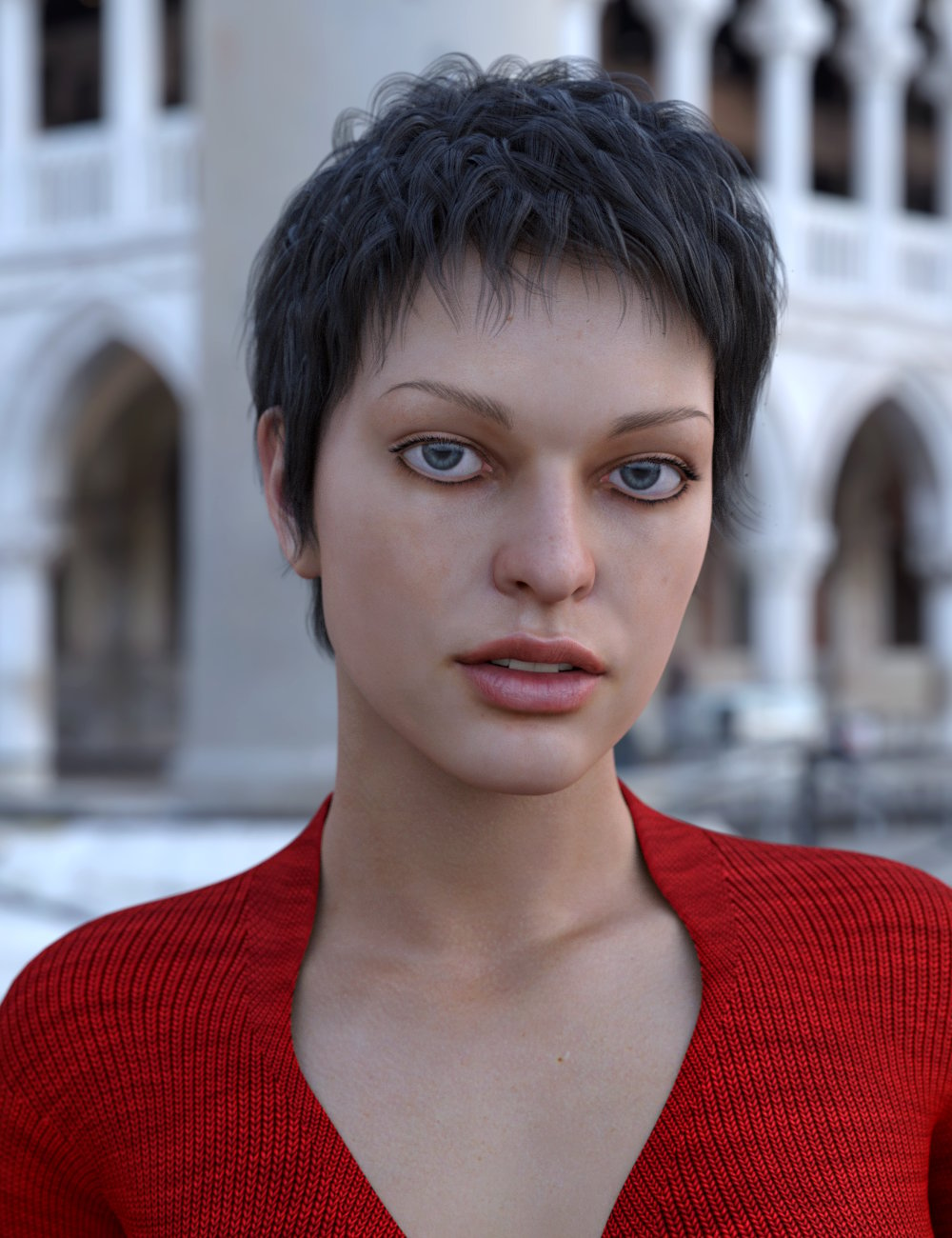 Anyone with woes about not being able to run Genesis 8.1 properly in Carrara, just know that Vyusur's rigging structures are truly professional and complete. Very articulate!
I think it's also a big bonus that she doesn't like it when the joints don't bend properly - so we can always expect excellent results from her!
I'm just a poor boy, so I only have Janna so far, but she is Excellent! Her rigging is incredible!
She mentions that she'd always rather adjust joint rotations by using the bones of the rig instead of using morph dials, but the morph/pose dials she includes are also excellent. The face is loaded with rig bones making it very powerful for animating or even just perfecting the desired expression.
Check out Janna's store page and look at all of the options she comes with.
Amazing!
Okay now I have to go the 'the other place' and check out this new guy!
Daz 3D is part of

Connect
DAZ Productions, Inc.
7533 S Center View Ct #4664
West Jordan, UT 84084Licensing Agreement | Terms of Service | Privacy Policy | EULA
© 2026 Daz Productions Inc. All Rights Reserved.