-
Jinx Jones
Sevrin said:
Excellent character. Wonderful morph and textures and the expression promos are top notch.
Did we really need another pirate bundle, though? Will there be one every year?
YES! Only if my prayers prevail.
AIUTO...CHI CONOSCE L’ITALIANO? PARTE TREDICIRuthven said:
Kainjy said:
Colgo l'occasione per chiedere una cosa...
Volevo sapere che tipo di morph vorreste per i vostri G8 (sia M che F) che ricrei character vecchi (es. Aiko, Hiro, ecc..).Ad esempio ho ricreato Hiro 5 per G8 (allego immagine) e volevo fare qualcosa che potesse piacere e interessare alla gente.
È un pezzo che lo chiedo - e più che singoli character preferirei set di morph per adattare le varie figure già esistenti: stile anime/manga come quelli delle Clamp, soprattutto per personaggi adulti e non solo adolescenti,
e nello stile di della prima Ryoko Ikeda e Michi Himeno (Lady Oscar, Cavalieri dello Zodiaco, per intenderci)
Anche qualcosa nello stile di roba più recente tipo "Free" o "Given" non sarebbe male
E sì, nel caso vi fosse venuto il dubbio, sbavo per i ragazzi dei cartoni dai tempi di Goldrake!

Eh, ragazza... Sarebbe un sogno anche per me!
Tuttavia questo mi ha dato una speranza: https://www.daz3d.com/dd-dahlia-hd-for-daisy-8 E' sputata allo stile di Hirohiko Araki, almeno è un punto di partenza!Anche CrocodileLiu, RareStone e LadyLittleFox sembrano puntare nella giusta direzione. Il fatto è che sono americani e nella loro mente "anime" significa solo sopracciglia di colori improbabili, occhi defunti e niente narici.

La scomparsa NearMe era una buona figura anime, insieme alla profuga Terai Yuki (ora raggiungibile solo su un sito giapponese) e BelBel (rimossa dal nostro store appena prima che potessi prenderla).
 Jinx Jones
I really really like her. I think this is the most realistic female character so far (DAZ always get it right for dark skinned girls like Monique 6 7 8 and Jada) BUT the bundle contains pretty much the same content as the Sahira pro bundle which I own, so... I am on the fence. $210 worth of free products? Most of the items which can be chosen aren't even in my wishlist.Sevrin said:Excellent character. Wonderful morph and textures and the expression promos are top notch.
Did we really need another pirate bundle, though? Will there be one every year?
Jinx JonesExcellent character. Wonderful morph and textures and the expression promos are top notch.
Did we really need another pirate bundle, though? Will there be one every year?
Problem with BHV scaling an othersGood afternoon.
I've been working with characters scaled smaller than the original, about 70%, and ran into a problem importing-exporting bhv animations. The problem is that daz3d when exporting a bhv skeleton returns a scale to 100%, the same happens when importing the finished animation. This distorts the animation, because the height from the root point to the hip is different. Is there a way to solve this problem? Is it possible to apply 100% scaling to all my skeleton characters and leave them at the same physical size? Or are there more solutions?Perhaps you can advise me to create an obj morph, I've already done that, and then a new problem comes up. This solves the scaling issue, but the smaller my character is, the more he has trouble with bending.
This is the original g8f 100%

The same original g8f with a morph that should reduce the size of the model to 64%

Bone position is perfect, no problems with weights, morph set with ERC Freeze.
I need to solve the bhv scaling problem or the obj morph problem, in both cases I am stuck and can't find a solution.
Thanks
[Released] Clothing Converter from Genesis 3 Female to Genesis 8 Female [Commercial]perawind said:
Thanks for the help. By the way how effective is the genesis 2 clothing to genesis 8 at converting clothes. Genesis 2 is a very old figure, I'd imagine it would be tougher to convert from that?
You're welcome! I am glad you got everything working.
The G2 converters work pretty well. The process deliberately makes them loose and you often have to use the provided tighten morph to fix this but that is not a big deal. The biggest problem is with things like big shoulder guards which will get distorted.
AIUTO...CHI CONOSCE L’ITALIANO? PARTE TREDICIKainjy said:
Colgo l'occasione per chiedere una cosa...
Volevo sapere che tipo di morph vorreste per i vostri G8 (sia M che F) che ricrei character vecchi (es. Aiko, Hiro, ecc..).Ad esempio ho ricreato Hiro 5 per G8 (allego immagine) e volevo fare qualcosa che potesse piacere e interessare alla gente.
È un pezzo che lo chiedo - e più che singoli character preferirei set di morph per adattare le varie figure già esistenti: stile anime/manga come quelli delle Clamp, soprattutto per personaggi adulti e non solo adolescenti,
e nello stile di della prima Ryoko Ikeda e Michi Himeno (Lady Oscar, Cavalieri dello Zodiaco, per intenderci)
Anche qualcosa nello stile di roba più recente tipo "Free" o "Given" non sarebbe male
E sì, nel caso vi fosse venuto il dubbio, sbavo per i ragazzi dei cartoni dai tempi di Goldrake!
New! Novica & Forum Members Tips & Product Reviews Pt 14certaintree38 said:
Some notes on product issues:
I've had CB Isabella HD for Genesis 8 Female for some time, and really, really like her morph and skin, so I was shocked when I noticed a seam on one hand where the textures don't properly cover the mesh. The side of her right hand and fingers have white lines where the diffuse texture is not covering it. I tried loading her in 4.14 and 4.15 and got the same thing. So I put in a ticket 2 weeks ago. Not sure if I have another character clashing with her or she is indeed inherently flawed, but I haven't seen the seam on anyone else.
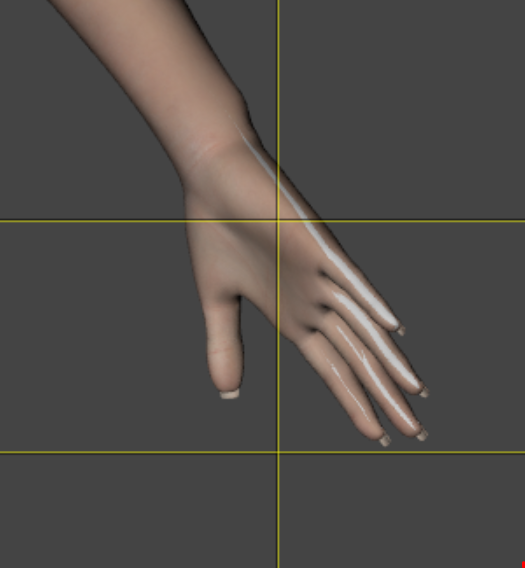
I just double checked this and it is really, really apparent. @cynderblue
How did that get past both the vendor and supposedly QA? EDIT: Note vendor's response several posts down. Very responsible.
AIUTO...CHI CONOSCE L’ITALIANO? PARTE TREDICISul forum (non ricordo dove) lo usavano per adattare i character come fossero dei vestiti e poi esportarli e reimportarli come morph...
Lei invece (una PA della DAZ) usa ad esempio i cloni e Transfer Utility per i soli Morph:
PS ho visto i mostriciattoli... ce ne sono parecchi perchè sono un nuovo character e dunque non compatibili con i G1/G2/G3/G8, pertanto hanno bisogno di capelli e vestiti propri
AIUTO...CHI CONOSCE L’ITALIANO? PARTE TREDICIKainjy said:
Usi Autofit per adattare i morph ?
Autofit per i Morph? (⊙ˍ⊙) Dove lo hai mai visto? Viene tutto storto e perdi tutti i correttivi.
Utilizzo GenX2 e gli altri sistemi presenti sullo store, solo che non sono sufficienti in certi casi e devo correggere alcune parti "a mano", specie quando faccio da G1 a G8 e molte volte nemmeno va, trioppi pochi poligoni.
Per contro, trasferire da G8/3 a G1 è un attimo visto il numero alto di poligoni, basta un solo passaggio.New! Novica & Forum Members Tips & Product Reviews Pt 14Some notes on product issues:
I've had CB Isabella HD for Genesis 8 Female for some time, and really, really like her morph and skin, so I was shocked when I noticed a seam on one hand where the textures don't properly cover the mesh. The side of her right hand and fingers have white lines where the diffuse texture is not covering it. I tried loading her in 4.14 and 4.15 and got the same thing. So I put in a ticket 2 weeks ago. Not sure if I have another character clashing with her or she is indeed inherently flawed, but I haven't seen the seam on anyone else.
Another weird issue is with Jordina for Genesis 3 and 8 female who I got last night. When G8F's legs bend with her installed, they become horribly deformed. The culprit is a non-character pose control jcm that gets dialed in to -1200%. It happens to other characters and the base g8f even when she is not dialed in. I checked the forums about this issue and haven't seen anyone talking about this, so I'm curious if there is something going on that is specific to who I happen to have installed. I put in a ticket for her as well. Even though she has the leg issue, she is so pretty and I adore her skin, so I will be keeping her and just leaving her uninstalled unless I need her. Edit: Turns out it was Just Sit poses that cause the deformations when moving from one of those poses to a pose from another set.
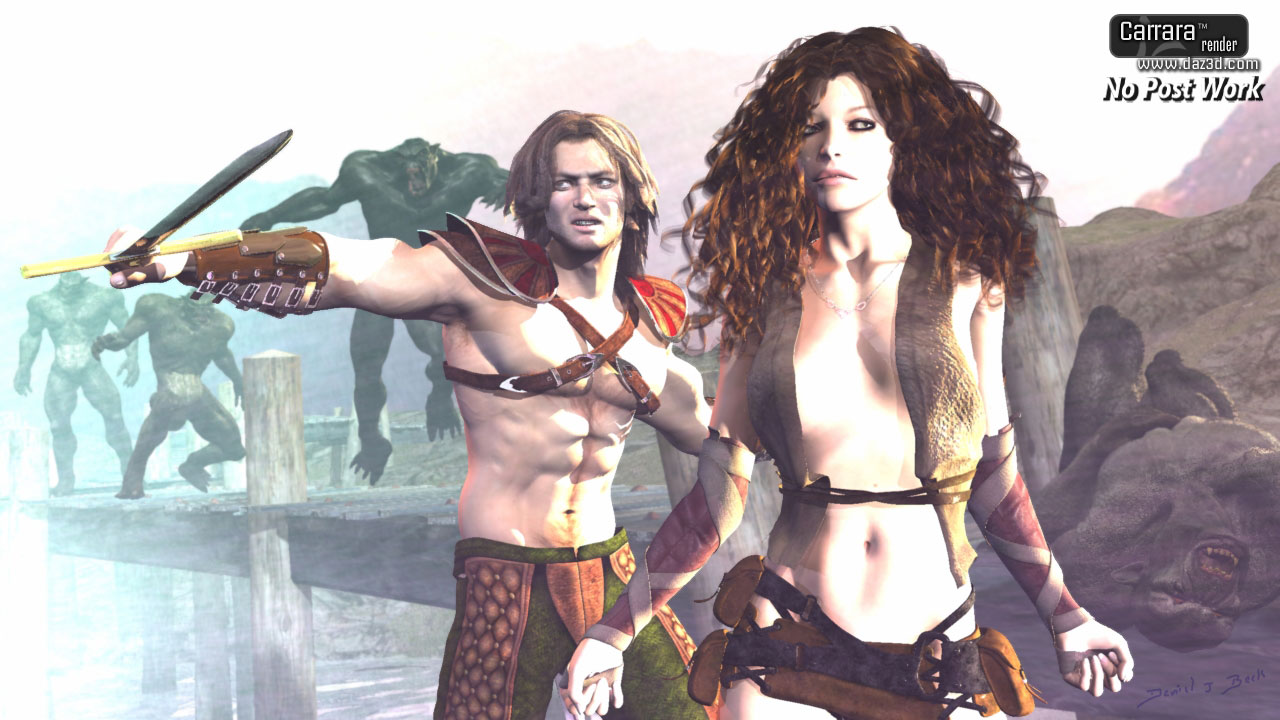
 Carrara challenge #59 ANNWFN - In honour of Chohole.
SileneUK said:
I am trying to find time to get an entry in. School Holidays+August=Grandchildren (almost daily!) But I just got news that my first cataract op is on 23rd August. Going to the eye hospital, so it's not a quickie job. I don't know if my other eye will be good enough to carry on with this, but here goes. My husband is Welsh and we've been married for 30 years and I've been to most corners of beautiful Wales. And Pam was a lovely helpful person that I wish I had known myself. I think she only lived an hour from me. After helping me with my new machine build, I should have made more of an effort since I think we were from the same generation.
So.....first I have made a woman dressed in traditional Welsh costume (Bedgown & Stovepipe Hat). The dress is DAZ Victorian Maid for G2F and shoes re-texted, and from Wilmap's Pilgrim costume for G2M, I re-formed the hat into the one that Welsh ladies used to wear. There is a controversial history about that fashion. See link below. I have also put an image showing what makes up most of the costume I was able to reproduce. The shawl is the DAZ Romi for G3F hip scarf retexted with a traditional red Welsh paisley pattern. Had fun making a bowl into a bonnet for under the hat. I am not very good at creating clothing. Then applied a lace texture with alpha. The daffodils were extracted from Tango Alpha's Country Ford, the Pembrokeshire Corgi (like the Queen has/had) came from CGT. Basket is DAZ Marrakesh Souk Basket. For now she and her puppy are just sitting on a bench from Victorian Street Props. I don't know if Pam had a dog, but I am sure she had a kind face and loved nature.
Next will be a few outdoor Welsh landscape scenes of the Brecon Beacons that I hope will reflect some of the real locations that I think Pam would have known, and perhaps visited. I have to pose her manually, as the dress just does not want to follow her arms, but got there in the end. There are lots of variations on traditional dress, and you can read more at the other link below. I didn't use my trusty Misty G3F as I could not get the Vic Maid dress to behave, so I used G2F. Unlike G3... I cannot get the exact facial expressions that they give, so have to make do with combining a few of G2 facial expressions. I am grateful to Alvin for his Morph Eraser. Saved me a lot of bloat!
More to come, but I am going to just kitbash DAZ materials but plan to use Carrara PA as much as possible, totally if I can manage it!
 Silene
About the hat: https://welshhat.wordpress.com/the-welsh-hat/theories-on-the-origin-of-the-welsh-hat/
About the costume: https://welshhat.wordpress.com/elements-of-welsh-costumes/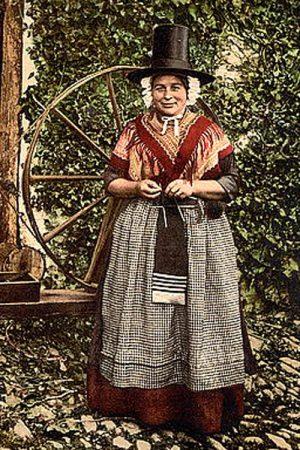
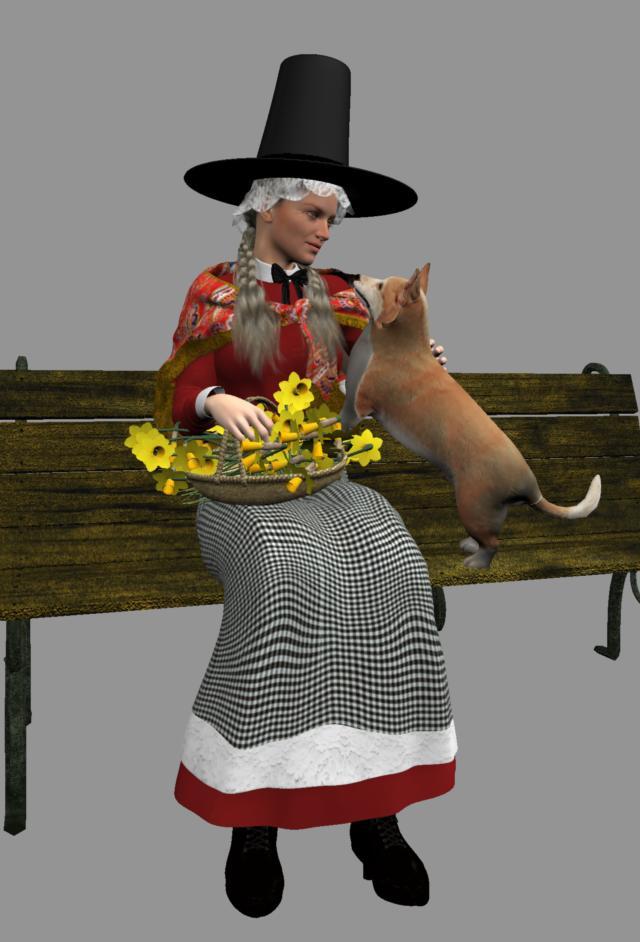
that's wonderful Silene, terrifically apt, great bit of research.!
Eyes scale morphsYou can use this to isolate the eye scale morph on each eye and make dials for them.
I have used it to make dials for just the mouth area of a head morph, then I dial that to -100 and boom! I have a head morph without the morph's mouth region affecting things. You could use it to give someone Ollie's nose without giving them the rest of Ollie's face. And in the promos it shows different sized eyes.
It comes with lots of ways to isolate areas, from planes that you can use to split the morph/figure in half, to preset regions, or you can just select areas with the geometry editor, though I have never used that last part. It's kind of pricey but well worth it, especially if you can get it on sale. You should definitely read the included pdf before getting started, so that all the dials and settings make sense.
Eyes scale morphshi, have not run across any morphs that scale the eyeballs and eyesocket around it at same time..individually. Xcept course poses, like eye widen-squint etc. But not sure they are right enough for what you want.
But Yes for both at same time with eye size and I think base G8 morphs (look char>head>face>real world>eyes and search for *size*
If was in your boots, would have that, put 2 figures in scene, and 1 you change both eyes with that morph, keep other fig as an orig size ref, use vert editor to create an eye selection for verts that has issue, then export that character to Hexagon, and then in DAZ set back changed figure back to default in DAZ and THEN send back to DAZ and use morphloader and then attenuate by that vertex selection you made. Safest is to do in t-pose. You would then have when you are happy with it, an eye morph that is always there for your character when you save it.
PS. Lara Croft is awesome.
 what did the bridge to hexagon do?
The Hexagon Bridge allows us to send items to Hexagon from Daz Studio, and back again. Likewise we can send models we make in Hexagon to Daz Studio, and then back again if we want.
Part of the huge magic of this is that, if we send a piece of clothing to Hexagon, we can change it as much as we want and, upon sending it back to Daz Studio, a dialog will launch asking if we want to make a morph slider for the change we've just made.
This is how I would add 'full body' morph target possibilities to clothing and hair for use in Carrara.
Aside from Victoria 4, who is unlocked by default, if we try to make new morphs in Carrara, we have to model each body parts separately, which can be nearly impossible - definitely improbable.
So I would open the item in Daz Studio, send it to Hexagon and make the tiniest change, and name the new morph something that I want to make a morph for in Carrara, and assign it to a new Morph Category of the figure, making it a Full Body morph zone.
So now back in Carrara, I can load that new version, and just make all the new morphs I want without selecting the head separatley from the neck zone, chest, abdomen, etc.,
That's how I made the older Rosie 4 hair from Angelina Hair. I made a bunch of morphs onto the original hair, then loaded in four times into Carrara, each changed quite significantly from the original, in order to make that long, thick curly hair that it was.
Original Angelina Hair

Rosie 4 Hair
 AIUTO...CHI CONOSCE L’ITALIANO? PARTE TREDICI
Usi Autofit per adattare i morph ?
Ho visto che DAZ per queste cose usa anche Generation X ma sono rimasti ai G3 (G2 se non hai l'addon..). Per caso ce l'hai ? Sarei curioso di sapere il loro funzionamentoface transfer failed"Face transfer failed to generate. Try a different source image."
I did look for people who faced the same issue,and I did what they says1.all the path need to be English
2.name of image need to be English too
but still not work
any solustion?
headbands for g8f?You could use a torus primitive, stretch it along the Y axis, scale and align it to the head of an unposed figure, export to obj and re-import, use the transfer utility to make it a wearable.
Eyes scale morphsIs there any morphs for scaling the eyes individually? My Lara morphs usually have warped eyes as I mixed many morphs when making them, I always have to move they eyes individually, and the eyes looks to be different sizes when I give her an expression, it's more noticable then. It bothers me so much, can't stand it, please, if anyone knows of such individually eyes scale morphs let me know, I would very much appreciate it
 . Would be such a relief to not have to see this in every render.
 Edit: Would be so amazing if there is such a morph set, to correct the bug that is visible w her eyes being slightly different in size, if anyone knows of such morphs I would be very grateful
. Like right eye scale, and left eye scale. Need a G8/8.1 version of Lilah!richardandtracy said:
RiverSoft Art's character transfer script can pop it onto G8 without noticeable change.
I did convert Lilah a couple of times, the result was good enough for my purposes....
Daz 3D is part of

Connect
DAZ Productions, Inc.
7533 S Center View Ct #4664
West Jordan, UT 84084Licensing Agreement | Terms of Service | Privacy Policy | EULA
© 2026 Daz Productions Inc. All Rights Reserved.