-
Mixamo created rig problems in DAZ
I almost know nothing about Poser... but AutoFit in DS is designed for Genesis figures rather than any other types of figures, that's why you find no options in AutoFit dialogue and the unexpected result without using any Clone.
A proper way is to rig the clothing on you Mixamo La Femme by using Transfer Utility... (if your Mixamo La Femme was imported from an FBX...) In this way, you need to follow the standard procedure of using Transfer Utility ~~
- If La Femme clothing is a CR2, export both figure and clothing to, let's say, Blender, make the clothing a perfect it on the figure.
- Export the clothing to OBJ and import OBJ into DS.
- Rig OBJ object onto Mixamo La Femme with Transfer Utility.[Released] Blender to Daz Studio Plugin released!!! Official support thread [Commercial]The more optimal way is to bake and transfer displacement map rather than the SubD mesh. The former is the typical way of handling displacement in DS.
Blender to Daz bridge- Blender to Daz Studio plugin just released!!!!!!!!!The more optimal way is to bake and transfer displacement map rather than the SubD mesh. The former is the typical way of handling displacement in DS.
[Released] Blender to Daz Studio Plugin released!!! Official support thread [Commercial]A major issue is the limit on poly count. Objects requiring a high polycount for displacement will not transfer, nor will grouped items with high poly counts such as ivy. The bridge needs either a setting to increase the poly count limit or just hardcode the increase. Slicing and dicing my objects just to bring them into DAZ is not a solution, it's a headache. For many sceens, I have to move objects in batches. That's fine if I can't use the "All" button, But for it not to work at all due to poly count, thats just broken.
Blender to Daz bridge- Blender to Daz Studio plugin just released!!!!!!!!!A major issue is the limit on poly count. Objects requiring a high polycount for displacement will not transfer, nor will grouped items with high poly counts such as ivy. The bridge needs either a setting to increase the poly count limit or just hardcode the increase. Slicing and dicing my objects jut to bring them into DAZ is not a solution, it's a headache.
Smooth Out Imperfections in Clothing When Posed?n.aspros123 said:
crosswind said:
Okay, but they're different in terms of design ~ It's tight under figure's breasts on the one you're using while that Rendo's one is obviously with a looser design. If the figure has larger breasts, you won't get the expected result with that Shrug Style Top... no matter you simulate in whatever way.
I suggest another way around since I ever mentioned that the initial shape of the cloting is important before simulation. You can make a morph with Blender to give the top a "looser style". (screenshot 1)
Then you'll get the expected result afer simulation and you won't have to tweak it each time after simulation. (screenshot 2)
Which tools did you use in Blender to make the morph?
As usual, Draw brush and Smooth brush in Sculpt mode.
Smooth Out Imperfections in Clothing When Posed?crosswind said:
Okay, but they're different in terms of design ~ It's tight under figure's breasts on the one you're using while that Rendo's one is obviously with a looser design. If the figure has larger breasts, you won't get the expected result with that Shrug Style Top... no matter you simulate in whatever way.
I suggest another way around since I ever mentioned that the initial shape of the cloting is important before simulation. You can make a morph with Blender to give the top a "looser style". (screenshot 1)
Then you'll get the expected result afer simulation and you won't have to tweak it each time after simulation. (screenshot 2)
Which tools did you use in Blender to make the morph?
Smooth Out Imperfections in Clothing When Posed?Okay, but they're different in terms of design ~ It's tight under figure's breasts on the one you're using while that Rendo's one is obviously with a looser design. If the figure has larger breasts, you won't get the expected result with that Shrug Style Top... no matter you simulate in whatever way.
I suggest another way around since I ever mentioned that the initial shape of the cloting is important before simulation. You can make a morph with Blender to give the top a "looser style". (screenshot 1)
Then you'll get the expected result afer simulation and you won't have to tweak it each time after simulation. (screenshot 2)
Freebie Challenge July 2025 - "Design a Book Cover" - Main ThreadFae3D said:
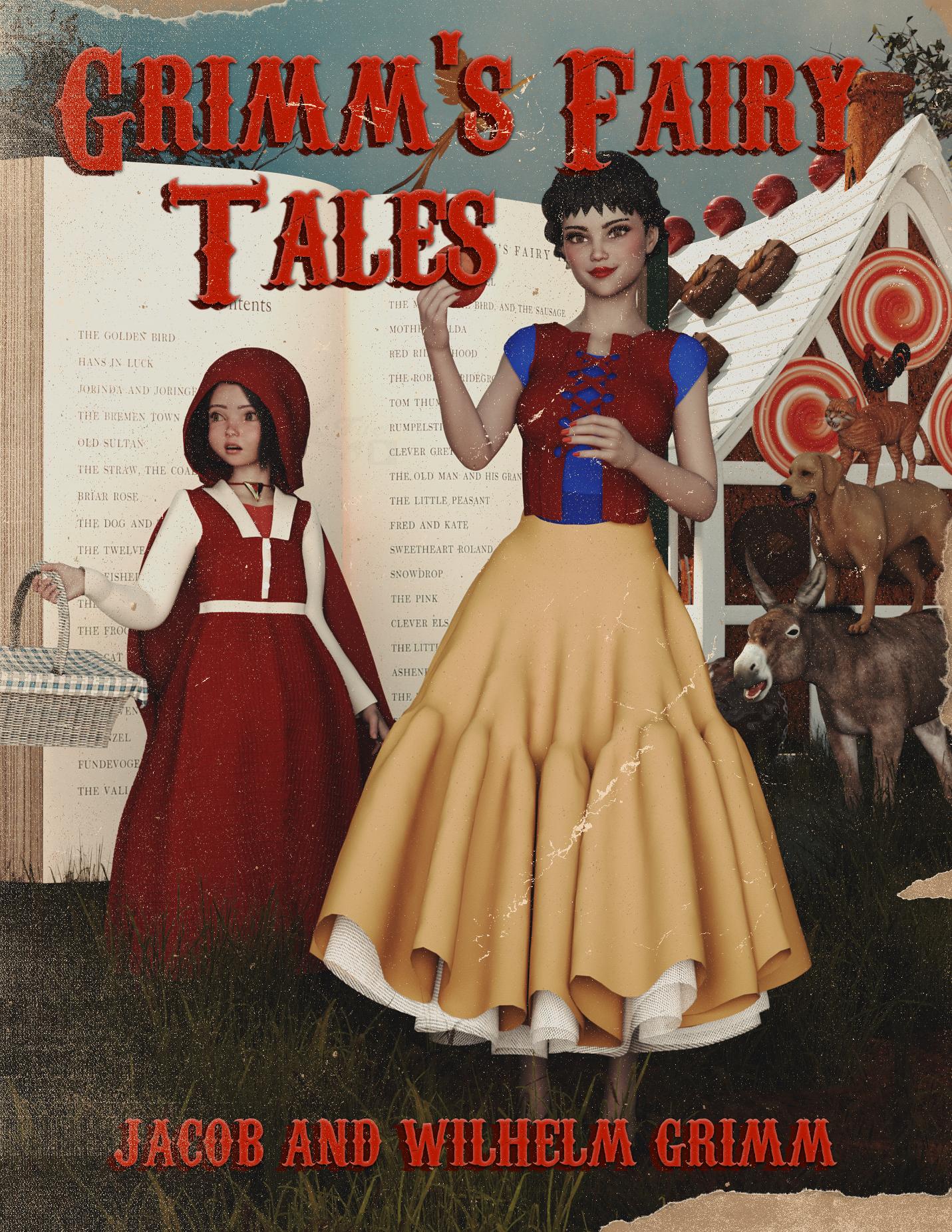
Grimm’s Fairy Tales
A classic among the classics! So many of our familiar children’s stories (though sometimes not so safe for kids) came from this collection. It, however, is not even the original source. Most of the stories told here were learned and collected from oral tales that have been told across Europe for centuries!
Freebies:
Real Book - https://www.renderosity.com/freestuff/items/73987/real-book
Pd-Soft Leather Daz Studio Shaders for Iray (book, RRH) - https://www.renderosity.com/freestuff/items/75152/pd-soft-leather-daz-studio-shaders-for-iray
Chameleon ROse 2 for Genesis 8 Female (Snow White, nails and lashes) - https://www.renderosity.com/mod/freestuff/chameleon-rose2-for-genesis-8-female/85859
Genesis 8 Female Christmas Dress 2 - (Snow White) - https://www.most-digital-creations.com/g8f_christmas_dress_2.php
KT Child G9 (RRH 100%) - https://www.renderosity.com/freestuff/items/98181/kt-child-g9
Cute Kay Toddler Morph for G9 (RRH, 10%) - https://www.renderhub.com/undeadcrabb/cute-kay-toddle-morph-for-g9
Eyes by Sir Maverick (no way to know which pack it was, link to freebies profile, RRH) - https://www.renderosity.com/users/SirMaverick/freestuff
Dress A for G9 (RRH) - https://www.renderosity.com/freestuff/items/98972/dress-a-for-g9
Sailor3HSa for G9 (Shoes RRH) - https://www.renderosity.com/freestuff/items/98454/sailor3hsa-for-g9
Basket - https://www.renderosity.com/freestuff/items/88982/basket
Hair Starter Pack (Update 1.1) (RRH) - https://www.renderosity.com/freestuff/items/98247/hair-starter-pack-update-11
Capes and Cloaks dForce G8F (RRH) - https://www.renderosity.com/freestuff/items/98539/capes-and-cloaks-dforce-g8f
SY 200 Free Morphs Genesis 8 (Snow White, RRH) - https://www.deviantart.com/sickleyield/art/SY-200-Free-Morphs-Genesis-8-756465264
Realistic Dog - https://www.cgtrader.com/free-3d-models/animals/mammal/dog-realistic
Rooster - https://www.renderosity.com/freestuff/items/91408/rooster
Mossy Forest HDRI - https://polyhaven.com/a/mossy_forest
Fantasy House 1 - https://www.renderosity.com/freestuff/items/66847/fantasy-house-1
Fairy Tree 3D Model - https://www.renderhub.com/shredder/fairy-tree
CRP Standing Cute Poses 13-20 - https://www.renderosity.com/freestuff/items/97778/crp-standing-cute-poses-13-20
Toon Food Apple - trumarcar.francemi.net/foodprops_tc.htm
Yellow Bird - https://www.cgtrader.com/free-3d-models/animal/bird/low-poly-yellow-bird
Freebie Zeus Morphs (Chonk) - https://www.deviantart.com/christine13black/art/Freebie-Zeus-Morphs-1148068111
Multiple Photoshop Brushes (used in postwork, just thought I’d share since it’s a really cool resource) - https://resourceboy.com/
No Count:
Genesis 9 Essential Shapes Bundle - https://www.daz3d.com/genesis-9-essential-shapes-bundle (not really sure I even used these, but just in case)
Universal Hair Baseline 001 (Snow White) - ??? (Freebie, I think I got it from ShareCG)
Ruffle Tutu (Scaled) (Snow White) - ??? (Freebie, I think I got it from ShareCG)
Leather Outfit for Genesis 8 Female (Snow White) - ??? (Freebie, Made by RhondaR, got it from ShareCG)
SY Super Hoodie Genesis (RRH) - ??? (Freebie, Made by Sickleyield, got it from ShareCG)
Shimmery Sheer II Shaders (RRH) - ??? (Freebie, Made by AllenArt, got it from ShareCG)
Paid:
Mesh Grabber (Mac) - https://www.daz3d.com/mesh-grabber-mac
3D Donkey - https://www.daz3d.com/3d-donkey
SY Invisilights Iray - https://www.daz3d.com/sy-invisilights-iray
Cat Zeus - https://renderhub.com/vyusur/cat-zeus
3DL Destiny For Genesis 8 Females - www.renderosity.com/marketplace/products/165290/3dl-destiny-for-genesis-8-females
I did some major reworking of the materials, the poses and even the geometry. I recently learned how to use Geometry Editor, and I also used Mesh Grabber to make some adjustments. Set up and rendered within Daz Studio Iray. Postwork in Pixelmator. No AI used.
I’ve attached the before post render (the one that says Raw Render) and the finished image file.
(Edited to add images)
Can't find the dog model... but I choose to believe that it is (or used to be) a freebie. therefore
Entry is approved! Please move to Entries Thread
Freebie Challenge July 2025 - "Design a Book Cover" - Main ThreadGrimm’s Fairy Tales
A classic among the classics! So many of our familiar children’s stories (though sometimes not so safe for kids) came from this collection. It, however, is not even the original source. Most of the stories told here were learned and collected from oral tales that have been told across Europe for centuries!
Freebies:
Real Book - https://www.renderosity.com/freestuff/items/73987/real-book
Pd-Soft Leather Daz Studio Shaders for Iray (book, RRH) - https://www.renderosity.com/freestuff/items/75152/pd-soft-leather-daz-studio-shaders-for-iray
Chameleon ROse 2 for Genesis 8 Female (Snow White, nails and lashes) - https://www.renderosity.com/mod/freestuff/chameleon-rose2-for-genesis-8-female/85859
Genesis 8 Female Christmas Dress 2 - (Snow White) - https://www.most-digital-creations.com/g8f_christmas_dress_2.php
KT Child G9 (RRH 100%) - https://www.renderosity.com/freestuff/items/98181/kt-child-g9
Cute Kay Toddler Morph for G9 (RRH, 10%) - https://www.renderhub.com/undeadcrabb/cute-kay-toddle-morph-for-g9
Eyes by Sir Maverick (no way to know which pack it was, link to freebies profile, RRH) - https://www.renderosity.com/users/SirMaverick/freestuff
Dress A for G9 (RRH) - https://www.renderosity.com/freestuff/items/98972/dress-a-for-g9
Sailor3HSa for G9 (Shoes RRH) - https://www.renderosity.com/freestuff/items/98454/sailor3hsa-for-g9
Basket - https://www.renderosity.com/freestuff/items/88982/basket
Hair Starter Pack (Update 1.1) (RRH) - https://www.renderosity.com/freestuff/items/98247/hair-starter-pack-update-11
Capes and Cloaks dForce G8F (RRH) - https://www.renderosity.com/freestuff/items/98539/capes-and-cloaks-dforce-g8f
SY 200 Free Morphs Genesis 8 (Snow White, RRH) - https://www.deviantart.com/sickleyield/art/SY-200-Free-Morphs-Genesis-8-756465264
Realistic Dog - https://www.cgtrader.com/free-3d-models/animals/mammal/dog-realistic
Rooster - https://www.renderosity.com/freestuff/items/91408/rooster
Mossy Forest HDRI - https://polyhaven.com/a/mossy_forest
Fantasy House 1 - https://www.renderosity.com/freestuff/items/66847/fantasy-house-1
Fairy Tree 3D Model - https://www.renderhub.com/shredder/fairy-tree
CRP Standing Cute Poses 13-20 - https://www.renderosity.com/freestuff/items/97778/crp-standing-cute-poses-13-20
Toon Food Apple - trumarcar.francemi.net/foodprops_tc.htm
Yellow Bird - https://www.cgtrader.com/free-3d-models/animal/bird/low-poly-yellow-bird
Freebie Zeus Morphs (Chonk) - https://www.deviantart.com/christine13black/art/Freebie-Zeus-Morphs-1148068111
Multiple Photoshop Brushes (used in postwork, just thought I’d share since it’s a really cool resource) - https://resourceboy.com/
No Count:
Genesis 9 Essential Shapes Bundle - https://www.daz3d.com/genesis-9-essential-shapes-bundle (not really sure I even used these, but just in case)
Universal Hair Baseline 001 (Snow White) - ??? (Freebie, I think I got it from ShareCG)
Ruffle Tutu (Scaled) (Snow White) - ??? (Freebie, I think I got it from ShareCG)
Leather Outfit for Genesis 8 Female (Snow White) - ??? (Freebie, Made by RhondaR, got it from ShareCG)
SY Super Hoodie Genesis (RRH) - ??? (Freebie, Made by Sickleyield, got it from ShareCG)
Shimmery Sheer II Shaders (RRH) - ??? (Freebie, Made by AllenArt, got it from ShareCG)
Paid:
Mesh Grabber (Mac) - https://www.daz3d.com/mesh-grabber-mac
3D Donkey - https://www.daz3d.com/3d-donkey
SY Invisilights Iray - https://www.daz3d.com/sy-invisilights-iray
Cat Zeus - https://renderhub.com/vyusur/cat-zeus
3DL Destiny For Genesis 8 Females - www.renderosity.com/marketplace/products/165290/3dl-destiny-for-genesis-8-females
I did some major reworking of the materials, the poses and even the geometry. I recently learned how to use Geometry Editor, and I also used Mesh Grabber to make some adjustments. Set up and rendered within Daz Studio Iray. Postwork in Pixelmator. No AI used.
I’ve attached the before post render (the one that says Raw Render) and the finished image file.
(Edited to add images)
The new "blender to Daz plugin"mummystoat said:
Ainm said:
mummystoat said:
I have it installed with 4.3, not super impressed.
It exports the OBJ wonderfully well. I haven't had one success with materials yet and with almost no documentation to help, it's basically a dead end.It relies on a PrincipledBSDF shader setup in Blender. PrincipledBSDF, from what I understand, is an open physically based rendering format (PBR). Iray is a PBR engine with equivalent material slots in its shaders. If a Blender mesh doesn't have PrincipledBSDF shaders nodes applied, this product can't bake/convert them to Iray shaders. Instead, you'll only get the mesh.
I don't buy a lot of Blender products, but most of those I own don't have that shader setup and don't transfer materials. Some of them I can sort of convert to PrincipledBSDF manually and they sort of work. The Blender products I own that do have PrincipledBSDF shaders are transferred to Daz/Iray perfectly.
I don't use Blender much and struggled to figure out the product. I thought it wasn't working, but it was a combination of not the best documentation and my severe lack of Blender shading systems. Having learned a little about those, the documentation seems more adequate (at least on the marketplace I bought it from).
Yes, the product does specify it needs a principledBSDF shader to work. I'm not relying on purchased products in Blender and my materials are set up with a Principled BSDF shader. Only the very simplest of setups has come through with any material export at all; anything with colour ramps, mix nodes, alpha channels (this one is really a mystery as it looks like it should be working correctly) etc. is a mess.
On product description it says
5) Bakes materials to create simplified texture maps that can be used in Daz Studio.
so guess that was potentially being over-sold?
SimpleBake for Blender can probably make baking down shaders to simply PBR easier before export. It's still tedious to do this even though SimpleBake makes it slightly easier.
The new "blender to Daz plugin"Ainm said:
mummystoat said:
I have it installed with 4.3, not super impressed.
It exports the OBJ wonderfully well. I haven't had one success with materials yet and with almost no documentation to help, it's basically a dead end.It relies on a PrincipledBSDF shader setup in Blender. PrincipledBSDF, from what I understand, is an open physically based rendering format (PBR). Iray is a PBR engine with equivalent material slots in its shaders. If a Blender mesh doesn't have PrincipledBSDF shaders nodes applied, this product can't bake/convert them to Iray shaders. Instead, you'll only get the mesh.
I don't buy a lot of Blender products, but most of those I own don't have that shader setup and don't transfer materials. Some of them I can sort of convert to PrincipledBSDF manually and they sort of work. The Blender products I own that do have PrincipledBSDF shaders are transferred to Daz/Iray perfectly.
I don't use Blender much and struggled to figure out the product. I thought it wasn't working, but it was a combination of not the best documentation and my severe lack of Blender shading systems. Having learned a little about those, the documentation seems more adequate (at least on the marketplace I bought it from).
Yes, the product does specify it needs a principledBSDF shader to work. I'm not relying on purchased products in Blender and my materials are set up with a Principled BSDF shader. Only the very simplest of setups has come through with any material export at all; anything with colour ramps, mix nodes, alpha channels (this one is really a mystery as it looks like it should be working correctly) etc. is a mess.
Why are my scene save files so massive?Richard Haseltine said:
But are the morphs standard morphs dialed in, or are they new morphs (not yet saved as modifier assets)? Also, had you made any changes to the models with the Geometry Editor?
Don't know the difference about the morph thing, so I can't answer that, sorry. No changes made with the Geometry Editor either.
The clothes don't fit to custom character morph.Proportion Legs Length is not really a "pure morph" but also ERC linked to a Pose, i.e. a value change on Y Translate of G9's Hip node. So, it's a bit unique case and more likely the root cause comes from an "improper rigging" did by the vendor .... or they could fix the bs morph of Proportion Legs Length on the Overall ~~
You can fill a support ticket in here to escalate the issue and ask for a fix: https://bugs.daz3d.com/hc/en-us/requests/new
Edit: If you want to try, you can export the Overall to OBJ, import OBJ into DS. Re-rig it on G9 Base with Transfer Utility by using Bodysuit Loose Template, then you should be able to see the issue is gone ~
sunglasses on face deformElor said:
A fourth solution is to create a FHM (I think it's the correct terminology, Full Head Morph) for the glasses, so that the next time you're loading them to this character, they will work without further adjusting.
With glasses, it's usually possible with Daz Studio only, because in essence, it's doing what @felis explained and the first solution from @crosswind, only going one step further by exporting the glasses at base resolution as OBJ and importing that OBJ as a morph named in such a way that Daz Studio will trigger it automatically when fitting the glasses on that character.
You'll have to do it for each character you want to use the glasses with, and it's a bit more work than other solutions, but once done, it's done, so if you're planning on using these glases a lot with this character, you will likely save more time on the long run.
Yeah, that's right, which is related to the 2nd way I mentioned but one further needs to fix it if zeroing it won't help much. FHM / FBM / PHM / PBM / bs etc. are usually automatically triggered on the rigged conformers (i.e. by Auto Follow), so you don't need to create one but just send the morph out for fixing, then import OBJ to update it as a delta. Then Save Modified Asset.
Content Library - no data categorydaveso said:
crosswind said:
Usually there're two ways to locate morph files (DSF files...):
- Filter or locate the morph property in Parameters or Shaping pane, click the gear icon on the right of the morph slider to open Parameter Settings... You'll find a field of File Path, click the browse button to locate the morph in Data folder.
- Directly find the morph file in File Browser. The morph files of character products are always within: your DAZ3D Library\data\DAZ 3D... then for example, drill down to your DAZ3D Library\data\DAZ 3D\Genesis 9\Base\Morphs to locate G9's characters' morphs, by vendors.On Readme page of a product, as long as there're any DSF files in the product package, you should be able to find the location of morph files by clicking File List
thanks. its actually a dress from Rendo, so the structure might not be the same? so the morphs are dress movements basically. I've had this problem finding morphs from other products from Rendo as well. there are a lot of morphs within the data folder, but maybe nothing to call them up? I'm at a loss. I've never liked Content library.
Anyway, my orkflow to install is the extract the files, copy them, and then paste them into the MY DAZ 3D Library folder. I works for most products, but not all. The morphs included in this package are DSON not DSF.The folder of the morphs of "a dress" locates in the path as Elor said. The way of finding the location of these morphs is as same as what I mentioned above: go to the file path in Parameter Settings. Searching in Content Library brings you nothing...
Your workflow of installing 3rd-party products is okay. But for Daz Studio format, morph files are always with file extension *.DSF. DSON means DazScript Object Notation, which is sort of a language rather than a file format / extension.
Besides DSA / DSE (Daz Script Files), there're two commonly-used file formats in DS 4.x format: 1) DSON Support File (DSF), which is non-user facing and used for defining geometry / morphs / UVs etc. 2) DSON User File (DUF), which is user facing and used for storing Scenes, Presets, etc.
G9 shaping glitch?paulawp (marahzen) said:
Thanks for the tips. I have found the guilty parties. On a stock G9 figure, there are numerous _cbs_ settings that are 0.0% until I apply any pose and then these character-related _cbs_ settings that should have nothing to do with a stock G9 figure show up. They're not so obvious with most other poses, but by chance I'd picked one to test where they were conspicuous and freakish, which called my attention to the problem.
I get that I could uninstall the characters and prevent this. If I wanted to fix them, how would I do that? I'm sure that's been asked like 5,000 times in Daz forum history, so if I know what I'm looking for, I could hunt for a thread that already talks about it.
Yeah, pls check this thread which showed almost the same issue... and how to fix it : https://www.daz3d.com/forums/discussion/comment/8936791/#Comment_8936791
In your case, just drag the culprit character's Body Morph ( xxx_bs_xxx ) to the 2nd Stage Controller of those xxx_cbs_xxx morph properties.
Then fill a support ticket as you wish.
sunglasses on face deformA fourth solution is to create a FHM (I think it's the correct terminology, Full Head Morph) for the glasses, so that the next time you're loading them to this character, they will work without further adjusting.
With glasses, it's usually possible with Daz Studio only, because in essence, it's doing what @felis explained and the first solution from @crosswind, only going one step further by exporting the glasses at base resolution as OBJ and importing that OBJ as a morph named in such a way that Daz Studio will trigger it automatically when fitting the glasses on that character.
You'll have to do it for each character you want to use the glasses with, and it's a bit more work than other solutions, but once done, it's done, so if you're planning on using these glases a lot with this character, you will likely save more time on the long run.
Content Library - no data categorydaveso said:
crosswind said:
Usually there're two ways to locate morph files (DSF files...):
- Filter or locate the morph property in Parameters or Shaping pane, click the gear icon on the right of the morph slider to open Parameter Settings... You'll find a field of File Path, click the browse button to locate the morph in Data folder.
- Directly find the morph file in File Browser. The morph files of character products are always within: your DAZ3D Library\data\DAZ 3D... then for example, drill down to your DAZ3D Library\data\DAZ 3D\Genesis 9\Base\Morphs to locate G9's characters' morphs, by vendors.On Readme page of a product, as long as there're any DSF files in the product package, you should be able to find the location of morph files by clicking File List
thanks. its actually a dress from Rendo, so the structure might not be the same?
Structure for morphs will be the same for all content in DS format.
so the morphs are dress movements basically. I've had this problem finding morphs from other products from Rendo as well. there are a lot of morphs within the data folder, but maybe nothing to call them up? I'm at a loss. I've never liked Content library.
Morphs often have only "data" files, which are technical files that you wouldn't see in the content library. Installing those files would simply add morph dials in the parameters, shaping and/or posing tabs (depending on what kind of morphs it is) when the original item is selected.
Anyway, my orkflow to install is the extract the files, copy them, and then paste them into the MY DAZ 3D Library folder. I works for most products, but not all. The morphs included in this package are DSON not DSF.
Zips from other stores may have a few extra folders like "my library" or one with the product name above the actuall folders holding the content files (data, Runtime, People, Props...). So when you copy them to your install directory make sure you don't copy over those extra folders and merge the actual content folders with the ones already installed.
The clothes don't fit to custom character morph.I purchased some clothes but when I put them on my custome characters they don't fit to the morphs.
The attaches images show The Proportion Legs Length with +50% and -50% applied.
The clothes I purchased are 'Urban Overalls Outfit' by fjaa3d and 'X-Fashion Melody Set' by Xtrart-3d.
They don't fit to different character morphs.
I think they are needed to correct by venders.
Daz 3D is part of

Connect
DAZ Productions, Inc.
7533 S Center View Ct #4664
West Jordan, UT 84084Licensing Agreement | Terms of Service | Privacy Policy | EULA
© 2026 Daz Productions Inc. All Rights Reserved.









