-
Quick tip: save loading time for Genesis
Some notes on this:
The speed difference for Carrara is due to it 'Not' having to access the database to load in the morphs you have installed.
Carrara saves All morphs' mesh data within the save. So if you look at the file size between Genesis from the default DS library compared to the Carrara save, there's a rather large difference.
This, of course means that any new morph installations or changes will Not show up in this save.
This can be a real boon to some of us because as I mention in my Genesis Morph Reduction article, we can tailor Genesis to be specific to a character, and then save it to the browser. Conduct the reduction process again for the next character, set up the character and save... repeat for more characters.
I've been doing this before Alberto's plugin. The main difference in methods is that my method is more of a manual, hands-on file cataloging, and the morphs that are not used also do not have a slider that simply doesn't work. The file size reduces in the same manner, for the Car file.
It can also be a real pain in the rump when we have a very specific character that's hard to transfer, and then we buy a morph addon that we really want that character to have, so we have to load in a fresh Genesis and build it up again.
I have an article which helps with this, but I've noticed that it doesn't always work as expected: Character Transfer Using NLA Pose
My new method might get me beat up in this forum, but it works well:
Design the character in Daz Studio and make several presets for it: Shape preset, Material Preset (less useful in Carrara) and a full Character preset. I also have a scene subset file saved for both Dart and Rosie, with their respective costumes on.
The advantage to this comes when we run into issues like above - we have a fully optimized Carrara character, lean on morphs, shaders just right, settings the way we want them to be... and then we buy a new morph set! Argh!!!
With the above mentioned DS Presets, we can at least get the character back onto a fresh copy of Genesis.
It's not always all about "Buying new morphs" either. I have made a special set of morph files for Genesis: Genesis 1 MorphForms +, which is very helpful for adjusting the arms, torso, etc., on animations because we don't have to edit the actual joints - the morphforms dials work across the whole time line.
Since then I've come up with more ideas to add to the MorphForms + for Genesis 1 - like foot correction when using generation 4 animations, etc.,
With my characters having DS presets, I can load in my Carrara save, add a new Genesis using my DS preset, and then transfer the clothing, dynamic hair, light rig, etc., over to the new Genesis. It's a lot easier and more efficient.
I hope you all find this info a little helpful.
has Headshop fixed the eyelash problem?I appreciate the feedback... but please note it's not a morph I make.
I purchased a program to create the morph for me.
If it is simply removing the eyelashes etc before creating the morph
then the vendor should simply have displayed a screen that says
"You are preparing to create a morph using gen8
for this to work properly you need to do this"
---
In my youth I coded a program to process credit cards for JC Pennys
do you think they been impressed if I said " oh, cards that start with 4 won't work you need to manually change it to X before processing?"
But I'll take the money for the program anyway.
Quick tip: save loading time for GenesisYour opinion: modeling with mesh grabberI don't see why Daz doesn't develop their own morph tool. Poser and CC3 both have one and it's similar in both. Be nice if DS had one too. **shrug**
XTransfer Module 1- Genesis 3 to Genesis 8 Morph Converter (Commercial)Hi. There is nothing to fix really. Your issues seem to stem from using another converter confusing the data folder with multple morphs (same morph converted). XTransfer saves all converted morphs into one folder location, isolating it from the base figure morphs. Also where is this Tamara character? I do not see it in the store.
I would like to convert it and send you the video.
Don’t bother having XTransfer convert the collection of morphs in the folder “.../Morphs/DAZ 3D/Base Correctives”.
You cannot convert those as they are linked to the base figure, converting those by themselves will do nothing, they won't work. This is like me converting a characters jcm's without the related figure. They won't do anything by themselves.
I had deliberately tried to avoid this kind of thing by converting morph collections in a certain order. I made sure to convert Teen Josie 7 BEFORE converting Tamara
No need. If a character uses a required figure shape it will automatically include it.
If you pose a G8 figure and the elbows and kneed are all messed up, try removing the converted morphs on “Base Correctives”. Maybe also the ones in “Base” and “Base Pose”.
There is no reason to touch or even mess with these. I have had no complaints about pose issues. This is not related to XTransfer. You must have done something to break these.
Lastly, your pic example is expected. Genesis 3 and Genesis 8 rigging is different. We even tweaked the rigging slightly to match the shoulders as best as possible during conversion process. They will never be exactly the same.
Do this to see for yourself, pose both figures in T or A Pose and look at the arm bones on each character, they are different on G3 and G8. (See attachment below). When converting we compensated for the difference. We actually alligned every bone except for the one you pointed out. That one could not be touched because of the design difference between a figure in T pose (G3) and A pose (G8). End of the day a converted shape in same pose won't match pose 100% in that area due to this. We tried to match rigging as best as possible.
Nifty Iris shader trick (mini tut?)Right. Especially during close-up profile shots, where the cornea bulge really expresses itself.
Arki also has EYEdeas for Gennesis 3 or 8 or both. I have them but can't remember who (both?) they're for. Instead of separate eye figures, these are morphs and shaders for the current eyes - just FYI.
Before discovering EYEdeas 3+ I made my own Iris concave morph for V4 and it was easy enough to do.
In the Vertex modeler, keep selecting outer layers of the eye until the iris are exposed - or select the iris and hide the rest.
Quick tip: save loading time for GenesisJust a super quick tip to make things quicker.
After you've loaded your Genesis up in the usual way from the Content folder, save it into your Objects tray. Loading it in future from the Objects tray will cut loading time in half.
For example, when I load Genesis1 up from the Content folder, it takes 1 minute and 7 seconds to load. But when I load Genesis1 from the Objects tray, it takes 35 seconds. For reference, I have nearly every morph possible for Genesis1, including tons of GenX2 morphs, so it's humongously loaded with morphs (which adds to the load time).
Before saving Gen1 to the objects tray, I like to make sure all my favorite defaults are already set up. For me, that means turning off collisions with hair, turning off collisions with objects, using Fenrics bone visibility tweak to get rid of bone visibility, load my preferred UV map onto it (I actually have several Genesis1's in my object tray with different UVs ready to go), and going through the rotation constraints and unchecking all of them bone by bone (otherwise applied poses won't look right, and even posing I won't be able to pose right either), as well as adding the morphs to correct the cornea bulge and to correct the iris depth. Takes a little time to set up, but once saved it's ready to go and a real time saver (and I don't have to worry about rendering a long animation and then realizing I forgot to correct the eyes, so they don't look right, etc...)
Nifty Iris shader trick (mini tut?)Just gorgeous eyes on Rosie there.
I'm chuckling in a bit of a chagrin; sounds like a lot of people already noticed this effect before me and were already using various techniques to emulate it in renders. lol I didn't really invent anything new here at all, just re-invented a technique others were already using and claimed it was mine in typical villain fashion (muhahahah) :)
The Eyedeas+ product is definitely an excellent way to go, looks like it's still available in the DAZ store (for now, who knows what the future holds): https://www.daz3d.com/eyedeas-3-for-victoria-4-and-michael-4 ; For anyone who doesn't have it in their toolkit, I recommend picking it up before DAZ vanishes it.
I don't know if it was one of the morph pack add-ons I bought way back when, or whether this is a morph that comes with Genesis1 by default, but it is important to make your Iris at least flattened, if not concave. If using Genesis1 native eyes instead of a replacement, I recommend always using the morph 'eye cornea bulge' or 'eyes cornea bulge' (I just looked and saw I have 2 similarly named morphs that do the same thing), as well as the Eye Iris Correction morph and the AoA Iris Depth morph (looking at that name, I'm guessing it came with the Subsurface Toon product: https://www.daz3d.com/subsurface-toon-shaders ; which is well worth picking up).
Without an adequate cornea bulge, we can't get realistic refraction to enhance the iris color and look, and without the iris at least being flattened, if not a little concave, then it won't look right, imo.
How long does it take you to load G8F?jbowler said:
In particular adding a new character adds the morph dial for that character to every other character.
You lost me there... Adding a new character, adds the morph dial only to the base figure which every 'character' for that base figure uses.
How long does it take you to load G8F?thenoobducky said:
Assumption: every formula takes the same amount of time to load.
I suspect that the time to do the "sum formulas" step in the load depends on something like the square of the number of "sum formulas". I originally assumed times were simply additive; my original timings were based on adding/removing groups of products and the overall time seemed approximately additive, but it would be unusual for something like this to be strictly linear because lists of things are being built internally. In particular adding a new character adds the morph dial for that character to every other character.
Hypothesis 1: by counting how many formulas each product adds to the cache file, we can figure out relatively how much each product impact load speed.
Hypothesis 2: removing products that adds the most impact will allow the most improvement with the fewest amount of content removed.
I suspect both are true, but I don't know a suffiiciently efficient way of measuring the first; it's obviously how to do it with DIM and a running DAZ Studio but it's a couple of minutes work plus the G8F load time for each product...
Warrior (aka Roy Batty from "Blade Runner") for G8.1M. Head morph only.EDIT: The Soldier for G8.1M is a failed attempt at creating the likeness of Roy Batty (Rutger Hauer) from "Blade Runner". Scroll down the thread to find the much improved version of the likeness of Roy Batty, the Warrior. Noncommercial use only. No textures included.
Original post:
I'm very tired - I have worked the whole night to prepare for you this head morph file, so I'll keep it short but sweet.
I hope you'll enjoy my work. Please remember that this head morph is for noncommercial use only. No textures included. If something isn't working, please let me know and I'll fix it.
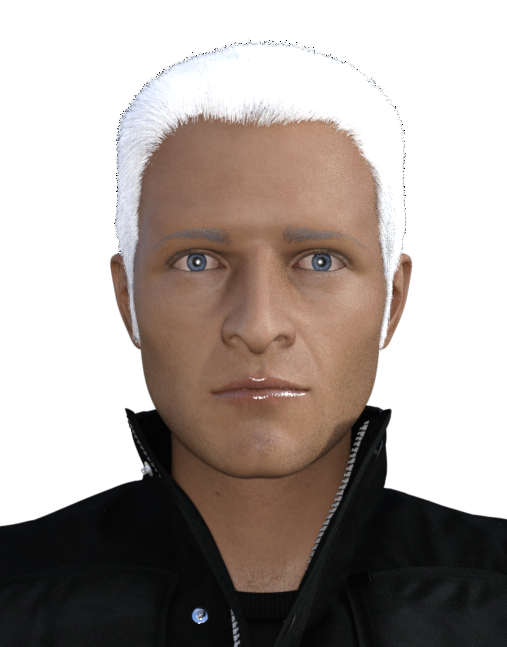
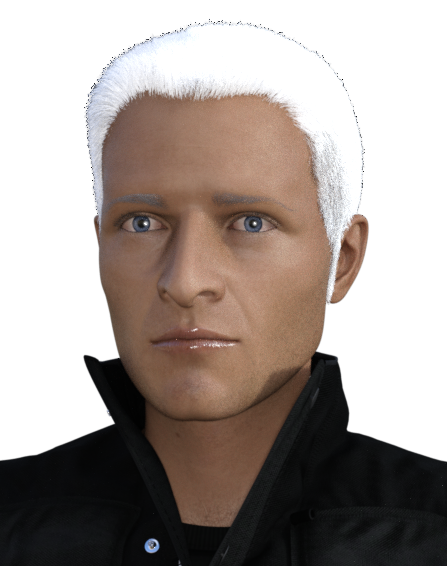

I have used in the renderings the following products:
Genesis 8.1 Male
Mi Tactical Outfit for G8 and G8.1 Males
Vlad Hair for G8M and Vlad figure
Bold Brows Fibermesh for G8M (Groomed02 option).
You will find the head morphs of the characters of Deckard (PI for G8.1M) and Rachael (Lady Noir for G8.1F) here:
I don't have plans for the near future to make any more head morphs but who knows...
Please be so kind and post your work including the Soldier head morph in this thread for me and everyone else to enjoy. Thanks.
Have fun!
AOBB
How to use g3 materials on g2It's not possible, you would need a version of the geografts with G3 UVs to be able to use map transfer to convert the maps.
How to use g3 materials on g2Hello everyone. Sorry for the necro but I have a question.
How can I make textures adapted by Genesis 3 UVs for Genesis 2 Female(s) to an proper texture for G2? The add on creates geografts to fill the gaps in the texture but since that is not part of the main texture the map transfer utility (or saving the material preset) seems to have problems to generate a proper output fr G2 (e.g. the ears appear in the face part and are missing from the torso and there are grey areas in the texture where the geografts are).Morphs on all of my Content Library things are missings, but not for Smart ContentHello everyone!
I have a bug to report and am confused as to what could be causing this issue. I have a product known as a dForce Hooded Cloak. At one point it had all of its morphs, but during one day I had to re-organize my Daz3D files as the space on my PC was beginning to run out. I reorganized everything as well as my Content Library and ended up discovering after getting what feels everything all organized. All my object morphs vanished as well as anything that had to be downloaded into the content library. I tried uninstalling and reinstalling Daz3D, but to no luck avail. I tried re-downloading them and nothing came back up for the morphs so I know something must be out of wack somewhere in Daz3D morph stuff. I tried finding any discussions that talked about this bug and couldn't find anything that remotely made any sense of my issue.
I don't really wanna go through this trouble, but I am a bit new around. I'm a digital artist who's been using Daz3D to help in most of my content and getting these morphs back into the object is incredibly important. So a bit of help would be nice as a little understanding of where the morphs would be located and how to place them back and sorts.
Thank you! Cannot Save Presets Since DAZ Studio Update
The log file from when it happens (Last two lines):
2021-09-06 01:07:04.189 DEBUG: IRay Memory Assistant Exited.
2021-09-06 01:07:04.202 Script executed successfully: C:/Users/Public/Documents/My DAZ 3D Library/scripts/simtenero/iraymemoryassistant.dse
2021-09-06 01:07:12.991 Loading script: C:/Users/Public/Documents/My DAZ 3D Library/scripts/v3digitimes scene optimizer/v3dso 01 store scene texture map state.dse
2021-09-06 01:08:06.859 DEBUG: bisATempMap false
2021-09-06 01:08:30.120 Script executed successfully: C:/Users/Public/Documents/My DAZ 3D Library/scripts/v3digitimes scene optimizer/v3dso 01 store scene texture map state.dse
2021-09-06 01:08:46.268 WARNING: ..\..\..\..\..\src\sdksource\fileoutput\dzassetoutfile.cpp(11229): No geometries match the vertex count of morph "PHMEyelashesCurl"
2021-09-06 01:08:46.273 WARNING: ..\..\..\..\..\src\sdksource\fileoutput\dzassetoutfile.cpp(11229): No geometries match the vertex count of morph "PHMEyelashesCurl"
2021-09-06 01:08:46.279 WARNING: ..\..\..\..\..\src\sdksource\fileoutput\dzassetoutfile.cpp(11229): No geometries match the vertex count of morph "PHMEyelashesTopPoint"
2021-09-06 01:08:46.279 WARNING: ..\..\..\..\..\src\sdksource\fileoutput\dzassetoutfile.cpp(11229): No geometries match the vertex count of morph "PHMEyelashesCurl"
2021-09-06 01:08:46.284 WARNING: ..\..\..\..\..\src\sdksource\fileoutput\dzassetoutfile.cpp(11229): No geometries match the vertex count of morph "PHMEyelashesCurl"
2021-09-06 01:08:46.483 WARNING: ..\..\..\..\..\src\sdksource\fileoutput\dzassetoutfile.cpp(11229): No geometries match the vertex count of morph "PHMEyelashesCurl"
2021-09-06 01:08:46.841 Failed to save image: C:\Users\Ron\Documents\DAZ 3D\Studio\My Library\Scenes\Chronicles of Kartis\Queen's Chamber\QC - Sirens.duf.png
2021-09-06 01:08:46.841 Operation failed
As well as a screenshot I added. This error message occurs when i save ANYTHING. Scene. Character Preset. Wearables Preset. Materials, etc ... everything that would normally generate a png thumbnail.
Thick blood vessels on characters?You can do this with HD morphs, or you can do this with normal and/or displacement maps. You can also unlock the limits on the morphs and surfaces to go above the default max. Some Daz characters, particularly the Daz Original HD characters, only load the HD morph if you use the HD preset, but no normals. The non HD version will load the normal maps but not the HD morphs. So what you can do is load the non HD version of the character and then locate and dial in their HD morphs. This will effectively double the effects. Plus you can unlock the limits and go even farther if you wish.
You can not edit HD morphs, but you can edit any texture map. So you can edit normal and displacement maps to your taste. However you may need the ability to paint across UV maps for some of these effects.
The advantage to HD morphs is that they are true geometry, the renderer will properly account for them. Normal and displacements are sort of cheats, they will look fine in most images but there may be some lighting setups that expose them as not being real geometry. The other downside is that any clothing or conforming/dforce props will not respect normals and displacement. They will only respect the true mesh. So if you have a really tight shirt on the character and the veins are done with textures, then the veins may pop threw the shirt. But if is a HD morph, the shirt will conform to the veins.
Another neat thing with HD add on morphs is that you can just dial multiple morphs in. If the morphs only add the vein effects, you can use different morphs at the same time to go really wild with it.
"Why it’s so hard to make CGI skin look real" - VOXDartanbeck said:
Jonstark said:
One of the surprises for me in finally going through all my character textures were some that I bought on a whim because they were cheap but didn't much care for the promo pics turned out to be very high quality. Specifically I'm thinking of Liquid Rust. All the promo pics look airbrushed and a little uninteresting, so I never thought much about them, but they are actually very high quality textures, and always include not just Diffuse, Spec and Bump maps, but also a Diffuse multiplier map as well as in many cases some Displacement maps. Much higher quality than I expected. Sometimes (most times!) those old promo renders on the product page just fall way short of giving a fair peek at what the product actually entails. :)
Makes me want to run out and buy some Liquid Rust!!! I'll have to dig through my collections and see what Liquid Rust I already have! ;)
Do you happen to have V4 Elite - Reby Sky?
I'm not sure if Reby Sky for Genesis included the same maps - I'll have to check. But the original has some pretty fun maps to play with in Carrara shaders, as well as inspiring us to see how the hand-painted controller maps were made so we can experiment with making our own - perhaps even going into great detail.
Oh yes, I've got Reby. I have all the Elite series, even the S5 Joanie, M5 Dave, V5 Valerie... the only one I didn't have up til a few weeks ago was V4 Ariana, which somehow I never saw or heard of before, and to be honest I'm wasn't in love with the promo renders for her, but when it popped up on sale my OCD side said: "must complete Elite collection immediately!" and since I have no impulse control...
The Reby sky for Genesis is just a morph for the Reby shape though, it doesn't include any textures. But yeah the Reby textures are kind of fun to see what kind of hijinx the texture creators were trying to get up to back in the day to make a crude SSS effect (which in fairness worked pretty well). The SSS maps made me chuckle, looks like a kindergartner with a crayon drew red marks over a diffuse map.
Better SSS maps are included with M5 Philip and V5 Bree (the 2 that every Carrarist has as they were included with Carrara). Though imo everyone has gotten SSS maps wrong in one way or another. I ended up making my own to make sure that the effect was guided to the right places and not the wrong ones. (almost everyone who made a SSS map seems under the impression that every character render should have eyes so red it looks like they are in the throes of a terrible malady).
Thick blood vessels on characters?I highly recommend Auto Muscle Enhancer for Genesis 8 Male(s). It comes with an AME Veins morph dial. By enabling the main Auto Muscle Enhancer Body dial by as little as 1%, it unlocks the AME Veins morph to be dialed in at any strength.
Best female for runway model frameThe measurements of the ideal runway fashion model are 72 inches tall and 32-22-33.
The measurements of the ideal Victoria's Secret model are 69 inches tall and 34-24-34.
I used Measure Metrics to make my figures these exact dimensions (don't ask me how - I don't remember).
The chest of the fashion model will likely be somewhat flat, but if you make her torso narrower, you can dial in a few inches of breasts so that the circumfrence of the chest is still 32 inches.
Here is an iimage of Genesis3Female with the ideal runway model measurements. The 2nd image is the same figure, but I made the chest narrower to balance them with the width of the hips, and added a few inches of breasts.
The head morph is 100% Chara. The hair is Chace. The skin texture is Brittany with the translucency lowered. The clothing is the Dance Gear leotard. The third image is the 2nd image model wearing the Ghost Bride outfit.
This body is just the base G3Female body with no character dialed into the body. I just altered the chest-waist-hip measurements. There are some really great products in the store for shapiing body parts - such as https://www.daz3d.com/killer-legs-morphs-for-genesis-3-female-s
If you want a figure that looks like a model in a fashion illustration, my choice would be Aiko 6.
Shadow Thief outfit issuesDoes anyone have any experience with the DAZ Originals G8F Shadow Thief outfit? It's very attractive, but the armor and straps on the bodice seem to intersect with the bodice fabric and get partially "lost" in it. No amount of fiddling with the morphs or Smoothing Modifier seems to help. Has anyone else experience this issue?
Edit: As it turns out, I had to adjust a character morph that the outfit did not support.
Daz 3D is part of

Connect
DAZ Productions, Inc.
7533 S Center View Ct #4664
West Jordan, UT 84084Licensing Agreement | Terms of Service | Privacy Policy | EULA
© 2026 Daz Productions Inc. All Rights Reserved.