-
SOLVED Can morphs for the anatomical elements work with opposite gender character elements
vwrangler said:
Yes,, the morphs for the male elements should work on the male-for-female elements. As Frinkky said, all you need to do is copy the morphs from one subdirectory to the equivalent subdirectory in the G81 male-for-female directory. I've tested that out a while back, and there weren't any issues.
But this nonsense with duplicating complete morph trees would not have been necessary if the Daz guys would have done their homework:
- Putting the geometry file for the female version of the G8M anatomical elements into the already present G8M elements directory (with altered file name)
- Using this geometry file for the loader preset, also linking to the original G8M UV map
Same counts for the male version of the G8F anatomical elements.
All the available morphs for G8M anatomical elements would work also with the female version and vice versa. But seems to me, this mess was intended - for making things more complicated as they would have to be. And with the file names of the loader presets "advertice" the new Genesis 8.1 and suggest that these transgender versions will work only with that - well, but that's clearly not the case.
For my personal purposes I have moved the geometry file and adjusted the .DUF loader, everything works like expected, there are NO issues.
How to fix hidden propertiesHidden properties can be left alone most of the time, but if you feel the need to tweak them to make the item fit better, go ahead. They can be adjusted just like any other morph. It's not clear why you think them having a value other than zero is something that needs to be "fixed" though.
By the way, what hair is that?
How to fix hidden propertiesWhen you fit hair or clothing to a character, the morphs that are activated (value other than zero) on the character will be transferred also to the hair/clothing that is being fitted, with the same value that is used on the character - Nothing to fix.
The morphs transferred from the character are hidden on the fitted hair/clothing.
Those hidden morphs can also be used to improve how the item fits on the character, just move the dials as you like, or if you need more control to achieve what you want, select the figure and set the value on a suitable dial to 0.1% or 0.1, and the morph is being transferred to the fitted items where you can increase the value as you like.
hi i need help with Go z and morph loader prolasagnaman said:
the preset used is daz studio and i did the same thing for both and it still wont work
lasagnaman said:
how do i do that with the obj scale
no nothing happens at all
lasagnaman said:
oh this is insane i dont understand whats going on goz wont work at all
so i imported and exported and when i did it said morph created but when i use the morph it scales the character instead of using the morph . what the hell am i doing wrong and why cant i do this
Make sure you use the same preset in the OBJ exporter options dialogue and the Morph Loader dialogue - OBJ doesn't have a built in scale so you need to ensure that the settings in each direction balance.
Export an OBJ (anything, it's just a test - you can cancel at the end) and in the options dialogue that appears after you set the name note which preset is used. That should eb the one you used to export the OBJ for ZBrush, so in Morph Loader select the same preset.
Try importing the OBJ as a model, using the same preset, and see how it compares to the base figure.
XTransfer Module 1- Genesis 3 to Genesis 8 Morph Converter (Commercial)Maybe this will help about creating a control property
hi i need help with Go z and morph loader pro
Sounds like you sculpted high resolution details. You can’t create a morph from that.lasagnaman said:
iok let me try to explain it better sorry for the confusion . ok what i did was took a genesis 8 female made her a bodybuilder in daz added veins and muscles and now i wanted to make adjustments using zbrush so i exported as obj and imported into zbrush did my adjustments and then exported back into daz studio when i tried using morph loader pro it says morph not created. Also before i did all this i used the hoz first but it wouldn’t work right and then i realized i had to versions of zbrush installed i had 2020 and 2021 so i uninstalled 2020 and now i lost the send to zbrush in daz studio and i need a walkthrough on how to get it back so can someone please help me with this
Change Morph Group Names?This is all I'm seeing when right clicking. What am I doing wrong? Clicking sort property groups only opens the morph menu.
hi i need help with Go z and morph loader prothe preset used is daz studio and i did the same thing for both and it still wont work
lasagnaman said:
how do i do that with the obj scale
no nothing happens at all
lasagnaman said:
oh this is insane i dont understand whats going on goz wont work at all
so i imported and exported and when i did it said morph created but when i use the morph it scales the character instead of using the morph . what the hell am i doing wrong and why cant i do this
Make sure you use the same preset in the OBJ exporter options dialogue and the Morph Loader dialogue - OBJ doesn't have a built in scale so you need to ensure that the settings in each direction balance.
Export an OBJ (anything, it's just a test - you can cancel at the end) and in the options dialogue that appears after you set the name note which preset is used. That should eb the one you used to export the OBJ for ZBrush, so in Morph Loader select the same preset.
SOLVED Can morphs for the anatomical elements work with opposite gender character elementsIs Catty based on G8.1M or G8.1F? If she is G8.1M, I think I'd go that route. I think the geographs that join to the hip make the AE too different for the morph files to be interchangable although I'm far from an expert of 3D modeled or how it's done for DAZ 3D products.
Change Morph Group Names?Is it possible [Change Morph Group Names]?
Edited for Please put your question in the post body and the title - Daz 3D Forums
SereneNight’s Sci-Fi Fun Thread 3Serene Night said:
vwrangler said: Maybe the indentations are meant to be old faded acne scars?
I can't tell what the dents are, except perhaps... Sculpting. Its a bit different, but if one does not like it, one can simply use a different body with the head. The head is very good, but not great with expressions. It has that gen 7 mask-like-face feel and not every expression really works on him.
I think they almost look like burn scars, from an injury that wasn't severe enough to require a skin transplant, but enough to leave obvious scarring. That's probably not what it's meant to be, though. Are they really sculpted into the morph?! I thought it was just the texture having ridiculously high bump settings.
Daz Studio 4.16[.0.x] Pro, General Release! (*UPDATED*)I must say, after getting more used to animating in Daz Studio, it starts to get easier.
The way that default TCP tweener works baffles me though.
Sometimes if I copy the entire hierarchy from one spot in time to another, with nothing in between, it contorts to rigging so vastly out of wack that DS sits n' spins forever.
I also think it's kinda clunky that, while I can select the triangle key markers, I can't do anything short of copy/paste/delete unless I drill down to the round markers - but at least it's doable.
I love the new bounding box that the devs made for Carrara 8.5. We can select a number of keys and they get surrounded by a bounding box. We can scale that box up and down to make the changes more or less - example being joint rotation: If we scale down the box, the joint will move less along that rotation. Scale it up and it will move more.
Not using the bounding box, we can hold Ctrl/Cmd to the right to make the frames take longer to complete (stretch them in time) or to the left to make them happen quicker. Alt + Drag to copy/paste them.
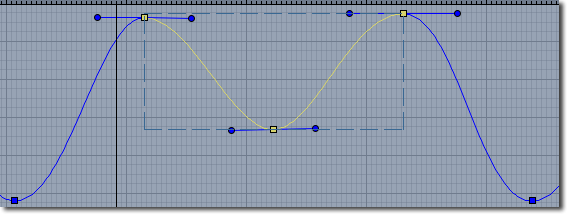
Here are the curve handles and bounding box in Carrara's graph editor
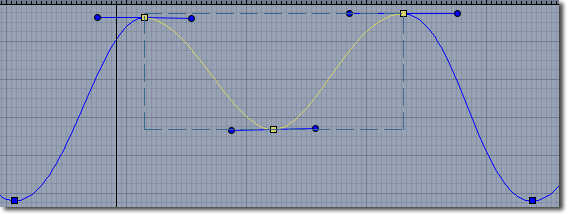
Having Noise tweeners is essential to be able to set two keys, and let the noise function determine any value in between throughout the timeline. Awesome for star ship console lights, flame flicker, etc.,
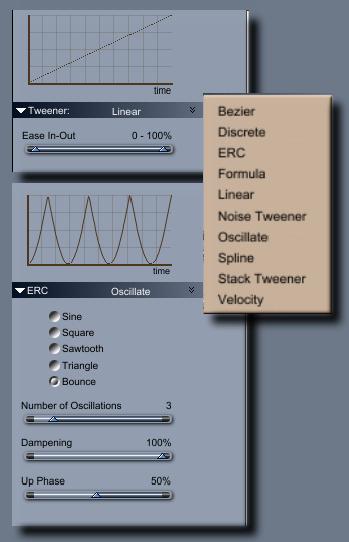
Oscillate gives us various options for repeating the two keys (two keys for each selected aspect) back and forth. Sawtooth works perfect for having a video repeat. 30 frame video at 30fps would have two oscillations to complete 3 seconds at 30fps. The first run, and then two more oscillations. Bounce uses a curve to determine how smoothly the animation goes from A to B, with B being at the climax that sends it back down to A using the inverse of the first curve, which can be editing for timing purposes. Perfect for creating things like jiggle, jello bouncing, etc., Sine is more like a Bezire that repeats as many time as we ask it to.
Bezier should have ease-in, ease-out, tighten-in and tighten-out paremters, unless is comes equipped with handle to adfjust the curve manually.
Even a Linear tweener should have settings for Ease-In and out.
Image on the right - see the top Linear Tweener adjustments. It doesn't look like much, but is perfect for Sci-Fi doors opening and closing by setting how quickly it starts and ends it's linear rate. Below that is one example (Bounce) of the many Oscillate options.
I am able to sculpt out some cool animations using aniMate 2's tools along with Pose Control morph dials, but in either case, aniMate 2 or the Timeline, I haven't found an efficient way of (for example) retiming the action of the legs or arms vs the rest of the animation, which is super easy to do in Carrara just by stretching and pulling around the selected range of keys.
XTransfer Module 1- Genesis 3 to Genesis 8 Morph Converter (Commercial)marble said:
Llola Lane said:
Update... I had a chance to play today... and I Xtransfered all 6 of my ladies and the same thing is happening with ALL of them... The Yscale is not transfering over on the CHEST UPPER... CHEST LOWER... ABDOMEN UPPER... and ABDOMEN LOWER... the X and Z numbers transfer just fine. I'm going to try and make a completely new character with G3 and see if I have the same issue. It bugs me that I can't figure this out. Like I said..."although my converted G3 characters are not EXACT for G8... they are passable." :)
It is very odd because, after Zev0 remarked that there was no scale parameter to transfer, I looked and he's right yet I am certain that I unchecked one that specified "scale" in the XTransfer panel list and my figure transferred correctly. I even mentioned it in my reply here in this thread. Perhaps look down that list before you hit the do it button?
I will have to look this weekend... I don't see a 'scale' option... I won't be about tomorrow to play. Thanks for the help... I will make do :)
XTransfer Module 1- Genesis 3 to Genesis 8 Morph Converter (Commercial)Llola Lane said:
Update... I had a chance to play today... and I Xtransfered all 6 of my ladies and the same thing is happening with ALL of them... The Yscale is not transfering over on the CHEST UPPER... CHEST LOWER... ABDOMEN UPPER... and ABDOMEN LOWER... the X and Z numbers transfer just fine. I'm going to try and make a completely new character with G3 and see if I have the same issue. It bugs me that I can't figure this out. Like I said..."although my converted G3 characters are not EXACT for G8... they are passable." :)
It is very odd because, after Zev0 remarked that there was no scale parameter to transfer, I looked and he's right yet I am certain that I unchecked one that specified "scale" in the XTransfer panel list and my figure transferred correctly. I even mentioned it in my reply here in this thread. Perhaps look down that list before you hit the do it button?
Bonnie 8.1 Bundles3D Vitality said:
Leana said:
I fail to see any similarities between Bonnie and Topsy...
https://gcdn.daz3d.com/p/82043/i/bonnie8111daz3d.jpg
https://gcdn.daz3d.com/p/72923/i/Topsy08Beauty.jpg
IMHO Bonnie is (just) a (good) morph from Topsy... they could be sisters / twins... and I always found this close apperance disturbing. And it's in my eyes nothing that warrants a new character. It just have smell of "making money fast". But that's only my 2ct on that.
I agree, when I first saw her last night, I thought it had to be a Topsy character. I think the body shape might have something to do with it too. I don't think they look like sisters, but to me they are "of the same type."
To: oso or rawart -- how about an anthropomorphic rabbit ?Quick render slapped together using
https://www.daz3d.com/harvey-rabbit-with-dforce-hair-for-genesis-8-male for rabbit elements
https://www.daz3d.com/toon-generations-essentials-for-genesis-8-males for toon proportions
https://www.daz3d.com/hfs-ultimate-shapes-for-genesis-8-male for a more animal like face morph
I messed something up with the face fur (I don't like the default goatee and I can't be assed to redo it right) but this could be close to what you are looking for.
hi i need help with Go z and morph loader prolasagnaman said:
how do i do that with the obj scale
no nothing happens at all
lasagnaman said:
oh this is insane i dont understand whats going on goz wont work at all
so i imported and exported and when i did it said morph created but when i use the morph it scales the character instead of using the morph . what the hell am i doing wrong and why cant i do this
Make sure you use the same preset in the OBJ exporter options dialogue and the Morph Loader dialogue - OBJ doesn't have a built in scale so you need to ensure that the settings in each direction balance.
Export an OBJ (anything, it's just a test - you can cancel at the end) and in the options dialogue that appears after you set the name note which preset is used. That should eb the one you used to export the OBJ for ZBrush, so in Morph Loader select the same preset.
Bonnie 8.1 Bundles3D Vitality said:
Leana said:
I fail to see any similarities between Bonnie and Topsy...
https://gcdn.daz3d.com/p/82043/i/bonnie8111daz3d.jpg
https://gcdn.daz3d.com/p/72923/i/Topsy08Beauty.jpg
IMHO Bonnie is (just) a (good) morph from Topsy... they could be sisters / twins... and I always found this close apperance disturbing. And it's in my eyes nothing that warrants a new character. It just have a smell of "making money fast". But that's only my 2ct on that.
a lot of the DAZ characters share many similarities.
Bonnie 8.1 BundlesLeana said:
I fail to see any similarities between Bonnie and Topsy...
https://gcdn.daz3d.com/p/82043/i/bonnie8111daz3d.jpg
https://gcdn.daz3d.com/p/72923/i/Topsy08Beauty.jpg
IMHO Bonnie is (just) a (good) morph from Topsy... they could be sisters / twins... and I always found this close apperance disturbing. And it's in my eyes nothing that warrants a new character. It just have a smell of "making money fast". But that's only my 2ct on that.
To: oso or rawart -- how about an anthropomorphic rabbit ?hmmm... yeah... pretty close actually... the face morph isn't quite like i'd expect but i can mix in some other ones i've got...
the body is very cool.. and the fur is nice and dense... looks good... thanks for pointing this outfrank
Daz 3D is part of

Connect
DAZ Productions, Inc.
7533 S Center View Ct #4664
West Jordan, UT 84084Licensing Agreement | Terms of Service | Privacy Policy | EULA
© 2026 Daz Productions Inc. All Rights Reserved.