-
UltraScenery - new territory [Commercial]
Norman_R said:
barbult said:
Thanks for the swamp hut comments. They do go well with the UltraScenery swamp and wetlands add-ons. I wanted to put in some alligators, but the AM alligators are just not shaped and posed like Florida alligators. I think I'll have to try to morph them someday.
barbult Thanks :)
he also has this https://www.daz3d.com/crocodilia-2-gharial-and-crocodile
I also have Crocodilia 1 Alligator and Caiman, but it diesn't have Iray shaders and I had difficulty converting, so I bought the Iray version of the alligator. This is what a Florida gator looks like in the water (photo from Saturday) and I haven't been able to achieve that yet with the Daz Studio product. I think it part shaping and part posing that is frustrating me.
What Model is this?It could be a custom character. If I was to try recreating it, I would start by dialing in some percentage of the Aiko 8 morph and experimenting from there.
Best tool for UV mapping/changing? (goal is M3/V3/H3/A3 UV to Genesis)yes the other option for Map transfer would be to give both meshes an alternative overlapping UV.
so if similar shapes they can be unwrapped to an identical layout
Best tool for UV mapping/changing? (goal is M3/V3/H3/A3 UV to Genesis)repaint in Ultimate Unwrap3D using clones
Blender baking using clones
Blacksmith3D
Zbrush Zprojection
If you have a UV product DAZ studio Map transfer is also a possibility, I do recall there being one using geografts for Genesis 3 or 8 but don't think there was one for Genesis
https://www.daz3d.com/legacy-uvs-for-genesis-3-special-edition-victoria-3
it could be awkwardly transferred from 3 to 1 afterwards though, due to different surfaces and geografted bits one would need to combine maps in an image editor.
V3, M3, A3 etc all have the same UV BTW
My trial ended prematurely after 2weeks due to some glitch but I did manage to create a rough V2 UV for Genesis 3 with a couple of shared surface issues in that time, sadly I didn't have time or skill to refine it.
But yes, Maya can project UV mapping from one mesh to another if they occupy the same vertex space even though the vertex counts differ.
Mystique 2 & Expansions for G8F [Commercial]N3p3nth3 said:
Herschel Hoffmeyer said:
N3p3nth3 said:
Love this like all your work, typical it came out while I was on a small Daz hiatus after checking for your new releases basically weekly since January

Looking forward to much more outfits and now even characters in the future.
Nice render! Love the character and the oufit goes great! Speaking of new releases, HH Sayble is out now!
Here's my attempt at a celebration of both - I wound up using 50 % Sayble and 50 % of something else for the head morph, so I'll post it here.
Keep up the good work, looking forward to everything, and especially if you have something in the vein of Ghostblade coming again ;)
Amazing character and render. Love those legs and overall shape to her. This is certainly something "Ghostblade" coming at you soon but more in both sexy and cyberpunk. Watch out for the "Cyber Samurai" expansion for the "Umbra" outfit.
Question importing models with geo-graftsIs this possible to do with the Daz to Cinema4d bridge while still retaining Daz's morphs for the model? Also how about clothing morphs? I haven't been able to get that to work. It took me a while to realize that the reason none of the morphs for my character were importing was due to the geo-grafts, but even then it seems to be finicky and sometimes doesn't import all the morphs I selected. It can import the model with the geo-graft, but all morphs are lost or rather they get put under the clothing and geo-grafts as "Poses" which as far as I know are unusable? Just recently got into Cinema and so maybe I'm missing something in that regard, but I've only managed to get the morph group to appear that actually allows the morphs to work.
If the bridge can't do that, anybody on here got any tips in regards to keeping the morphs and also attaching the geo-graft to the model within Cinema? I did import the geo-graft as an fbx which more or less worked out fine tho I'd have to recreate the pose morphs for it. Not that I have much if any experience doing that either haha. I actually had tried importing morphs from Daz to Cinema manually using obj files and the pose morph tag in Cinema, but couldn't figure out how to keep the pose morphs without having to keep the importing obj file in the scene for the pose morph reference.
Any tips or advice appreciated.
UltraScenery - new territory [Commercial]barbult said:
Thanks for the swamp hut comments. They do go well with the UltraScenery swamp and wetlands add-ons. I wanted to put in some alligators, but the AM alligators are just not shaped and posed like Florida alligators. I think I'll have to try to morph them someday.
barbult Thanks :)
he also has this https://www.daz3d.com/crocodilia-2-gharial-and-crocodile
UltraScenery - new territory [Commercial]Thanks for the swamp hut comments. They do go well with the UltraScenery swamp and wetlands add-ons. I wanted to put in some alligators, but the AM alligators are just not shaped and posed like Florida alligators. I think I'll have to try to morph them someday.Breast physics daz model in ue4 helpcleberwhatsup said:
Hi, i do it with physics body and morphs! For the breast i use physics, because the skeleton have bones for that. For the butt i use morph targets.
Here some videos from my chanel...

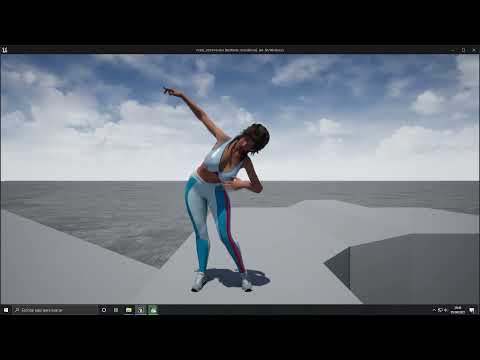
wow you would mind making a tutorial of how you did that??? it was really awesome!!!!!.
Help to Fix a really annoying "pose bug" in unreal from daz, if anyone know a good way to fix itok after some tests today i've found a possible "fix" or work around aboust this, i was playing with daz pose controls and decided to expor the knee up control to unreal and found out which while it don't work in the same way it work in daz i means in daz it actually move the legs while in unreal it just "deform" the legs but it lead to the "butt" and crouch to actually looks good here:
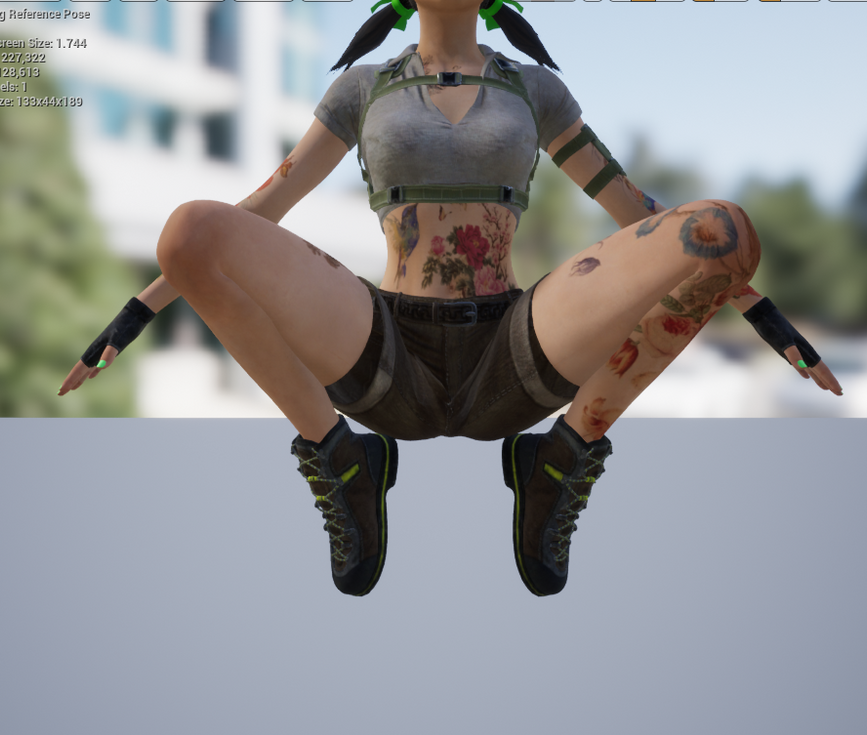
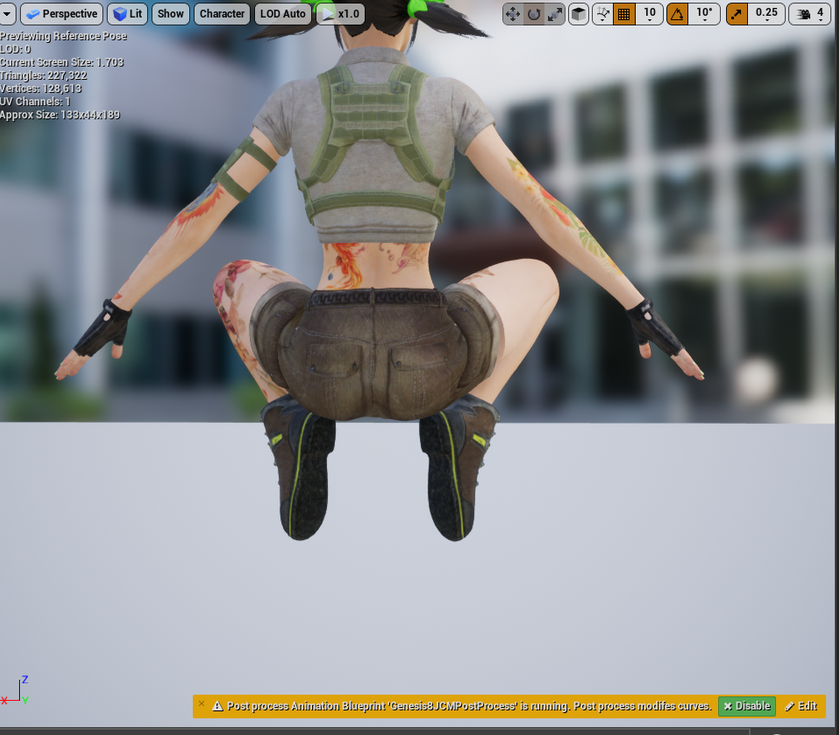
as you can see it's looks much better and natural than when you bend the legs with animation or manually, then i would love to know if is possible to get the "the hip" part of the knee and create a "jcm(corrective morph) of it to be applied using the animation bp post processing like the others joints if it would be possible to use the "hip part" of this control then it would be perfect to fix this pose issue.
anyone with knowledge about "corrective morphs" to know if can be possible do it????
Is there a way to do a shaping morph or shaping preset for only the eyes?
You are welcome !Jonstark said:CHWT said:
Did you try saving the post-eye adjustment shape as an obj (base resolution, no subdivision), then loading a new genesis and use morph loader to load the obj as morphs, adjust rigging to shape and ERC freeze, finally saving as a new morph asset?
Ha, that was it. It was on high resolution. Dumb mistake on my part, thank you very much! :)
Sellmateskulala said:
I'm just trying to find out if I can sell my account for daz 3d I stopped enjoying it but I put a lot of money into it so I'm sorry and I want to find out if it can be sold
https://www.daz3d.com/eula
This Agreement is User's proof of license to exercise the rights granted herein and may be printed and retained by User. User shall not give, sell, rent, lease, sublicense, or otherwise transfer or distribute any Content on a temporary or permanent basis without the prior written consent of DAZ.To get written consent of DAZ you would need to open a Help ticket and ask them.
https://helpdaz.zendesk.com/hc/en-usEJ Face Morphs gone from the store?magog_a4eb71ab said:
benniewoodell said:
magog_a4eb71ab said:
I hope their products that I've already purchased are still downloadable through DIM or I'll be SOL and po'ed. I have quite a few of their morph packs for both G3 & G8 and I'll be needing to do a fresh install of Daz Studio on a new Win10 system. Can anyone confirm if this content is still available on DIM if we already own it?
Someone brought this up in the there's always another sale thread and somebody said that all the products you've purchased are still available for you to download.
That's good to know. It would be a real pain in the ass having to contact/convince the PA that you own the products and that you just need to download & reinstall them. I also noticed that the Charlotte 8 Pro pack is being sold over at ArtStation by a Daz3DTafi for the exact same price(not the discounted price), which I find rather odd since pro packs contain multiple products made by different PAs.
The products in old G8 (and earlier) pro bundles are all owned by DAZ3D and are DAZ originals. IIRC PA's either contract to make the products for DAZ, or DAZ purchases the rights to the products. So DAZ has the rights to sell them at Artstation if they want to. Tafi is apparently the parent company for DAZ3D which I would guess give them the rights to sell DAZ3D originals.
EJ Face Morphs gone from the store?benniewoodell said:
magog_a4eb71ab said:
I hope their products that I've already purchased are still downloadable through DIM or I'll be SOL and po'ed. I have quite a few of their morph packs for both G3 & G8 and I'll be needing to do a fresh install of Daz Studio on a new Win10 system. Can anyone confirm if this content is still available on DIM if we already own it?
Someone brought this up in the there's always another sale thread and somebody said that all the products you've purchased are still available for you to download.
That's good to know. It would be a real pain in the ass having to contact/convince the PA that you own the products and that you just need to download & reinstall them. I also noticed that the Charlotte 8 Pro pack is being sold over at ArtStation by a Daz3DTafi for the exact same price(not the discounted price), which I find rather odd since pro packs contain multiple products made by different PAs.
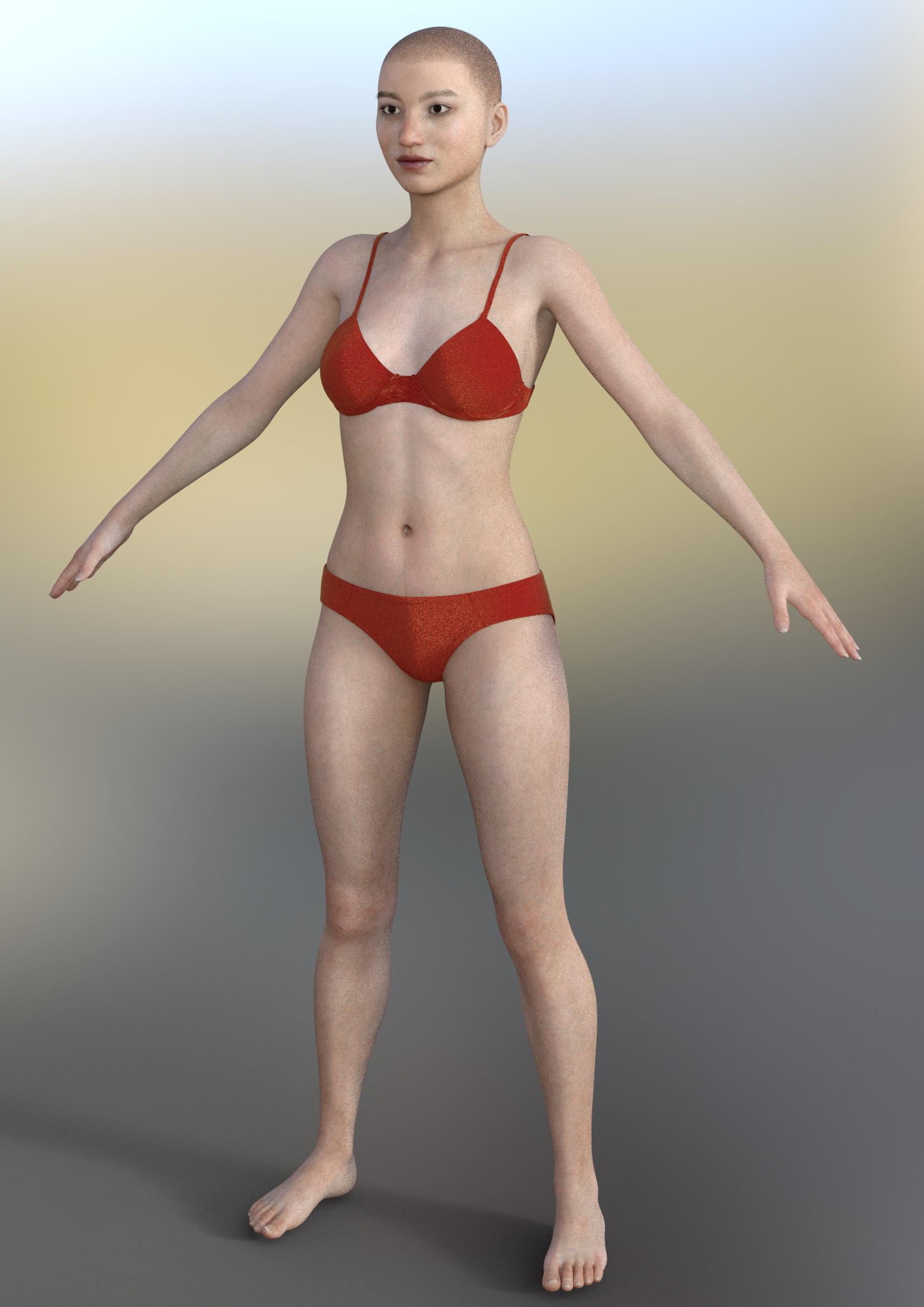
The "Dial Them Out" ThreadI got MingYue for Tika 8 and I don't have Tika 8. But she did seem to mix well with Teen Josie 8 and her morph looks good without Tika 8. Here's a render I did with MingYue's morphs only, in case others are interested in getting her and also don't have Tika 8. Used bluejaunte's Shaved for G3F for the hair.
 EJ Face Morphs gone from the store?
magog_a4eb71ab said:
I hope their products that I've already purchased are still downloadable through DIM or I'll be SOL and po'ed. I have quite a few of their morph packs for both G3 & G8 and I'll be needing to do a fresh install of Daz Studio on a new Win10 system. Can anyone confirm if this content is still available on DIM if we already own it?
Someone brought this up in the there's always another sale thread and somebody said that all the products you've purchased are still available for you to download.
EJ Face Morphs gone from the store?I hope their products that I've already purchased are still downloadable through DIM or I'll be SOL and po'ed. I have quite a few of their morph packs for both G3 & G8 and I'll be needing to do a fresh install of Daz Studio on a new Win10 system. Can anyone confirm if this content is still available on DIM if we already own it?
Duplicate keyRichard Haseltine said:
Tugpsx said:
Still getting duplicate keys on some assets with the latest Studio release.
ERROR: duplicate key value violates unique constraint "product_guid_key"
Reindeer Irradiator and Poses
SBibb Kitten Poses and Morph
Mars the planet
Stylized Animations for Genesis 8
Beauties of the World for Genesis 8 Female
Only Dress for Genesis 8 Female
Industrial Pneumatic Tools
Variety Facial Hair for Genesis 8 Male(s)
Lisa''s Botanicals - Palm Trees
Genesis Starter EssentialsAnuy fixes or should i resort to the links in this post.
That is an issue that needs to be fixed in the product metadata, not in DS.
So does this means i should ignore these error untill the products are updated? I guess since it is the prduct_guid_key we dont have a choice until the vendor corrects the issue.
Extracting specific morphs for individual body parts.This will do the job https://www.daz3d.com/shape-splitter , or you can export as OBJ at base resolution and with just the figure, then set up a dForm with a weight map on the areas you want to affect (or exclude) and when loading the OBJ as a morph in Morph Loader Pro select that dForm in the Attenuation options.
Duplicate keyTugpsx said:
Still getting duplicate keys on some assets with the latest Studio release.
ERROR: duplicate key value violates unique constraint "product_guid_key"
Reindeer Irradiator and Poses
SBibb Kitten Poses and Morph
Mars the planet
Stylized Animations for Genesis 8
Beauties of the World for Genesis 8 Female
Only Dress for Genesis 8 Female
Industrial Pneumatic Tools
Variety Facial Hair for Genesis 8 Male(s)
Lisa''s Botanicals - Palm Trees
Genesis Starter EssentialsAnuy fixes or should i resort to the links in this post.
That is an issue that needs to be fixed in the product metadata, not in DS.
Daz 3D is part of

Connect
DAZ Productions, Inc.
7533 S Center View Ct #4664
West Jordan, UT 84084Licensing Agreement | Terms of Service | Privacy Policy | EULA
© 2026 Daz Productions Inc. All Rights Reserved.