-
Crummy changes and problems with 4.2 "Pro"
IceCrMn said:
1. Next to every object on the Scene Pane will be a small arrow with a little x or check mark next to it.
Click the arrow to switch to the x. Now the object isn't selectable in the view port.
If it's a large prop environment or you have multiple things you you can make a "New Group".Let me know if you need help with this. It's in the Create menu on the main toolbar.
Then when you click the arrow for the group everything in the group will be effected.
2.The current General Release version has a known bug that causes that.It's a relatively easy fix if you don't want to wait for the next update.Or you can install the beta version that has the fix for this already.
The broke is DS isn't writing the new files because there weren't any old files to check before the file write commit.
The fix is to make new empty files so there is something to check.
https://www.daz3d.com/forums/discussion/553786/can-not-save-workspace-layout
3. If Filament( or any other viewport renderer) that is left turned on it will stay that way when you shutdown and restart or when you open new scenes. I didn't know of any other way to fix this other than to switch it off/on when needed.
I use the toggle next to the camera controller in the viewport constantly to switch between preview modes.
I've not seen DS turn this on all by itself, so If you're having issues with this it might take little more sleuthing to find out what's going on.
Okay I'll give this a go, thank you!
Crummy changes and problems with 4.2 "Pro"pjzanca said:
I actually like and use the Filament renderer because I can't get good performance out of the Iray preview (quality is great, just terrible performance on my hardware) - but if you really want to, you can disable the plugin permanently:
Ooh, now you're speaking my language. I get what you mean, but I don't find the lighting preview to be good enough for me to tell. Thank you!
Crummy changes and problems with 4.2 "Pro"I actually like and use the Filament renderer because I can't get good performance out of the Iray preview (quality is great, just terrible performance on my hardware) - but if you really want to, you can disable the plugin permanently:
Crummy changes and problems with 4.2 "Pro"1. Next to every object on the Scene Pane will be a small arrow with a little x or check mark next to it.
Click the arrow to switch to the x. Now the object isn't selectable in the view port.
If it's a large prop environment or you have multiple things you you can make a "New Group".Let me know if you need help with this. It's in the Create menu on the main toolbar.
Then when you click the arrow for the group everything in the group will be effected.
2.The current General Release version has a known bug that causes that.It's a relatively easy fix if you don't want to wait for the next update.Or you can install the beta version that has the fix for this already.
The broke is DS isn't writing the new files because there weren't any old files to check before the file write commit.
The fix is to make new empty files so there is something to check.
https://www.daz3d.com/forums/discussion/553786/can-not-save-workspace-layout
3. If Filament( or any other viewport renderer) that is left turned on it will stay that way when you shutdown and restart or when you open new scenes. I didn't know of any other way to fix this other than to switch it off/on when needed.
I use the toggle next to the camera controller in the viewport constantly to switch between preview modes.
I've not seen DS turn this on all by itself, so If you're having issues with this it might take little more sleuthing to find out what's going on.
Crummy changes and problems with 4.2 "Pro"1) Can I make the universal tool stop highlighting the nodes I touch? I like selecting things like heads and then bend, etc, but having my cursor highlight EVERY. SINGLE. THING. it touches in the viewport is an eyesore and I don't know how to get rid of it.
2) I can't seem to save layouts anymore and Daz3D isn't interested in keeping any of the custom layouts I do try to make. What's up with that?
3) Filament is garbage and I'd like Daz to not open my scene files with it, how do I make it stop doing that?
Thanks for any advice, "if it ain't broke, don't fix it!".
Render clothing only (no base figure) while not showing hidden/rear partsyou probably need very even lighting as well, an all white HDRi and no emitters/sun node
a PBR render engine is always going to cast shadow, maybe use Filament
New DS Filament Render EngineWendyLuvsCatz said:
the HDR file has to be 2:1 not the render
Gimp can save as HDR
there may be other reasons but Filament is defaulting to the DT Ruins because it cannot read your HDR
there are several I have it won't load either
exr files especially are not all readable too, edited they often work
Sorry, I meant that I forced 2:1 inside Gimp and saved as .hdr file. Iray again has no problems, but filament still can't handle it, so it must be because of another reason, as you suspected in your last post. Well, Filament is still being developed...
But thanks for making things clearer to me!
New DS Filament Render Enginethe HDR file has to be 2:1 not the render
Gimp can save as HDR
there may be other reasons but Filament is defaulting to the DT Ruins because it cannot read your HDR
there are several I have it won't load either
exr files especially are not all readable too, edited they often work
New DS Filament Render EngineWendyLuvsCatz said:
mding said:
WendyLuvsCatz said:
it is using the default ruins probably because your HDR is not 2:;1 in dimensions
@WendyLuvsCatz Thanks for helping! But it works with iray, or is this 2:1 only a necessity of Filament (I know very little about HDRIs).
only Filament I discovered it earlier in this thread
Thats weird: I forced it to 2:1 and it still doesn't show...
New DS Filament Render EngineWendyLuvsCatz said:
mding said:
WendyLuvsCatz said:
it is using the default ruins probably because your HDR is not 2:;1 in dimensions
@WendyLuvsCatz Thanks for helping! But it works with iray, or is this 2:1 only a necessity of Filament (I know very little about HDRIs).
only Filament I discovered it earlier in this thread
Thats weird: I forced it to 2:1 and it still doesn't show...
New DS Filament Render Enginemding said:
WendyLuvsCatz said:
it is using the default ruins probably because your HDR is not 2:;1 in dimensions
@WendyLuvsCatz Thanks for helping! But it works with iray, or is this 2:1 only a necessity of Filament (I know very little about HDRIs).
only Filament I discovered it earlier in this thread
New DS Filament Render Enginemding said:
WendyLuvsCatz said:
it is using the default ruins probably because your HDR is not 2:;1 in dimensions
@WendyLuvsCatz Thanks for helping! But it works with iray, or is this 2:1 only a necessity of Filament (I know very little about HDRIs).
only Filament I discovered it earlier in this thread
New DS Filament Render EngineWendyLuvsCatz said:
it is using the default ruins probably because your HDR is not 2:;1 in dimensions
@WendyLuvsCatz Thanks for helping! But it works with iray, or is this 2:1 only a necessity of Filament (I know very little about HDRIs).
New DS Filament Render EngineHi there, I have a problem with an HDRI in Filament:
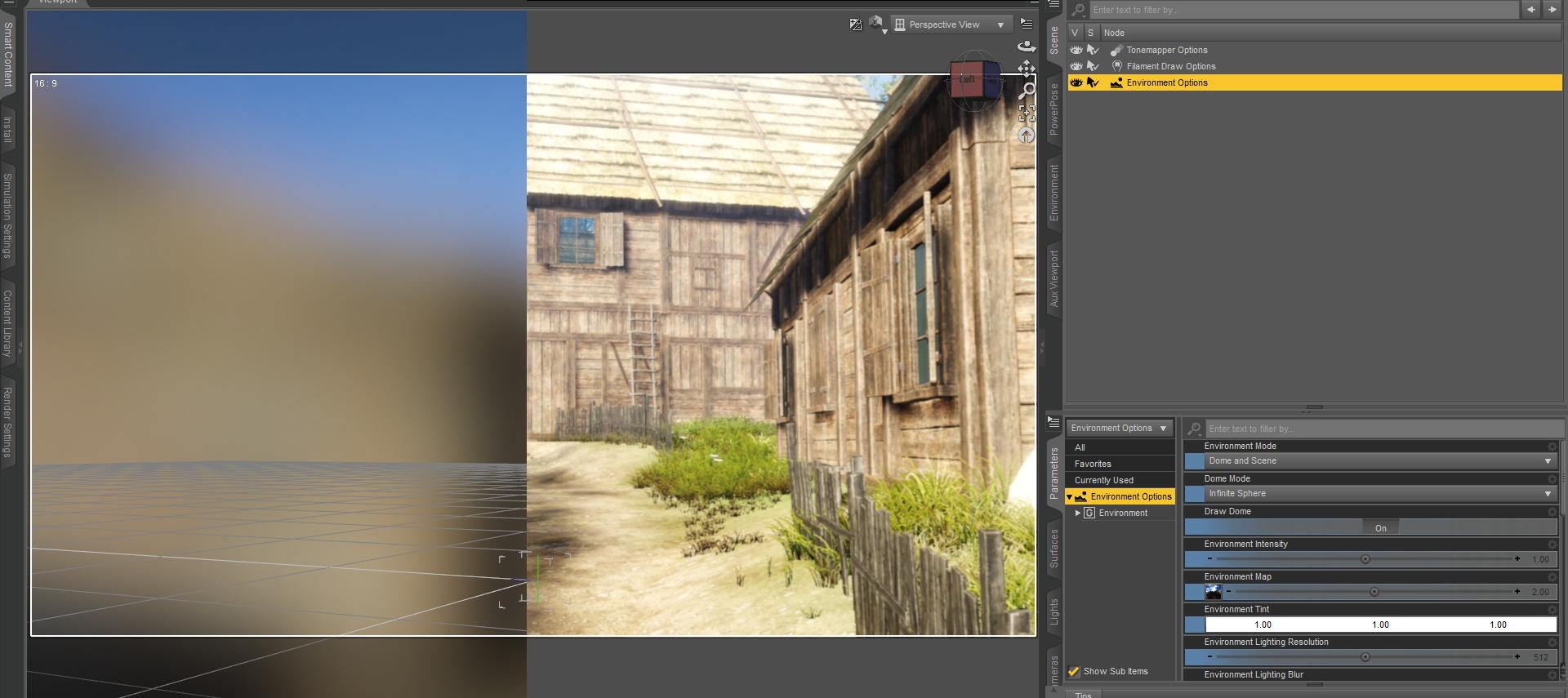
I never had problems using HDRI in Filament, but this time, although it works in IRAY without problems (right side), in Filament it looks way too blurry (left side). The product used is https://www.daz3d.com/eadrith-hdri. I didn't use the preset here (.duf) but loaded it directly in the environment tab (.hdr) and tried to tweak relevant filament dials without success. Could anybody help me please? Thanks!
List of Filament ResourcesReview: Filament PRO Lights And Rendering Secrets - 2 New Lights + Video Tutorial
https://www.daz3d.com/filament-pro-lights-and-rendering-secrets--2-new-lights--video-tutorial
Length: about 160 Minutes / 11 Videos
Bonus: 3 Filament Lights and 2 Filament Presets (1 Indoor, 1 Outdoor)
The Tutorial consists of 3 Parts:
The first part takes slighty more than 80 minutes (6 videos) and explains how Filament works and behaves in contrast to IRAY/3Delight/Textured View. It further on shows how to efficiently use Filament by explaining the relevant dials and how they are structured, then the use of different lights, limitations and how to overcome them, showing how the bonus lights delivered with this tutorial can be created.
In the second part the theory of the first is being put to use by creating an artwork. This making of takes about 75 minutes (4 videos).

The third part is a short video explaining how to use the Bonus Lights.
My impression:
Dreamlight is a light genius, it is amazing to watch him build a point light which creates shadows, or explaining how to make soft shadows possible in Filament.

He does a great job explaining the structure and hierarchy of the different Filament dials, and uses his Layer Technique (which he previously developed for 3Delight and also explained for IRAY in several tutorials) in order to overcome most of the encountered lighting limitations of Filament, using Layer Graphics Software like Photoshop or The Gimp.
While he shows for example a gradual blur effect and how to add fog or smoke in postwork, the main part of the tutorial takes place inside DAZ Studio and focuses on indoor lighting, outdoor lighting being treated for about 16 minutes, which seems consistent with the higher complexity encountered at indoor lighting.
Of course not every Filament topic is treated, known issues like shader conversion or hair issues are only touched briefly with limited success.
As usual with Dreamlight, his tutorial isn’t scripted, which sometimes results in spontaneously surfacing additional insights for the viewer, and sometimes just demands a bit of patience.
Still, all this didn‘t reduce the overall great impression I had of this beginner to medium level tutorial.

The bonus lights (a Soft Spot Light, a Distant Light as sunlight for outdoor renders and a Point Light which creates shadows) and the bonus presets (outdoor, indoor) have been very useful, so that I consider them as important part of my future Filament work flow.
So to conclude this review, as an advanced beginner, I strongly recommend this tutorial to everybody planning to use filament for more than just another render preview option, like creating backgrounds as basis for further postwork, or animation, when the own hardware is lacking the necessary „cuda power“.
FSL Realistic Hair Shaders How to useHi team, using the material shades in various hair types can be a bit limited for me and up to now have tried to mess around with surfaces. But I looked for something I could use as a one click (Or two) to do that for me.
So, I recently bought FSL Realistic Hair Shaders for Iray and Filament by Fuseling. However, I can't get any results from it and there are no instructions. I have thus far tried selecting the hair in the scene and clicking on the colour I wanted but nothing happens.
Obviously I've misunderstood exactly how this add on works, can anyone explain for me please?
Many thanks
List of Filament ResourcesReview: Rssy 3delight and Iray to Filament from Riversoftart and Sickleyield
https://www.daz3d.com/rssy-3delight-and-iray-to-filament
What it does:
It tries to make your scene look better:
It converts IRAY and 3Delight Materials to look better in Filament.
It adapts the environment settings, converts or adds lights and even shadows.
It adds a hair cap prop to avoid known translucency issues with hair in filament.
How to use it:
It is installed in the Utilities section in the Smart Content tab.

There not as expected under „Utilities“ but „Documents“.

Double Click on the script icon, click on „Scan“, then on „Find Matches“, then on „Apply Presets“ and „Accept“. And you are done.
My impression:
In my scene I used an IRAY environment and a G2F Figure (3Delight) with G2F Clothing (also 3Delight). I didn’t add any lights, no camera headlamp, only tweaked the dome rotation / orientation settings. I didn’t change any script settings.
The script changed my scene in a few seconds from this:

to this:

Also the script wasn’t able to add the hair cap to my G2F figure, as the props are meant for G8F or G8M only. Same with the skin, which stayed 3Delight.
But with a G3F clone it was no problem to add the hair cap. As the hair is black, the black hair cap material had to be used on the props‘ surface.
The skin material could be applied after using an iray uber shader on g2f skin surface.
The script had added a strong Distant Light to create the shadows and turned down the environment intensity a lot, so tweaking those settings quickly got me „back on track“:

Conclusion:
The clothing, skin and hair have been improved considerably in a matter of minutes.
The more painterly look of the nature props was lost, the crisp shadows and stronger contrast naturally changed the mood of the scene.
As an advanced beginner, i am very impressed of this scripts‘ efficiency and wholeheartily recommend it – it’s a great time saver and on top of that can be further adapted.
Share Great Hairs For Filament@3Diva recommends hair for use with filament in the following post (with renders):
https://www.daz3d.com/forums/discussion/comment/6267891/#Comment_6267891
hairs @3Diva recommends:
- https://www.daz3d.com/courtney-hair-for-genesis-3--8-females
- https://www.daz3d.com/diesel-hair-for-genesis-3-male-s-female-s
- https://www.daz3d.com/eliot-hair-for-genesis-3-male-s-female-s
- https://www.daz3d.com/gizelle-hair-for-genesis-3--8-females
- https://www.daz3d.com/lani-hair-for-genesis-3-female-s
- https://www.daz3d.com/odessa-hair-for-genesis-3-female-s
Renders to be found in the post. But you are told it isn't easy...
Share Great Hairs For FilamentXinXin hair was used for some of this video in the Filament shots
https://www.daz3d.com/xinxin-for-aiko-3

(is not all Filament lots of Carrara 2:18 and Octane too, but mostly Filament)
Share Great Hairs For Filamentwell I guess I can add these shaders to the list, are in my wishlist
https://www.daz3d.com/fsl-realistic-hair-shaders-for-iray-and-filament
I am on a journey of discovery here, still looking for good hair options rather than dressing all my characters in hoods and hats

this hair I don't have should work too
https://www.daz3d.com/nata-toon-hair-for-genesis
as would any solid toon hairs
Daz 3D is part of

Connect
DAZ Productions, Inc.
7533 S Center View Ct #4664
West Jordan, UT 84084Licensing Agreement | Terms of Service | Privacy Policy | EULA
© 2026 Daz Productions Inc. All Rights Reserved.