-
Lost and Found growing! Is that right?
Richard Haseltine said:
geekydad123 said:
I just purchased a product that went straight to Lost and Found. It's got over 300+ files associated with it (it's a complex environment), I really don't want to have to sort that myself. Hopefully a support ticket will get things straightened out.
If it is part of a bulk transfer from Renderosity then it probably won't get official metadata - but if someone, using the default install locations, created metadata for it that could be shared.
Users are probably not eager to do Daz's work for them for free. Even packaging up the metadata for sharing after creating it takes time. That is followed by the requests for help because people don't know how to install it, or they don't know how to import it, or they don't have their product installed in the same hierarchy, or... I volunteer you, if you are interested.
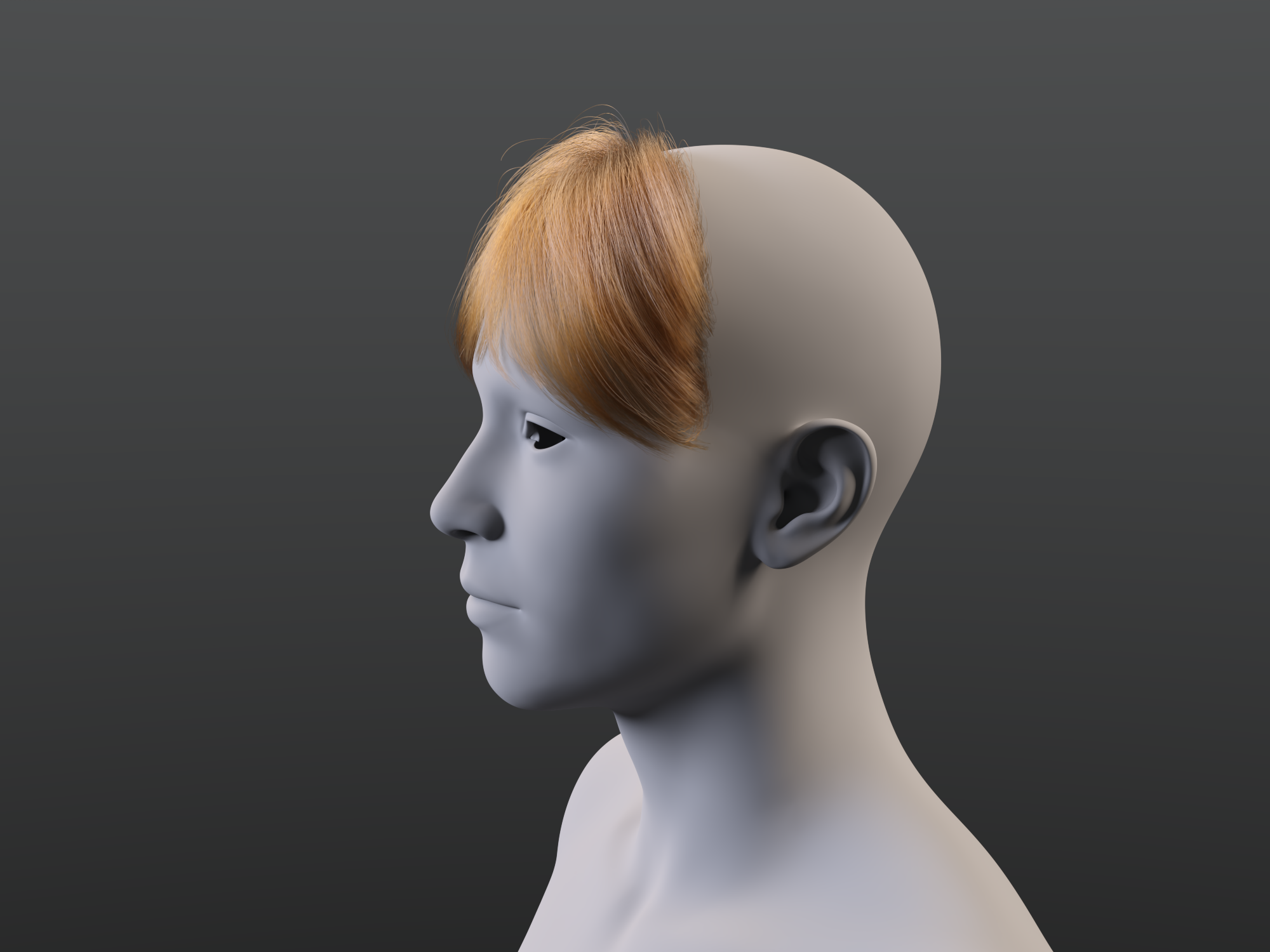
 really like the look of the bangs in the promo for dForce Strand-Based Autumn Style Bob Hair for Gen
It is not difficult to morph a dForce root radius hair. I made this quick morph to scale the back of the hair down and move it inside the G9 head, as an example. I wrote up these instructions a couple years ago and posted in some forum thread. These reference G8, but the technique still worked today in DS 4.23.0.4 with G9 and the Autumn Style Bob hair strands.
I don't know if all these settings are critical or not, but this is what works for me:
- Load G8F
- Select G8F and a load dForce hair (I'm using dForce Neroli Hair).
- In the Scene pane, select dForce hair object (not the cap).
- In Parameters pane, make sure Generate PS Hairs, Generate PR Hairs and Preview PR Hairs are On. Make sure Line Tessellation is >0? It is 3 on the hair I am using.
- Zero out any morphs in the dForce hair that are set when the hair is loaded.
- Select the Geometry Editor Tool.
- Hide everything except dForce hair object in the Scene pane.
- Export to OBJ.
- Import OBJ to modeler (Blender, etc.) modify and export modified OBJ.
- Back in DS with dForce hair object still selected and Geometry Editor tool still selected, run Morph Loader Pro.
- In Morph Loader Pro, load the modified hair OBJ and create the morph.
- Save the morph as a morph asset.
Instead of editing an OBJ in a modeler, you can drape the hair with dForce and export that as an OBJ. Clear the simulation, and import the OBJ with Morph Loader Pro. Save the morph as a morph asset.
Remember to select a tool other than Geometry Editor or Mesh Grabber before rendering.
 Lost and Found growing! Is that right?
geekydad123 said:
I just purchased a product that went straight to Lost and Found. It's got over 300+ files associated with it (it's a complex environment), I really don't want to have to sort that myself. Hopefully a support ticket will get things straightened out.
If it is part of a bulk transfer from Renderosity then it probably won't get official metadata - but if someone, using the default install locations, created metadata for it that could be shared.
Extremely bad performance with DAZ charactersPadone said:
In general it certainly depends on the figure and assets you load of course. It is also true that some daz assets are extremely heavy so to be avoided for animation. However, here I have a very basic hardware with a old GTX 1060, and with "normal" figures I don't experience much lag in the viewport. Using the Victoria 8 pro bundle I loaded Victoria 8 with Voss hair and the Defender armor. It runs at 30 fps both in solid mode and material preview.
I just use easy import with the preset for G8 so everything is included from jcms to correctives to morphs. Of course with simplify enabled, I woldn't dare anything without.
p.s. For heavy items, using the hide icon in the outliner doesn't affect the viewport performances. You have to use the disable icon instead, which will hide and disable the item so viewport performances are affected. There's no need to delete the item from the scene, just disable it.
Thank you for your response. I’ve already found the reason and managed to fix the issue
Actually, I was really surprised to find out it’s the brows. The character with the worst performance had brows from the 'Echo HD for Genesis 8.1 Female' model, and they have over 480,000 faces. When I checked about 10 other brows from my assets, they were all somewhere between 40,000 and 80,000 faces. I have no idea what went wrong when someone created this model, but that’s just insane
After using 'unsubdivide' on the brows, the face count dropped from 480,000 to 120,000, and now there's no more lag. A lot of my characters are based on Mousso models (the creator of Echo HD), and it seems like the high face count issue is common with many of their brows (at least for me)
However, problem solved! Thanks :)
Extremely bad performance with DAZ charactersIn general it certainly depends on the figure and assets you load of course. It is also true that some daz assets are extremely heavy so to be avoided for animation. However, here I have a very basic hardware with a old GTX 1060, and with "normal" figures I don't experience much lag in the viewport. Using the Victoria 8 pro bundle I loaded Victoria 8 with Voss hair and the Defender armor. It runs at 30 fps both in solid mode and material preview.
I just use easy import with the preset for G8 so everything is included from jcms to correctives to morphs. Of course with simplify enabled, I woldn't dare anything without.
p.s. For heavy items, using the hide icon in the outliner doesn't affect the viewport performances. You have to use the disable icon instead, which will hide and disable the item so viewport performances are affected. There's no need to delete the item from the scene, just disable it.
p.p.s. shaders. Also shaders and textures can slow down the viewport, so using solid mode for animation is generally faster, especially for complex scenes.
HELP - custom morphs causes mesh explosionLegacy way of import / export OBJ file in Blender older versions may bring the above issues. After Blender 4.0, Legacy way is discontinued, so it turns much safer.Install of unowned product?One example is 'Carina HD for Robyn 8' (64859).
- I see it in the Product Library
- I see it in installation tab of DS 4.23; after installation it's in the updates tab; the update will result the same
- 2024-10-19 17:12:45.590 [WARNING] :: \src\sdksource\cloud\dzcloudtasknotifier.cpp(201): Invalid ownership reason structure for product: 64859
2024-10-19 17:12:45.590 [WARNING] :: \src\sdksource\cloud\dzcloudtasknotifier.cpp(201): Install of unowned product Carina HD for Robyn 8 64859
2024-10-19 17:12:45.592 [INFO] :: "Carina HD for Robyn 8": Install Failed.
2024-10-19 17:16:33.023 [INFO] :: Updated metadata for 0 of 1 items
2024-10-19 17:16:38.491 [WARNING] :: \src\sdksource\cloud\dzcloudtasknotifier.cpp(201): Product "NO_PRODUCT" has no token
2024-10-19 17:16:38.500 [INFO] :: Starting Update of "Carina HD for Robyn 8"
2024-10-19 17:16:38.554 [WARNING] :: \src\sdksource\cloud\dzcloudtasknotifier.cpp(201): Invalid ownership reason structure for product: 64859
2024-10-19 17:16:38.554 [WARNING] :: \src\sdksource\cloud\dzcloudtasknotifier.cpp(201): Install of unowned product Carina HD for Robyn 8 64859
2024-10-19 17:16:38.555 [INFO] :: "Carina HD for Robyn 8": Update Failed.
- 2024-10-19 17:12:45.590 [WARNING] :: \src\sdksource\cloud\dzcloudtasknotifier.cpp(201): Invalid ownership reason structure for product: 64859
- I can't find it in DIM 1.4.1.69; but I will see it in Daz Central
4.23 loses all the face groups.
Understand,thanks!crosswind said:woyodo said:
crosswind said:
woyodo said:
crosswind said:
Yep, exactly as barbult said. Just:
- Change Resolution Level to Base, activate Geometry Editor.
- Hide Belts and Metal surfaces. Export to OBJ.Again, Face Groups transferred from G8F are used for bone mapping and skin weight binding. You should've manipulated on Surfaces rather than Face Groups
I have another question:How can I sort the materials indexes of all the surfaces.For example:mat01-leather;mat02-heel;mat03-metal...With Geometry Editor, double-click on the surface label in Tool Settings to rename it... however, if you do so in DS, Material Presets won't work anymore on the item ~~
I mean to change the SORT of the materials.The first material : Main,the second : Heel ... When I import it to unreal , the materials sort like what I want.Not achievable in DS 'cause DS just list them alphabetically in ascending order ( sorting them by adding a prefix of number is already a good way...) ...You can do it in UE... if it's doable.
Extremely bad performance with DAZ charactersHey everyone! I’m here to ask for your help because I’ve spent the last few days trying to solve this problem on my own, but I haven’t had any luck. I’m not sure if there’s even a solution, but I thought it was worth a shot
A few weeks ago, I started learning Blender. I’ve been a DAZ artist for many years and wanted to try something new. Since I have a lot of characters, I began importing some of them into Blender (using HD Export - the characters are SubD 3 with a few HD morphs, Genesis 8 or Genesis 8.1). Each character usually comes with hair, brows, eyelashes, a shirt, pants, footwear, and maybe some accessories like a neck piece. I always import the characters using Diffeomorphic. I’m using Blender version 4.2.2 and Diffeomorphic version 4.2.1
The problem is that no matter whether everything on the character or the character itself is in Blender with multires set to 0 or 3, they’re all extremely laggy. I did some renders (where I also built an environment), and I never run out of VRAM, mostly around 5-6GB usage. But posing the character or trying to create a simple animation (like blinking) results in constant lag, and the timeline plays at a max of 4fps
However, I noticed that if I remove the hair, clothing, and brows in Blender, everything works just fine. So, I assume the problem is with those items, not the character itself. I’m specifically saying 'removing them' because hiding those items in the viewport doesn’t solve anything. Turning off multires on those items or using the Simplify option with the lowest values also doesn’t help
So, has anyone else encountered the same problem as me, or is there any solution I can try to fix this? I feel like I’ve tried everything, but nothing seems to work
Also, I’m not denying that the source of the problem might be hardware-related since I'm working with an RTX 3060 12GB. I'm just not sure if my hardware could actually influence things like posing. But yeah, I thought it was important to mention that
If there’s anyone who can at least try to help, I’d really appreciate it!
Thank you! :)
Edit: Yes, I'm facing the same problem with both non-HD and HD characters, there's not much of a difference
Anyone else having trouble with the new Pug?The Pug's shape was made based on Dog 8... the issue seems to be a wrong sculpting on its shape or wrong morph importing ~~
If you remove delta vertices from selected eyes, the eyeballs will "jump out" as Dog 8 has a different body shape / size... (if with partially selected vertices...it might be distorted in another way...) So, with the "jumped out" eyeballs, you have to "re-rig" them to the Pug by changing their Transforms in DS or directly in external software, e.g. Blender , export the Pug to OBJ and import it back to update Pug morph with deltas. Or, wait for the fix from the vendor ~~
[Solved] Diffeomorphic 'Blender to ZAZ' - 'Save pose Preset' euler rotation order ?the app i am targeting reads only daz / genesis bvh format files and doesn't have any special import options or anything. the input needs to be in the correct format.
How to import animations from Daz to Blender using Diffeomorphic?Padone said:
You are trying to import the morphs to a different mesh, 25182 vs 2028 vertices. You have to select the mesh object you want to import the morphs for.
Wait, just to make sure I'm doing this right. The action and/or poses should be applied to the armature but the morphs should be loaded onto the meshes?
4.23 loses all the face groups.woyodo said:
crosswind said:
woyodo said:
crosswind said:
Yep, exactly as barbult said. Just:
- Change Resolution Level to Base, activate Geometry Editor.
- Hide Belts and Metal surfaces. Export to OBJ.Again, Face Groups transferred from G8F are used for bone mapping and skin weight binding. You should've manipulated on Surfaces rather than Face Groups
I have another question:How can I sort the materials indexes of all the surfaces.For example:mat01-leather;mat02-heel;mat03-metal...With Geometry Editor, double-click on the surface label in Tool Settings to rename it... however, if you do so in DS, Material Presets won't work anymore on the item ~~
I mean to change the SORT of the materials.The first material : Main,the second : Heel ... When I import it to unreal , the materials sort like what I want.Not achievable in DS 'cause DS just list them alphabetically in ascending order ( sorting them by adding a prefix of number is already a good way...) ...You can do it in UE... if it's doable.
4.23 loses all the face groups.
I mean to change the SORT of the materials.The first material : Main,the second : Heel ... When I import it to unreal , the materials sort like what I want.crosswind said:woyodo said:
crosswind said:
Yep, exactly as barbult said. Just:
- Change Resolution Level to Base, activate Geometry Editor.
- Hide Belts and Metal surfaces. Export to OBJ.Again, Face Groups transferred from G8F are used for bone mapping and skin weight binding. You should've manipulated on Surfaces rather than Face Groups
I have another question:How can I sort the materials indexes of all the surfaces.For example:mat01-leather;mat02-heel;mat03-metal...With Geometry Editor, double-click on the surface label in Tool Settings to rename it... however, if you do so in DS, Material Presets won't work anymore on the item ~~
How to import animations from Daz to Blender using Diffeomorphic?You are trying to import the morphs to a different mesh, 25182 vs 2028 vertices. You have to select the mesh object you want to import the morphs for.
[Solved] Diffeomorphic 'Blender to ZAZ' - 'Save pose Preset' euler rotation order ?Of course diffeomorphic changed the orientation, because blender and daz studio use a different orientation so when you import a model you have to fit the orientation to the target. As for bvh, again the target application should provide you options in the importer. Then if you don't need the animation in daz studio I doubt setting the bvh to the daz orientation will do you any good.
Where are you trying to import the bvh file, I mean what's your target application ?
Daz 4.23 Update Broke Iray RenderingBefore the update, I could render hundreds of frames just fine on GPU, sometimes it might drop to CPU, but would always go back to GPU no matter what.
Now, I only get one or two frames rendered on GPU before it fails completely. The first frame renders normal, as it always does, with iterations I am accustomed to, and then it fails.
Here is part of the Log:
2024-10-18 14:36:41.626 Iray [INFO] - IRAY:RENDER ::   1.0   IRAY   rend info : Initializing local rendering.
2024-10-18 14:36:41.634 Iray [INFO] - IRAY:RENDER ::   1.0   IRAY   rend info : CPU: using 15 cores for rendering
2024-10-18 14:36:41.635 Iray [INFO] - IRAY:RENDER ::   1.0   IRAY   rend info : Initializing OptiX for CUDA device 0
2024-10-18 14:36:41.953 Iray [INFO] - IRAY:RENDER ::   1.0   IRAY   rend info : Rendering with 2 device(s):
2024-10-18 14:36:41.953 Iray [INFO] - IRAY:RENDER ::   1.0   IRAY   rend info : 	CUDA device 0 (NVIDIA GeForce RTX 3050 Laptop GPU)
2024-10-18 14:36:41.953 Iray [INFO] - IRAY:RENDER ::   1.0   IRAY   rend info : 	CPU
2024-10-18 14:36:41.954 Iray [INFO] - IRAY:RENDER ::   1.0   IRAY   rend info : Rendering...
2024-10-18 14:36:41.954 Iray [INFO] - IRAY:RENDER ::   1.13  IRAY   rend progr: CPU: Processing scene...
2024-10-18 14:36:41.954 Iray [INFO] - IRAY:RENDER ::   1.7   IRAY   rend progr: CUDA device 0 (NVIDIA GeForce RTX 3050 Laptop GPU): Processing scene...
2024-10-18 14:36:41.954 Iray (Scene Access) : Retrieving geometry
2024-10-18 14:36:41.954 Iray [INFO] - IRAY:RENDER ::   1.40  IRAY   rend info : Initializing Embree
2024-10-18 14:36:45.565 Iray (Scene Access) : Retrieving volumes
2024-10-18 14:36:45.565 Iray (Scene Access) : Retrieving textures
2024-10-18 14:36:47.177 Iray (Scene Access) : Retrieving flags
2024-10-18 14:36:47.177 Iray (Scene Access) : Retrieving section objects
2024-10-18 14:36:47.178 Iray (Scene Access) : Retrieving lights
2024-10-18 14:36:47.178 Iray [INFO] - IRAY:RENDER ::   1.40  IRAY   rend info : Importing lights for motion time 0
2024-10-18 14:36:47.179 Iray [INFO] - IRAY:RENDER ::   1.40  IRAY   rend info : Initializing light hierarchy.
2024-10-18 14:36:47.181 Iray [INFO] - IRAY:RENDER ::   1.40  IRAY   rend info : Light hierarchy initialization took 1.239 ms
2024-10-18 14:36:47.181 Iray (Scene Access) : Retrieving materials
2024-10-18 14:36:47.187 Iray (Scene Access) : Compiling custom code
2024-10-18 14:36:47.187 Iray (Scene Access) : Retrieving environment
2024-10-18 14:36:47.373 Iray (Scene Access) : Retrieving backplate
2024-10-18 14:36:47.373 Iray (Scene Access) : Retrieving decals
2024-10-18 14:36:47.374 Iray (Scene Access) : Retrieving motion transform data
2024-10-18 14:36:47.375 Iray (Scene Access) : Retrieving lens data
2024-10-18 14:36:47.376 Iray [INFO] - IRAY:RENDER ::   1.13  IRAY   rend info : CPU: Scene processed in 5.422s
2024-10-18 14:36:47.465 Iray [INFO] - IRAY:RENDER ::   1.13  IRAY   rend info : CPU: Allocated 158.204 MiB for frame buffer
2024-10-18 14:36:48.588 Iray [INFO] - IRAY:RENDER ::   1.41  IRAY   rend info : JIT-linking wavefront kernel in 27.918 ms
2024-10-18 14:36:48.615 Iray [INFO] - IRAY:RENDER ::   1.7   IRAY   rend info : CUDA device 0 (NVIDIA GeForce RTX 3050 Laptop GPU): Scene processed in 6.661s
2024-10-18 14:36:48.629 Iray [INFO] - IRAY:RENDER ::   1.7   IRAY   rend info : CUDA device 0 (NVIDIA GeForce RTX 3050 Laptop GPU): Allocated 158.204 MiB for frame buffer
2024-10-18 14:36:48.639 Iray [INFO] - IRAY:RENDER ::   1.7   IRAY   rend info : CUDA device 0 (NVIDIA GeForce RTX 3050 Laptop GPU): Allocated 203.486 MiB of work space (194k active samples in 0.010s)
2024-10-18 14:36:50.378 Iray [INFO] - IRAY:RENDER ::   1.7   IRAY   rend info : Allocating 1-layer frame buffer
2024-10-18 14:36:50.603 Iray [INFO] - IRAY:RENDER ::   1.0   IRAY   rend info : Received update to 00001 iteration after 8.650 s.
2024-10-18 14:36:50.769 Iray (Scene Traversal) : Initializing update
2024-10-18 14:36:50.769 Iray (Scene Traversal) : Retrieving journal and checking for changes
2024-10-18 14:36:52.434 Iray [INFO] - IRAY:RENDER ::   1.0   IRAY   rend info : Received update to 00002 iterations after 10.480 s.
2024-10-18 14:36:54.647 Iray [INFO] - IRAY:RENDER ::   1.0   IRAY   rend info : Received update to 00003 iterations after 12.693 s.
2024-10-18 14:36:56.787 Iray [INFO] - IRAY:RENDER ::   1.0   IRAY   rend info : Received update to 00004 iterations after 14.834 s.
2024-10-18 14:36:56.913 Iray (Scene Traversal) : Initializing update
2024-10-18 14:36:56.913 Iray (Scene Traversal) : Retrieving journal and checking for changes
2024-10-18 14:36:58.831 Iray [INFO] - IRAY:RENDER ::   1.0   IRAY   rend info : Received update to 00005 iterations after 16.878 s.
2024-10-18 14:37:00.865 Iray [INFO] - IRAY:RENDER ::   1.0   IRAY   rend info : Received update to 00006 iterations after 18.911 s.
2024-10-18 14:37:01.518 Iray [INFO] - IRAY:RENDER ::   1.0   IRAY   rend info : Received update to 00007 iterations after 19.564 s.
2024-10-18 14:37:03.103 Iray [INFO] - IRAY:RENDER ::   1.0   IRAY   rend info : Received update to 00008 iterations after 21.150 s.
2024-10-18 14:37:03.186 Iray (Scene Traversal) : Initializing update
2024-10-18 14:37:03.187 Iray (Scene Traversal) : Retrieving journal and checking for changes
2024-10-18 14:37:06.537 Iray [INFO] - IRAY:RENDER ::   1.0   IRAY   rend info : Received update to 00010 iterations after 24.583 s.
2024-10-18 14:37:10.112 Iray [INFO] - IRAY:RENDER ::   1.0   IRAY   rend info : Received update to 00012 iterations after 28.158 s.
2024-10-18 14:37:10.236 Iray (Scene Traversal) : Initializing update
2024-10-18 14:37:10.236 Iray (Scene Traversal) : Retrieving journal and checking for changes
2024-10-18 14:37:13.410 Iray [INFO] - IRAY:RENDER ::   1.0   IRAY   rend info : Received update to 00014 iterations after 31.456 s.
2024-10-18 14:37:14.705 Iray [INFO] - IRAY:RENDER ::   1.0   IRAY   rend info : Received update to 00015 iterations after 32.751 s.
2024-10-18 14:37:16.953 Iray [INFO] - IRAY:RENDER ::   1.0   IRAY   rend info : Received update to 00017 iterations after 34.999 s.
2024-10-18 14:37:17.047 Iray (Scene Traversal) : Initializing update
2024-10-18 14:37:17.047 Iray (Scene Traversal) : Retrieving journal and checking for changes
2024-10-18 14:37:20.919 Iray [INFO] - IRAY:RENDER ::   1.0   IRAY   rend info : Received update to 00019 iterations after 38.965 s.
2024-10-18 14:37:25.188 Iray [INFO] - IRAY:RENDER ::   1.0   IRAY   rend info : Received update to 00021 iterations after 43.234 s.
2024-10-18 14:37:25.310 Iray (Scene Traversal) : Initializing update
2024-10-18 14:37:25.310 Iray (Scene Traversal) : Retrieving journal and checking for changes
2024-10-18 14:37:28.161 Iray [INFO] - IRAY:RENDER ::   1.0   IRAY   rend info : Received update to 00022 iterations after 46.208 s.
2024-10-18 14:37:29.772 Iray [INFO] - IRAY:RENDER ::   1.0   IRAY   rend info : Received update to 00024 iterations after 47.817 s.
2024-10-18 14:37:34.797 Iray [INFO] - IRAY:RENDER ::   1.0   IRAY   rend info : Received update to 00026 iterations after 52.843 s.
2024-10-18 14:37:35.028 Iray (Scene Traversal) : Initializing update
2024-10-18 14:37:35.028 Iray (Scene Traversal) : Retrieving journal and checking for changes
2024-10-18 14:37:38.739 Iray [INFO] - IRAY:RENDER ::   1.0   IRAY   rend info : Received update to 00028 iterations after 56.786 s.
2024-10-18 14:37:42.979 Iray [INFO] - IRAY:RENDER ::   1.0   IRAY   rend info : Received update to 00030 iterations after 01:01.025.
2024-10-18 14:37:43.154 Iray (Scene Traversal) : Initializing update
2024-10-18 14:37:43.154 Iray (Scene Traversal) : Retrieving journal and checking for changes
2024-10-18 14:37:44.294 Iray [INFO] - IRAY:RENDER ::   1.0   IRAY   rend info : Received update to 00031 iterations after 01:02.340.
2024-10-18 14:37:46.870 Iray [INFO] - IRAY:RENDER ::   1.0   IRAY   rend info : Received update to 00033 iterations after 01:04.916.
2024-10-18 14:37:52.352 Iray [INFO] - IRAY:RENDER ::   1.0   IRAY   rend info : Received update to 00036 iterations after 01:10.398.
2024-10-18 14:37:52.585 Iray (Scene Traversal) : Initializing update
2024-10-18 14:37:52.585 Iray (Scene Traversal) : Retrieving journal and checking for changes
2024-10-18 14:37:58.380 Iray [INFO] - IRAY:RENDER ::   1.0   IRAY   rend info : Received update to 00039 iterations after 01:16.426.
2024-10-18 14:37:58.541 Iray (Scene Traversal) : Initializing update
2024-10-18 14:37:58.541 Iray (Scene Traversal) : Retrieving journal and checking for changes
2024-10-18 14:37:59.714 Iray [INFO] - IRAY:RENDER ::   1.0   IRAY   rend info : Received update to 00040 iterations after 01:17.760.
2024-10-18 14:38:01.800 Iray [INFO] - IRAY:RENDER ::   1.0   IRAY   rend info : Received update to 00042 iterations after 01:19.847.
2024-10-18 14:38:03.795 Iray [INFO] - IRAY:RENDER ::   1.0   IRAY   rend info : Received update to 00043 iterations after 01:21.841.
2024-10-18 14:38:03.943 Iray (Scene Traversal) : Initializing update
2024-10-18 14:38:03.943 Iray (Scene Traversal) : Retrieving journal and checking for changes
2024-10-18 14:38:05.988 Iray [INFO] - IRAY:RENDER ::   1.0   IRAY   rend info : Received update to 00044 iterations after 01:24.034.
2024-10-18 14:38:07.738 Iray [INFO] - IRAY:RENDER ::   1.0   IRAY   rend info : Received update to 00045 iterations after 01:25.784.
2024-10-18 14:38:09.804 Iray [INFO] - IRAY:RENDER ::   1.0   IRAY   rend info : Received update to 00046 iterations after 01:27.849.
2024-10-18 14:38:09.957 Iray (Scene Traversal) : Initializing update
2024-10-18 14:38:09.957 Iray (Scene Traversal) : Retrieving journal and checking for changes
2024-10-18 14:38:11.455 Iray [INFO] - IRAY:RENDER ::   1.0   IRAY   rend info : Received update to 00047 iterations after 01:29.500.
2024-10-18 14:38:13.533 Iray [INFO] - IRAY:RENDER ::   1.0   IRAY   rend info : Received update to 00048 iterations after 01:31.579.
2024-10-18 14:38:13.735 Iray [INFO] - IRAY:RENDER ::   1.0   IRAY   rend info : Received update to 00049 iterations after 01:31.781.
2024-10-18 14:38:15.196 Iray [INFO] - IRAY:RENDER ::   1.0   IRAY   rend info : Received update to 00050 iterations after 01:33.242.
2024-10-18 14:38:15.197 Iray [INFO] - IRAY:RENDER ::   1.0   IRAY   rend progr: Maximum number of samples reached.
2024-10-18 14:38:15.313 Iray [INFO] - IRAY:RENDER ::   1.0   IRAY   rend info : Device statistics:
2024-10-18 14:38:15.313 Iray [INFO] - IRAY:RENDER ::   1.0   IRAY   rend info : CUDA device 0 (NVIDIA GeForce RTX 3050 Laptop GPU): 44 iterations, 7.014s init, 86.447s render
2024-10-18 14:38:15.313 Iray [INFO] - IRAY:RENDER ::   1.0   IRAY   rend info : CPU:                                                6 iterations, 5.423s init, 86.344s render
2024-10-18 14:38:15.848 [INFO] :: Saved image:
2024-10-18 14:38:15.848 [INFO] :: Rendering frame 1102...
2024-10-18 14:38:21.741 Iray [INFO] - TRAV:DATABASE ::   1.0   TRAV   db   progr: Traversing scene.
2024-10-18 14:38:23.343 Iray [INFO] - TRAV:DATABASE ::   1.0   TRAV   db   info : Traversing scene took 1.602 s.
2024-10-18 14:38:23.939 Iray (Scene Traversal) : Initializing update
2024-10-18 14:38:23.939 Iray (Scene Traversal) : Retrieving journal and checking for changes
2024-10-18 14:38:23.939 Iray (Scene Update) : Updating LPE labels
2024-10-18 14:38:23.939 Iray (Scene Update) : Updating geometry contexts
2024-10-18 14:38:23.939 Iray [INFO] - IRAY:RENDER ::   1.0   IRAY   rend info : Updating geometry contexts.
2024-10-18 14:38:23.940 Iray (Scene Update) : Updating geometry
2024-10-18 14:38:23.940 Iray [INFO] - IRAY:RENDER ::   1.0   IRAY   rend info : Updating geometry.
2024-10-18 14:38:23.940 Iray [INFO] - IRAY:RENDER ::   1.0   IRAY   rend info : Importing scene graph.
2024-10-18 14:38:24.310 Iray [INFO] - IRAY:RENDER ::   1.0   IRAY   rend info : Auto instancing compression 1.0x (Full instancing compression 1.0x)
2024-10-18 14:38:24.310 Iray (Scene Update) : Retrieving geometry
2024-10-18 14:38:24.310 Iray [INFO] - IRAY:RENDER ::   1.0   IRAY   rend info : Importing geometry for motion time 0
2024-10-18 14:38:24.808 Iray [INFO] - IRAY:RENDER ::   1.0   IRAY   rend info : Geometry import (1 triangle object with 10 M triangles, 1 instance yielding 10 M triangles) took 497.176 ms
2024-10-18 14:38:24.809 Iray (Scene Update) : Updating motion transform data
2024-10-18 14:38:24.809 Iray [INFO] - IRAY:RENDER ::   1.0   IRAY   rend info : Updating motion transforms.
2024-10-18 14:38:24.809 Iray (Scene Update) : Updating section objects
2024-10-18 14:38:24.809 Iray [INFO] - IRAY:RENDER ::   1.0   IRAY   rend info : Updating section objects.
2024-10-18 14:38:24.809 Iray (Scene Update) : Updating materials
2024-10-18 14:38:24.809 Iray [INFO] - IRAY:RENDER ::   1.0   IRAY   rend info : Updating materials.
2024-10-18 14:38:24.934 Iray [INFO] - MATCNV:RENDER ::   1.0   MATCNV rend info : found 544 textures, 0 lambdas (0 unique)
2024-10-18 14:38:24.934 Iray [INFO] - IRAY:RENDER ::   1.0   IRAY   rend info : Emitter geometry import (1 light source with 2 triangles, 1 instance) took 9.600 us
2024-10-18 14:38:24.934 Iray (Scene Update) : Updating environment
2024-10-18 14:38:24.934 Iray [INFO] - IRAY:RENDER ::   1.0   IRAY   rend info : Updating environment.
2024-10-18 14:38:25.038 Iray (Scene Update) : Updating code
2024-10-18 14:38:25.039 Iray [INFO] - IRAY:RENDER ::   1.0   IRAY   rend info : Updating compiled material code.
2024-10-18 14:38:25.039 Iray [INFO] - IRAY:RENDER ::   1.0   IRAY   rend info : Updating compiled environment code.
2024-10-18 14:38:25.039 Iray (Scene Update) : Updating textures
2024-10-18 14:38:25.039 Iray [INFO] - IRAY:RENDER ::   1.0   IRAY   rend info : Updating material textures.
2024-10-18 14:38:25.049 Iray [INFO] - IRAY:RENDER ::   1.0   IRAY   rend info : Updating environment textures.
2024-10-18 14:38:25.049 Iray [INFO] - IRAY:RENDER ::   1.0   IRAY   rend info : Updating BSDFs.
2024-10-18 14:38:25.050 Iray (Scene Update) : Updating volumes
2024-10-18 14:38:25.050 Iray [INFO] - IRAY:RENDER ::   1.0   IRAY   rend info : Updating volumes.
2024-10-18 14:38:25.050 Iray (Scene Update) : Updating lens data
2024-10-18 14:38:25.050 Iray [INFO] - IRAY:RENDER ::   1.0   IRAY   rend info : Updating lens.
2024-10-18 14:38:25.050 Iray (Scene Update) : Updating lights
2024-10-18 14:38:25.050 Iray [INFO] - IRAY:RENDER ::   1.0   IRAY   rend info : Updating lights.
2024-10-18 14:38:25.050 Iray (Scene Update) : Updating instance topology
2024-10-18 14:38:25.051 Iray (Scene Update) : Updating flags
2024-10-18 14:38:25.051 Iray [INFO] - IRAY:RENDER ::   1.0   IRAY   rend info : Updating object flags.
2024-10-18 14:38:25.052 Iray (Scene Update) : Updating backplate
2024-10-18 14:38:25.052 Iray [INFO] - IRAY:RENDER ::   1.0   IRAY   rend info : Updating backplate.
2024-10-18 14:38:25.052 Iray [INFO] - IRAY:RENDER ::   1.0   IRAY   rend info : Updating compiled backplate code.
2024-10-18 14:38:25.052 Iray [INFO] - IRAY:RENDER ::   1.0   IRAY   rend info : Updating backplate textures.
2024-10-18 14:38:25.052 Iray (Scene Update) : Updating decals
2024-10-18 14:38:25.052 Iray [INFO] - IRAY:RENDER ::   1.0   IRAY   rend info : Updating decals.
2024-10-18 14:38:25.070 Iray [INFO] - IRAY:RENDER ::   1.0   IRAY   rend info : Using no convergence estimate.
2024-10-18 14:38:25.070 Iray [INFO] - IRAY:RENDER ::   1.0   IRAY   rend info : Allocating 1-layer frame buffer
2024-10-18 14:38:25.085 Iray [INFO] - IRAY:RENDER ::   1.0   IRAY   rend info : Using batch scheduling, caustic sampler disabled
2024-10-18 14:38:25.085 Iray [INFO] - IRAY:RENDER ::   1.0   IRAY   rend info : Initializing local rendering.
2024-10-18 14:38:25.094 Iray [INFO] - IRAY:RENDER ::   1.0   IRAY   rend info : CPU: using 15 cores for rendering
2024-10-18 14:38:25.095 Iray [INFO] - IRAY:RENDER ::   1.0   IRAY   rend info : Initializing OptiX for CUDA device 0
2024-10-18 14:38:25.427 Iray [INFO] - IRAY:RENDER ::   1.0   IRAY   rend info : Rendering with 2 device(s):
2024-10-18 14:38:25.427 Iray [INFO] - IRAY:RENDER ::   1.0   IRAY   rend info : 	CUDA device 0 (NVIDIA GeForce RTX 3050 Laptop GPU)
2024-10-18 14:38:25.427 Iray [INFO] - IRAY:RENDER ::   1.0   IRAY   rend info : 	CPU
2024-10-18 14:38:25.427 Iray [INFO] - IRAY:RENDER ::   1.0   IRAY   rend info : Rendering...
2024-10-18 14:38:25.427 Iray [INFO] - IRAY:RENDER ::   1.7   IRAY   rend progr: CPU: Processing scene...
2024-10-18 14:38:25.427 Iray [INFO] - IRAY:RENDER ::   1.13  IRAY   rend progr: CUDA device 0 (NVIDIA GeForce RTX 3050 Laptop GPU): Processing scene...
2024-10-18 14:38:25.427 Iray (Scene Access) : Retrieving geometry
2024-10-18 14:38:25.428 Iray [INFO] - IRAY:RENDER ::   1.40  IRAY   rend info : Initializing Embree
2024-10-18 14:38:28.941 Iray (Scene Access) : Retrieving volumes
2024-10-18 14:38:28.941 Iray (Scene Access) : Retrieving textures
2024-10-18 14:38:30.679 Iray (Scene Access) : Retrieving flags
2024-10-18 14:38:30.679 Iray (Scene Access) : Retrieving section objects
2024-10-18 14:38:30.680 Iray (Scene Access) : Retrieving lights
2024-10-18 14:38:30.680 Iray [INFO] - IRAY:RENDER ::   1.40  IRAY   rend info : Importing lights for motion time 0
2024-10-18 14:38:30.680 Iray [INFO] - IRAY:RENDER ::   1.40  IRAY   rend info : Initializing light hierarchy.
2024-10-18 14:38:30.682 Iray [INFO] - IRAY:RENDER ::   1.40  IRAY   rend info : Light hierarchy initialization took 1.360 ms
2024-10-18 14:38:30.682 Iray (Scene Access) : Retrieving materials
2024-10-18 14:38:30.686 Iray (Scene Access) : Compiling custom code
2024-10-18 14:38:30.686 Iray (Scene Access) : Retrieving environment
2024-10-18 14:38:30.797 Iray (Scene Access) : Retrieving backplate
2024-10-18 14:38:30.797 Iray (Scene Access) : Retrieving decals
2024-10-18 14:38:30.798 Iray (Scene Access) : Retrieving motion transform data
2024-10-18 14:38:30.799 Iray (Scene Access) : Retrieving lens data
2024-10-18 14:38:30.799 Iray [INFO] - IRAY:RENDER ::   1.7   IRAY   rend info : CPU: Scene processed in 5.372s
2024-10-18 14:38:30.851 Iray [INFO] - IRAY:RENDER ::   1.7   IRAY   rend info : CPU: Allocated 158.204 MiB for frame buffer
2024-10-18 14:38:31.699 Iray [INFO] - IRAY:RENDER ::   1.41  IRAY   rend info : JIT-linking wavefront kernel in 29.189 ms
2024-10-18 14:38:31.984 Iray [INFO] - IRAY:RENDER ::   1.13  IRAY   rend info : CUDA device 0 (NVIDIA GeForce RTX 3050 Laptop GPU): Scene processed in 6.557s
2024-10-18 14:38:31.987 [WARNING] :: \src\pluginsource\DzIrayRender\dzneuraymgr.cpp(373): Iray [WARNING] - IRAY:RENDER ::   1.13  IRAY   rend warn : CUDA device 0 (NVIDIA GeForce RTX 3050 Laptop GPU): Failed to allocate 158.204 MiB for (device) frame buffer, will try allocating smaller (partial) frame buffer
2024-10-18 14:38:31.991 Iray [INFO] - IRAY:RENDER ::   1.13  IRAY   rend info : CUDA device 0 (NVIDIA GeForce RTX 3050 Laptop GPU): Allocated 79.102 MiB for device frame buffer
2024-10-18 14:38:32.034 Iray [INFO] - IRAY:RENDER ::   1.13  IRAY   rend info : CUDA device 0 (NVIDIA GeForce RTX 3050 Laptop GPU): Allocated 158.204 MiB for host-side frame buffer
2024-10-18 14:38:32.035 [WARNING] :: \src\pluginsource\DzIrayRender\dzneuraymgr.cpp(373): Iray [WARNING] - IRAY:RENDER ::   1.13  IRAY   rend warn : CUDA device 0 (NVIDIA GeForce RTX 3050 Laptop GPU): Succeeded in allocating partial device frame buffer. Device efficiency will be affected.
2024-10-18 14:38:32.060 Iray [INFO] - IRAY:RENDER ::   1.13  IRAY   rend info : CUDA device 0 (NVIDIA GeForce RTX 3050 Laptop GPU): Allocated 257.793 MiB of work space (246k active samples in 0.025s)
2024-10-18 14:38:33.451 [WARNING] :: \src\pluginsource\DzIrayRender\dzneuraymgr.cpp(373): Iray [ERROR] - IRAY:RENDER ::   1.17  IRAY   rend error: CUDA device 0 (NVIDIA GeForce RTX 3050 Laptop GPU): Kernel [1] (SSS & RT          ) failed after 0.200s
2024-10-18 14:38:33.452 [WARNING] :: \src\pluginsource\DzIrayRender\dzneuraymgr.cpp(373): Iray [ERROR] - IRAY:RENDER ::   1.17  IRAY   rend error: CUDA device 0 (NVIDIA GeForce RTX 3050 Laptop GPU): an illegal memory access was encountered (while launching CUDA renderer in <internal>:904)
2024-10-18 14:38:33.453 [WARNING] :: \src\pluginsource\DzIrayRender\dzneuraymgr.cpp(373): Iray [ERROR] - IRAY:RENDER ::   1.17  IRAY   rend error: CUDA device 0 (NVIDIA GeForce RTX 3050 Laptop GPU): Failed to launch renderer
2024-10-18 14:38:33.453 [WARNING] :: \src\pluginsource\DzIrayRender\dzneuraymgr.cpp(373): Iray [ERROR] - IRAY:RENDER ::   1.13  IRAY   rend error: CUDA device 0 (NVIDIA GeForce RTX 3050 Laptop GPU): Device failed while rendering
2024-10-18 14:38:33.454 [WARNING] :: \src\pluginsource\DzIrayRender\dzneuraymgr.cpp(373): Iray [WARNING] - IRAY:RENDER ::   1.13  IRAY   rend warn : CUDA device 0 (NVIDIA GeForce RTX 3050 Laptop GPU) is no longer available for rendering.
2024-10-18 14:38:33.456 [WARNING] :: \src\pluginsource\DzIrayRender\dzneuraymgr.cpp(373): Iray [ERROR] - OPTX:RENDER ::   1.13  OPTX   rend error: Error synching on OptixPipeline event (CUDA error string: an illegal memory access was encountered, CUDA error code: 700)
2024-10-18 14:38:33.461 [WARNING] :: \src\pluginsource\DzIrayRender\dzneuraymgr.cpp(373): Iray [ERROR] - IRAY:RENDER ::   1.13  IRAY   rend error: optixPipelineDestroy(pop_ptr(m_pipeline)) failed: CUDA error
2024-10-18 14:38:33.461 [WARNING] :: \src\pluginsource\DzIrayRender\dzneuraymgr.cpp(373): Iray [ERROR] - OPTX:RENDER ::   1.13  OPTX   rend error: Error synching on OptixPipeline event (CUDA error string: an illegal memory access was encountered, CUDA error code: 700)
2024-10-18 14:38:33.461 [WARNING] :: \src\pluginsource\DzIrayRender\dzneuraymgr.cpp(373): Iray [ERROR] - IRAY:RENDER ::   1.13  IRAY   rend error: optixPipelineDestroy(pop_ptr(m_pipeline)) failed: CUDA error
2024-10-18 14:38:33.462 [WARNING] :: \src\pluginsource\DzIrayRender\dzneuraymgr.cpp(373): Iray [ERROR] - OPTX:RENDER ::   1.13  OPTX   rend error: Error synching on OptixPipeline event (CUDA error string: an illegal memory access was encountered, CUDA error code: 700)
2024-10-18 14:38:33.463 [WARNING] :: \src\pluginsource\DzIrayRender\dzneuraymgr.cpp(373): Iray [ERROR] - IRAY:RENDER ::   1.13  IRAY   rend error: optixPipelineDestroy(pop_ptr(m_pipeline)) failed: CUDA error
2024-10-18 14:38:33.463 [WARNING] :: \src\pluginsource\DzIrayRender\dzneuraymgr.cpp(373): Iray [ERROR] - OPTX:RENDER ::   1.13  OPTX   rend error: Error synching on OptixPipeline event (CUDA error string: an illegal memory access was encountered, CUDA error code: 700)
2024-10-18 14:38:33.463 [WARNING] :: \src\pluginsource\DzIrayRender\dzneuraymgr.cpp(373): Iray [ERROR] - IRAY:RENDER ::   1.13  IRAY   rend error: optixPipelineDestroy(pop_ptr(m_pipeline)) failed: CUDA error
2024-10-18 14:38:33.505 [WARNING] :: \src\pluginsource\DzIrayRender\dzneuraymgr.cpp(373): Iray [ERROR] - IRAY:RENDER ::   1.13  IRAY   rend error: CUDA device 0 (NVIDIA GeForce RTX 3050 Laptop GPU): an illegal memory access was encountered (while de-allocating memory)
2024-10-18 14:38:33.505 [WARNING] :: \src\pluginsource\DzIrayRender\dzneuraymgr.cpp(373): Iray [ERROR] - IRAY:RENDER ::   1.13  IRAY   rend error: CUDA device 0 (NVIDIA GeForce RTX 3050 Laptop GPU): an illegal memory access was encountered (while de-allocating memory)
2024-10-18 14:38:33.506 [WARNING] :: \src\pluginsource\DzIrayRender\dzneuraymgr.cpp(373): Iray [ERROR] - IRAY:RENDER ::   1.13  IRAY   rend error: CUDA device 0 (NVIDIA GeForce RTX 3050 Laptop GPU): an illegal memory access was encountered (while de-allocating memory)
2024-10-18 14:38:33.506 [WARNING] :: \src\pluginsource\DzIrayRender\dzneuraymgr.cpp(373): Iray [ERROR] - IRAY:RENDER ::   1.13  IRAY   rend error: CUDA device 0 (NVIDIA GeForce RTX 3050 Laptop GPU): an illegal memory access was encountered (while de-allocating memory)
2024-10-18 14:38:33.507 [WARNING] :: \src\pluginsource\DzIrayRender\dzneuraymgr.cpp(373): Iray [ERROR] - IRAY:RENDER ::   1.13  IRAY   rend error: CUDA device 0 (NVIDIA GeForce RTX 3050 Laptop GPU): an illegal memory access was encountered (while de-allocating memory)
2024-10-18 14:38:33.507 [WARNING] :: \src\pluginsource\DzIrayRender\dzneuraymgr.cpp(373): Iray [ERROR] - IRAY:RENDER ::   1.13  IRAY   rend error: CUDA device 0 (NVIDIA GeForce RTX 3050 Laptop GPU): an illegal memory access was encountered (while de-allocating memory)
2024-10-18 14:38:33.508 [WARNING] :: \src\pluginsource\DzIrayRender\dzneuraymgr.cpp(373): Iray [ERROR] - IRAY:RENDER ::   1.13  IRAY   rend error: CUDA device 0 (NVIDIA GeForce RTX 3050 Laptop GPU): an illegal memory access was encountered (while de-allocating memory)
2024-10-18 14:38:33.508 [WARNING] :: \src\pluginsource\DzIrayRender\dzneuraymgr.cpp(373): Iray [ERROR] - IRAY:RENDER ::   1.13  IRAY   rend error: CUDA device 0 (NVIDIA GeForce RTX 3050 Laptop GPU): an illegal memory access was encountered (while de-allocating memory)
2024-10-18 14:38:33.508 [WARNING] :: \src\pluginsource\DzIrayRender\dzneuraymgr.cpp(373): Iray [ERROR] - IRAY:RENDER ::   1.13  IRAY   rend error: CUDA device 0 (NVIDIA GeForce RTX 3050 Laptop GPU): an illegal memory access was encountered (while de-allocating memory)
2024-10-18 14:38:42.291 Iray [INFO] - IRAY:RENDER ::   1.7   IRAY   rend info : Allocating 1-layer frame buffer
2024-10-18 14:38:42.455 [WARNING] :: \src\pluginsource\DzIrayRender\dzneuraymgr.cpp(373): Iray [ERROR] - POST:RENDER ::   1.0   POST   rend error: CUDA check failed: an illegal memory access was encountered at render_target_cuda.cpp:26
2024-10-18 14:38:42.457 [WARNING] :: \src\pluginsource\DzIrayRender\dzneuraymgr.cpp(373): Iray [ERROR] - POST:RENDER ::   1.0   POST   rend error: Exception during postprocessing: an illegal memory access was encountered.
2024-10-18 14:38:42.457 Iray [INFO] - POST:RENDER ::   1.0   POST   rend info : Postprocessing will fall back to CPU.
I need solutions...
I loaded in a character and a camera, and tried that simple scene, and it still has the same problems. This is a problem with the update, not my GPU. I attached a log for that test too.
Is there a documentation about packaging archives for DIM ?Hello,
I ask because I'm writting a Bash script to be able to create such archives and I want to avoid various pitfalls that could lead to problems for people using the archives I'm creating.
I know products are sold on Daz Store to take care of it, but most are for Windows and I don't see myself using them enough to justify buying them.
Does someone know if there is documentation somewhere about the requirement of an archive packaged to allow DIM to install what's inside it ? Or a list of the special characters that must to be escaped in Manifest.dsx (like '&' replaced by '&'), ?
I opened a couple of them from my library and they seem to be standard zip archives, with a simple structure:
- A Content directory with the various files needed by a product to work in Daz (including the metadata stored in the file in /Runtime/Support)
- A Manifest.dsx file
- A Supplement.dsx
Is that the case or is there some hidden requirements somewhere (to use a similar example: epub files are zip archives but with a special twist: their first file must to be named mimetype must to be uncompressed) I may have missed?
[Solved] Diffeomorphic 'Blender to ZAZ' - 'Save pose Preset' euler rotation order ?Padone said:
kilimalou said:
Thanks for the reply, but did you see the screenshots? The converted pose key frames from diffeomorphic spike / are no longer smooth in the highlighted sections.
Yes, that is the issue in daz studio I am talking about. You don't have that in blender but only when you import the animation in daz studio. Should you export as bvh then import the same animation in Maya or back to blender, that doesn't happen.
As mentioned above, I don't actually need the animation in DAZ. I am only trying to get a bvh file back in the DAZ oriented (y-up) bone format (since diffeomorphic changed the bone orientation when importing). Do you know a way do that? Would doing the first part of this blog post work https://diffeomorphic.blogspot.com/2021/04/importing-animation-back-into-daz-studio.html
How to import animations from Daz to Blender using Diffeomorphic?I appreciate the help, but baking didn't work, it changed her body back to the base figure for some reason. content folder is correct in global settings.
It's strange, in Blender when I import the action it will give me this python error and not import anything at all, then when i reimport the exact same animation the same way it works but doesn't include all the morphs. The consol indicates a vertex mismatch which doesn't make sense as I'm quite confident the morphs don't change the vertex count.
Loading morphs in category WOH! Vicky 9
Vertex count mismatch: 25182 != 2028
# WOH! G9 01
Vertex count mismatch: 25182 != 2028
# WOH! G9 02
Vertex count mismatch: 25182 != 2028
# WOH! G9 03
Vertex count mismatch: 25182 != 2028
# WOH! G9 04
Vertex count mismatch: 25182 != 2028
# WOH! G9 05
Vertex count mismatch: 25182 != 2028
# WOH! G9 06
Vertex count mismatch: 25182 != 2028
# WOH! G9 07
Vertex count mismatch: 25182 != 2028
# WOH! G9 08
Folder loaded in 0.030 seconds
Make all bones posable
Rig LILLY already has extra driven bones
Rename bones
Change constraints
Restore bone drivers
Restore sum drivers
Update scripted drivers
Update drivers
Update vertex groups
Make All Bones Posable completed in 0.7 seconds
Info: Make All Bones Posable finished
Morphs made for Genesis 9 (male or female).Missing morphs not found:
['Misfit 2 Expressions 02', 'Misfit 2 Expressions 03', 'Misfit 2 Expressions 04', 'Misfit 2 Expressions 05', 'Misfit 2 Expressions 06', 'Misfit 2 Expressions 07', 'Misfit 2 Expressions 08', 'Misfit 2 Expressions 09', 'Misfit 2 Expressions 10', 'Misfit 2 Expressions 11', 'Misfit 2 Expressions 12', 'Misfit 2 Expressions 13', 'Misfit 2 Expressions 14', 'Misfit 2 Expressions 15', 'Misfit 2 Expressions 16', 'Misfit 2 Expressions 17', 'Misfit 2 Expressions 18', 'Misfit 2 Expressions 19', 'Misfit 2 Expressions 20', 'Misfit 2 Expressions 21', 'Misfit 2 Expressions 22', 'Misfit 2 Expressions 23', 'Misfit 2 Expressions 24', 'Misfit 2 Expressions 25', 'GP_GenScaleY', 'GP_Urethra_Open', 'GP_Vagina_Open', 'GP_Vagina_Open_Forward', 'GP_Vagina_Open_Squeeze', 'GP_Vagina_Open_Stretch', 'NGFOAAD_head_bs_BrowsSqueezeForeheadWrinkles_HD4-0xa11447f', 'NGFOAAD_head_bs_BrowsSqueezeForeheadWrinkles2_HD4-0xa1316d5', 'NGFOAAD_head_bs_BrowUpForeheadWrinkles_HD4-0xa1144aa', 'NGFOAAD_head_bs_BrowUpForeheadWrinkles2_HD4-0xa1335d0', 'JS%20Katey%20Exp%20Alt%20Smile', 'JS%20Katey%20Exp%20Angry', 'JS%20Katey%20Exp%20Flirt', 'JS%20Katey%20Exp%20Sad', 'JS%20Katey%20Exp%20Smile', 'JS%20Katey%20Exp%20Surprised', 'JS%20Katey%20Exp%20Undecided', 'MSO_Rebecca_Annoyed-0xa32265a', 'MSO_Rebecca_Awe-0xa32265a', 'MSO_Rebecca_Confident-0xa32265a', 'MSO_Rebecca_Kiss-0xa32265a', 'MSO_Rebecca_Laugh-0xa32265a', 'MSO_Rebecca_Open_Smile-0xa32265a', 'MSO_Rebecca_Sad-0xa32265a', 'MSO_Rebecca_Sexy-0xa32265a', 'MSO_Rebecca_Simple_Smile-0xa32265b', 'MSO_Red_Annoyed-0xa31316f', 'MSO_Red_Awe-0xa31316f', 'MSO_Red_Confident-0xa31316f', 'MSO_Red_Cute-0xa31316f', 'MSO_Red_Kiss-0xa313170', 'MSO_Red_Lips_Part-0xa313170', 'MSO_Red_Simple_Smile-0xa313170', 'MSO_Red_Smile_Open-0xa31901d', 'MSO%20Sophie%20Angry', 'MSO%20Sophie%20Annoyed', 'MSO%20Sophie%20Awed', 'MSO%20Sophie%20Kiss', 'MSO%20Sophie%20Laugh', 'MSO%20Sophie%20Lips%20Part', 'MSO%20Sophie%20Sexy%20Smile', 'MSO%20Sophie%20Smile', 'MSO_Tony_Angry-0xa37c3cc', 'MSO_Tony_Annoyed-0xa37c3cc', 'MSO_Tony_Confident-0xa37c3cc', 'MSO_Tony_Kiss-0xa37c3cc', 'MSO_Tony_Lips_Part-0xa37c3cc', 'MSO_Tony_Shocked-0xa37c3cc', 'MSO_Tony_Smile-0xa37c3cc', 'MSO_Tony_Smile_Open-0xa37c3cc', 'MSO_Tuesday_Confident-0xa2d55e8', 'MSO_Tuesday_Grumpy-0xa2d562d', 'MSO_Tuesday_Kiss-0xa2d55e9', 'MSO_Tuesday_LIps_Part-0xa2d55e9', 'MSO_Tuesday_Shocked-0xa2d55e9', 'MSO_Tuesday_Smile-0xa2d562d', 'MSO_Tuesday_Smile_Simple-0xa2d562d', 'MSO_Tuesday_Undecided-0xa2d55e9', 'NGFOAAD_head_bs_EyeSquintWrinkles_HD4-0xa133772', 'OW_head_bs_Jaw%20Lower%20Curve', 'Jaw%20Lower%20InOut', 'Lips%20Bottom%20InOut', 'bottom%20left', 'lowerright', 'OW_head_bs_Lip%20Lower%20Up-Down', 'Lips%20Top%20InOut', 'upperleft', 'upperright', 'OW_head_bs_Lip%20Upper%20Up-Down', 'Mouth%20Corner%20InOut', 'Lip%20Pull%20L', 'Lip%20Pull%20R', 'Mouth%20Corner%20UpDown', 'OW_head_bs_Mouth%20Offset%20L', 'OW_head_bs_Mouth%20Offset%20R', 'Mouth%20Open%20Height', 'Mouth%20Open%20Width', 'Mouth%20Open%20Wide', 'Fellatio%20Big', 'Fellatio%20Massive', 'MouthFull%20Both', 'MouthFull%20Left', 'MouthFull%20Right', 'OW_head_bs_Throat%20Expand', 'NGFOAAD_head_bs_NoseSneerUnderEyesWrinkles_HD4-0xa1336b9', 'NGFOAAD_head_bs_NoseSneerUpperBridgeWrinkles_HD4-0xa12f356', 'NGFOAAD_head_bs_NoseSneerUpperBridgeWrinkles2_HD4-0xa1334e9', 'NGFOAAD_head_bs_NoseSneerUpperBridgeWrinkles3_HD4-0xa133863']
Make all bones posable
Rig LILLY already has extra driven bones
Rename bones
Change constraints
Restore bone drivers
Restore sum drivers
Update scripted drivers
Update drivers
Update vertex groups
Make All Bones Posable completed in 0.7 seconds
Info: Make All Bones Posable finished
File C:\Users\josia\OneDrive\Desktop\anim1.duf imported in 13.373 seconds
Error in bpy.app.handlers.frame_change_post[1]:
Traceback (most recent call last):
File "C:\Users\josia\AppData\Roaming\Blender Foundation\Blender\4.1\scripts\addons\JiggleArmature.py", line 747, in update
dt = 1.0/(scene.render.fps*scene.jiggle.sub_steps)
~~~~~~~~~~~~~~~~^~~~~~~~~~~~~~~~~~~~~~~
TypeError: unsupported operand type(s) for *: 'int' and '_PropertyDeferred'
Error in bpy.app.handlers.frame_change_post[1]:
Traceback (most recent call last):
File "C:\Users\josia\AppData\Roaming\Blender Foundation\Blender\4.1\scripts\addons\JiggleArmature.py", line 747, in update
dt = 1.0/(scene.render.fps*scene.jiggle.sub_steps)
~~~~~~~~~~~~~~~~^~~~~~~~~~~~~~~~~~~~~~~
TypeError: unsupported operand type(s) for *: 'int' and '_PropertyDeferred'
Error in bpy.app.handlers.frame_change_post[1]:
Traceback (most recent call last):
File "C:\Users\josia\AppData\Roaming\Blender Foundation\Blender\4.1\scripts\addons\JiggleArmature.py", line 747, in update
dt = 1.0/(scene.render.fps*scene.jiggle.sub_steps)
~~~~~~~~~~~~~~~~^~~~~~~~~~~~~~~~~~~~~~~
TypeError: unsupported operand type(s) for *: 'int' and '_PropertyDeferred'
Error in bpy.app.handlers.frame_change_post[1]:
Traceback (most recent call last):
File "C:\Users\josia\AppData\Roaming\Blender Foundation\Blender\4.1\scripts\addons\JiggleArmature.py", line 747, in update
dt = 1.0/(scene.render.fps*scene.jiggle.sub_steps)
~~~~~~~~~~~~~~~~^~~~~~~~~~~~~~~~~~~~~~~
TypeError: unsupported operand type(s) for *: 'int' and '_PropertyDeferred'
Error in bpy.app.handlers.frame_change_post[1]:
Traceback (most recent call last):
File "C:\Users\josia\AppData\Roaming\Blender Foundation\Blender\4.1\scripts\addons\JiggleArmature.py", line 747, in update
dt = 1.0/(scene.render.fps*scene.jiggle.sub_steps)
~~~~~~~~~~~~~~~~^~~~~~~~~~~~~~~~~~~~~~~
TypeError: unsupported operand type(s) for *: 'int' and '_PropertyDeferred'
Error in bpy.app.handlers.frame_change_post[1]:
Traceback (most recent call last):
File "C:\Users\josia\AppData\Roaming\Blender Foundation\Blender\4.1\scripts\addons\JiggleArmature.py", line 747, in update
dt = 1.0/(scene.render.fps*scene.jiggle.sub_steps)
~~~~~~~~~~~~~~~~^~~~~~~~~~~~~~~~~~~~~~~
TypeError: unsupported operand type(s) for *: 'int' and '_PropertyDeferred'
Error in bpy.app.handlers.frame_change_post[1]:
Traceback (most recent call last):
File "C:\Users\josia\AppData\Roaming\Blender Foundation\Blender\4.1\scripts\addons\JiggleArmature.py", line 747, in update
dt = 1.0/(scene.render.fps*scene.jiggle.sub_steps)
~~~~~~~~~~~~~~~~^~~~~~~~~~~~~~~~~~~~~~~
TypeError: unsupported operand type(s) for *: 'int' and '_PropertyDeferred'
Error in bpy.app.handlers.frame_change_post[1]:
Traceback (most recent call last):
File "C:\Users\josia\AppData\Roaming\Blender Foundation\Blender\4.1\scripts\addons\JiggleArmature.py", line 747, in update
dt = 1.0/(scene.render.fps*scene.jiggle.sub_steps)
~~~~~~~~~~~~~~~~^~~~~~~~~~~~~~~~~~~~~~~
TypeError: unsupported operand type(s) for *: 'int' and '_PropertyDeferred'
Error in bpy.app.handlers.frame_change_post[1]:
Traceback (most recent call last):
File "C:\Users\josia\AppData\Roaming\Blender Foundation\Blender\4.1\scripts\addons\JiggleArmature.py", line 747, in update
dt = 1.0/(scene.render.fps*scene.jiggle.sub_steps)
~~~~~~~~~~~~~~~~^~~~~~~~~~~~~~~~~~~~~~~
TypeError: unsupported operand type(s) for *: 'int' and '_PropertyDeferred'Daz 3D is part of

Connect
DAZ Productions, Inc.
7533 S Center View Ct #4664
West Jordan, UT 84084Licensing Agreement | Terms of Service | Privacy Policy | EULA
© 2026 Daz Productions Inc. All Rights Reserved.