-
The "The Weather Changes More Often than the Thread Title" Complaint Thread
Yeah, I know it's possible to change out search engines. I'm just in general trying to get away from Google and the like in the places where I can manage it.
The "The Weather Changes More Often than the Thread Title" Complaint ThreadNylonGirl said:
It is possible to change the default search engine the web browser uses, even in Chrome. I also like the DuckDuckGo search engine, particularly for image
That's what I did. I use Chrome browser on my Lenovo Nook tablet, with DDG set as default search engine. If I don't get many hits with a given search in DDG, I will try Google as it sometimes gives better results
The "The Weather Changes More Often than the Thread Title" Complaint ThreadIt is possible to change the default search engine the web browser uses, even in Chrome. I also like the DuckDuckGo search engine, particularly for image search.
The "The Weather Changes More Often than the Thread Title" Complaint ThreadSilverGirl said:
kyoto kid said:
.. not sure if this was mentioned before, but there is a way to disable AI on Google searches by prefacing your search string with -AI (not case sensitive).
Additionally, if you leap over to the DuckDuckGo browser, there's a setting for disabling AI on DuckDuckGo searches. I made the switch a while ago because I got frustrated with myself at how often I was forgetting to add the modifier (the planet shouldn't be suffering because I had a brain fart). Seems like something that should be opt IN instead of opt OUT, but at least going Duck fixed that.
Duck is a very good search engine & it's my default. I do still use Google. I wish I liked their browser. Maybe I don't have it set up correctly but I find it awkward to use. For example there's no back-forward arrows
The "The Weather Changes More Often than the Thread Title" Complaint Threadkyoto kid said:
.. not sure if this was mentioned before, but there is a way to disable AI on Google searches by prefacing your search string with -AI (not case sensitive).
Additionally, if you leap over to the DuckDuckGo browser, there's a setting for disabling AI on DuckDuckGo searches. I made the switch a while ago because I got frustrated with myself at how often I was forgetting to add the modifier (the planet shouldn't be suffering because I had a brain fart). Seems like something that should be opt IN instead of opt OUT, but at least going Duck fixed that.
The "The Weather Changes More Often than the Thread Title" Complaint Thread.. not sure if this was mentioned before, but there is a way to disable AI on Google searches by prefacing your search string with -AI (not case sensitive).
Daz Studio 6.25[.0.x], General Release!I asked in the Mac forum but haven't gotten a response yet, so I figured I'd try here. Are there ongoing issues with the strand based hair tool? I have not been able to get it to work yet in Daz 6 (on an older Intel Mac). The initial steps work, but when I try to paint the regions for hair, it either doesn't work at all, or there's a huge offset (if I paint on the screen way to the right of my character, the paint marks start to appear). It often crashes Daz at this stage as well.
Ext3nd Studio Freebies threadDo you remember this?
Deco for Genesis 8 Female

Kururu for Genesis 8 Female

Now are on our new Patreon Blog (free for everyone who search freebies)
Reminder To Myself: Never again SBH Hairmattlight07 said:
lilweep said:
3DSaga said:
I asked DAZ AI (Victoria) a similar question a few days ago; "Why do some of my dForce hair products not simulate?" I don't remember the answer verbatim so I just asked again, and this is how it was explained:
"Some hair products are built using the dForce hair system, but the creator never intended the final product to actually run a simulation. They use the dForce tools mainly to help design or generate the hair strands, then leave the hair as a static asset in the final product.
So even though the name includes “dForce,” the hair may:
- Have no simulation setup
- Not respond to dForce simulation at all
- Be meant to stay fixed in the scene
This naming can definitely be confusing, because “dForce hair” doesn’t always mean it will simulate."
Granted, DAZ AI isn't always completely accurate so I'm reluctant to say this is "official" DAZ documentation.
I dont think there is any documentation, but that agrees with what has been said in threads on this forum over the years.
Hair physics systems in most software are not actually simulating every single strand of hair, that would be a pretty computationally expensive/stupid way to do it. Obviously aglorithms have come a long way, and it's no longer fantasy to have a sim do such things. But certainly in blender today and daz today, simulation is done on proxy strands, not every single strand.
In Daz dforce hair, my understanding is that the guide strands (and the PS strands) are the proxies that get simulated and then the children hairs just follow. Not every hair strand simulates.
So that means for a dforce hair to actually be simulatable, the PA/Vendor should set the hair up with guide strands/ps strands and then children hairs get generated inside daz. But some Daz PAs clearly do not want to generate the children hairs within Daz studio because the hairs look better in the the software where they author them. Those PAs bring in every single strand of hair instead of just a minimal number of guide strands. They still convert the hair to dforce hair to get access to other properties, but the hair is not going to be simulatable with so many guide strands. They will probably have changed the dforce sim settings to stop it from simulating.
Anyways, the confusing nomenclature probably leads to many returns and sales queries, so it's strange that Daz has not changed the naming conventions yet.
Can I get a source about the blender part? Is it enforced that it could only simulate guides and not individual hairs? What if you place the modifier after the hair hair duplication? I seem to recall videos of it producing different movements per strand on a single guide curve.It's not enforced in Blender, and it isnt enforced in Daz either.
But it is what people do because doing otherwise makes simulation takes too long.
Because you support our artist couponThere have been occasions where I didn't receive the coupon in DIM or as a banner on the store, yet managed to copy and paste it from the forum and it worked. That leaves me to conclude that the "intended recipient" thing just means Daz couldn't be bothered to send it out to everyone.
Art, the arts, CGI comics, Graphic Arts, AI and everything else.
The Wanderer Marcus Griffin assumes the Heroic name Dynamics Plus as he leaves his homeland in search of adventure. On his quest to discover his greater destiny, he will meet friends, allies, lovers, and discover some legends must be lived to be believed and fate must be tested.
The Dynamic Universe and The Creative Mind of Drew Spence present Age of Forgotten Heroes The Movie: City of Snakes. The Season I episodes have been combined, reworked, remastered, and enhanced with new material. The series pilot is now your fresh experience with this thrilling saga.
The series soundtrack is by instrumental group Fallout Shelter, which is composed of Producer Drew Spence, Rap Artist Dynamics Plus, Electronic Musician Domino Grey and Lo-fi figure Xodus Phoenix. AVXP Music/Dynamica Music is available on all digital platforms for purchase and streaming. Lauryn Grace, Kaitlyn Grace, and David Lyon appear courtesy of AVXP Music.
Additional SFX and support themes created by Griffin Avid. This video contains AI-filtered, enhanced and/or generated content. Any Stock footage has been licensed for use. The characters and events depicted in this motion picture are fictitious. Any resemblance to actual persons, living or dead, or to actual events is purely coincidental. The Dynamic Universe thanks you for your support.
Reminder To Myself: Never again SBH Hairmattlight07 said:
lilweep said:
3DSaga said:
I asked DAZ AI (Victoria) a similar question a few days ago; "Why do some of my dForce hair products not simulate?" I don't remember the answer verbatim so I just asked again, and this is how it was explained:
"Some hair products are built using the dForce hair system, but the creator never intended the final product to actually run a simulation. They use the dForce tools mainly to help design or generate the hair strands, then leave the hair as a static asset in the final product.
So even though the name includes “dForce,” the hair may:
- Have no simulation setup
- Not respond to dForce simulation at all
- Be meant to stay fixed in the scene
This naming can definitely be confusing, because “dForce hair” doesn’t always mean it will simulate."
Granted, DAZ AI isn't always completely accurate so I'm reluctant to say this is "official" DAZ documentation.
I dont think there is any documentation, but that agrees with what has been said in threads on this forum over the years.
Hair physics systems in most software are not actually simulating every single strand of hair, that would be a pretty computationally expensive/stupid way to do it. Obviously aglorithms have come a long way, and it's no longer fantasy to have a sim do such things. But certainly in blender today and daz today, simulation is done on proxy strands, not every single strand.
In Daz dforce hair, my understanding is that the guide strands (and the PS strands) are the proxies that get simulated and then the children hairs just follow. Not every hair strand simulates.
So that means for a dforce hair to actually be simulatable, the PA/Vendor should set the hair up with guide strands/ps strands and then children hairs get generated inside daz. But some Daz PAs clearly do not want to generate the children hairs within Daz studio because the hairs look better in the the software where they author them. Those PAs bring in every single strand of hair instead of just a minimal number of guide strands. They still convert the hair to dforce hair to get access to other properties, but the hair is not going to be simulatable with so many guide strands. They will probably have changed the dforce sim settings to stop it from simulating.
Anyways, the confusing nomenclature probably leads to many returns and sales queries, so it's strange that Daz has not changed the naming conventions yet.
Can I get a source about the blender part? Is it enforced that it could only simulate guides and not individual hairs? What if you place the modifier after the hair hair duplication? I seem to recall videos of it producing different movements per strand on a single guide curve.The guide hairs ar what can be edited, interpolated hairs are generated from the guides (the relative proportions of one to the other being set in the SBH Editor or in dForce setup). None of us have access to the dForce hair set-up tools, however, so we can go only by results or what is mentioned in the change logs.
Reminder To Myself: Never again SBH Hair
Can I get a source about the blender part? Is it enforced that it could only simulate guides and not individual hairs? What if you place the modifier after the hair hair duplication? I seem to recall videos of it producing different movements per strand on a single guide curve.lilweep said:3DSaga said:
I asked DAZ AI (Victoria) a similar question a few days ago; "Why do some of my dForce hair products not simulate?" I don't remember the answer verbatim so I just asked again, and this is how it was explained:
"Some hair products are built using the dForce hair system, but the creator never intended the final product to actually run a simulation. They use the dForce tools mainly to help design or generate the hair strands, then leave the hair as a static asset in the final product.
So even though the name includes “dForce,” the hair may:
- Have no simulation setup
- Not respond to dForce simulation at all
- Be meant to stay fixed in the scene
This naming can definitely be confusing, because “dForce hair” doesn’t always mean it will simulate."
Granted, DAZ AI isn't always completely accurate so I'm reluctant to say this is "official" DAZ documentation.
I dont think there is any documentation, but that agrees with what has been said in threads on this forum over the years.
Hair physics systems in most software are not actually simulating every single strand of hair, that would be a pretty computationally expensive/stupid way to do it. Obviously aglorithms have come a long way, and it's no longer fantasy to have a sim do such things. But certainly in blender today and daz today, simulation is done on proxy strands, not every single strand.
In Daz dforce hair, my understanding is that the guide strands (and the PS strands) are the proxies that get simulated and then the children hairs just follow. Not every hair strand simulates.
So that means for a dforce hair to actually be simulatable, the PA/Vendor should set the hair up with guide strands/ps strands and then children hairs get generated inside daz. But some Daz PAs clearly do not want to generate the children hairs within Daz studio because the hairs look better in the the software where they author them. Those PAs bring in every single strand of hair instead of just a minimal number of guide strands. They still convert the hair to dforce hair to get access to other properties, but the hair is not going to be simulatable with so many guide strands. They will probably have changed the dforce sim settings to stop it from simulating.
Anyways, the confusing nomenclature probably leads to many returns and sales queries, so it's strange that Daz has not changed the naming conventions yet.
Reminder To Myself: Never again SBH Hair3DSaga said:
I asked DAZ AI (Victoria) a similar question a few days ago; "Why do some of my dForce hair products not simulate?" I don't remember the answer verbatim so I just asked again, and this is how it was explained:
"Some hair products are built using the dForce hair system, but the creator never intended the final product to actually run a simulation. They use the dForce tools mainly to help design or generate the hair strands, then leave the hair as a static asset in the final product.
So even though the name includes “dForce,” the hair may:
- Have no simulation setup
- Not respond to dForce simulation at all
- Be meant to stay fixed in the scene
This naming can definitely be confusing, because “dForce hair” doesn’t always mean it will simulate."
Granted, DAZ AI isn't always completely accurate so I'm reluctant to say this is "official" DAZ documentation.
I dont think there is any documentation, but that agrees with what has been said in threads on this forum over the years.
Hair physics systems in most software are not actually simulating every single strand of hair, that would be a pretty computationally expensive/stupid way to do it. Obviously aglorithms have come a long way, and it's no longer fantasy to have a sim do such things. But certainly in blender today and daz today, simulation is done on proxy strands, not every single strand.
In Daz dforce hair, my understanding is that the guide strands (and the PS strands) are the proxies that get simulated and then the children hairs just follow. Not every hair strand simulates.
So that means for a dforce hair to actually be simulatable, the PA/Vendor should set the hair up with guide strands/ps strands and then children hairs get generated inside daz. But some Daz PAs clearly do not want to generate the children hairs within Daz studio because the hairs look better in the the software where they author them. Those PAs bring in every single strand of hair instead of just a minimal number of guide strands. They still convert the hair to dforce hair to get access to other properties, but the hair is not going to be simulatable with so many guide strands. They will probably have changed the dforce sim settings to stop it from simulating.
Anyways, the confusing nomenclature probably leads to many returns and sales queries, so it's strange that Daz has not changed the naming conventions yet.
The "The Weather Changes More Often than the Thread Title" Complaint Thread...I've noticed that Google's search AI frequently references Wikipedia who's content is "open access".
GPU 3D crashPlease tell us exactly what version of Daz Studio you are running. The best way to give complete information is to go to the Help menu in Daz Studio and select About Daz Studio...
A box will pop up with all the details. Take a screenshot of that pop up and save it on your computer. Then, in this forum thread, select Attach a file then click the Browse button, navigate to the screenshot you saved, select it and Click Open. Then click the POST COMMENT button.Tell us what NVIDIA studio driver version (the number) you have installed. The latest is not always the greatest.
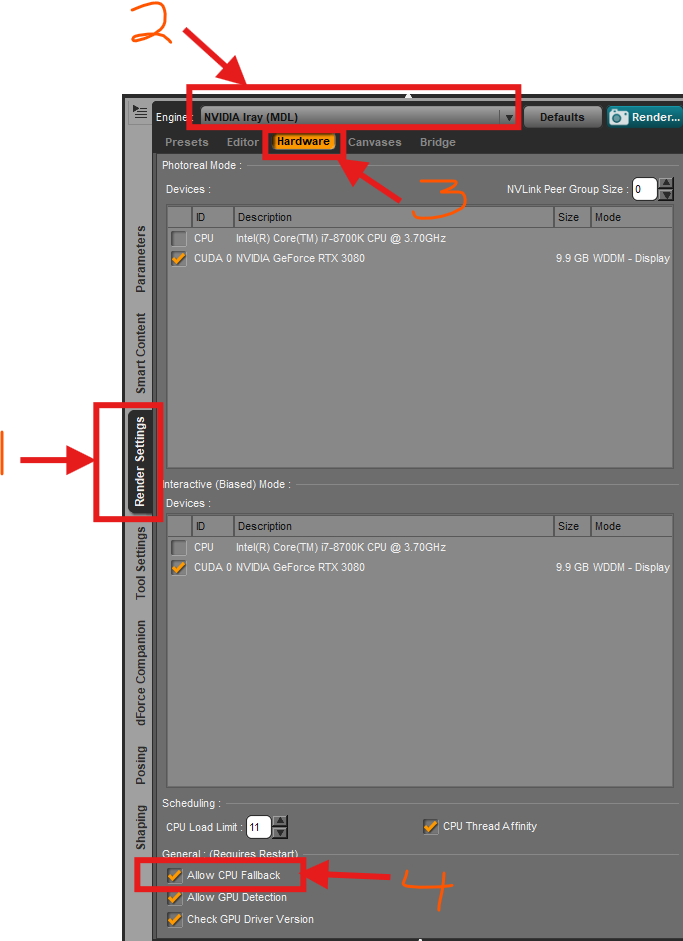
If you are looking for an Advanced tab in the Render Settings pane, you may be following obsolete instructions. That's part of why I asked you to let us know what version of Daz Studio you are running. The Allow CPU Fallback setting is on the Hardware tab in both DS 4.24.0.4 and DS6 versions, when the NVIDIA Iray (MDL) Render Engine is selected. I have attached a DS 4.24.0.4 screenshot of my Render Settings. I have a custom layout. Your layout probably has Render Settings in a different section of the layout, but that doesn't matter. I hope this helps you locate the CPU Fallback option.
CPU Fallback is really kind of a last resort, though. CPU rendering will be MUCH slower that rendering with your RTX 4070. It would be a good data point, though, to know if your scene renders OK with the CPU. It is much better to try to resolve the cause of your crash. Lots of people are here willing ot help. As crosswind said, if you get a crash report, save it. That is a good place to start.
 poser content.
p.s. i used that directory tree because that was the only place search could find a runtime folder
3d printing best practicesOh wow, you have no idea how deep the rabbit hole goes. I would recommend doing a web search on each of those questions.
Your choice of printer depends on your budget--resin printers give you great detail for figures, but resin can be toxic and hard to work with. Good results can be had with filament or FDM printers, anything new from Bambu Labs, Prusa, or other brands are a good option, though Bambu Labs tends to have a closed ecosystem and some are wary of not being able to use 3rd party software with them.
I have gotten good results with an enclosed Bambu Labs printer using a PLA Meta filament. You can print Daz characters, but you may have to tweak them a little. They need to be "water tight" models, so to speak, and have thickness so they can be printed as a real object.
Maybe start with the printer and then go from there.
How to reach out to model creators?In essence you can't. Daz is handling customer support.
If a PA is active in forums you can write to them or in a thread, if they have a commercial thread for the product.
But customer service is in general handled by Daz, and you can create a ticket. If they then deem it relevant to contact the PA thay will.
Mentioning the product and your issue, there might be someone here in the forum that has a solution.
Bug in DS v4.24.0.3 Beta: DzSIReloadAction sets getScriptFileName() == ""*** UPDATE 2026-Sep-04 ***
The problem happens only if the .dsa file uses CRLF (0x0D 0x0A) as End-Of-Line characters.If the .dsa uses only LF characters as EOL then the problem disappears.
How bizzare.
I have reported this in Support Ticket # 504845
You can convert from CRLF to LF-only by loading the .dsa file into the Script IDE Pane and saving it back to disk.
The problem has nothing to do with any special Comment at the start of the file
This probably explains the wierd behaviour discussed in this forum thread:
https://www.daz3d.com/forums/discussion/508496/getscriptfilename-alternativeDaz 3D is part of

Connect
DAZ Productions, Inc.
7533 S Center View Ct #4664
West Jordan, UT 84084Licensing Agreement | Terms of Service | Privacy Policy | EULA
© 2026 Daz Productions Inc. All Rights Reserved.