-
Converting V4 clothes to G8
You could rig the optitex clothing to a V4 figure that has been converted to general weightmaps using the Transfer Utility. This could then be autofitted to G8F using a clone.
However that is likely to give a pretty poor fit (the front of the dress is likely to be messed up) as autofit does a bad job on long dresses.
I have converted V4 optitex dresses to G8F by running a dynamic dForce drape with the G8F figure starting off as morphed as V4 (using the clone) then the V4 clone is zero by the end of the animation so it ends up on unmorphed G8F. This normally gives a much better final result. You can then export the G8F draped dress as OBJ, reimport it back, then use the transfer utility to make it G8F conforming (I would also add a dForce modifier).
I do own the maid dress, but I have not tried to convert that one yet.
GoZ Sending New Objects instead of Updating.tonyjianqing_f243a622ba said:
I have the exact problems. GoZ for some reason. sometimes it refuses to import the object back to Daz3d as a morph, instead as a new object.
For me, I accepted it as a new object, next I exported that new object from Daz3D as an OBJ. Then, using Morph Loader Pro to make that new object as a morph.
Yes, it's extra work, but at least it can do the job.
As long as you uncheck Export at current resolution when GoZing, it should always bring you a Morph rather than an Object.
Let's appreciate/discuss today's new releases - more ongoinger thread
Thank you!Alessandro Mastronardi said:Hemi426 said:
barbult said:
Gordig said:
Who could say no to an AM creature for $2.99?
People who are deathly afraid of sharks? ( A friend of mine has had some too close for comfort encounters while diving.)
Does it have a "close mouth" morph?
Yes
Let's appreciate/discuss today's new releases - more ongoinger threadHemi426 said:
barbult said:
Gordig said:
Who could say no to an AM creature for $2.99?
People who are deathly afraid of sharks? ( A friend of mine has had some too close for comfort encounters while diving.)
Does it have a "close mouth" morph?
Yes
GoZ Sending New Objects instead of Updating.I have the exact problems. GoZ for some reason. sometimes it refuses to import the object back to Daz3d as a morph, instead as a new object.
For me, I accepted it as a new object, next I exported that new object from Daz3D as an OBJ. Then, using Morph Loader Pro to make that new object as a morph.
Yes, it's extra work, but at least it can do the job.
Let's appreciate/discuss today's new releases - more ongoinger thread
Does it have a "close mouth" morph?barbult said:Gordig said:
Who could say no to an AM creature for $2.99?
People who are deathly afraid of sharks? ( A friend of mine has had some too close for comfort encounters while diving.)
Jepes Flying VeilsTo parent, go into the scene tab, select the veil in use and drag it to the g9 figure name.
Alternatively you can right click on the item and select Change "(name)" parent and in the popout menu select the Genesis 9 figure from the list and click accept. You can do this in the Scene tab or in the Viewport tab.
Each of the veils has a set of morphs that change the shape to conform to the corresponding pose.
Veil 1, for instance, has 9 different morph sliders in the Parameters or Shaping tab that change the shape and works with pose 1 only.
[Released] RSSY Character And Material Conversion Bundle Genesis 8 to Genesis 9 [Commercial]Hi, I have converted a character from G8 to G9 (using convert scene character) but when I dial in the character, I lose G9 expressions. I can't understand how this could be happening because I thought morphs were additive. So... if I dial in an expression on G9 and then apply my character, the character is dialled in and the expression disappears. If I have the character dialed in and dial in the expression not much happens (minor movement of lips etc...). The character I am converting is a single face morph in G8. I thought at first that I had lost my expressions on G9 but I think that the new character dial has got the face rig encoded in it... the bone rotations of the face rig are definitely changing when I dial the new character in and out. Do you know what I might have done wrong?
How to change skin color of Face TransferHey! I'm trying to create a 3D model of a real person using a picture with Face transfer 2, on genesis 9 base model. The picture is simple, I edited out the background so it's just the face on a white background. For some reason when using face transfer, the skin tone is off, way brighter than on the picture.
Is there a way to edit the Face Transfer once it's done? I tried editing the model with base color settings, but it doesn't render at all with IRay and shows up as a singular block of color with no shadows or texture.
Also is there a way to edit in a neck tattoo ? it is present in the original picture but doesn't show up in the transfer
Any help? thanks for reading!
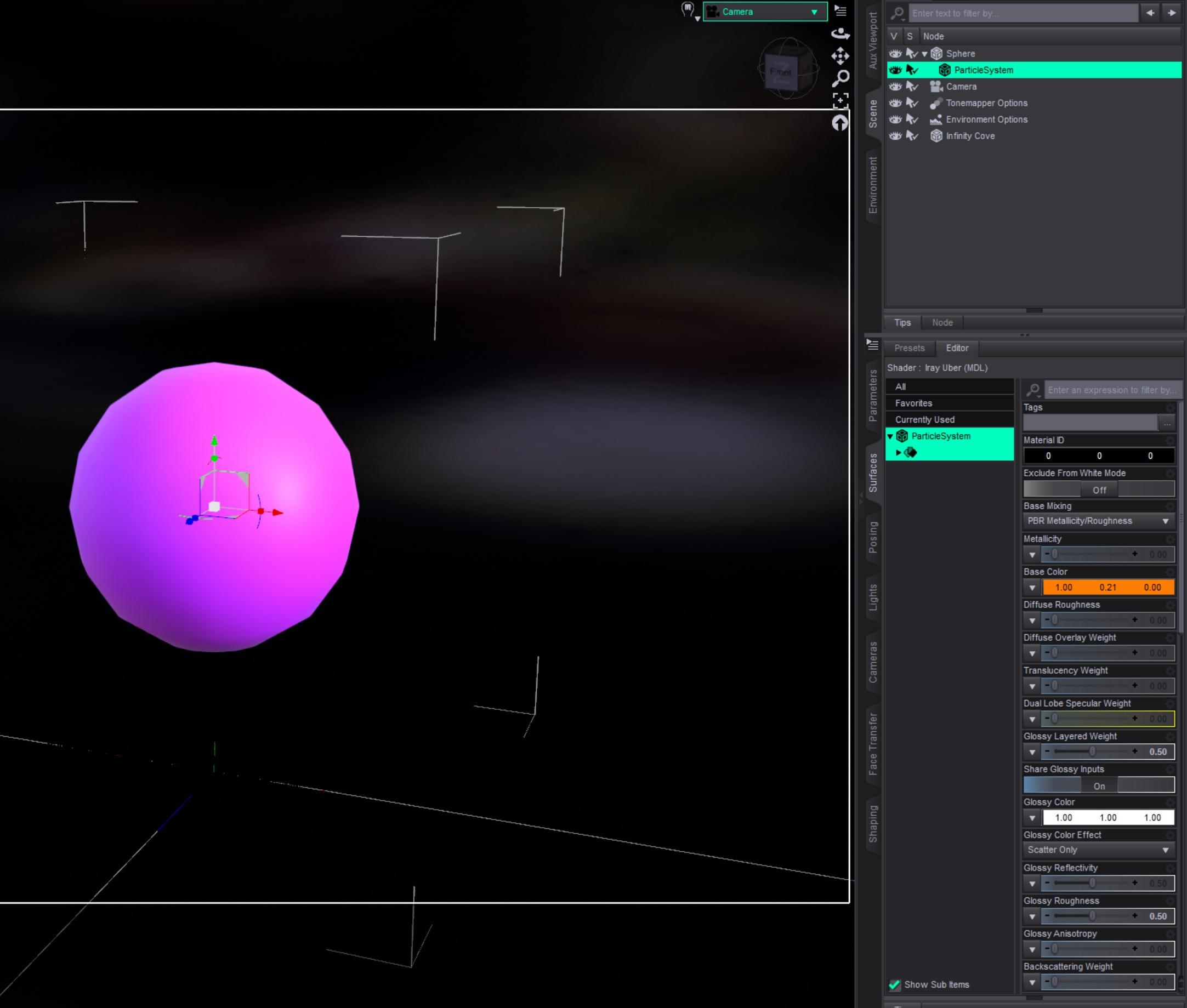
[Released] Blender to Daz Studio Plugin released!!! Official support thread [Commercial]Just quickly tested to create a hair particle system in Blender and transfer it to Daz Studio.
From this:

to that in Daz Studio:
 Let's appreciate/discuss today's new releases - more ongoinger thread
I'm glad that helped. I'm going to delete the file I linked to recover space in my Dropbox.Ainm said:barbult said:
Ainm said:
I think I've misunderstood how this idle animator works. After the first frame, it has reset my character's body shape to what looks to be the default Genesis 9 shape. Are we supposed to run it on a base G9 and then somehow save/apply to our characters?
That didn't happen to me, but there are no instructions, so...
In the timeline I have "Types" set to TR. That is Translation and Rotation only. If you have different settings there, that might be recording morph changes. I don't know.That's it - thank you! Maybe there was a timeline in the file at some point that it was remembering.
Let's appreciate/discuss today's new releases - more ongoinger threadbarbult said:
Ainm said:
I think I've misunderstood how this idle animator works. After the first frame, it has reset my character's body shape to what looks to be the default Genesis 9 shape. Are we supposed to run it on a base G9 and then somehow save/apply to our characters?
That didn't happen to me, but there are no instructions, so...
In the timeline I have "Types" set to TR. That is Translation and Rotation only. If you have different settings there, that might be recording morph changes. I don't know.That's it - thank you! Maybe there was a timeline in the file at some point that it was remembering.
Let's appreciate/discuss today's new releases - more ongoinger threadAinm said:
I think I've misunderstood how this idle animator works. After the first frame, it has reset my character's body shape to what looks to be the default Genesis 9 shape. Are we supposed to run it on a base G9 and then somehow save/apply to our characters?
That didn't happen to me, but there are no instructions, so...
In the timeline I have "Types" set to TR. That is Translation and Rotation only. If you have different settings there, that might be recording morph changes. I don't know.Issue with saved character not loading with all morphs applied.Oh, when I searched morph, it said it couldn't find the word.
Request for help in finding a characterHello everyone,
I'm new here, and I'm not sure if that's correct place to ask, but let's see!
I need to create a character in Daz Studio (G8F or 8.1). I've tried to do it using different combinations of moprhs and preset characters, but i did not had a satisfying results. Whatever I do this is not "the girl" i have in my mind.
I've decided to try a few image-generating AIs, and one of the results was very close (images attached)Now I need to find a character for G8F (or 8.1) in the shop similar to this image. I have reviewd most of the items and I can't find anything suitable. However, one of the reasons might be that promo images are not showing the potential of the head morph.
Can anyone think of the character (or just head morph) that would look similar? Don't pay attention to skin texture, I can handle that, I have few favourite skins that I will use, I only need the head morph.
I am also considering buying something like this:
https://www.daz3d.com/200-plus-head-and-face-morphs-for-genesis-8-female-s
And try to create it myself, but I know I'm not good at it :)Any suggestion would be very welcomed!
Thanks!


 Issue with saved character not loading with all morphs applied.
If you open the duf file for the character you can search for 'morph' and then you can find all the morphs that is in the character. Then you can see if there is something odd looking among these.
Issue with saved character not loading with all morphs applied.I used Growing up for G9, and a morph created years ago when I first created this character with M4 and have converted to each new base from Genesis 1 to G9. There are probably numerous other morohs, far too many to keep track of. I delete the files in the data folder in the cache folder, because I was chatting with Gemini and it suggested to delete what's in the data folder in the cache folder and the temp folder in the Daz Studio 4 folder in roaming. If I don't before I open DAZ, the character loads like in image 1,
Understanding Alternate shapes for specifics characters (individual dials for face and body)If there is a head shape you should be able to adjust it and the result will be the cumulative effect of head and body shapes. Essentially a morph is a set of new positions for the vertices (points) that define the shape, the percentage for a given shape controls how far the vertex moves along a line from base position to full shape, and the final shape of the model is the sum of those movements across all morphs. If there are no separate head and body shapes then there are a few ways to split a base resolution morph, but for HD morphs we cannot do anything.
Understanding Alternate shapes for specifics characters (individual dials for face and body)Hey everyone! I'm quite new to DAZ and its figures. I've been purchasing and experimenting with some G9 figures and having a blast with some of the differents body and face shapes. Just today I came across a very interesting figure that is going on sale (Neanderthal 9), and saw that it has some additional alternate shapes specific to that character. These alternate shapes would work nicely on a project I'm thinking of, however, looking at the included files, these alt shapes seem to only come with the complete shape to apply, unlike the base character, that comes with a body and head shapes to add and dial individually.
I'm intersted in experimenting with only the body morph of these alt shapes for Neanderthal, but before I dip any money in them, I wanted to learn more about how these shapes work when the intention is to combine them with other characters' morphs (body and head separately).
An example of what I mean:
I want to use the female Neanderthal preset and dial-in some of Kala 9 head shape, and also significantly reduce the default female Neanderthal head shape. Since it's a full character preset, if I dial-down the %, will I begin to lose both the head and body shapes? Or since the preset is applied to Neanderthal 9, which does have a dedicated head shape dial, do I get to retain the body morph intact and play with the head by itself to create the character I want?
On an similar note, I noticed that all these alt shapes say to require the "HD" version of the base character. The alt-shape do seem to have a "non-HD" preset and an "HD" preset. Can I apply the "non-HD" version to my "non-HD" Neanderthal 9 and skip having to buy his HD sculpt?
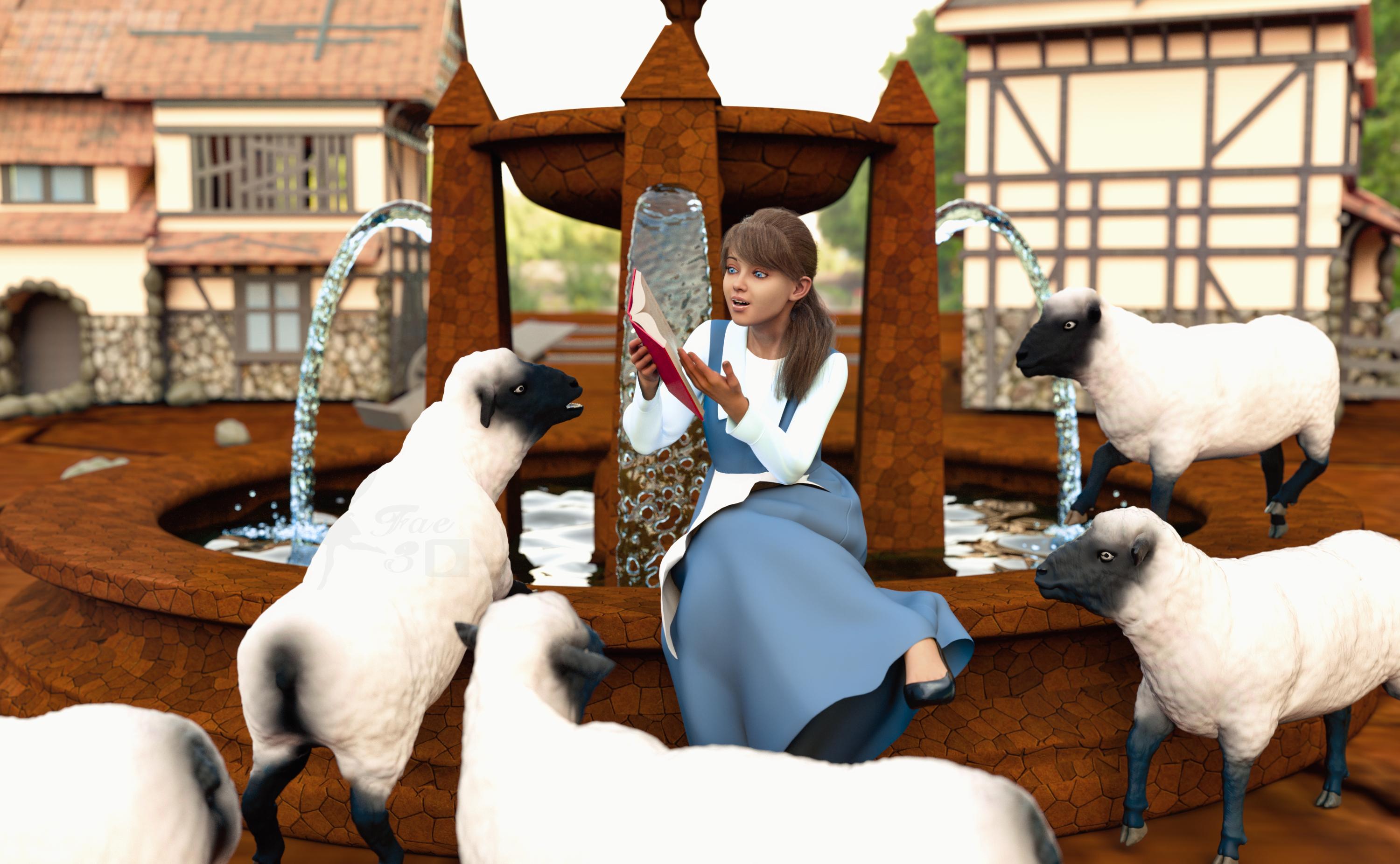
Freebie Challenge August 2025 - "Pure Cinema" - Entries ThreadSkipping to Chapter Three
I’m not sure if this is really a “famous” scene, but I loved this movie as a kid, and this scene always stood out to me for some reason. Maybe it’s because I really like fountains, maybe because I love the song this is part of, or maybe it was all the cute sheep, who knows XD
Freebies:
Fountain 3D Model Free Obelisk - https://www.cgtrader.com/free-3d-models/architectural/decoration/fountain-3d-model-8630db18-5f66-4d85-8ecf-eafaad74ef89
The Fountain - https://www.cgtrader.com/free-3d-models/exterior/other/the-fountain-f841a04b-cac4-4348-97c4-d8a1b740730d
Fountains 4 Set of Water - https://www.cgtrader.com/free-3d-models/various/various-models/fountains-4
Dress A for G9 - https://www.renderosity.com/freestuff/items/98972/dress-a-for-g9
Apron 01 for G9 - https://www.renderosity.com/freestuff/items/95613/apron-01-for-genesis-9
Pretty Look for Genesis 8 Female - https://www.renderosity.com/freestuff/items/83823/pretty-look-for-genesis-8-females
Hiroki Hibari Anime Character Morph for G8 and 8.1 Female (35%) - https://www.renderhub.com/humanxystudio/hiroki-hibari-anime-character-morph-for-g8-and-8-1-female
Kk Kate Character for Genesis 8, 8.1 Female (Body 30%, Head 55%) - https://www.renderhub.com/melovephoto/kk-kate-character-for-genesis-8-8-1-female
HF3D Sylkie for G8.1F HD Textures (Materials) - https://www.renderhub.com/halofarm/hf3d-sylkie-for-g8-1f-hd-textures
Eyes by Sir Maverick (no way to know which pack it was, link to freebies profile, RRH) - https://www.renderosity.com/users/SirMaverick/freestuff
Angela3D's Free Iray Stone Shaders Vol. 1 - https://www.renderosity.com/freestuff/items/85178/angela3ds-iray-stone-shaders-vol-1-updated
Soda Pop! Shaders (Water) - https://www.renderosity.com/freestuff/items/94467/soda-pop-shaders
Medieval House Free Low Poly - https://www.cgtrader.com/free-3d-models/exterior/house/medieval-house-4871e6ab-73f5-4955-82f3-fc55700c68c6
Small Rural Road 02 (HDRI) - https://polyhaven.com/a/small_rural_road_02
No Count:
Genesis 9 Essential Shapes Bundle - https://www.daz3d.com/genesis-9-essential-shapes-bundle (not really sure I even used these, but just in case)
Paid:
SP Hair 008 for Genesis 3 and 8 Female(s) - https://www.daz3d.com/sp-hair-008-for-genesis-3-and-8-females
Z My Favorite Book Prop and Pose Mega Set - https://www.daz3d.com/z-my-favorite-book-prop-and-pose-mega-set
Daz Sheep 2 - https://www.daz3d.com/daz-sheep-2
Mesh Grabber (Mac) - https://www.daz3d.com/mesh-grabber-mac
I did some major reworking of the materials, the poses and even the geometry with Geometry Editor (which I seriously encourage everyone to learn to use, it is SO much help!!!), and I also used Mesh Grabber to make some adjustments. Set up and rendered within Daz Studio Iray. Postwork in Pixelmator. No AI used.
I’ve attached the before post render (the one that says Raw Render) and the finished image file.
(Post edited to add image)
Daz 3D is part of

Connect
DAZ Productions, Inc.
7533 S Center View Ct #4664
West Jordan, UT 84084Licensing Agreement | Terms of Service | Privacy Policy | EULA
© 2026 Daz Productions Inc. All Rights Reserved.