-
That *^!#^*!#$ Clear Button!
Well, even so.
So we're not using aniBlocks. Just put the pose at some frame past 15. Say... 20.
We're only concerned with one frame, right?
Let dForce drape the simulation until you get to a frame you like and cancel the sim. Scrub through and pick the frame you like best (even if it's after you hit cancel!*) and just render that in Iray - then use an image editor or daVinci to combine it with whatever.
I only use filament while I'm working. It would be the same for me with eevee. I just don't want my art to look like an insta-render game.
That *^!#^*!#$ Clear Button!Dartanbeck said:
marble said:
I avoid the timeline because I sometimes want to use that scene as the initial frame for an animation and having a dForce animation in the scene already ruins any chance of using it later for character animation. If DAZ Studio had some kind of multiple timelines or NLA it might be more practical but I don't really understand all these technicalities as I am not an animator - I just like to animate certain scenes as best I can manage.
If I know for sure that the scene will never be used for character animation then I do sometimes use the timeline for dForce but only when Start-from-Memorized doesn't cut it.
For collisions with props (such as the couch) I don't use the actual prop as a collision target - I create primitives and hide them from the render. Props generally don't have enough polygons.
Here's where the magic comes in, my friend:
When we simulate something using dForce, unlike VWD, if we save that, either as a scene or subset, the simulation stays with the save.
My character animations all begin with a Blank aniBlock covering the first 30 frames. I use these first 30 frames for any tweaks that I might want to make before the render starts. However, when we bake the animation to the timeline, these first 30 frames hold the pose all the way through - so in the timeline I delete frames 1-29 for anything and everything in the scene at this early stage.
I've discovered early on that this appears to make no difference at all. Those first thirty frames still hold that same position. Oh... I see... it's because the first keys have ALL been set to "Constant".
I have Animate 2 but don't use it. I have aniblocks but don't use them. Almost everything I animate is quick and dirty manual keyframing from frame 0 to frame 60 (or whatever). Very short loops, generally. I don't have the patience to wait all day for 1200 frames of an aniblock to render. Nor do I like the look of Filament so I render with IRay (I do wish that Filament was more like Eevee in Blender though).
To explain a little further - I like to make stories like the old photo-comic stories that you could see in magazines. Occasionally I will add a quick animation in with the stills which is something those old magazines couldn't do but I bet they wish they could have. The story will typically be 100 - 120 scenes and will take me a couple of weeks to complete. When it is done, I usually go over it for a few days, decide I could have done better with much of it so I then delete it and start a new story (not the same story). That's my hobby - it keeps me occupied and challenges my creativity. Sometimes my stories are actually memories from my youth or childhood that I populate with digital avatars of friends and family. Other time the stories are just pure imagination let loose.
The point I am trying to make is that I am not concerned with making exhibition art - nobody will ever see my stories but myself. But I am concerned with wasting valuable time waiting for dForce over 120 scenes. So that's why I am so keen on DAZ coming up with something that can simulate in seconds rather than minutes. I follow this forum and type these posts while I am waiting for dForce (or renders) so if DAZ gets tired of my constant whining, they can shut me up by giving me a quick cloth simulator.
Before I Start - Can I Do This?I love your DAZ too!
It always used to just be my toolbox for helping me make things work in Carrara, or to make conforming items and such - again... for Carrara! LOL
Just last night I broke out my old Carrara Studio 3 Handbook and perused the wonderful nostalgic gallery images on the disc, along with the (now ancient) free trial software apps. What fun!
Even that old copy of Carrara has a lot going for it - Spline and Vertex modelers with Metaballs too! Carrara 8.5 Pro is AweSome!!!!!
Since I've started this journey into Daz Studio, I've really grown a lot of respect for this amazing 3d environment. Just before Filament and that whole 4.15 (I think it was) release. Now I'm REALLY having fun!!!
Trying to reinstall a fresh version of DS?Dartanbeck said:
One thing that kept giving me that message was having Filament as the workspace viewer. I'd fire DS back up, change to Texture Shaded or Flat shaded and I wouldn't get the message.
The most recent scene I had to do this for was Massive - All five Urban Sprawl City Blocks plus six additional instances of them, over 160 animated LoRez people, a bunch of Polish's Cyberpunk Back Alley signs and buildings (though the Fatal Error came before I added those)
I don't recall the one before that - but it was clearly a Filament related issue. Now every time I get that error and fire DS back up again, sure enough. It was on Filament (which is what I normally use for setting up my character animations)
I have never used filament.
If I had known it was going to be this much of a headache...I wouldnt have tried this. It should be simple. Yet, its not being simple.
Im almost considering doing a factory reset and starting -really- from scratch. I dont have anything else to install other than Daz and content.
Trying to reinstall a fresh version of DS?One thing that kept giving me that message was having Filament as the workspace viewer. I'd fire DS back up, change to Texture Shaded or Flat shaded and I wouldn't get the message.
The most recent scene I had to do this for was Massive - All five Urban Sprawl City Blocks plus six additional instances of them, over 160 animated LoRez people, a bunch of Polish's Cyberpunk Back Alley signs and buildings (though the Fatal Error came before I added those)
I don't recall the one before that - but it was clearly a Filament related issue. Now every time I get that error and fire DS back up again, sure enough. It was on Filament (which is what I normally use for setting up my character animations)
AIUTO...CHI CONOSCE L’ITALIANO? PARTE TREDICIImago said:
devi posizionare tu in ogni caso i punti luce che ti servono, il motore non può immaginarsi che tu vuoi un neon qui e una candela là...
Giusto.
Io pensavo a un Daz Studio dove si possano comprare interi quartieri, paesaggi ecc.interamente esplorabili e pronti all'uso, come nei videogiochi:
Ho bisogno di una scena dove due parlano camminando in centro? Carico i due personaggi, li poso, e li piazzo lungo il corso principale del set "Modern City", e CLICK!
Un po' come se potessi caricare i miei personaggi in un videogioco già pronto, tipo World of Warcraft, o qualsiasi altro.
Oppura mi basterebbe anche un Filament funzionante con qualsiasi set o character dello store: posiziono e PIGIO il tasto di screen shot!
Le luci dovrebbero essere già nel set, insomma.
^_^
AIUTO...CHI CONOSCE L’ITALIANO? PARTE TREDICITiziano said:
Sapete cosa mi piacerebbe trovare, in una futura versione di Daz Studio? Un nuovo sistema di renderizzazione, tipo quello dei videogiochi, che non fosse ossessionato dal super-iper-ultra realismo.
Un sistema che mi permettesse di usare i personaggi in una ambientazione in tempo reale, dove tutto si vede sempre bene, senza dover posizionare al millimetro le luci e poi dover fare innumerevoli render di prova.
Iray è ottimo per chi fa illustrazioni, ma per chi fa immagini seriali (fumetti) è scomodo, e per chi fa animazioni è addirittura pressochè impossibile da utilizzare.
A me piacerebbe, insomma poter utilizzare i meravigliosi oggetti dello store in un motore tipo quello di qualsiasi videogioco moderno (ma sempre all'interno di Daz Studio).
Io vorrei fare fumetti, non fotografie ^_^;
Avevo sperato in Filament, ma così com'è non serve a nulla.
Ho timore che tu non abbia ben presente come funzionano i motori in tempo reale.
 Non c'è modo di poter avere l'infinità di possibili illuminazioni di 3Delight e IRay in un motore in tempo reale con dei semplici preset. E devi posizionare tu in ogni caso i punti luce che ti servono, il motore non può immaginarsi che tu vuoi un neon qui e una candela là...
E se vuoi provare a costo zero, scaricati i bridge per Unity e Unreal.
AIUTO...CHI CONOSCE L’ITALIANO? PARTE TREDICISapete cosa mi piacerebbe trovare, in una futura versione di Daz Studio? Un nuovo sistema di renderizzazione, tipo quello dei videogiochi, che non fosse ossessionato dal super-iper-ultra realismo.
Un sistema che mi permettesse di usare i personaggi in una ambientazione in tempo reale, dove tutto si vede sempre bene, senza dover posizionare al millimetro le luci e poi dover fare innumerevoli render di prova.
Iray è ottimo per chi fa illustrazioni, ma per chi fa immagini seriali (fumetti) è scomodo, e per chi fa animazioni è addirittura pressochè impossibile da utilizzare.
A me piacerebbe, insomma poter utilizzare i meravigliosi oggetti dello store in un motore tipo quello di qualsiasi videogioco moderno (ma sempre all'interno di Daz Studio).
Io vorrei fare fumetti, non fotografie ^_^;
Avevo sperato in Filament, ma così com'è non serve a nulla.
Daz Studio 5 development updatewsterdan said:
Yes, these are example images of glass, atmosphere and interior lighting, there's others, including skins, fire and others, not to mention conversion scripts.
If soemone's not dead-set on iRay photorealism, I think they could make some very decent images or animations, with minimal render times without requiring an Nvidia card. let alone a high-end one.It's a different rendering engine, one with very low hardware requirements.
I've been holding off doing too much Filament testing until the Mac version is avaialble, but looking at the images has me thinking about using the Windows version to see what I might be able to do.
-- Watl Sterdan
That is why I have hoped for Filament on the MacBook Pro M1, as well as my Window computers. Especially since my 2012 iMac is limping to its death. I hope to replace it with a iMac M2 when they are released.
Filament is a valid form of art, just as 3Delight, Iray, or Octane, or taking your base image into Photoshop or AI, whatever. You have a vision and want to create it. It is a tool to express yourself. And I love being able to use it during the creation process.
Daz Studio 5 development updateYes, these are example images of glass, atmosphere and interior lighting, there's others, including skins, fire and others, not to mention conversion scripts.
If soemone's not dead-set on iRay photorealism, I think they could make some very decent images or animations, with minimal render times without requiring an Nvidia card. let alone a high-end one.It's a different rendering engine, one with very low hardware requirements.
I've been holding off doing too much Filament testing until the Mac version is avaialble, but looking at the images has me thinking about using the Windows version to see what I might be able to do.
-- Watl Sterdan
Daz Studio 5 development update@wsterdan. Those actually are not bad at all, they tend to have a decidedly "painterly" look, which is difficult to get with Iray, that would be great for book covers and illustrations.
So images like those could be done with the Filament utilities available in the store.
It seems like in daz 4.21.0.5 taking a screenshot right after switching to filamentpbr always crashe4070ti, driver 528.02 aka driver 31.0.15.2802
It might just be this scene, though, as it's now crashing any time I even try to enter filamentpbr mode.
DAZStudio.exe caused ACCESS_VIOLATION in module "V:\DAZ 3D installed here\DAZ 3D\DAZStudio4\dzfilamentapi.dll" at 0033:0000000076AE14D7, std::vector<unsigned char,std::allocator<unsigned char> >::_Xlength()+555579 byte(s)
I haven't updated anything since last week when filament was more reliable, but this is a more complex scene, with strand hair and genesis 8.1 skin all of which I asn't using last week.Daz Studio Pro BETA - version 4.22.0.15! (*UPDATED*)upgraded to 4.21.1.29 because i use guided sampling, and that got fixed in this beta along with new IrayVersion out (http://docs.daz3d.com/doku.php/public/software/dazstudio/4/change_log#private_build_channel). DS beta working fine so far.
In case anyone is wondering about quick toggle to render engine - iray vs viewport. I know i was. Only thing could find was scripts for 3dl. Found this just by trying things. Save Render Presets storing engine Iray vs viewport(Filament) do work. Do have a certain image dimension with that. Then save as custom action and can add to toolbar for quicker switching. Rendering filament frame is instant. Like less than one second. Handy for icons for example. Did get Dreamlights Filament render guide along with changed lighting in the past. Default filament lighting was too bright for me.
Edit: Speaking of rendering icons. Found this handy script. http://docs.daz3d.com/doku.php/public/software/dazstudio/4/referenceguide/scripting/api_reference/samples/rendering/render_to_asset_icon/start
shortcuted and added script to toolbar and changed to my prefered image size the 91,91 to 800,800
oRenderOptions.imageSize = new Size( 91, 91 );
now if only could figure out the syntax to add to this script to delete the orig *.duf.png. Manual delete after browisng to menu adds more time again. Can anyone suggest?Daz Studio 5 development updateinquire said:
@westerdan: So you used OpenGL on these. Were you able to do any in Filament? Or did you do these in Filament? You mentioned that There are a number of products in the store that help get exceptional (to me, at least) quality out of Filament (click on linked image to unsqueeze it): Which products are you referring to?
Sorry for not being clearer (I've updated my last post to clarify); those are Filament images from some of the products in the store, they're not mine and certainly not OpenGL. Search for "filament" in the store.
-- Walt Sterdan
Daz Studio 5 development update@westerdan: So you used OpenGL on these. Were you able to do any in Filament? Or did you do these in Filament? You mentioned that There are a number of products in the store that help get exceptional (to me, at least) quality out of Filament (click on linked image to unsqueeze it): Which products are you referring to?
Daz Studio 5 development updateRichard Haseltine said:
WendyLuvsCatz said:
this is why they added Filament I guess
it needs to be working properly (cutout opacity, glow, shadow) and for every operating system though
Filament is a drawstyle, not a full renderer.
With all due respect, we'll have to disagree with what a "renderer" is. I know Filament as it's currently implemented is supposed to be used for previews for iRay, and it's certainly no replacement for iRay as a final rendering engine but I suspect part of that is that people don't fully set their scenes up for Filament, simply because they don't want to mess up their iRay settings, and even compromising to get their iRay images to work well in Filament still knocks their iRay-render qualtiy down a notch or two.
There are a number of products in the store that help get exceptional (to me, at least) quality out of Filament; here's a few of the store's images for some of the products (click image for full size):



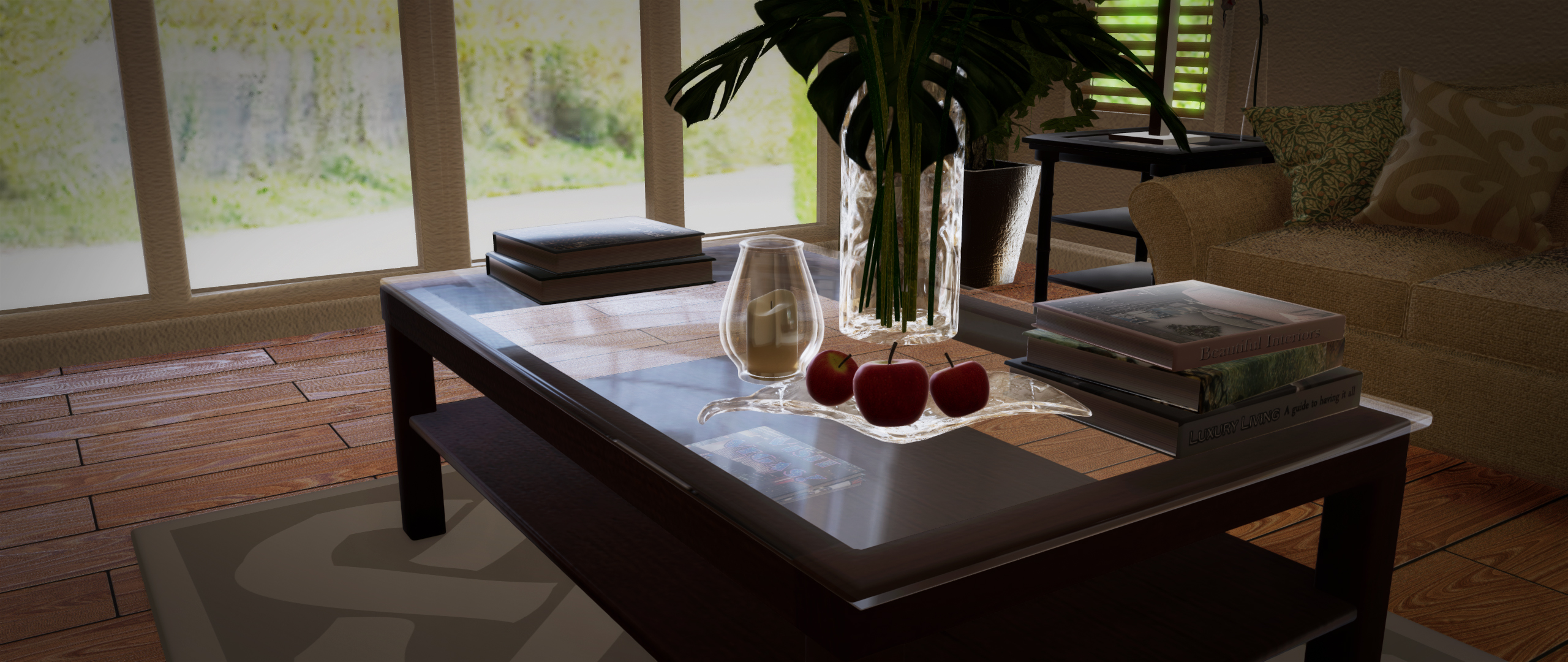
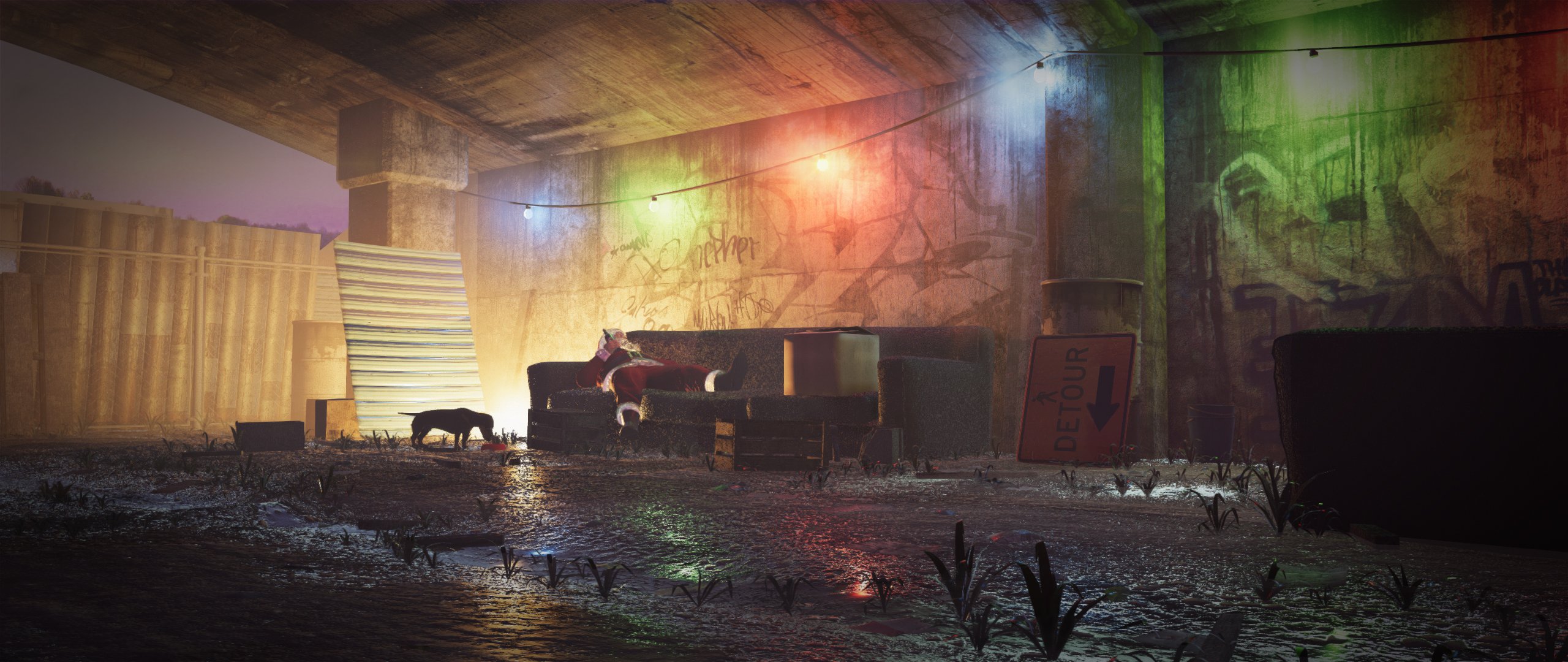
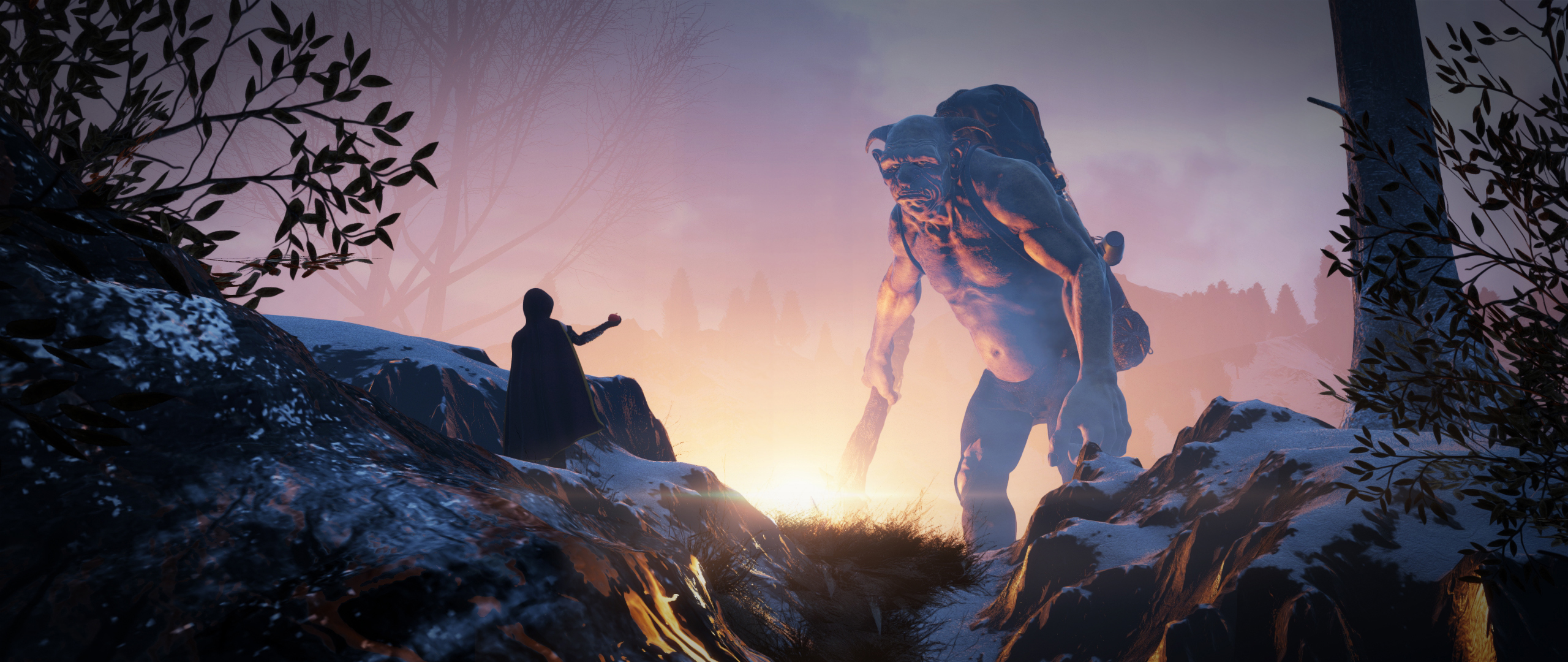
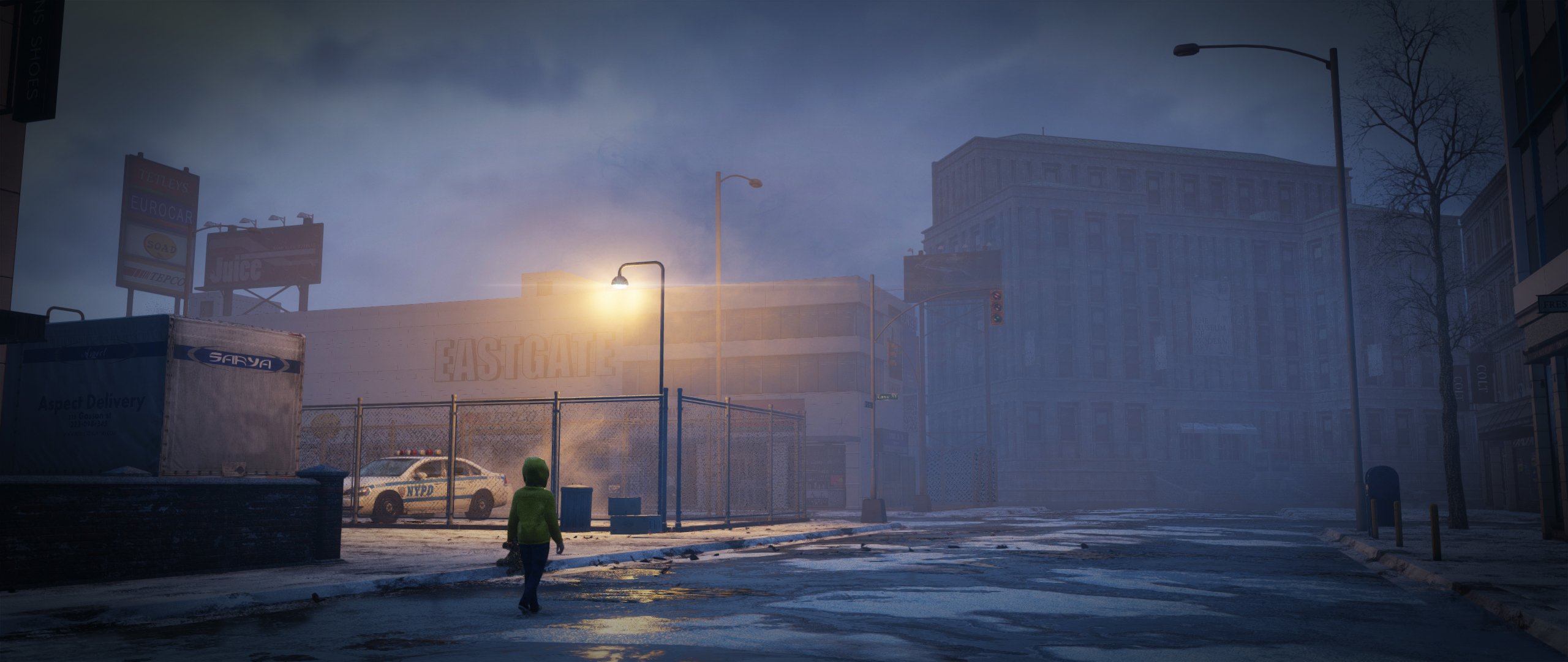
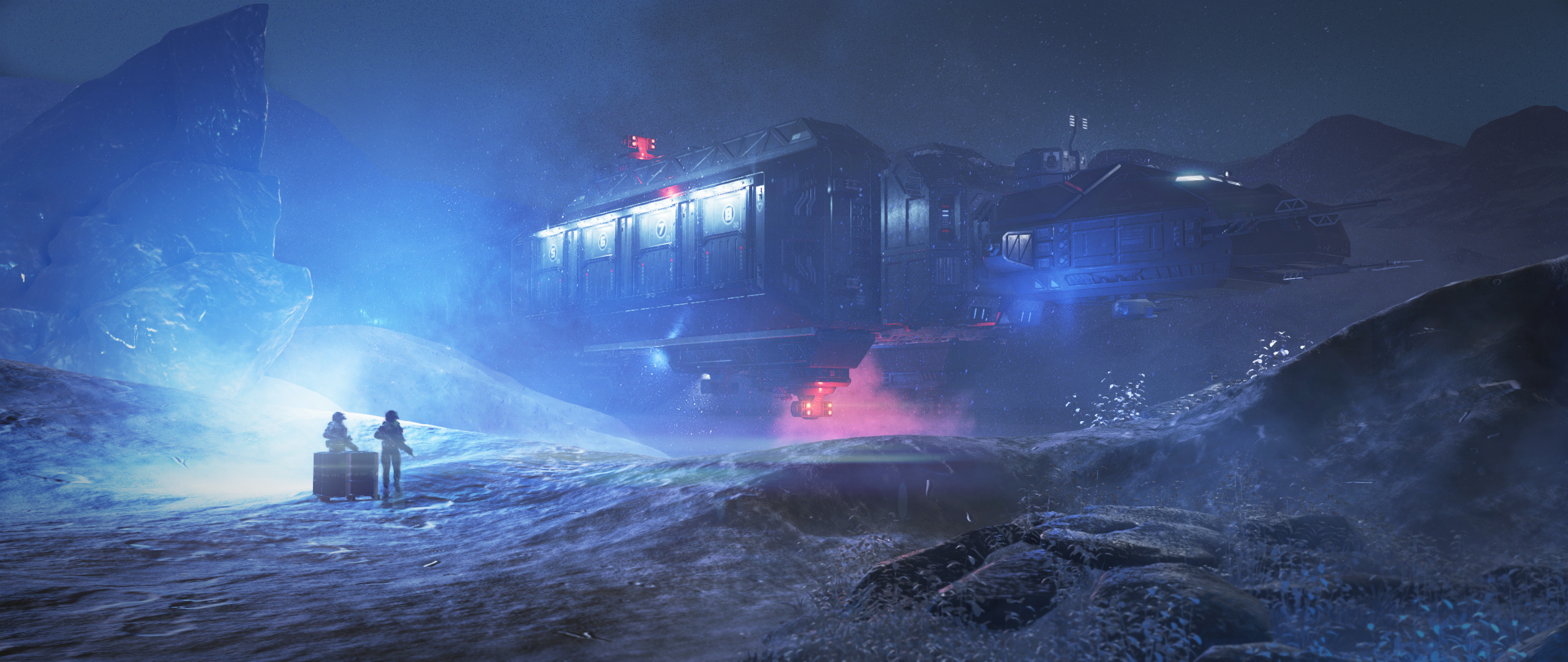
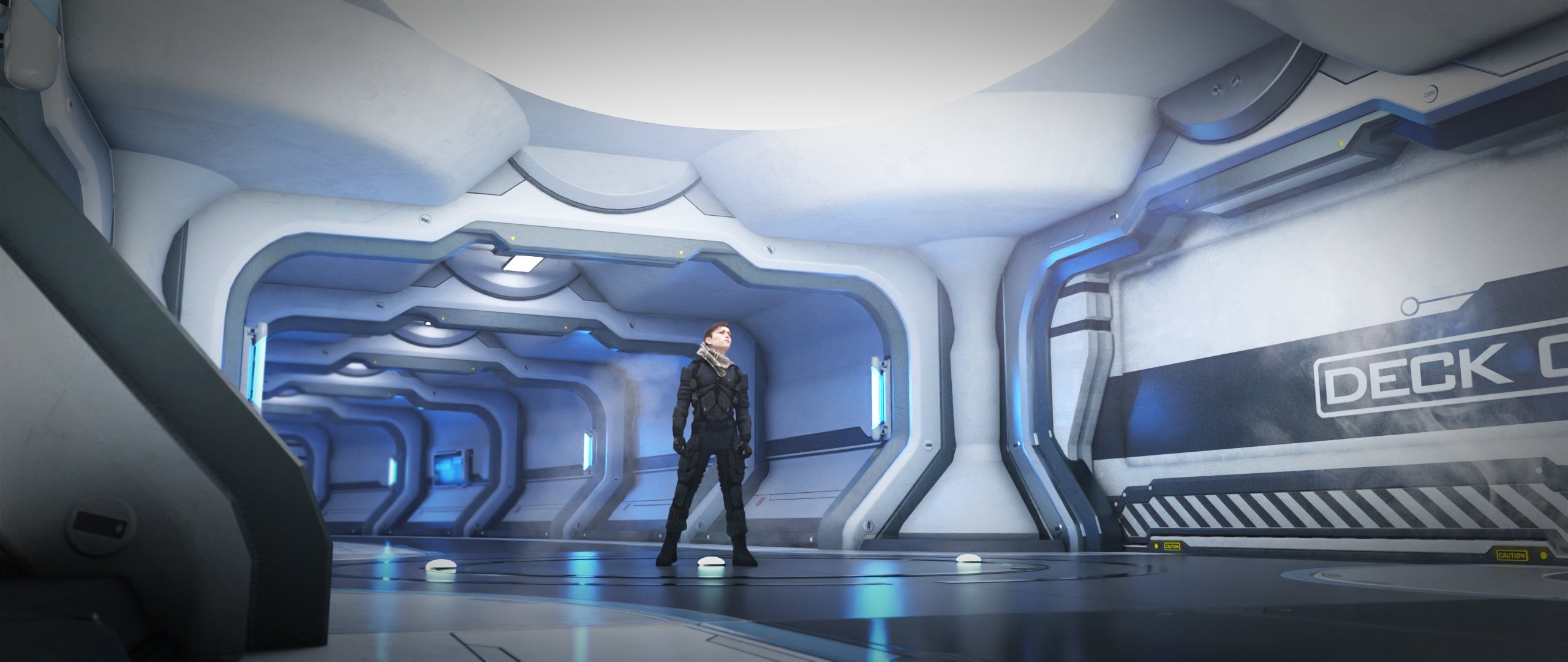
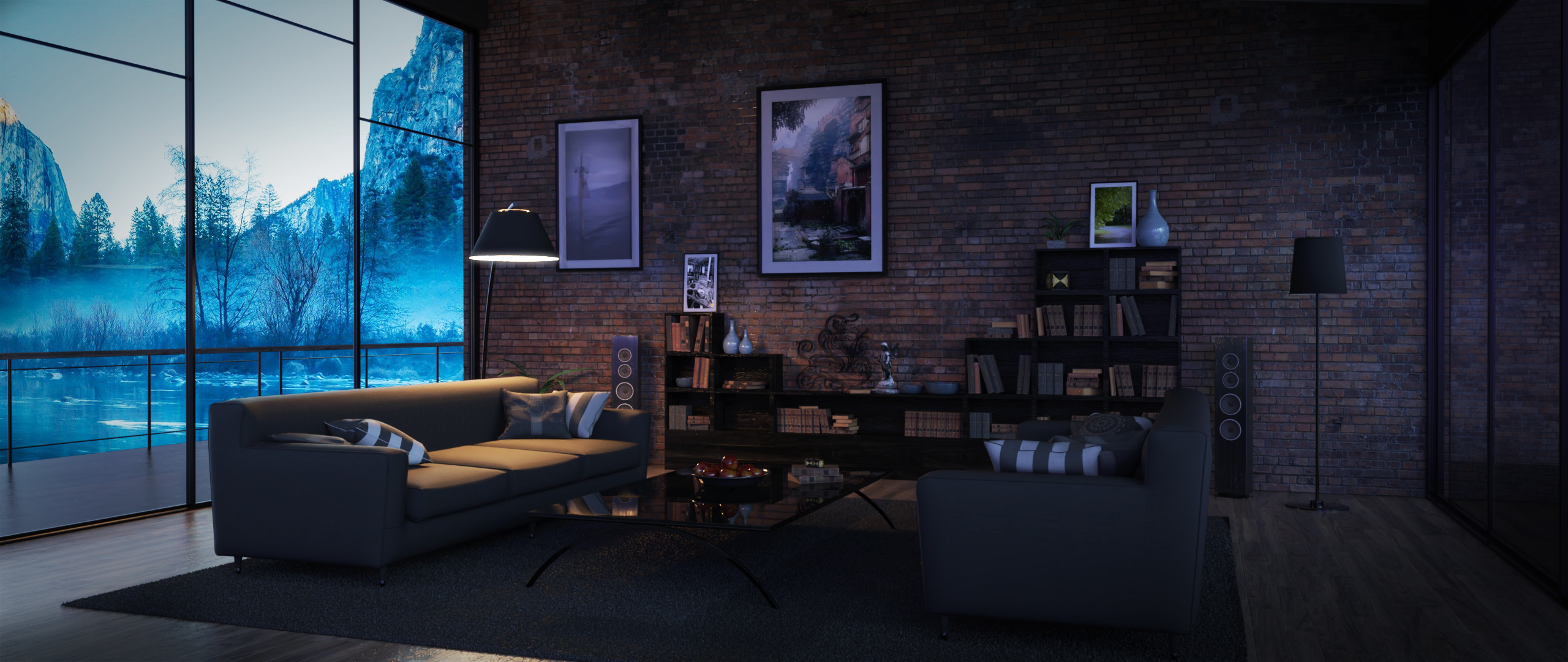
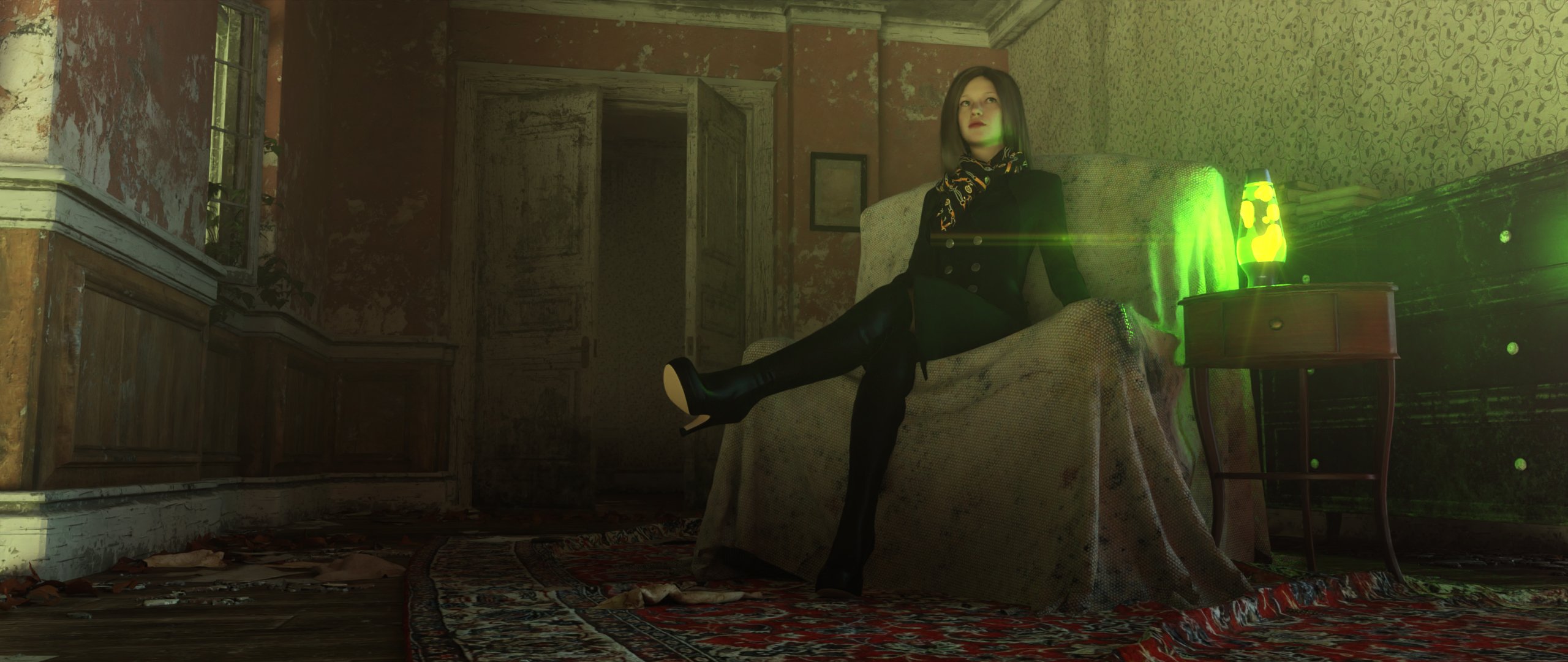
I know die-hard iRayers won't find this photorealistic enough for their needs, and I agree with them. Others might not find the output "cinematic" enough, and again, I agree with them and their needs.
For me, I'm using and am happy with OpenGl for my toon animations, Filament would allow for more semi-realitic animations.
I'm currently getting 1080p renders at over two fps with OpenGL on my M1 iMac, if I can get rendered frames like the above without a huge hit to speed, sign me up. Me, I call this a rendering engine.
-- Walt Sterdan
Edits made to clarify that the images are from the store's Filament products pages, they're not mine, and to resize preview images.
Daz Studio 5 development updateRichard Haseltine said:
As far as I know it's a version issue - Filament needs a newer version of the Qt framework than DS was built with.
To the best of my knowledge, metal support (the preferred back-end for Filament) wasn't available in QT until version 6.
-- Walt Sterdan
Daz Studio 5 development updateWendyLuvsCatz said:
Richard Haseltine said:
WendyLuvsCatz said:
this is why they added Filament I guess
it needs to be working properly (cutout opacity, glow, shadow) and for every operating system though
Filament is a drawstyle, not a full renderer.
but why does that have to exclude Mac users who cannot use Nvidia either
As far as I know it's a version issue - Filament needs a newer version of the Qt framework than DS was built with.
as for Windows users, I render videos with openGL sometimes too, just being a drawstyle does not mean it cannot be used for something you are going to postwork or need a quick video done to demonstrate something
if users cannot use a Nvidia card for some reason it's a good alternative to 3Delight and considerably faster than CPU based iray so why not add the omitted features
edit
forum not showing posts until after I have posted
I wasn't intentionally repeating what others have said
 Daz Studio 5 development update
Richard Haseltine said:
WendyLuvsCatz said:
this is why they added Filament I guess
it needs to be working properly (cutout opacity, glow, shadow) and for every operating system though
Filament is a drawstyle, not a full renderer.
but why does that have to exclude Mac users who cannot use Nvidia either
as for Windows users, I render videos with openGL sometimes too, just being a drawstyle does not mean it cannot be used for something you are going to postwork or need a quick video done to demonstrate something
if users cannot use a Nvidia card for some reason it's a good alternative to 3Delight and considerably faster than CPU based iray so why not add the omitted features
edit
forum not showing posts until after I have posted
I wasn't intentionally repeating what others have said
Daz Studio 5 development updateWendyLuvsCatz said:
this is why they added Filament I guess
it needs to be working properly (cutout opacity, glow, shadow) and for every operating system though
Filament is a drawstyle, not a full renderer.
Daz 3D is part of

Connect
DAZ Productions, Inc.
7533 S Center View Ct #4664
West Jordan, UT 84084Licensing Agreement | Terms of Service | Privacy Policy | EULA
© 2026 Daz Productions Inc. All Rights Reserved.