-
The "Animators Assemble!" thread for Daz animation WIPs, clips, and tips
WendyLuvsCatz said:
you can animate in DAZ studio too
it's probably where you should start
there are Aniblocks included or you can use poses and interpolate between them
Filament render useful for fast rendering
Since I'm on a Mac, I'm still waiting for Filament, hopefully soon.
In the meantime, I just finished my first serious attempt at a cartoon short. Back in November, 2021 I had a few days off work and I did a very quick 'n' dirty test video to help show me how much I didn't know. It was a lot. Uuuuuuugly.
I retired recently and am finally sitting down and working on projects that have been sitting on the back burner for literally decades.
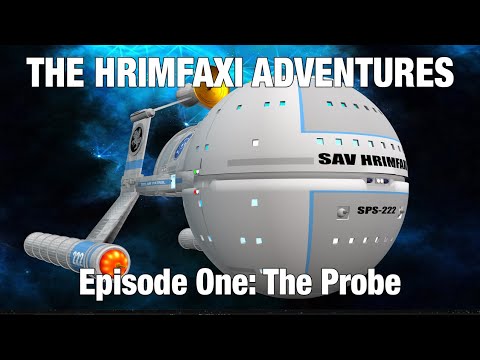
This is the second draft of my first real video (still lots to learn).
My goal wasn't to rival Pixar (or any of the animators in this thread who do such incredible work) but to show what's possible using DAZ Studio and a low-end computer in a production-style environment, not great video but decent; I was thinking of 60s/70s quality, inspired by Fireball XL5 and Star Trek: The Animated Series.
In makng this, I spent a total of 95 minutes doing 7 minutes of lip synch using DAZ's 32-bit lip synch (still the best lip synching availble in my opinion). This video uses about half of the 55+ clips, a second video uses the other half. All of the lip synching is in 55+ partial-poses and can be applied to any G3, G8 characters as well as my custom toons used here, without significantly changing any of the targets' body poses or animations.
As a proof-of-concept, I did the first draft using an Intel MacBook Air using OpenGL. I did any corrections to the first draft to make this draft using an M1 iMac, speeding up the renders a fair bit, but if I were doing a new video in this style (lots of talking) I'm pretty confident I could generate four or five minutes of animation like this a week without breaking a sweat.
-- Walt Sterdan
The "Animators Assemble!" thread for Daz animation WIPs, clips, and tipsWendyLuvsCatz said:
gwr2n said:
WendyLuvsCatz said:
you can animate in DAZ studio too
it's probably where you should start
there are Aniblocks included or you can use poses and interpolate between them
Filament render useful for fast rendering
I'm not familar with filament render
it's the drawstyle directly under iray
to render in it or OpenGL or Wireframe you choose viewport instead of iray or 3Delight
Thanks i actually jsut found a video on it to i appreciate it
The "Animators Assemble!" thread for Daz animation WIPs, clips, and tipsgwr2n said:
WendyLuvsCatz said:
you can animate in DAZ studio too
it's probably where you should start
there are Aniblocks included or you can use poses and interpolate between them
Filament render useful for fast rendering
I'm not familar with filament render
it's the drawstyle directly under iray
to render in it or OpenGL or Wireframe you choose viewport instead of iray or 3Delight
The "Animators Assemble!" thread for Daz animation WIPs, clips, and tipsWendyLuvsCatz said:
you can animate in DAZ studio too
it's probably where you should start
there are Aniblocks included or you can use poses and interpolate between them
Filament render useful for fast rendering
I'm not familar with filament render
The "Animators Assemble!" thread for Daz animation WIPs, clips, and tipsyou can animate in DAZ studio too
it's probably where you should start
there are Aniblocks included or you can use poses and interpolate between them
Filament render useful for fast rendering
Cannot create sphereHi & Welcome to the forums :)
It looks like you do have a Sphere there but as you are using Filament drawstyle (drop-down that is to the left of where it says "Perspective View" in the top-right of the viewport) which is very bright by default. If you click on the sphere and then go into the Surfaces tab (in your left panel), and under Sphere>Default find the item that says "Base Color". Click on the white bit (which will bring up a colour-picker) and select a non-white colour and click OK. This should give you a better view of the sphere since you can see the light reflecting off of the object.
EDIT: See screenshot attached - ignore that fact that I am using a different theme and my surface tab is on the right - but that shows the sphere with a colour so you can see the light reflecting off it as you move around it.
No effect with Dome Scale Multiplier or Dome RadiusWorks fine here. If I set the dome radius to 2 meters I can see the dome sphere becomes smaller. Of course you have to to set "draw dome" to on to see it.
While "visualize finite dome" doesn't seem to work, if this is what you mean. But you can see it in iray rendering or iray preview.
Doesn't work for filament.
AI is going to be our biggest game changerwell I seem to have broken my local installation of Stable Diffusion
so might be going back to doing DAZ iray renders
(I was doing renders on my other PC but mostly Carrara and Filament)
KuJ dForce Medieval Dress for Genesis 9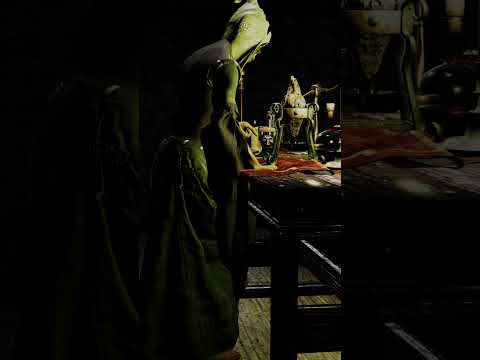
I had issues not related to the skirt

but will share
Filament render hence the odd shading
Released: Placeholder Manager [Commercial]Totte said:
Basically, never work in Iray Preview mode, always work in Open GL Textured Mode or in Filament (If you need to). Bascially, working in Iray Preview is just slowing you down, and, somtimes updates are not correctly propagated to Iray preview, like texture changes. Iray Preview is great to get a "look" of "how will this look rendrered, and also great when adjusting light settings, not so much for anything else.
So, yes, you are right, they are setup to be "boxes" in Open GL Texture Mode and rendered in rendering mode.
Internally, there are flags that says:
- Visible in viewport (which is OpenGL Textured or any other view poet mode)
- Visible in Renderer (which is rendering in 3DL/Iray and that is render or rendered preview like aux viewport in render mode (3DL) or Irey Preview. (Not familiar with what modes Filament is using as I don't have it (I'm on macOS)Thanks much for confirming that I was thinking correctly about this which is not always the case when I delve into Daz Studio. I agree that while Iray preview is nice, it is burdensome on my system.
Released: Placeholder Manager [Commercial]jjoyner said:
@Totte - Hello. I have three of your script products and have a few more on my wishlist. The most recently purchased one was Placeholder Manager two months ago. I began exploring it today and want to make sure that I understand it as fully as possible. The placeholders appear in the viewport when the viewport is in Texture Shaded mode but not when it is in Iray mode. Is this how the product should be used – in Texture Shaded mode until near ready to render?
Basically, never work in Iray Preview mode, always work in Open GL Textured Mode or in Filament (If you need to). Bascially, working in Iray Preview is just slowing you down, and, somtimes updates are not correctly propagated to Iray preview, like texture changes. Iray Preview is great to get a "look" of "how will this look rendrered, and also great when adjusting light settings, not so much for anything else.
So, yes, you are right, they are setup to be "boxes" in Open GL Texture Mode and rendered in rendering mode.
Internally, there are flags that says:
- Visible in viewport (which is OpenGL Textured or any other view poet mode)
- Visible in Renderer (which is rendering in 3DL/Iray and that is render or rendered preview like aux viewport in render mode (3DL) or Irey Preview. (Not familiar with what modes Filament is using as I don't have it (I'm on macOS)
Does anyone have any good tips for a starterWith all due respect but that's way too broad of a question I think. Daz Studio is seriously extensive and things could go into either direction. I mean, is this about Daz Studio itself, the rendering process, the market place?
Meh, but then again.... let's just DO THIS :)
Daz Studio
At the risk of coming across as a fanboy: if you stop to think about all the features which Daz Studio ("DS") provides I think it's very interesting to see his being presented for free. Yah, sure, it's also a sales model (important detail!) but seriously: do not underestimate this environment!
- Make sure to become familiar with both the smart contents pane as well as the so called "Content Library" pane, both are equally important. Trying to apply an accessory meant for Genesis 8 onto Genesis (1)? Impossible with the smart contents pane because of its filtering but no bother at all with the content library. Of course there's more: sometimes stuff doesn't end up in the smart contents section, sometimes you may want to look up all the assets of a product and sometimes... you want to rely on 3rd party contents which you need to install yourself. => content library pane.
- For example: find "Genesis" in the smart contents pane, right click, and check the "Show asset in..." area...
- DS is like elastic: everything can be customized! Press F3 (or use the pulldown menu: Windows => Workspace => Customize) and you can just do it all... keyboard shortcuts, toolbars, even the pulldown menus themselves! Just be careful not to overdo things if you're new, make sure you know what you're messing around with!
- 3rd party contents: Trust me: some day you'll be going here as well. With all due respect to Daz3D but there's more than just their marketplace. If you're going there: don't dump your new stuff into existing places. Instead create a new folder somewhere, then use that as your new 3rd party library. This helps you keep an overview, it will prevent your library from clogging up and keep things manageable.
- Add your own categories! => For example, I do a lot with Genesis base figures, in many cases that's how I start. I mean, when I'm creating poses it doesn't matter what character it's meant for: the Genesis generation is all that matters. As such: Figures => Genesis is a category in my setup (know what? I'll share a screenshot).
- Old doesn't imply obsolete!! => I cannot stress this one out enough: yes, Iray is an amazing render engine and the stuff you can squeeze out of that is sometimes mindblowing. Some of my older sceneries honestly suddenly looked... frickin' amazing, when all I did was change render engines. Thing is though: 3Delight is still an amazing engine and you should not underestimate the things you can learn from using it.
- However... this also applies to the figures in the Daz store. Genesis 9 is the new hot deal but trust me: that doesn't mean older generations suddenly have no value anymore. Even up to this very same date (time of writing but... I don't see this ending soon) I'm still more than often using Genesis; so the first generation? I'll do you one more: some of my renders ("elsewhere") featuring Genesis 3 can sometimes still go through the roof where appreciation is concerned. That's also kinda old stuff ;)
- If you're serious about this stuff: consider getting a "3D editor". Daz provides Hexagon, very dated but also very capable. Even free of charge it seems?. And it's natively supported by DS through a "bridge" => "Send to Hexagon".
- Bias goes into effect here for this item: There's also Blender, also free of charge but with a bit of a learning curve too. To be fully honest I never liked this product myself, but that doesn't mean I can't appreciate it's amazing potential. My personal favorite though is ZBrush. Commercial software, very expensive and I'm not even sure how long it will remain available as a perpetial license vs. a subscription model. I've been using this critter for 3 years now and I'm still learning stuff; there's pretty much nothing I can't do here!
- Much cheaper but also seriously useful: Daz Bryce. This isn't the kind of "3D editor" I had in mind with my main point above, but this critter is priceless when it comes to creating backdrops. Clouds in the sky? This fractal generator can still blow your mind to this very same day, even in combination with Iray (provided that you know how to use the whole shebang and set up proper lighting and all....). I'm serious... My start menu for 3D? => Daz Studio, ZBrush and Bryce 7. Followed by Photoshop organizer.
- Instead of buying texture packs... maybe consider Substance Painter? ;)
Render process
- 3Delight can give you way more freedom and options than you may realize!
- Lighting is a very important part of your rendering process, and 3Delight can help highlight all of this. Because it's a lot easier to apply lighting and then almost immediately showcase their effect. Yah, I'm the nut who actually set up a red, green and blue lightsource ("spotlight"), aimed them in the same general direction of a 3D primiate I placed, just to see what would happen. Then I added a figure in between....
- Don't always accept standard presets: at the very least go over the properties to see if you understand what's happening there.
- Filament is an awesome render engine but ... if you just select it in your viewport you will probably get met with oversaturated objects. Solution: Create => New filament draw options node. (remember my "DS is elastic" comment earlier? Nothing is stopping you from adding this option to, say, your toolbar?).
- If you do go here: pay specific attention to "Environment intensity scale" as well as "distance scene light scale".
- White dots in your Iray render usualy indicate lighting issues. Either go over your render settings or... add more light sources.
Daz marketplace
- Don't trust promo pictures! You more than often do not get what the pictures are showing you, be sure to go over a product contents section and try to veriry that you understand what you're grabbing.
- Daz Central isn't the only option to install stuff... many people rely on the Daz Install Manager for example. Simply put: if you want your software to reside on drive C and your content library on D... you'll want DIM.
- Please keep this in mind: older does not imply worse! When Genesis 8 hit I soon had a field day with several Genesis ("1") assets because they dropped so much in price... And yes, you will come across assets which were build for "RSL" (Renderman Shader Language; used with 3Delight) which may not properly work with the modern MDL ("Material Definition Language", specific for NVidia's Iray). So then there's this thing called Substance Painter, available on the Adobe website for rent but also on Steam for purchase with a perpetual license. Once you got your fingers behind that you'll never bother with a texture pack again. And it can go as simple as to just drag & drop materials to "make it work" towards applying several layers in order to customze stuff into the most detail possible. Maybe even fully converting RSL based assets into MDL.
- Also don't be afraid to experiment... I made some of my best "ghost renders" by simply (ab)using the lack of support for MDL and just put an RSL asset into my scene. It rendered pure white with a bit of variations and... it looked pretty cool despire that it wasn't meant to be used this way.
- With all due respect to Daz3D (<= they deserve it IMO!) => 3rd party marketplaces exist and they also often sell awesome stuff.
- And yes, I am going here: if you're looking for proper / useful anatomy... on the Daz 3D marketplace you need to grab Pro bundles for their Genesis assets (other than Genesis 9 I think, with all due respect I'm ignoring 9 for now). The assets are useful, but you may want to focus on "other places" if you need more detail.
- Speaking of bundles: sometimes it helps to check the individual parts. Are you sure you need all of the items? Maybe you can save money there.
- And speaking of saving money: this hobby isn't cheap, try to build up a pose of your own (no: not using morphs!) and you'll see how much time and effort it'll take. Now imagine building 3D assets yourself! If you're new to Daz3D and want to build up a nice collection then I strongly recommend using Daz+. I also strongly recommend to keep taps on all this and to make sure that you're still in your "buying spree year / moment" when you re-evaluate your subscription. You might notice I don't have such a subscription right now myself but trust me: when I build up my library I had, and put it to good use too! It's definitely worth noting.
- Last but certainly not least: Free doesn't imply useless advertisement junk. But it can be! Always make sure that a freebie doesn't rely on "other items", this often happens on the Daz marketplace. But there are also plenty of freebies up for grabs "out there" on the Internet and yah: all easily implemented into your smart contents pane if you'd want to (there's a reason why I mentioned NOT to underestimate the insane amount of usability of DS despite it being provided free of charge!).
And there you go!
My take on getting started in the wonderful / awesome world of Daz3D / Daz Studio. Thanks for reading, I hope this could be useful!
For context sakes, this is what my setup looks like, I'll bet you don't have a 'Genesis' section ;) =>
All become opaque in viewport in filament mode suddenly ...I work since a long time on daz3d.
But suddenly, all things on my viewport disappear but just in filament mode...
The others modes are ok.
Someone can help me please ?
Remixing your art with AI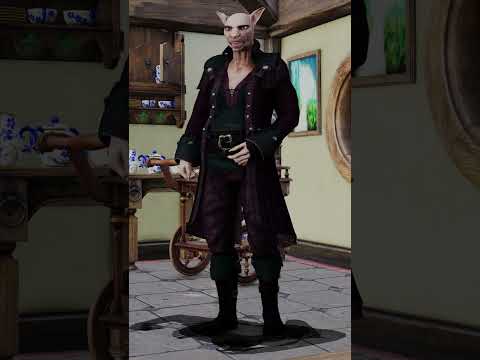
original Filament render video
AI transformation
 Help: Animation Timeline Lags to the point of being unusable. Is there a solution?
shawn_2093844fdb said:
I'm having a similar issue and they can't blame the hardware, not a single core on my system is over 50% and the CUDA's are snoring yet animation in the viewport is garbage on any type.
What DrawStile are you using? If it isn't Iray or Filament the the GPU is not relevant, CPUcore usage doesn't in itself prove anything as the system will distribute taks in a way that means a thread running flat-out is likely to be handled by seveal cores, so none will hit 100%.
Weird Mystery Effect in ViewportCan anyone tell me what is going on in the attached images?
I have this character I set up on my old PC, and when opening the file for the first time on my new PC, after helping Daz locate the custom textures, the viewport was just a blank gray (no terrain grid, no model).
I went through all of the viewport display options (Wireframe, Texture Shaded, etc.) and they were all blank until I reached Filament. What I see on the viewport is what is pictured in the attachments. It is like a water surface tilted at an angle. I cannot for the life of me figure out what is going on here.
There are no other objects in the scene aside from the character, her clothing, weapons, and accessories. I tried hiding them one by one, and the weird plane did not go away. I was able to open another scene file that has the same character in it, so it is not a problem with the model or associated props.
Anyone have a clue what is going on? Is the scene file corrupted or something?
Remixing your art with AIFilament and AI

 AI is going to be our biggest game changer
I do this mostly
as well as photographs
my ai videos are mostly img2img batch processed image series renders using openGL or Filament
Daz only allocate 2Gb whatever the sceneSo, I noticed in my logs after failing to render a scene today that every render I have een doing apparently only allocates 2GB of VRAM...
2023-02-08 21:58:42.434 Iray [INFO] - IRAY:RENDER :: 1.7 IRAY rend info : CUDA device 0 (NVIDIA GeForce RTX 3090): Scene processed in 0.107s
2023-02-08 21:58:42.435 Iray [INFO] - IRAY:RENDER :: 1.8 IRAY rend info : CUDA device 0 (NVIDIA GeForce RTX 3090): Allocated 18.296 MiB for frame buffer
2023-02-08 21:58:42.435 Iray [INFO] - IRAY:RENDER :: 1.7 IRAY rend info : CUDA device 0 (NVIDIA GeForce RTX 3090): Allocated 1.906 GiB of work space (2048k active samples in 0.000s)
I have 24GB of VRAM, I don't understand why I cannot render a simple scene of 1 character with Fiber mesh hair... (that's what I tried to do today)I keep getting a ram allocation error as soon as I use filament hairs
The iray preview has no problem whatsoever
[SOLVED] imported .obj, Texture mode and PBR mode half transparentTexture Sahded has issues with Z-ordering (stacking surfaces in order depending on how far they are from the camera) with surfaces that have an opacity map, even if the map says they should be opaque. Iray (and 3Delight) can of course cope. I was not aware that Filament (if that is what you mean by PBR) but, given that it is a performance issue, I would not be surprised if sacrifices had been made in this respect.
Daz 3D is part of

Connect
DAZ Productions, Inc.
7533 S Center View Ct #4664
West Jordan, UT 84084Licensing Agreement | Terms of Service | Privacy Policy | EULA
© 2026 Daz Productions Inc. All Rights Reserved.