-
Working in Daz studio but without a 'GPU'
Hmm, I have reinstalled the latest UHD graphics driver and restart my computer...
Okay, now daz studio doesn't respond anymore when switching to filament when a spotlight has a deep shadow map or software
So, i have a simple scene 1 figure, 1 spotlight and when i hit the filament its all good... until i select a shadow type for my spotlight...
As I mentioned before, I don't have a gpu. Only the 13700k with the integrated gpu
Working in Daz studio but without a 'GPU'I can confirm that it is needed to switch between smooth shaded and filament to force filament to update the lights settings. This is a bug.
But I have no crashes here switching the shadow types. Using the ryzen apu. So probably updating drivers will fix it for you.
Working in Daz studio but without a 'GPU'if using Filament as your renderer try adding and editing stuff especially lights in textured mode then switch back or it won't always update
this also could be why it crashes
Working in Daz studio but without a 'GPU'The sahdow type applies only to 3Delight anyway, if you are rendering in Iray (which is when Filament makes most sense) then you should not see the option unless you have Show Hidden Properties enabled. Still, it shouldn't crash so please report this as a possible bug if you are using the current version of Daz Studio via a support ticket.
Working in Daz studio but without a 'GPU'Hello! I have a problem with the filament render. Daz Studio crashes every time I select a shadow type for my spotlight.
It doesn't crush when I have a directional light with any type of shadow, but when I select deep map shadow or raytraced, on my spotlight, it crushes.
I need help because I don't know what to do. please! Thank you!
My pc has 32gb ram and 13700k cpu. No GPU for the moment, just the intel UHD770 from the cpu.
It happens within the 4.16.03 version as well.
Strand based hair. It aint easymy sole issue with Dforce strandbased hair being PA only is the fact I cannot do out of the box things with it like I do with Carrara.
I rarely even simulate Carrara fur on creatures and DForce cloth hairs IMO are superior to Strandbased hairs anyway, I really only buy SB Dforce hair iif on sale mostly for Filament or if fur for a critter but I prefer rigged fibermesh hair if I can get it, which sadly nobody does anymore.
What I do want to do is use it for interactive grass on terrains any terrain which one cannot do
you can either buy the few flat options or a specific terrain with Dforce curve grass if it's produced
Carrara I can paint my grass where I like on anything
and yes, I do just use Carrara but it's also a shame not everything I want to use it with will work in Carrara either as DAZ no longer supports it,
The fact is I buy a damned lot of DAZ content but DForce strandbased hair is not finding its way generally into my cart so whatever strategy is behind making it PA only is not working as far as selling it to me, the fact it exists just annoys me because I cannot use the technology how I would like in my renders.
and Oso3D I don't buy your critters for the hair, you could sell them bald and I would still buy them
 Filament - HDRI's are not working, recent problem 4/2023
I'm having this issue on multiple machines and it just started. HDRI environments no longer light up the scene, it is totally black, even from saved files. If I remove the HDRI map and use "none" the scene lights up with the default map. If I switch over to IRAY the scene lights up. It will not under Filament. Is anybody else running into this, and do you know how to fix it?
It doesn't work for any HDRI file, as soon as one is loaded the scene goes black unless you use point lights
Best possible PC for rendering and animating with DAZWendyLuvsCatz said:
OMG 16K, I live in Australia and that's actually more than my yearly income! (early retirement living on Superannuation)
main thing you need is a good Nvidia graphics card, more VRAM the better otherwise there is always Filament Render
(I have a Ryzen3 BTW which is very entry level, and I do animations, I do have an RTX2080Ti though a gift and 32GB of RAM)
How is daz working especially in viewport, when real-time rendering for posing and stuff with your specs? Could you share your specs please for comparison? Ty!!
Best possible PC for rendering and animating with DAZOMG 16K, I live in Australia and that's actually more than my yearly income! (early retirement living on Superannuation)
main thing you need is a good Nvidia graphics card, more VRAM the better otherwise there is always Filament Render
(I have a Ryzen3 BTW which is very entry level, and I do animations, I do have an RTX2080Ti though a gift and 32GB of RAM)
Embedding morphs in Duff File ( 2 of the worst nuisances in daz for me)ssaqibalitipu_627e275e4d said:
Richard Haseltine said:
Inj/Rem require pre-defined channels for the morph, just as the current native morph system does. The morphs were not enbedded in the saved files (which would not be desirable as it would then be impossible to share scenes under the license terms).
A lot of work has in fact been done to improve loading times, especially when there are issues (for me Duplicate Formula clashes now have no perceptible impact on load time) - try the beta to see this.
One option is to install morphs to one or more additional content directories, then hook up only the ones you need for a given session (you can save content directory sets to make that quick).
Thanks for giving a pretty understandable licensing reason. Yes I am running multiple runtimes... Plus i extract character morphs from the directory and place those in similar structure and place only what i need for the moment, and it works pretty good and fast (though still a dirty hack). I do appreciate the performance improvements Daz has been doing and yes i have been playing with beta for some time. Although I still wisth Daz would have done some more work on either Filament or some new open source real time renderer. I know it's not a mundane task, esp when daz is giving away this wonderful piece of software for free. But that's their business model and that's what keeps the clock ticking ;).
As I understand it the issue with Filament on mac was one of Qt version, DS 5 will be built on a newer version of the Qt framework and will have parity with respect to Filament.
Embedding morphs in Duff File ( 2 of the worst nuisances in daz for me)Richard Haseltine said:
Inj/Rem require pre-defined channels for the morph, just as the current native morph system does. The morphs were not enbedded in the saved files (which would not be desirable as it would then be impossible to share scenes under the license terms).
A lot of work has in fact been done to improve loading times, especially when there are issues (for me Duplicate Formula clashes now have no perceptible impact on load time) - try the beta to see this.
One option is to install morphs to one or more additional content directories, then hook up only the ones you need for a given session (you can save content directory sets to make that quick).
Thanks for giving a pretty understandable licensing reason. Yes I am running multiple runtimes... Plus i extract character morphs from the directory and place those in similar structure and place only what i need for the moment, and it works pretty good and fast (though still a dirty hack). I do appreciate the performance improvements Daz has been doing and yes i have been playing with beta for some time. Although I still wisth Daz would have done some more work on either Filament or some new open source real time renderer. I know it's not a mundane task, esp when daz is giving away this wonderful piece of software for free. But that's their business model and that's what keeps the clock ticking ;).
Is it possible to make the render frame horizontal and not vertical?If you want to see in advance the area that will render, then you need to enable Aspect Ratio in the display (from the hamburger menu at the top of the viewport). Not sure it will show in Filament Mode, but definitely will in Texture Shaded.
The "Animators Assemble!" thread for Daz animation WIPs, clips, and tipsGriffin Avid said:
It's all straight Filament, the freeze frame into post work is a frame from the video- exported and affected in Photoshop to look more like my comics.
And the song is also mine. I've made a bunch of storytelling songs over the years and a few complete albums.
This animation, where the screen is a render that tilts in 3D was done with the AI-powered LeiaPix.
"Nucleon: Eve of Destruction"

I feel like the Daz animation "engine" or workflow is still based on...like...flash....as opposed to pathfinding.
Like, place a point and instruct the character to walk there (and choose the style of HOW) and I'm surprised no one (Vendors) are making animations.
Like full sets of animations...With poses, they do several walk poses, so I'd expect a variety of runs in an animation package.
And there's very little content in all the offerings. I was always thinking "How do they expect this to catch on, with so few options?"
I'm kinda hanging back to see what happens next.
I didn't realize that was your music, too, so colour me double-impressed!
The AI-aided effects in "Nucleon: Eve of Destruction" were pretty cool, seemed to fit with the song while the solid shots of your hero contrasted nicely to snap it back to "real".
There are a number of animotion blocks in the store beyond walk cycles and while I've tested a few here and there but I find animtion awkward and possibly a little buggy (it could also be me but I seem to see things gummed up if I save and close the file, then open it later, etc.). There are also some sets at "the other place".
Wolf359 posted this very helpful, very easy tutorial to pulling in animations from Adobe's Mixamo site (still free as far as I know) with a huge amount of animation clips to choose from:
https://www.daz3d.com/forums/discussion/comment/3940711/#Comment_3940711
I'll probably finish off the second half of my animation test in the next day or so, once I've got another project finished, then probably hold off for a bit to see if or when DAZ 5 hits the streets. I don't want to invest too much time in a more serious animation until I see what it offers.
Thanks again for sharing your work, I'll have dig into it a little more, it all looks like stuff I like.
-- Walt Sterdan
The "Animators Assemble!" thread for Daz animation WIPs, clips, and tipsIt's all straight Filament, the freeze frame into post work is a frame from the video- exported and affected in Photoshop to look more like my comics.
And the song is also mine. I've made a bunch of storytelling songs over the years and a few complete albums.
This animation, where the screen is a render that tilts in 3D was done with the AI-powered LeiaPix.
"Nucleon: Eve of Destruction"
I feel like the Daz animation "engine" or workflow is still based on...like...flash....as opposed to pathfinding.
Like, place a point and instruct the character to walk there (and choose the style of HOW) and I'm surprised no one (Vendors) are making animations.
Like full sets of animations...With poses, they do several walk poses, so I'd expect a variety of runs in an animation package.
And there's very little content in all the offerings. I was always thinking "How do they expect this to catch on, with so few options?"
I'm kinda hanging back to see what happens next.
The "Animators Assemble!" thread for Daz animation WIPs, clips, and tipsGriffin Avid said:
Your script was really well done and the syncing of the characters. You really nailed the Trekker vibe.
Um, Filament....Tiffanie who specializes in PD Howler suggested I use Filament. She's a whiz.
The render speed is insane. For some of the clips, it was almost in real time. I wish I had discovered it earlier.
I find the look of the textures and lack of color and lighting control a hassle. Everything is a work-around.
As an idea, it's incredible, in practice, it needs a few more products. I have everything related to Filament- and even some of those products have "guide icons" that still render.
BUT! The best part is - being able to work in Filament Preview mode, to see exactly what you're going to get when you render. That's a blessing.
Thanks for the comments. I'm mostly happy with OpenGL for now, I'm expecting better things from Filament.
I liked the output quality of Filament from what I've tested so far; I've picked up most of the filament store items so far, but I'm waiting for DAZ 5 to really give it a work out. As Kyoto Kid mentioned elsewhere, the renders often have a more "illustrated" look to them, which is perfect for the Toon stuff I'm working with.
Did you do any post work on the rendered frames, or is the movie mostly straight Filament?
I also forgot to mention how well you lined eveything up with the lyrics, you've rendered everything in the "story". Impressive when working with someone else's song.
-- Walt Sterdan
Edited for typos.
The "Animators Assemble!" thread for Daz animation WIPs, clips, and tipsYour script was really well done and the syncing of the characters. You really nailed the Trekker vibe.
Um, Filament....Tiffanie who specializes in PD Howler suggested I use Filament. She's a whiz.
The render speed is insane. For some of the clips, it was almost in real time. I wish I had discovered it earlier.
I find the look of the textures and lack of color and lighting control a hassle. Everything is a work-around.
As an idea, it's incredible, in practice, it needs a few more products. I have everything related to Filament- and even some of those products have "guide icons" that still render.
BUT! The best part is - being able to work in Filament Preview mode, to see exactly what you're going to get when you render. That's a blessing.
The "Animators Assemble!" thread for Daz animation WIPs, clips, and tipsI forgot to ask, feel free to share any tips or tricks. How was it working with Filament (still waiting for the Mac version, hopefully this year)?
-- Walt Sterdan
The "Animators Assemble!" thread for Daz animation WIPs, clips, and tipsGriffin Avid said:
Animation I did for the song "Big Dynamic Robot".
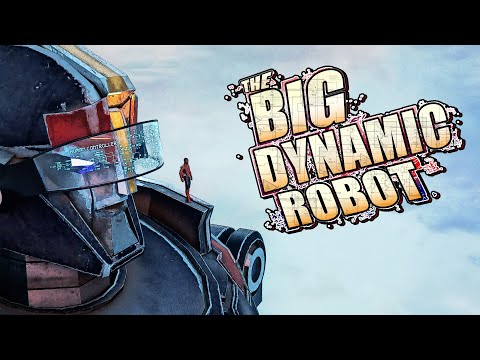
Was hoping that Daz would have a lot more resources for Filament.
Pure fun, thanks for sharing!
-- Walt Sterdan
The "Animators Assemble!" thread for Daz animation WIPs, clips, and tipsAnimation I did for the song "Big Dynamic Robot".
Was hoping that Daz would have a lot more resources for Filament.
Carrara Challenge #66 - Jumping Off a Browser Scene Go Splat !WendyLuvsCatz said:
trying to find the specific post where they gave me issues
not this one
it might have been animated
Roygee seems to touch on the issue
it's like DAZ Filament cutout opacity how it behaves
https://www.daz3d.com/forums/discussion/comment/973233/#Comment_973233
yes Carrara plays up when transmapped thingies are superimposed or various light gels go through transmaps etc , no reason not to go splatting though. We all have to work around our inadequacies - that's why I use spill chicker everytime I post!
Daz 3D is part of

Connect
DAZ Productions, Inc.
7533 S Center View Ct #4664
West Jordan, UT 84084Licensing Agreement | Terms of Service | Privacy Policy | EULA
© 2026 Daz Productions Inc. All Rights Reserved.