-
Genisis 3 promotion, $50 credit not applied
The offer said
Buy Victoria 7, Eva 7, Bethany 7, or any of their bundles before Aug. 13, 11:59PM (MDT, UTC -6) and we will give you a coupon worth $50 of DAZ originals.
DAZ Original $50 coupon code will be given to qualified individuals in an on-site message - like this one - on Friday, Aug. 14 at 12:00PM (MDT, UTC -6). Coupon excludes PC+ items, gift cards, memberships, and new releases.
Genisis 3 promotion, $50 credit not appliedDaz website said if I bought Genisis 3 and or Victoria 7 I would get a $50 credit. I did not. Tonight I entered the correct code, and it did not knock off a single cent. Anyone know what's up? I purchased about $70 of Gen3 and V 7 stuff so I clearly qualified. Thanks.
Why Radeon graphic card is slow for Iray render??just recently I've purchased Victoria 7 pro bundle and it's killing me every time I render using Iray
It's not only slow but when I load one more figure and start rendering within one minute DAZ will shut down..!!!I am not even able to use any lights, It will kill the render time more and more
somehow I manage to render 3 or 4 pics for V7 BUT with minimum level of settings
Notes; I had this issue since I upgrade Daz4.8, It's very much slowly and occasionally will shut downand I have
Dell laptop
core i7
2 GB Graphic card
8 GB RAMI can handle a view things it wasn't an issue
V7 is the new generation of DAZ and work best in Iray render, It's kinda useless without Iraymy questions are:
I have 20 GB free space in my 'C driver' wich DAZ installed on it, could that effect DAZ rendering performance?
Is there any difference between AMD Radeon & nvidia graphic card ?
Is there any particular settings in Radeon graphic card for Iray render?
Is it possible to add one more Graphic card? If so, what's the Consequences?Please help me asap
Problems with EcVh0 Iray Skin Shader for G2FV6 Anna and V6 Belle are IRAY shaders for genesis two females; they are under IG Iray Essentials within the Genesis 2 Female folder; I thought they were free, although I can't remember how I got them. Seem to rememver they appeared about the same time that Daz 4.8 did, but maybe I'm wrong; they work great with any Genesis two, just hold down Ctrl to retain existing textures. There is also a V6 and a V6 HD within the same folder.
Ha, nope, I bought them. :)
http://www.daz3d.com/ig-iray-essentials-victoria-6-michael-6
V7/Genesis3 Not Dominating Sales?Yes sorry,, it uses that abbreviation,, I only have the V4 licence but Krystal Starfox works too and some Poser figures.
i do have clothes converter that worked on V4 conversion to M4, when I get my desktop fixed will be posting results in a video, bit of a setback sadly at moment hope not too damaged.
Ahh, thx... I thought it sounded familiar, toyed with it many years ago version 1 or 2... Cool to hear. Will have to check it out again.
Before anyone can say V8 ... Lets not forget the rest of the G3 family yet to arrive ;)
Speaking of product longevity and obsoletness, yeah when Victoria 4 and the rest of the Gen4 family followed, Gen3 slowly went on the decline at Rendo. Probably mid-way into V4's lifespan as current generation model, Gen3 clothing was tough to come by at Rendo due to their clearance market model. Save for the Japanese Aiko3 modeling community which put out some top notch freebies, Gen3 was quite easily forgotten in favor of V4. Now, We've had Genesis 1, 2, now 3, and if we look at the Rendo market place, even RuntimeRdna, Gen4 clothing is still full swing in production and sales. V4 still works perfectly unhindered across Studio, Carrara, and Poser without need of the DSON. Probably has the single most widest user base. DSON likely hampered Genesis 1 & 2 somewhat for the Poser crowd. I've no clue if G3 even works in Poser via DSON...
I recently picked up the V4 joint fixes by Xemeva, and will enjoy using V4 again. Hope I can find a similar joints fix package for the Gen4 males.
Possibly the biggest feature about the Genesis series is the improved clothing support across all the figures. Genesis 1 was UniSex , emphasised use clothing male or female for either gender. Genesis 2 & 3, became more gender specific again, however regardless which shapes and morphs package you bought, you didn't have to worry what and which clothing had support specific for those morphs, or even support for the rest of the Gen4 base character family. Couple that with being able to convert clothing from your Gen4 content, the Genesis series is quite remarkable.
Show Us Your Iray Renders. Part IVI did another biker girl last nite.This one took 15 hours to render.
btw,,it's not easy to get a photo taken outside in harsh sunlight when everything is white.Wedding photographers make it look easy.
15 hours???? Man, are you sure did you not use Luxrender by mistake?. The render its impressive, anyway.
Now, seroiusly, you mean that you personally photoshoot the enviroment. Its used as a plain backdrop or its converted to an HDRI enviroment?
Thank you :)
The photo shoot part was supposed to be joke,,I'm just bad at telling them. :) The background is an HDRI called "parkinglot" . The scene has mostly white in it , so the glare was so bright it was covering up all the details in the bike and suit. so I had to google how to fix that.Oddly enough I was taken to a photography blog about taking wedding photos.
I started the render yesterday after noon.There was a lot of noise in it near the tires and chrome parts after about 5 hours.So I set the progressive render settings to 15k samples and 100% convergance and went to bed.When I checked it this morning, it had about 13k iterations complete and was 97% converged.I stopped it there because it looked to have all the noise gone.I don't have an Nvidia GPU.I went with an all AMD solution for this build.I doing all of this on CPU so it's a bit slower.
Well, youre not good at telling jokes and english it´s not my native languaje so were done... 0_O XD
But I pretty know what youre talking about and that´s a rarity of Iray, sometimes he don´t want to render correctly some areas of the scene no matter how much samples you set up. In my first autocensored Victoria 7 image I had to manually remove the skin noise in postwork because it seemed that Iray employed all samples in rendering a fine hair but forgiving about the skin and incresing sample rate was not the solution.
This is the only solution I always use to deal with Iray noise problems, instead of oversampling and have to wait several hours for just a little noise I use this program, which haves a digital camera removal tool which comes very handy. And the best of all it´s now freeware. I´m a heavy postworker and I don´t need more than this to do what I want. http://www.oldversion.com/windows/download/paint-shop-pro-9-0
And, yes, It´s very difficult to find a nice hdri enviroment wich not floods your image with just a flat white colour. The hdris Im using are form the IRadiance Studio hdris, but it are just blabk-grey-white studio lights wich not gives you a nice enviroment if you turn on the draw dome option.
I hope in future updates Iray will let you choose one hdri for just lightning and another for visual enviroment as other softwares do.
Have you tried making your own HDRi's & IDL lights using free stock images, once you do learn how to make your own you have ab better understanding of rendering HDRi images . I'll admit it takes a little practice to learn it
heres a good resource for free HDRi images and tutorials that you can use to create your own. http://www.hdrlabs.com/sibl/archive.html
Thats the page I got my parking lot from :) Just scroll down it's called HDR 111.
Show Us Your Iray Renders. Part IVI did another biker girl last nite.This one took 15 hours to render.
btw,,it's not easy to get a photo taken outside in harsh sunlight when everything is white.Wedding photographers make it look easy.
15 hours???? Man, are you sure did you not use Luxrender by mistake?. The render its impressive, anyway.
Now, seroiusly, you mean that you personally photoshoot the enviroment. Its used as a plain backdrop or its converted to an HDRI enviroment?
Thank you :)
The photo shoot part was supposed to be joke,,I'm just bad at telling them. :) The background is an HDRI called "parkinglot" . The scene has mostly white in it , so the glare was so bright it was covering up all the details in the bike and suit. so I had to google how to fix that.Oddly enough I was taken to a photography blog about taking wedding photos.
I started the render yesterday after noon.There was a lot of noise in it near the tires and chrome parts after about 5 hours.So I set the progressive render settings to 15k samples and 100% convergance and went to bed.When I checked it this morning, it had about 13k iterations complete and was 97% converged.I stopped it there because it looked to have all the noise gone.I don't have an Nvidia GPU.I went with an all AMD solution for this build.I doing all of this on CPU so it's a bit slower.
Well, youre not good at telling jokes and english it´s not my native languaje so were done... 0_O XD
But I pretty know what youre talking about and that´s a rarity of Iray, sometimes he don´t want to render correctly some areas of the scene no matter how much samples you set up. In my first autocensored Victoria 7 image I had to manually remove the skin noise in postwork because it seemed that Iray employed all samples in rendering a fine hair but forgiving about the skin and incresing sample rate was not the solution.
This is the only solution I always use to deal with Iray noise problems, instead of oversampling and have to wait several hours for just a little noise I use this program, which haves a digital camera removal tool which comes very handy. And the best of all it´s now freeware. I´m a heavy postworker and I don´t need more than this to do what I want. http://www.oldversion.com/windows/download/paint-shop-pro-9-0
And, yes, It´s very difficult to find a nice hdri enviroment wich not floods your image with just a flat white colour. The hdris Im using are form the IRadiance Studio hdris, but it are just blabk-grey-white studio lights wich not gives you a nice enviroment if you turn on the draw dome option.
I hope in future updates Iray will let you choose one hdri for just lightning and another for visual enviroment as other softwares do.
Have you tried making your own HDRi's & IDL lights using free stock images, once you do learn how to make your own you have ab better understanding of rendering HDRi images . I'll admit it takes a little practice to learn it
heres a good resource for free HDRi images and tutorials that you can use to create your own. http://www.hdrlabs.com/sibl/archive.html
Show Us Your Iray Renders. Part IVI did another biker girl last nite.This one took 15 hours to render.
btw,,it's not easy to get a photo taken outside in harsh sunlight when everything is white.Wedding photographers make it look easy.
15 hours???? Man, are you sure did you not use Luxrender by mistake?. The render its impressive, anyway.
Now, seroiusly, you mean that you personally photoshoot the enviroment. Its used as a plain backdrop or its converted to an HDRI enviroment?
Thank you :)
The photo shoot part was supposed to be joke,,I'm just bad at telling them. :) The background is an HDRI called "parkinglot" . The scene has mostly white in it , so the glare was so bright it was covering up all the details in the bike and suit. so I had to google how to fix that.Oddly enough I was taken to a photography blog about taking wedding photos.
I started the render yesterday after noon.There was a lot of noise in it near the tires and chrome parts after about 5 hours.So I set the progressive render settings to 15k samples and 100% convergance and went to bed.When I checked it this morning, it had about 13k iterations complete and was 97% converged.I stopped it there because it looked to have all the noise gone.I don't have an Nvidia GPU.I went with an all AMD solution for this build.I doing all of this on CPU so it's a bit slower.
Well, youre not good at telling jokes and english it´s not my native languaje so were done... 0_O XD
But I pretty know what youre talking about and that´s a rarity of Iray, sometimes he don´t want to render correctly some areas of the scene no matter how much samples you set up. In my first autocensored Victoria 7 image I had to manually remove the skin noise in postwork because it seemed that Iray employed all samples in rendering a fine hair but forgiving about the skin and incresing sample rate was not the solution.
This is the only solution I always use to deal with Iray noise problems, instead of oversampling and have to wait several hours for just a little noise I use this program, which haves a digital camera removal tool which comes very handy. And the best of all it´s now freeware. I´m a heavy postworker and I don´t need more than this to do what I want. http://www.oldversion.com/windows/download/paint-shop-pro-9-0
And, yes, It´s very difficult to find a nice hdri enviroment wich not floods your image with just a flat white colour. The hdris Im using are form the IRadiance Studio hdris, but it are just blabk-grey-white studio lights wich not gives you a nice enviroment if you turn on the draw dome option.
I hope in future updates Iray will let you choose one hdri for just lightning and another for visual enviroment as other softwares do.
V7/Genesis3 Not Dominating Sales?Noticed this little offer appear for me at the top of the screen a few days ago (probably for others in this forum too):
"We have noticed that you haven't taken the opportunity to try out Genesis 3 yet. Let us help persuade you. Buy Victoria 7, Eva 7, Bethany 7, or any of their bundles before Aug. 13, 11:59PM (MDT, UTC -6) and we will give you a coupon worth $50 of free DAZ originals. "
I didn't take advantage, even though I considered buying and then returning V7 as faulty since it doesn't work in Carrara, and grabbing free loot, but I didn't feel good about trying to take advantage of a technicality :) But it did get me wondering...
I've got to think that if V7 was selling like hotcakes they wouldn't be trying to bribe me to buy her. On the other hand, this could be nothing but a random flash offer, but I started thinking, and there are some solid reasons why V7, although the latest/greatest, might not be 'burning up the charts' in sales figures, so to speak.
1 - V7 doesn't work in Carrara yet, so very few Carrara users have purchased her (this is an obvious one, so I'll list it first :) ) I'm sure many would say 'piffle, there aren't that many Carrara users anyway'. But I think there are more than people suspect, and one thing that is 100% sure about every Carrara user is that we are the type of customers who will crack open our wallets and fork over the dough for something we want. Can't always say that about the folks who stick only with the freebie program... :)
2 - V4/M4 *still* have never been toppled. If you look at the 3rd party sites that sell content, you'll find that at no point have V4/M4 gone out of vogue, and new content items for V4/M4 are still generated daily by vendors to support that line. V4/M4 enjoyed a long long run at the top of the figures market, and have deep, deep support, huge numbers and varieties of clothing, poses, animations, characters, morphs, etc etc. The figures work great in a variety of software, not just Studio (yes, Poser. yes, Carrara. Even Vue via the poser to Vue process, as I understand it). For the past many years, even new Genesis1 and Genesis2 characters that were released were traditionally often released as a similar morph for both V4/G2F or M4/G2M or V4/Genesis or M4/Genesis... in other words, the vendors themselves realized how well V4/M4 was still widely supported by users, so would release morphs for their Genesis characters paired with similar morphs that could be applied to V4/M4. "But, but, the bends and joints! Only latest Genesis has good bends!" Ahem... no. Xameva and Meipe's Perfect V4 looks great on all the bends, and there have been tons of other products to fix the joint bending issues in V4/M4.
3 - Genesis1 and Genesis2 autofit quite well, thanks. With the advent of dynamic cloth gaining a foothold, especially the ability to turn a conforming outfit dynamic as in iClone or the new plugin for Poser being developed that will also work for Carrara (not to mention that Carrara can go some distance towards this just using the bullet softbody physics) I think the importance of the autofit feature is diminishing, but I can still see it as a strong selling point for the Genesis line. But that's not really an argument for Genesis3, since autofit works great all the way back to Genesis1. In fact it's a detriment to Genesis3 that you apparently can't autofit V4/M4/Genesis1/G2M clothing to Genesis3, which is weird because prior generations of Genesis were pretty careful to preserve the autofit feature to use older generations clothing items. There is now a plugin called 'Wear Them All' which has been released to help Genesis3 wear prior clothing, but this costs extra.
4 - Can't use texures from prior generations? Well at least not easily. For Genesis1 and Genesis2, using textures from prior generations was as simple as changing the UV and slapping on the texture you wanted. From discussions I've seen in the Commons, you can't do this with Genesis3. Apparently there's a very complicated process of retexturing that makes it technically possible, but unlikely for most users to be able to have the expertise to do. So all those great textures people bought for prior generations aren't effectively useable.
5 - The Emperor's New Awesome Features Wow, V7 just looks fantastic in those promo renders! Oh wait, that's because it's being rendered in Iray, an unbiased render engine. Hey, even V3/M3 look pretty great when you have the right texture settings and are using an unbiased renderer. So why exactly is V7 so freaking amazingly greater than prior generations of Genesis? Hmmm, is it because it's got a '7' at the end of the name? Because I can't see much else. Some say it 'bends better'. Yeah... it seems to have great looking bends at the joints... but so did V6... and V5... and even V4 if you add on some of the 3rd party morphsets to correct the bends. Others have mentioned that Genesis3 has better abilities to make more realistic expressions. What was wrong with the expressions that previous generations were able to do? I thought the expressions and phonemes of prior generations looked pretty great and realistic, didn't realize there was any kind of problem there to begin with. So aside from having (yet another) base morph shape for a figure, what is the outstanding reason I should want to switch to this new figure?
6 - Eh, there will surely be a V8 soon anyway... V5 never got a tremendous amount of time to try to dominate the market before V6 was released and pulled the rug out from under, being the shiniest/bestest/newest. V6 seemed like it had a bit more time to make a dent, and really seemed to have a lot more vendor content-creation support rolling for it, and was just starting to get some real traction in the 'customers can trust this will not be a here-today-gone-tomorrow figure' department. By no means am I saying that Genesis2 is suddenly going to die and vendors will stop developing support content for Genesis2. In fact this may be a strike against long-term vendor support for Genesis3. Up til now, for a lot of content items, the creators have been able to 'hedge their bets', by making content that is useable for both V4 and G2F as one example, tapping into both markets (like with so many of those character sets built and sold), but since this is apparently not possible with Genesis3, this may mean that the market forces naturally push vendors back towards support of V4/G2F instead if sales for V7 content aren't rip-roaring as expected. And if there's no deep long-term vendor support, then V7 is going to be in trouble over the long haul. If customers also have in the back of their minds that (by Daz's pattern of release) it won't be all that long til V8 might be on the horizon and will pull the rug out from under V7, then this could mean V7 might become a 'skipped generation' for many users and vendors alike.
Anyway, just a couple of thoughts that struck me. Curious what other Carrara users think.
Show Us Your Iray Renders. Part IVSome educational renders...
This comparisons are not intended for those ones who limits to load a figure, add some clothing or props, load factory default shaders and thats all.
This goes fort hose ones who don´t get satisfied at first render and wants to improve their renders at maximum possible using this great Iray engine which allows with just some work to get in a short time photorrealistic results which some time ago where just a dream.
Now, lets go ahead.
This is what you get when loading Victoria 7 and you apllie the default Iray mats for her.

A dull, faded skin with absolutely no sheen brightness it doesn´t look very real and don´t pick too much attention from the eye.
Ok.- Now lets do as follows: Lets change all skin mat base mixing from PBR metallicity/roughness to PBR specular/glossiness. I read some tutorials disadvacing that, but my experience and as you are about to see, tells the opposite.
After changing mixing mode I played with all glossines parameters till getting a subtle highlight coming from below the skin, thats called sheen and now the skin looks more interesting, realistic and alive, All skins need those highlights to look more realistic.

And now lets play a little with the top coat parametes, as default comes in reflective mode, I tried severalcombinations with reflective and fresnelmode and I didnt get noticeable changes.
But when i put in weighted mode things changed drastically. I set up cot glossines to 95 to get a closed highlight and reduced top coat weight to 33 to not get very intense white color on the higlight, the result its a wet, oiled skin look, with a highlight that comes from above the skin layer.

So in my opinion, using the specular/glossy mode without touching the coat parameters are cool for rendering normal skins and the coat option is usefull to render wet or oiled skins, a figure wich is in a beach with a coat of tanning oil or coming out from the water, or taking a bath, etc.
This was an advice from your faithfull friend Cesariuss, hope you found it usefull. :)
JUST Recieved $50 coupon from promo!Yeah truly sad : /
As mrmorph said, he bought base Victoria 7 and got the offer, so did I and I didn´t get anything.
Victoria 7This isn't a question or a request for a tip, but a feeback comment. I bought the V7 Pro Bundle, tweaked her features a little, used one of the stock makeup options and loaded her into a basic studio scene. I must admit that she didn't look too impressive in the window and I was having doubts. However, when I rendered her in Iray, I was absolutely blown away. Hats off to the V7 creators....well done.Pubic hair, or not pubic hair, that is the question.Removing hair from the texture is alot more work than adding..
I have no problem with a mix if it is at least 50 / 50.
But right now textures without hair is rare.
Or am I just have some bad luck.
Last buy was Bethany and Camilla. And they have hair. One of them had a very thin string.
That one would not had been that much work to fix if one want to.
Victoria as mention has no hair and the same is true for the Black skin resource for G3.
Eve has hair I think.
Maybe we could post info about witch one has hair and witch don't in this tread.
I post a list of the one I knows about tomorrow.
I made a suggested to DAZ that there sould be a small version of the textures to download so that one could check before buying.
Based on the answer I got the impression that they rather have users demanding refounds than making such changes.
And as they stand behind the 100% satisfied guarantee it's ok by me.
Removing hair doesn't take long at all. Adding hair, if you aren't using a premade prop actually takes a lot of time, and most users aren't going to be able to do that. Again, most users don't use hair props. Many don't even render nudes.
I wouldn't make assumptions they would rather have people request refunds. For one I don't work for Daz...I'm just sharing some insight. You are the one complaining about this, and in the years I have been using Daz content it's not big a big fuss for users. Don't assume you are in the majority.
You will find more people who would rather have textures without eyebrows. There was a long lived thread about this with a poster sharing which sets actually had this option. However, they have survived all this time fine even though it's very rare for textures to come with this option.
Expecting them to allow a small version of the asset for download is unrealistic.
I think your missing the point.
The idea behind this thread was to get PA:s to know if there is a preference or not.
Maybe its 50 / 50 maybe it's not. I dont know.
That's what I'm trying to find out.
You fix it yourself so I guess you don't care.
But others might.
Best practices? using genesis and genesis 2 content in CarraraOk, My bad, yeah I'll go through those and list which clothing items I used. Sometimes its hard for me to identify what sets they are from - been using the Categories group in the Smart Content browser tab.
Issue #1:
* Update: Just tried re-importing the scene today, still same results
- Morphed and Clothed in Studio, saved as Scene Subset, imported into Carrara
- Future Cop - either V4 or Genesis 1 (apparently i have both)
- Paris Hair V3 - Converted via autofit
- Jbag - Diana and Jones for G2 F & M (Luthbellina)
- RazorZ Glasses - MechGirl G2F
- Porsimo SMG RH
- G2 Female w/ body morps:
- Lin Body 1.0
- - 100.0% (Abdomen1, Abdomen2, Chest, Left Collar, Left Elbow, Left Feet, Left hand, Left Knee, Left Shoulder, Left Thigh, Right Collar, Right Elbow, Right Feet, Right Hand, Right Knee, Right Shoulder, Right Thigh)
- Aiko 6 Body .50
- Body Tone .36
- Edit 40.0%
- Elisa 10.0%
- Face Heart / Left / Right .31
- Face Square / Left / Right -0.36
- Grace 50.0%
- Breast Cleavage 0.57
- Breasts Heavy .21
Issue #2:
- Victoria 6
- New scene in Carrara, dragged from browser into instances list
- Jacket - Apocalyptica for G3F (Carrara didn't filter out G3 clothing even with Vic6 selecte)
* Update: Tried loading Victoria 6 today, loaded just fine, poses just fine, skeleton not detached.
Issue #3:
- Start new Carrara Scene
- Drag M6 from Smart Content tab to Instances List
- dragged clothing onto Genesis 2 Male figure (Above Actor)
- Urban Metro Pants (wouldn't auto-fit)
- Surf's Up Shirt (wouldn't auto-fit)
- Jacket (wouldn't auto-fit)
- Urban Metro Shoes (wouldn't auto-fit)
- Yakuza Necklace (wouldn't auto-fit)
- Began manually conforming clothing to Genesis 2 figure (Pants, Shirt, Jacket)
- Carrara crashes at 97.0% Building Projection Morphs
* Update: Tried doing scene today, loaded Genesis 2 Male, then began to select clothing. Both Male and Female G2 as well as Genesis 1 clothing are showing in the smart content list. Selecting between Actor, Gensis 2 Male, and Scene won't refresh / reset the list to display Genesis 2 male clothing only...
Just to show you my Smart Content database isn't messed up, it shows just fine in Daz Studio. This is definately a Carrara issue...
Converting V4 Genesis UV sets to G2MApologies if this has already been covered...But I have some Male Genesis character textures that use the Victoria 4 default UV set. Is there a way to convert these materials for use with Genesis 2 Males?
Any help would be greatly appreciated.
--Max
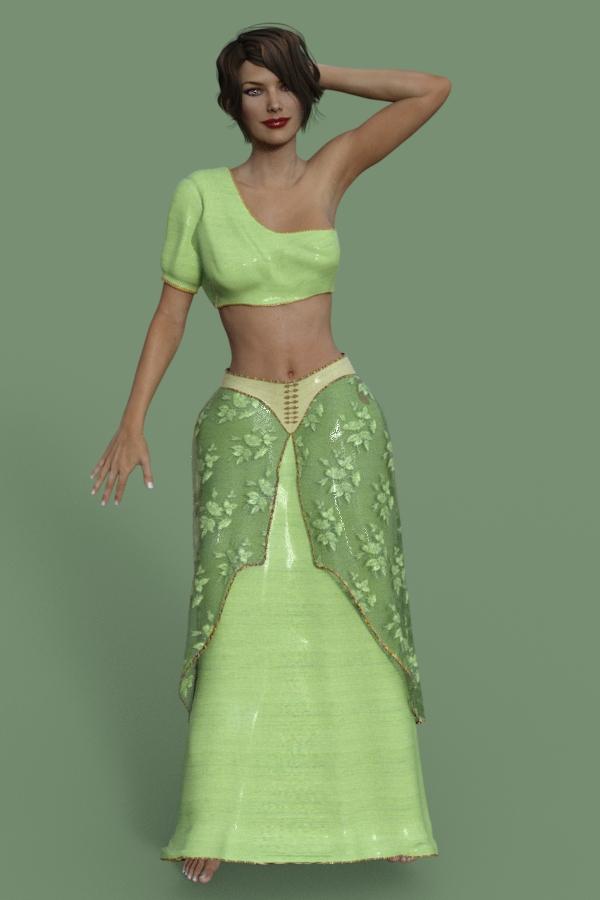
NEW! Novica & Invited Guest Contributors Tips & Product Reviews Pt 6Okay, here's one without a pattern- she has one leg slightly behind the other so that's why one foot shows more than the other. As you can see, no deep creases between the legs. (And wow, that material was a pleasant surprise for an iray non-optimized surface!) It's Fae Realm
 Selbsthilfegruppe DAZ Studio - Beispiele, Fragen, Diskussion und sonstiges Gequatsche
Übrigens gibt es Neuigkeiten zu G3M. Dieser wird erst in einigen Monaten herauskommen, wahrscheinlich eher zum Jahresende 2015 oder Anfang 2016. Bis dahin wird noch mindestens ein G2M Charakter herausgegeben. Dieser soll aber nicht David 6 oder Hiro 6 sein. Man(n) kann gespannt sein. :-)
Außerdem stehen uns noch einige weitere Charaktere der Reihe G3F ins Haus. Mal sehen, wer nach Eva und Bethany kommt... Celine, vielleicht? ;-)
Naja, dann bleibt zu hoffen, dass DAZ oder derjenige, der dat Dingen zusammenklatscht, etwas über PBR Shading dazulernt... der von V7 ist in m.A.n. nicht so "das Gelbe". Ohne Fummelei sieht die zumeist aus, als bestünde sie aus einer Art Knetgummi o.ä. Von der angesagten Preisklasse erwarte ich doch ein mehr als nur klein wenig mehr Genauigkeit... zumindest aber für die veränderten Anforderungen eines PBS entsprechend angepasste/zusätzliche Texturen (Specular Maps/Gloss Maps). In Iray taugen die enthaltenen Standard-3Delight-SpecMaps nicht die Bohne. Traurich...

Lass ma' seh'n: wir haben den "Model"-Faktor mit Victoria 7, den "Cutie"- (oder Niedlichkeits-/Twen-) Faktor mit Eva 7 (die künftige Stephanie?) und den "Pummelchen"-Faktor mit Bethany 7 (die neue Olympia?). Dann ist eigentlich der "Muskelweib"-Faktor á la Gia (ehemals SheFreak?) schon irgendwie überfällig, bei Genesis 2 kam die ja, wenn ich mich da recht erinnere, als zweite heraus. Oder der "Toon"-Faktor Aiko / Girl / Giselle / Ninive. Nicht zu vergessen den "Fernost"-Faktor Mei Lin oda den "Political Correctness"-Faktor Monique. Oder die "Teenies" Belle / Josie. Und fast wär' mir jetz' glatt noch die dämonische Lilith entschlupft!
Und wo wir gerade dabei sind... wer der Geier ist "Celine"?? Hab' ich eine essentiell wichtiche Figur verpasst? In meinem recht gut sortierten (aber teils schlecht geordneten) Repertoire der Genesis 2-Generation findet sich keine Basisfigur dieser Bezeichnung. Und die Shopsuche gibt mir auch nix g'scheits raus, die zeigt mir nur "feline" als Resultat. Hmmmm....
Hey, Rendo zählt hier nicht, erstens machen die keine DAZ Originals... und zweitens kleben die noch in einhundert Jahren an ihrer heiß geliebten Victoria 4.

Mich würd' echt mal interessieren, wieviel Umsatz DAZ 3D heutzutage mit der noch macht. Wenn ich mal richtich Kohle hätte, würd' ich DAZ aufkaufen... und die Vicki4 nur so aus Jux mal eben kurzfristig aus'm Regal nehmen...
 Show Us Your Iray Renders. Part IV
These are a couple of Iray renders of the character Elsa from the Disney movie Frozen. rendered in Daz Studio 4.8 full GPU rendered - No post work
That title came to mind even before I read the description. Nice work!
Should I be concerned, that even at my advanced age I get the title of that kind of movie in almost no-time?

But Tangled was waaaaaay better! Oh my...
Some Star Wars fan-art...mostly made to play with emitters. Lightsabers were my mortal enemy in 3delight, I just can't make them look good; I'm happy with the results here. I'm less happy with my color choices on the droid...
Cool one. Darth Lilith and Victoria Skywalker? (or Vicki-Wan Kenobi?). "No! I'am your... errr... mother."
 Hard to say, is it glossy black and somewhat pink on the astromech? Puts in some "Pop-Art" into that. And with J.J. Abrams now at the helm, I'd expect to anything being allowed. If busting up a main world of the canon would be okay...
I've read somewhere, that applying some bloom filter to the render will make the sabers even look more "realistical".
May the Force be with you... always.
EcVh0 Iray Skin Shader for Genesis 2 Female (Coming Soon)[Commercial]Yeah that's true --- there is no 100% physically correct human skin shaders even in the physically correct engine (at least not at this level), so what I've done is try to make it as close as possible to what real world skin is like.
And yeah there are even still plenty sticking to the old classic 3Delight cuz it's here for just way too long XD
True, a 100% correctness will be hard to achive, depending on how the renderer works, which we don't know, 'cause I really doubt NVIDIA let us peak at their Iray source code. And I guess you got me wrong. I didn't mean, that some people are still sticking to the "old classic 3Delight", which depends on personal taste and/or technical restrictions. What I meant is, that people still stick to old classic 3Delight methods by setting up their shaders and stuff by hard guessing, ruling over the thumb and judging by the eye. And thereby often ignoring the laws of physics or even altering them 'till they get what they wanted to. That's not how a Physical Based Renderer works. If you feed in close-to-real-world data, you should get close-to-real-world results. Without messing around with the basic laws of physics.
And yes, I know that the research for real-world data is a painful and lenghthy process, I did some myself for a few months now and already read a crapload of stuff, mainly papers about medical and computer graphics research, I normally wouldn't touch (if not been paid for
).So, I had the opportunity to get a glimpse on your shader (on page 4 of your users manual published on your product's read me page), and I strongly guess that the data on the picture inside represent those of your final product. As boisselazon already mentioned, he finds your skin is a bit too shiny. Me, too. So, let's see:
You chose the PBR Weighted mix, which is, compaired to the other two, the most complicated one to work with. You really need to have your data straight on this one, or the results will be way too inaccurate. Me personally, for that reason I don't like it that much. It's the less forgiving PBR Mix. Next:
Base Color: nothing critical, but since you advertise your product as usable with ANY skin, the yellowish color you chose could collide with lighter skin tones, making them darker as there texture implies. Plain white would be a better choice. That's an IMO.
Translucency Weight seems to be in range for an unmapped shader setup, so it looks like you did your homework on that.
Translucency Color: bright RBG 255, 0, 0 red. Although recommended by some, without an additional texture masking off f.e. eyebrows, you'll get a bit of a problem with lighter colored eyebrows, like on those of Victoria 6. Additionally, the translucency color is thought to simulate the coloring from the blood within the dermis layer of human skin. Real-World blood color is a bit different from 255, 0, 0. More in the range of 180, 65, 65. That's a value I picked from a photo of a real-world bleeding human bodypart. Since there are several roads that lead to Rome, that's also more or less an IMO.
The "Glossy" part of a shader is the "make or break" it. It makes your skin look like if it's been made of plastic, clay, or any other substance that doesn't even far look like human skin. Unfortunately, the "Glossy Weight" portion of the PBR Weighted Mix isn't really explained in the Iray Uber Shader Documentation. If it's similar to the "Top Coat Layering Mode" Weighted, than there could the reason why your skin looks that unnatural shiny. From above mentioned research papers, the oily film (sebum) on human skin normally reflects between 4 to 7% of incident light. In values of linear space that would be between 0.04 and 0.07, 1.0 beeing 100%. Your 0.12 value is almost twice as high, and since your "Glossy Roughness" of 0.9 is below a recommended value of 0.7 for that, there's something doesn't fitting in there. About "Glossy Anisotropy", since there isn't much scattering occuring within the oily film layer, there won't also be a strong, if any, anisotropy effect, since that is the result of scattering; travel path of light is changed 'cause something got in it's way, if I got that that right. "Glossy Color" nevertheless is in a correct range, it's really a relief that there's someone who doesn't put in any greys, oranges, whatever into that. Since the materials human skin is made of are all dielectrics, anything but white would be wrong there, since dielectrics don't have the ability to change the coloring of incident light, only metals do.
"Refraction Index" would be an important part, too, since it has a direct impact on absorption and scattering abilities (see Section 4.3.2 of the NVIDIA Material Definition Language Handbook, page 68 ff for that. Especially the examples on page 71). Although water is a large component of the human body, it's influence on scattering is lower then those of f.e. melanin and hemoglobin, both strong absorbers. 1.33 is the refraction index of Pure Water, which isn't a strong absorber and therefore it'll produce more or less inaccurate results.
I'm pretty aware of the fact that there are many differences, and that there's no precise value for the refraction index of human skin and that even research papers differ on that topic, since it depends on the amount of fluid in the dermal layers, the amount of blood in the dermis, the age of the test subject and even the method of gathering data (in vitro vs. in vivo; of what I'd prefer the latter, since the samples are more or less unaltered, which makes their results IMO more accurate than previously dried, frozen and later rehydrated ones. But how it's said: "Don't trust statistics you didn't personally forge."
).Some representative values could be: 1.52 for Stratum Corneum, 1.34 for Epidermis and 1.41 for Dermis, depending on what part of skin your layer is meant to represent, and as I understood, you can even go with an average of a sum of them. They are taken btw from:
Tearney G. J., Brezinski M. E., Southern J. F., Bouma B. E., Hee M. R. and Fujimoto J. G.
“Determination of the refractive-index of highly scattering human tissue by optical coherence tomography.”
Optics Letters, Volume 20, Issue 21, 1995, 2258–2260Last but not least: "Base Thin Film" of 180.0 nanometers. That's about 0.00018 milimeters, which is way too low to represent the oily layer; a representative value could be around 20800.0 nm (0.0208 mm) which I found during my own research in an NVIDIA presentation. The "Base Thin Film IOR" is also curious. What should that one represent? For the sebum layer you can go by the default 1.50 there. Funny, that the sweat/oil mix on skin has the same IOR as plastic.
Now, you could say, that you'd give a f... (as some other PA) about physically correctness, but since you advertised your product as "based on Real World Simulation" (which implies IMO, that the shader is based on Real World Data, which obviously isn't the fact; and in that case is dangerously close to "false advertising") that won't be a good reply.
I really hope you don't take it personally, and more like a potential customer review/critics. I've no grudge against you or any other, but I'm already tired of products, which are somewhat expensive, being advertised with including an Iray compatible shader, and when you peek under the hood, you find it full of... bonkers is the only word come to my mind. That even newly published DAZ Originals don't meet the requirements of a PBR environment makes it nothing better. So, in the current state, I wouldn't get it even for $2.95, let alone $24.95/ $17.47 introductory price. As a freebie, maybe, but if I had to put that effort into it to adjust the things that aren't that accurate, I could even create one from scratch myself to make it easier for me. I really know how hard it is to slap a 5 layer heterogenous surface, with different refraction indexes, absorption and scattering coefficiencies for each layer, into a plain 2 layer surface (that's minus the "Metallic Flakes" layer, which doesn't really help on such complex as human skin). But for that price I expect a decent amount of professionalism and, more importantly, a somewhat proper research.
NEW! Novica & Invited Guest Contributors Tips & Product Reviews Pt 6SY Ultra Templates for Genesis 3 Female(s)
Wonderful PDF explanation (be sure and read it for tips for long, tight dresses)
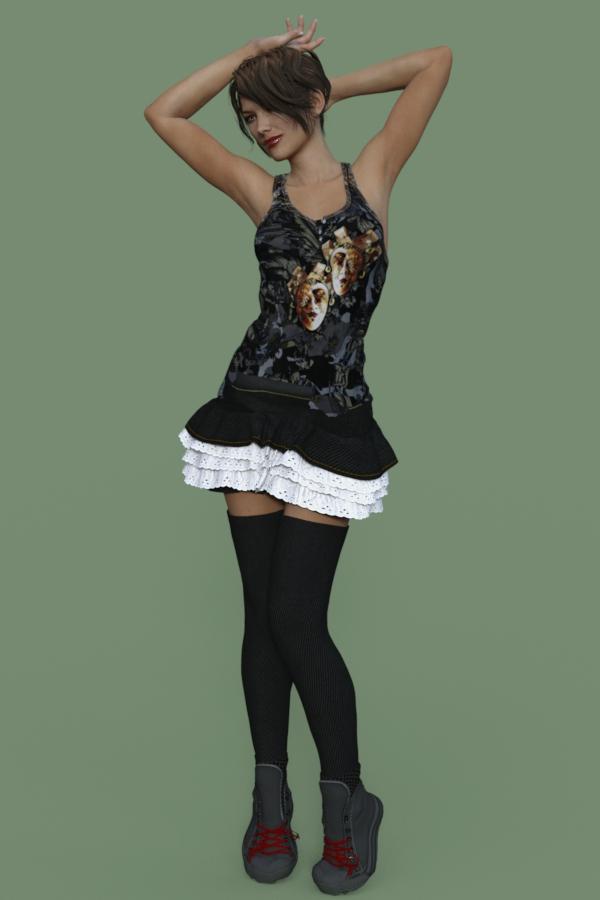
Well, getting an idea of what this does in combination with the Wear Them All. I was putting the Kenzi Outfit (V4) on Genesis 3 Victoria 7, and then I got the additional options shown. (see screenshot.) Very nice! It's my first time encountering that drop down with the Ultra Templates, when I went into Scene (Pelvis, see screenshot) or clicked on parts of the skirt, I did have handles and movement (in addition to some default scaling (the XYZ) which made this skirt rock!
You know how hard it is to do ruffles, when you have a leg raised- pokethrough with ruffles disappearing. Well, with the handles, I swung, was able to bend and twist (default options) and look at my skirt. A V4 outfit on GENESIS 3!
Be sure and look at the skirt the way it loaded, even with Wear Them All, the SY Ultra Template came to the rescue with the bent leg and ruffles.The Wear Them All gave the correct fit, but the movement was handled with the Ultra.
BTW, remember with Leggings like this, to choose "Pants" for the autofit.
And yes, the shoes were a BREEZE with the Wear Them All!!!!
So big, huge thumbs up to SY Ultra Templates and Wear Them All. Yes, I would buy both.
Daz 3D is part of

Connect
DAZ Productions, Inc.
7533 S Center View Ct #4664
West Jordan, UT 84084Licensing Agreement | Terms of Service | Privacy Policy | EULA
© 2026 Daz Productions Inc. All Rights Reserved.