-
Does anybody have a suggestion for a subway car?
Hey there, I have The Central District Subway Station that never came with a subway car as far as I can tell. Does anybody have a suggestion for a subway car that works best with it? It would be nice to find one that doesn't need a lot of adjustments to make it work. Since I already have the station, I figure it would be nice to extend its usefulness.
Daz Studio now works on my Mac but not Daz Centralfelis said:
Richard Haseltine said:
It should be listed in the usual place for fidning isntalled applications - the Dock I assume. You don't launch the application from Install Manager, that is one feature it lacks that Daz Central has.
Why would one open an installer to launch an application?
That makes no sense to me.
I think the idea is to be able to launch Daz Studio and have it load the newly-installed content, rather than just as a way to launch the application.
Daz Studio Doesn't loadAre you trying to update or to launch? You can launch from the Start menu, you can update thjrough Install Manager instead of Daz Central https://www.daz3d.com/get_install_manager/
Daz Studio Doesn't loadI have come back from a little vacation bout a month i come to update Daz Stuio Central and it wont load, so i reboot same thing , i uninstall reinstall no go , it keeps just acting like its going to load then it will stop working and you have to force it closed. , Daz3d will load but now with how you guys have DAZ Central the only way to update Daz3d program nothing works correctly.
I have attached error files and what the screen looks like
please help because i would like to use this program again.
Daz Studio now works on my Mac but not Daz CentralRichard Haseltine said:
It should be listed in the usual place for fidning isntalled applications - the Dock I assume. You don't launch the application from Install Manager, that is one feature it lacks that Daz Central has.
Why would one open an installer to launch an application?
That makes no sense to me.
Daz Studio now works on my Mac but not Daz Centralandybell1970 said:
see pic how do i open daz studio interface from here. i am using a macbook
It should be listed in the usual place for fidning isntalled applications - the Dock I assume. You don't launch the application from Install Manager, that is one feature it lacks that Daz Central has.
Migrating DAZ library to another discPersonally, I don't use Daz Central.
I prefer to install my Daz files with 7-Zip, but I agree that Daz Central is a wonderful tool.If you want to use Daz Central, you can choose your directory to install your 3D files.
To do this, you need to launch Daz Install Manager.In the main window of Daz Install Manager, you need to click on the top right icon (cogwheel)
Then choose Advanced Settings...
Select the Installation tab.In the combo Content Path Shortcuts, select Custom
Then, at the bottom of the window, in the line Custom, click on the small button on the right.
In the window that opens, select the root of your directory where you want to install your 3D files.(To launch Daz Install Manager, you must first close Daz Central)
Migrating DAZ library to another discWilly2 said:
You don't need to move DazStudio.
You can move your 3D files to an external drive.
From the Daz Studio Formats icon at the top left of the main window, choose Removes All Base Directories
Then select your new directories with the Add a Base Directories menu line.
There may be a faster way to do this, which would be to select the new directories all at once, rather than one by one.Wow, this was truly painless. Other posts I found made it into that complicated process, and your reply made it easy. Thank you so much!
I do have a follow up question: Daz Central still installs new content in disc C (recreates the folder), so it seems that I'm missing some setting somewhere. Or will I have to always install them to C: and move them manually?
Edit: Nmv, I seem to have found it. I don't know how I missed it the last time. Thank you again!
DazCentral - some wishes for improvementThanks. I most often use Install Manager, but only when I know what I am looking for by name. It does not show thumbnails like Daz Central do.
It's really good with thumbnails when you're looking for something specific, but do not know what it's called or are looking for inspiration in certain themes you own.
In my view it's a real shame that Daz Central is so close to being usable, but still so far away due to a few adjustments to the program.
If I'm the only one who has this wish for Daz Central, I'll probably not get far with a support ticket :P
Change file location for My LibraryI wish I had read the full thread, because I followed the inital instructions and now my Smart Gallery doesn't work. I can add a figure and clothes by double-clidking it from Central, but I cannot get hair to add.As I searched for hair I noticed many items seem broken now.
I'm going to uninstall everything, run CCleaner to clear out remaining registry items, and re-install. I hope this will get it back to working again. But it's pretty sad that you can't move the content from the C drive. I have raids with terabytes free for content to be stored, but Daz I guess insists on just filling up my C drive.
Update: even cleaning the registry didn't help, it still remembered the old paths. I tried installing new content from Central, but Studio gave me an error that it was missing items. I had to put a ticket in, as of right now it's completely unusable.Daz Bridges Update!!!prixat said:
I'm getting text in the toolbar instead of icons.
I think this may be an edge case in the Beta, when script-based plugin menu options are uninstalled by Daz Central or DIM. I was easily able to fix my layout by switching layout from the "Window -> Workspace -> Select Layout" menu option.
They look like menu items, and the Blender Bridge submenu is empty.
I think you are seeing a "ghost" of the old Script-based Bridge menus. They should be empty, because they are uninstalled. The NEW Daz To Blender Bridge menu option is in File -> Send To -> Daz To Blender. For more information, please refer to the video tutorials found here: https://www.daz3d.com/forums/discussion/572806/daztoblender-bridge-2022-what-s-new-and-how-to-use-it#latest
...and I thought they were not meant to show up in the Beta anyway!
No, the Bridges will install and are usable in both release and beta .
Migrating DAZ library to another discAs many new users, I installed DAZ on disc C, and as my library is getting bigger and bigger, I'm looking to migrate it to an external hard drive.
I've read various posts I managed, but some of them seem slightly outdated while others left me confused or didn't exactly match my situation, so I thought I'd ask in a separate post, in hope someone will be able to help me with my specific circumstances:- Windows 10, DAZ Studio and everything related installed with default settings
- I'd prefer to leave DS where it is as I want to move the library to an external drive rather than to another partition
- All the library content was installed via Daz CentralWhat would be the easiest and most straightforward process to migrate my library to another disc? Yes, I'm looking for "easy" over "quick", so I'd rather uninstall the whole library, change a few paths, and install it again over time than do some complicated juggling with paths, folders etc. Any particular steps I need to take?
Thank you in advance!
Transferring InstallationLeana said:
What method do you use to install content? (there will be different settings to change depending on the method)
Hi, Leana. Thanks for your response. I use Daz Central to install the majority of my content.
DazCentral - some wishes for improvementDaz Install Manager has a mid-tone UI, https://www.daz3d.com/get_install_manager/ - it should inherit all of your Daz Central settings. It also has more advanced filtering options, including soem pre-rolled strings if you install its default filters.
OFFICIAL DazToBlender Bridge 2022 (SEPTEMBER UPDATE): What's New and How To Use ItThe DazToBlender Bridge 2022 September Update is now available on Daz Central and Daz Install manager! It has some changes to the UI which may take users familiar with the old version time to get used to. Here's what's new:
- Subdivision crashfix for Blender's FBX Importer, allowing to re-enable Subdivision Baking Features
- Improved Geograft Material
- Preliminary Geograft Morph support (Genesis 8 Male and Female, Centaur 8)
- Updated to latest Daz Bridge Library v2.2
- Updated Help and Welcome text
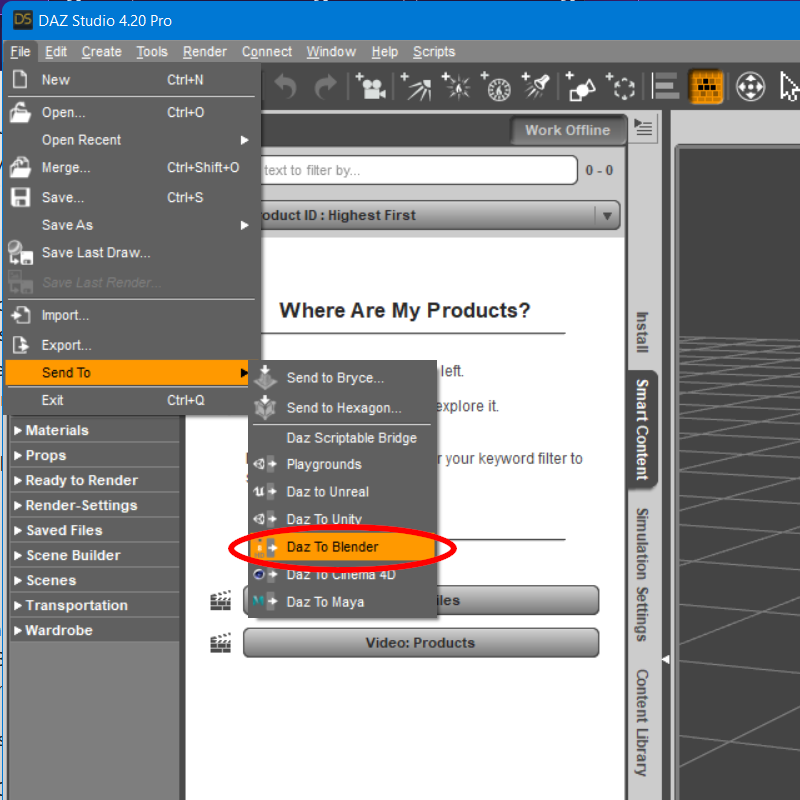
You will need to install the Blender Plugin using the new integrated Blender Plugin Installer. Access this from the Advanced Settings box of the new DazToBlender Bridge UI.
How to Install the Blender Plugin
- The Daz Studio Plugin now comes embedded with an installer for Blender. From the Daz To Blender Bridge Dialog, there is now section in the Advanced Settings section for Installing the Blender Plugin.
- Select your Blender Version from the drop down menu. If your Blender version is not directly supported by this drop-down or you have a custom plugins folder, then select "Custom Addon Path".
- Then click the "Install Plugin" button. If you selected a supported version of Blender, you should see a popup dialog box confirming if the Blender plugin was successfully installed for your version of Blender. Be sure to restart Blender after installing the Blender Plugin.
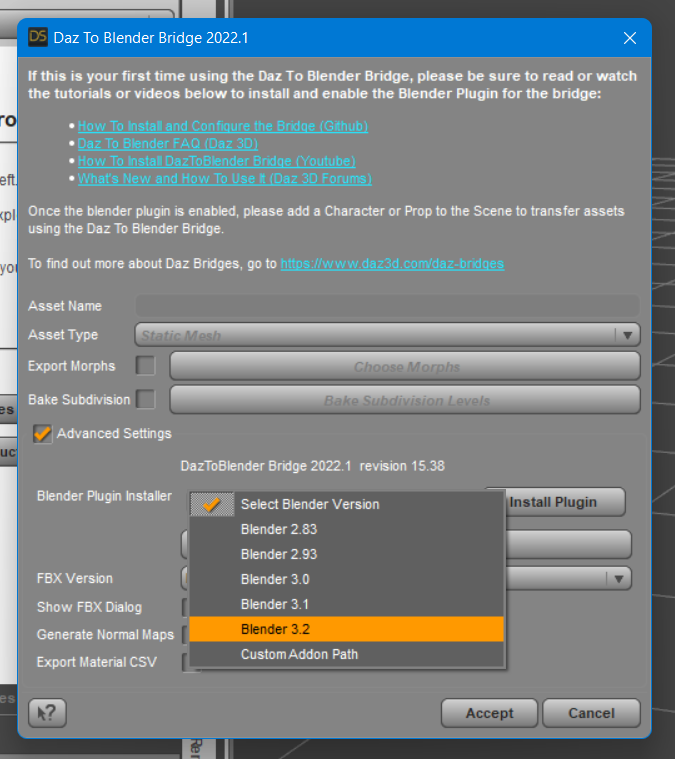
- From Blender, open the Blender Preferences window by selecting Edit -> Preferences from the Blender main menu.
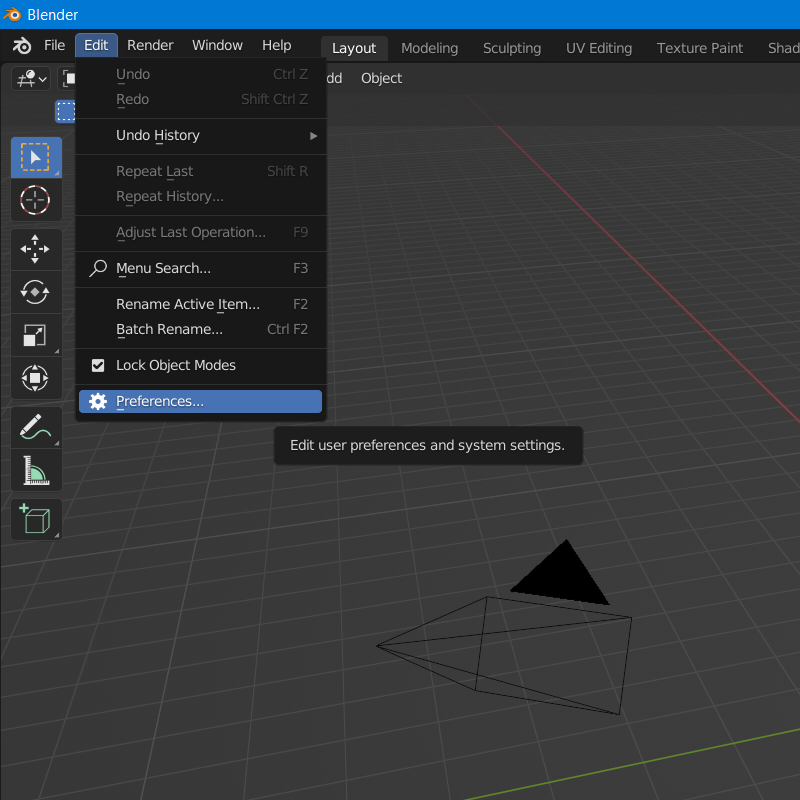
- In the Blender Preferences window, click on the Addons button found along the left side of the window.
- Scroll down the list of add-ons, and look for "Import-Export: DazToBlender". Check the box next to "Import-Export: DazToBlender" to enable the plugin.
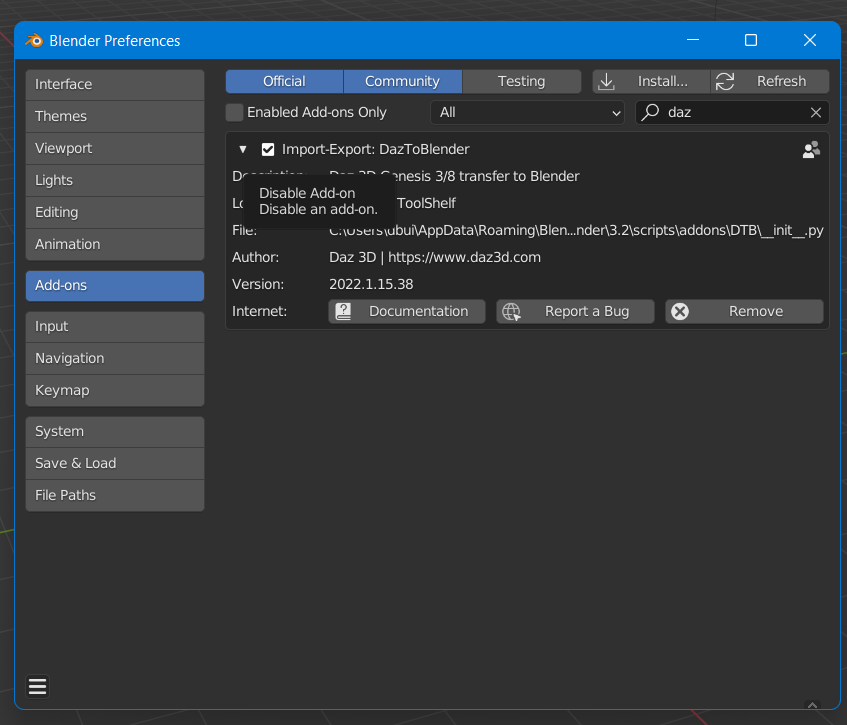
- A DazToBlender tab should now appear on the Blender "Tool-shelf" which are a set of vertical tabs along the right edge of the Blender viewport window.
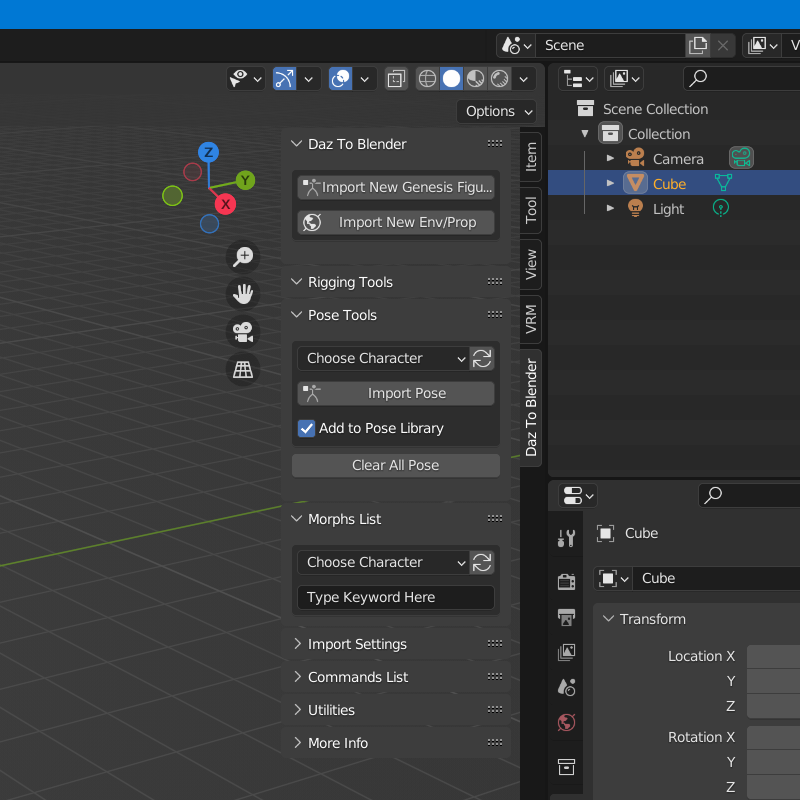
The following steps are for people who wish to use the "Custom Addon Path" installation option.
- If you chose "Custom Addon Path", you will see a window popup to choose a custom Scripts or Addons folder. The starting folder path will be the location where Blender stores preferences and files for each version of Blender.
- If you are using an unsupported version of Blender, you should see a subfolder corresponding to your version from the starting folder path. Open that folder and select the scripts folder. Then click "Select Folder".
- If you have configured a custom Scripts path from the Blender Preferences window, then you may navigate to that folder and click "Select Folder". You will then see a confirmation dialog stating if the plugin installation was successful.
For more information on the updates to the DazToBlender Bridge, please see these resources:
- Download latest updates and bugfixes (Github Releases Page)
- DazToBlender Bridge FAQ (daz3d.com)
- DazToBlender Github Page
- How to Install DazToBlender Bridge (Github Readme)
- How to Use DazToBlender Bridge (Github Readme)
Install and Configure OFFICIAL DazToBlender 2022
OneDrive Backup Compatibility and How to Set Custom Import Path

And here are several tutorials on how to use the new interface:
1. Transfer Figure with Clothing and Hair
2. Transfer Figure with Morphs, use Blender Native Subdivision Surfaces
3. Transfer Animation
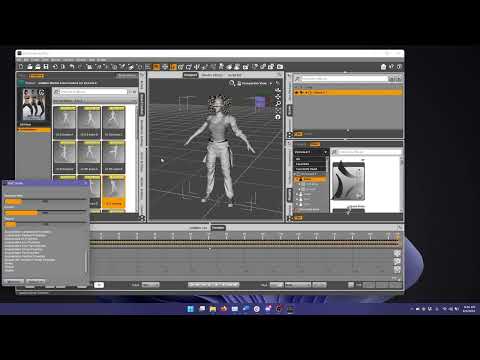
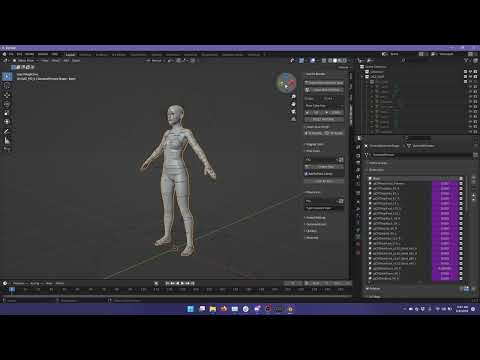
4. Transfer and use Auto-JCMs:
 DazCentral - some wishes for improvement
Would love to help, but I have never used daz central or connect and naver plan to. Would probably reach the intended target if you put this in a support ticket
Will this make it to 2022 Sales Thread:Report Issues Here "There's Always Another Sale™"Good to know. Thank you!
Robert Freise said:
firewarden said:
I did mine at 11:25 pm, also Texas / Central time. Got charged $2.10. Guess I should a have waited an hour, but I didn't know if the store sometimes chagned over early the way that it used to.
I''ve found that the change over usually shows between 0115 and 0130 Texas time
Will this make it to 2022 Sales Thread:Report Issues Here "There's Always Another Sale™"firewarden said:
I did mine at 11:25 pm, also Texas / Central time. Got charged $2.10. Guess I should a have waited an hour, but I didn't know if the store sometimes chagned over early the way that it used to.
I''ve found that the change over usually shows between 0115 and 0130 Texas time
Will this make it to 2022 Sales Thread:Report Issues Here "There's Always Another Sale™"I did mine at 11:25 pm, also Texas / Central time. Got charged $2.10. Guess I should have waited an hour, but I didn't know if the store sometimes changed over early the way that it used to.
FiguresGenesis 8.1 is the latest. The various Genesis figures come with Daz Studio, the Genesis # Starter Essentials products (split into male and female packages for Daz Central and Install Manager, though by default Daz Central will install the base content at the same time as the application).
Daz 3D is part of

Connect
DAZ Productions, Inc.
7533 S Center View Ct #4664
West Jordan, UT 84084Licensing Agreement | Terms of Service | Privacy Policy | EULA
© 2026 Daz Productions Inc. All Rights Reserved.