-
Oh, Misty, I forgot my Complaint Thread
hacsart said:
only one complanit today - its 9C (48F), wind is blowing a hoolie (50-65 MPH) and there's torrential rain.. Had to put the heat on this am.. Rivers are rising too, and ist snowing west of us..
...been sort of like that for us here as well. Not quite a cold but still unseasonable for this time of year. Yeah, we'll be struggling to even make 70 on the first day of summer when the normal high is supposed to be in the mid 70s. At least is now supposed to be partly cloudy, though as I've seen that can change for the worse in a few days. Tomorrow was supposed to be partly sunny but now calls for cloudy all day. Beginning to feel I'm in Juneau Alaska instead of Portland OR.
Meanwhile, back in the old home country, more extreme heat in Wisconsin. 96° in downtown Steven's Point (up in the north central area of the state) where I first went to college. 98° at Mitchell Airport in Milwaukee though 102° by Warnimont Park which is on the lake shore near my old high school, and 100° in Bay View where I used to go to grade school. In Madison where I lived for a bit, 96° on the UW campus and at Dane County Airport. while 90° up north in Park Falls (which in winter is usually the state's coldest spot)
The Cloud.Thank you, I haven't used this stuff in years. Good advice that I will apply.
Also found...
"Install Manager iss till avaialble, Daz Central is a different front-end for the same code with simplified options (just a base location)."
The Cloud.dramenon said:
No, I did not even use it for installing this time around
 this is a new box, and that was the way to install now... so I thought. It seems to work for the most part aside from being ineffecient eg no mass install all my content.
 In the end it might be moot, some work some do not.
Thank you for the feedback... My question - if I were to do this again what would be the best away to approach this?
Didn't use what?
If I were to start fresh, I would download the manual installation files for DS and install it like any other windows program.
Then I would use the DIM (DAZ Installation Manager) to install my content to some other (any other) drive than CDAZ Central, which DAZ is trying to push, is just dummied down version of DIM, it's not something better than DIM.
The most important thing would be never to log in to DS and never giving your DAZ log in information to DS, since that allows DAZ Connect within DS to contact DAZ servers and download metadata updates by itself and as we have seen countless of times here in the forums, fooling people to install products and product updates for no reason, causing the products to be installed twice, taking twice the space on the drives, using non traditional paths for those installations (the cloud folder), suffering from decryption errors and preventing functional DIM installed versions from working.
The Cloud.So you have G:\Daz\ set as your Daz Connect Data Directory, where is the content isntalled through other methods (Daz Central/Install manager)? Can you see it in the Content Library pane, under Daz Studio Formats>Anything but Daz Connect?
Introducing the Daz to Blender Bridge & native Blender File Formatsdanielbui78 said:
vuron00 said:
Did the location of the exports change with the new version? I'm using the addon on an older version of Blender (2.92) and had some issues after updating the plugin through Daz Central. When I use the addon in Blender, it still loads in an old export that was done before the upgrade. I can see the current exported character if I drill down in my documents folder, but Blender isn't importing that one.
I just can't tell where Blender might be importing from and I have so many FBX and OBJ files that I can't even search for what it might be pulling.
Please try this new version if your Documents folder is on another drive or a custom user home path: https://github.com/daz3d/DazToBlender/releases/tag/2022.1.10
This worked. I copied the new DLL to DAZ and still had the same result. Once I reinstalled the Blender plugin through the DAZ Blender export again, it worked. Thanks.
Introducing the Daz to Blender Bridge & native Blender File Formatsdanielbui78 said:
vuron00 said:
Did the location of the exports change with the new version? I'm using the addon on an older version of Blender (2.92) and had some issues after updating the plugin through Daz Central. When I use the addon in Blender, it still loads in an old export that was done before the upgrade. I can see the current exported character if I drill down in my documents folder, but Blender isn't importing that one.
I just can't tell where Blender might be importing from and I have so many FBX and OBJ files that I can't even search for what it might be pulling.
Please try this new version if your Documents folder is on another drive or a custom user home path: https://github.com/daz3d/DazToBlender/releases/tag/2022.1.10
This worked. I copied the new DLL to DAZ and still had the same result. Once I reinstalled the Blender plugin through the DAZ Blender export again, it worked. Thanks.
Im new to Daz. I need to move all my files to a different driveAs Frank said, you can move the folders to a new location and update the path within Daz Studio Edit > Preferences > Content, then Daz Studio will work.
But in order to get your installer to handle the new location, you have to tell that where the new folder is. I don't know how to do that in Daz Central, as I only use DIM.
Furthermore, you probably have manifest files somewhere, as Daz Central uses the same core as DIM, and in order to make the installer correctly handling changes to existing content, you have to update these files with the new path. It is pure text files, so these can be mass updated in an advanced text editor like Notepad++
Installing Daz Studios Without Daz Central?Others are able to uwe Central to install to a non-system drive. have you tried using Install Manager instead? https://www.daz3d.com/get_install_manager/
Im new to Daz. I need to move all my files to a different drivefelis said:
How are you installing?
I have installed a bunch of free content into mydaz3d. All the products I purchased are installed through daz central.
The Cloud.That is content installed through Daz Studio itself, not through Daz Central. If you look in the content Library under Daz Studio Formats is there a folder with your Daz Central installs, not the Daz Connect container (which is a virtual composite of all those numbered folders in the /data/cloud/ folder)?
Released : Wet And Tanned Skins For Genesis 8.1 Bundle (Commercial)Hi roger,
First I’m very happy to see that you manage to have the results you expect in terms of skin look. I’m a bit disappointed that you have an issue with the Genitalia. Indeed, normally, it should be straight forward, and here is the normal procedure :
- Set up your wet and tanned look on Genesis 8.1 Male
- Once done, load the genitalia geocraft and apply the genitalia material on it* (*if you have no specific material for the genitalia, you can select the Genitalia surface, CRTL+left click on the hierarchical material preset for the figure, and choose “only selected surfaces”, so that you don’t erase the work you did on the rest of the figure). At this stage the genitalia parts are supposed to be parented to your 8.1 figure and have their original materials.
- Once the genitalia are loaded and their material applied, you must select the genitalia SURFACE or FIGURE and run the G81WT !!!Transfer To GenitaliaM. In theory, it should apply the same shader as for the rest of the figure, with the same properties, and the maps adapted to the wet look maps you use for the body. TAKE CARE : if you installed your product with smart connect, or with Daz central, the map transfer will not work (because Daz renames the files with lower case letters in this case, this is why the script cannot identify the figure wet maps properly). IT IS HIGHLY RECOMMENDED TO INSTALL WITH DIM, or to do a manual install.
Please note that I also noticed that a function that I thought non case sensitive may be now case sensitive, and in this case the wet base bump map transfer will fail it you use map 1 for the wet look, the wet base bump map will not transfer properly on the genitalia wet base bump map (it is I think the only fail, and I'm gonna patch it, while trying to make it also compatible with daz connect installations in the patch to come).
I just had a look with Michale 8.1, applied points 1 to 3 of the procedure, and it works perfectly. If it does not work for you, can you tell me if you are using a Genesis 8 or 8.1 material (look if your torso surface is named body or torso, it should not be linked to that but one never knows)? Can you tell me what figure you are using?
If it does not work, and only in this case while I try to figure out what is happening for you, another simple procedure you can do is:
a. select your figure body/torso and make : file/save as/shader preset, and in the "three lines of the right" of the shader preset save options popup, choose unchek, uncheck all images.
b. select the genitalia surface and apply the shader you just saved
c. back on the body/torso click on the little image icon of the "Base Color" (the icon of the base color map in the surfaces editor tab), then choose "image editor". Note the image gamma use.
d. the same way, apply the gamma you saw to the "Base Color" map of the genitalia.
e. finally have a look at the maps used for the wet look, and pick the corresponding maps (they have the same name first letters) for the genitalia.
Normally you should not have to do all this, because the script for the genitalia transfer copy the properties, the gamma, and load the images corresponding to the wet look of the figure (except the map 1, for which I must patch the script because of the lower case issue I mentioned before).
Did using the method described points 1 to 3 solve your issue? If not can you tell me if it works using method "a. to e."? For now I had several feedbacks where the genitalia transfer worked as is should, but maybe there is a particular case of figure that I did not saw and which will require that I specifically include it in the transfer, this is why it is important for me to know if using the method described point 1 to 3 works for you.
Introducing the Daz to Blender Bridge & native Blender File Formatsvuron00 said:
Did the location of the exports change with the new version? I'm using the addon on an older version of Blender (2.92) and had some issues after updating the plugin through Daz Central. When I use the addon in Blender, it still loads in an old export that was done before the upgrade. I can see the current exported character if I drill down in my documents folder, but Blender isn't importing that one.
I just can't tell where Blender might be importing from and I have so many FBX and OBJ files that I can't even search for what it might be pulling.
Please try this new version if your Documents folder is on another drive or a custom user home path: https://github.com/daz3d/DazToBlender/releases/tag/2022.1.10
OFFICIAL DazToBlender Bridge 2022 (SEPTEMBER UPDATE): What's New and How To Use Itakiraxsojiki said:
if people are having trouble installing this i got it to work doing the following in the image attached. Its crude guide but hopefully it works for somene else too.
Thanks very much for making the image! These are actually the same steps that are written and demonstrated in the first video of the first post of this thread, that is labeled "Install and Configure OFFICIAL DazToBlender 2022 USING DAZ CENTRAL (OR DIM)". :)
DAZ to UE 5 Error: Failed to find any bone hierarchy. Try disabling the "Import As Skeletal" optionOkay, so I finally made it.
Reinstalling UE may not be necessary since I still have that error after reinstalling and copying the UE plugin.The problem I think lies on the bridge.
At the current time, I say not to use the bridge from the DAZ Marketplace or installing it from DAZ central.
Maybe they haven't update it or maybe intended for previous version.I download the bridge from here:
https://github.com/daz3d/DazToRuntime/releasesAnd it seems there are two bridges made by different people.
One from DAZ and one from the original creator.
The one from the original creator has different github link.
The github link above from DAZ.
It's really confusing for user like me. They need to make it clearer on how to do this.Introducing the Daz to Blender Bridge & native Blender File FormatsDid the location of the exports change with the new version? I'm using the addon on an older version of Blender (2.92) and had some issues after updating the plugin through Daz Central. When I use the addon in Blender, it still loads in an old export that was done before the upgrade. I can see the current exported character if I drill down in my documents folder, but Blender isn't importing that one.
I just can't tell where Blender might be importing from and I have so many FBX and OBJ files that I can't even search for what it might be pulling.
The Cloud.Been awhile and now... the Cloud.
Downloaded with the Central app and content is mapped with "cloud" - Did I just waste a lot of time? It seemed cool at the time

Is there a workaound to this and the gigabytes of files that are mapped without "cloud" etc?
And Locating them all everythime is not an option.
OFFICIAL DazToBlender Bridge 2022 (SEPTEMBER UPDATE): What's New and How To Use Itdanielbui78 said:
marble said:
I'm confused about this D2B Bridge. How many forks are there? Is there an official download (i.e. via DIM) and are there others downloadable from Github or elsewhere? If so, what are the differences?
Sorry for the confusion, I updated the the thread to make it more clear that I am talking about the OFFICIAL DazToBlender Bridge here. Just like the first video demonstrates: you can download and install directly from Daz Central or Daz Install Manager (DIM).
Regarding other forks, the DazToBlender Bridge and the other Daz Bridge products are open-source with Apache 2.0 License. So there are many, many other forks available. The Apache 2.0 license does not require anyone to notify Daz or anyone else if they create/distribute a new fork.
So there is no way to truly know how many forks exist, however, we can at least know the public forks that users are sharing via with each other via Github: https://github.com/daz3d/DazToBlender/network/members ; Based on that page, there are currently 29 forks. Of these, at least 10 of them have had some changes applied to their repositories based on the information here: https://github.com/daz3d/DazToBlender/network
Hope that answers your questions.
Regarding Geografts: exporting of geografts should behave like they did with the previous DSA-based Blender Bridge -- in other words, they will be baked into the main mesh. If there are additional geoshell elements, these will probably export without rigging. We are planning on fixing this in addition to other bugs, but there is no timeline for those updates yet.
Many thanks for the explanation. Are there threads here that specifically describe another fork with other features or advances (such as geografts, for example)? As I mentioned, I am somewhat confused when I look at threads about which fork we are talking about.
As for the geografts, I believe that would be a huge step forward for this add-on as many of the users here rely on geografts for most, if not all, of their characters. I don't like the fact that geografts make DAZ figures less exportable to other applications but we seem to be stuck with them.Perhaps if DAZ could provide a reliable merge option it might help with those issues but I know very little about the technical difficulties involved.
OFFICIAL DazToBlender Bridge 2022 (SEPTEMBER UPDATE): What's New and How To Use Itmarble said:
I'm confused about this D2B Bridge. How many forks are there? Is there an official download (i.e. via DIM) and are there others downloadable from Github or elsewhere? If so, what are the differences?
Sorry for the confusion, I updated the the thread to make it more clear that I am talking about the OFFICIAL DazToBlender Bridge here. Just like the first video demonstrates: you can download and install directly from Daz Central or Daz Install Manager (DIM).
Regarding other forks, the DazToBlender Bridge and the other Daz Bridge products are open-source with Apache 2.0 License. So there are many, many other forks available. The Apache 2.0 license does not require anyone to notify Daz or anyone else if they create/distribute a new fork.
So there is no way to truly know how many forks exist, however, we can at least know the public forks that users are sharing via with each other via Github: https://github.com/daz3d/DazToBlender/network/members ; Based on that page, there are currently 29 forks. Of these, at least 10 of them have had some changes applied to their repositories based on the information here: https://github.com/daz3d/DazToBlender/network
Hope that answers your questions.
Regarding Geografts: exporting of geografts should behave like they did with the previous DSA-based Blender Bridge -- in other words, they will be baked into the main mesh. If there are additional geoshell elements, these will probably export without rigging. We are planning on fixing this in addition to other bugs, but there is no timeline for those updates yet.
DazToUnity 2022 Bridge (SEPTEMBER UPDATE): What's New and How to Use ItThe September Update for the Daz to Unity Bridge is now available on Daz Central and Daz Install Manager. These are the new features and some video tutorials on how to use them.
- Bugfixed URP shader code
- Updated to latest Daz Bridge Library v2.2
- Fixed morph undo bug (distorted faces on export)
- Improved Geograft material support
- Preliminary steps for Geograft Morph support (exports blendshapes)
You can find out more about DazToUnreal Bridge and Daz Bridges from these resources:
- Download latest updates and bugfixes (Github Release Page)
- DazToUnity Main Github page
- How to Install DazToUnity
- How to Use DazToUnity
- DazToUnity FAQ
- Daz Bridges
The steps to install the Unity Plugin have changed from previous versions. Please make sure you follow these directions to fully install the Unity Plugin component:
How to Install the Unity Plugin
- Start your Unity Project and leave it in running in the background.
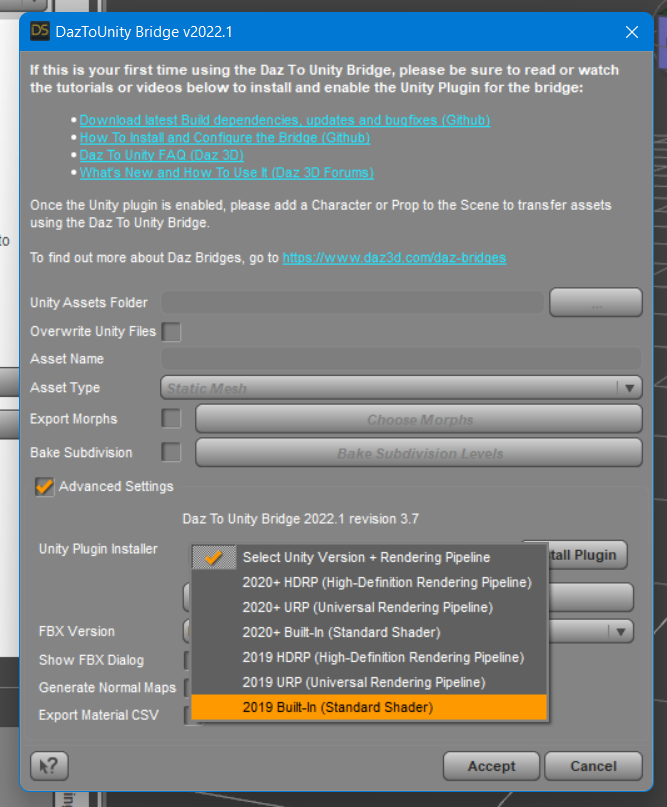
- Start Daz Studio and select File -> Send To -> DazToUnity.
- Enable the Advanced Settings checkbox.
- Select your Unity Version and Rendering Pipeline from the dropdown.
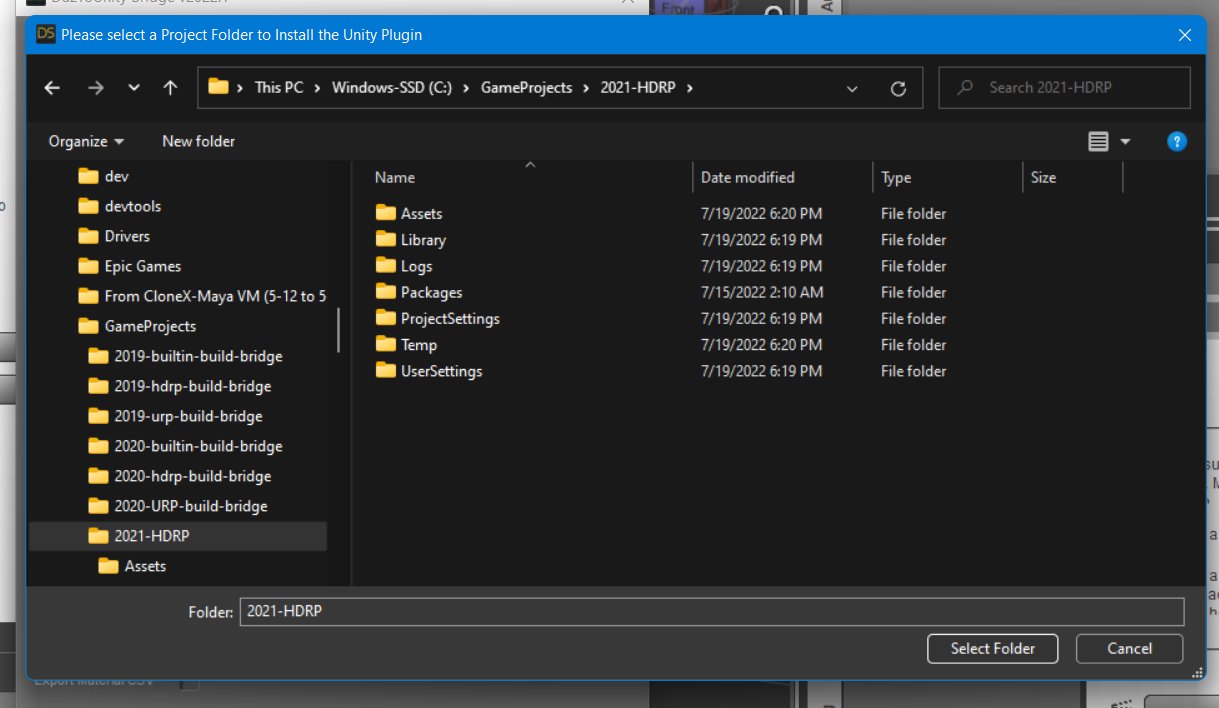
- Click "Install Plugin". A window will popup for you to select a Unity Project to which to install the Unity plugin.
- Navigate to your Unity Project's root folder.
- Click "Select Folder". You will see a confirmation dialog stating if the plugin was successfully copied to your Unity Project.
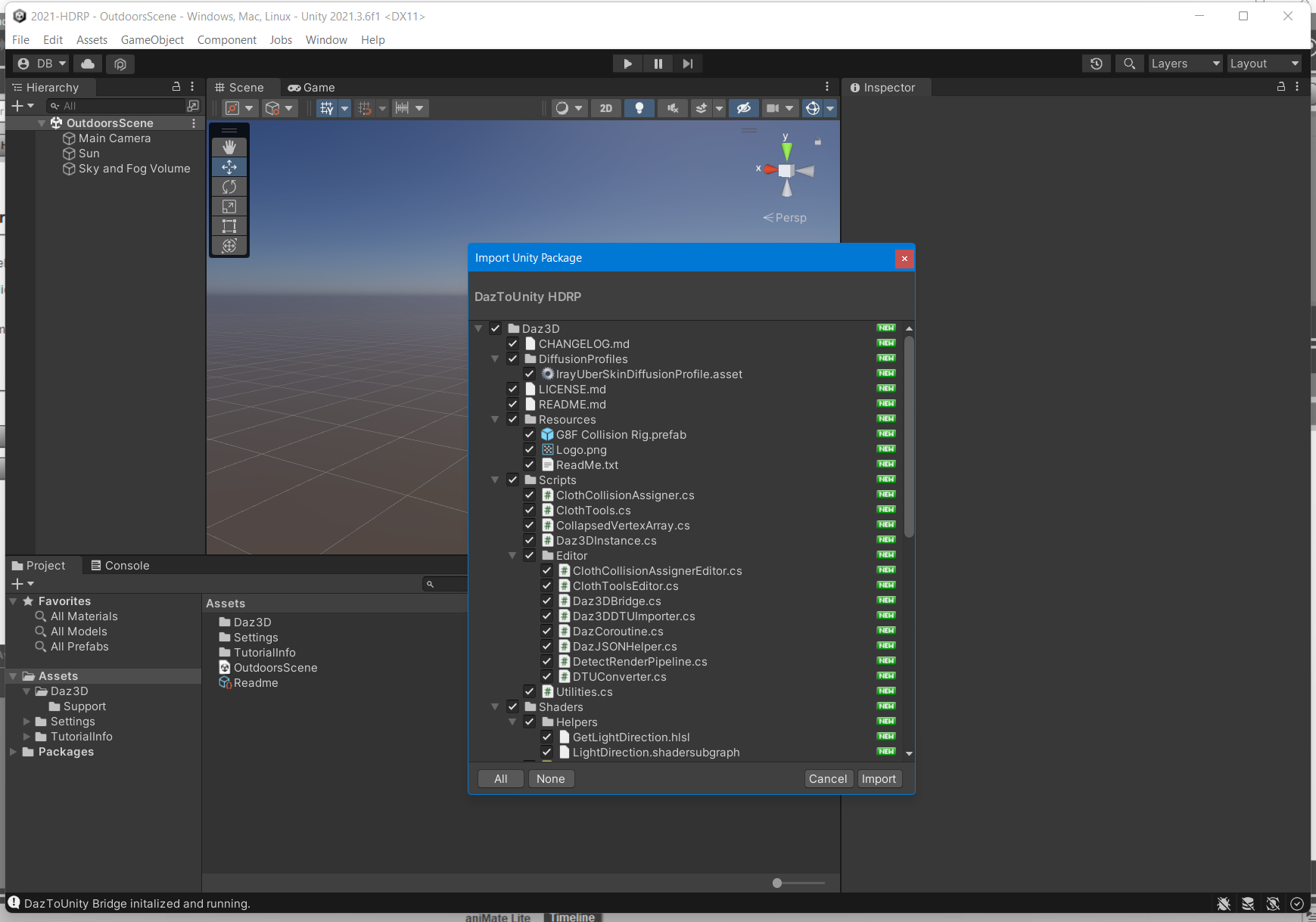
- Depending on your machine and setup, a Unity Import Package dialog may automatically appear. Click Import.
- If an Import Package dialog does not appear, switch to your Unity Project and navigate to the Assets\Daz3D\Support folder.
- Inside that folder, you will find installation packages for all render-pipelines:
- For HDRP: double-click "DazToUnity HDRP.unitypackage" and click Import.
- For URP: double-click "DazToUnity URP.unitypackage" and click Import.
- For Built-In Render-pipline: double-click "DazToUnity Standard Shader.unitypackage" and click Import.
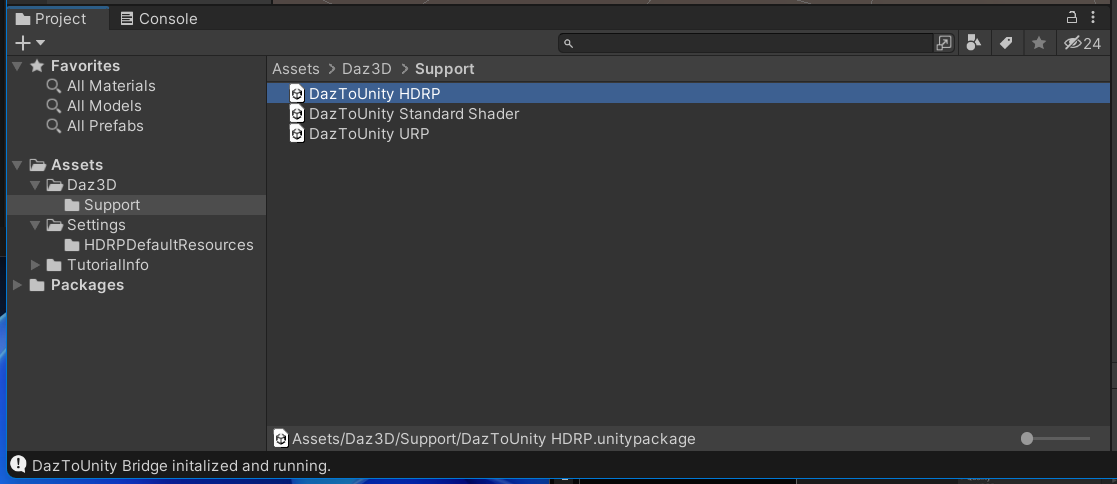
- If a popup window asks you to Update the Scripts or API, then click "Yes, for these and other all files".
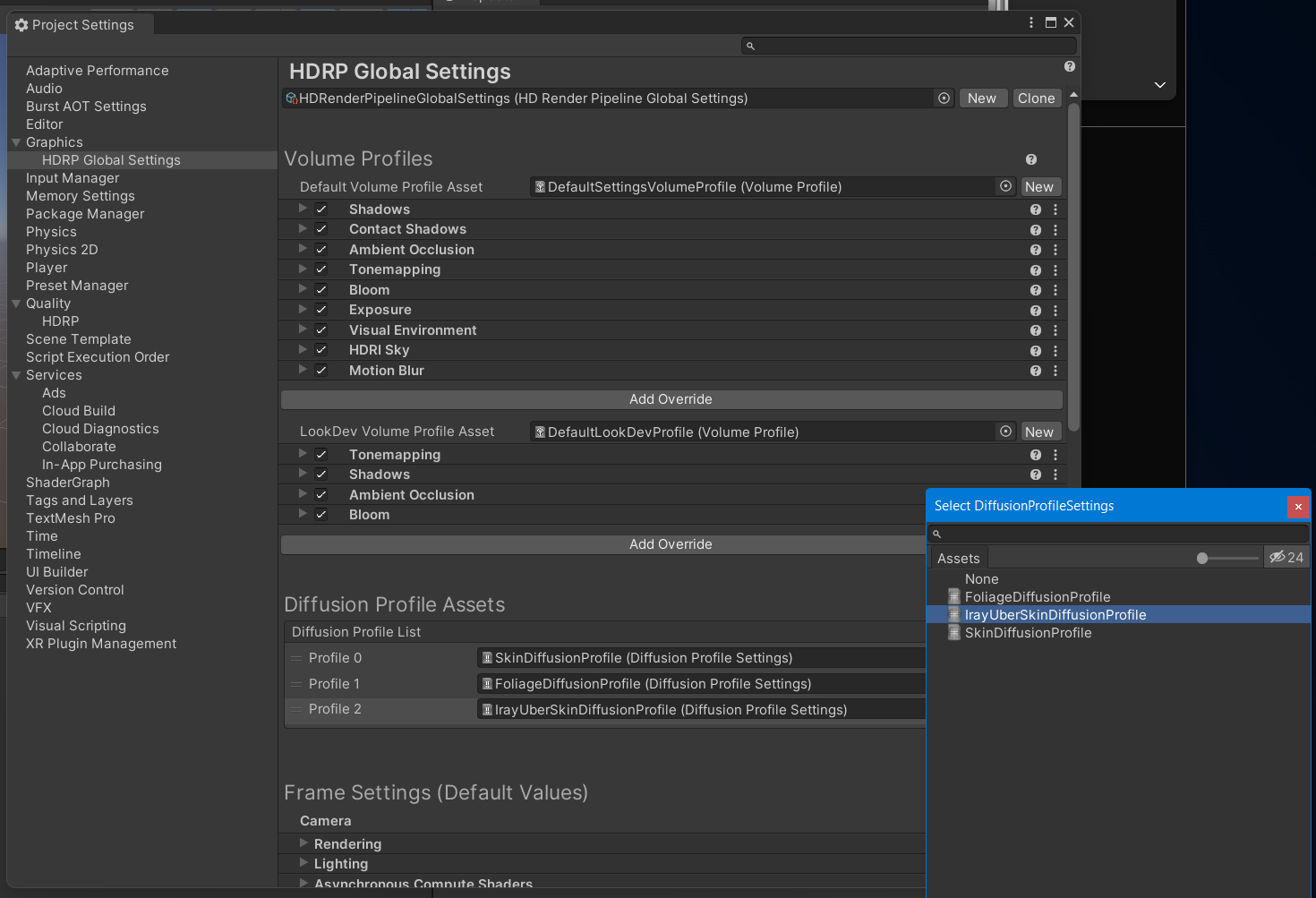
- For HDRP, you will also need to add a diffusion profile: Unity 2019: This list is found in the Material section of each HD RenderPipeline Asset, which can be found in the Quality->HDRP panel of the Project Settings dialog. Unity 2020: This list is found at the bottom of the HDRP Default Settings panel in the Project Settings dialog. Unity 2021: This list is found in the Graphics -> HDRP Global Settings panel.
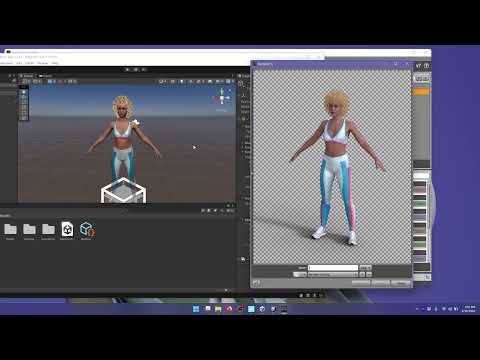
Here is a video demonstrating the above steps for Unity 2021 LTS + HDRP:
1. How to Install DazToUnity Bridge with Unity 2021 LTS + HDRP:
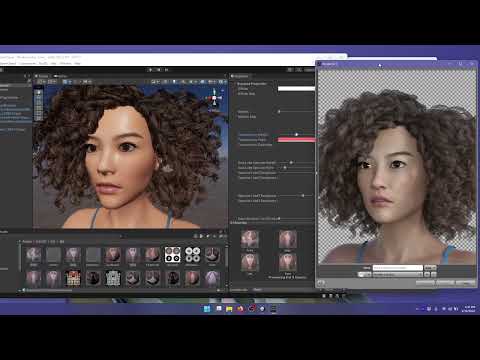
Does the skin look too shiny or oily? Is the complexion too red? Are the hair strands or eye-lashes too blocky or pixelated? Check out how to modify these things in video #2...
2. How to tweak Materials in Unity that were generated by DazToUnity Bridge:
more videos coming soon...
Daz Central Not RespondingSame on a Mac with OS Monterey - Daz Central andDaz Studio hard crash in multiple user profiles. :-/
Daz 3D is part of

Connect
DAZ Productions, Inc.
7533 S Center View Ct #4664
West Jordan, UT 84084Licensing Agreement | Terms of Service | Privacy Policy | EULA
© 2026 Daz Productions Inc. All Rights Reserved.