-
Sketchup Models
kenmo said:
Thanks for the tips. I've used the trial version of unwarp3d before. But for uv maping and went with UV Mapper instead. Now I use 3DCoat for UV mapping. But it is certainly worth to look at Unwrap3d if it can cure some of the nasty topology in Sketchup models.
Ultimate Unwrap3D won't fix the topography, you have to fix modeling related problems yourself.
UU3D is just a more reliable way of getting a model over to DS...
I make a lot of stuff in SketchUp and after I make a model I can just import the SKP directly into UU3D.
One issue SketchUp has always had is meshes tend to "break" when exported (parts of the mesh randomly become "unwelded")... with UU3D I find it easier to "weld" the mesh back than in Blender or most other programs, generally I just import the SKP by opening it in UU3D, when the import dialogue box appears, I make sure to check "weld vertices", once it opens you'll see the model automatically had all faces triangulated... if the model was thoughtful made, you can select the whole model and "untriangulate" it to save some polygons... if it's not a very well constructed model it probably won't change more than a handful of faces.
But I stress that this is not any sort of retopology, it's just eliminating unnecessary edges.
If the model is satisfactory you can then export it in OBJ format to DS.
Sketchup ModelsThanks for the tips. I've used the trial version of unwarp3d before. But for uv maping and went with UV Mapper instead. Now I use 3DCoat for UV mapping. But it is certainly worth to look at Unwrap3d if it can cure some of the nasty topology in Sketchup models.
Sketchup Modelskenmo said:
Any tips on how to clean up Sketchup models for use in DAZ3D? I am thinking mostly about car models as there seems to be more car models available for Sketchup then any other file version. And why more Sketchup car models than DAZ has available.
I've tried the SKP importer for Blender. And it works fine. But the topology is terrible. And would require a lot of manual work.
I'm using Sketchup Make (free version) and the only export option is DAE which is ugly when imported into DAZ or 3D Coat or anything else.
Not sure why Sketchup models are such a mess.
Cheers
Its not SketchUp, it's the individual who makes the models... SketchUp allows you to model "too easily" and this invites lazy modelers to invert normals, model using only N-gons (as opposed to quads or tris), leave behind duplicate vertices, make terrible UV mapping mistakes and other cardinal sins of modeling.
Also most people are only aware of the "base" toolset that comes with the free version of SketchUp, and are completely unaware of the dozens of free plugins that are available, that transform SketchUp into a fairly competent modeling application.
I generally model correctly and only have to deal with crappy modeling if I'm working on a project with someone, which usually causes me to have to redo all their garbage, so I do know a lot about fixing crappy modeling... and honestly, some great looking models have been terribly made.
If you are using the current free version of Sketchup (the online only version), ditch it and get the last version which could still use plugins (Make 2017).
As far a tips... that's really hard to nail down, as there are tons of things to be aware of...
I'll start with two tips...
Tip One...
A big tip I could offer is to view the model in monochrome view before trying export it... (you'll understand why in a moment)
To access that, go to View > Face Style > Monochrome... Unless the person who made the model changed the default colors, all the front faces (outward facing normals) should be white and back faces (the reverse side, inward facing normals) should be blue-grey.
A well made model should be entirely white... but most likely what you'll see is a patchwork of white and gray... that's bad... worse yet, sometimes people actually apply a texture to the reverse face instead of the front face making repairs harder... before even bothering to fix anything, you should make note of a couple of reversed faces (if there are any) and go back to "Shaded With Textures"... (View > Face Style > Shaded With Textures).
If there are more than a couple of textured faces that are reverse, it might not be worth fixing because at some point the amount of time involved will exceed the value... but if you still want to try, basically you are going to have select the whole model (assuming it's not comprised of multiple groups and components)...(more on that later)... and (in SU2017) go to Window > Default Tray > Materials.
The default tray window should open, go down to Materials and on right side under the " X" button (close button) there should be three icons... the top looks like two stacked squares with a triangle and a plus sign in them... in the middle, a cube with circle with a plus sign in it on one corner... and on the bottom a square split diagonally into two colors (representing the default colors)...(hopefully white and grey)...
Select the Paint Bucket tool and click on that two color icon to select the default color.
Apply that to the whole model... if it's made of lots of components and groups that might be a problem and you may have to "Explode" the whole model... that basically means ungrounding all the groups and components... blegh.Now about reversing those flipped faces... also blegh...
There is a plugin to automate this, but it's old and works spottily... but it might take some tedium out of the process...
https://sketchucation.com/pluginstore?pln=Vbfr
There is also this one, but I've never used it... it might be more efficient, the author (TIG) is a real expert plugin writer.
https://sketchucation.com/pluginstore?pln=FixReversedFaceMaterials
Otherwise, you are going to have to manually flip each reversed face...
Select the face, click the right mouse button and chose "Reverse Face".
If you are really lucky, you'll find a model that requires little work.Tip 2...
Deleting unused geometry...
A big huge issue with a lot of models is people think that by erasing something, it's actually deleted... this is especially problematic with exploded groups and erased components.
To get rid of this invisible garbage go to > Model Info... in the menu box that opens on the left side is a list... Animation, Components, Credits, etc...
Chose "Statistics"
In the new window that opens inside, go down to the bottom left and click the "Purge Unused" button.
Congratulations, you just flushed all the unused garbage out of the model... this my have little impact, or it may significantly lighten the model... either way, it makes it easier to export...
ALWAYS DO THIS AS THE LAST STEP BEFORE EXPORTING!
I'll throw in a third tip, but I don't have much time to explain in detail...On like 90% of the models it is going to make more sense to explode the model before exporting... the exporter or importer is going to have to sift through a ton of unnecessary group and component garbage as it converts it... in most cases you can't use those groups the way they were intended, so it just bogs down the model and leads to little errors.
Sorry but I don't have time to explain the process in detail, but could later if you are interested.
I'll make another suggestion...
If you like to use SketchUp models, may I suggest getting Ultimate Unwrap3D Pro it's $60, and even if you don't use it for the UV mapping its intended for, it has one of the best SketchUp importer I've ever used... it preserves textures and will export to OBJ without involving Blender (but the model scale get messed up so you may still need to mess around with it in Blender if you prefer that to DS for tweaking)
https://www.unwrap3d.com/u3d/index.aspx
Sorry I'm cutting this short, but I'm running out of time, and to be honest 95% of the times I've responded to posts like this, the OP was not really looking actual tips or suggestions but merely asking "Where's the Fix Everything Button?" They ask and never respond again and I don't know if it was helpful or they were just like "Eff this, too much to read, don't care"...
If you really are interested I can share more info, including screen shots if necessary and I'm very happy to help... so just let me know.
Have a great day and I hope this was helpful.
Sketchup ModelsI have looked at SKP files in the past in hopes of converting some, but outside of the apps they are meant for, SKP files will be a royal mess. I am guessing it has to do with how Sketchup modeling works compared to regular box modeling or sculpting.
Sketchup ModelsSketchup models are pretty inefficient and will usually need work, it's due to how the modeler works and the workflow. Users with previous modeling skills will do better creating in sketchup, but in general you will need to do modifications for best results in other apps like DS.
Sketchup ModelsAny tips on how to clean up Sketchup models for use in DAZ3D? I am thinking mostly about car models as there seems to be more car models available for Sketchup then any other file version. And why more Sketchup car models than DAZ has available.
I've tried the SKP importer for Blender. And it works fine. But the topology is terrible. And would require a lot of manual work.
I'm using Sketchup Make (free version) and the only export option is DAE which is ugly when imported into DAZ or 3D Coat or anything else.
Not sure why Sketchup models are such a mess.
Cheers
What went wrong?So which prius from the sketchup warehouse is this and I'll look at it.
Show Us Your Iray Renders. Part VIIISorry for the long delay. My company changed the theme of the project from military to industrial just 4 days before the deadline. Wasted almost 2 weeks preparing military scenes and props.
Actually, the majority of the props I use are royalty free from either 3D Warehouse or GrabCAD. Hope I'm not breaking any rules by sharing this. (some models listed might not be the exact one I used because there's such a huge collection of models)
https://3dwarehouse.sketchup.com/model/9c92ed9d-177e-4f1e-be3a-051b7c853c7a/Military-helicopter
https://3dwarehouse.sketchup.com/model/9e1d0f73564995831d17b6d940ebf675/us-army-humvee
https://3dwarehouse.sketchup.com/model/54cce5a6b27f1efaa844e77de62dbd71/m939-army-truck
https://grabcad.com/library/hummer-humvee-military-vehicle--1
https://grabcad.com/library/leopard-2a7-a63-rws-1
https://3dwarehouse.sketchup.com/model/2de8710fb7bbbd426142b9e030189928/M1-Abrams
https://3dwarehouse.sketchup.com/model/ufddc7c04-36ef-4b73-b84d-959870af8f8c/ATS-ISV-Hammer-Mark-I
For folks who don't have Sketchup, you can open models from 3D Warehouse using their online version of Sketchup and then export it as an STL. You import the STL into Blender and export it as an OBJ.
For GrabCad, you set search settings to STL and OBJ when doing a search. You'll need Blender to convert STL's to OBJ's.
Be fore warned that none of the free stuff are rigged and it's a trial and error process because some of the models are poor quality. You may also have to manually split surfaces up to assign texture.
FSMCDesigns said:
mechengineer97 said:
Just some props I'll be using for my next project at work.

Pretty cool. Mind listing the assets you used so I can check out their store page.
How do I reduce the number of Polys in Daz?What you probably want here is the free "Automatic OBJ Exporter" script set for DAZ, which for decimation works in tandem with the $50 Atangeo Balancer software. The script-assisted workflow is meant for Windows people who want to take posed and dressed Genesis figures to Poser, for real-time comic-book rendering. But it looks like it would also be useful for you, so long as you're not on a Mac.
In my experience getting anything from Daz or Poser to SketchUp is a bit of a nightmare. They just don't work well together. Even with a quality and easy decimator like Atangeo, you will likely still see slight crinkly edges, once the obj is in SketchUp. You will then have to use a chunky sketch style-preset to try to hide this.
How do I reduce the number of Polys in Daz?My current model has about 3 million polys which is making it fairly un-usable for my output software (Sketchup / Enscape). How can I significantly reduce the number of polys in D3D before I export as an OBJ file?
ISO: split rail fencehttps://3dwarehouse.sketchup.com/model/7ede63467c3c1201d4850fa83ac02647/split-rail-fence
https://free3d.com/3d-model/split-rail-fencing-v2--447425.html
https://www.turbosquid.com/3d-models/colonial-stacked-split-rail-fence-3d-model/294284
https://www.turbosquid.com/3d-models/split-rail-fence-3d-1412259
What's the one thing you've always wanted to see sold at daz but never have?One item I was turning the Net uypside down looking for, and that I gather at least one other person was also turning the Net upside down looking for, some months back was a fairly detailed diaperbag, with a pocket for the baby bottle, etc. etc. I eventually wound up kitbashing one out of a regular carpet-bag and some assorted props from one of the baby-nursery sets. But one resembling this one over here would be a Godsend:
https://3dwarehouse.sketchup.com/model/b0f8d285-f9ec-4211-8c8e-210ad8f07a11/媽媽包-Baby-Diaper-Bag-嬰兒用品包-Nappy-bag-Backpack
....but no matter how I tried to import it, it always arrived with large chunks of it missing.
Genres You'd Like to See in the Store?..unfortunately with many of those sites, it's not just the price. SOmetimes it is the quality, for exampe, when I was searching for a concert hall grand piano I saw some pretty awful stuff some of which was not at all "affordable" by our standards nor would probably pass Daz QA. There are also file format as well as usage restrictions to be concerned about.
Daz cannot directly import formats like .3ds, .MAX (which is proprietary), .C4D, .and .STL. Collada, which is supposed to be compatible with Daz, also has its issues. More often than not, you have to go into a modeller to make the conversion (usually to .obj) and even then it's not a sure bet the materials will transfer properly, particularly if there is no UV file provided. That may be one thing for a freebie. So it can be a lot of work (and I'm not even counting cleaning up errors like reversed polys and ngons [particularly an issue with Sketchup models]) . Not sure I care to pay 75$ - 100$ for a model I need t do spend a lot of time converting and fixing on to get it to work in Daz.
Reference images for creating neighborhoods in Blender?Depending on the neighborhood you might find it easier to use the old Sketchup Warehouse neighborhoods for some places and then section by section replace and model those usually very low poly sketchup models using Google Streetview images as references. It's a lot of work however you do it but that gets you somewhere.
How do I build 3D rooms?Also be aware Sketchup applies different surfaces to the frontface and backface. I use the following to work round this: https://sketchucation.com/plugin/740-tt_uv_toolkit
How do I build 3D rooms?I've been playing around with Daz for a few years now. My intent was to use it to 3D print scale model figures but I haven't gottent far with that due to print quality.
Recently I got the idea to build rooms to pose scenes inI know they can be bought but I like the idea of making things that are unavailable. I'm able to build such things in Sketchup but am having trouble figuring out how to "finish" everything, meaning floor tile, wall paper, etc. I have made 3D floor tile. Is there a way to color this tile or does an image represent the 3D texture instead? I've tried searching the net but frankly I don't know the terminology to search for.
TYIA!Octane X in the Mac App StoreThere's a feature article on the Mac App Store today, announcing the release of Octane X for Mac. It requires Big Sur, but will run on Apple Silicon. The blurb says:
[Otoy] built Octane X from the ground up for Mac, optimizing it for Apple's Metal graphics API and the Apple M1 GPU. It also integrated plug-in support for Cinema 4D, SketchUp, Maya, Houdini, Blender, Modo, Nuke, Unreal Engine, Unity and other 3D content-creation tools.
It sounds as if you need to pair the (free) renderer with a subscription to make use of it. It does come with a free one-year subscription to Octane X Enterprise or Octane X Prime. Enterprise seems to run you about EUR40/month once your one year sub runs out, so you'd need to like it quite a lot to make it worthwhile. Prime offers a free tier for 'personal and non-commercial use' with some limitations. Otoy have more info on their site.
Compatibility with Apple Silicon is interesting, although the requirement for Big Sur leaves DAZ users hanging: current versions of DAZ Studio won't be Big Sur-compatible until later this year (according to DAZ), and I don't believe that any of DAZ's other tools -- Carrara, Hexagon, Bryce -- are or probably ever will be Big Sur compatible. Maybe you'll need to export from DAZ Studio to Blender, then use the Octane/Blender integration to render your images on that fancy new M1 Mac you just bought. Sounds like a lot of work.
But it may hint at things to come: if Otoy are going all in on supporting Apple's hardware and APIs, that makes Octane a potentially interesting rendering platform for Mac fans. And if people start using it, then Otoy may see some value in offering inexpensive subscriptions to hobbyists (better than the free tier, but less expensive than Enterprise) and DAZ may think about offering tighter integration with Octane in future. Which sounds good.
People who know more about Octane will be along shortly to tell you what this all means, but I thought I'd just point it out as something possibly of interest.
Carrara. ... and Unity?adding 2c,
unity and unreal are entire dev and presentation 3D world platforms that are intended for real-time game/interactive use by end-users.
One ruler to help measure their place relative to 'our' own 3D scheme, is that neither of those engines export squat (well, except live and captured video/images). They are the end point for their intentions, period. This is great, by the way, but simply where they fit.
Both environments (everything DS/Carrara do, and more) can be practically free to use/develop in, as they have indy-friendly business models - so we can all play and dream, hence the interest by DAZ/Reallusion in providing their content (and 'interactive licenses' - note the recent push on the DAZ main page? - yup...) to this marketplace. It's a prudent business direction/decision.
The unity and unreal world developer would typically create their mesh worlds from DAZ/Reallusion/Sketchup/Turbo-squid/Rendo assets (and licenses), add then their figures (from same sources) with animation/rigging (fbx/collada/...) to those worlds. (Think actors and sets - much like the games I believe you already play)
Then within their respective scripting contexts, developers map interactive user-controls to 'canned' figure animated events and/or they script logic to take commands from the users and the story logic/scripts to generate the reactions and results in an interactive context (if user does X, then figure does Y, and if figure A hits figure B with Axe, then activate gory death animation, etc.). Add camera controls, physics engines, lighting, atmosphere, rendered styles, etc. to add the magic that we hand-key in our animations...
It's all very-much a realtime interactive environment at the end, but uses a lot of preset elements that are generated using essentially the same 3D elements that we all work with. Hence the urge to find overlap. We also do this with tools like Marvelous Designer - very much the same, but different.
Take a look at the latest unreal-5 engine demo that Wendy posted a few weeks back and understand that the figure is being 'driven' through that world by a user with an Xbox-like controller, and while the figure is driven by the user, the world iteslef (lights, gravity, dust, bugs, rocks-falling, etc.) is programatically generated and reacting with the meshes and environment fed to the renderers (masterfully pre-setup), and also responding to the user/figure as it interacts with their world(s).
unreal engine 5 demo:
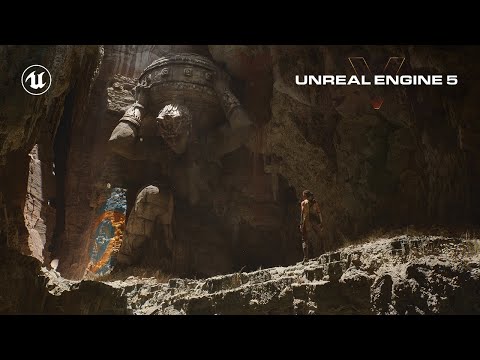
Then, last week they released this stuff with interactive super-real people. Cool/humbling:

To be honest, everything that goes on in those demos makes me believe that *if* that can all happen in realtime on a high-end Intel processor, and a pair of NVIDIA 3070s (cavemen tools, relative to even human brains), that perhaps we *are* all living in a simulation of some sort :) If so, I really want to have a chat with the guy/gal that's got my controller in hand, heh.
Add to that, that the whole oculus-rift immersive headset environments are doing all of this in realtime, all around you ( picture 15 4K TVs worth of imagery updating at 30-60 frames-per-second, in every direction around you - in 3D-stereo, so that's times X 2 for each frame - jeez.
Check out the demo - unity has similar goals and strengths/differences, etc. - it's mind-blowing and humbling stuff, and hopefully, after seeing/reading this, the framing of all of this unity/unreal stuff will fall into place relative to Carrara/DS/Poser/C4d/Maya more readily. For animators, it just changes the game entirely, but the enjoyment of 'old school' still has its own value. Think Farrari and convertable VW-Thing, heh. I think I'll take the 'Thing' and some AM radio or 8-track for the win.
Personally, I'm obviously impressed, but kind of afraid of it all, so I'll go back to my humble DS/Carrara world and run another render or two, and be happy and impressed with my mastery (!) of this domain.
That the humble pencil and paper can still enable the most powerful of ideas to propagate, leaves me quite inspired with the tools I'm able to explore in the comfort of my own space. In both cases, it's safe to blame the operator.
best to you misty,
--ms
Future of Hexagon?I don't see anything wrong with hexagon. Especially since it's last upgrade. It rarely crashes on me and I do all my modelling on it for everything I do and not just DAZ although mostly for DAZ and I have programs such as 3dsMax, ZBrush, and others of that caliber and still turn to Hexagon. Hexagon just takes time to get to learn how to use it properly. I ve have used it since it was first introduced and only now am I becoming very good with it as I have learned to use it. Any mistakes I make now are because of my error and not its and are usually in my construction by making something not the way it should actually be such as the example attached. For a free product hexagon is extremely powerful. You just have to learn what to do and not to do. Many things you can do very well with hexagon and a few things you can't. For example again, I never UV in hexagon. That is not a strong attribute of hexagons. I use a different program designed for just UVs. Hexagon is a model builder and for that it is excellent and rivals some most expensive products out there. Bar none.
I am working right now on a set for DazStudio for Vince 8. Two guns, clothing and other accessories... below are some pictures of those models. The clothing I am still working on. Pants in front of me right now. All of this is done in Hexagon, except UVing. I am very good with 3dsMax, zbrush, carrara, sketchup, and others that I have. But Hexagon is my program of choice for modeling. It cannot be beat especially for the price.
Lighting a painting.It's not the obj importer thats doing that. Sketchup just does that to pretty much any rectangular surface. It's related to the way it also insists on closing everything up automatically and not really leaving wide open empty spaces inside objects. Like you have to go back and delete planes that you never put there, but you can never get them all because it just keeps making more. It's also related to how they achieved such an easy to learn, fun modeler that can also create really complex and amzing things. Like everything about it is pretty much completely different than other programs, right?
The tool I linked to will most likely make the model you already made work perfectly.
Alternately just model the lamp hardware and use a DAZ primitive for the bulb.
Daz 3D is part of

Connect
DAZ Productions, Inc.
7533 S Center View Ct #4664
West Jordan, UT 84084Licensing Agreement | Terms of Service | Privacy Policy | EULA
© 2026 Daz Productions Inc. All Rights Reserved.