Genesis 3 UV Swap
 Stormlyght
Posts: 666
Stormlyght
Posts: 666
Hi @Slosh,
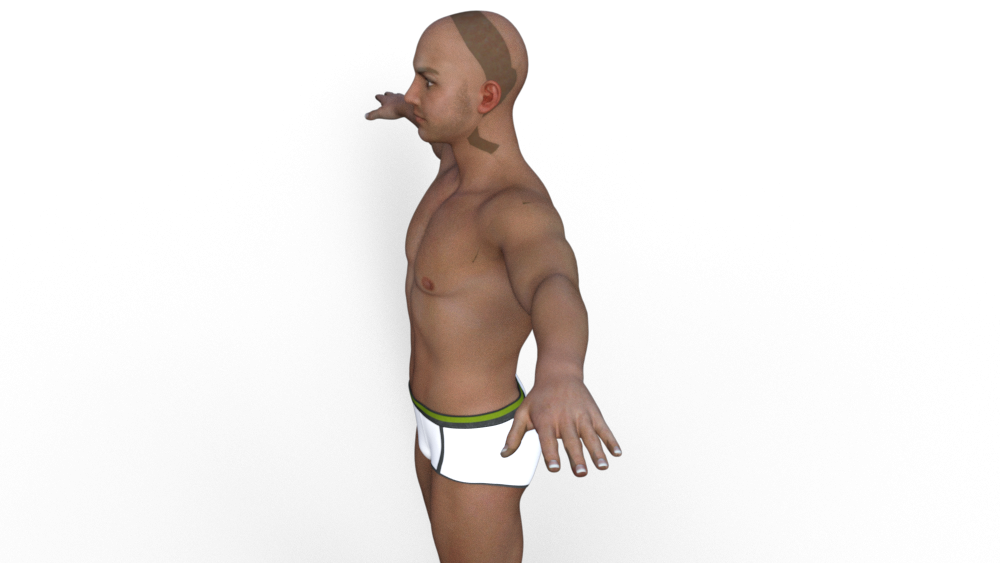
I apologize if this has been addressed elsewhere. I purchased the G3 UV Swap hoping I could figure it out without to much trial and error. I tested it by using one of my favorite textures by Chevybabe25 (Amisi). I applied the corresponding base textures to G3M and then applied the UV Female Preset. Attached is what I got.
Now I don't mind photoshopping out the seams and I can correct the "girlie" fingernails with post-work, however would this be what I need to expect if I choose to swap textures from male to female? I did dial in some "Dash" and "Aiden" to the base after swapping so maybe that's why the image appears the way it does. Any insight would be helpful. Thank you.
Trish

Daz 3D is part of 
Connect
DAZ Productions, Inc.
7533 S Center View Ct #4664
West Jordan, UT 84084
Licensing Agreement | Terms of Service | Privacy Policy | EULA
© 2026 Daz Productions Inc. All Rights Reserved.
Comments
If you apply Amisi to G3F, select one of the skin surfaces and look in the Surfaces pane which UV set is used? Morphs don't affect the way textures apply, though they may of course cause stretching.
Hi Richard,
I did as you instructed and it says "Base Female." Thank you.
Trish
Interesting. Even without applying the female uv swap, my Amisi's head doesn't look like that. Here is what Imget for Amisi's texture after applying the ups to G3M. Is there a chance you applied the base male ups here instead of the base female? That's the only thing I can think of.
Thank you for your response--and that G3M looks good wearing Amisi ! I'm going to "nuke" my current file and start over. It shows that I'm using the "base female" but I can try again. I'll let you know.
Trish
yes, please do... any anomolies like this would be good to know about
Hi @Slosh,
After redoing the whole thing, I didn't get the weird seams and/or striping. Not sure what I did differently or if it was just a weird anomaly. Once again, thank you for your quick response.
Trish
I found that the Genesis 3 UV Swap works very well; it is BIG fun and opens a lot of possibilities. Thanks, Slosh!
I'm happy it's working for you now, Trish.
@caravelle, thanks for the thanks
Awesome Stormlyght Amisi looks good on him.