How do I fix this?
 leo04
Posts: 400
leo04
Posts: 400
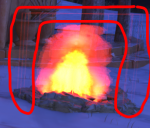
I have a scene with a campfire prop in it. I am getting "fireflies" on the edges of planes that make up the flames.
I am using a two point light setup using SpotLight props, with Disk light geometry.
Any idea on how to keep this from happening?

Daz 3D is part of 
Connect
DAZ Productions, Inc.
7533 S Center View Ct #4664
West Jordan, UT 84084
Licensing Agreement | Terms of Service | Privacy Policy | EULA
© 2026 Daz Productions Inc. All Rights Reserved.
Comments
In the cutout-oppacity map, is the outer parts fully black, i.e. RGB = 0,0,0?
Yes.
Then I don't know how that can happen.
Is the fire/texture from a commercial product?
Yes.
While I used the prop in a completely different scene, I have had the issue in the Camping Site scene too.
I don't have it.
I can see your flame has a larger area where it seem to glow. I am talking about the area above the fire where it becomes red.
Have you increased the lumens for the fireplane by a lot?
You can try: Go to Surfaces pane, select the fire or flame surface, Cutout Opacity slot, click its dropdown list to open Image Editor, set Image Gamma to 0.00. Redo Iray preview or Render, see if the weird frames are gone.
If the issue is gone, that means the opacity map is not dark enough as felis said ~ You also can fix the map by darkening the transparent area in an Image Editor.