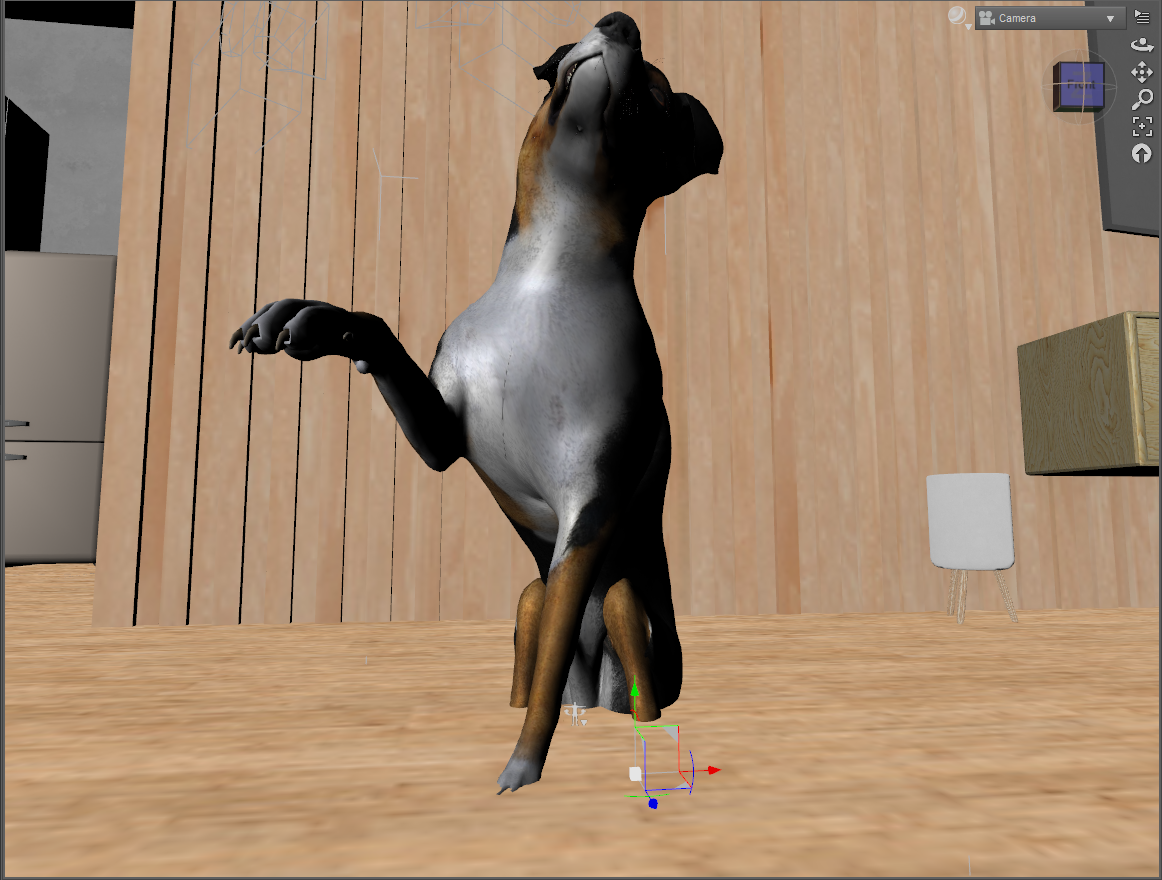
How can I keep my dog from sinking?
 Ron Knights
Posts: 2,351
Ron Knights
Posts: 2,351
I decided to do a series of renders using various breeds of the DAZ Dog 8.
I'm using Simple Serenity House for the renders. I really like the scene. However the dog sunk into the floor with the first pose.
The dog was fine when I first placed him in the scene. Is there a way to modify individual poses to keep the dog from sinking into the floor?
Post edited by Ron Knights on

Daz 3D is part of 
Connect
DAZ Productions, Inc.
7533 S Center View Ct #4664
West Jordan, UT 84084
Licensing Agreement | Terms of Service | Privacy Policy | EULA
© 2026 Daz Productions Inc. All Rights Reserved.
Comments
For generic dog poses, you can't ensure that they won't think into the ground or flow, as it depends on the size of the dog.
If the floor are at actually Y=0, you can Edit > Figure > Move to Floor.
If not, you can just pull it up using Y translate on the root node.
As an addendum to the above, keep in mind that as most poses for DAZ animals are based on the generic base rather than any with morphs applied, you'll also probably have to do a moderate amount of re-posing to get all four legs to look properly grounded, as move to floor only drops the creature to the point where it's lowest base element is touching the floor level, so depending on the leg lengths and postion, it may appear to be walking on tip-toes or have some limbs floating above the floor..
I think I solved the problem. I switch to a different scene just because the last scene seemed to take a lot of resources.
I'm using Room Creator by Maclean right now. Not using any furniture yet.
...when working on scene I create a "Floor Camera" that is even with the floor plane (so you see just a line) and lock its (X, Z) rotation and (Y) transition sliders. Sometimes applying a pose preset can put a character's feet or body slightly above or below the floor plane while still indicating "0.00" position in the Y transition slider.
I do a similar trick by creating a white plane primative and dropping it to the floor, then put the figures on it. That makes it easy to fairly see if the feet are solidly planted or hovering with Iray, 3DL or FIlament and gives you an easy horizontal refence to match things that aren't touching to. Best part: you can parent multiple figures to the same plane and then move them all at once just by moving the plane, then hide the plane once you have everything where you want it.
Thanks for the tips. I get easily confused trying to turn the words into actuality.
In the meantime I noticed some pose sets are only for a few dog breeds.
The Australian shepherd wasn't included in some sets. The Dachshund was included.
I bought the Dog Park, and it seems to work well with the two poses I tried. I like the colors too.
Well, the red sky is a bit strange, but seems to go with the general color scheme.
Oh darn!
Most of the multi-breed pose sets came out when Dog 8 debuted or shortly after & will only have the breeds that were released back then, like base, Dachshund and Great Dane. Someose sets do include other breeds such as Lab, French bulldog, husky, etc. So you are going to have to tweak poses.I would start with a pose for a breed of similar size and build.
Yeah, I was working with a beagle and every pose would cause it to drop into the floor a bit. I never thought about the dog being small affecting the poses.
And that dog park is great.
Although as anyone who's ever been to a dog park can tell you, it's grossly incomplete without this essential companion product - https://www.daz3d.com/dog-waste-station-and-props
"Grossly" is correct .
Perhaps. But I've done maybe a dozen renders using the park, and at no time did I lament the lack of such a station. :)
Course, that's now been added to my wishlist. One never knows.
Yesh I added the waste station to my wishlist too.