Daz Studio Timeline Reverse Playback utility

One of the most asked for feature of Daz studio is the ability to playback the timeline in reverse, well I have built a script to do just that.
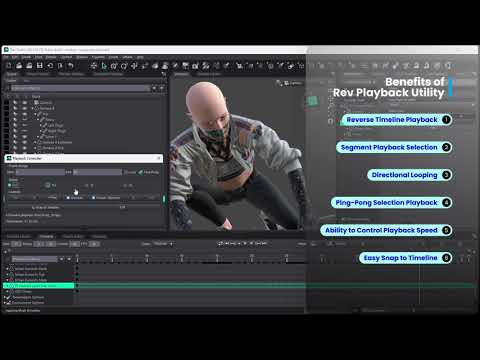
Rev Playback utility is available for Daz Studio 4.2.x and Stiudio 2025. This utility allows you to playback the timeline in reverse and much more.
- Reverse Timeline Playback,
- Segment Playback Selection,
- Directional Looping,
- Ping-pong selection playback,
- Ability to control playback speed.
Post edited by Tugpsx on

Daz 3D is part of 
Connect
DAZ Productions, Inc.
7533 S Center View Ct #4664
West Jordan, UT 84084
Licensing Agreement | Terms of Service | Privacy Policy | EULA
© 2026 Daz Productions Inc. All Rights Reserved.
Comments
This thing is AWESOME!!!
BTW - the download link for the tool is in the description of the video HERE
Thanks Tugpsx! The ability to control playback speed is going to be really neat and useful! Will try out soon.
First Look
Thank you Tugpsx!
This will be very useful!
I love the interface too, but I think the arrows on the "Play" and "Reverse" buttons are pointing in the wrong direction.
LOL! thanks for catching that, it appears I packaged the incorrect version. The app was also renamed to Rev-Playback Controller and has a Quick-Manual.
I noticed you posted a new video on Youtube yesterday, but the download link in description is the same and files didn't change.
Did I miss something?
If you're using it in Daz Studio 4.2x, open the tool and look at the Play and Reverse buttons. If the arrows are pointing the wrong way, go back to this video and download/install again. He's updated it since then.
Nothing has changed on the Daz Studio 2025 Alpha version as far as I know.
Also, he included a pdf manual in the latest download
For future-proof purchases, this post was made 11/23/2025 as I'm quite certain that he'll be updating it again
I'm using Daz Studio 4.2x.
I deleted the Tugspx folder from my Scripts folder
I removed the related Custom Action I made yesterday
Followed the link you give here ( )
)
The video was posted yesterday 22 nov. 2025
The link in description is: https://drive.google.com/file/d/1nDGzK0nh0T3hH73Mf_rhAhNNgy5qbIxn/view
I checked the content of the downloadable 7zip file: Tugspx/AnimPlayback. I see 4 files: PlaybackController.dse, PlaybackController.dse.png, PlaybackController42.dse, PlaybackController42.dse.png
I don't see any PDF manual file.
Reinstalling the scripts didn't correct anything.
Please check the file has been update and access granted. A single file is needed and is now compatible with Studio 4.2 and Studio 2025 versions for Mac and PC.
Fantastic script, thank you!
Thank you for the update!