Old Victorian House

I bought this - https://www.daz3d.com/old-victorian-house-exterior

I really like the promo picture and it honestly it would be great for what I'm looking for, but I can't quite figure out how it was put together.

I know i can't use the picture directly but would like to figure out something similar.

Any suggestions?
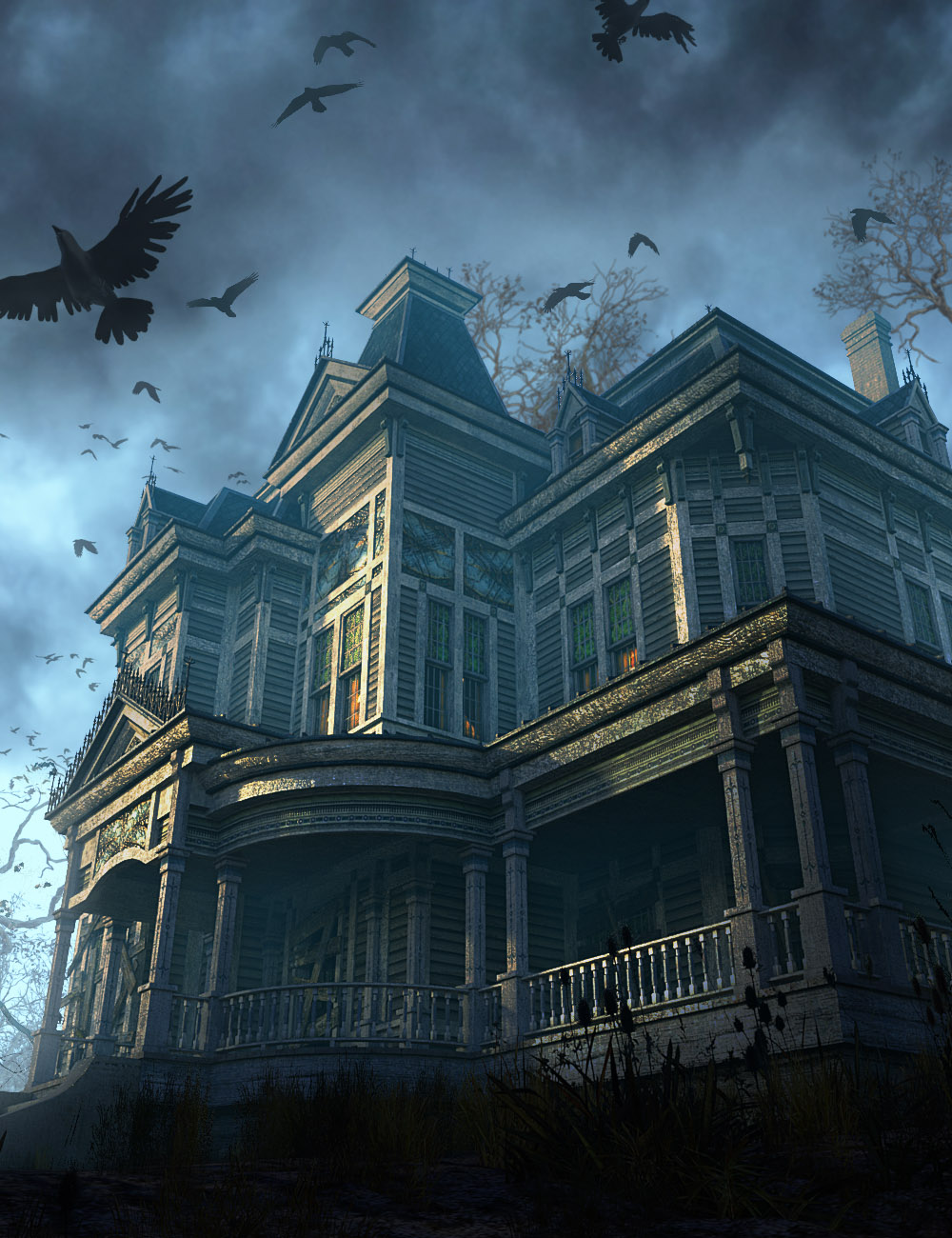
Old Victorian House Exterior by: The Management, 3D Models by Daz 3D

Comments

  • kprkpr Posts: 297

    whispers65 said:

    ... but would like to figure out something similar.

    I don't have the product but, from the product page, it just looks like a great camera POV and probably a couple of trees (not in the product - but plenty of those in the store) that are raised a long way up from the ground-plane (and crows, but chances are they are post-work)

    What can't you figure? <-- please explain.

  • whispers65whispers65 Posts: 1,034

    kpr said:

    whispers65 said:

    ... but would like to figure out something similar.

    I don't have the product but, from the product page, it just looks like a great camera POV and probably a couple of trees (not in the product - but plenty of those in the store) that are raised a long way up from the ground-plane (and crows, but chances are they are post-work)

    What can't you figure? <-- please explain.

    not worried about the trees or crows. I noticed after purchasing that there are several parts to this product and tress is one of those.  but I'm just trying to get the overall look and feel the same.  Here's my pathetic attempt so far lol. 

    Test2.jpg
    810 x 921 - 610K
  • kprkpr Posts: 297

    whispers65 said:

    kpr said:

    whispers65 said:

    ... but would like to figure out something similar.

    I don't have the product but, from the product page, it just looks like a great camera POV and probably a couple of trees (not in the product - but plenty of those in the store) that are raised a long way up from the ground-plane (and crows, but chances are they are post-work)

    What can't you figure? <-- please explain.

    not worried about the trees or crows. I noticed after purchasing that there are several parts to this product and tress is one of those.  but I'm just trying to get the overall look and feel the same.  Here's my pathetic attempt so far lol. 


    Ahhh... if you got the trees then you probably bought the bundle: https://www.daz3d.com/old-victorian-house-bundle

    Nothing wrong with your image... But if you want to get a bit closer to the promo...

    Maybe make a ground plane (not much bigger than the house) and stand the house on it, so you can drop the camera below it; then add some "weed type plants" onto it, near to the camera (to hide the edge of the plane). The promo does a great trick of not lighting those, to give the silouette effect.

    Draw the camera down until it is below the height of the ground plane and increase the camera angle, so that you can see the base of the house and above its roofline. Put in a couple of trees behind the house (and probably "miles" from the ground, because I'd be surprised if they were that tall!)...

    ... You'll get there, just keep tinkering (all the fun of doing "it" is in the tinkering) smileyyes

  • Richard HaseltineRichard Haseltine Posts: 107,945

    I think if you load the house and the cameras preset then Camera 10 will give you the angle of view from that promo image. Adding the graveyard and then hiding the tombstones will do the plants. Adding the trees and hiding the two that fill the near field of view may finish it off about right.

  • Richard HaseltineRichard Haseltine Posts: 107,945

    There isn't any lighting provided, so that and post-render tone-mapping will be needed to get a similar result to the promo. This is an almost entirely unconverged render made as in the previous post.

    Old Victorian House Camera 10.jpg
    1000 x 1300 - 3M
  • whispers65whispers65 Posts: 1,034

    kpr said:

    whispers65 said:

    kpr said:

    whispers65 said:

    ... but would like to figure out something similar.

    I don't have the product but, from the product page, it just looks like a great camera POV and probably a couple of trees (not in the product - but plenty of those in the store) that are raised a long way up from the ground-plane (and crows, but chances are they are post-work)

    What can't you figure? <-- please explain.

    not worried about the trees or crows. I noticed after purchasing that there are several parts to this product and tress is one of those.  but I'm just trying to get the overall look and feel the same.  Here's my pathetic attempt so far lol. 


    Ahhh... if you got the trees then you probably bought the bundle: https://www.daz3d.com/old-victorian-house-bundle

    Nothing wrong with your image... But if you want to get a bit closer to the promo...

    Maybe make a ground plane (not much bigger than the house) and stand the house on it, so you can drop the camera below it; then add some "weed type plants" onto it, near to the camera (to hide the edge of the plane). The promo does a great trick of not lighting those, to give the silouette effect.

    Draw the camera down until it is below the height of the ground plane and increase the camera angle, so that you can see the base of the house and above its roofline. Put in a couple of trees behind the house (and probably "miles" from the ground, because I'd be surprised if they were that tall!)...

    ... You'll get there, just keep tinkering (all the fun of doing "it" is in the tinkering) smileyyes

    I didn't buy the bundle.  I didn't see it until after the fact, but I'm short on money right now so it doesn't matter much anyway.  I can kit bash trees and stuff.  Thanks. I will try your suggestions. 

  • whispers65whispers65 Posts: 1,034

    Richard Haseltine said:

    I think if you load the house and the cameras preset then Camera 10 will give you the angle of view from that promo image. Adding the graveyard and then hiding the tombstones will do the plants. Adding the trees and hiding the two that fill the near field of view may finish it off about right.

     Unfortunately, I didn't get the bundle because I didn't see it so I'm missing a few things and don't see any cameras.  I'll keep working on it.

  • FishtalesFishtales Posts: 6,209
    edited November 1

    There are settings under Camera/Lens you can use to get that view. It is the Lens Distortion setting and the settings that follow.

    I have attached the settings and the rendered image. You can play around with them for different lens distortions that is how I got this view :)

    Click on image for full size.

    Click on image for full size.

    20251101_143720.jpg
    1389 x 691 - 204K
    dragon-respect-copyright-002.jpg
    1920 x 1080 - 1M
    Post edited by Fishtales on
  • Richard HaseltineRichard Haseltine Posts: 107,945

    whispers65 said:

    Richard Haseltine said:

    I think if you load the house and the cameras preset then Camera 10 will give you the angle of view from that promo image. Adding the graveyard and then hiding the tombstones will do the plants. Adding the trees and hiding the two that fill the near field of view may finish it off about right.

     Unfortunately, I didn't get the bundle because I didn't see it so I'm missing a few things and don't see any cameras.  I'll keep working on it.

    If you open the house as a product you should see a Cameras category in there, which contains a single cameras preset - that adds a dozen or so cameras to the scene which you can pick using the selector at top-right of the Viewport (probably says perspective View initially). Camera 10 in that list matches the promo image, then you would need a ground prop and some plants if you wanted that element and you'd need to find or create suitable lighting (sadly Sun/Sky doesn't do Moon/Sky)..

  • whispers65whispers65 Posts: 1,034

    Fishtales said:

    There are settings under Camera/Lens you can use to get that view. It is the Lens Distortion setting and the settings that follow.

    I have attached the settings and the rendered image. You can play around with them for different lens distortions that is how I got this view :)


    Click on image for full size.


    Click on image for full size.

    Thanks! 

  • whispers65whispers65 Posts: 1,034

    Richard Haseltine said:

    whispers65 said:

    Richard Haseltine said:

    I think if you load the house and the cameras preset then Camera 10 will give you the angle of view from that promo image. Adding the graveyard and then hiding the tombstones will do the plants. Adding the trees and hiding the two that fill the near field of view may finish it off about right.

     Unfortunately, I didn't get the bundle because I didn't see it so I'm missing a few things and don't see any cameras.  I'll keep working on it.

    If you open the house as a product you should see a Cameras category in there, which contains a single cameras preset - that adds a dozen or so cameras to the scene which you can pick using the selector at top-right of the Viewport (probably says perspective View initially). Camera 10 in that list matches the promo image, then you would need a ground prop and some plants if you wanted that element and you'd need to find or create suitable lighting (sadly Sun/Sky doesn't do Moon/Sky)..

    Thanks.  You are absolutely correct.  I went back tot  he product and saw the cameras and loaded them in.  I don't know why I didn't see that before.  A lot of scenes I do autoload them so I didn't think about it.  Live and Learn. 

  • whispers65whispers65 Posts: 1,034

    Well good news.  That doesn't happen often.  I was looking at the bundle and it popped up as being on sale and I got a discount from the part I had just bought so now I have the full bundle.  :)

  • kprkpr Posts: 297

    whispers65 said:

    Well good news.  That doesn't happen often.  I was looking at the bundle and it popped up as being on sale and I got a discount from the part I had just bought so now I have the full bundle.  :)

    yessmiley

    Should be "easy" to do from there  cheeky

  • whispers65whispers65 Posts: 1,034

    kpr said:

    whispers65 said:

    Well good news.  That doesn't happen often.  I was looking at the bundle and it popped up as being on sale and I got a discount from the part I had just bought so now I have the full bundle.  :)

    yessmiley

    Should be "easy" to do from there  cheeky

    Everything except the lighting lol 

  • whispers65whispers65 Posts: 1,034

    Not sure if this is allowable, but this is what I finally came up with and I'm pretty please.  It may not be 100% perfect, but I like.

    Chasing Shadows.png
    2000 x 1464 - 3M
  • mdingmding Posts: 1,651

    Very well done @whispers65!

  • whispers65whispers65 Posts: 1,034

    mding said:

    Very well done @whispers65!

    Thank you.  Trying to learn with no budget lol. 

  • kprkpr Posts: 297

    whispers65 said:

    Not sure if this is allowable, but this is what I finally came up with and I'm pretty please.  It may not be 100% perfect, but I like.

    That's a really great cover smileyyes 

  • whispers65whispers65 Posts: 1,034

    kpr said:

    whispers65 said:

    Not sure if this is allowable, but this is what I finally came up with and I'm pretty please.  It may not be 100% perfect, but I like.

    That's a really great cover smileyyes 

    Thanks.  It replaces the current cover and then I have to make another one for my next book which hopefully will be ready by the end of next week. 

  • nonesuch00nonesuch00 Posts: 18,722

    Very happy to have go the bundle for $10 yesterday! I had forgotten it was in my wish list.

  • whispers65whispers65 Posts: 1,034

    nonesuch00 said:

    Very happy to have go the bundle for $10 yesterday! I had forgotten it was in my wish list.

    Good for you.  it wasn't $10 for me but I'm really pleased with it. 

Sign In or Register to comment.

