Having problem with Bookworm Hair
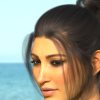
There is a bald spot the hair. How do I fix it?

dForce Bookworm Hair for Genesis 9 | Daz 3D

Thank you.

 

Comments

  • chevybabe25chevybabe25 Posts: 1,316
    edited October 18

    Can you give me a little more information?   Are you using this on G9? Or is this scaled to fit a different figure and parented?

    Is maybe mesh grabber or the geometry editor selected?

    Post edited by chevybabe25 on
  • anpa97anpa97 Posts: 21

    Its G9 (Its a mixture of different G9 characters)

    How to find if mesh grabber or geometry editor is selected

    Thank you

  • chevybabe25chevybabe25 Posts: 1,316

    Click on the tab labeled "tool settings" and see what the active tool is.

    Screenshot 2025-10-18 130746.png
    661 x 554 - 59K
  • anpa97anpa97 Posts: 21

    This is how it looks

    Screenshot (1).png
    1920 x 1080 - 816K
  • chevybabe25chevybabe25 Posts: 1,316

    Ok try doing this.. this will adjust the width of the hair to be a smidge thicker, and cover the scalp area more:

    In the scene tab: select:dForce Bookworm Hair Base

    Click on the surfaces tab: click on dForce Bookworm Hair Base. This will select all the surfaces on the hair.

    Change the "Line Start Width" from .10 to .15.

    Then render and see if that covers it enough for you.

    Screenshot 2025-10-18 132511.png
    510 x 283 - 26K
  • anpa97anpa97 Posts: 21

    Thank you so much.

    I really appreciate you help.

    This is how it looks now

    testcgar2.png
    910 x 1240 - 2M
  • chevybabe25chevybabe25 Posts: 1,316

    Yay!!! Glad I could help :)   Enjoy the new hair!

  • anpa97anpa97 Posts: 21

    I will Thank you

    I love this hair and how good it looks on my Character

  • crosswindcrosswind Posts: 9,537

    Alternatively, you can find a Hair with opacity textures on the hair base node (Scalp / Cap), load the hair to the figure and delete the SBH node ~ 

    In this way, you can fix the issue while keeping the optimal surface settings given by chevybabe25

    SNAG-2025-10-19-016.png
    2560 x 1392 - 2M
  • anpa97anpa97 Posts: 21
    edited October 18

    crosswind

    Where do i find the hair base node (Scalp / Cap) and SBH node

    Screenshot (2).png
    1920 x 1036 - 686K
    Post edited by anpa97 on
  • crosswindcrosswind Posts: 9,537

    anpa97 said:

    crosswind

    Where do i find the hair base node (Scalp / Cap) and SBH node

    You can firstly check in your Product Library or DS > Smart Content... to see if you have such hairs...

    The strand-based hairs made by some PAs like outoftouch (https://www.daz3d.com/outoftouch), Toyen (https://www.daz3d.com/toyen) ... usually have the texturized hair scalp or hair hap that can mitigate the issue you have.

    For instance, on Elis Hair from Toyen, you just keep the Hair Base node, then delete the sub-node of Elis Hair, i.e. the SBH node. Pls check the screenshot 1 down below.

    SNAG-2025-10-19-021.png
    2560 x 1392 - 491K
  • anpa97anpa97 Posts: 21
    edited October 18

    Thank you so much crosswind

    I really appreciate your help.

    Post edited by anpa97 on
  • barbultbarbult Posts: 26,157
    edited October 19

    crosswind said:

    Alternatively, you can find a Hair with opacity textures on the hair base node (Scalp / Cap), load the hair to the figure and delete the SBH node ~ 

    In this way, you can fix the issue while keeping the optimal surface settings given by chevybabe25

    I solved the problem in a similar manner. I created a texture map for the Bookworm Hair scalp and set it to visible. The bald spot really bothered me. I had to fix it. (OCD?) 

    The first attached image is without a visible scalp. The seconds attached image is with the visible scalp.

    Mira 9 Young Bookworm Hair_Without Cap 1.jpg
    2000 x 2000 - 2M
    Mira 9 Young Bookworm Hair_With Cap.jpg
    2000 x 2000 - 2M
    Post edited by barbult on
  • crosswindcrosswind Posts: 9,537

    barbult said:

    crosswind said:

    Alternatively, you can find a Hair with opacity textures on the hair base node (Scalp / Cap), load the hair to the figure and delete the SBH node ~ 

    In this way, you can fix the issue while keeping the optimal surface settings given by chevybabe25

    I solved the problem in a similar manner. I created a texture map for the Bookworm Hair scalp and set it to visible. The bald spot really bothered me. I had to fix it. (OCD?) 

    The first attached image is without a visible scalp. The seconds attached image is with the visible scalp.

    Looks fairly nice ! yes 

  • anpa97anpa97 Posts: 21

    barbult said:

    crosswind said:

    Alternatively, you can find a Hair with opacity textures on the hair base node (Scalp / Cap), load the hair to the figure and delete the SBH node ~ 

    In this way, you can fix the issue while keeping the optimal surface settings given by chevybabe25

    I solved the problem in a similar manner. I created a texture map for the Bookworm Hair scalp and set it to visible. The bald spot really bothered me. I had to fix it. (OCD?) 

    The first attached image is without a visible scalp. The seconds attached image is with the visible scalp.

    Can you please let me know how and where to create texture map 

    Thank you


  • felisfelis Posts: 5,721
    edited October 20

    When the hair is loaded, in the scene tab select the bookworm hair itself. That is the hair cap. To the hair is parented 2 items the SBH and the clip.

    But with the hair cap selected, then in the surfaces tab select the surface that belongs to the hair cap, and if you then swith your viewport to UV view, you can see the UV layout of the haircap (see screenshot below).

    And you want a texture where you paint the inner part of the cap. You could take a screenshot of you viewport and use that as guidance. It can be in low resolution.

    And when you have the texture put it into base color of the hair cap, and check that it has low gloss/reflection.

    Forgot the most nescesarry, a black/white texture, painted white where you want it to cover, and the rest black that shall in oppacity cutout channel. You might actually not need the first texture, you can just add a dark color corresponding to the hair color in base color.


    DS_Bookworm.PNG
    1222 x 703 - 128K
    Post edited by felis on
  • anpa97anpa97 Posts: 21

    felis said:

    When the hair is loaded, in the scene tab select the bookworm hair itself. That is the hair cap. To the hair is parented 2 items the SBH and the clip.

    But with the hair cap selected, then in the surfaces tab select the surface that belongs to the hair cap, and if you then swith your viewport to UV view, you can see the UV layout of the haircap (see screenshot below).

    And you want a texture where you paint the inner part of the cap. You could take a screenshot of you viewport and use that as guidance. It can be in low resolution.

    And when you have the texture put it into base color of the hair cap, and check that it has low gloss/reflection.

    Forgot the most nescesarry, a black/white texture, painted white where you want it to cover, and the rest black that shall in oppacity cutout channel. You might actually not need the first texture, you can just add a dark color corresponding to the hair color in base color.


    felis 

    The quick test worked

    Thank you so much

    I really appreciate your help

    Can you please tell me which software do i use for texture and to paint on it


    Screenshot (3).png
    1920 x 1038 - 1M
  • felisfelis Posts: 5,721

    I would suggest Gimp or Krita. They are both free (open source). Personally I use Krita.

  • anpa97anpa97 Posts: 21

    felis said:

    I would suggest Gimp or Krita. They are both free (open source). Personally I use Krita.

    felis

    Thank you so much. 

Sign In or Register to comment.
