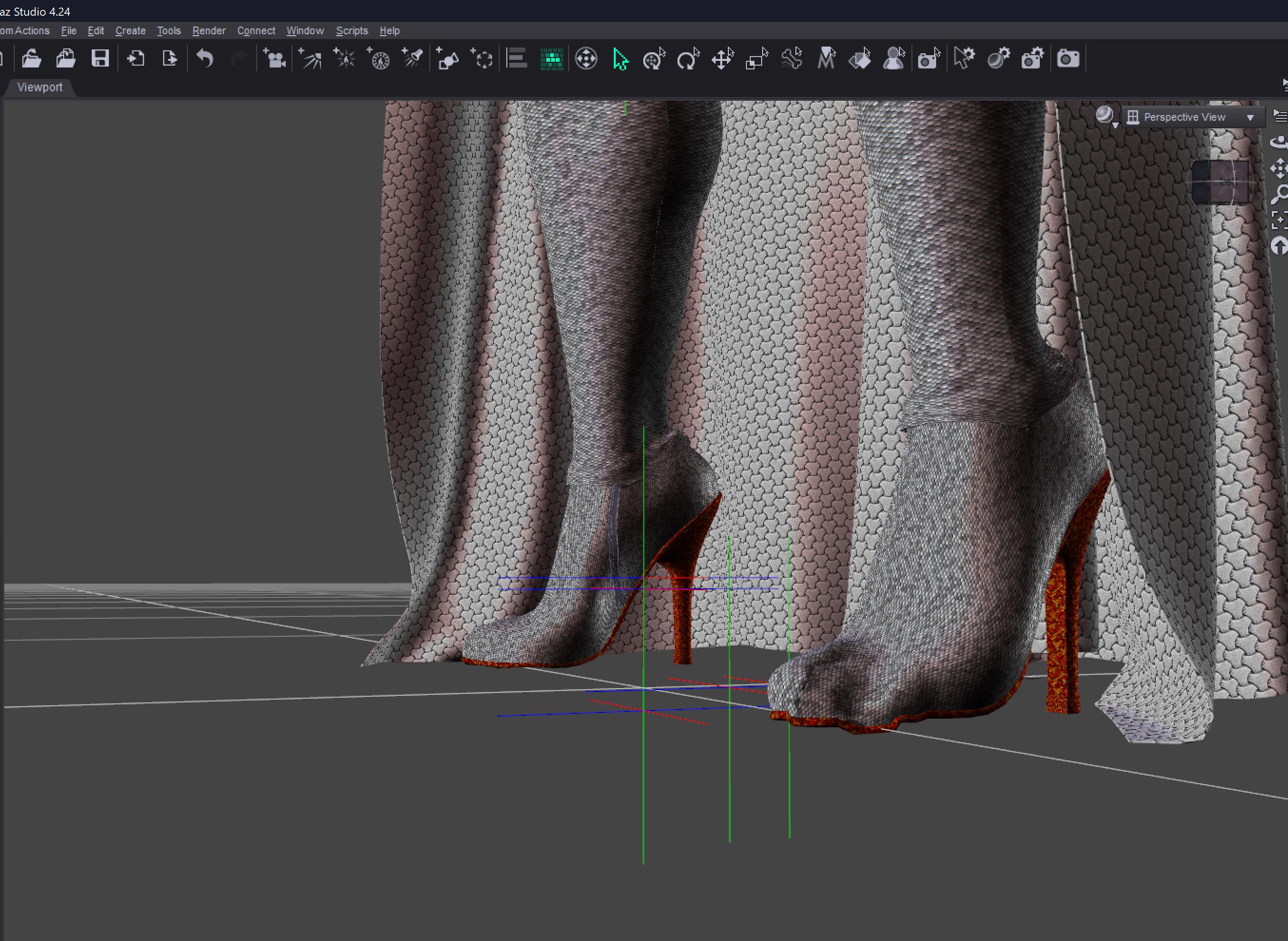
How do i fix this boots_Toes issue

zaselim_08eb9236zaselim_08eb9236 Posts: 70
edited October 8 in Daz Studio Discussion

Ok so i have 2 same gen 8 custom characters, and in one of their outfits i was using modern boots for one character and they are work fine. I made a similar outfit for my other character and move these boots over to her and then i notcied that the shope on the outer toe area is disfiguired on both feet which wasn;t the case on the first character so i thought may be i moved them from one body to another, both have different body shape, which is why it happened to i removed them and then used the boots directly from the original source Modern Boots in cloths and the still had the toe shape disfigured issue.

How can i solve that issue? and Why is happeneing on one body but not on the other.
 

Post edited by zaselim_08eb9236 on

Comments

  • crosswindcrosswind Posts: 9,537

    If both of your characters had very identical body shapes as well as Poses, the issue wouldn't happen...in principle.

    You can try saving a Properties Preset with both Shaping and Pose from the character that has no issue, then apply the preset to the problematice one, see if there's any change.


  • zaselim_08eb9236zaselim_08eb9236 Posts: 70
    edited October 8

    crosswind said:

    If both of your characters had very identical body shapes as well as Poses, the issue wouldn't happen...in principle.

    You can try saving a Properties Preset with both Shaping and Pose from the character that has no issue, then apply the preset to the problematice one, see if there's any change.

    No their shape is not indentical like i said they are 2 different characters, yes they both have curvu muscular bodies but their oveall shape is different so the look different from the body as well and not just the face.

    wjay do you mean properties preset? You mean i save the shape preset but only for the feet part and for the feet pose as well?

    Post edited by Richard Haseltine on
  • Richard HaseltineRichard Haseltine Posts: 107,868

    A proeprties preset has tabs for the different kinds of proeprty (Pose, Shape etc.) which can be enabled or disabled and then the individual properties within each type can be toggled, so you could use a single preset for both shape settings and pose settings and limit to just those needed to make the boots work.

  • Richard Haseltine said:

    A proeprties preset has tabs for the different kinds of proeprty (Pose, Shape etc.) which can be enabled or disabled and then the individual properties within each type can be toggled, so you could use a single preset for both shape settings and pose settings and limit to just those needed to make the boots work.

    You mean properties Hierarchy? Sorry, what i see are Parameters, shapes, Pose, Surface, Lights, Cameras,  powerpose, Properties Hierarchy.

  • zaselim_08eb9236 said:

    Ok so i have 2 same gen 8 custom characters, and in one of their outfits i was using modern boots for one character and they are work fine. I made a similar outfit for my other character and move these boots over to her and then i notcied that the shope on the outer toe area is disfiguired on both feet which wasn;t the case on the first character so i thought may be i moved them from one body to another, both have different body shape, which is why it happened to i removed them and then used the boots directly from the original source Modern Boots in cloths and the still had the toe shape disfigured issue.

    How can i solve that issue? and Why is happeneing on one body but not on the other.



    Just to double check because of semantics 
    Did you put a new pair on the second character
    or did you copy them and did you fit them to the new character? 


  • Richard HaseltineRichard Haseltine Posts: 107,868

    zaselim_08eb9236 said:

    Richard Haseltine said:

    A proeprties preset has tabs for the different kinds of proeprty (Pose, Shape etc.) which can be enabled or disabled and then the individual properties within each type can be toggled, so you could use a single preset for both shape settings and pose settings and limit to just those needed to make the boots work.

    You mean properties Hierarchy? Sorry, what i see are Parameters, shapes, Pose, Surface, Lights, Cameras,  powerpose, Properties Hierarchy.

    File>Save As>Properties Preset.

  • zaselim_08eb9236zaselim_08eb9236 Posts: 70
    edited October 9

    alan bard newcomer said:

    zaselim_08eb9236 said:

    Ok so i have 2 same gen 8 custom characters, and in one of their outfits i was using modern boots for one character and they are work fine. I made a similar outfit for my other character and move these boots over to her and then i notcied that the shope on the outer toe area is disfiguired on both feet which wasn;t the case on the first character so i thought may be i moved them from one body to another, both have different body shape, which is why it happened to i removed them and then used the boots directly from the original source Modern Boots in cloths and the still had the toe shape disfigured issue.

    How can i solve that issue? and Why is happeneing on one body but not on the other.


    Just to double check because of semantics 
    Did you put a new pair on the second character
    or did you copy them and did you fit them to the new character? 


    Tried both ways. My 1st character had the new pair, i retexture them to my need. Then i made a similar outfit for my 2nd character and wanted to use the same boots so to avoid extra time i made a duplicate of the boots and then right click "fit to" and selected my 2nd character. When it went over to the 2nd character, with feet position set to default flat feet, the feet it auto posed the feet into heel position and the toe area became disfigured like that. I deleted the boots and the applied to the new set onto my 2nd character but same thing happened. I dragged the new set of boot onto the csene without selecting the body and then used the trafer utlity.  It fixed the toe area but the heel part of the boot becme extra long lol.

    Now what i am gooan do is delete the heel area of this new boots and the make a copy of previous boots with the bad toe area and then remove the boot without the heel and then put it in the new boot being a parent.

    Post edited by zaselim_08eb9236 on
  • crosswindcrosswind Posts: 9,537
    edited October 9

    zaselim_08eb9236 said:

    crosswind said:

    If both of your characters had very identical body shapes as well as Poses, the issue wouldn't happen...in principle.

    You can try saving a Properties Preset with both Shaping and Pose from the character that has no issue, then apply the preset to the problematice one, see if there's any change.

    No their shape is not indentical like i said they are 2 different characters, yes they both have curvu muscular bodies but their oveall shape is different so the look different from the body as well and not just the face.

    wjay do you mean properties preset? You mean i save the shape preset but only for the feet part and for the feet pose as well?

    Ah, I misunderstood ~~ I saw you said in the OP.. " have 2 same gen 8 custom characters", I though they're identical. So, just ignore my suggestion.

    Well, yes, some body shapes may bring you the distortion issue. In principle, the more changes there're on the feet / toes of the body shape, the more chance it'll bring distortion to the conformed wearables. That's why shoe vendors usually fix auto-generated FBM (full body morph) on the shoes for popuplar character products... However, they have no way to provide fixed morphs for all characters ~~

    So, I'm afraid you have to fix the issue (on the 2nd character...) yourself ... by using Rigidity Group in DS or using external modeling/sculpting software like Blender...

    I fixed it with Rigidity Group for a unique body shape that brings the similar distortion on the boots, as shown in below screenshots. 

    Pls be noted that depending on different bodyshape, the result of fixing may be different or not really as respected. The best way is to always fix such issue with external software ~~ I myself usually fix them with Blender, which can bring nearly perfect result.

    Edit: How to fix it with a Rigidity Group: You may refer to this mini tutorial that I ever wrote, the method is almost the same : https://www.daz3d.com/forums/discussion/comment/8765141/#Comment_8765141 ;

    SNAG-2025-10-9-008.png
    2560 x 1392 - 1M
    SNAG-2025-10-9-009.png
    2560 x 1392 - 873K
    SNAG-2025-10-9-010.png
    2560 x 1392 - 774K
    Post edited by crosswind on
  • crosswind said:

    zaselim_08eb9236 said:

    crosswind said:

    If both of your characters had very identical body shapes as well as Poses, the issue wouldn't happen...in principle.

    You can try saving a Properties Preset with both Shaping and Pose from the character that has no issue, then apply the preset to the problematice one, see if there's any change.

    No their shape is not indentical like i said they are 2 different characters, yes they both have curvu muscular bodies but their oveall shape is different so the look different from the body as well and not just the face.

    wjay do you mean properties preset? You mean i save the shape preset but only for the feet part and for the feet pose as well?

    Ah, I misunderstood ~~ I saw you said in the OP.. " have 2 same gen 8 custom characters", I though they're identical. So, just ignore my suggestion.

    Well, yes, some body shapes may bring you the distortion issue. In principle, the more changes there're on the feet / toes of the body shape, the more chance it'll bring distortion to the conformed wearables. That's why shoe vendors usually fix auto-generated FBM (full body morph) on the shoes for popuplar character products... However, they have no way to provide fixed morphs for all characters ~~

    So, I'm afraid you have to fix the issue (on the 2nd character...) yourself ... by using Rigidity Group in DS or using external modeling/sculpting software like Blender...

    I fixed it with Rigidity Group for a unique body shape that brings the similar distortion on the boots, as shown in below screenshots. 

    Pls be noted that depending on different bodyshape, the result of fixing may be different or not really as respected. The best way is to always fix such issue with external software ~~ I myself usually fix them with Blender, which can bring nearly perfect result.

    Edit: How to fix it with a Rigidity Group: You may refer to this mini tutorial that I ever wrote, the method is almost the same : https://www.daz3d.com/forums/discussion/comment/8765141/#Comment_8765141 ;

    Thanks i will check it out. I already fixed the issue like i said i would. I used the trasnfer utlity and that fixed the issue but then made the heels way longer so i deleted all the polys from disfiqured boots except the heels and tehn removed the heels from the fixed boots and put the heels inside the fixed toes boots.

Sign In or Register to comment.
