
Daz 3D is part of 
Connect
DAZ Productions, Inc.
7533 S Center View Ct #4664
West Jordan, UT 84084
Licensing Agreement | Terms of Service | Privacy Policy | EULA
© 2026 Daz Productions Inc. All Rights Reserved.
Comments
No FBM provided but it'll Auto Follow the hair scalp which is conformed to the figure ~
No, you don't need any Premier tools or even Mesh Grabber. The Geometry Editor is a tool that is part of Daz Studio. You don't even have to interact with Geometry Editor other than to have that tool selected when you export the hair to OBJ. I have only ever used Blender, but I would expect any modeling tool to work, as long as it can handle the large hair OBJ files and you use the right import and export options. I don't know other tools, so I can't advise on specific settings for Hexagon or Carrara.
OK. I'm quite familiar with the Geometry Editor in DS, so I may give it a try with Hexagon or Carrara when I get the time. Thanks!
I've been trying to upload the two additional morphs I made, but the forum isn't letting me upload the zip files. It just says Uploading... forever.
I experienced the issue before. That was probably because of the disconnected server. Now it works.
Certain special characters in file names can cause this. Alphanumeric, hyphen and underscore are safe to use.
Special characters in a file name... ? I'm afraid they're not accepted by Windows at the first place ~
I've been having the same issue for about two months now. It also prevents me from publishing anything in the gallery. It's persistent across browsers, devices, and wifi/data, but... goes away when I either turn the VPN on or plug the ethernet cable in, so if you have either (I got a free Proton VPN just for that), see if it helps. Fun fact is that I have two more sites (completely unrelated to Daz or 3D or not even located anywhere near Utah) that also experience this issue.
I kind of tracked it down to possible either DNS or my router issues (but if it's the router, why my phone on mobile data has the problem too), but nothing but VPN or ethernet cable fixes it.
How large are the files?
Oh yes, it's only a few that are forbidden in Windows: *< > : " / \ | ?
Here are some samples of legal Windows file names:
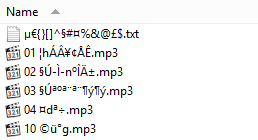
No special characters in the ZIP file name or the content names. I am connected via Ethernet cable to a switch which is connected via Ethernet cable to the router. The file sizes are 27MB and 35MB. Is there a published size limit for forum attachments?
5mb as far as I know.
I tried again. The failure scenario changed. This time it said Uploading for a few seconds and then that went away. I think felis is probably on the right track. The files are probably too big. So. I'll just try attaching a smaller file, a render or two here, to see if that works. OK that works, so file size is probably the problem.
The attached renders use by new left and right Fluffy morphs and the right Move Away From Eye morph.
100% Fluffy is pretty wild, but a lower value is not bad. I don't know if they are useful to anyone, but since I made them, I thought I'd share them. I'll find some other place to upload them and share a link.
Thank you to everyone who helpd figure out why I couldn't upload the zip files. I created a free Dropbox account to share these files. I hope it works
Vilola Hair Left Morph Open the zip file and copy the barbult folder and its contents into the data\Hair Studio\HS Viola Hair G9\HS Viola Hair L G9\Morphs folder in your Content Library. You will find the Fluffy morph in Actor/Adjust when the HS Viola Hair L G9 object is selected in the Scene pane.
Viola Hair Right Morph Open the zip file and copy the barbult folder and its contents into the data\Hair Studio\HS Viola Hair G9\HS Viola Hair R G9\Morphs folder in your Content Library. You will find the Fluffy morph in Actor/Adjust when the HS Viola Hair R G9 object is selected in the Scene pane. This zip file also contains the previously shared Move Away From Eye morph. If you already have that installed, you can overwrite it or skip it.
@barbult Thank you !
You are welcome. Were you able to access the Dropbox files from the links?
Yes, I was able to download the files with no problem !
Thanks @barbult!
You are both welcome. I hope you find a use for them. I'm glad to hear the links worked. I wasn't sure if I did it right.
I actually found a use for my Fluffy morph! I applied it full strength to the right side and a little bit to the left side. The I used a timeline simulation on the hair, moving the pillow up into position. Now she has reasonably believable bed head. The pose and props are from https://www.daz3d.com/vicky-leisure-time-prop-and-pose-expansion
Very nice result indeed :)
Thank you Barbult. KindredArts could have used your skills today for https://www.daz3d.com/ultimate-dforce-bed-3. I love your render. Just need Richard combing through the hair with teeth and claws!
Mary
Just found an update to HS Viola Hair in DIM this morning. I am unable to get to the Read Me, get a 503 error. But this file is only 105.6 MB and the original file I have installed is 720.4 MB (package size 149.5 MB). Not sure if I want to install it without checking the Read Me.
Has anyone installed it and found out what has changed?
And I expect we will need to reinstall @barbult's morphs again?
Mary
The morph should remain.
DIM will uninstall all the old files that is listed in the manifest file, and then install the new ones, so it should not touch if you have installed new files in the same folders.
Thaks felis.
I've updated my Viola Hair morphs to work with the updated Viola Hair. Here are the Dropbox links.
Viola Hair Left Morph Update Open the zip file and copy the barbult folder and its contents into the data\Hair Studio\HS Viola Hair G9\HS Viola Hair L G9\Morphs folder in your Content Library. You will find the Fluffy morph in Actor/Adjustment when the HS Viola Hair L G9 object is selected in the Scene pane.
Viola Hair Right Morph Update Open the zip file and copy the barbult folder and its contents into the data\Hair Studio\HS Viola Hair G9\HS Viola Hair R G9\Morphs folder in your Content Library. You will find the Move Away From Eye morph and the Fluffy morph in Actor/Adjustment when the HS Viola Hair R G9 object is selected in the Scene pane.
If you discover any problems, let me know and I'll try again to fix them.