Animating the screen graphics in the "Command & control center" product
 harvey220us
Posts: 0
harvey220us
Posts: 0
Hi guys, I recently bought the command & control center product and want to know if it's possible to animate the graphics displays built into the set so they are displaying moving data sets and motion graphics. I'm using it as a set for a sci-fi project.
Any tips and suggestions are very much welcome.

Daz 3D is part of 
Connect
DAZ Productions, Inc.
7533 S Center View Ct #4664
West Jordan, UT 84084
Licensing Agreement | Terms of Service | Privacy Policy | EULA
© 2026 Daz Productions Inc. All Rights Reserved.
Comments
You could try using this script: https://sites.google.com/site/mcasualsdazscripts/texanimfords3
Or maybe this product: https://www.daz3d.com/abas-animated-shaders-system
Either way, you'd have to acquire or make animations of whatever's going to be on the screen(s), split it out into a series of images, and then apply them to the screens but changing wih each frame.
I’ve been wanting to do the same thing and for too many years but have been at the outside looking it even though I have bought two products that could get me there … with enough time and energy. One is ABAS: Animated Shaders System that is linked above by @chris-2599934 and the other is Animated Textures Script Pro for Daz Studio 3 & 4 (https://www.daz3d.com/animated-textures-script-pro-for-daz-studio-3-4). Jay Versluis has posted two YouTube tutorial videos about ABAS:
Animating Shader Properties in Daz Studio with ABAS (April 2022)
https://www.youtube.com/watch?v=fq3GdCugxzs
Animating Textures and Shader Properties with ABAS (January 2023)
https://www.youtube.com/watch?v=R_2ivz6VYOo .
If you make any headway, let me know.
Another option, in today's $1 sale: https://www.daz3d.com/animated-textures-script-for-daz-studio
I don't think Animated Textures Script for DAZ Studio can work for Iray ~~
Another method is good old green screening. I assume you're going to be editing and assembling things in a movie editing software; if so, you can change all the screens that you'll want to animate in your DAZ file to green and once your movie file is in your editing software, use green screening to mask in your animated screens as needed. This method allows you the most flexibility and should save you time in the long run should you want to edit your animated screens on an ongoing method.
I just did this quick sample in the last 15 minutes: I took a starship bridge, changed the front view scren to green, added my character's audio and animations (it's a quick sample for this reply, don't judge me too harshly) and exported my .mov file with audio. I then dropped that into iMovie (I'm on a Mac, but pretty much any movie editing software will do and probably do it better), added the animated shot of flying through space and exported my finished clip below.
1. Drop exported .mov file with audio into iMovie.
2. Add an animated texture below and set top clip to "Green screen".
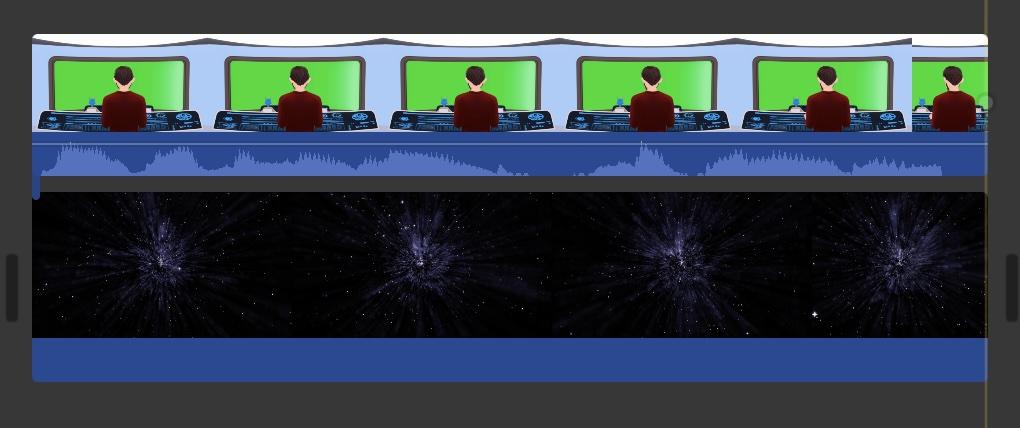
3. This is how it now appears in the movie editing software.
Final exported movie clip:
https://sterdan.com/wp-content/uploads/2025/09/GreenScreenTest00-1.mp4
It doesn't cost anything to test and if it works for you, it's free!