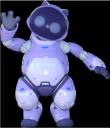
Does anyone recognize this?
 leo04
Posts: 400
leo04
Posts: 400
I had this model from a DAZ product but can't seem to find it.
Does anyone recognze it and waht package it is from?
Thanks

Daz 3D is part of 
Connect
DAZ Productions, Inc.
7533 S Center View Ct #4664
West Jordan, UT 84084
Licensing Agreement | Terms of Service | Privacy Policy | EULA
© 2026 Daz Productions Inc. All Rights Reserved.
Comments
it was made by Sanctum Arts, they stopped making content a long time ago
https://poserdazfreebies.miraheze.org/wiki/Sanctum_Arts_Kitty_Mass
Any idea where I can get the model. I had it once but can't seem to find it on my hard drive anymore
Thanks.
If you purchased from Daz iut will be in your Product Library.
I found it. It is part of the product package you get with purchase of Poser.
Thanks to everyone for your help. I really want to use this in some stuff and was so desparate to find it, and now I have.
I will get it into a DAZ Format and then save it in My Characters folder for keeps.
Thanks to everyone.
Well [botheration] I reset my data base and lost it again! Grrr. Why didn't it remain?
Did you export your custom changes before resetting the database? If not, then that is why your custom character no longer shows in Smart Content. This is because when you reset the database and reimport it goes through all the dsx files in your mapped folder /Runtime/Support/ folders and builds the database up from those files. There will not be a file for your custom changes unless you specifically use the export feature of Content DB Maintenance to write a UserData.dsx file.
The physical files will still be where they were before so you'll just have to recreate the metadata for it.
Do you mean this? If you do, yes I did that.
After I finished reseting the DB I then reimported the Metadata using the box above that.
(I did check the export DB and Reset DB at the same time)
But perhaps I don't understand the process...
Thanks.
Just to check, did you do the Export on it's own and click accept and then go back in and do the reset? I am not sure what happens if you check Export and Reset at the same time :/
If you did do them separately then you should have had a option right at the top of the import list named USER_DATA or USER_DATA1 (or similar - it's been a while since I have done that) and providing that is checked then it should have imported all your custom database changes.
I did them together and I was never prompted to name or save a file. So I guess you have to so the process separatrly ?
I did not do them separately. So I never saw any import list.