Help with distance pass and near/far clip distances
 asterial
Posts: 1
asterial
Posts: 1
Hi, so, I have a specific problem I need some help with.
I'm using Bryce 7.1 Pro to generate pre-rendered backgrounds for a game I'm making in Godot. To try and be clever and save myself a lot of hassle, I'm writing a shader that essentially takes a render, takes a distance pass, and then maps that depth out so a player could walk around, say, a pole, without having to manually tell the engine where the poll is in 3D space. However, I'm running into some problems getting what I need from Bryce for this.
1. I have no idea where the near/far clipping planes/distances are (basically, where distance-wise the camera starts rendering and where it stops). It seems like Bryce moves the far clipping plane around based on the geometry of the scene? More specifically, it seems to set the far plane to intersect the furthest point of geometry from the viewport while remaining parallel to it). Here's a diagram showing what I mean:
However, I still have no idea where the near plane is, and putting in the distances from the camera to the far clip plane (doing some basic trigonometry and converting out of BU (assuming 1 BU == 8 feet, please correct me if I'm wrong)) seems to still misalign with the render. Does anyone know how exactly Bryce calculates its near/far clipping distances?
2. The distance pass seems to be awfully faded even when close to the camera. This is usually because the near clip plane is too small (i.e. far from the start of geometry) but it might also be because the distance pass algorithm is non-linear. Does anyone know if the distance pass calculates linearly?
General advice is also very welcome, happy to share any assets if it'll help, anyone who's had experience exporting Bryce renders for pre-rendered backgrounds or any sort of depth shader wizardry with them would be sorely appreciated. I've been slamming my head into the wall for the past week trying to get this to work and this is the most I've been able to squeeze out of the depth pass...
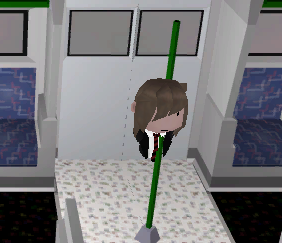
(Ignore half the character's body being obscured and their head sticking through the pole. Their torso is behind it which is the intended effect! (The torso that is. The body disappearing and head being piked by a rail beam is not an intended feature))

Daz 3D is part of 
Connect
DAZ Productions, Inc.
7533 S Center View Ct #4664
West Jordan, UT 84084
Licensing Agreement | Terms of Service | Privacy Policy | EULA
© 2026 Daz Productions Inc. All Rights Reserved.
Comments
asterial - I am not sure I can help. Bryce has a camera that works quite (but not exactly) like a real one, you can put lenses in front of it, like a fisheye or for distortion, or centre sharp and periphery blurred, and so on.
Distance is rather arbitrary. 1 BU (Bryce Unit) is what you decide - 1 mm, 1 m, a ft, a yard, a mile, a km. The BU as such is linear: double the BU and the distance doubles.
When I use DOF (depth of field), I put a simple object like a cylinder at the distance/location where I want the scene focused and sharp and select it (and when I have set the DOF, I delete it or make it invisible).
In the Render Options, I select Premium and below Depth of Field, click on Set To Current Selection (the cylinder in the example) to get the exact Focal Length from the camera to the centre of the cylinder. With the Lens Radius you control the range of sharpness (like when you use a real camera and adjust the f/stop): the smaller you set Lens Radius, the wider the depth of field gets (like if you use f/16 or f/32) and the wider the Lens Radius the narrower the sharp part (like f/1.2, 1/8). Try values from 0.001 to 10.0 and see what happens when you render. Unfortunately, there is no preview without rendering.
I am not sure what near/far clipping planes/distances in 3D tools are. I guess Bryce does not have/use those, since I never came across a discussion on these, but maybe the real experts know more.
Sounds like an exciting project!
The Bryce camera doesn't use clipping from my experience. No matter how close you zoom in on an object, you will never be so close or far away from the camera that it doesn't "see" and render whatever is in front of it. This is a good thing usually, as near/far distance clipping often is super annoying in many rendering applications.
That said, I'm not sure how to give you advice on how to do it at this time. The feedback Horo offered is how most of us would do what you're doing, however since you've written a distance pass algorithm to solve DOf for you, it may be incompatible.
I'd say review the ideals you've used for the algorithm, and see if you can change its dependencies to something more natural for Bryce.
Personally, I always work to exact scale. Typically I set 1BU as 1 inch, as this allows much more space to work within than assuming 1BU is already 8ft.
Best of luck. So sorry we werent able to help more. But at least knowing that distance clipping isnt a thing should help you.
Hi everyone,
Thanks for sharing your many years of wisdom with Bryce, I'm very appreciative both an amateur 3D artist and a relative newcomer to Bryce :) I'm determined to make this work as Bryce's rendering, lighting and generation capabilities are simply too aesthetically pleasing for me to use anything else.


It looks like you're absolutely correct Rashad, the near clip plane is essentially 0 and the far clip plane for all intents and purposes is however far it needs to be, so all I need to do is set the far clip to as far as the geometry exists and I can eyeball it from there.
However, it turns out that was not actually the problem causing this! The issue was twofold:
1. Conversion from the sRGB colour range to linear colour... a rookie mistake ;-; (don't worry if this is unintelligible, this has nothing to do with Bryce)
2. Some odd eccentricities of Bryce distance masks..
For one, I've noticed that Bryce distance masks tend to darken things close to the camera further when new objects are added far away. Let me show you what I mean:
Notice how the tree is darker when the sphere is in the background?
The other quirk I've noticed is what it means by distance. In modern renderers, distance tends to mean depth, i.e., the distance from the camera to the object just on the shared plane, or "as the crow flies". However, in Bryce, it's calculated as the distance from that object to the camera. Another diagram to show what I mean:
This might seem like a small change, but it means we need to convert it to the typical distance with a little Pythagoras' theorem to get the depth we need for this use case. And with those in mind... by setting a plane at the "far clip distance" to keep all the distance relative to that range, and squaring the distance value, adding it to the square of the camera height and then square rooting it to get the depth value we're looking for... Voila!
(This is a snippet from a video I posted in the Bryce 5 discord (sorry for cheating by using Bryce 7... haha))
Now the next big step is doing this but with panoramic renders to make 3D rooms that pivot around the camera... wish me luck!
Wow, you are really going into depth here. I wish you luck!
This sounds exciting! Good luck with your project!
Asterial,
Please keep the research coming! Im already I'm super intrigued.
I can see using this technique being used to reliably assign blur masks as well, enabling quick postwork solutions that are comparable to rendered results. Thanks for sharing your findings!
Yes, Bryce does make beautiful renders, I wholeheartedly agree!