Walk Designer for Genesis 9
 RandWulf
Posts: 218
RandWulf
Posts: 218
Is this "walk forward" and "walk in place" or just "walk forward"?
Post edited by RandWulf on

Daz 3D is part of 
Connect
DAZ Productions, Inc.
7533 S Center View Ct #4664
West Jordan, UT 84084
Licensing Agreement | Terms of Service | Privacy Policy | EULA
© 2026 Daz Productions Inc. All Rights Reserved.
Comments
This is a good question
still this looks like a useful product
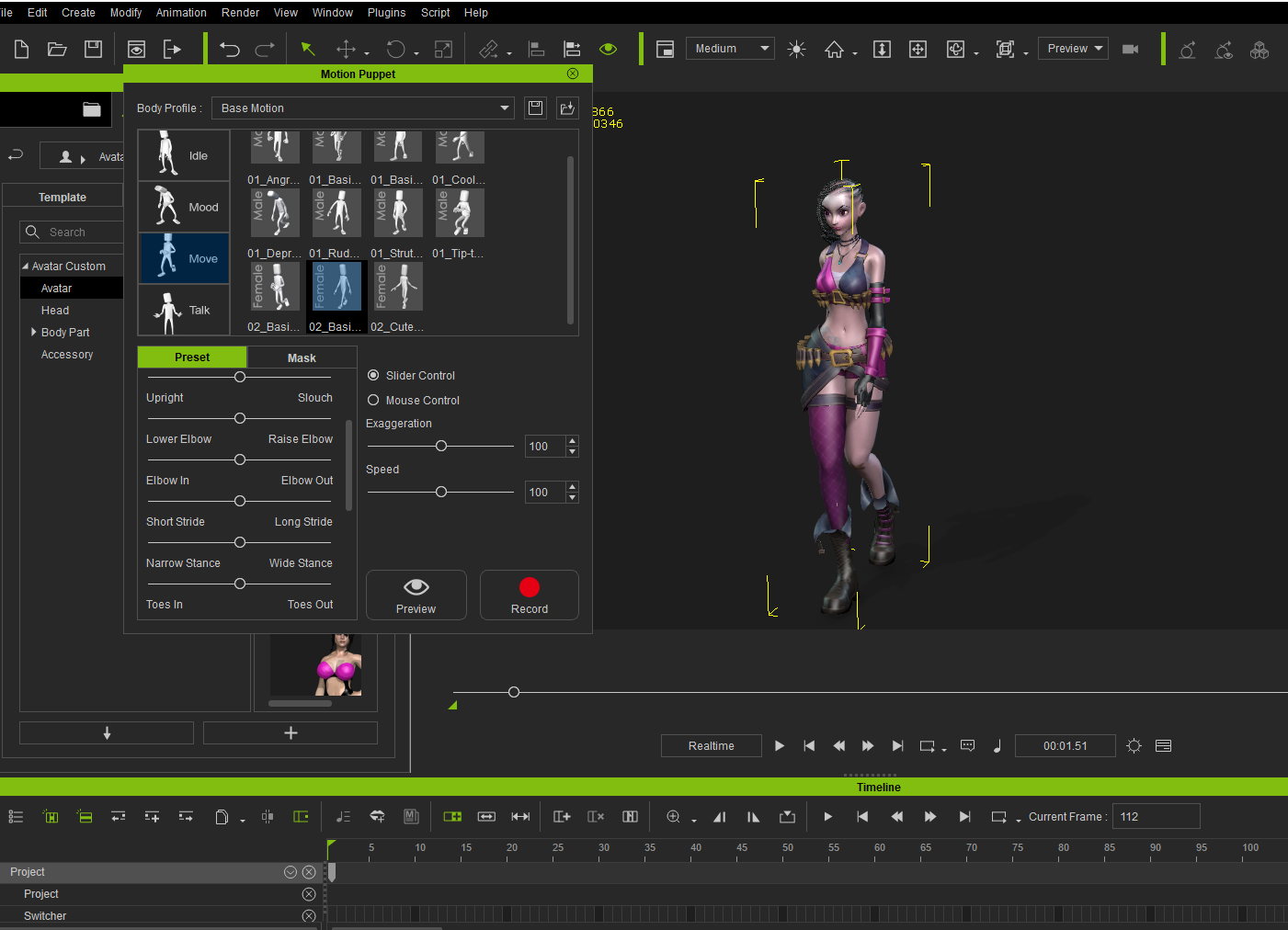
Reminds me of the “Motion puppet” tool we have in Iclone
, Kudos to 3Duniverse!
https://www.daz3d.com/walk-designer-for-genesis-9
Well done, 3DU, I've wanted to see this type of thing in Daz Studio for a heck of a long time now, so congratulations on this!
Congratulations also for using cinema-friendly frame rates, and I really do hope you add to this system as much as possible.
Wow, so we finally have an actual "Walk Designer" in Daz Studio where it belongs!
Something else I've always wanted to see in Daz Studio. is the auto-balance system that is used in Poser when posing a figure. If you drag a figure's body part around in the Poser viewport, it uses centre of gravity to keep the pose looking as natural as possible. This is sorely missing in every figure-centric tool that doesn't have it. Daz Studio still lacks it, and as far as I'm aware, so does iClone.
First Impressions : 3D Universe's Walk Designer for Genesis 9
Of course, I'm not really using Genesis 9 much yet, so I also grabbed Riversoft Art's Bone Minion - Genesis 9 Poses for Genesis 8/8.1 so that I can add my results to Rosie 8! :)
Enjoy!
I've only just started playing with it, but I haven't seen a way to add forward motion. The default behavior is "In Place"
There's no mention of it in the promotional material, but I'm hoping it works as a 'Run Designer' too. There are slider names which, as with iClone, could suggest that it's possible, but without actually using it I cannot say for sure, and it's a shame you didn't try that in your video.
It would also be nice to see an 'Idle Motion' designer from 3DU too, one that works in exactly the same way. Something that uses sliders to blend together various random body movements in order to create custom idle motions. To be honest though, I'd be very surpried if he doesn't already plan to do that, and I really hope he does, because it's every bit as needed as this walk designer is.
Great video @Dartanbeck
Also forward motion is easily accomplished with literally two key frames in the graph editor on the hips Z axis.
I love seeing tools like this for Daz users to spare them from paying for recycled Mixamo Motions of walks for upwards of $20 dollar each.
Sorry. I'm very busy. Didn't even think I'd have time to try it but couldn't help myself. Why don't you try it ?!!! :)
Do you have Pose Architect? Idle animations can be really fun and easy using those!
Thanks Wolf!
I also made my own rigs that move everything else so that the character doesn't have to - same z axis motion but in reverse! ;)
I didn't mean for you to do another video, I just meant it's unfortunate it wasn't part of the video you already did. Haven't bought it yet (due to the issue you mentioned in the video), but if it gets an update I'll defnitely buy it.
I do have the full paid version of AniMate, and yes, I do have Pose Architect too and I know where you're going with that. The AniBlocks wouldn't work with Genesis 9 last time I tried, although granted, I suppose it could be fixed by now.
Pose Architect really blew my mind! So I ended up getting the whole ball of wax - it's so fun. The fact that they're actually animated dials is really powerful for folks who like to put things in motion.
More on that, I was nervous that that might be very similar to the custom dials that I'm always urging folks to create. As soon as I tried them, that fear was completely lifted. Pose Architect dials are more advanced than anything I'm talking about, and work in a somewhat different approach - so it all works together very well.
Since switching from Carrara to Daz Studio for my animation/Character Creation work, I've become more and more a fan of 3DU's tools! This Walk Designer is definitely no exception!
Which issue are you talking about needing an update?
Also, after reading my reply back again... I certainly didn't mean to sound so defensive!!! It was supposed to be a fun and inspirational sort of conversation! I hope you didn't take offense!
Personally, I wouldn't go into something like this - especially at this great price even when not on sale - to perform a whole lot of extra tasks like running and so on.
That said, with the idea of having the ability to set the total number of keyframes, so many posture controls, stride functions, etc., etc., I'm sure that it can make beautiful running cycles!
Since we're working to create a cycling animation, I imagine that the lower numbers of keyframes result in much faster walks/runs. Hence his inclusion of being able to pull the body forward (opposite of what I did), removing some sway, pushing the head foward, etc., etc.,
Next opportunity should be coming soon. I do have some pressing work that has to be finished though!
Cheers.
Also - yeah... this is a Great addition to the DS animation toolset!!! We really needed this!
Absolutely no offence taken. I was just clarifyng because I thought you were under the impression that I was asking for another video or something - lol
Regards the other stuff, I meant the issue you outlined in the video about the 'jump' as the cycle repeats. I hope that he fixes it, or that maybe it was just down to the settings you had dialled in. But yes, I totally agree, I think it's fantastic to see this stuff in Daz Studio at last, and I love Pose Architect too. Gonna have to take another look at AniMate though. I have the paid version and unfortunately the AniBlocks wouldn't work with Genesis 9 the last time I tried it.
I had heard that there used to be an issue with that. Maybe for MacOS? Not sure. I don't really use Genesis 9 much yet.
With the speed at which I threw everything together in that First Impresssion, I'm sure that the bumpy thing was something I did during the aniMate procedures or something
I use aniMate 2 every single day. It's what really helps make animation techniques possible in Daz Studio - the ability to reverse, mirror, retime, combine or otherwise blend, stack, edit (in multiple ways) animation data into a non-linear animation clip (aniBlock) is what allows us to transfer motion data (MoCap and/or keyframed by hand) from the stored state to how the individual character will deliver that performance.
Of course, I also make my own custom controls to even further assist with the characterization aspects, but all of that that I just mentioned comes first. That's what I'm sending to the Daz Studio Timeline.
I have a ton of aniMate 2 (and other) information here: The Power of aniMate 2
Thanks for the feedback! We are already working on a walk path designer which would work Hand-in-hand with this tool to enable Genesis 9 to walk along a predefined path.
Ohhhh Yeahhhh!!!! :)
@Dartanbeck
Have to say I'm totally wiith you on your enthuisiasm for animating in Daz Studio. I've always felt it was something it does very well thanks to the plugins, and man, this new walk designer and even a path system for it, almost too good to be true!
Haven't visited your link yet, but cheers mate, will definitely be checking that out. Come to think of it, you're the main person I see enthusing about Daz Studio animation stuff, here and on YouTube, and a massive thumbs up to you for doing it. And not related, but are you the person that made an animated series called "Human Citizen" or "Unwanted Citizen" or something else with "Citizen" in the title? I was trying to find it a few months back because I vaguely remember it being done by someone who does tutorials. It's something I saw a heck of a long time ago, even long before Daz Studio ever got these animation toys, or perhaps when it got the first one.
@3DUniverse
I can only echo Dartanbeck's enthusiasm, but would also like to thank you for the other tools you make.
I think it's fair to say that everyone posting in this thread, truly realise what a big deal these tools are. Makes me wonder though, now that we have a walk designer and even a walk path system to follow, how many people realise that the only thing missing now is the idle motion designer and you would effectively have iClone 5 Pro eclipsed inside Daz Studio. And sure, that's a hint that it would be amazing to have that too, an idle moton designer that works on the same principle as the walk designer does.
Either way, I'll be supporting you on each and every tool you create for this system, and I'm so damn pleased to see it. I was beginning to think we never would never see this stuff in Daz Studio. And I also think you're going to make a lot of Daz Studio animators, very happy!
I think it's really cool that you've now planted that "Idle Designer" idea into 3DU's head!!! :)
...and the video with the title... something about "...Citizen"... not me.
3DU has been great at supporting the Mac OS users with their tools as well.
Iclone 5 pro was released 14 years ago
We are on Iclone 8.6
And there still the matter of a native built in 64bit audio to lipsinc solution ,for speaking animated characters, not available in DS 4.2.4 or DS 6.X (Alpha.)
Time will tell if the various third party 64 bit lipsinc options will be updated by the various PA’s to work with DS 2025 (version 6.X)
@Dartanbeck
Thanks for the heads-up on the "Citizen" thing. I'm surprised I can't find it though. Regards planting an idea into 3DU's head, who knows,, but I'd be very surprised if it wasn't already there. He's already created the product in some ways,,assuming the coding part would work the same as with the Walk Designer. An Idle Designer would probably be achievable by replacing the walk movements with random movements that individually drive the individual body parts body parts, so that they can be dialled-in and mixed together to create natural looking idle movement.
@wolf359
It sure is an oldie, but it's also a goldie!
I do agree that we need a quality lip-sync solution that will work in 4.24. And since the A.I effect opon price-sclaping GPU manufacturers is going to ensure that the vast majority of Daz Studio users will not move beyond that version for many years to come anyway, I'm very surprised that no one has leveraged an ethical A.I. algorithm to create a much better lip sync solution for 4.24.
But look at tit this way: If 3DU did also create an Idle Designer (which let's face it doesn't sound too far-fetched considering the work he's already putting into the walk and walk path system), then all we would really be lacking at that point (as far as essentils go) is a modern lip sync editor that works with version .4.24. I don't know if a lip sync system is something that 3DU would tackle, but if it is then I really hope he does, because together, these tools bring a much needed solution to Daz Studio.
...and like I said previously, Pose Architect (especially with the full set) is kind of that already. Setting just a few keyframes strategically along the timeline, letting the built-in animations of the Pose Architect dials do their thing... Bam! Instant animation!
I don't usually work this way, but I find it incredibly impressive how well put together those crazy dials are! Love them!!!
While we wait for the Idle Designer, I like to use any of the many idle motion captures I have collected over the years. I seldom ever use them "As-Is", but instead use my Handy Dandy Custom Pose Dials to further animate them.
I've come to really trust some of the animation vendors here at Daz 3D. It never bothers me if part of the pack comes from Mixamo animations, because of how they've been optimized to work on the figure in question - which is magic for me. I like having my massive aniBlock collection. Of course, some of those come as animated pose files for that specidic figure, but I always make a new section for them and save them as new aniBlocks. I get a Ton more mileage from aniBlocks.
It's funny how, over the years I've gone back through all of the V4/M4, etc., animation packs that I failed to collect along my journey, and started correcting that by buying them all. I now own All of the GoFigure and Reisormocap packs and Love the versatility such collections give me.
As I mention in my Power of aniMate 2 articles, pages and course, I frequently visit these collections so that I am informed as to All of the motions they make.
Backing up a bit - Since I'm working primarily with Rosie 8, I immediately transfer all of my animation packs to Genesis 8 Female as soon as I get them - and I buy animation packs regarless of the supported generation. So when I say that I frequently visit these collections, it means loading Rosie 8 and hovering over the aniBlock loader file to get the visual representation in the viewport.
During these visits, I'm not using my usual 30 frame buffer - because I only use that when I'm actually animating the figure. When I want to "Save" new pose/animation assets, I get rid of it during those sessions.
As I view these collections of motions, I like to load one in, Bake it to the timeline, select all keyframes for the rig from the Hip down, excluding the torso on up, copy selected keys. Then I right-click on the Timeline Pane tab > Clear Animation > Clear Figure Pose. Then I make sure I'm back on frame 0 (zero) and Paste the keys back in - this results in the full hip motion including the pelvis, legs and feet - but nothing above that - no torso, arms, neck or head.
Now I go back into aniMate 2 and right-click > Create aniBlock from Studio's Timeline. Now I save this in my "Partials" category under the Hip & Legs section.
Most of my Partials are the opposite of that - Arms, Neck and Head only... once in a while I might also save the torso with that, but that's a different category.
I have single-arm/hand partials that draw a weapon. If I want I can add the same one to two separate subtracks in aniMate 2, mirror one of them, and I have both hands drawing weapons.
It's amazing how many animations I gather doing this. Just a single arm motion with the hand - I can very easily delete the hand keyframes if I decide I don't want them, so I include them unless it's obviously not worth it from the start. Some animations don't have animated hands - so I don't save the hand keys for those.
Using these Partials in combination with other full motions, and then further tweaking them with my own custom control dials... that's how I work - all day, every day.
The more of these packs I buy (regardless of how the author created them) the more inspiration my own library gives me as I work in this way. It's incredible how valuable various Office Moves are when I'm working on a covert cyberpunk mission! Both for other actors as well as our heroes... these motions can take us places that we want our actors to go - especially when we combine them to other entirely different animations - thanks to aniMate 2!!!
@Dartanbeck
Reading your post gave me an idea, because using that partial system you describe, perhaps it would be possible to build-up a library of 'Viseme Partials' so that we can pull them from the library at will and just drop them onto the aniMate timeline, sliding them around and adjusting their length until they fit the speech!
So now I'm going to suggest a purpose-designed viseme sequencing system from 3DU.
I don't care how much of this stuff we ask of him, just as long as it makes him rich!
Daz Genesis 8.1 and higher already have industry standard FACS system to support most of the Major facial mocap systems that is how PA solutions like "Face Mojo" were created.
https://www.daz3d.com/face-mojo--facial-mocap-retargeting-for-genesis-9
No need for 3DU to invent new manual lipsinc solutions and if cost is an issue just use diffeo
and import your G8-9 into Blender for free facial mocap from any video
Yes, you can. When creating the aniBlocks, make sure that no other part of the figure is animated (unless you want it included with your viseme) and that you check the bottom box "Transfer Morphs" or something like that. I show that check box the first time I make an aniBlock in the video above.
So a great wat to do it would be to sculpt actual sound shapes. Like P-S-T, "Woe", Way, Tee, Laa, Ra, Ro... etc.,
I'm rather lucky in that regard for still using Genesis 8. The Face Controls for Genesis 3 & 8 product comes with rather lengthy FACS performance captures as example animations. I've converted those into aniBlocks and stored them, then also cut those into smaller chunks (and still make new ones) that I can blend together in aniMate 2 on the actual Face Control rig, which is completely separate from Genesis 3 & 8's actual face contorl morphs - it works really well for 'Mock Speach"
At the beginning of my "Evolution of Rosie" video, we can see a glimpse of how I animate Rosie's facial musculature Today - a process whose current identifier is "Rosie 8.25".
Rosie 8.24 and 8.25 are actually the same in visual appearance, and loading a Rosie 8.24 character will be the same as loading a Rosie 8.25 character, but loading a Rosie 8.24 (2024 process technology) saved animated file will be very different from a Rosie 8.25 save.
In 2024 I began implementing my own custom dials to Genesis 8 around the procedures that a Hollywood studio might use for implementing the FACS workflow for a specific, performance captured actor/character.
FACS (Facial Action Coding System - by Dr. Paul Ekman) was not actually intended to be used as a means for the government to be able to identify specific individuals from one another simply by facial motions - but it was discovered that it can help in such regards because of how unique each person's individual facial muscles "Fire: throughout their everyday life.
Yes, it's taught as a means of properly conveying Expressions upon a face, but as Richie Banham (WETA Digital) and his team utilize the system, we can animate how each person has their own true identity through their unique use of their facial musculature on a subconscious level, to develop cohesive actors that begin to remove the un-believe-ability of them due to their 3D model, stagnant and often too static (unused) facial control dials.
What I'm referring to at the end of that sentence is very evident in the base results from things like Mimic, Anilip, etc., that auto-generate lip sync. Performance capture is different in that it can automate a lot more of the actor's portrayal of the character. But it's still highly beneficial to edit these automated results to help finalize what we see on screen.
While automation tools can be a real blessing of an advantage as a starting point, it's also quite common for a "Home Animator", like myself, to stop there and call it a day. The result is an obvious 3D figure with generic, even if excellent, lip sync applied.
In his "Animation in Carrara" video course my dear friend and mentor, Mr. Phil Wilkes, demonstrates how much fun it can be to animate lip sync by hand key frame methods. At the time of release and upon first viewing (same day! LOL) I thought he was Nuts for saying that. I mean... we both (as well as many others) have an extraordinarily powerful version of Mimic Lip Sync - Mimic Pro for Carrara, which allows us the opportunity to create custom, individualized Mimic sessions for individual characters - which is really cool!
Well, nowadays, I can Completely see where he was coming from. Animating speech by hand key framing can be incredibly rewarding and personal for each individual character. Then there are people like Wolf359 who can personalize characteristics of the face using Puppeteer and other methods - it's all a real treat that we can find so many different workflows to accomplish these goals of Humanizing our digital actors!
I use things like this to help drive my inspiration for pushing myself forward.
Of course, these techniques and technologies are done with teams of people. My main Team is the evolution of Daz Studio software and the content creators making cool tools that help, like this Walk Designer. So... Daz 3D is my team!
As for the character of Rosie, I push that development further on my own, using my own videos and animations to help guide where to go next. Everything I learn while moving forward with her increases my skills for everyone else in the cast along the way. Since I work so hard to push Rosie's development for better animation forward, many of the techniques I train myself to use get more fluid and second-nature the more I perform the tasks - and the whole thing just keeps getting more fun - even if the results meant for a bit of a lapse in quality... I get to 'see' that on screen in my videos, pick myself up off the embarrassment floor, and move on, without removing these catastrophes from my channel. It's all just part of the whole experience.
Gallery > Inspiration is a place on my website that I use to collect and display videos like that, which is located in Gallery > Inspiration > Alita Battle Angel, and there are many more, and more will be added in time down the road.
I originally made that spot as a place for myself to go and relax and learn and get more and more inspired. Tutorials are great for learning the software and specific techniques, but these are excellent demonstrations that guide how I will use my growing knowledge to further my animation techniques, how I render them, how I portray them on screen, etc., So I find this Inspiration sections to be, to me, one of the most important - and I'm grateful that these top-of-the-class professionals are so willing and eager to share!
Like my Evolution of Rosie movie explains at the beginning, Rosie 8.25 is a brand new push forward for me and it's starting to take my animation skills to a whole new level of quality.
Most of the time when I mention the Rosie 8.25 advancements, I'm referring to my facial musculature system, which is still just pushing what I teach in my Dynamic Character Animation for Daz Studio course into deeper philosophies of how these custom controls make Daz Studio such a blast to animate in.
However, she's also seeing completely redesigned outfit changes and/or alterations and additions, newly sculpted shaping of her incredible dForce-simulated hair, by Linday, new makeup options and other detail enhancements that can be changed on the fly - specifically now because I'm also creating a whole new Content Library area specifically for the Rosie character - both 8.25 (and beyond) as well as Rosie 9, who still hasn't even found her way to an Alpha version yet.
No hurry on that front since, working with Rosie 8 is such a privilege. She's fun and exciting to animate and has access to a really good variety of tools that just are not available yet to Genesis 9 - at least not with as predictable results or ease of use. One day I'll get there, but until then, Rosie 8 Rocks!!!
Indeed and its really a shame that Daz abandoned
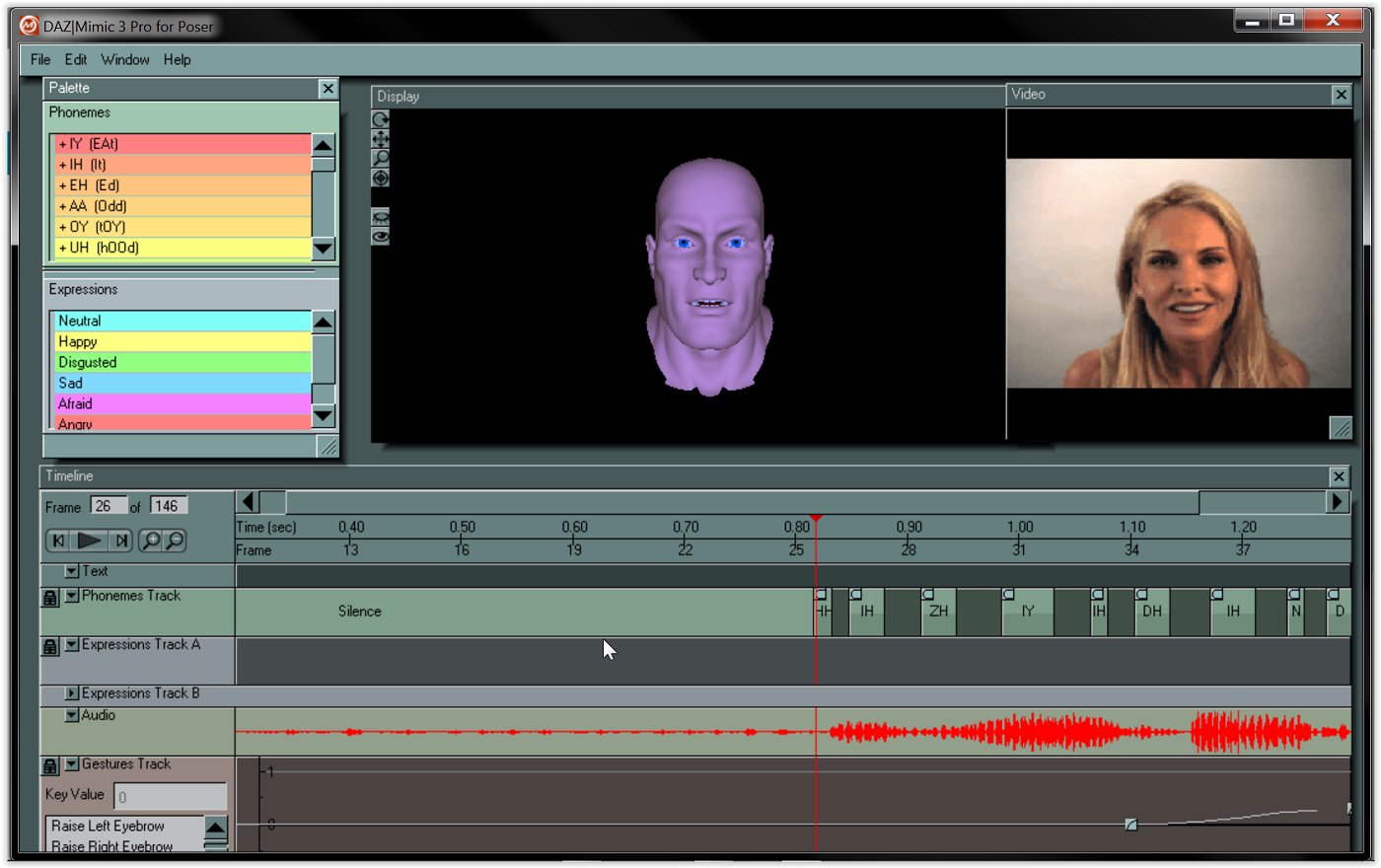
the mimic pro software as it had a powerful editing feature where you could adjust the phonemes much like aniblocks to get a more accurate performance and even import a real life reference video as a guide
@wolf359
I won't be wiggling my face in front of any phone, and I much prefer a sequenced approach so that I can precisely orchestrate the expression anyway. I do agree about Mimic Pro, and that's kinda what I'm getting at. Would be amazing if 3DU could make something like that (basically a viseme sequencing system which is what Mimic Pro is), but one that works with 4.24.
@Dartanbeck
Man, you really put some serious passion into this stuff, and it's really nice to see! I'm afraid a lot of it is lost on me at the moment since I've just not kept up with it all. I always wanted to be able to animate completely in Daz Studio, but I used to come back to the idea on and off because there was always some aspect missing. Things definitely look to be improving now, and I will definitely be checking out your videos and website, but I'm intentionally avoiding both right now so that I don't get distracted.
That aside, I do like your character, Rosie. I like how you obsess over her and continue to improve her, kinda like Masterstroke does with his Roxy character, and I've often wondered how neat it would be if more people had that sort of mindset. They're kinda like mascots really!
Indeed if 3DU replicated the functionality of the venerable Mimic pro 3 it would make $$massive sales$$
It bothers me because the user terms of the Mixamo site STRICTLY FORBIDS the $$resale$$ of the motion Data from Mixamo and it does not matter if you retargeted it for a specific Daz Character
or Blender rig or Iclone Character.
they can only be distributed FREE NOT for money!!
This is why I converted the entire Mixamo Library to Daz genesis 8 BVH and made them FREE for the Daz community to spare them from getting RIPPED OFF by certain vendors selling them piece meal
at $15-$20 each.
https://www.daz3d.com/forums/discussion/701106/over-2-700-free-bespoke-bvh-animations-for-genesis-8