Show Us Your Iray Renders. Part IV
This discussion has been closed.

Daz 3D is part of 
Connect
DAZ Productions, Inc.
7533 S Center View Ct #4664
West Jordan, UT 84084
Licensing Agreement | Terms of Service | Privacy Policy | EULA
© 2025 Daz Productions Inc. All Rights Reserved.
Comments
I've had that problem. Usually what I do is adjust the red-blue coloring.
Yeah, I've done that too, it helps a bit but it's not enough to get a real looking lightning. Thanks anyway.
So playing around with stuff in Carrara, finally getting some handle on modeling and UV, then into Daz for Irayfication.
And voila'!
Finally found some time to iRay my set of Steampunk Fairy figurines. From left to right the base figures are - Toon Amy, Girl 6, Aiko 6, Jazlyn, Keiko 6. Outfits and props are from all over the place...
It would be interesting to see how they would 3D print.
Looks like only 3 show up in the thumbnail - click for the full image
they would look awesome 3D Printed simon.
Nice results :)
Simon, those textures converted over really well. I think they all look awesome. All of the metals have a beautiful sheen to them.
Another Iray render playig around with some more depth fields , this was stonemasons wintery terrain, with Dark Matters helicopter, I applied the Iray deffualt shaders too everything accept I used a HdrI skydome with the sun placed behind the Helicopter. .I got The HDRi Skydome at HDRi Labs.com
Lens flare is post work layer in photoshop.
magnifique character and render design!
Oh I forgot post this...I had to crop images due to forum rules...
I would love to have them all!
Cool everyone. I have seen it mentioned to adjust cornea buldge to 1 for eyes. Is that in character's settings? Does it apply to all generations?
A close up good for all ages :) http://fav.me/d9bzajs
Thanks Ivy.
In the shaping tab under eyes.
Cool thanks Johnny!
Cool!. Which hair was used in 'captura2'? That skin tone goes pretty well with her.
the infamous Kozaburo's Long Hair Evolution V1-V3
An exercise of comic using iRay desaturation and bloom effects...take a look, and I hope you know Spanish!... the text is in my native language.
...actually have a character with that hair in a scene I'm currently working on.
I have some new Iray renderrs from converting the Chroft Apartment - Open Plan Living: http://www.daz3d.com/chroft-apartment-open-plan-living
I am currently working on a way to add just a little bit of dust here and there but it isn't working out like I want it to. If I add too much then it looks filthy or like a rendering mistake. If I add too little then you don't even notice it. I want a bit of dust in the air, some on the floor in the corners, around the legs of the couches, and such. I want it to look like the Roomba couldn't quite get in there to clean it. I am still working on it.
However these renders have a better, more realistic flooring. I tried to use the bump maps provided for the floor to give it a realistic wood floor but the bump maps weren't just high enough of a resolution to stand up to this high-res of a rendering. So, I am going with an epoxy coated wood flooring which is quite popular now in modern construction since it doesn't scuff up. So, it is supposed to still be shiny but not the mirror finish I had before. I mostly just added Glossy Roughness and Top Coat Roughness to achieve this effect.
The added props are from various sets but mostly from these:
http://www.daz3d.com/the-pool-house
http://www.daz3d.com/comfort-living-room
http://www.daz3d.com/collective3d-kitchen-counter-stuff
http://www.daz3d.com/mhe-fruit
Cool I notice that iray just stops at some point no matter what settings I use. This is on both systems. The renders do look complete for the most part. anyhoo *Nudity* http://fav.me/d9bzakw
Nice Pictures. As to the dust in the air, we only normally notice dust in the air when there are godrays present so any dust may just end up looking like fog or an anomaly.
In the previous renders that I did, I only had an atmosphere camera turned on for the bedroom render. This time, I remembered to use it for all 3 of the renders. I find that using either the AtmoCam for Iray or just creating your own atmosphere cube/ball, tends to make more realistic lighting even when inside of a small scene.
By my thinking, it makes sense, because Iray is an accurate light simulation. If you give the air itself some properties, then the simulation will be more accurate. The result, I find, has softer shadows and the atmosphere diffuses the light better like a photographer's screen would in front of a spotlight.
In these renderings, I am using AtmoCam for Iray: http://www.daz3d.com/atmocam-for-iray, with the settings of white and light fog. The distances here are so low that it doesn't look foggy but you can compare the previous renderings to these new ones to tell that it does affect the lighting.
I also have been able to replicate what AtmoCam does using Sickleyeild's tutorial here: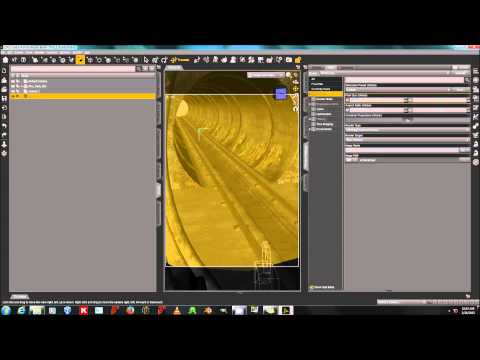
AtmoCam just seems to supply a quicker way to just click and get what you want in a few easy steps. I also just keep an atmosphere attached to a single camera. So I can keep moving that camera around and the atmosphere stays just in front of the camera. So, I make all of my cameras that I want without an atmosphere ball just as a normal camera. Then I copy and paste the settings from the camera that I want to render to my camera with the atmosphere ball. Because if you attach an atmosphere ball to all of your cameras, you have to remember to turn the other ones to invisible - 2 atmosphere balls equals double the amount of fog effects.
The living room render contains my initial experiment into creating ground planes of dust around the sofa legs. I just made a flat plane and gave it an opacity map that I made in a paint program. I fiddled with the texture settings and tried different shades of white/gray and ended up just leaving it alone for now. If you look closely there are subtle rings of gray around each leg on the floor. These are attached to the sofa so it would move with it. I think maybe they need a diffuse map that is a basic noise texture and I might use that as a displacement map as well.
Working on stuff coming up in my webcomic. (shh)
Cool man
That's beautiful. You have such a wonderful imagination, Will!
Beautiful.
Here's an animated render. It's a shame there's no motion blur function in Iray. Without motion blur,everything looks strobing
https://www.youtube.com/watch?v=0Rz2jAikVSM
Aw, thanks.
When I was a kid I wanted to become a geneticist so I could make weird new creatures. I was disappointed when I found out what geneticists generally do. (Which is, from what I understand, mostly staring at centrifuges for hours or writing up proposals begging for more money)