Change skin texture
 spram
Posts: 14
spram
Posts: 14
Bonjour,
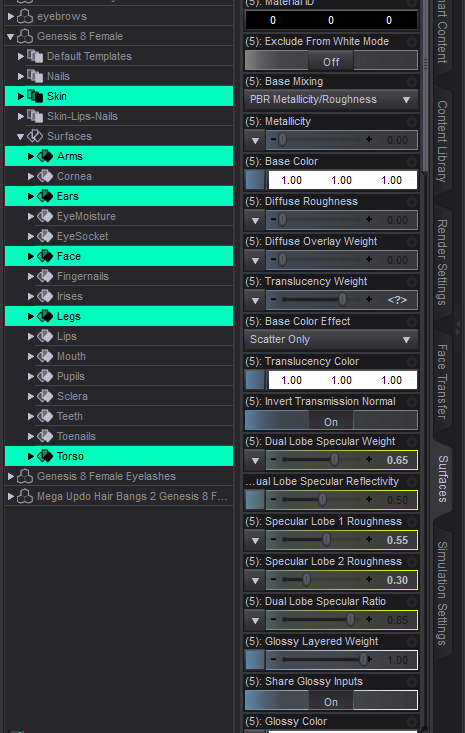
I would like to know if it was possible to change the texture of our character's skin via the "Surfaces" panel > "Editor" > "Skin" > And here, select the skin of another character that we have purchased for example?

Daz 3D is part of 
Connect
DAZ Productions, Inc.
7533 S Center View Ct #4664
West Jordan, UT 84084
Licensing Agreement | Terms of Service | Privacy Policy | EULA
© 2026 Daz Productions Inc. All Rights Reserved.
Comments
You can use skin from any character of same generation and gender (unless G or G9, as they are unisex).
If you are using Smart Content, you can select the character in the scene tab, and then in Smart Content (check Filter by Content), go to Materials > Iray > Feminine and find a skin set.
Do you know if there is another menu to access it?
What do you mean? What are you wanting to do?
Sorry, I figured out how to replace my character's skin.
Now I've added tattoos. The problem is that these tattoos have to be behind my character, not on the side. Do you know how I can rotate the tattoos or put them directly on the right side?
Image removed
Please don't post images of the actual texture maps, even in modified form.
The problem you are going to have there is that there s a seam down the back of the leg, so bits of your tattoo will need to be on one edge and other bits on the other, placed so they join up when the image is wrapped around the leg. If you have a tool that can paint onto the mesh that may not be too bad, otherwiise I would look at using an Iray Decal to project the tattoo in DS itself (assuming the render will use IIray, of course).
ok thanks, I restarted daz with the character today and miraculously the tattoos went in the right place. :)