

List of Products Used - script [Commercial]

2

Comments

  • MikeD said:

    sidcarton1587 said:

    I am trying script and noticing some weird behavior. 

    1. Start a new scene (but don't save the scene yet)

    2. Load character and outfit

    3. Run the script. Shows the products for the character and outfit

    4. Save the scene 

    3. Run the script. Shows no products at all. 

    I've reset the database and re-imported metadata and get the same results. 

    Any ideas? Has anyone seen this behavior or can run a quick test on their setup to see if it's just me? 


    Edit:

    Reading further up the thread I suspect that this same behavior would appear in MikeD's commercial script as with the free script if they're based on the same concepts. A little bit of digging uncovered an older thread that pointed out some differences in the way that Asset Manager and Content Manager "see" product information (the latter takes a disk based approaach for example). I wonder, given that the sample script primarily relies on Asset Manager, whether that could cause a problem once the scene is saved. 

    I suppose a simple test might be to add a character into an empty scene, save the scene, and add a new character to the scene but don't save the scene file again. Given the behavior I'm seeing, I would expect the sample script run at that point to show the product information for the new character but not the old one. I'll have to try that when I'm back in my workshop. 


    This is interesting ...


    I'll take a look at the content manager and asset manager ...


    I really apreciate if you link the tread here ...

    Thanks in advance


    Apologies for the late reply. The older thread was something I had stumbled across while Googling on this topic, and I unfortunately didn't bookmark it. I'll try to find it again and share if I find it. 


  • jmucchiellojmucchiello Posts: 601
    edited December 2024

    This product is sometimes inaccurate.

    It always says Ultrascenery is "used" just because it's installed, I guess.

    I applies some eye MATs and skin MATs to a figure and it didn't report them at all. They were from Addy Chloe and Expressions for Genesis 9. That product isn't listed.

    Products used: =========
    - CHB Fiona and Expressions for Genesis 9
    - CityScapes Backdrops Volume 2
    - Default Resources
    - dForce Melanie Outfit for Genesis 9
    - FE Ashlee Hair for Genesis 9
    - Genesis 9 Starter Essentials
    - LOCAL USER
    - PW Amphibious Plane Vera
    - UltraScenery - Landscape Features Volume 1
    ======================

    (The HDRI background is from Poly Haven.)

    Untitled.png
    515 x 652 - 118K
    sea plane 1.png
    960 x 540 - 756K
    Post edited by jmucchiello on
  • MikeDMikeD Posts: 315

    jmucchiello said:

    This product is sometimes inaccurate.

    It always says Ultrascenery is "used" just because it's installed, I guess.

    I applies some eye MATs and skin MATs to a figure and it didn't report them at all. They were from Addy Chloe and Expressions for Genesis 9. That product isn't listed.

    Products used: =========
    - CHB Fiona and Expressions for Genesis 9
    - CityScapes Backdrops Volume 2
    - Default Resources
    - dForce Melanie Outfit for Genesis 9
    - FE Ashlee Hair for Genesis 9
    - Genesis 9 Starter Essentials
    - LOCAL USER
    - PW Amphibious Plane Vera
    - UltraScenery - Landscape Features Volume 1
    ======================

    (The HDRI background is from Poly Haven.)


    I guess it is the situation described in manual page 14 for not listing the Addy's product:

    Check every map (Possible false results):
    By default, this option is unchecked. If you have this option checked the script will make
    a deeper scan, using all the material maps, to find the products used. This may give false
    positive results, if one map is used in several different products.

    I also have the "UltraScenery" but it doesn't report for me... If a PA has used it for creating a product it may pop up ...


    if it reports products that are not used, then it is the case described in manual page 5:


    Beware: In some cases, the script presents a lot more products from the same PA than
    the ones that have actually been used in the scene. It is completely normal, and not a
    script failure, as many PAs use the same assets (for example, the same maps) in more
    than one of their products. In this case the script will list all the registered products that
    use the same asset(s).

  • LinwellyLinwelly Posts: 6,053
    edited May 21

    Hello, everybody, I hope someone can help me with this,

    I'm trying to use this script one one of my (rather complex) scenes including ultra scenery 2 Hedge maker and some textures altered by me.

    while I can see in the log file that the scan works well, the output is a madup product by the SKU 12345678 it lokates in local user. (I believe this is similar to what others have reported

    I suspect that it has trouble because I have my whole DAZ installed on a different harddrive than the standdart, (the "studio" folder is on C while everythingn else is on E) but I cant' find a place to tell the scrip where to look for the products or whatever else I need to change.

    So maybe one of you knows, or has an alternative idea to slove the problem

    I saw a link to a test version of the product listing but I'm not sure how to apply? would I dowload that and move it to the scripts folder?

    Thanks a lot in advance

    Post edited by Linwelly on
  • jmucchiellojmucchiello Posts: 601

    I use MikeD's list o products all the time without issue and all my daz stuff is not in the default locations. I even install Studio itself elsewhere. So that shouldn't be the problem. Does anything show up in the logs when you run it?

  • MikeDMikeD Posts: 315
    edited May 21

    Linwelly said:

    Hello, everybody, I hope someone can help me with this,

    I'm trying to use this script one one of my (rather complex) scenes including ultra scenery 2 Hedge maker and some textures altered by me.

    while I can see in the log file that the scan works well, the output is a madup product by the SKU 12345678 it lokates in local user. (I believe this is similar to what others have reported

    I suspect that it has trouble because I have my whole DAZ installed on a different harddrive than the standdart, (the "studio" folder is on C while everythingn else is on E) but I cant' find a place to tell the scrip where to look for the products or whatever else I need to change.

    So maybe one of you knows, or has an alternative idea to slove the problem

    I saw a link to a test version of the product listing but I'm not sure how to apply? would I dowload that and move it to the scripts folder?

    Thanks a lot in advance


    The script actually doesn't care about the installed folder but for the database references... If you have install the products in the past in a specific folder and then you copy them into a new folder the database may has not updated the new location... Generally this script has problems when the database is not updated or something is wrong with it.


    The SKU 12345678: LOCAL USER is a "vitrual product" created by DS for your own saved assets...

    Post edited by MikeD on
  • LinwellyLinwelly Posts: 6,053

    jmucchiello said:

    I use MikeD's list o products all the time without issue and all my daz stuff is not in the default locations. I even install Studio itself elsewhere. So that shouldn't be the problem. Does anything show up in the logs when you run it?

    the log file show that the scan is working, yes

  • LinwellyLinwelly Posts: 6,053

    MikeD said:

    Linwelly said:

    Hello, everybody, I hope someone can help me with this,

    I'm trying to use this script one one of my (rather complex) scenes including ultra scenery 2 Hedge maker and some textures altered by me.

    while I can see in the log file that the scan works well, the output is a madup product by the SKU 12345678 it lokates in local user. (I believe this is similar to what others have reported

    I suspect that it has trouble because I have my whole DAZ installed on a different harddrive than the standdart, (the "studio" folder is on C while everythingn else is on E) but I cant' find a place to tell the scrip where to look for the products or whatever else I need to change.

    So maybe one of you knows, or has an alternative idea to slove the problem

    I saw a link to a test version of the product listing but I'm not sure how to apply? would I dowload that and move it to the scripts folder?

    Thanks a lot in advance


    The script actually doesn't care about the installed folder but for the database references... If you have install the products in the past in a specific folder and then you copy them into a new folder the database may has not updated the new location... Generally this script has problems when the database is not updated or something is wrong with it.


    The SKU 12345678: LOCAL USER is a "vitrual product" created by DS for your own saved assets...


    OK the local user mystery is solved. still the rest of the scan is working but the products are nto showign up

    I let the DIM install everything directly to the E drive and don't move anything from there after that

     since the scene is working the references should all be intact

    I recently deleted all metadata and reinstalled that, so all that should be in order as well

  • LinwellyLinwelly Posts: 6,053

    ok I don't seem to get any further with this, might have to return the product then

  • barbultbarbult Posts: 26,160

    Linwelly said:

    ok I don't seem to get any further with this, might have to return the product then

    I could never get it to work either. I even reset the database and reimported metadata, but it still didn't work. I did return it.

  • Richard HaseltineRichard Haseltine Posts: 107,880

    barbult said:

    Linwelly said:

    ok I don't seem to get any further with this, might have to return the product then

    I could never get it to work either. I even reset the database and reimported metadata, but it still didn't work. I did return it.

    How about http://docs.daz3d.com/doku.php/public/software/dazstudio/4/referenceguide/scripting/api_reference/samples/metadata/list_products_used/start ?

  • LinwellyLinwelly Posts: 6,053

    Richard Haseltine said:

    barbult said:

    Linwelly said:

    ok I don't seem to get any further with this, might have to return the product then

    I could never get it to work either. I even reset the database and reimported metadata, but it still didn't work. I did return it.

    How about http://docs.daz3d.com/doku.php/public/software/dazstudio/4/referenceguide/scripting/api_reference/samples/metadata/list_products_used/start ?

    I saw the link in the thread further up, I'm not sure how I apply that, do I download and place it in scripts in DAZ like products from offsite?

  • DoctorJellybeanDoctorJellybean Posts: 9,585

    barbult said:

    Linwelly said:

    ok I don't seem to get any further with this, might have to return the product then

    I could never get it to work either. I even reset the database and reimported metadata, but it still didn't work. I did return it.

    I got it to work by using Connect and updating the Metadata. Others got it to work without doing that, so your mileage may vary.

  • barbultbarbult Posts: 26,160

    Richard Haseltine said:

    barbult said:

    Linwelly said:

    ok I don't seem to get any further with this, might have to return the product then

    I could never get it to work either. I even reset the database and reimported metadata, but it still didn't work. I did return it.

    How about http://docs.daz3d.com/doku.php/public/software/dazstudio/4/referenceguide/scripting/api_reference/samples/metadata/list_products_used/start ?

    The sample script used to work for me, a long time ago, but not during the same time I tested the commercial product.

  • barbultbarbult Posts: 26,160

    DoctorJellybean said:

    barbult said:

    Linwelly said:

    ok I don't seem to get any further with this, might have to return the product then

    I could never get it to work either. I even reset the database and reimported metadata, but it still didn't work. I did return it.

    I got it to work by using Connect and updating the Metadata. Others got it to work without doing that, so your mileage may vary.

    I do not want to use Connect. I gave up on it after it caused me so many problems, like updates that broke previously working products. I only use DIM now. I did spend quite a bit of time trying to get the "show products used" to work, including resetting the database and updating metadata. No luck. Some people get it to work; other people do not.

  • barbultbarbult Posts: 26,160

    Linwelly said:

    Richard Haseltine said:

    barbult said:

    Linwelly said:

    ok I don't seem to get any further with this, might have to return the product then

    I could never get it to work either. I even reset the database and reimported metadata, but it still didn't work. I did return it.

    How about http://docs.daz3d.com/doku.php/public/software/dazstudio/4/referenceguide/scripting/api_reference/samples/metadata/list_products_used/start ?

    I saw the link in the thread further up, I'm not sure how I apply that, do I download and place it in scripts in DAZ like products from offsite?

    Yes, that's right.

  • Richard HaseltineRichard Haseltine Posts: 107,880

    barbult said:

    Linwelly said:

    Richard Haseltine said:

    barbult said:

    Linwelly said:

    ok I don't seem to get any further with this, might have to return the product then

    I could never get it to work either. I even reset the database and reimported metadata, but it still didn't work. I did return it.

    How about http://docs.daz3d.com/doku.php/public/software/dazstudio/4/referenceguide/scripting/api_reference/samples/metadata/list_products_used/start ?

    I saw the link in the thread further up, I'm not sure how I apply that, do I download and place it in scripts in DAZ like products from offsite?

    Yes, that's right.

    or for a quick test just drag the downloaded file into the DS Viewport.

  • LinwellyLinwelly Posts: 6,053

    That scrip does seem to produce an output I can use, at least as starting point, Thanks a lot.

  • MikeDMikeD Posts: 315
    edited May 27

    You can also download the sample script into a Content Library folder, navigate from DS to this folder and right click... Choose "Open in Script IDE"... The script panel will popup... Execute the sample script from there...
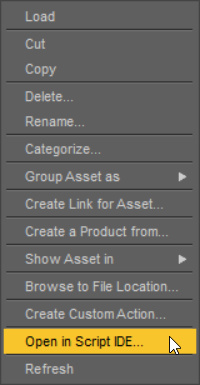

    If it works for you the panel below should have all the products by tilte:


    If the sample scipt is working and you can see the "Title" of products then the "List of Products" script should also work (the have the same core code).


    menu.png
    200 x 385 - 28K
    Sample List.png
    1010 x 308 - 124K
    Script List.png
    1502 x 915 - 399K
    Post edited by MikeD on
  • LinwellyLinwelly Posts: 6,053

    Thanks a lot Mike I will experiment some more with that

  • barbultbarbult Posts: 26,160
    edited May 27

    Linwelly said:

    That scrip does seem to produce an output I can use, at least as starting point, Thanks a lot.

    The problem I have is that the sample script only works on a newly created scene, before it has been saved (for me) . Once it is saved as a scene file, even while the scene is still open, the sample script doesn't find much of anything.
    With a scene with Genesis 9, hair, shirt and skirt, before saving the scene,  the sample script finds all 4 items. After saving the scene, the sample script finds only Genesis 9. If I close and reopen the saved scene file, the sample script finds only Genesis 9. That makes the sample script (and the commercial product which does the same thing) pretty useless to me.
    The log file says the script executed successfully in all cases. No warnings or errors are reported.

    Post edited by barbult on
  • LinwellyLinwelly Posts: 6,053

    barbult said:

    Linwelly said:

    That scrip does seem to produce an output I can use, at least as starting point, Thanks a lot.

    The problem I have is that the sample script only works on a newly created scene, before it has been saved (for me) . Once it is saved as a scene file, even while the scene is still open, the sample script doesn't find much of anything.
    With a scene with Genesis 9, hair, shirt and skirt, before saving the scene,  the sample script finds all 4 items. After saving the scene, the sample script finds only Genesis 9. If I close and reopen the saved scene file, the sample script finds only Genesis 9. That makes the sample script (and the commercial product which does the same thing) pretty useless to me.
    The log file says the script executed successfully in all cases. No warnings or errors are reported.

    I applied it to a scene I had before and it worked with that, what it does have trouble with is getting all the details I did with my two main characters who have been highly customised vial morphs, partly dialed in characters and skins from yet other characters which then have been manually adapted by me.

  • MikeDMikeD Posts: 315

    Linwelly said:

    barbult said:

    Linwelly said:

    That scrip does seem to produce an output I can use, at least as starting point, Thanks a lot.

    The problem I have is that the sample script only works on a newly created scene, before it has been saved (for me) . Once it is saved as a scene file, even while the scene is still open, the sample script doesn't find much of anything.
    With a scene with Genesis 9, hair, shirt and skirt, before saving the scene,  the sample script finds all 4 items. After saving the scene, the sample script finds only Genesis 9. If I close and reopen the saved scene file, the sample script finds only Genesis 9. That makes the sample script (and the commercial product which does the same thing) pretty useless to me.
    The log file says the script executed successfully in all cases. No warnings or errors are reported.

    I applied it to a scene I had before and it worked with that, what it does have trouble with is getting all the details I did with my two main characters who have been highly customised vial morphs, partly dialed in characters and skins from yet other characters which then have been manually adapted by me.

    It will show you the products, but not your customized work... All Daz's dial morphs will be shown as "Default Resaurces" or "Genesis 9 Body Shapes" or something similar.... (I dont remember the name of this product now..) If you use my script (and not the sample Daz script) these products may be excluded, so take a look at the settings page for them. Also, if you use custom maps, the script doesn't know the original sourse so it will show the "Local User" product as Sku 12345678 (the one I told you about in a previous comment). If you use my script, you can also go to the settings tab and check the "Check every map" option for a deeper scan, but be careful for faulty resaults... If a PA is using some common maps between his characters, you may get of all of them in the list...

  • LinwellyLinwelly Posts: 6,053

    Ok, thanks, with all this knowledge I will try your product again and hope to get the result I need

  • bytescapesbytescapes Posts: 1,905

    I'm having the same problem that some others have had.

    If I open a new scene and add some products to it, then run MikeD's script, the script captures the products used correctly.

    If I save that scene and re-run the script, the product listing comes up empty.

    If I open an existing scene, the product listing comes up empty.

    The original DAZ List All Products sample script -- which I think is the basis for MikeD's script -- behaves similarly. I remember that one working reliably for me in the past, but now it has the same issue as MikeD's script: as soon as you save the scene, it's all over.

    I dug into the sample script a bit, but wasn't able to find an obvious cause. It's possible that there's been a change in recent versions of DAZ Studio that affects some of the API calls -- I suspect the Asset Manager may not be returning what it once did in all circumstances -- but I haven't been able to confirm that.

    One more data point: I thought I'd try to sneak up on the bug by creating a new scene, then merging an existing scene into it and running the script. This might make it look like a "new" scene to the script. Didn't work. So it may be that the process of saving a scene modifies the node in some way such that lookups no longer work. Again, I haven't been able to figure out exactly what's changing.

  • MikeDMikeD Posts: 315

    bytescapes said:

    I'm having the same problem that some others have had.

    If I open a new scene and add some products to it, then run MikeD's script, the script captures the products used correctly.

    If I save that scene and re-run the script, the product listing comes up empty.

    If I open an existing scene, the product listing comes up empty.

    The original DAZ List All Products sample script -- which I think is the basis for MikeD's script -- behaves similarly. I remember that one working reliably for me in the past, but now it has the same issue as MikeD's script: as soon as you save the scene, it's all over.

    I dug into the sample script a bit, but wasn't able to find an obvious cause. It's possible that there's been a change in recent versions of DAZ Studio that affects some of the API calls -- I suspect the Asset Manager may not be returning what it once did in all circumstances -- but I haven't been able to confirm that.

    One more data point: I thought I'd try to sneak up on the bug by creating a new scene, then merging an existing scene into it and running the script. This might make it look like a "new" scene to the script. Didn't work. So it may be that the process of saving a scene modifies the node in some way such that lookups no longer work. Again, I haven't been able to figure out exactly what's changing.

    Sorry for the late answer... I have digged very deep into this to find the root of the problem, with no luck... One quick Q... Is your scenes' folder mapped into the Content Maneger?


  • barbultbarbult Posts: 26,160

    MikeD said:

    Sorry for the late answer... I have digged very deep into this to find the root of the problem, with no luck... One quick Q... Is your scenes' folder mapped into the Content Maneger?


    Mine is not. 

  • MikeDMikeD Posts: 315

    barbult said:

    MikeD said:

    Sorry for the late answer... I have digged very deep into this to find the root of the problem, with no luck... One quick Q... Is your scenes' folder mapped into the Content Maneger?


    Mine is not. 

    I saw that the code needs the abs path of the assets (taken from the content manager) for finding the products... Check if you include the scene folder into your content library folders (with the content manager) solves the problem with the missing products after saving the scene... If I remember well you had the same problem as well...

  • barbultbarbult Posts: 26,160
    edited June 23

    MikeD said:

    barbult said:

    MikeD said:

    Sorry for the late answer... I have digged very deep into this to find the root of the problem, with no luck... One quick Q... Is your scenes' folder mapped into the Content Maneger?


    Mine is not. 

    I saw that the code needs the abs path of the assets (taken from the content manager) for finding the products... Check if you include the scene folder into your content library folders (with the content manager) solves the problem with the missing products after saving the scene... If I remember well you had the same problem as well...

    Yes, I had the problem with your tool not finding products after a scene was saved.  I cannot test it now, because I returned the product when it didn't work for me.

    Post edited by barbult on
  • jjoynerjjoyner Posts: 748

    If I load old Daz Studio products into a scene along with newer ones and 3rd-party ones, the newer Daz Studio products show up when I run List of Products.  As expected, the old Daz Studio products and 3rd party products do not.  Is there anything that I can manually add to the metadata of old Daz Studio products and 3rd-party products so that List of Products will display them when in a scene?

    Below is an example.  The scene contains

    • Cow (SKU 354)
    • Grumpy Santa (SKU 106421)
    • Bench (SKU 102789)
    • Abacus (SKU 21250)
    • Dragon (SKU 487)
    • Baseball (SKU 32221)
    • 14MU Worker (SKU 13537)
    • Barrel (SKU 23591)
    • Mantle clock (Renderosity).

    Prior to saving the scene, List of Products listed the products containing newer Daz3D content - Grumpy Santa, the bench, the abacus, the baseball and 14MU Worker.  After saving the scene and reloading it, List of Products only listed the products containing the abacus, the baseball and 14MU Worker.

    example scene.png
    1000 x 729 - 390K
    List of Products after save.png
    1000 x 610 - 239K
Sign In or Register to comment.