G9 Shape Preset for SWOLE Garrick mix
 Lee Moon
Posts: 927
Lee Moon
Posts: 927
Hi everyone.
I was asked to share a shape preset for a G9 figure I'd used in a recent render.
Here's my Shape Preset file and readme for the G9 SWOLE Garrick Stylized shape.
The following image is a comparison between the original character shape and the revised one which uses far fewer morph packs to achieve a similar look.
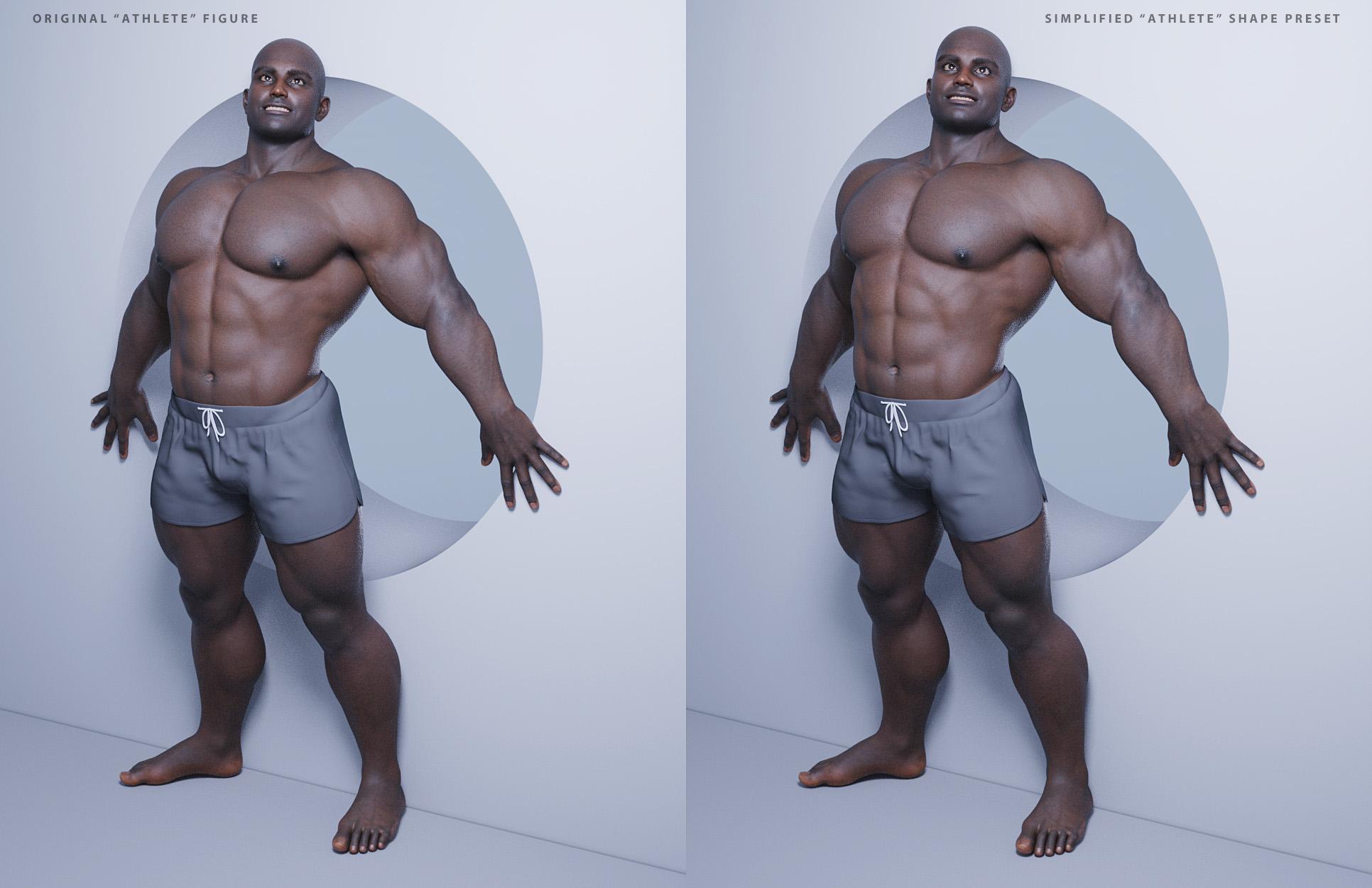
This is the shape preset preview render:

And here are the requirements and readme for the shape preset:
Genesis 9 Base - Swole Garrick Stylized Shape Preset
Preset created by Lee Moon, February 10, 2025 using the following DAZ products.
Required minimum products:
Genesis 9 Starter Essentials (Free - Included with recent DAZ Studio versions)
https://www.daz3d.com/genesis-9-starter-essentials
Genesis 9 Body Shapes
https://www.daz3d.com/genesis-9-body-shapes
Genesis 9 Head Shapes
https://www.daz3d.com/genesis-9-head-shapes
SWOLE for Genesis 9
https://www.daz3d.com/swole-for-genesis-9
Toon Heroes for Genesis 9
https://www.daz3d.com/toon-heroes-for-genesis-9
Garrick for Genesis 9
https://www.daz3d.com/garrick-for-genesis-9
Easy Shape Master - Age Control and Shape Tuning for Genesis 9
https://www.daz3d.com/easy-shape-master--age-control-and-shape-tuning-for-genesis-9
Optional product(s):
SWOLE 9 Face Erase (not used in my Shape Preset, but helpful when using other character heads)
https://www.daz3d.com/swole-9-face-erase
Installation and use:
1) Please find and download the Shape Preset for SWOLE Garrick linked below (G9 SWOLE Garrick Stylized Shape Preset.duf). Save it to a convenient place on your computer.
2) Load an empty scene in DAZ Studio.
3) Load the base Genesis 9 figure and select it in the viewport.
4) Set the Genesis 9 figure’s View SubD Level to 3 and the Render SubD Level to 3.
5) You may also want to set FACS Detail Strength, Body Pose Detail Strength, and Flexion Automatic Strength parameters all to 100%.
6) Drag and drop the downloaded Shape Preset for SWOLE Garrick onto the Genesis 9 figure in the viewport.
7) The Shape Preset should apply and automatically set the Genesis 9 parameter dials to achieve the SWOLE Garrick shape.
8) Save the newly shaped Genesis 9 as a Scene Subset for later use if desired.
9) Apply textures, accessories, hair, wardrobe, etc. as needed/desired.
10) Render and have fun. Customize the shape further by dialing in additional characters, morphs, and adjusting the dial settings that my preset has already applied.
The Shape Preset is found as an attachment below (DUF file):
As always, please enjoy the Shape Preset and I hope you find it useful as-is or after customizing the shape further. I would be delighted to hear if anyone finds the preset useful and/or uses it in renders. It makes my day when someone shows me a render that has used one of my presets.
Thank you for taking an interest in my preset(s)! Have fun!
Lee Moon

Daz 3D is part of 
Connect
DAZ Productions, Inc.
7533 S Center View Ct #4664
West Jordan, UT 84084
Licensing Agreement | Terms of Service | Privacy Policy | EULA
© 2026 Daz Productions Inc. All Rights Reserved.
Comments
Thanks Mr Lee,
I am converting a bunch of Muscleman Bodybuilder poses from Genesis 8 Male/Female to Genesis 9 however, I am finding that the Genesis 9 figure just doesn't look correct in the elbows. I have all the DAZ Originals backages you listen but which of the others you listed is most crucial to getting normal muscular arms in the biceps flexed pose looking correct without deformed looking forearms, wrists, and albows? I'm lacking the Garrick 9 character as yet too.
dup
You are very welcome, nonesuchoo!
Posing bulky, beefy, heavily muscular figures are certainly a challenge with respect to joints. I often have to dial back a bend pose to account for the folding artifacts that might show up. I do use a few bend enhancer products, though I can't recall which ones at the moment. Not sure if it helps or not, but take a look at the G9 automatic flexion strength parameter - I have it turned on at 100% - I think it's 0% by default. Not sure what it controls (perhaps under the hood joint/bend correctives?) Anyway, I always set it to 100%. There's a new product in the store, Ultimate Natural Bend Morphs for Genesis 9 Feminine 2.0. It states that it can be of use in G9 masculine shapes. I have it in my wishlist and will purchase it at some point.
Feel free to share you experiences with the various morph sets. I'd love to find out what others are doing to make those types of poses work better.
Thanks!
Lee
OK, well I decided to switch to another G9 character as I felt the PA of the product I want to use probably didn't thoroughly test the product in all the poses they should have. I am going to try to use these posings to pose AI prompts at NightCafe.Studio as I stumbled upon how to use their Flex training database to do that. I will update you here though after I buy the products you've listed (SimonWM only: probably as I must watch my budget). I do have a one or two pose corrective products already, one from 3DU, I will try them and post here too.
I'll be looking forward to seeing what you find out regarding bends/flexes.
When I create a dial-spun figure, I always try a variety of poses to see if the figure is bending properly. Sometimes I make other adjustments to the figure, sometimes I just scrap the figure and start over entirely. :)
Lee
Gave myself a little creative break this evening.
This G9 chap is dialed up using the Classic Barbarian, Thimor, ESM morphs, a sprinkle of Fibo, a small dash of Toon Heroes, and various other shaping morphs for fine tuning.
Ran the render through Pixelmator Pro for the final image.
Lee
Your work always looks so wonderful, Lee. So is this a new preset? What would I have to buy?
And what is PIXELMATOR PRO? Is that like a Photoshop app? Is that the one that Apple bought and owns?
anyway, fantastic! You're the best at dreaming up new character combinations.
Hi, inquire!
I may create a shaping preset for this guy depending on how much time I have to work on it. :)
Yes, Pixelmator Pro is the image editing app (like Photoshop) that Apple now owns. It's quite good and I am enjoying it more every time I use it. You can find it in the App Store to view the requirements, price, etc.
Thank you for the great feedback!!! Always appreciated!!!
Lee
Grizzly / GrizzLee / GrizzLou
Mostly Lou from @RawArt with Thimor, SWOLE (Fibo), Easy Shape Master (ESM Body Masculine Muscular, ESM Pectorals Developed (M), ESM Pectorals Undeveloped (M) and perhaps a few more), M3D Tyrone (Head), miscellaneous add-on morph packs, and Harlow's materials (adjusted for my lighting setup.)
There's a NSFW version with body hair, but I didn't have time to render the image sequence again with and without the trunks/hair for editing out the poke through hair in the trunks.
I think he came out great. Lou is awesome and easy to work into my dial spinning universe of characters. :)
Lee
I've purchased a lot of add-on morph/shaping products for Genesis 9 and tend to make use of a fair number of them with my shaping presets.
This time I really tried to reduce the number of products used to create one of my usual muscular male shapes for G9.
The shape preset has a rather generic head allowing you to dial in another character's head as needed. I find using head shapes dialed in from 10% to 35% work well in my limited testing. And I also combine head shapes (Zack + Dain for instance) with some success.
This basic preset provides a starting point for you to modify/add on to suit your style.
Still working on creating the preset file and some additional renders.
Will post it here if anyone's interested. I know my freebies have a limited/niche audience. :)
Have a great day and don't forget to hug a loved one!
Lee
Yes, I'm interested.
Awesome! I've created the shaping preset and will need to write the instructions for using it (pretty much the same as my other presets). Once I do some demo renders, I'll post everything here.
Thanks so much, @inquire!
Lee
This doesn't look the same as a figure you had up on another site. Is it, except for the head? I'm really interested in that other character. Is it possible to post a preset for that one, also, if they are different characters?
Hi inquire!
Was it the figure I used in "SWOLE Sean"? I vaguely remember replying to your comments about that one (unless it was another render.)
Lee
Yes, it was the Swole Sean.
I'll look into it. That one iuses a lot of add-ons, but I'll see if I can reduce the number of products used. I'll also try adding Sean to the preset I'm about to give away. It will be a good starting point to recreate SWOLE Sean "Lite". :)
Lee
Just did a quick test. Using my upcoming shape preset, Kooki's Sean (head -or- head and body and HD Details), and M3D's Tyrone (head) along with a touch more Fibo gets very close to SWOLE Sean. I'll play with it more as I have time. Still working on getting the new shape preset ready.
Lee
Purchased Julian 9 this morning.
Here's Julian's head at 65%, his veins at 300%, and his texture map (surface settings adjusted for the scene lights) applied to my G9 SUPER shape preset. Created a monochrome image to draw out some of the details.
The smaller, posed render uses Julian's head at a different setting (maybe 25-35%?) and includes Julian's Proportions at 100%.
All the renders are using Charlie 9's blue eyes materials (adjusted surface settings for light reflections.)
Just testing things out before I post the 3 new shape presets here.
Lee
And here are images of the 3 shape presets (SUPER, SOLID, and SLEEK) with no other characters mixed in.
Mixing in other head shapes and some body shapes and details on each preset shape gives some nice variety while keeping the overall muscular theme.
Lee
All very beautifully done, Lee.
Thank you so much, @inquire!
I'm dragging my feet on writing up the instructions/list of products. That's about all that's left to do before I post the presets here.
Not sure if the forum allows for .zip files to be attached, but I don't think it does. That will mean several files will need to be downloaded -- the 3 shaping preset files and instructions/readme file.
Lee
You're allowed to attach zip file to the forum but I think there is an upper limit to the size of any file attached to a message, one I don't know.
Thanks for the info, @Elor! I will try putting all the files into one .zip file. The shaping presets are around 70 KB each, plus a small ReadMe text file, so I hope a few hundred KB before compression will work.
Thank you again!!
Lee
A bit more tinkering with throwing different G9 characters onto the SUPER shape preset.
Here's some heads mixed together.
Lee
On the other end of the spectrum from the head portrait above...
This mix of SUPER, Astaroth Toon, and Drut came out looking nicely stylized. I decided to give the anime/toon add-ons a try to replace the brows, eyes, teeth, and textures. He's rendered with Iray, but I think I put anime and/or filatoon materials on him. Not sure, but when I have more time, I'd like to try this one out using Filament/Filatoon.
Lee