

Star Trek Builders Unite 8: THE REBOOT

16263656768

Comments

  • blutobluto Posts: 912


    This may be a forlorn hope, but has anybody by chance made a Tellarite morph for G8M? Or G3M or G9 even? I checked the listings on the first page of course but sometimes folks start projects that don't quite make it to Official Freebie Releasewe.

     we are working on some but they arent quite ready yet. when they are they well be for g3 m/f g8 m/f and g9

    tellerites.jpg
    959 x 1439 - 763K
  • blutobluto Posts: 912

    OperationBedlam said:


    Way cool; nice compliment to the standard. Will you be making a female version?

    Also, what do folks do for TOS-style Klingon eyebrows? Tried doubling up on Super Natural Brows but wasn't quite satisfied with the results from that.

     you bet cha , got  it covered

    dress uniforms 1.jpg
    960 x 1440 - 695K
    dress uniforms 2.jpg
    960 x 1440 - 792K
  • blutobluto Posts: 912

    heres mudd in your eye

    welcome to muddtopia.jpg
    1440 x 1440 - 1M
  • blutobluto Posts: 912

    OperationBedlam said:


     what do folks do for TOS-style Klingon eyebrows? Tried doubling up on Super Natural Brows but wasn't quite satisfied with the results from that.

     personally i cheat i have bought several of 3duk's game ripped klingon characters for g8 male and femalei use then on g3 characters,or i adjust the the skin tone of an existing character mat then add the supernatural brows i then sape them to vulcan style

  • bluto said:


    This may be a forlorn hope, but has anybody by chance made a Tellarite morph for G8M? Or G3M or G9 even? I checked the listings on the first page of course but sometimes folks start projects that don't quite make it to Official Freebie Releasewe.

     we are working on some but they arent quite ready yet. when they are they well be for g3 m/f g8 m/f and g9

    Marvelous. The Klingon unis look great as well.

  • TimbalesTimbales Posts: 2,418

    bluto said:

    tos klingon dress uniform

    Way cool; nice compliment to the standard. Will you be making a female version?

    Also, what do folks do for TOS-style Klingon eyebrows? Tried doubling up on Super Natural Brows but wasn't quite satisfied with the results from that.

    I suggest this freebie from AprilYSH: https://shop.aprilsvanity.com/onfleek-for-genesis-3-8-female-s.html It's also great for Vulcan brows. They have a bunch of manual adjustments that are really handy.
  • ChronopunkChronopunk Posts: 294

    (Decloaking from Lurk Mode)

    So I've agreed to take on a project as a proof of concept for some folks, and as part of that, I need some help with some resources. I've gone digging through the thread, and have found many of the things I need, such as the Ambassador Class model, Figure Guy's TWOK-era uniforms (seems a shame Dodger's stuff is apparently no longer out there? The folding panels on the tunic would have been so very welcome), and more. But I do still have some outstanding items, and I'd like to ask for help (and opinions!) if I may.

    I need a Bridge. Specifically a Bridge that could be from an Ambassador-Adjacent (described as "the Miranda version of the Ambassador) ship - not as spartan and severe as the Enterprise C, but not as open-concept as the Galaxy Class/Enterprise D. Something that says "This is a vessel dedicated to long-range exploration, search and rescue, and some damned good science." Obviously, it can't have a bunch of TNG-era LCARS displays everywhere, or I'd just use the various TNG/VOY/DS9 bridges that are so available.

    Similarly, interior corridors, etc. I have some good ideas on which of those I want to use, but I figure - this thread is full of people who know their stuff, so I should ask the experts.

    Thank you in advance for any input and advice. :)

  • blutobluto Posts: 912

    Captain Christopher Pike

    pike.jpg
    1280 x 1440 - 830K
    base textures pike.jpg
    678 x 705 - 159K
    thumbnail.jpg
    960 x 1440 - 93K
  • blutobluto Posts: 912

    more jeffery hunter pike


    crispy close up 1.jpg
    960 x 1440 - 606K
    crispy close up 2.jpg
    960 x 1440 - 611K
    crispy close up 3.jpg
    960 x 1440 - 610K
  • GoggerGogger Posts: 2,482
    edited July 14

    I've had this model for a while and always meant to get her rendered.  Tonight's the night!
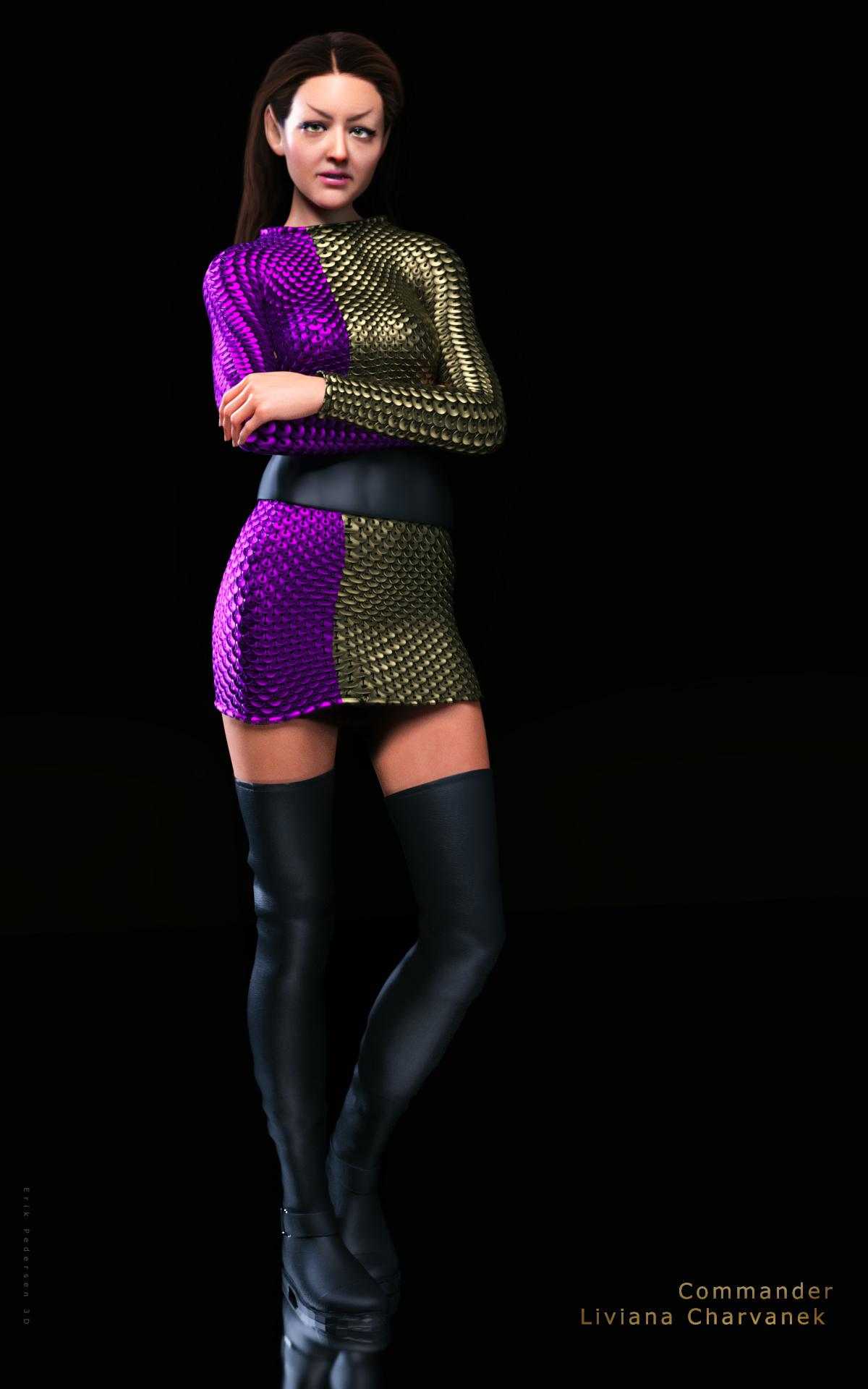
    Romulan Commander Liviana Charvanek


    VT_Liviana_Charvanek_3D_Erik_Pedersen.jpg
    1200 x 1920 - 565K
    Post edited by Gogger on
  • Ryuu@AMcCFRyuu@AMcCF Posts: 772
    edited July 27

    Okay, someone PLEASE tell me how the hell am I supposed to get my pictures to show up!! angry


    Post edited by Ryuu@AMcCF on
  • Richard HaseltineRichard Haseltine Posts: 107,857

    Click the Atach a File button, then click Browse and select the image to upload (format and size permitting)

  • Ryuu@AMcCFRyuu@AMcCF Posts: 772

    Richard Haseltine said:

    Click the Atach a File button, then click Browse and select the image to upload (format and size permitting)

    Sorry, Richard, but I think there must be a step or 2 missing.

    How do I get the attachement to show up with a larger size picture in the thread? I'm only getting the tiny little thumbnail to appear.

    I posted several pictures in the Gallery, but I can't get any of the renders to show up in the thread here like we used to be able to do.


  • wsterdanwsterdan Posts: 3,038

    Ryuu@AMcCF said:

    Richard Haseltine said:

    Click the Atach a File button, then click Browse and select the image to upload (format and size permitting)

    Sorry, Richard, but I think there must be a step or 2 missing.

    How do I get the attachement to show up with a larger size picture in the thread? I'm only getting the tiny little thumbnail to appear.

    I posted several pictures in the Gallery, but I can't get any of the renders to show up in the thread here like we used to be able to do.

    One way is to post them as you did so that the thumbnails show up (as you've done) then, once they're in place, Edit your post and copy the URL from the thumbnail and using the picture icon in the top row of the edit window and paste the URL into the dialog box that shows up, then save your edits. Don't delete the small thumbnails though, as that'll remove your larger image becaue it's linked ot the URL of the thumbnail.

    I can post screenshots if you need, just let me know.

  • Richard HaseltineRichard Haseltine Posts: 107,857

    wsterdan said:

    Ryuu@AMcCF said:

    Richard Haseltine said:

    Click the Atach a File button, then click Browse and select the image to upload (format and size permitting)

    Sorry, Richard, but I think there must be a step or 2 missing.

    How do I get the attachement to show up with a larger size picture in the thread? I'm only getting the tiny little thumbnail to appear.

    I posted several pictures in the Gallery, but I can't get any of the renders to show up in the thread here like we used to be able to do.

    One way is to post them as you did so that the thumbnails show up (as you've done) then, once they're in place, Edit your post and copy the URL from the thumbnail and using the picture icon in the top row of the edit window and paste the URL into the dialog box that shows up, then save your edits. Don't delete the small thumbnails though, as that'll remove your larger image becaue it's linked ot the URL of the thumbnail.

    I can post screenshots if you need, just let me know.

    Make sure you copy the link from the thumbnail (which goes to the full sized image) not the image link, which is just the thumbnail.

  • Ryuu@AMcCFRyuu@AMcCF Posts: 772
    edited July 27


    testing

    Post edited by Ryuu@AMcCF on
  • wsterdanwsterdan Posts: 3,038

    Looks like it worked, and a very nice image!

  • Richard HaseltineRichard Haseltine Posts: 107,857
    edited July 27

    Don't delete the attachment - the image is displayed in the post from the link to the attachment, so that is still needed (you may see a cached copy).

    Post edited by Richard Haseltine on
  • Ryuu@AMcCFRyuu@AMcCF Posts: 772

    Richard Haseltine said:

    Don't delete the attachment - the image is displayed in the post from the link to the attachment, so that is still needed (you may see a cached copy).

    I’m getting an “incorrect string value: ‘\xF0\x9F\x98\x89 for some reason

  • Ryuu@AMcCFRyuu@AMcCF Posts: 772

    I tried again, but still not working indecision

  • blutobluto Posts: 912

    now that share 3d is shut down where are all the listed freebie resources going to be hosted?

    gorn dudz final.jpg
    959 x 1438 - 724K
  • Sharecg suggested Renderhub

  • blutobluto Posts: 912

    Koloth

    Komander Koloth.jpg
    799 x 1438 - 703K
  • TimbalesTimbales Posts: 2,418
    bluto said:

    Koloth

    Nice work
  • wsterdanwsterdan Posts: 3,038

    bluto said:

    Koloth

    Looking good! Still my favourite style of Klingons...


  • blutobluto Posts: 912

    komander kang

    kang.jpg
    959 x 1438 - 685K
  • Robert FreiseRobert Freise Posts: 4,567

    Nice work

  • blutobluto Posts: 912

    Komander Kor

    kor.jpg
    959 x 1438 - 720K
  • blutobluto Posts: 912
    edited August 10

    Kang's consort Mara

    Kang's consort Mara.jpg
    959 x 1438 - 785K
    Post edited by bluto on
  • ChronopunkChronopunk Posts: 294

    Figured I'd check back in here a month and change later - I've been continuing on ahead with the proof of concept I've been working on, gathering assets, etc.

    Still hoping I can get some good suggestions for bridge/corridors/etc for an Ambassador-adjacent (figure 2-5 years after Narendra III) ship if possible.

    I'd also like to echo Bluto's question about new location(s) for where the freebies will end up. I see a lot of places still pointing at ShareCG, less so Renderhub.

    Once again, thank you in advance for any pointers and suggestions on which bits and bobs to grab to make it so. :)

Sign In or Register to comment.