The dForce Hair Thread
 zombiewhacker
Posts: 696
zombiewhacker
Posts: 696
Many times a DAZ dForce hair product appears in the store without any promos telling you what the item looks like when dForce is actually applied in a scene.
For instance, take today's offering:
https://www.daz3d.com/dforce-fv-dramatic-side-sweep-hair-for-genesis-9
At first glance, it looks like a great product. The problem is, with every subsequent glance, the product looks exactly the same because the hairs remain in place from shot to shot. What happens to the spit curl when the character bend over or tilts his head to one side? What does the entire style look like when the character is posed in an action scene or even hanging upside down?
So I thought it might be a good idea to start a thread specifically for dForce products like this where users can post their own renders to help other customers out. If you have FV's Dramatic Side Sweep Hair, please post your render in the comments. But if you have a request about another dForce hair where the promos aren't so clear, feel free to post that here as well. Or if you've recently had some success with a dForce hair you've purchased that the store's promo pages hasn't done justice, volunteer some example pics. Eventually, if there enough posts, people might start browsing the thread simply to see what's new or to get new ideas.

Daz 3D is part of 
Connect
DAZ Productions, Inc.
7533 S Center View Ct #4664
West Jordan, UT 84084
Licensing Agreement | Terms of Service | Privacy Policy | EULA
© 2026 Daz Productions Inc. All Rights Reserved.
Comments
Quite dForce hair products are not intended to simulate, it is just a way to deliver strand-based hair. I would have thought a style like this would be likely to be fairly wind- and gravity-resistant anyway, thanks to gel or spray or the like.
When introduced, dForce was described by Daz as "dForce is a physics simulation engine". Users expect any product advertised as "dForce" to simulate within Daz Studio. Why does Daz use the term "dForce" to describe strand-based hair that does not simulate?
What does non-simulating dForce hair offer that just plain Strand-Based Hair does not offer?
I like the idea of this thread. I think it would be valuable to customers to know whether /how well a "dForce Hair" product simulates. I intend to contribute.
to rub it in to us who do animations that the only ones who can apply Dforce to Strandbased products can choose not to do so perhaps?
Carrara and Poser were 10 years ahead of DAZ in hair simulation technology and when DAZ finally implimented it in their flagship program they did so to laugh in our faces.
That is how I feel and you cannot tell me otherwise,
Hair in my product Library filter brings up 19 pages which is a thousand hairs by filter alone so it's not as if I don't buy hairs
I actually would use it for things other than hairs if I could like I do in Carrara
hell if they didn't stop developing Carrara I wouldn't even care about their Dforce hair
Hello there,
as a hair content creator, I can clear this one up a little bit.
'dForce Hair' is a technology used to create strand-based hairstyles inside Daz Studio.
Hairstyles that are both static (that do not drape) as well as dynamic (that drape) can be created using the dforce hair technology.
As for the naming conventions - when customers hear 'dforce' they imagine it being synonymous with 'draping' although that does not nescessarily always have to be the case.
Again 'dForce Hair' is the name of Daz Studio's hair technology. That includes both hair generation as well as simulation. However, customers associate it only with simulation.
That's where the naming conventions get a bit unfortunate. A hair item can be advertised as 'dforce' even if it does not drape because technically - it is.
As for my own products, most of my hair products use a pose+simulate approach. So whenever there is a need to simulate the hair, the product page will always tell you.
Always check the promo images as well as the product descriptions. If the hair has 'dforce' in the title but the product description/promo images do not mention simulation that is most likely describing the technology itself, not the ability to drape.
That is definitely what I would assume looking at the hairstyle above. It is short, styled and if you were wearing it in real life, it probably wouldn't 'drape' too much either.
Generally speaking, how are products presented in the promo images is how they are supposed to be used. So if there is no 'hanging upside down' look, that hair is probably not supposed to be used in such a scenario. That from a hair content creator's perspective is rather hard to accomodate for every single hairstyle.
And 'What does non-simulating dForce hair offer that just plain Strand-Based Hair does not offer?' It's a more advanced/better technology to create strand-based hair inside Daz Studio.
Hope this helps!
Toyen
the funny thing is, I actually have converted Carrara hairs exported as mesh to curves that can use the iray omniHair shader
only issue is they can only be static props, so I can actually make those nondforce noneditable strandbased hairs
https://www.daz3d.com/forums/discussion/comment/8833171/#Comment_8833171
This has bothered me before. I always assumed the creator waas only showing the collors not what was important. Daz should correct the confusing nomenclature.
The biggest issue around all this is style. If the hair looks like it would need 10 cans of hair spray to hold it in place like that, you are best to assume it will barely move if at all with dforce.
My POV, as someone who buys a ton of hair items: I begged for the first years I was here at Daz for more hair styles that are appropriate for real-life guys. It's my informal impression that a lot of these hair items that we're probably talking about in this thread are hair items of have recently come along that meet that need (and yes, I have bought most of them). I'm glad for them but I would like them a bit more of they had any options for variations, be they dForce or morphs. There are some short, simple hair styles that don't move much and wouldn't look weird if two or three people in the same scene had them, but as soon as it has any noiticeable feature, like a little curl on one side, with no morphs or shapes and no actual dForce, it becomes a hair you can only use once in a group.
OMG! Yes! 1000% yes. I very much appreciate it when a PA includes morphs and movement for all hair types, short and long. I've bought so many hairs for my characters that I thought would work but I find out they don't move, so I can't make it look realistic. I'm always looking for quality, short styles for my guys, but I'm disappointed by so many recent offerings because the styles are so static. I've had to be diligent in sticking to a handful of PAs who I trust to make quality, versatile hairs.
Yeah that's a massive negative of curve based hair I've bought, even the ones that are simulation ready, it looks great in the state it's in but there's almost nothing you can do to it in D|S other than simulate and pray. You'd think Daz would have relaxed about that ~propriety format~ rubbish since 2017 but no.
The most recent dForce hair I purchased is Toyen's dForce Linet Hair for Genesis 9. The attraction of that hair is that it is a simple style not overly puffy. It looks like a real person's hair.
Here is Linet Hair as loaded, before simulation:
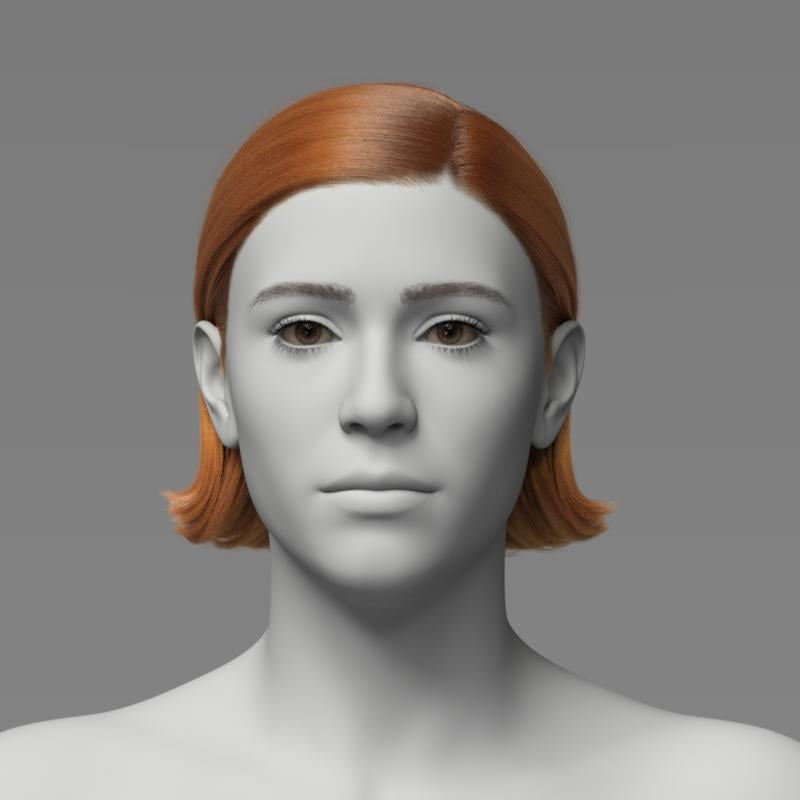
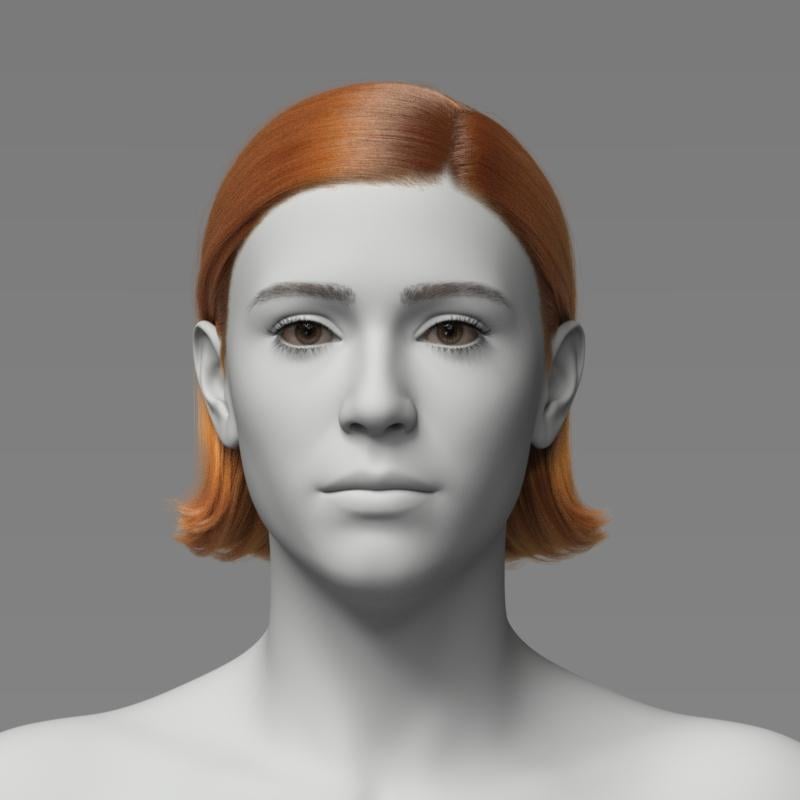
Here is Linet Hair after simulating with the simulation settings provided with the product. You can see that there is a slight movement due to the simulation.
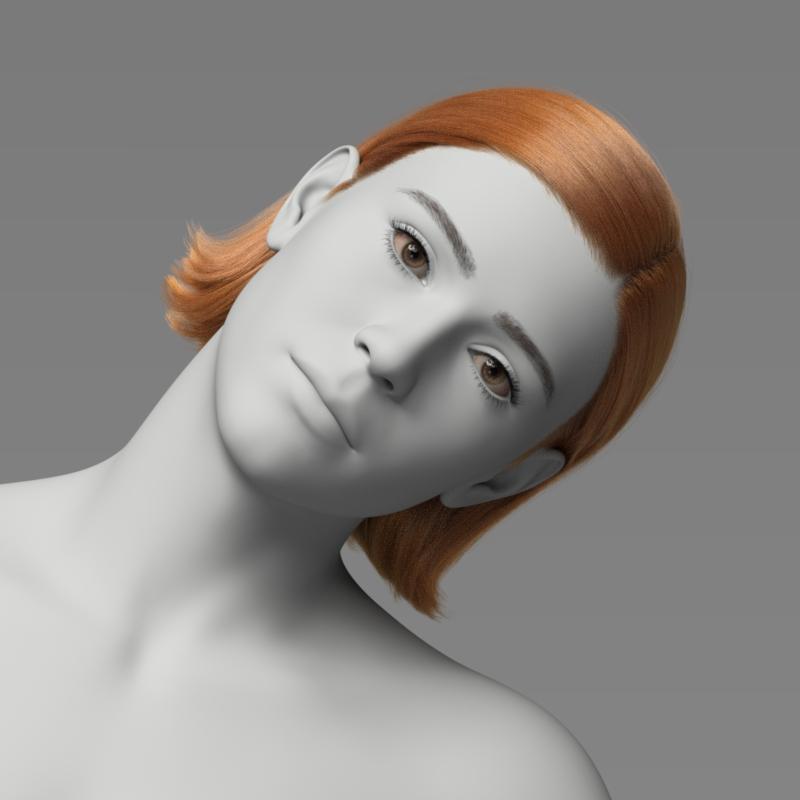
Here is Linet Hair after simulating with G9's head, neck and torso tilted to the side - not much movement of the hair toward the side. (There is a wind left morph in the product, but I did not apply it here. This is just simulation results.)
Here is Linet Hair after simulating with G9 upside down - not much movement toward the ground. Even setting gravity to 2 instead of 1 did not make much difference.
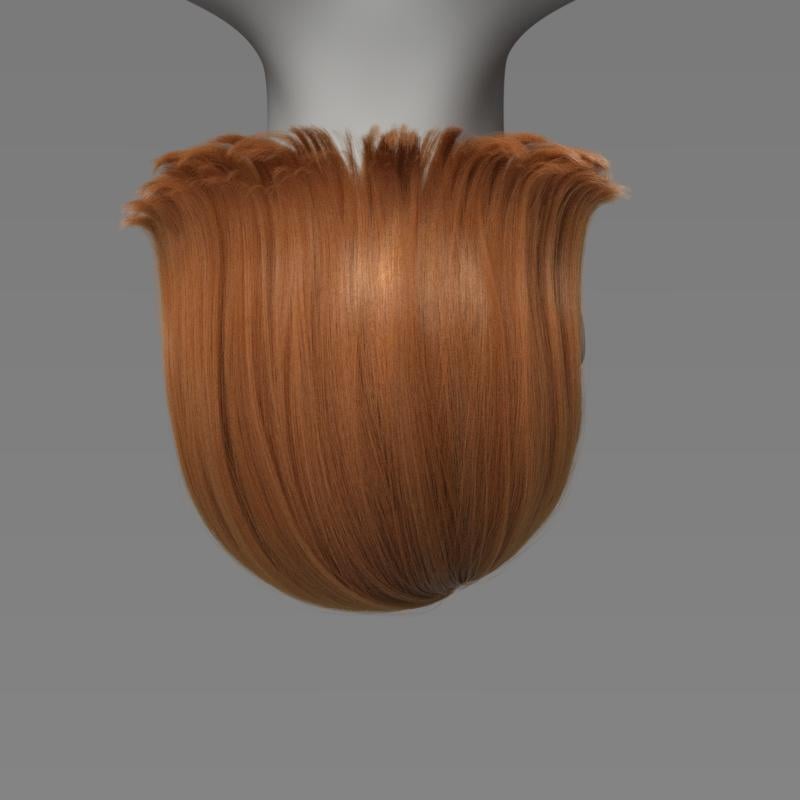
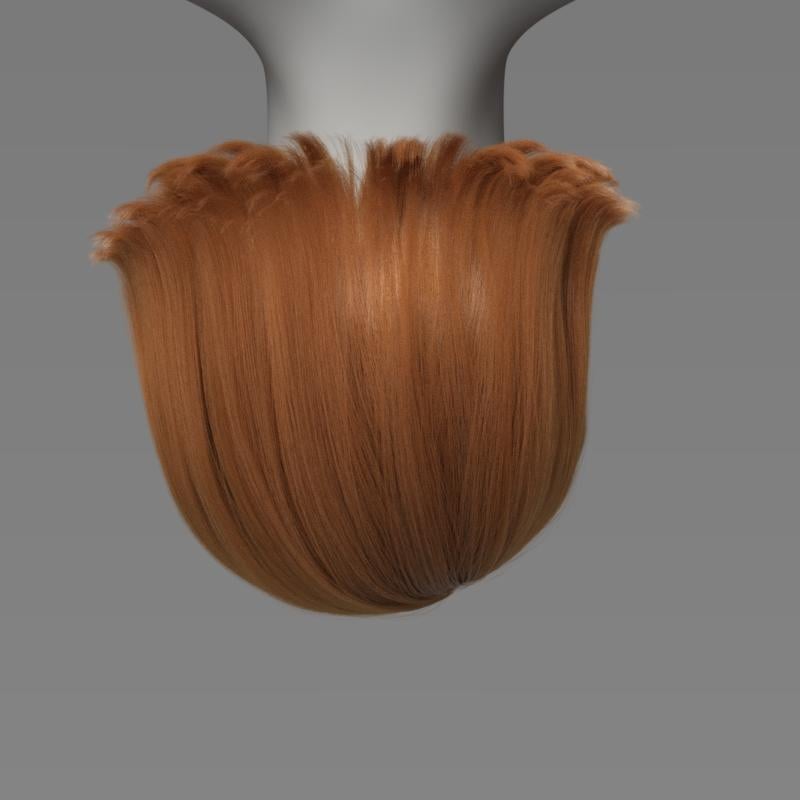
However, it is possible to change dForce parameters in the Surfaces pane to get more movement out of this hair. Lowering the Local Constraint strength is one parameter to experiment with. Changes to the Simulation Settings can also make a difference (gravity, subframe parameters, etc.) It takes experimentation. I tried lots of combinations.
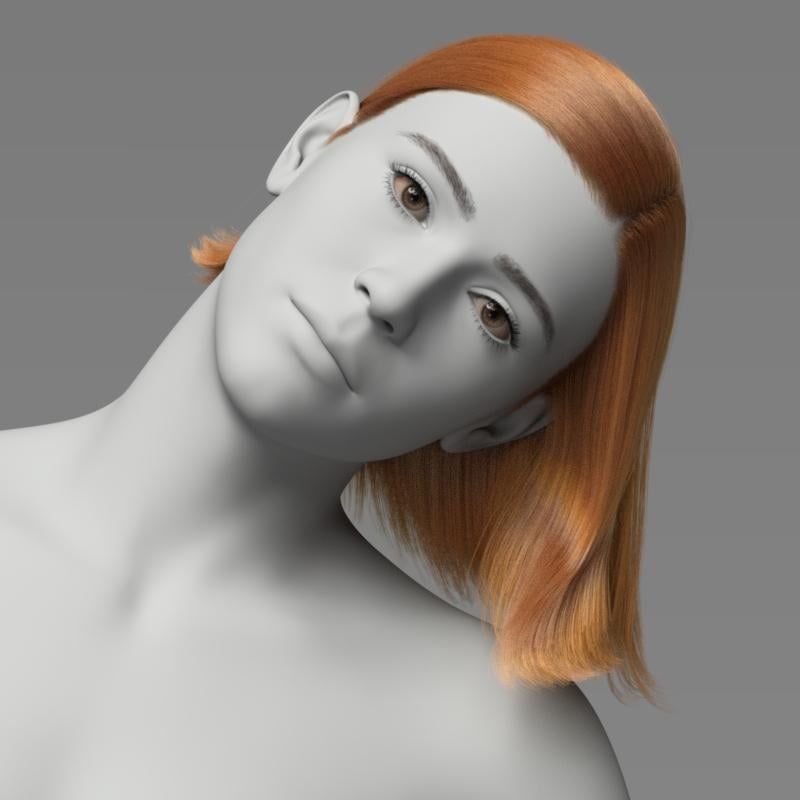
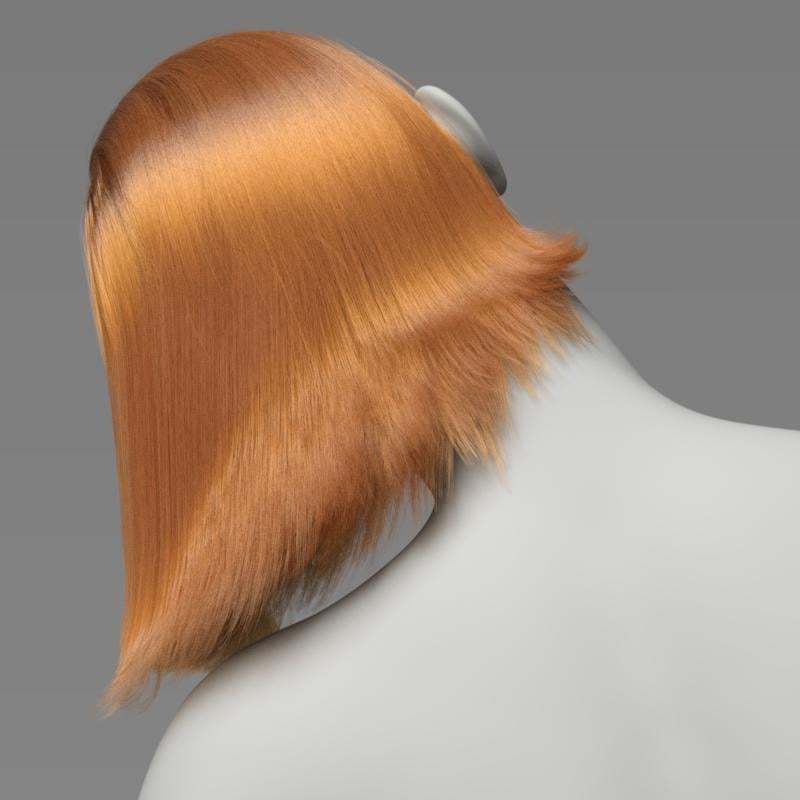
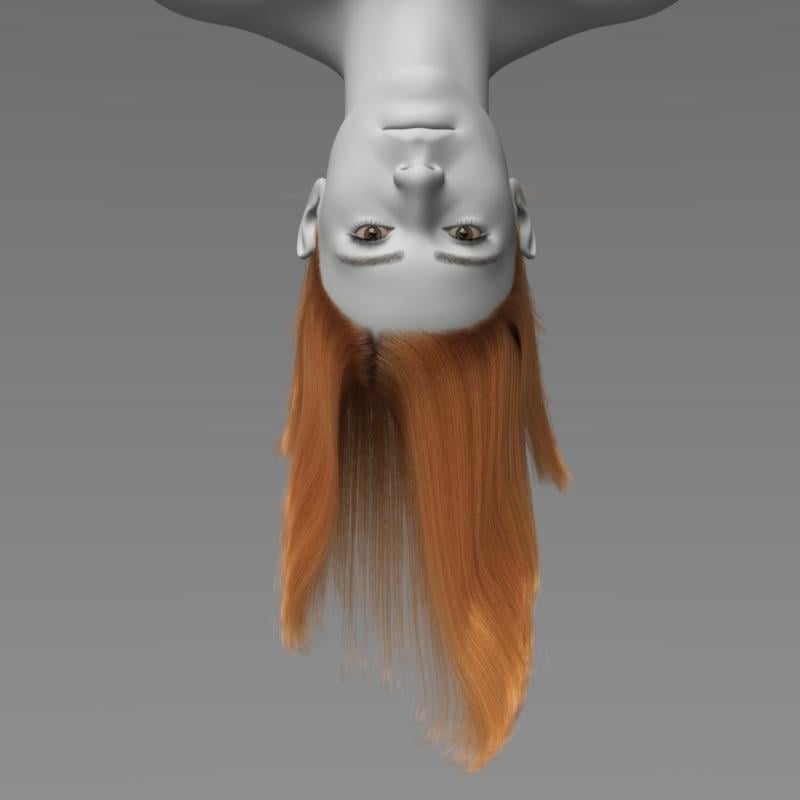
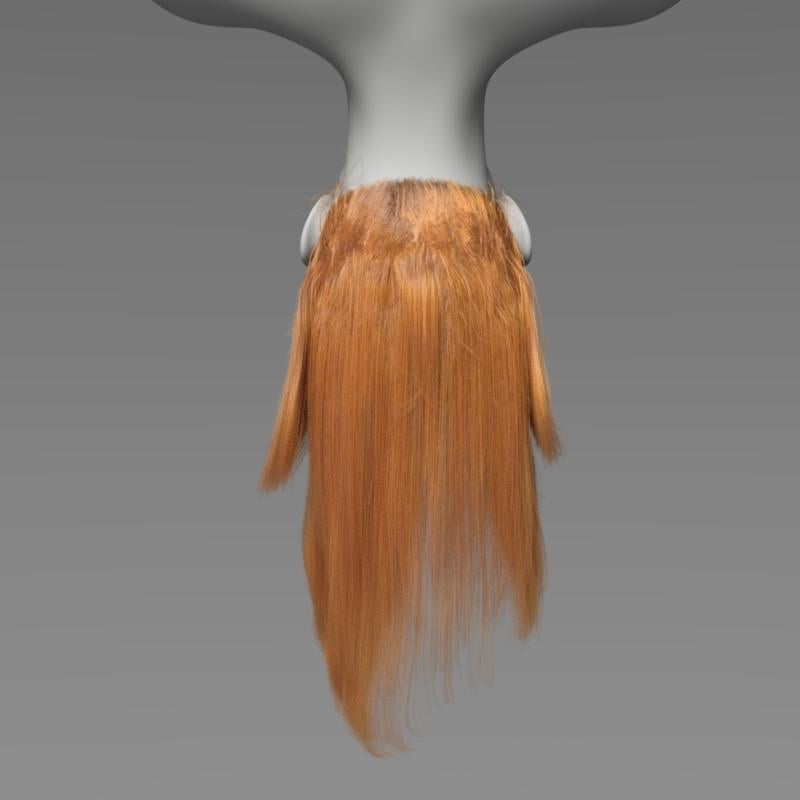
Here is Linet Hair with changes to surface and simulation settings.
Yes you can tinker in the hair surface parameters to make any dForce hair drape more. Since it is usually not the product's original intention to drape this much, the results may vary and be less than ideal. Yours however look quite good!
You did a nice job of creating the hair so it grows quite naturally out of the scalp. Not all hairs behave this well.
you can't even do anything like assign subsets of hair to different material groups so you can at least have a little bit of control over how it simulates, nope, got to keep it ~proprietary~
"you can't even do anything like assign subsets of hair to different material groups so you can at least have a little bit of control over how it simulates, nope, got to keep it ~proprietary~"
That's not why you cant assign surfaces and subsets. Surfaces have to be created BEFORE it is converted to daz curves. As a PA that makes these hairs, I can reassure you its just as incovenient for us. If I make a hair and convert it to dforce, load in all the morphs ( which some morphs of mine take up to an hour to load in) only to find out I forgot that the bangs should have a surface too, absolutely stinks. It essentially means starting over from scratch. It's just the way it is.
I know it goes without saying but calling something dForce that isnt meant for simulation is an extremely illogical naming convention. dForce was the term used for their cloth physics simulation system so it stands to reason all customers will assume dForce is referring to physics. (Force is in the name!)
If a hair was made with the dForce hair system to generate hairs, but the strands arent simulatable via the dForce physics engine, that shouldnt mean it needs to be sold as dForce hair. it should just be sold as Strand-Based Hair. Someone at Daz ideally needs to decide on a convention that makes sense to customers and vendors alike, then rename all the products on store so there isnt a thread like this every few days.
We do need to remember that people with even moderately long hair that isn't fixed in place are constantly, reflexively having to move it out of the way if they tip their heads etc. - having to break out the promitives to push dForce hair back into place would get annoying very quickly, since it isn't just an automatic flip with the fingers, which is I suspect part of the reason for keeping at least some parts of the hair fixed. I would wish for presets to adjust that, but it would add to the complexity of the products.
I agree with @lilweep about the nomenclature
if it's called dforce, one expects it to use the dforce engine
otherwise it is just uneditable Strandbased hair
Oh I am absolutely not blaming the artists making this stuff for how difficult to work with it is, I'm aware how locked in it is.
e: fyi in the geometry editor, as a user you can actually make selections of vertices that make up points on the curves, and the selection tools (grow, shrink, marquee select etc) all work in this mode; but DAZ never added controls to let you make selection groups of them, or assign them to different material groups that you could copy/paste properties to, choosing to leave these locked out of user access. this isn't exactly just how it is, this is how DAZ made it work and maintains it.
The user can just exclude the hair from simulation if the don't want movement.
maybe it should be called iray curves
because it is it's own thing, PA produceable only
the ones with simulation simply can be Dforce iray curves
personally, I prefer Dforce geometry based transmapped hairs and buy lots of them, sadly they are becoming rarer but fortunately I can edit older hairs myself
I do like Dforce geometry based transmapped hairs too, and have rarely had success/believable hair with the curve based hairs. Linday's Dforce geometry based transmapped hairs do work very well for me without too much messing about to the settings originally specified.
Regards,
Richard
they are just curves, the iray part comes in as the material applied to them. the geometry that make them up can be exported in OBJ format and taken into modeling apps (e.g Cinema, here) where you can see they're just splines. There is a little more going on, in that there's selection grouping that lets the artist set stuff like stiffness via point weights but it's not tied to the render engine.
unfortunately this is a one way operation, you can't get it back into D|S in this state without the proprietary import tool, you have to convert the splines to polys - roughly quadrupling the vertex count, which is already over a million verts just for this hair. if you ever wondered why this type of curve based hair feels so heavy to work with, yeah that's why (the G8 characters themselves are 16.5 thousand vertices)
With Geometry Editor tool active, you can export the "curves" hair, move the vertices in a modeler, and with the Geometry Editor still active, import your modified OBJ to DS to create a morph. You do not have to be a PA to do that. I have made several morphs for PA dForce (strand-based) hair products that way. I have posted this in the forums a couple of times at least. You can even simulate in DS and export that and reimport it as a morph. The key is to have the Geometry Editor tool active during export and import. There can be millions of vertices in some of these hairs, so the morph creation can take some time.
Oh I am absolutely not blaming the artists making this stuff for how difficult to work with it is, I'm aware how locked in it is.
e: fyi in the geometry editor, as a user you can actually make selections of vertices that make up points on the curves, and the selection tools (grow, shrink, marquee select etc) all work in this mode; but DAZ never added controls to let you make selection groups of them, or assign them to different material groups that you could copy/paste properties to, choosing to leave these locked out of user access. this isn't exactly just how it is, this is how DAZ made it work and maintains it
Again, I dont believe it has to do with Daz trying to lock people out. I *think* that it has more to do with the fact there is no geometry once the hair has been converted to curves. Surfaces can only be assigned to actual geometry.. Which is why it will work when you export it out like you did. *waits to see if Richard can fact check me here lol*
No, the geometry is there, which is why you can export it back out to OBJ. They've had 8+ years to add features to the user side to make this easier to work with if they wanted to.
e: the geometry is there in the form of vertex data, the same as polygons, just with no face data.
This is a cool trick, never would have thought to try something like this. Thanks! Is there documentation on details of this or anything? What else can be done?
e: being able to make a few morph targets really would be great, e.g. with that particualr hair I love the way it looks from the front but not so much from the back. would be nice to be able to customize!
Im gonna disagree here. If there was actual geometry here, Id be able to open it up ad see it inside Maya or Zbrush with no tesselation added. There is no mesh. You are seeing something on your end, but it most definitely isnt what id consider geometry.
I just showed a screenshot of the vertices in Cinema straight from import, that's geometry :) Geometry is not strictly polygons. I don't have Maya so can't comment but I'm not doing anything at all to the data after importing to Cinema, it comes in in spline form because D|S writes it out in spline form in the OBJ file.
I don't know of any documentation on this. I don't even remember how i learned it. I may have discovered it by accident or maybe someone else told me. I started doing it years ago, starting when Neroli Hair was released.
This is correct. The splines and vertices show up in Blender, too (as long as you export the polylines from DS along with the vertices). Blender is what I use.