Eyes going white
 Taoz
Posts: 10,285
Taoz
Posts: 10,285
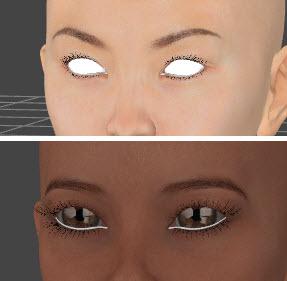
I'm having a problem with certain characters (e.g. V6 HD, Stephanie6 HD, Gia, Mei Lin) - as soon as I change the opacity setting to hide the character the eyes go white, and remain white when I set opacity back to 100%.
With others, like Pebble HD, it's only the Tear surface that's affected.
Any idea what causes this, and how to fix it?
Post edited by Taoz on

Daz 3D is part of 
Connect
DAZ Productions, Inc.
7533 S Center View Ct #4664
West Jordan, UT 84084
Licensing Agreement | Terms of Service | Privacy Policy | EULA
© 2026 Daz Productions Inc. All Rights Reserved.
Comments
Before setting the opacity - can you verify the original opacity setting for those surfaces? :)
Hm, yea, they're 0. So it looks like the problem is that they are set to 100 with the rest, when turning opacity to 100 again.
No problem, just recalled I can hide the figure by clicking the "eye" on the scene tab...
Thanks!
:)
What renderer?
For Iray, you should set both eye reflection and cornea to Glass-Thin, Water-Thin, or other shader with the Thin Walled option set. Cutout Opacity should be 1.0. index of refraction some number around 1.3 to 1.5, and Refraction Weight 1.0. You can toy with setting the EyeReflection (in G2F character's, it's a shell around the eye group), and Cornea to be the same shader, or different. You may find the latter works to avoid sparkly fireflies.
Well it was a general problem, not really renderer related. But thanks for the useful info anyway!
I had problems with white eye, eyelashes and eyebrowns, but found that the opacity map was missing. In this case we can generate a simple OP using photoshop map leaving black in the areas ( according to UV) we want to apear. Solved my problem.